

Running native ads without benchmarking is risky. Tracking metrics like CTR, CPC, ROAS, and engagement ensures your campaigns perform effectively. This is especially important for developer-focused campaigns, where precision matters to engage a technical audience.
Key tools for benchmarking include daily.dev Ads, AdStellar AI, Varos, Madgicx, Supermetrics, and Cometly. These platforms provide features like real-time tracking, developer-specific targeting, and AI-driven analysis to help optimize performance.
Quick Comparison
| Tool | Real-Time Tracking | Developer Targeting | Key Features | Pricing |
|---|---|---|---|---|
| daily.dev Ads | Yes | Excellent | Developer-focused metrics, 1M+ audience | Custom Pricing |
| AdStellar AI | Yes | Moderate | AI-driven insights, reusable elements | Enterprise Focus |
| Varos | Yes | Good | Industry benchmarks, trend analysis | Accessible |
| Madgicx | Yes | Strong | Creative-first optimization | $2,000+/month |
| Supermetrics | Yes | Flexible | 100+ integrations, automated reporting | Subscription |
| Cometly | Yes | Moderate | Precise attribution, ecommerce focus | Custom Plans |
Benchmarking tools help you compare performance against industry standards, adjust strategies quickly, and improve ROI. For developer campaigns, choose platforms offering precise targeting and actionable insights tailored to this niche.
::: @figure 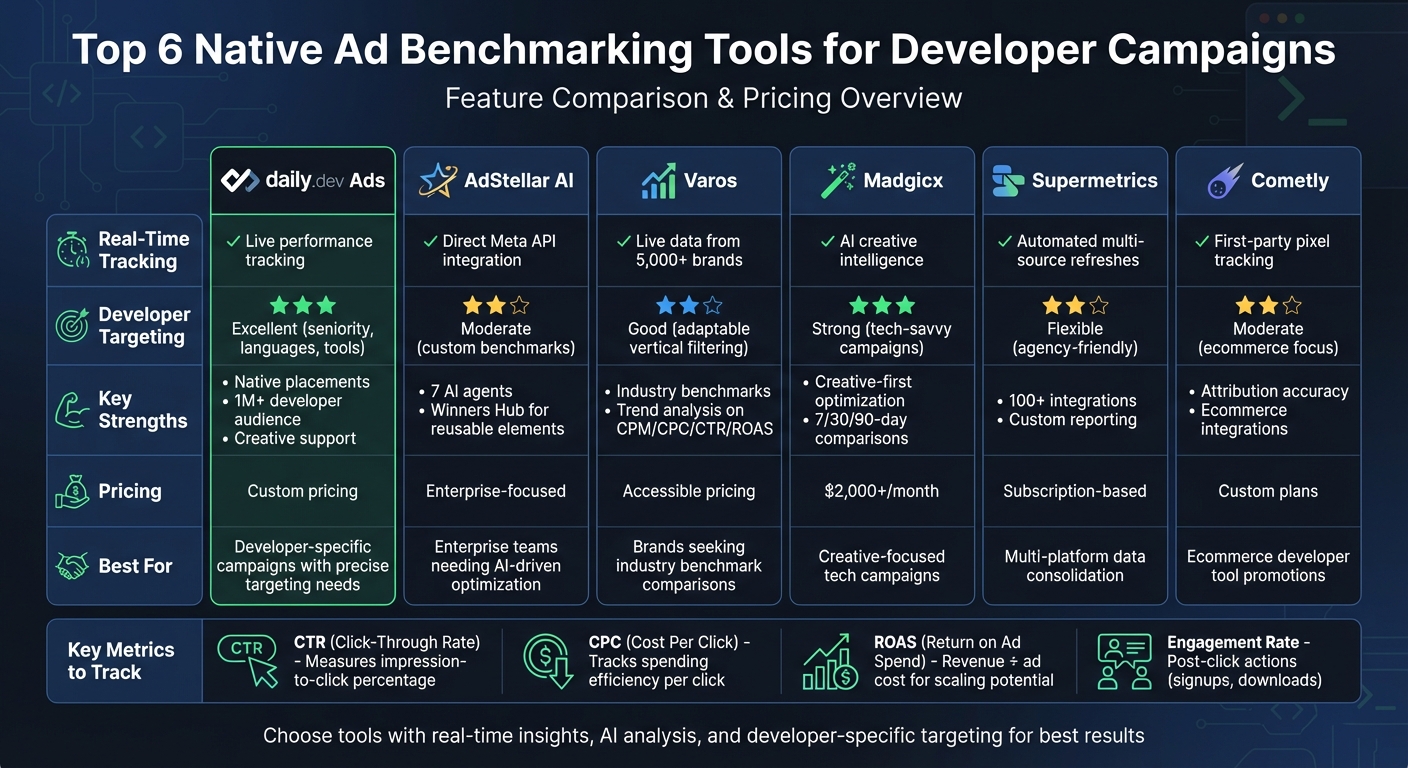 {Native Ad Benchmarking Tools Comparison for Developer Campaigns}
Why Benchmark Native Ads for Developer Campaigns
Reaching developer audiences is no easy task. These highly technical professionals are quick to dismiss marketing that feels exaggerated or lacks depth. To launch a successful advertisement campaign for developers, benchmarking becomes a must. Without it, you're essentially flying blind - unable to gauge if your click-through rate (CTR) is hitting the mark for a senior backend engineer audience. Developers thrive on precision and detail, and your campaigns should reflect that.
Benchmarking provides the hard data you need to fine-tune your campaigns. It helps you adjust creatives, refine targeting (like focusing on specific seniority levels or tech stacks), and allocate budgets effectively. This is particularly important when scaling campaigns across different developer segments, where one-size-fits-all strategies rarely work.
Thanks to real-time analytics and multivariate testing, the guesswork is gone. These tools allow you to test multiple variations of creatives, landing pages, and placements simultaneously. The result? Data-driven decisions that lead to more clicks and conversions - not just assumptions about what developers might like .
Core Metrics for Benchmarking
To benchmark native ads effectively, focus on these four key metrics. Each one offers unique insights into how your campaigns are performing with developer audiences:
- Click-through rate (CTR): Measures the percentage of impressions that lead to clicks. This tells you if your creative is catching developers' attention as they scroll through their feeds.
- Cost per click (CPC): Tracks how much you're spending to generate each click. This metric highlights how well you're balancing budget and targeting efficiency.
- Return on ad spend (ROAS): Calculated by dividing revenue by ad cost, ROAS shows whether your campaign has the potential to scale - especially for promoting tools or events .
- Engagement rate: Looks at what happens after the click, such as signups or downloads. This metric gives you a clearer picture of how effective your content is at driving meaningful actions.
Here's a quick breakdown:
| Metric | What It Measures | Why It Matters for Developer Campaigns |
|---|---|---|
| CTR | Percentage of impressions that result in clicks | Shows if your creative resonates with technical audiences |
| CPC | Cost to generate each click | Indicates how efficiently you're targeting and spending |
| ROAS | Revenue divided by ad cost | Highlights scaling potential for tools or events |
| Engagement Rate | Actions taken after clicking (e.g., signups, downloads) | Reflects overall campaign effectiveness beyond clicks |
By analyzing these metrics together, you can pinpoint where your campaigns need work. For example, if you have a high CTR but low engagement, your creative might grab attention, but your landing page could be falling short. On the other hand, a high CPC paired with low ROAS might signal that your targeting is too broad or not aligned with the right seniority levels. These insights are critical for fine-tuning developer-focused campaigns.
Developer-Specific Campaign Challenges
Developer campaigns come with their own set of hurdles, making benchmarks even more essential. For starters, niche targeting can complicate comparisons. A campaign aimed at Rust developers will operate on a completely different scale than one targeting WordPress developers. Audience size and interest levels vary widely, creating unique baselines.
Another challenge is how developers engage with content. Unlike other professional audiences, developers often take a deep-dive approach. They’ll scrutinize claims, explore code repositories, and read technical documentation before making a decision. This extended evaluation period can disrupt standard attribution models, as the gap between a click and a conversion might stretch beyond typical attribution windows. That makes it harder to measure performance accurately and requires a more nuanced approach to assessing success.
sbb-itb-e54ba74
Top Tools for Native Ad Benchmarking
daily.dev Ads is a powerful tool designed specifically for benchmarking and improving developer-focused ad campaigns. It tackles the unique metrics and challenges faced in this niche, giving you the insights you need to fine-tune your efforts.
daily.dev Ads
With daily.dev Ads, native ad placements seamlessly integrate into developers' daily content feeds. This platform offers real-time performance tracking and precise targeting based on factors like developer interests, seniority, and preferred programming languages or tools.
What sets daily.dev Ads apart is its ability to benchmark key metrics such as CTR and ROAS while addressing the specific challenges of developer-oriented campaigns. Its native ad options - like in-feed ads, post page ads, and personalized digest ads - ensure you're measuring engagement from a highly relevant audience, not just generic web traffic. With access to a global community of over 1 million developers, you can compare your campaigns against a truly specialized audience.
On top of that, daily.dev Ads provides expert creative support. This feature helps you refine your campaigns by leveraging proven strategies, so you can build on what works instead of starting from scratch.
How to Choose the Right Benchmarking Tool for Developer Ads
Key Features to Evaluate
When running developer-focused ad campaigns, the right benchmarking tool can make or break your strategy. Here are some features to look for that cater specifically to the fast-moving and detail-oriented nature of developer marketing.
Start with real-time insights. Developer campaigns often promote tools or events with tight timelines, so you need a platform that tracks performance as it happens. Real-time data lets you tweak targeting or creatives immediately - whether to fix underperforming elements or amplify what’s working.
Another must-have is AI-driven analysis. The most effective tools don’t just show numbers; they interpret them. Platforms that use AI to optimize budgets, test creatives, and identify patterns in developer behavior are invaluable. For example, AdStellar AI employs seven specialized AI agents, including a Targeting Strategist and Creative Curator, to guide campaigns using historical data rather than guesswork.
Developer-specific targeting is also non-negotiable. Generic filters like age and location won’t cut it. Look for tools that allow targeting by programming languages, seniority, or even the specific tools developers use. This level of precision ensures your benchmarks reflect genuine developer engagement rather than broader, less relevant tech metrics.
Finally, ensure integration with major platforms. Tools that connect seamlessly with platforms like Meta, Google Analytics, or developer-focused networks provide unified data, simplifying your benchmarking process. For instance, Supermetrics integrates with over 100 data sources, offering automated updates for cross-channel comparisons. Similarly, Cometly’s first-party pixel tracking and ecommerce integrations provide accurate ROAS benchmarks, especially useful for promoting developer tools.
Comparison of Tools
Here’s a quick breakdown of how top tools stack up against these critical features:
| Tool | Real-Time Optimization | Developer Targeting Fit | Key Strengths | Estimated Budget |
|---|---|---|---|---|
| daily.dev Ads | Live performance tracking | Excellent (seniority, languages, tools) | Native placements, 1M+ developer audience, creative support | Custom pricing |
| AdStellar AI | Direct Meta API integration | Moderate (custom benchmarks) | 7 AI agents, Winners Hub for reusable elements | Enterprise-focused |
| Varos | Live data from 5,000+ brands | Good (adaptable vertical filtering) | Industry benchmarks, trend analysis on CPM/CPC/CTR/ROAS | Accessible pricing |
| Madgicx | AI creative intelligence | Strong (tech-savvy campaigns) | Creative-first optimization, 7/30/90-day comparisons | $2,000+ monthly |
| Supermetrics | Automated multi-source refreshes | Flexible (agency-friendly) | 100+ integrations, custom reporting | Subscription-based |
| Cometly | First-party pixel tracking | Moderate (ecommerce focus) | Attribution accuracy, ecommerce integrations | Custom plans |
When selecting a tool, prioritize those offering custom historical benchmarks tailored to developer audiences. Generic averages won’t provide the insights you need for this specialized group. Set up automated alerts to flag performance dips, and use tools that allow you to test and reuse successful creative elements. This iterative approach is far more efficient than starting from scratch for every campaign.
Conclusion
Measuring native ad performance is essential for developer-focused campaigns. It lays the groundwork for smarter budget decisions and ongoing improvements. Without defined benchmarks, gauging the success of a campaign becomes a guessing game. As Joinative emphasizes, "It's crucial to [set] KPIs before you start running your native ad campaigns" . Establishing these goals upfront gives you a clear framework to determine if metrics like CTR, cost per lead, or conversion rates align with expectations.
In this space, daily.dev Ads stands out as a tailored solution for developers. With its ability to target by programming languages, seniority levels, and tools, it ensures precision. Plus, its real-time performance tracking spans a global audience of over 1 million developers, making it easier to set benchmarks that reflect authentic engagement from your target audience.
Effective benchmarking takes the uncertainty out of your campaigns. It helps identify where conversions are falling off, allowing you to maximize ROI. Look for tools that provide automated alerts, track conversions at every stage of the funnel, and enable cross-platform performance comparisons. Whether you're advertising a developer tool, promoting an event, or showcasing a technical resource, accurate benchmarking transforms raw data into actionable insights, improving results with every iteration.
FAQs
What benchmarks should I set before launching native ads to developers?
Before rolling out native ads targeted at developers, it's crucial to establish clear benchmarks to evaluate performance. Pay attention to key metrics such as click-through rate (CTR) to measure initial interest, conversion rates (like sign-ups or downloads) to track valuable actions, and engagement levels to understand how users are interacting with your content. Real-time tracking tools can help you refine your campaigns on the fly, ensuring your strategy stays aligned with industry norms to achieve the best possible return on investment (ROI).
How can I tell if low ROAS is caused by targeting or attribution issues?
To figure out why your ROAS is underperforming, take a closer look at your targeting and attribution setup.
Targeting problems often happen when your audience is either too broad or doesn't align with your campaign goals. This mismatch can result in poor engagement and wasted ad spend. On the other hand, attribution issues arise when conversions aren't being tracked accurately.
Review your audience metrics to ensure you're reaching the right people, and double-check your attribution models - like conversion APIs - to make sure they're capturing the full picture. These steps can help you identify what's holding back your performance.
How often should I review and update native ad benchmarks?
Native ad benchmarks need regular review - preferably in real time or at intervals that allow for effective performance adjustments. Keeping a close eye on metrics and consistently testing ensures your campaigns stay relevant and deliver strong results.