

When publishing content for developers, choosing the right platform is critical to reaching your target audience. Each platform caters to specific types of developers and content. Here's a quick summary of the top options:
- GitHub: Ideal for technical documentation, code repositories, and open-source projects. Best for showcasing expertise to an audience focused on practical solutions.
- Stack Overflow: Perfect for solving specific coding problems and gaining visibility through SEO. Focuses on concise, problem-solving content.
- dev.to: Great for connecting with a community of 1.5M+ developers, especially junior developers and JavaScript enthusiasts. Easy to trend with approachable content.
- daily.dev: A content aggregator that reaches developers during work hours. Best for sharing tools, insights, and curated tech news.
Quick Comparison
| Platform | Best For | Key Features | Challenges |
|---|---|---|---|
| GitHub | Technical guides, code, documentation | Stars, Discussions, Issues, Pull Requests | Limited reach for non-code content |
| Stack Overflow | Solving coding problems | SEO-driven, reputation system | No room for personal branding |
| dev.to | Tutorials, personal stories | Markdown editor, tags, reactions | Competition with low-quality posts |
| daily.dev | News, tools, niche communities | Browser extension, Squads, ranking feeds | Requires publishing on other platforms first |
Each platform offers unique opportunities to connect with developers. Your choice should depend on your content type, audience, and goals.
::: @figure 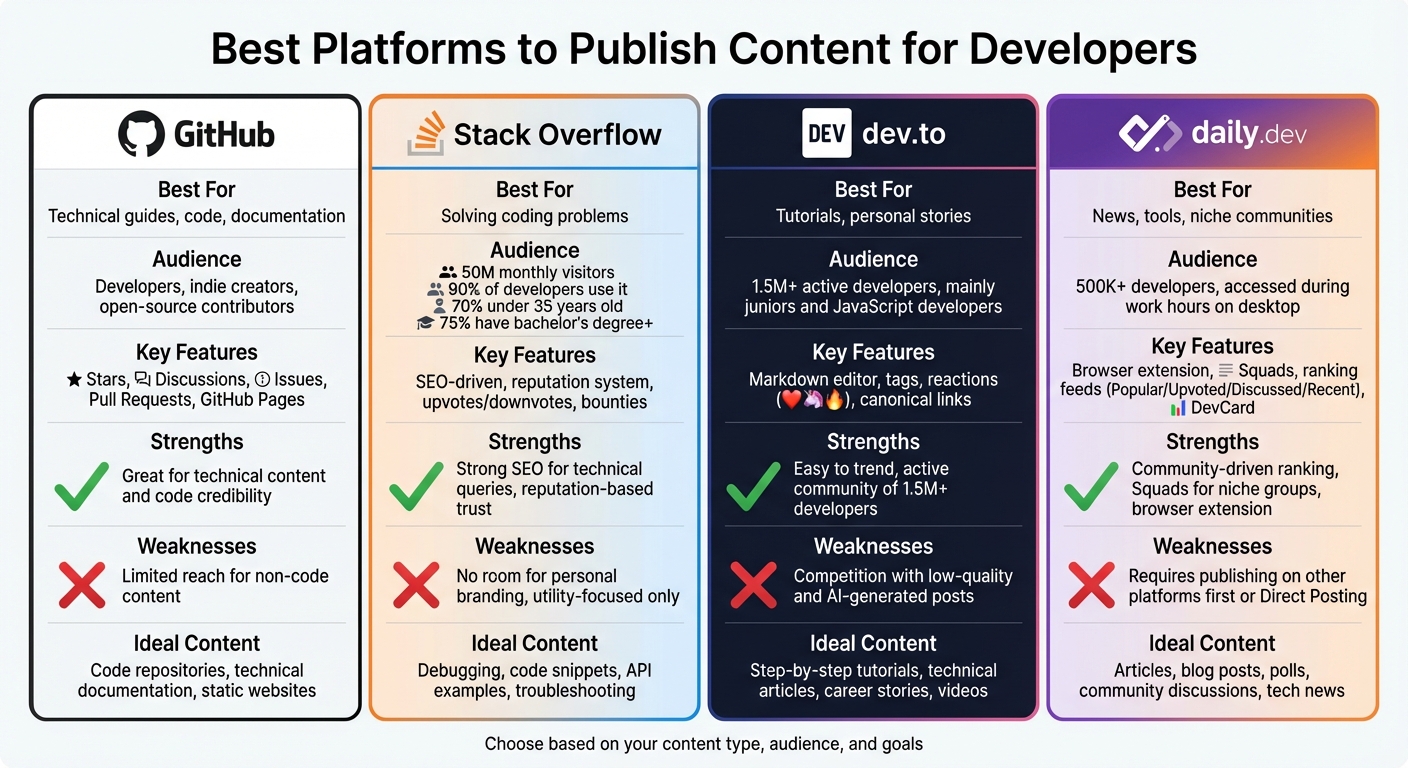 {Developer Content Publishing Platforms Comparison: GitHub vs Stack Overflow vs dev.to vs daily.dev}
1. GitHub
GitHub is a go-to platform for developers looking for technical solutions. Unlike social media platforms that prioritize trending content for a general audience, GitHub draws in developers who are actively searching for specific, practical answers.
Audience Demographics
The GitHub community includes developers, indie creators, and open-source contributors who value substance over flash. As Nimrod Kramer from daily.dev puts it:
"Developers hate hype, bad docs, and forced sales funnels. Be transparent, provide real value, and engage where they already are - like GitHub."
For developers, "Time-to-Value" is critical. If your content or project doesn’t demonstrate its usefulness within five minutes, you risk losing their attention entirely.
Now, let’s explore the types of content that work best on GitHub.
Content Types Supported
GitHub thrives as a hub for technical content. It’s perfect for hosting conceptual guides, step-by-step instructions, technical specs, troubleshooting documentation, and, of course, code repositories. It also supports static websites via GitHub Pages and facilitates community discussions. Open-source projects do particularly well here since developers often trust tools that come with peer validation over corporate marketing claims.
Engagement Features
GitHub offers several features to encourage interaction and collaboration. GitHub Discussions create spaces for broader community conversations beyond just code updates. Pull Requests allow for peer reviews and collaborative improvements, while Issues help track bugs and collect feedback. Stars act as bookmarks and ranking signals, and users can follow profiles to stay informed about new releases and repository activities.
Reach and Visibility
To maximize visibility on GitHub, focus on creating content that’s easy to scan. Developers often skim rather than read in detail, so use elements like code blocks, bullet points, and tables to emphasize key points. Structure your documentation using the inverted pyramid approach: start with the most critical information, then provide additional context. Keep your language simple and your sentences brief.
Another important strategy is to create AI-friendly documentation. This means writing content that is clear, structured, and follows consistent patterns, making it easy for both developers and machines to interpret. As Kramer wisely notes:
"DevRel must adapt by writing for machines: structured, unambiguous, and pattern-rich. If the agent doesn't get it, the developer never will."
2. Stack Overflow
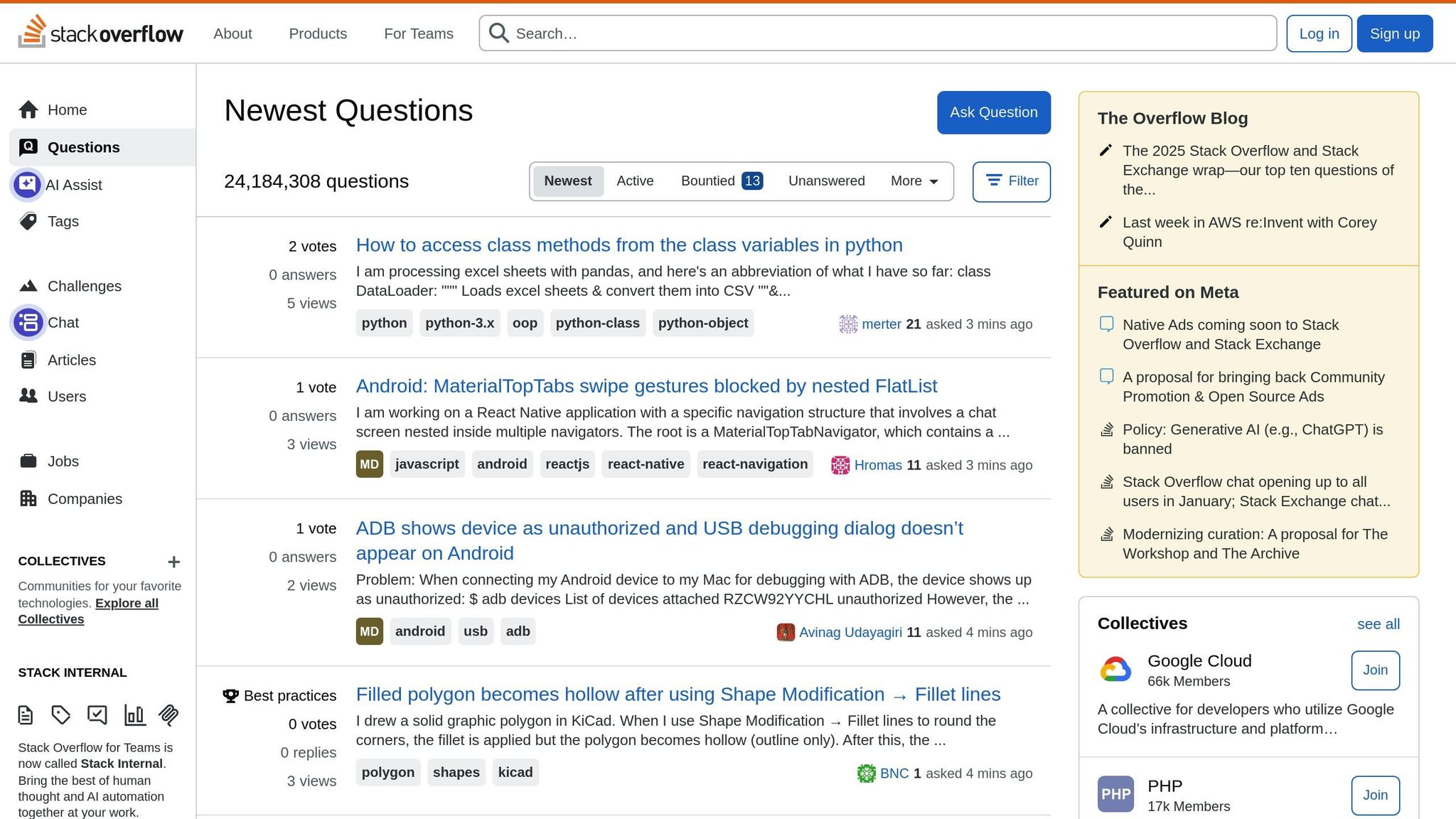
Stack Overflow is a go-to platform for developers tackling coding problems. According to the Stack Overflow Developer Survey, nearly 90% of developers rely on the site when they're stuck. With around 50 million visitors each month - 20 to 25 million of whom are either professional developers or university-level learners - it’s one of the largest and most active technical communities online. These numbers highlight its focus on technical and professional collaboration.
Audience Demographics
Stack Overflow attracts a young, highly educated, and engaged audience. About 70% of professional developers using the platform are under 35 years old, and approximately 75% hold at least a bachelor’s degree. Interestingly, 65% of users have been coding professionally for less than a decade, and 78% code as a hobby outside of their jobs. The platform primarily serves back-end (55.2%), full-stack (54.9%), and front-end (37.1%) developers. Additionally, over 40% of its users are active in other online developer communities. This dynamic audience shapes the type of content that performs well on the platform.
Content Types Supported
Stack Overflow thrives on content that solves specific coding problems. Posts that focus on debugging, detailed code snippets, API examples, or technical troubleshooting tend to resonate the most. With 52% of its traffic coming from return visitors, providing content that directly addresses particular error messages or technical challenges can significantly boost relevance and visibility. The platform's reputation system also plays a crucial role in maintaining the quality of contributions.
Engagement Features
Stack Overflow’s reputation system is designed to reward helpful contributions and discourage low-quality posts. Features like upvotes, downvotes, accepted answers, and bounties for difficult questions ensure that the best responses gain prominence. Users can also leave comments to clarify issues or collaborate through edits, fostering continuous improvement and refinement of answers.
Reach and Visibility
Visibility on Stack Overflow is heavily tied to search engine optimization (SEO), as most users find content through search engines rather than internal navigation. The platform’s focus on high-quality, problem-solving content ensures excellent rankings on search engines like Google. To increase visibility, start with a clear and specific question, followed by detailed examples. Use descriptive titles that include error messages or function names, and consider using canonical tags to ensure search engines prioritize the most relevant version of your post.
3. dev.to
Dev.to stands out as a community-focused platform tailored to developers, offering a unique space for sharing knowledge and experiences. With 1.5 million active developers , it fosters a welcoming environment where junior developers can share their journeys alongside seasoned professionals . The platform’s focus on "learning in public" makes it especially appealing to early-career developers and JavaScript enthusiasts, making it a great place for educational and approachable technical content .
Audience Demographics
Dev.to attracts a younger and more diverse audience compared to traditional developer platforms. Nevo David, founder of Postiz, highlights this:
"The platform consists mainly of juniors and Javascript developers. You acquire an audience fast there" .
This demographic mix offers a valuable opportunity for content creators to connect with developers who are eager to learn and engage in discussions. The platform’s audience is an ideal match for those looking to share knowledge or spark conversations.
Content Types Supported
Publishing on Dev.to is straightforward, thanks to its Markdown-based editor, which supports formatted code blocks and syntax highlighting . The platform welcomes a variety of content, including:
- Step-by-step tutorials
- In-depth technical articles
- Personal career stories
- Video submissions
Topics that combine technical detail with accessibility tend to perform well. In 2025, popular themes include AI-powered development, Rust, WebAssembly, and cloud computing . This content diversity, paired with Dev.to’s user-friendly tools, makes it a versatile platform for creators.
Engagement Features
Dev.to encourages interaction with a fun reaction system, featuring emojis like hearts (❤️), unicorns (🦄), and fire (🔥) . Using clear headings and specific tags (e.g., #webdev or #javascript) can help target niche audiences and boost engagement. Since readers often decide within 10–20 seconds whether to continue, starting with a strong hook is essential .
Reach and Visibility
Dev.to’s algorithm is designed to make it easier to gain visibility compared to more crowded platforms . Vishwajeet Kondi notes:
"DEV is one of the easiest places to trend and build an audience quickly" .
With the right strategy, articles can gain significant traction, sometimes reaching over 100,000 views . The platform also supports canonical links, allowing you to first publish content on your blog and then syndicate it to Dev.to without hurting SEO. This approach can amplify your reach by 300–500% while keeping ownership of your content . To maximize visibility, driving initial traffic through social media or newsletters within the first few hours is crucial, as the algorithm prioritizes early engagement .
sbb-itb-e54ba74
4. daily.dev
Daily.dev takes a fresh approach to connecting developers with the latest programming news and trends. Acting as both a professional network and content aggregator, it transforms your browser's new tab page into a personalized feed. This ensures developers stay engaged and informed. With a community of over 500,000 developers and content sourced from more than 1,300 tech news outlets, it’s a go-to platform for reaching developers when they’re in a discovery mindset .
Audience Demographics
Daily.dev appeals to a mix of individual developers, tech influencers, and corporate teams . Most users interact with the platform on their desktops during work hours, making it an ideal time to share tools and insights. Nimrod Kramer, CEO of daily.dev, highlights this strategic timing:
"The ideal platform reaches developers when they're in discovery mode - on desktop, during work hours, with precisely targeted ads. That's exactly what daily.dev offers" .
Content Types Supported
The platform supports a variety of content, including articles, blog posts, polls, and community discussions . It also allows direct posting, so users can contribute content while maintaining attribution . Additionally, daily.dev integrates with platforms like Hashnode and DEV.to, pulling in content through RSS feeds . For targeted engagement, users can join Squads - dedicated communities focused on specific technologies like React, AI, or DevOps - where they can share content and interact with niche audiences .
Engagement Features
Daily.dev encourages interaction through a ranking system that organizes content into four feeds: Popular (based on reads and upvotes), Upvoted, Discussed (focused on comment quality and reputation), and Recent . Notifications keep users engaged, prompting them to upvote, comment, or participate in interactive polls . Another standout feature is the DevCard, which acts as a shareable profile showcasing a user’s reading habits and interests within the community . These tools create a dynamic space for developers to connect and interact in real time.
Reach and Visibility
Developers access daily.dev through a Chrome/Edge extension, a PWA, or an Android app . To gain traction in the Popular feed, focus on driving early reads and upvotes, as these are key ranking factors . Daphna Giniger, Head of Marketing at daily.dev, offers this advice:
"Writing for developers means cutting the fluff and getting to the point... developers won't waste time on anything less" .
For those looking to establish authority, starting a Squad can help build long-term relationships and position themselves as leaders in specific technical fields .
Advantages and Disadvantages
When deciding where to focus your content efforts, it's essential to weigh the strengths and weaknesses of each platform. Here's a quick breakdown of the key takeaways from the analysis.
GitHub is excellent for showcasing technical expertise through code and documentation. It's a go-to for building professional credibility in the tech world. However, if your content leans more toward tutorials or thought leadership rather than actual code, your audience reach might be limited.
Stack Overflow shines when it comes to SEO for specific technical questions. Its reputation-based system ensures credibility, but the platform's strict focus on utility leaves little room for personal branding or broader community discussions.
dev.to offers a supportive community of over 1.5 million developers, making it easier for new writers to gain traction and trend quickly . That said, the platform's growing influx of low-quality listicles, AI-generated posts, and student assignments can make it harder for quality content to stand out .
daily.dev promotes engagement through features like Squads and its browser extension, which helps content gain visibility. Its ranking system and direct attribution also provide a boost. On the downside, personal blogs aren't accepted as direct sources, so you'll need to publish on established platforms first or use their Direct Posting system .
Here’s a quick comparison of the pros and cons for each platform:
| Platform | Strengths | Weaknesses |
|---|---|---|
| GitHub | Great for technical content and code credibility | Limited audience for non-code-focused articles |
| Stack Overflow | Strong SEO for technical queries; reputation-based trust | Utility-focused; lacks personal branding opportunities |
| dev.to | Easy to trend; active community of 1.5M+ developers | Visibility diluted by low-quality and AI-generated content |
| daily.dev | Community-driven ranking; Squads for niche groups; browser extension | Requires established platform publishing or Direct Posting |
This summary highlights each platform's trade-offs, giving you the tools to refine your content strategy effectively.
Conclusion
Choose a platform that aligns with your goals and audience. For junior developers aiming to grow their careers and engage in shared learning, dev.to provides a welcoming and collaborative community environment . On the other hand, senior developers who prioritize technical precision and streamlined workflows will find GitHub, especially when used with static site generators, an excellent choice for its performance and built-in version control .
If you're promoting developer tools or technical content, it's important to prioritize domain authority and SEO. Established third-party platforms often rank more quickly for technical keywords compared to new company blogs . This approach ensures your content strategy remains technically sound and effective.
"Lose the mindset that sharing developer content you created is a form of marketing. It may be, but make that an afterthought. You want to help with the content you create genuinely." – William Imoh, Developer Advocate
To get the most out of your efforts, consider using multiple platforms. For example, daily.dev allows for native ad placements that naturally integrate into a developer's workflow, helping you reach them during work hours when they're actively exploring new tools and ideas .
FAQs
What are the best ways to increase visibility for my GitHub repository?
To make your GitHub repository stand out and draw more attention, try focusing on these practical strategies:
Choose a clear, descriptive name and relevant keywords: Your repository's name should immediately convey its purpose. Include keywords that developers are likely to search for to make it easier to find.
Craft a compelling description and tag relevant topics: A well-written description and the right topics can improve your repository's visibility in GitHub's search results. Be concise but informative about what your project offers.
Build a detailed README file: Your README is the first impression of your project. Include a brief overview, step-by-step installation instructions, usage examples, and a call-to-action like “Star this repo.” Adding visual elements, such as build status or license badges, can also make your project look more polished and trustworthy.
Maintain regular activity: Keep your repository alive by updating dependencies, merging pull requests, and releasing new versions. Frequent updates signal to GitHub’s algorithm - and potential contributors - that your project is active and relevant.
Engage with GitHub’s social features: Enable Discussions to create a space for Q&A, and pin key issues to highlight important updates or areas where help is needed. These features can foster a more interactive and engaged community around your project.
By implementing these strategies, you'll not only increase your repository's visibility but also attract more contributors and build a stronger presence in the developer community.
What kind of content performs well on dev.to?
Content that clicks with the dev.to community tends to be practical, relatable, and packed with value. Developers love step-by-step tutorials that include clear, actionable code examples - these are a go-to for solving specific challenges. Articles that dive into technical deep-dives, like exploring frameworks, improving performance, or tackling architectural patterns, also draw attention by offering expertise that's not easy to come by.
On the flip side, personal developer stories resonate when they share real-life challenges, lessons learned, and takeaways from hands-on projects. These kinds of posts build a connection by letting others see the human side of the coding journey. And don’t underestimate the power of listicle-style content - topics like "Top 5 Tools for Front-End Development" or "Best Practices for Debugging" are favorites because they’re quick to read, easy to share, and loaded with practical tips.
The key? Focus on delivering content that’s useful and sparks thoughtful conversations. That’s how you truly connect with the dev.to crowd.
How does daily.dev decide which content gets more visibility?
Daily.dev employs a ranking system to decide which content gets featured and receives greater visibility on the platform. While the exact workings of this system aren't openly disclosed, it's understood that elements such as engagement, relevance, and content quality likely influence the selection process.
For more precise information about how the ranking system operates, you can explore daily.dev's official resources or reach out to their support team for assistance.