

Developers read blogs to solve problems, not for entertainment. To create content they value, focus on these essentials:
- Be precise and actionable: Use technical terminology, peer-reviewed insights, and functional code snippets.
- Understand your audience: Tailor your content to specific developer personas and their challenges.
- Choose relevant topics: Solve real problems with tutorials (70%) and thought leadership (30%).
- Optimize for search: Target long-tail keywords and match search intent with your content format.
- Structure for scanning: Use clear headers, short paragraphs, and visuals like code snippets and diagrams.
- Craft compelling headlines: Be specific, use technical language, and address problems directly.
- Distribute effectively: Share in developer communities and use targeted ads to reach developers to reach the right audience.
::: @figure 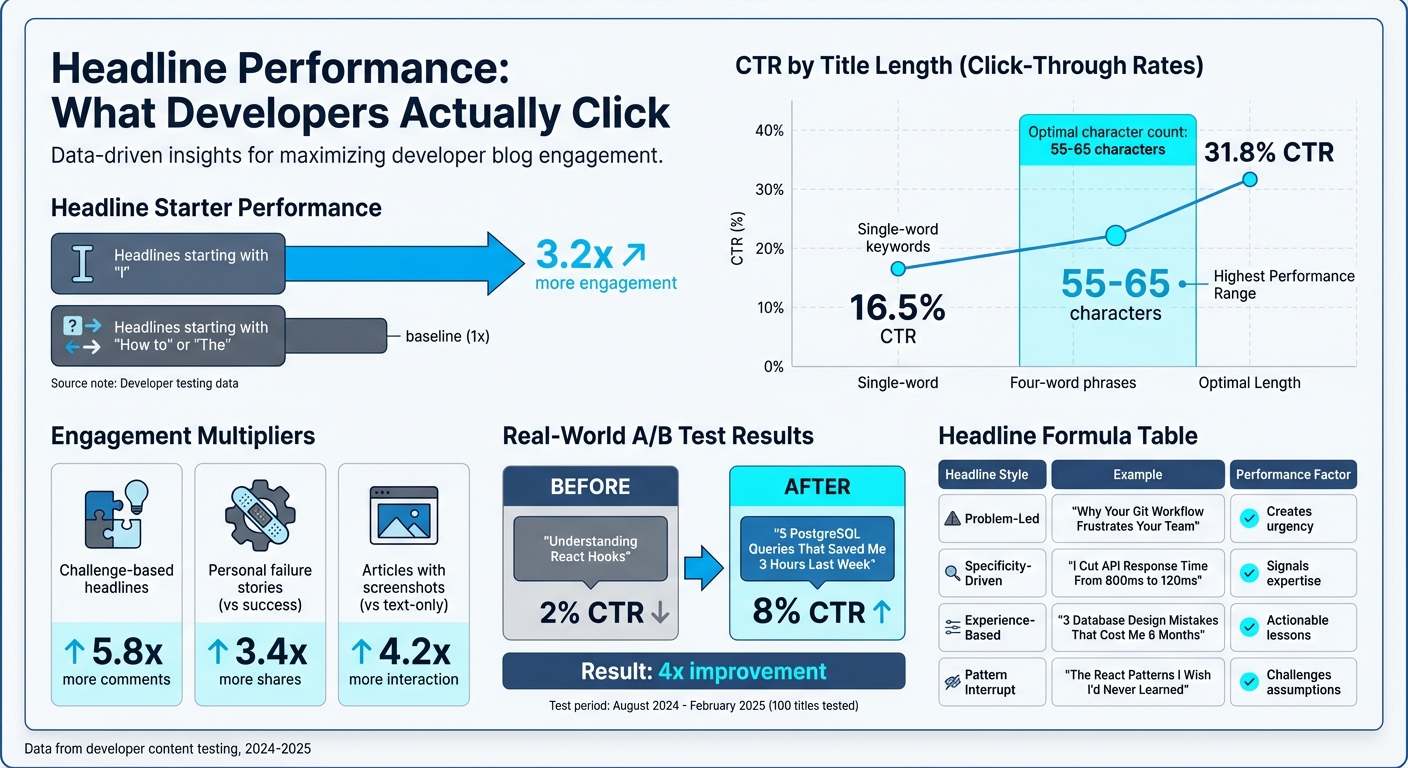 {Headline Performance Comparison: What Makes Developer Blog Titles Click}
1. Know Your Developer Audience
Developers aren’t a one-size-fits-all group. A junior developer learning React has vastly different needs compared to a senior engineer managing Kubernetes. Instead of relying on broad labels like "Backend Developer", create detailed personas that reflect real roles and challenges. For example, think of personas like "API Integrator Alex" to better capture their specific goals and obstacles .
1.1 Define Developer Personas
To create effective personas, consider factors like experience level, tech stack, and use cases. Are they building new products? Integrating APIs? Automating workflows? Securing applications? Each scenario demands a different approach. For instance:
- Startup developers often prioritize speed and agility.
- Enterprise engineers may focus more on stability and compliance.
Gather data through developer interviews and product analytics to understand how they interact with your tools. And don’t let these personas go stale - update them every quarter to keep up with evolving behaviors and tech trends.
1.2 Find Developer Pain Points
Want to know what’s frustrating developers? Dive into GitHub issues, browse Stack Overflow threads, or check out conversations in developer Slack groups. Common concerns might include things like unclear API rate limits, clunky onboarding processes, or missing error handling .
Don’t stop there - your internal teams are goldmines of information. Developer Relations, sales, and support teams often hear recurring questions or complaints that can shape your content strategy.
When addressing these pain points, focus on the technical nitty-gritty. Developers aren’t looking for vague business advice - they need actionable solutions to the challenges they face every day.
1.3 Choose Topics That Matter
The best content solves real problems. Look at internal documentation, support tickets, and FAQs for inspiration. Turn these into clear, concise tutorials that developers can actually use . A good rule of thumb: aim for a mix of about 70% practical tutorials and 30% thought leadership .
Before publishing, validate your topics with your engineering team. Their feedback can help refine your ideas and ensure relevance. And don’t shy away from sharing your unique perspective - it’s what sets your content apart.
"Anybody can replicate keyword research, but nobody can replicate your worldview" .
Once you’ve nailed down your audience and their challenges, it’s time to dig into the keywords they’re searching for [Section 2].
sbb-itb-e54ba74
2. Research Keywords Developers Actually Search
Developers are not casual browsers - they're on a mission to find precise, actionable solutions. When someone searches for "how to automate GitHub backups", they’re looking for a clear, step-by-step answer, not fluff. Your keyword strategy needs to reflect that level of precision and urgency.
2.1 Understand Search Intent
Before choosing keywords, figure out what developers are trying to achieve. Are they learning something new, troubleshooting an issue, or comparing tools before making a decision? Search intent typically falls into four groups: informational, navigational, commercial, and transactional.
Here’s a simple way to uncover intent: search the keyword yourself and study the results. Are the top links tutorials? That means developers want hands-on guidance. Are they comparison articles or product pages? Then they’re evaluating options. The format of your content should match what’s already ranking. For example, skip the listicle if developers expect an in-depth walkthrough.
"Google's ranking systems first need to determine intent before they can return relevant results." - Semrush
Pay close attention to words like "how", "fix", "best", or "vs" in search queries. These modifiers give clues about intent. For instance, "how to use React hooks" signals a need for educational content, while "best error tracking software" shows they’re ready to compare tools.
2.2 Target Long-Tail Keywords
Instead of chasing broad terms like "Python" or "Kubernetes", focus on long-tail keywords - those specific, multiword phrases that directly address developer needs. Broad terms are often dominated by major platforms and attract general traffic, not users seeking exact solutions.
Long-tail keywords usually have less competition and higher click-through rates. For example, four-word phrases achieve a 31.8% CTR, compared to just 16.5% for single-word terms . A good target for developer content is keywords with over 100 monthly searches and a difficulty score below 20 .
You can find these keywords in places where developers hang out, like Stack Overflow, GitHub Issues, Hacker News, and subreddits like r/devops or r/golang. You can also reach developers directly on platforms where they start their day. Pay attention to how developers phrase their questions. For example, instead of "Python CSV", you might see "python read csv from command line" - that’s the kind of specificity you want.
Don’t overlook internal resources, either. Your support and sales teams can provide insights from frequently asked questions or recurring issues. For instance, if customers often ask about API rate limits, that’s a clear opportunity for content aimed at the bottom of the funnel.
2.3 Review Top-Ranking Content
Once you’ve identified the right keywords, study the top-ranking content for those terms. The top five results capture nearly 70% of clicks , so focus on what makes them successful. Are they detailed guides, quick references, or video tutorials? Match their format, but aim to improve on what’s already out there.
Tools like Ahrefs (starting at $99/month) and SEMrush (starting at $119.95/month) can help you spot keyword gaps your competitors have covered but you haven’t . For example, Ahrefs might show you several Kubernetes-related phrases with over 1,000 monthly searches and a difficulty score of 30 or less .
Don’t just replicate what’s ranking - find ways to do it better. Look for older articles (3–5 years) and create updated, more relevant versions. Technology evolves quickly, and outdated content leaves room for fresh takes to capture attention.
Finally, validate your keyword choices with your engineering team. They can help you refine your strategy by catching nuances that tools might miss. For instance, they’ll know whether people searching "serverless architecture" are looking for AWS Lambda tutorials or broader insights.
Once your keywords are locked in, the next step is structuring your blog for easy scanning.
3. Structure Your Blog for Easy Scanning
Developers don’t read every word - they scan. In fact, studies reveal that online readers typically consume only 20% of the text in an article . If your content doesn’t help them find answers quickly, it’s not doing its job. The key? Organize it better. Start with a solid outline to map out your content.
3.1 Build a Clear Outline First
To make your content actionable and easy to navigate, start with a well-thought-out structure. Before you write anything, create a hierarchical outline. Use H2 headers (##) for major sections like "How the Integration Works" and H3 headers (###) to break down details under those sections . Keep your headers descriptive and concise - aim for under eight words. For example, "Configure Your API Keys" is far clearer than a generic "Configuration" .
For longer posts, include a table of contents at the top so readers can jump directly to the section they need . Another great addition is a TL;DR summary at the beginning, giving readers an overview of the key points before they dive into the details. Think of your outline as a roadmap - if someone only reads the headers, they should still understand the main takeaways.
"A well-structured technical blog isn't just easier to read, it's easier to use. Developers are often scanning for specific answers or steps." - Komal, Content Writer, Infrasity
3.2 Break Up Dense Information
Once your outline is ready, focus on making the content easy to digest. Keep paragraphs short - no more than five lines - and lead with the main idea to save readers time . Adding whitespace between sections not only improves readability but also helps readers process information faster .
To keep readers engaged, include a visual element every three paragraphs. This could be a code block, a diagram, a list, or even a subheading . Use bold to emphasize key terms and italics for names or specific terms, but don’t overdo it - too much formatting can dilute its impact . When presenting information, use bullet points for unordered lists and numbered lists for sequential steps .
Here’s an example: In February 2026, developer Devrim Ozcay revamped a technical article about production incidents. By adding four screenshots of metrics and code diffs and breaking up dense text, the article’s views skyrocketed from 214 to 12,400 in just 24 hours .
3.3 Add Code Snippets and Visuals
Once you’ve structured and simplified your content, take it a step further by including code snippets and visuals. Code snippets show your solution in action . Use fenced code blocks (e.g., ```js) for multi-line code and inline backticks for short commands or variables . Keep snippets concise - around 10 lines - and follow them with 2–3 sentences explaining what the code does .
Make sure your code is ready to copy and paste. Avoid placeholders that require manual edits; instead, use environment variables . Including CLI outputs is another great way to help readers verify their progress. For instance, showing the output of terraform init reassures users that providers were located and backends configured correctly .
Visuals also play a huge role in engagement. Articles with screenshots get 4.2 times more interaction than text-only ones . Use annotated screenshots to call out specific UI elements or architecture diagrams to clarify complex systems . Always add descriptive Alt text for accessibility and SEO . For diagrams, tools like Mermaid-JS or Excalidraw are excellent choices, and dbdiagram.io works well for database schemas .
"Never go for longer than three paragraphs without using one or more of the following: Pictures, Diagrams or charts, Code snippets, Lists, Headings, Tables." - Tomas Fernandez, Full-time Writer, Semaphore
4. Write Headlines and Openings That Get Clicks
A headline has just two seconds to grab a developer's attention. Crafting effective titles isn’t about luck - it’s about strategy. Developers value precision over vague claims and prefer personal, hands-on insights to generic theories. Once your blog is structured for easy readability, the next step is creating headlines that reflect that clarity and purpose.
4.1 Use Technical Language Correctly
Developers can spot inauthenticity in an instant. Using the right terminology is key - ditch the buzzwords and stick to the language developers use every day. For instance, if you’re writing about React hooks, say "useState and useEffect" instead of something like "modern state management techniques." Similarly, if you’re discussing database optimization, call out specific tools like PostgreSQL or MySQL rather than using the broad term "relational databases." This level of detail builds trust right away.
Interestingly, titles that begin with "I" generate 3.2 times more engagement compared to those starting with "How to" or "The" . For example, a headline like "I Debugged 52 Production Incidents in 6 Months. This Tool Saved Me 312 Hours" immediately signals authentic, hands-on experience. Developer Narayana BK tested 100 blog titles between August 2024 and February 2025 and discovered that switching from general titles like "Understanding React Hooks" to more specific and problem-focused ones - such as "5 PostgreSQL Queries That Saved Me 3 Hours Last Week" - boosted average click-through rates from 2% to 8% .
"Specificity signals that you have real experience, not just theoretical knowledge. Developers can smell generic advice from a mile away." - Narayana BK, Developer
4.2 Experiment with Headline Formats
Headlines that address problems create urgency by tapping into readers' insecurities. For example, "Why Your TypeScript Config Is Probably Wrong" makes readers question their own setup. On the other hand, outcome-based headlines focus on tangible results, like "Docker Made My Deployments 10x Faster." Pattern interrupts, which challenge conventional thinking, also grab attention in a crowded space .
To ensure your headlines perform well, keep them between 55 and 65 characters to avoid being cut off on mobile feeds . Developers also tend to favor headlines with smaller numbers (3–7), as these suggest depth without overwhelming breadth . Additionally, headlines that challenge common beliefs generate 5.8 times more comments, while personal failure stories are shared 3.4 times more often than success stories .
| Headline Style | Example | Why It Works |
|---|---|---|
| Problem-Led | "Why Your Git Workflow Frustrates Your Team" | Creates urgency by addressing a pain point. |
| Specificity-Driven | "I Cut API Response Time From 800ms to 120ms" | Signals expertise with measurable results. |
| Experience-Based | "3 Database Design Mistakes That Cost Me 6 Months" | Offers actionable lessons from real-world errors. |
| Pattern Interrupt | "The React Patterns I Wish I'd Never Learned" | Stands out by challenging assumptions. |
4.3 State the Problem and Solution Upfront
The opening paragraph is your hook - it’s what decides whether readers keep going or click away. Start by presenting a clear problem and its solution right away. For example, instead of saying, "In this post, we'll explore database optimization", grab attention with, "Your queries are taking 800ms when they should take 120ms. Here's why." This creates an information gap that readers will want to close .
Within the first 100 words, aim to include a dramatic moment or a clear before-and-after scenario . Before you hit publish, apply the "So What?" test: if you can’t explain the value of your content in one concise sentence, chances are readers won’t stick around .
5. Get Your Blog in Front of Developers
Writing a blog post is just the first step - the real challenge lies in making sure it reaches the right developers. You've already nailed the essentials: a catchy headline, scannable structure, and actionable advice. Now, it’s all about distributing your content where developers spend their time.
5.1 Share in Developer Communities
Developers are active on platforms like Hacker News, Reddit, and niche forums where they discuss and share technical content. These communities value genuine contributions and dislike overt self-promotion, so your approach needs to strike the right balance by being authentic and useful. On daily.dev, there are three ways to share your content effectively:
- Use the "New Post" feature (introduced in 2025, replacing Community Picks) to share your content directly and grow a personal following.
- Create a "Squad" to cultivate a community centered around specific technical topics or expertise. This is a great option for both individual creators and companies aiming to build a niche audience.
- If you manage an established developer publication, you can suggest it as a "Source" to reach a wider audience on daily.dev. However, personal or corporate blogs don’t qualify for this option .
For Hacker News, timing and accuracy are key. Post during peak hours (8:00 AM to 10:00 AM EST on weekdays) and ensure your headline matches your blog title exactly. Avoid tweaking the title to make it more clickbaity - this community values honesty and will quickly downvote anything that feels misleading.
If organic sharing isn’t enough, daily.dev also provides ad tools to help amplify your content.
5.2 Use daily.dev Ads for Targeted Distribution
To extend your reach, daily.dev Ads allows you to target over 1 million developers with precision. You can customize campaigns based on seniority levels (junior, mid-level, senior), programming languages (JavaScript, Python, Go), or even specific tools and frameworks.
The platform offers a variety of ad placements, such as in-feed ads, post page ads, and personalized digest ads, all designed to integrate smoothly into the developer’s browsing experience.
What sets daily.dev Ads apart is its focus on a trusted developer ecosystem. Your content appears alongside curated technical articles, ensuring it’s seen in a relevant and credible context. Plus, real-time tracking and creative support help you fine-tune your campaign for maximum impact.
5.3 Write Clear Calls-to-Action
Once your blog reaches developers, it’s crucial to guide them with clear and actionable next steps. Developers prefer direct instructions over vague suggestions. Tailor your call-to-action (CTA) to the type of content you’re sharing:
- "Read the Docs" works well for educational content or introductory guides.
- "Get the Code" is ideal for tutorials or how-to posts.
- "Try the Demo" is perfect for showcasing features or user interfaces.
If you’re promoting a tool, link directly to its GitHub repository or installation guide. For API-focused content, point developers to interactive documentation or a Postman collection.
Make it easy. For example, if your blog explains a database optimization technique, your CTA should be something like "Download the SQL Scripts" with a direct link. Avoid adding unnecessary steps, like asking readers to subscribe to a newsletter before accessing the promised resource. Developers value efficiency and won’t hesitate to leave if you make the process complicated.
Conclusion
Building a successful developer blog boils down to three core principles: utility, authenticity, and smart distribution. Great blogs address real-world problems, back up their claims with technical proof like code snippets, and respect developers' time by presenting information in a clear, scannable format.
Here’s a quick recap: The IDEA framework is a reliable approach - Intrigue readers with a strong hook, Demonstrate your points with code and facts, Engage through relevant examples, and Advocate for clear next steps. But remember, creating content is just the start. As Draft.dev wisely advises: "Spend as much time sharing your content as you spend creating it" . Some experts even suggest an 80/20 rule - 80% of your effort should go into promoting, with only 20% focused on writing .
One common pitfall? Failing to share your work effectively. Around 90% of writers fall into this trap . To avoid it, leverage developer communities, experiment with platforms like daily.dev Ads, and include clear calls-to-action in your posts. Promotion is not an afterthought; it’s what transforms a good blog into one that actually gets read.
Seth Godin captures the right mindset perfectly: "The professional writer says, 'It is almost certain that most of what I write will not resonate with most people who read it, but over time, I will gain an audience who trusts me to, at the very least, be interesting'" .
Use a checklist to stay on track, monitor engagement metrics beyond just traffic - like time spent on page and scroll depth - and refine your strategy based on what works. When developers find your content valuable, they’ll not only return but also share it with others. By following these steps, you can turn your technical expertise into blogs that truly resonate.
FAQs
How do I pick one developer persona to write for?
Start by pinpointing the specific group of developers that best fits your content or product. Pay attention to factors like their area of expertise, career level, or the industry they work in. Once you've identified your target persona, craft your content to match their needs and interests. Focusing on one persona helps ensure your message stays relevant, engaging, and aligned with their technical knowledge.
How can I validate long-tail keywords without paid SEO tools?
To check long-tail keywords without spending money, try tools like Google Keyword Planner or KeywordTool.io. These platforms help you spot low-competition, specific phrases while providing useful metrics. Another approach is to manually evaluate search intent. You can do this by looking at search engine results, exploring related queries, and examining the content that ranks for those terms. These methods let you gauge how relevant and effective a keyword might be for your content plan - all without breaking the bank.
What should I track to know if developers find my post useful?
To understand if developers find your post helpful, keep an eye on engagement metrics such as comments, shares, and the time readers spend on your content. Look for signs that your post is sparking conversations on developer forums or platforms. Another useful indicator is how often your post gets bookmarked or cited in other developer-focused content. Together, these signals can give you a clear picture of how relevant and valuable your post is to the developer community.