

Want to impress developers with your product demo? Focus on their needs: show how your tool solves specific problems using detailed, hands-on examples. Developers value technical depth, not surface-level features or buzzwords. Here's how to create demos that resonate:
- Understand your audience: Tailor your demo to their role, tech stack, and pain points. Show integration with their workflows.
- Structure for clarity: Follow a "Problem → Solution → Value" flow. Highlight 3–5 key features tied to real challenges.
- Make it interactive: Use live coding, sandbox environments, or API access to let developers explore your product.
- Use real code and data: Stick to familiar programming languages and realistic scenarios to build credibility.
- Test thoroughly: Run dry runs, gather feedback, and refine based on metrics and developer input.
- Engage in conversation: Keep the demo collaborative, invite questions, and dive into technical specifics when needed.
Developers appreciate demos that are clear, practical, and aligned with their work. Skip the fluff and focus on solving their problems effectively.
::: @figure 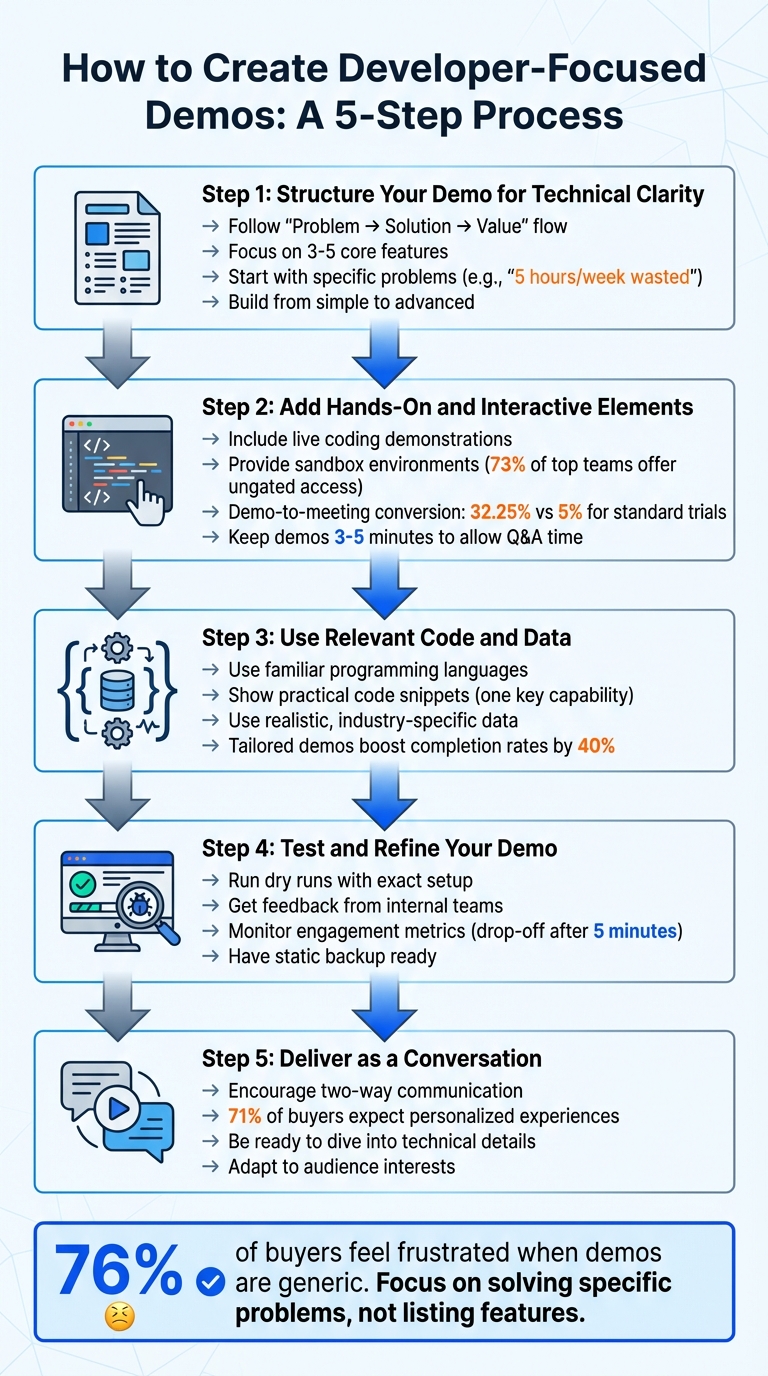 {5-Step Process for Creating Developer-Focused Product Demos}
Step 1: Structure Your Demo for Technical Clarity
A demo shouldn't feel like a checklist of features. Developers aren’t interested in sitting through a tedious rundown of every capability your product offers - they want to see how it solves their specific problems. To make your demo resonate, structure it with a clear narrative: "Problem → Solution → Value". This approach focuses on what matters most to developers, rather than overwhelming them with a flood of details .
Focus on Key Features
Zero in on 3–5 core features that directly address the central problem developers face . Trying to showcase everything at once often leads to cognitive overload, leaving nothing memorable. Instead, choose the most impactful features and integrate them into a cohesive story. Your demo should guide developers through a logical flow that connects their pain points to your solution.
Start with the Problem
Begin by addressing the specific challenges developers encounter in their daily workflows. Avoid generic statements like "data management is tough." Instead, be precise: "Your team spends 5 hours every week manually updating CRM records" . When the problem is framed clearly and concretely, it becomes relatable and sets the stage for your solution.
This contrast between the frustrating status quo and your product’s transformative potential is what makes the demo engaging. As Gabe Sumner, Director of Technical Product Marketing at Salesforce, explains:
"Your demo's finish will only be as delightful as our beginning was painful. Simply put, high highs require low lows" .
By painting a vivid picture of the "low low", you make the value of your solution immediately apparent.
Show Features Through Real Scenarios
After establishing the problem, demonstrate your solution using scenarios that align with real developer workflows . Avoid showing isolated API responses or abstract configurations. Instead, create a small, functional example - like a simple app or UI - that highlights the practical benefits of your features .
For instance, if you're presenting an authentication tool, don’t just walk through code snippets or configuration files. Show how a developer can integrate it into an application, handle edge cases, and enhance security in their existing stack. This approach helps developers picture how your product fits into their own projects.
Build from Simple to Advanced
Start with the basics and gradually introduce more advanced capabilities. This progression ensures that both beginners and experienced developers can follow along . New users won’t feel overwhelmed, while seasoned developers will appreciate the deeper technical insights.
Since attention spans often drop after five minutes , lead with a high-impact example to grab attention right away. Then, transition into advanced features to showcase the full technical depth of your product. This step-by-step approach mirrors the natural user journey - from solving initial problems to tackling more complex optimizations.
| Demo Flow Type | Best For | Target Audience |
|---|---|---|
| Linear Walkthrough | Basic features and quick awareness | New buyers or industry beginners |
| Demo Branching | Personalized, advanced journeys | High-intent buyers seeking more specific insights |
| Demo Showcases | Comprehensive, multi-feature overviews | Stakeholders ready for deep technical evaluation |
Step 2: Add Hands-On and Interactive Elements
Developers thrive on hands-on exploration. The best demos allow them to interact directly with your tool through live coding, sandbox environments, or technical Q&A sessions. This approach aligns with what developers value most: the freedom to discover and the ability to explore features at their own pace . Let’s break this down, starting with live coding.
Include Live Coding or Walkthroughs
Live coding puts your product in action, showing how it solves real-world problems in real time. Focus on demonstrating one specific feature with clean, easy-to-follow code . To ensure readability, use your IDE’s presentation mode or manually increase font sizes - especially since nearly 40% of demos are viewed on mobile devices . This high mobile engagement highlights the importance of reaching developers where they consume content, such as through targeted developer campaigns.
When showcasing APIs, skip the raw JSON or YAML blobs. Developers often find this unengaging and unhelpful in illustrating the value of your product . Instead, build a simple, functional demo application that highlights the end result of the API call - the user experience your API enables . This approach transforms abstract data into something meaningful and relatable.
Keep the viewer’s attention by decluttering your shared screen. Share only the essential browser tab or window and keep all necessary tools on the same virtual desktop to avoid distractions .
Offer Sandbox Environments or API Access
After live coding, provide a sandbox environment where developers can experiment with your product. Sandboxes create a safe space for developers to test features and try out use cases without affecting live systems . Open, ungated sandboxes are particularly effective, with 73% of top-performing teams offering demos without requiring a sales barrier . This unrestricted access encourages deeper engagement and exploration .
For sandboxes, use HTML/CSS-based captures instead of static video. This retains dynamic elements like hover states, making the experience feel interactive and closer to the real product . Focus on leading developers to 2–4 key "aha" moments where your product solves specific pain points. These moments should be easy to find and clearly demonstrate the value of your tool . Interactive demos that hit these marks can achieve an average demo-to-meeting conversion rate of 32.25%, far surpassing the 5% benchmark for standard trials .
Make Room for Questions
A great demo isn’t just a presentation - it’s the start of a conversation. Chris Bensen from Oracle Developers puts it best:
"What you produce will start a conversation and you have no idea who that will inspire or where it will lead. Your goal should be to create talking points and give people a reason to look at your idea" .
Keep your demos short - around 3–5 minutes - to leave time for technical Q&A . These discussions help uncover what matters most to developers and highlight the moments that grab their attention. This feedback not only clarifies technical details but also helps you refine and improve future demos. An interactive dialogue is key to making your demo both engaging and effective.
Step 3: Use Relevant Code and Data
When presenting to developers, authenticity is key. Your code and data need to feel real, not staged. Developers can easily spot artificial scenarios, so it's crucial to align your demo with the tools, languages, and challenges they actually encounter.
Use Familiar Programming Languages and Tools
Your demo should reflect the tech stack your audience uses. Technical evaluators often want to dive into the details, while end users are more interested in how the tool integrates into their daily work . For example, if you're presenting to a fintech audience, highlight security and compliance features. For healthcare developers, demonstrate how your tool handles HIPAA regulations and patient data . If you're unsure about their preferred framework, Vanilla JavaScript is a safe choice to showcase core functionality . Demos tailored to the audience's tools and workflows can boost completion rates by up to 40% .
Show Practical Code Snippets and Examples
Instead of overwhelming your audience with too many features, focus on one key capability and back it up with clear, concise code . Stephen O'Grady, Co-founder of RedMonk, praises Twilio for setting the standard:
"They provide 'quickstart' documents that marry specific capabilities with accompanying source code in simple, digestible steps" .
If you're sharing code during a video presentation, make sure to increase the font size or use your IDE's presentation mode. This ensures the code remains legible, even on smaller screens or compressed video feeds . To further clarify your code, include a README file and JSDoc comments to explain its purpose and functionality .
Use Realistic Data and Scenarios
Generic placeholders don’t cut it. Swap them out for datasets that resonate with your audience's industry. For example, if you're demoing to e-commerce developers, use e-commerce data. For healthcare developers, create scenarios involving patient records or medical workflows . Avoid showing raw JSON or YAML blobs - they don't effectively communicate value. Instead, build a simple UI or application to illustrate how the data is used and why it matters . Address real developer pain points, such as streamlining inefficient workflows . If you're using real datasets, make sure to anonymize sensitive details like usernames or account numbers . The goal is to lead your audience to an "aha! moment" where they clearly see how your tool solves a specific problem .
Step 4: Test and Refine Your Demo
Even the best-prepared demo can crumble without proper testing. Testing is essential to ensure the technical flow of your demo works smoothly and that your presentation feels polished. This step bridges the gap between preparation and a professional delivery. Before showcasing your demo to developers, confirm that every technical detail is functional and that your narrative is clear and engaging.
Run Dry Runs to Ensure Technical Precision
Dry runs are your chance to catch potential issues before going live. Keep your script concise to avoid filler words that can dilute your message . Use the exact setup you’ll have during the actual presentation, and organize all necessary windows on a single virtual desktop. This prevents distractions, especially since video conferencing tools often compress high-resolution screens into what one engineer describes as a "scrambled, compressed mess" . To improve clarity, zoom in on your code and enable Presentation Mode so technical details remain legible.
When sharing your screen, limit it to specific windows or tabs rather than your entire desktop. This avoids the risk of notifications or personal content interrupting the flow . Always have a static backup on hand - like a slide deck with screenshots - so you’re ready in case of technical glitches or API failures . As one engineer from Quobix wisely puts it:
"Your mouse is a laser pointer during a demo... People follow the mouse" .
Be mindful of unnecessary clicking or random highlighting, as these can distract your audience.
Get Feedback From Internal Teams
Schedule a 30-minute session with your core team, stakeholders, and technical colleagues to walk through the entire demo. These internal "demo your demo" sessions can reveal gaps in logic, missing technical details, or awkward transitions before you face an external audience. Start with simple visual aids, like sketches or diagrams, to encourage early feedback, and gradually transition to working prototypes as your demo evolves . To ensure smooth execution, assign roles in advance for any technical handoffs .
Refine Based on Developer Feedback
Gather feedback after every demo session . For recorded or self-guided demos, monitor metrics like watch time and engagement rates to pinpoint where viewers lose interest - studies indicate that completion rates drop significantly after the 5-minute mark . Anticipate objections by running the "hater test", where you consider every possible reason a skeptical developer might dismiss your demo. Use this exercise to address those concerns in your next version . Finally, eliminate elements that may seem intellectually interesting but don’t add practical value. Focus on delivering a functional proof-of-concept that resonates with your audience rather than a dry list of features .
With thorough testing and feedback, your demo will be ready to engage your audience and spark meaningful conversations.
Step 5: Deliver the Demo as a Conversation
Once you’ve built a structured, interactive demo, the next step is to present it as a conversation. Think of your demo as a collaborative problem-solving session rather than a one-sided presentation. This approach not only boosts technical credibility but also keeps developers engaged and curious.
Encourage Two-Way Communication
Start by inviting input from your audience. Ask them which areas or features matter most to their work. A simple way to do this is by sending a pre-session email asking for their top three challenges. This helps you tailor the demo to their specific needs. After all, studies show that 71% of buyers expect personalized experiences, while 76% feel frustrated when demos come across as generic .
During the demo, make it a habit to pause and check in. Summarize the technical wins you’ve discussed and confirm that the solutions align with their expectations. As the Supademo team wisely notes:
"The best demos are conversations, not monologues" – Supademo Blog
This back-and-forth exchange often leads to deeper, more meaningful technical discussions.
Be Ready to Dive Into the Details
Developers will challenge your knowledge - it’s part of the process. Be prepared to step away from your script and dive into specifics like your tech stack, API architecture, or even edge cases. Use your script as a flexible guide, not a rigid playbook. If you’re not comfortable navigating the product without sticking to a script, it might be better to have a more technically experienced colleague lead the session.
When responding to technical questions, try the "Because, Therefore, But" framework to make your explanations clear. For example:
"Because the API rate limit was hit, therefore we implemented exponential backoff, but we also added a caching layer to reduce redundant calls."
Identify any potential weaknesses in your product ahead of time. Be honest about them, and come prepared with solutions - whether that’s a roadmap update or a practical workaround.
Adapt to Your Audience’s Interests
Pay attention to your audience’s engagement and adjust accordingly. For experienced users, pick up the pace and dive deeper into the technical aspects. For those less familiar, simplify your explanations and slow things down.
Use decision branching to give your audience control over the demo. For example, you might ask, "Would you like to see more about the admin view or the API integration?" You can even color-code your script to remind yourself of optional detours - like opening specific tabs, showcasing related features, or diving into advanced use cases if the audience shows interest.
Conclusion
Review of the Demo Creation Process
A well-crafted developer-focused demo addresses real-world challenges with technical precision and clear communication. The process begins with understanding your developer audience - what problems they face and what they aim to achieve. Structure your demo to progress logically, starting with basic concepts and gradually moving into advanced use cases. Each step should directly tie back to a specific problem developers encounter. Incorporate live coding sessions, sandbox environments, or API access to let developers interact with your tool. Use realistic and relatable code snippets in commonly used languages, and ensure the data you showcase feels relevant rather than generic. Before presenting, conduct dry runs with internal teams to catch any technical issues and gather constructive feedback. Always center your demo around the developer’s workflow and challenges.
These steps provide the groundwork for creating demos that truly connect with developers.
Final Tips for Success
To build on this foundation, here are a few additional tips to make your demo even more impactful. Keep refining your demo over time - teams that adjust their presentations based on engagement data and feedback consistently see better results . Pay close attention to engagement metrics to identify and resolve any friction points. Developers tend to respond better to demos that focus on solving their specific problems rather than making generalized claims about productivity . As the LiveDemo.ai team shared:
"The moment we rebuilt our demo around customer pain instead of product features, our inbound meeting requests jumped overnight"
Highlight the purpose behind every feature you showcase, make sure your code is easy to read during presentations, and use your mouse intentionally to direct attention. Present your demo as a conversation rather than a lecture, delivering the technical depth developers expect.
FAQs
How can I create a demo that truly connects with developers?
To craft a demo that truly connects with developers, start by honing in on their specific needs and challenges. Understand your audience - whether they’re junior developers, seasoned specialists, or engineers - and focus your demo on solving a particular problem your tool addresses. Rather than showcasing every feature, highlight one impactful aspect that demonstrates your product's value.
Keep it short and focused - aim for a runtime of 5 to 10 minutes. Use real-world examples, such as live coding or API calls, to make the demo feel genuine and relatable. Ensure your visuals are easy to follow by enlarging text, enabling presentation mode, and displaying only the essential screens. After the demo, provide helpful follow-up resources like quick-start guides or sample projects so developers can dive in on their own. Lastly, don’t forget to gather feedback; it’s the best way to refine your demos and keep them engaging for your audience.
What are some effective ways to make demos engaging for developers?
To truly connect with developers, it's essential to include interactive elements that invite hands-on exploration and experimentation. Features like live code editors or sandboxes are fantastic for this - developers can tweak the code and immediately see how their changes play out. Similarly, an interactive API explorer can make a big difference. By allowing users to input parameters, send test requests, and view responses in real time, you create a space where they can dive deeper into your tools.
Adding micro-interactions - like quizzes, polls, or decision points - can also keep things lively. These not only make the experience more engaging but also provide valuable insights into how developers are interacting with your content. Tailoring the demo to each user by showing examples in their preferred programming language is another way to make it more relevant and respectful of their expertise. Lastly, incorporating real-time feedback tools, such as comment boxes or emoji reactions, transforms the demo into a two-way conversation, fostering better engagement and gathering useful feedback.
How can I test and improve my developer-focused demo for better results?
To make your developer-focused demo as effective as possible, start by setting clear goals. For example, track metrics like average watch time or conversion rates to measure its success. Share the demo with your team to gather feedback on its clarity, screen readability, and overall flow. Once you’ve made initial adjustments, test it with a small group of developers from your target audience. This will help you understand if the technical depth and content are hitting the mark.
Use analytics to pinpoint where viewers lose interest or engage the most. This data will guide you in refining the demo - emphasize the most valuable features while cutting out unnecessary details that might overwhelm your audience. Keep repeating this cycle of testing, analyzing, and tweaking until your metrics show steady improvement and the demo connects well with your developer audience.