
Email still works for developers - but only if you do it right. Developers are flooded with emails, Slack updates, and RSS feeds, so your newsletter must respect their time and deliver real value. Here’s what matters most:
- Focus on utility: Developers want technical insights, working code examples, and updates that solve problems.
- Avoid marketing fluff: Buzzwords, over-personalization, and vague pitches turn them off instantly.
- Design for skimming: Simple layouts, clear subject lines, and mobile-friendly designs make emails easier to read.
- Segment your audience: Tailor content by role, tech stack, and experience to keep it relevant.
- Track the right metrics: Click-to-Open Rates (CTOR) and post-email product engagement are better indicators than inflated open rates.
The key takeaway? Developers don’t hate email - they hate wasted time. Craft newsletters with meaningful content, and you’ll earn their trust and attention.
Understanding Developer Preferences
How Developers Read Emails
Developers don't linger over emails - they skim. A glance at the subject line and the opening sentence is often all it takes for them to decide whether to read or archive. For senior engineers, unread email counts can soar into the thousands, as they lean heavily on tools like Slack for urgent matters while treating most emails as low-priority noise . This means your newsletter has just seconds to make an impression.
What keeps developers engaged? Immediate, practical value. They want content that teaches them something new, solves a technical issue, or saves them time . Consistency also plays a huge role. When developers know they can expect useful content from you, they’re more likely to keep opening your emails. Open rates reflect this: changelogs often see 25–40% open rates, while general newsletters hover between 15–25% .
This quick decision-making process highlights the importance of understanding what appeals to developers - and what drives them away.
Developer Triggers and Turnoffs
Want to lose a developer subscriber quickly? Sound like a marketing pitch. As Jane Portman, co-founder of Userlist, explains:
"Developers smell sales from five miles away. They cherish a clean inbox, unsubscribing right and left."
Developers are naturally skeptical. They don’t just take claims at face value - they dig into GitHub stars, source code, and peer reviews to evaluate tools and products . Over-the-top phrases like "revolutionary" or "game-changing" tend to backfire, breeding mistrust. Instead, developers are drawn to technical depth, original insights, and straightforward transparency. This is especially true when it comes to issues like breaking changes or edge cases that directly affect their work.
Here’s a quick breakdown of what resonates with developers - and what doesn’t:
| Developer Preferences | Developer Turnoffs |
|---|---|
| Technical insights and original analysis | Buzzwords and vague marketing claims |
| Scannable formats | Long, wordy paragraphs |
| Working code snippets and documentation links | Feature announcements without technical documentation |
| Transparency about breaking changes | Manufactured urgency (e.g., "Only 24 hours left!") |
| Direct, technical language | Robotic over-personalization (e.g., "Hi [first_name]") |
| Predictable sending frequency | Inconsistent or excessive sending cadences |
One of the biggest mistakes? Using superficial personalization - like inserting a first name - without backing it up with relevant, high-quality content. This kind of empty gesture signals that you don’t understand your audience, often leading to unsubscribe rates climbing above 0.5% .
To truly connect with developers, you need to avoid these missteps and focus on delivering value in every email. It’s about building trust, one meaningful interaction at a time.
Crafting Developer-Friendly Newsletters
Newsletter Layout and Structure
Developers tend to skim through newsletters, so having a simple and lightweight layout (under 100KB in HTML) ensures they can quickly find the key information. When your newsletter consistently follows a predictable format - like starting with an in-depth section, followed by curated links and a community question - readers develop a clear mental model. This familiarity encourages quicker engagement.
Keep the design clean and responsive, especially for mobile devices, where over 60% of newsletter opens occur . Aim for a fluid layout that adapts well between 320–480px screens. Before sending, test how your newsletter appears in Gmail, Apple Mail, and Outlook dark modes. To avoid awkward white boxes on dark backgrounds, use SVGs or semi-transparent PNGs for logos.
Typography also matters: stick to at least 16px for body text and 22–28px for headings. Limit your calls-to-action (CTAs) to one primary and no more than three total. Overloading with CTAs can confuse readers and even throw off AI inbox summarizers. Louis Corneloup, Founder at Dupple and Techpresso, highlights this shift:
"The newsletters that perform in 2026 design for the preview, not the body."
This means your subject line (30–50 characters) and preheader text (80–120 characters) are now more critical than ever. With AI-powered inboxes like Apple Intelligence and Gmail summarizing emails before they're opened, these elements carry significant weight in grabbing attention.
A solid layout is the foundation for delivering content that truly resonates with developers.
Content That Engineers Want to Read
To capture a developer’s interest, your content needs to provide immediate value. Tutorials with clear, step-by-step code snippets, post-mortems exploring real-world production challenges, and release notes that explain the why behind a feature - not just what it does - are all effective formats. These approaches respect a developer’s time and provide actionable insights .
When sharing curated links, include one or two sentences explaining why each link matters to your audience. Without this context, your newsletter risks becoming just another slow alternative to their RSS feed. Ben Adler, AI Productivity Correspondent, sums it up well:
"A newsletter that sends three links they already saw on Reddit with a paragraph of fluff commentary will be unsubscribed from faster than a vendor email."
Content like comparisons, incident breakdowns, and community showcases can help establish credibility. Unlike generic link roundups, these formats offer depth and give developers a reason to save your newsletter for future reference.
Once you’ve nailed the layout, the focus shifts to curating content that genuinely supports and informs developers.
Branding and Tone Consistency
A consistent tone is essential for building trust with developers. Inconsistencies can create a disconnect, so aim to communicate like a peer rather than a marketing team. Developers prefer a direct, evidence-based approach over exaggerated or overly polished language .
Stick to a conversational, practitioner-to-practitioner tone. Avoid hype and focus on clear, outcome-driven subject lines. Titles like "How to [achieve outcome]" or "[Number] ways to [solve problem]" tend to outperform vague or overly clever alternatives because they set clear expectations . Jesse Sumrak from Twilio SendGrid emphasizes this point:
"Developer email marketing succeeds when it feels like communication between practitioners rather than marketing from a company."
Don’t forget one small but crucial detail: always include a quick reminder of what your product or platform does. As Jonathan Markwell, CTO, notes:
"Too many companies fail to give me a one sentence reminder of what the tool does in the emails they send. It's an extra leap for me to go and try figuring it out from their website."
Developers often subscribe to numerous tools, so it’s important not to assume they’ll automatically remember yours. A simple reminder reinforces your relevance.
When combined with a clean design and useful content, a consistent and relatable tone helps establish credibility with your developer audience.
Personalization and Targeting
Developers expect content that feels tailored to their needs. To meet this expectation, personalization must go beyond surface-level adjustments.
Segmenting by Skills and Interests
A generic newsletter won’t cut it for developers. Their daily routines vary widely based on their role, tech stack, and experience level. If content misses the mark, they’ll notice - and disengage.
A smart way to address this is by grouping your audience into segments based on three key factors:
- Job function: Backend, frontend, DevOps, or mobile
- Technology stack: TypeScript, Python, React, Next.js, etc.
- Seniority level: Junior engineers often prefer step-by-step guides, while senior developers lean toward in-depth discussions on system design and decision-making.
You don’t need to create entirely different emails for each group. Instead, use dynamic content blocks to customize sections of your email. This keeps the overall structure intact while making it feel relevant to individual subscribers. Why does this matter? Segmented campaigns see a 14.31% boost in open rates compared to non-segmented ones . Over time, that difference adds up.
Building these segments can start with your signup form. Ask developers to choose their primary language or area of expertise. You can also use lead magnets - for example, offering a "Production-Ready TypeScript Starter" naturally attracts TypeScript developers without adding friction .
Once you’ve established these segments, you can refine them further by tracking user behavior.
Using Behavior Data to Personalize Content
Initial signup data gives you a starting point, but subscriber behavior tells the full story. Tracking clicks is one of the easiest ways to gauge interest. For instance, if someone frequently clicks on Python-related content, tag them as a Python enthusiast and prioritize similar topics in future emails .
Your signup source also offers valuable clues. A developer who joins through your API documentation is likely tackling a specific technical issue, while someone who signs up after a conference talk might be browsing for general insights. Tailoring your welcome emails to reflect these contexts makes a stronger first impression .
Synergist Digital Media sums it up well:
"Email segmentation sounds fancy, but it's really just common sense with data. Instead of treating your entire list like one homogeneous blob, you split people into groups based on what they actually care about."
It’s also useful to organize subscribers by their engagement level. For example:
- New subscribers: Those in their first 30 days need onboarding content.
- Engaged subscribers: Active users within the last 90 days benefit from advanced material.
- Dormant subscribers: Those inactive for over 90 days might need a re-engagement sequence.
This segmentation ensures you’re delivering the right message to the right people, at the right time.
Using Email Marketing Tools Effectively
Managing segmentation and personalization at scale requires the right tools. Platforms like ConvertKit excel at granular tagging, making it easy to track developer interests. HubSpot and ActiveCampaign go a step further by syncing website behavior. For instance, if a subscriber visits your documentation multiple times in a week, you can automatically send them a follow-up email tailored to their activity .
For broader outreach, daily.dev Ads is a great option. It connects you to over 1 million developers and allows precise targeting by seniority, programming language, and tools. These native ad placements fit seamlessly into how developers consume technical content, helping you grow a subscriber base that’s already aligned with your focus.
As Sunil Sandhu of Circuit.ooo points out:
"Developers are quick to unsubscribe from generic or salesy mail; they stay when emails help them learn, solve problems, or stay informed."
This principle also applies when building your list. Reaching developers in spaces where they’re already learning - rather than interrupting them - sets a positive tone for future engagement.
Measuring and Improving Newsletter Performance
Once you've crafted tailored content for your audience, the next step is to measure how well your developer newsletter is performing. This ensures you're not just sending emails but delivering value that resonates.
Key Metrics to Track
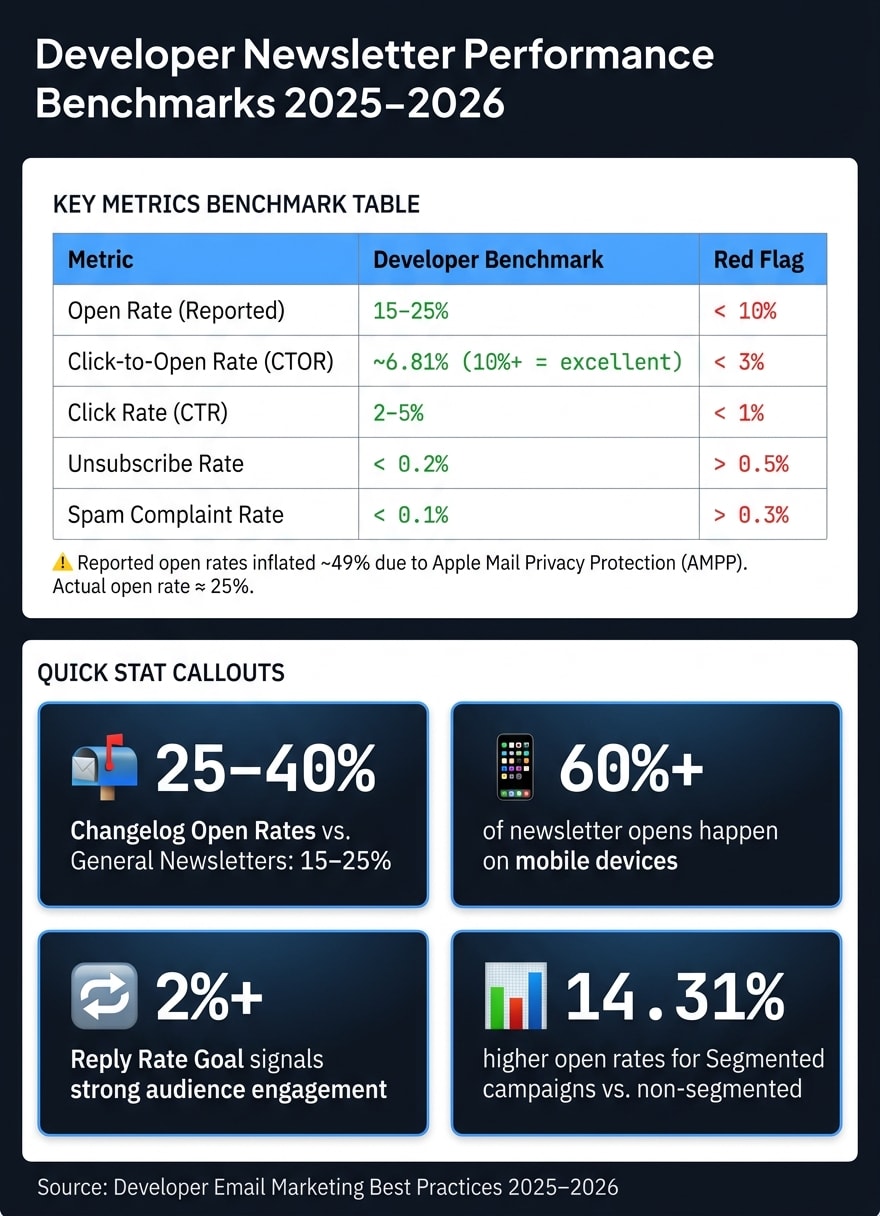
When it comes to tracking performance, some metrics are more reliable than others. For instance, open rates can be misleading. Thanks to Apple Mail Privacy Protection (AMPP), reported open rates are often inflated - by about 49%, in fact. While the industry average for 2025 might show a reported open rate of 43.46%, the actual figure is closer to 25% .
Instead, focus on Click-to-Open Rate (CTOR). This measures the percentage of subscribers who clicked on a link after opening the email. Unlike open rates, CTOR avoids the distortion caused by privacy features. The average CTOR for 2026 is 6.81%, with anything above 10% considered excellent for developer-focused newsletters .
For developer tools specifically, the most valuable metric is post-email product engagement. This tracks whether recipients take meaningful actions after reading, such as updating an integration, making API calls, or running a CLI command.
"The metric that matters most: Post-email product engagement. Did developers who received your changelog email update their integration?" - Sequenzy
Another critical metric is your spam complaint rate. Keep this below 0.10% to avoid issues with providers like Google and Yahoo, which may throttle or reject emails if complaints exceed 0.3% . Here's a quick benchmark chart for reference:
| Metric | Developer Benchmark | Red Flag |
|---|---|---|
| Open Rate (Reported) | 15–25% | < 10% |
| Click-to-Open Rate (CTOR) | ~6.81% | < 3% |
| Click Rate (CTR) | 2–5% | < 1% |
| Unsubscribe Rate | < 0.2% | > 0.5% |
| Spam Complaint Rate | < 0.1% | > 0.3% |
With these benchmarks in mind, the next step is to refine your strategy through testing.
Running Tests to Improve Results
A/B testing is your go-to tool for improving newsletter performance. For developer audiences, start with subject lines. Developers tend to respond better to direct, technical phrasing. For example, "New: WebSocket support in v2.4" will often outperform vague or overly clever titles . To get reliable results, test with at least 500 subscribers per variant and wait a minimum of 4 hours before sending the winning version to the rest of your list .
Beyond subject lines, experiment with your content hierarchy. In changelog emails, try placing breaking changes at the top versus leading with new features. Even small tweaks in content order can significantly impact click rates. Another area to test is your Call-to-Action (CTA). Phrases like "Read the documentation" or "Try the API" often perform better than generic options like "Learn More" because they clearly communicate the next step .
You should also test your send frequency. Sending an email for every minor update can feel overwhelming, while batching updates into a weekly digest might reduce unsubscribe rates. If your unsubscribe rate exceeds 0.5% after a single send, it’s a sign that your content might be perceived as spammy or irrelevant .
While testing provides valuable insights, you can gain even more clarity by gathering direct feedback.
Collecting Feedback and Iterating
Metrics show you what's happening, but feedback explains why. One simple way to collect feedback is by adding a "One question for you" prompt at the end of each newsletter. This not only provides qualitative insights but also signals to email providers that your content is engaging and appreciated .
"Replies signal to email providers that your newsletter is valued. They also generate reader insight you cannot get from analytics alone." - Ben Adler, AI Productivity Correspondent
A reply rate of 2% or higher is a strong indicator that your audience is engaged . If you're consistently below this, consider adjusting your tone or content format. Pair this feedback with unsubscribe trends - if a particular type of content consistently leads to unsubscribes, it’s a clear sign to rethink or remove it. Remember, improving your newsletter is an ongoing process. Treat each issue as a chance to test, learn, and refine.
Conclusion
Once you've fine-tuned your targeting and evaluated performance, it's crucial to focus on the core principle: respecting developers' time. As Peter Cooper aptly puts it:
"No, I don't see any indication that developers hate email. They just hate email that steals their time and makes their life worse."
The most successful developer newsletters feel more like reliable technical resources than promotional tools. To achieve this, it's important to segment your audience by their tech stack and behavior, use a straightforward tone, design a layout that's easy to scan, and experiment with subject lines and send frequency.
Every edition that provides value strengthens trust, while wasting time undermines it. The aim isn't perfection from the start - it's crafting a newsletter that's consistently helpful and earns its spot in a developer's inbox week after week.
FAQs
How do I choose the right segments for a developer newsletter?
To identify the best segments, consider your audience's interests and habits. Break them down based on factors like job roles (e.g., backend developers, frontend developers, DevOps engineers), technology stack, signup source, or engagement levels (such as email opens or link clicks). Grouping by specific technologies or frameworks ensures your content aligns with their preferences and adds value. By understanding their needs, you can deliver tailored content that addresses their challenges or keeps them updated, which can lead to higher open rates and better engagement.
What should I send if I don’t have new product updates?
If there aren’t any new product updates to share, shift your focus to creating useful content that developers will appreciate. Consider topics like:
- Industry news and trends: Keep readers informed about the latest developments in their field.
- Technical tips, tutorials, or best practices: Offer actionable advice or in-depth guides to help them improve their work.
- Upcoming webinars or events: Highlight opportunities for learning or networking.
You can also include curated discussions or solutions to common challenges developers face. By focusing on content that builds skills or offers valuable insights, your newsletter remains engaging and relevant, even without product-related news.
How can I measure newsletter impact without relying on open rates?
To gauge the effectiveness of your newsletter beyond just open rates, shift your attention to metrics like click-through rates (CTR) and click-to-open rates (CTOR). These metrics offer a clearer picture of how engaged your audience is with your content. By monitoring clicks on links, code snippets, or documentation, you can better understand what sparks interest among your readers.
For newsletters that generate income, tracking revenue per subscriber can be especially helpful. This metric reveals how well your content drives outcomes like conversions or sales, which is particularly valuable in today’s privacy-focused environment.