

Here's why:
- Developers value practicality: They want hands-on experiences, clear documentation, and technical accuracy - not sales pitches.
- Community-driven growth: Engaging in forums like GitHub, Stack Overflow, and Reddit builds trust and lowers acquisition costs.
- Better conversions: Developer-focused strategies yield trial-to-paid conversion rates of 15–25%, compared to 10–15% for standard B2B methods.
Key tactics for success:
- Understand developers: Segment by skills, tools, and interests. Tailor content to their needs - junior devs want tutorials; senior devs prefer benchmarks.
- Focus on technical content: Offer quickstart guides, sandbox demos, and clear documentation. Avoid flashy marketing.
- Engage in their spaces: Contribute to open-source projects, share debugging tips, and join technical discussions.
- Use native ads strategically: Platforms like daily.dev deliver ads that feel organic, achieving higher click-through and trial conversion rates.
- Track the right metrics: Measure community engagement, trial activations, and API usage - not just clicks or views.
Next steps:
- Audit your documentation and onboarding process.
- Create content that solves developer pain points.
- Test ads in developer-friendly spaces like daily.dev, and refine based on performance.
Developer marketing is about helping, not selling. Focus on providing real value, and you'll see better engagement and conversions.
::: @figure 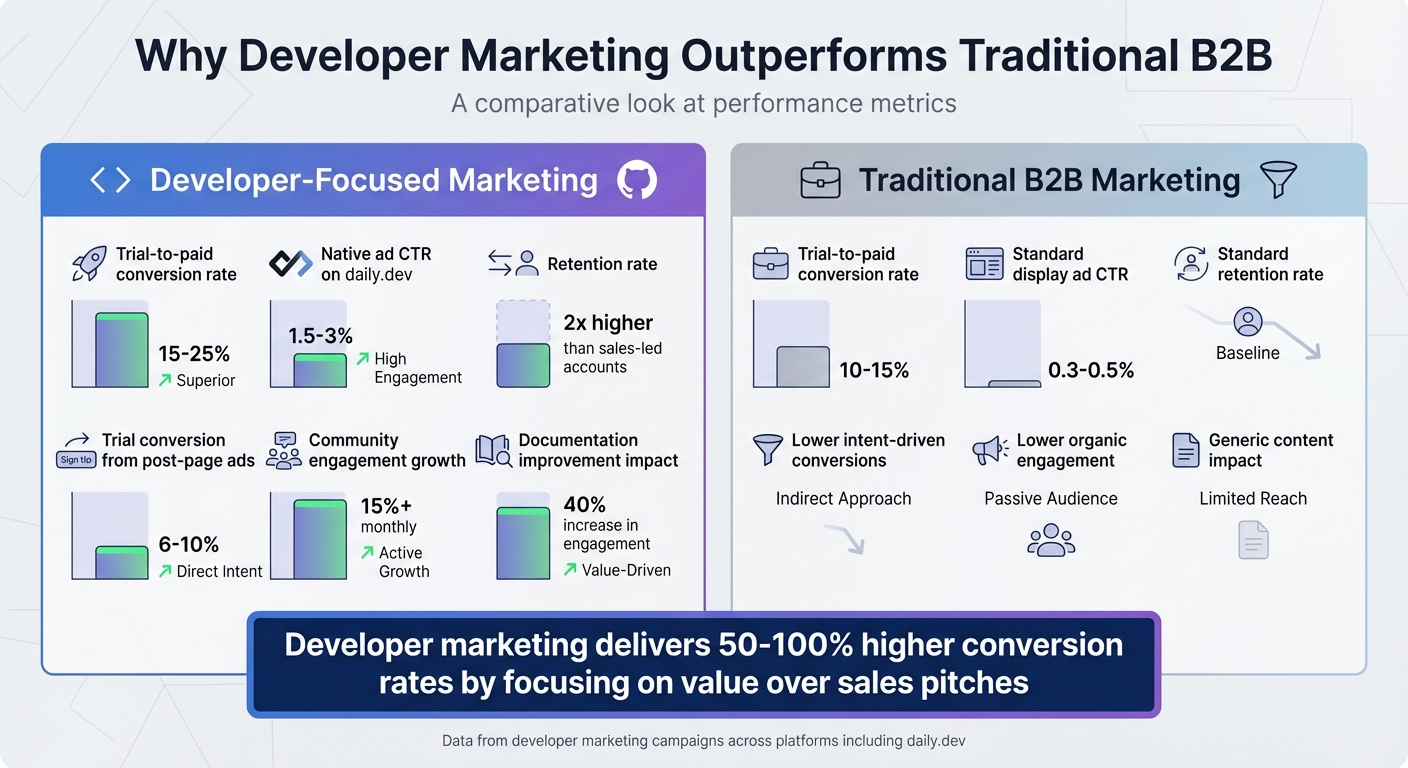 {Developer Marketing vs Traditional B2B: Performance Metrics Comparison}
Building a Developer-Focused Marketing Strategy
Creating a marketing strategy for developers requires precision and focus. Unlike general consumer campaigns, these efforts need messaging that aligns with technical realities and metrics that reflect genuine engagement. A well-structured approach ensures your outreach resonates with developers and tracks meaningful progress.
Identifying Key Developer Personas
Understanding your audience is the cornerstone of any successful strategy. Developers can be segmented by factors like seniority, preferred programming languages, tools, and specific interests. For instance, junior developers often look for hands-on tutorials and onboarding guides, while senior developers are more interested in performance benchmarks and architectural insights.
Start by identifying where your target developers spend their time. Platforms like GitHub, Stack Overflow, Reddit, and Discord are goldmines for uncovering trends, challenges, and discussions. Conduct a competitive analysis to spot influencers and popular conversation topics. For example, if you're targeting cloud-native developers, focus on Kubernetes-related communities and track which tools are being discussed. Additionally, dive into your own analytics - look at documentation usage and trial behavior to see which segments are already engaging with your product. To validate your assumptions, interview developers or study forum threads to better understand their needs. Prioritize high-impact platforms first, directing your resources to areas with the strongest engagement.
Crafting Messaging That Resonates
Developers value technical accuracy and solutions to real-world challenges. Messaging should focus on addressing pain points like integration ease, debugging hurdles, or demonstrating ROI. Forget flashy slogans - developers care more about how your tool can simplify their work or improve efficiency.
Instead of saying, "Our platform is revolutionary", explain how it reduces deployment time or makes error handling easier. Offer resources like sandbox environments that showcase value instantly, along with working code examples and regularly updated content. Developers trust documentation-quality materials over traditional marketing copy because they see it as a reliable resource.
When engaging on platforms like Discord or Reddit, lead with insights rather than promotion. Share architectural tips, debugging solutions, or industry trends - this positions your brand as a helpful collaborator rather than a pushy salesperson. By focusing on collaboration and problem-solving, you can build credibility and trust within developer communities. Once your messaging is solid, define clear goals and metrics to measure your campaign’s success.
Setting Goals and KPIs for Developer Campaigns
To measure success, your metrics should align with how developers evaluate and adopt tools. Focus on leading indicators like community engagement, content usage, and trial activations, alongside lagging indicators such as conversions, revenue, and retention. Separating developer-driven activity from sales-led metrics helps you understand organic growth.
Set SMART goals with defined timelines, like "Increase technical content engagement by 20% in three months" or "Boost trial-to-paid conversions by 15% within six months." Use baseline analytics - like current documentation views, trial activity, and community participation rates - to establish benchmarks. The AARRR funnel (Acquisition, Activation, Retention, Referral, Revenue) is a helpful framework for tracking the developer journey from awareness to advocacy.
Plan your efforts in phases. Spend the first three months establishing tracking systems and gathering baseline data. Then, optimize your campaigns based on insights. Map out your ecosystem - whether it’s conferences, podcasts, or GitHub communities - and focus on high-impact channels where your target audience is most active. Align your KPIs with the broader goals of your developer marketing strategy. If the results meet expectations, scale up. If not, adjust based on the data to refine your approach and focus on areas where developers are engaging most.
sbb-itb-e54ba74
Choosing the Right Advertising Channels for Developers
When targeting developers, picking the right advertising channels is crucial. Developers often ignore traditional advertising, so your strategy should focus on meeting them in spaces they trust for technical content and industry updates. By doing this, your message lands in environments where developers are more likely to engage.
Native Advertising on daily.dev
daily.dev is a platform that connects with over 1 million developers who browse curated tech news daily. It offers three native ad formats that seamlessly blend with its content. Here's how they work:
- In-feed ads: These appear directly in the news feed, mimicking editorial content. They boast click-through rates three times higher than standard banner ads.
- Post-page ads: These are displayed on individual article pages, targeting readers at their most engaged moments.
- Personalized digest ads: Coming soon, these will deliver sponsored content tailored to each developer’s tech stack and preferences, potentially improving conversion rates by 20–30%.
For example, a SaaS API monitoring tool used in-feed ads to showcase a simple 7-line integration demo. The result? A 15% click-through rate, 8% trial conversion rate, and over 500 signups in just one month. This success highlights the platform's ability to connect with developers who value tools solving real-world problems.
Optimizing Native Ad Placements
To succeed with native ads on developer platforms, technical precision and relevance are key. Here’s how to craft effective ads:
- Headlines: Keep them under 60 characters and focus on solving specific problems (e.g., "Cut API Latency 50%").
- Visuals: Use high-quality thumbnails like code snippets, dashboards, or architecture diagrams that resonate with developers.
- Calls-to-action: Opt for action-oriented phrases such as "Try Demo" or "View Sandbox" rather than generic prompts like "Learn More."
- Timing: Schedule ads during peak hours, such as 8–10 AM UTC, to align with US developers starting their workday.
- Testing: Run A/B tests with 3–5 creative variations weekly to see what works best. Retarget engaged users who didn’t convert to boost trial activations by 25%.
Avoid overly promotional language. Developers prefer straightforward, documentation-style content that speaks directly to their technical needs.
Integrating Campaigns Across Developer Ecosystems
To maximize your impact, integrate daily.dev campaigns with other developer-focused channels. Here’s how you can create a cohesive strategy:
- Use in-feed ads to drive traffic to your GitHub repository.
- Host Discord AMAs to engage users who show interest.
- Collaborate with Twitter influencers who are active in your tech niche.
Consistency is key. If your daily.dev ad promises "Seamless Integration in Minutes", ensure your GitHub README and Discord discussions back that up.
Additionally, track campaigns using UTM parameters to attribute conversions across channels. This multi-touch approach builds trust and credibility, which are essential for developers who often research, test, and validate tools before committing. By nurturing users through multiple interactions, you can increase retention by 35% and create a lasting presence in developer communities.
Designing and Running High-Impact Ad Campaigns
Creating effective developer-focused ads requires a mix of technical accuracy and practical demonstrations. A great example is Stripe's ads, which use concise, seven-line code snippets to show immediate value. This approach aligns with developers' preference for hands-on examples over traditional sales language. To build on this, your visuals and copy should reflect the same principles.
Developing Effective Ad Creatives
Your visuals should feel familiar to developers. Include elements like syntax-highlighted code snippets, terminal screenshots, or simple diagrams that explain API integrations. Using dark mode themes and recognizable icons, such as GitHub's octocat, can also help. For instance, AWS keeps it straightforward with console screenshots paired with overlays like "Deploy in 2 minutes", while Vercel highlights deployment improvements using code diffs. These relatable visuals often resonate with developer communities and can even gain organic traction.
When it comes to copy, focus on clear and specific benefits. Instead of vague claims, say something like, "Reduce API latency by 40% with one-line integration." Adding proof points, such as "battle-tested by 10,000+ repos", can further establish trust. Sharing useful insights - like debugging tips or architectural guidance - can also build credibility before introducing your product. For calls-to-action (CTAs), opt for low-barrier options like "Try in sandbox" or "See live demo", linking directly to interactive tools or GitHub repositories. Research shows that these CTAs, which allow developers to immediately explore value, often outperform traditional "Sign up now" buttons that can feel too pushy.
A/B Testing and Campaign Optimization
Once your creatives are ready, test their performance through structured experiments. Start by defining clear variables to compare, such as technical copy versus benefit-driven copy or code snippets versus architecture diagrams. Segment your audience by developer types (e.g., frontend vs. backend) and run tests for 1–2 weeks, ensuring each test gets at least 1,000 impressions. Track key metrics like click-through rates (CTR, aiming for 2–5%), trial sign-ups (10–20% of clicks), and bounce rates (below 40%). Data from developer marketing shows that iterative testing can improve conversions by 30–50%. Once you identify the winning creatives, scale them up and eliminate underperformers. You can then refine other elements, such as ad placements or timing, for further optimization.
Real-Time Performance Tracking
After validating your strategy through testing, monitor your campaign's performance in real time to make quick adjustments. Developers often follow non-linear paths, so being able to tweak campaigns on the fly can prevent wasted spending. Use tools like Google Analytics or Mixpanel to track key actions, such as "API key generated" or "trial completion." Set alerts for sudden drops in CTR, and keep an eye on metrics like funnel performance from impressions to activations, reviewing data hourly. Case studies show that pausing low-performing ads within hours can save 20–30% of your budget. Compare performance across different channels and reallocate your budget to the top performers. Early optimizations like these can lead to efficiency gains of around 40%.
Measuring and Improving Developer Growth Results
After designing and testing your campaign, the next step is to measure its impact. Accurate tracking is essential to identify what works and where to improve. Developer advertising, unlike standard campaigns, requires a focus on metrics that reflect how developers interact with and adopt tools. While traditional campaigns might prioritize metrics like page views or follower counts, developer-focused efforts should zero in on engagement, click-through rates (CTR), and conversion funnels tailored to this audience.
Key Metrics for Developer Advertising
Start by understanding CTR benchmarks that align with developer behavior. For instance, platforms like daily.dev report native ads achieving CTRs between 0.5% and 2%, with personalized technical content performing even better. In contrast, standard B2B display ads often hover around 0.3–0.5%. Developer campaigns also show 10–20% more engagement when using code snippets compared to generic content. This means your metrics should focus on technical interactions - such as time spent on documentation, forks of GitHub repositories, or API key activations - rather than just clicks.
To optimize performance, track both leading and lagging indicators. Leading indicators, like community engagement growth (aim for 15%+ monthly increases in metrics like Reddit upvotes or documentation views) and content consumption rates, can guide early adjustments. Lagging indicators, such as trial-to-paid conversion rates (targeting 5–10%) and lifetime value, help validate long-term success. Developer accounts often retain users at twice the rate of sales-led accounts, making these metrics essential for ROI projections. Notably, developer-focused marketing teams report trial-to-paid conversion rates of 15–25%, compared to 10–15% for traditional B2B approaches.
Using Data to Improve Campaign Performance
To improve your campaign, start by segmenting performance data across different developer personas. Compare how frontend and backend developers engage with your content or evaluate the effectiveness of various channels - such as in-feed ads on daily.dev versus post-page placements. Tools like Google Analytics can help track developer actions, such as sandbox logins or trial completions, and identify where users drop off in the conversion funnel through custom event tracking.
Qualitative feedback from developer communities can also be a game-changer. Monitor GitHub issues, participate in Stack Overflow discussions, or conduct surveys to uncover why developers engage - or disengage - with your product. For example, if trial drop-offs stem from a lengthy setup process, streamlining onboarding from hours to minutes could boost conversions by 30%. Similarly, improving documentation based on community feedback can increase engagement by 40% and drive organic testimonials. Combining insights from community feedback with quantitative data allows for iterative improvements, such as refining ad creatives through A/B testing, which could lead to a 20% increase in CTR. Additionally, analyzing channel performance helps refine budget allocation for better results.
Channel Performance Comparison
Different ad formats on daily.dev serve distinct roles in a developer growth strategy. In-feed ads are great for driving volume, while post-page ads attract more intent-driven traffic. Here's a breakdown of their performance:
| Metric | In-Feed Ads | Post-Page Ads |
|---|---|---|
| CTR | 1.5–3% (high visibility) | 0.8–1.5% (contextual exposure) |
| Engagement Rate | 25%+ (quick scroll interactions) | 15–20% (deeper post-article reads) |
| Conversion to Trial | 4–7% (immediate CTAs) | 6–10% (intent-driven traffic) |
| Cost per Engagement | Lower ($0.50–$1.00) | Higher ($1.00–$2.00) |
This data can guide budget allocation. For example, if post-page ads yield higher-quality trials despite lower volume, it makes sense to scale them for bottom-of-funnel targeting. On the other hand, if in-feed ads efficiently drive awareness, increasing spend there can broaden your reach. The key is to track trends over time rather than relying on one-off results, as longitudinal analysis often reveals better optimization opportunities.
Conclusion: Key Takeaways for Developer Growth Marketing
Recap of Proven Strategies
Developer growth marketing thrives when the focus shifts from promotion to providing genuine value. The strategies outlined here emphasize understanding developer personas, tailoring messages to meet their technical needs, and using channels that naturally fit into their workflows. By mapping out developer communities and offering trust-building resources - like top-notch API references and integration guides - you create assets that not only reduce support demands but also encourage organic growth.
The key is to remove barriers at every stage. For instance, product trials should include instant sandbox access, enabling developers to see value in minutes instead of hours. This approach, which treats developers as collaborators rather than mere prospects, leads to higher conversion rates . Metrics like community engagement growth, time-to-first-value, and developer-initiated accounts are essential for measuring success.
These strategies lay the groundwork for leveraging tools like daily.dev Ads effectively.
The Role of daily.dev Ads in Developer Marketing
daily.dev Ads offers a native advertising solution designed to integrate smoothly into developer workflows, reaching over 1 million active developers worldwide. Its strength lies in its precision targeting - allowing you to filter by seniority, programming languages, and tools to connect with the exact developer personas you're aiming for. In-feed ads deliver high visibility with click-through rates ranging from 1.5% to 3%, while post-page ads focus on intent-driven traffic, achieving conversion-to-trial rates between 6% and 10% .
The platform also provides real-time tracking, enabling you to compare channel performance and scale successful strategies quickly. Its native format respects developer preferences by avoiding intrusive pop-ups or pushy sales tactics. Instead, it surfaces relevant content in spaces where developers naturally explore new tools and technologies.
This seamless integration into developers' workflows aligns perfectly with the strategies outlined in this playbook.
Next Steps for Implementing the Playbook
To put these strategies into action, start with a focused 30-day sprint to establish your foundation. Begin by auditing your technical documentation to identify gaps in API references and onboarding guides. Implement analytics to monitor documentation usage, trial activations, and community engagement. Use this data to pinpoint and address friction in your onboarding process .
In the second month, focus on creating educational content that addresses real-world challenges - like debugging tips, architectural advice, or practical code examples. Actively participate in developer communities, prioritizing value-driven interactions. By month three, launch A/B tests on daily.dev to refine your ad creatives and messaging .
Keep in mind that developer marketing is a long-term effort. Relationships, high-quality content, and trust take time to build but yield compounding benefits over the years. Prioritize community engagement, consistent technical content, and platforms that align with how developers naturally discover and evaluate tools .
FAQs
How do I pick the right developer personas?
To select the right developer personas, begin by pinpointing essential traits like their career stage (e.g., junior, mid-level, senior), technical skills, favorite tools, and level of engagement in developer communities. Dive deeper into specifics such as their tech stack, job roles, and preferred platforms. Use behavioral data and campaign results to fine-tune these personas, ensuring your messaging aligns with their interests and addresses their distinct needs.
What should I track beyond clicks?
Tracking developer engagement metrics goes beyond just counting clicks. Metrics like API calls, documentation views, GitHub activity, SDK implementation rates, and feature activation offer deeper insights. These numbers not only help you fine-tune your marketing strategies but also provide a clearer picture of your ROI.
How do I cut time-to-first-value in trials?
To make a strong impression during trials, aim to deliver meaningful results within the first 15 minutes of onboarding. Developers, like most users, expect quick wins. The faster they see value, the more likely they are to stay engaged.
Here’s how you can make it happen:
- Streamline the setup process: Remove unnecessary steps and make it as easy as possible to get started.
- Provide clear, actionable guidance: Use tooltips, walkthroughs, or simple instructions to help users navigate key features without confusion.
- Grant early access to core features: Don’t hide the most valuable tools - let users experience them right away.
This approach not only boosts initial activation but also improves retention and sets the stage for long-term growth. When you meet the need for quick results, you’re far more likely to keep users invested.