

Most developer tools lose users in the first 10 minutes. Why? Developers are skeptical, technical, and impatient - they want fast results. A staggering 80-95% of visitors drop off after clicking "Get Started", and 68% cite "too much setup time" as the reason. But here's the key: developers who make their first API call within 10 minutes are 3-4x more likely to convert to paid plans.
To fix this, focus on reducing friction during onboarding. Tools like Stripe and Vercel have set the standard with Time to First API Call (TTFAC) under 90 seconds. This metric is critical for improving user activation and maximizing ROI from ad campaigns. The best strategies include:
- Code-first onboarding: Let developers try your product immediately without long forms or email verification.
- Interactive tutorials and sandbox environments: Provide pre-built setups and hands-on examples to remove barriers.
- Segmented onboarding: Tailor the experience to developer roles (e.g., frontend, backend, DevOps) for faster results.
- Simple forms and clear documentation: Avoid unnecessary fields and ensure code examples work flawlessly.
::: @figure 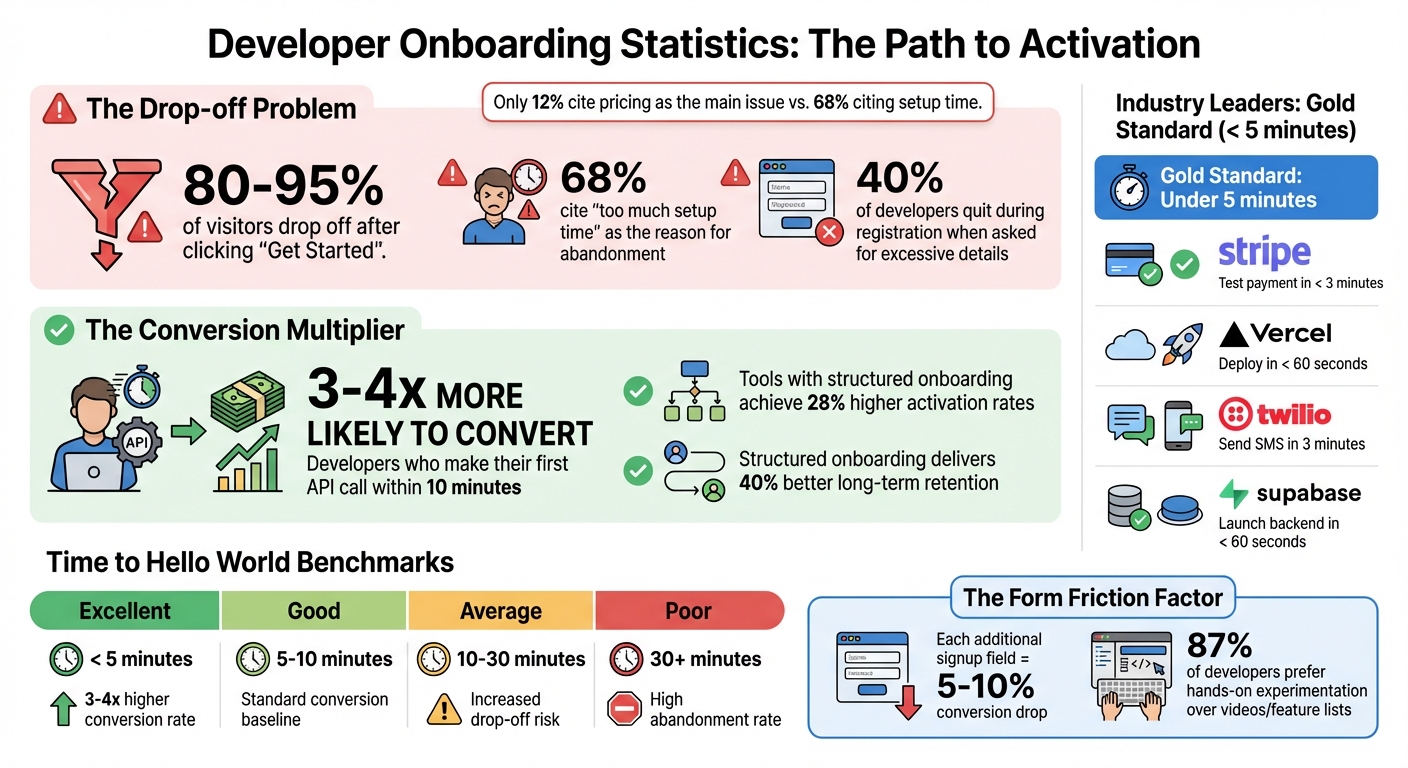 {Developer Onboarding Statistics: Drop-off Rates, Conversion Impact, and Time-to-Value Benchmarks}
The Marketing-to-Product Handoff
Getting the transition from ad click to product experience right is essential for boosting developer onboarding and squeezing the most value out of your advertising spend.
From Landing Page to First Experience
The path from clicking an ad to a developer's first interaction with your product is where many tools lose momentum - and users. If your landing page promises something quick and easy, like "Deploy in 60 seconds", but then bombards users with long forms or email verifications, trust is immediately eroded.
The most effective developer tools prioritize a code-first approach over a form-first one. Instead of dragging developers through a tedious signup process, the best workflows allow them to dive straight into the product - copying code, seeing results, and only registering when they’re ready to save progress . This approach resonates with the fact that 87% of developers prefer hands-on experimentation to evaluate tools rather than skimming feature lists or watching videos .
Here’s an example of how this could work: A developer clicks on your daily.dev ad and lands on a page with a clear, outcome-focused headline like "Run your test suite in 4 minutes instead of 22." They immediately see a working code example in their preferred language (e.g., Python, Node, or Go), ready to be tested. Registration is only asked for after the value has been demonstrated .
Every extra field in your signup form can slash conversions by 5-10% . Asking for irrelevant details like company size or job title before the developer has even tried your API will hurt your ROI. The best-performing tools skip these hurdles by offering pre-generated sandbox API keys right after account creation - sometimes even before email verification - so developers can start building instantly .
This frictionless process ensures a strong first impression that keeps developers engaged.
Making First Impressions Count
A smooth initial experience is just the beginning. Your landing page must deliver on its promises right away because it’s not just an introduction - it’s part of the product experience. While the average SaaS landing page converts at 3-5%, the top ones hit 10-15% . The difference? They align the ad’s promise with the user’s first interaction.
Use benefit-driven copy instead of generic feature lists. For example, instead of "Parallel job execution", highlight the result: "Test suite runs in 4 minutes" . Developers aren’t interested in fluffy marketing language like "We’re thrilled to have you!" What they want is actionable guidance, such as "Run npm install to get started" . CTAs should be specific and actionable - think "Deploy my first app" or "Make my first API call" - rather than vague phrases like "Join the Community" .
"Developers trust working code, not slide decks." - GetMonetizely
To address any lingering doubts, add micro-copy below your CTA buttons with reassuring details like "No credit card required" or "Free for up to 3 projects" . Pre-populated sandboxes are another powerful tool - letting developers see success instantly. Companies like Stripe and Vercel have set the bar high by enabling first API calls in under 90 seconds. Their landing pages don’t just describe the product; they are the product .
sbb-itb-e54ba74
Time to Hello World: The Core Onboarding Metric
Defining Time to Hello World
Time to Hello World (TTHW) measures how long it takes from a developer's first interaction - like signing up or accessing documentation - to their first successful action, such as running a command, making an API call, or executing a project . This is the moment when a developer confirms that your tool works for their needs . It’s not about extra steps; it’s about delivering results quickly and efficiently.
Here’s why TTHW matters: 68% of developers cite “too much setup time” as the top reason they abandon a tool trial . If your tool doesn’t show value fast enough, developers will move on, no matter how powerful it is. The numbers don’t lie - developers who make their first API call within 10 minutes are 3-4x more likely to convert to paid plans .
"Developers will pay premium prices for tools that save them time, but they'll abandon free tools that waste it." - Monetizely
For product-led growth (PLG), TTHW is like a North Star. It reflects how easily developers can adopt your tool without needing hand-holding . A short TTHW builds trust immediately, while a long one signals friction and complexity, making adoption harder . This metric provides instant feedback before you even dive into deeper performance evaluations.
Performance Benchmarks from Leading Tools
TTHW benchmarks set clear goals for onboarding speed, directly influencing conversion rates and retention. Industry leaders use these benchmarks to streamline the onboarding process and ensure success.
The gold standard for developer onboarding is under 5 minutes . Some of the best tools aim for a first API call within just 90 seconds of signup .
- Stripe: Developers can process a test payment in under 3 minutes, thanks to code samples embedded directly in their documentation. It only takes 3 lines of code to make a working API call .
- Vercel: With the
npx vercelcommand, developers can deploy a project to a public URL in less than 60 seconds - often before they even create an account . - Twilio: Their “get a phone number” quick-start guide allows new users to send an SMS within 3 minutes .
- Supabase: Pre-built database templates let developers launch a fully configured backend, complete with authentication and file storage, in under 60 seconds .
Here’s a breakdown of TTHW performance levels:
| TTHW Duration | Performance Level | Impact on Retention |
|---|---|---|
| < 5 minutes | Excellent | 3-4x higher conversion rate |
| 5-10 minutes | Good | Standard conversion baseline |
| 10-30 minutes | Average | Increased drop-off risk |
| 30+ minutes | Poor | High abandonment rate |
These examples highlight how a fast TTHW can make or break a developer’s first impression of your tool. Tools that prioritize speed and simplicity during onboarding consistently drive better retention and engagement.
Onboarding Patterns That Work
Interactive Tutorials and Step-by-Step Guides
Getting developers up to speed quickly is critical, and interactive tutorials are a great way to make that happen. Developers overwhelmingly prefer hands-on experimentation - 87% would rather test tools directly than watch videos or read feature lists . So, your onboarding should focus on letting them dive in right away. The best tutorials let developers copy code snippets, see them in action, and experience your tool's value before asking for signups or email verifications .
It's all about offering help at the right time. Instead of forcing users through a rigid product tour (which most will skip), use "just-in-time" tooltips. These pop up only when a developer interacts with a specific feature, keeping the experience relevant and engaging. This method has been shown to boost engagement by 50% in technical learning scenarios . Figma does an excellent job with this, providing canvas interaction hints that teach users as they work . Adding clear progress markers like "Step 2 of 4" taps into completion bias, making the process feel less overwhelming .
"Developers trust working code, not slide decks." - GetMonetizely
Include flexible code samples with language toggles - Python, Node, Go, and others - so developers can easily adapt examples to their tech stack . And don’t overlook the small but impactful details, like offering "Copy as cURL" options in your documentation. These allow developers to test APIs instantly, no matter their stack .
Once interactive tutorials spark interest, sandbox environments take things a step further by removing setup barriers.
Sandbox Environments and Starter Templates
Sandbox environments are a lifesaver for developers, eliminating the hassle of setup by providing pre-filled data and one-click "seed database" options . Supabase does this brilliantly, letting developers spin up a fully configured backend in under 60 seconds .
The "reverse demo" technique is another powerful approach. Show developers the end result - a completed report, a populated project board, or a finished design - before asking them to configure anything . This narrows the "imagination gap", helping them visualize outcomes and get inspired. Templates also shift the focus from creating something from scratch to simply customizing it. Notion, for example, starts users off with workspace templates, so they can edit instead of starting with a daunting blank page .
Another smart move? Provide a test or sandbox API key right after account creation, even before email verification. This makes it easier for developers to make their first successful API call without unnecessary roadblocks . The goal is straightforward: let them experience the value of your tool before asking for any commitment.
To further streamline the onboarding process, CLI wizards can simplify local setup.
CLI Wizards for Quick Setup
For CLI tools, simplicity is key. The three-command rule - init → cd → dev (or deploy) - ensures developers can get a working local environment almost instantly. Vercel is a prime example, with its npx vercel command allowing developers to deploy a project to a public URL in under 60 seconds, often before even creating an account .
Browser-based OAuth flows are another game-changer. Commands like tool login can open a browser, handle authentication, and auto-write credentials, eliminating the need to manually copy tokens . This small tweak removes a major pain point during setup. Additionally, tools like npx enable zero-install initialization, letting developers start projects without globally installing your CLI.
For added transparency and trust, include a --dry-run or preview mode. This shows planned file changes or command executions without actually applying them, giving cautious developers peace of mind. Avoid making automatic changes like reformatting code or installing dependencies unless the developer explicitly approves them . Always respect the developer’s existing project structure and conventions to build trust and keep things seamless.
Onboarding Mistakes That Increase Drop-Off
While strategies like interactive tutorials and sandbox environments can boost engagement, certain missteps during onboarding can lead to significant drop-off.
Forced Sales Calls and Feature Gates
Developers often decide whether to adopt a tool within minutes. Forcing sales calls during this critical window can lead to immediate abandonment . Developers prefer hands-on experimentation, so requiring a "contact sales" step before accessing key features can reduce trial signups by 30% to 50% .
Similarly, restrictive feature gating can be a major turnoff. When developers encounter a generic "Upgrade Now" message before experiencing any value, frustration sets in. This friction has been identified as a leading cause of abandonment . A better approach is educational gating, which explains the reasoning behind the restriction. For example, a message like "Production deployments require custom domains - included in Pro tier" helps developers see the value of upgrading, creating a smoother path forward instead of a hard stop.
"Developers trust working code, not slide decks." - Monetizely
These barriers, combined with other friction points, can severely hinder a developer's journey from initial interest to success.
Long Forms and Missing Documentation
In addition to gating issues, overly complex signup forms and poor documentation can further alienate developers. Each additional field in a registration form increases the likelihood of abandonment. For example, 40% of developers quit during the registration process when asked for excessive details like phone numbers, company addresses, or credit card information before accessing any value . The table below highlights how different fields impact friction:
| Signup Field | Friction Level |
|---|---|
| Company Name | Low |
| Phone Number | Moderate |
| Company Size | Moderate |
| Use Case Description | High |
| Address | High |
| Credit Card (before value) | Severe |
Poor documentation is another major contributor to drop-off. Developers rank non-working code examples as the most frustrating issue . Many portals suffer from the "curse of knowledge", assuming users already understand prerequisites or formats. This assumption leads to high bounce rates - between 80% and 95% of visitors to developer portals leave without converting . Even developers who successfully generate an API key often fail to make a single request, with 50% citing unclear documentation or unhelpful error messages like "Invalid request" as the reason .
"Your developer portal is your sales team, your support team, and your product demo combined. Every piece of friction costs you customers." - Zuplo
Hidden pricing is another pitfall. If developers can’t find pricing details within 30 seconds, they often assume the tool is too expensive and leave . Combined with buried API keys and unclear setup instructions, this creates a perfect storm for drop-off. The fix? Keep signup forms simple - limit them to email and password. Provide clear, working code examples and make API keys instantly accessible without requiring email verification .
Segmented Onboarding for Different Developer Roles
Generic onboarding often leads to drop-offs. When developers sign up, they’re essentially asking: "Does this tool fit my needs?" Role-specific onboarding provides a quick, clear answer by demonstrating value that aligns with their workflow .
By segmenting onboarding based on developer roles, the experience becomes more personalized and effective. This approach strengthens the developer activation funnel while reducing drop-offs. The results speak for themselves: onboarding tailored to specific roles can increase activation rates by 28% and improve long-term retention by 40% . The key? Technical relevance. For example, a frontend developer benefits more from React code samples than Python scripts, while a DevOps engineer appreciates pre-configured infrastructure templates over UI tutorials. This ensures developers achieve their first milestone faster.
Custom Paths for Frontend, Backend, and DevOps Developers
The best way to start is by using progressive profiling - asking one or two targeted questions, like "What is your role?" during signup. This helps tailor the onboarding experience without overwhelming the user . Some platforms take it a step further by detecting tech stacks through GitHub or GitLab integrations and customizing documentation accordingly .
Here’s how onboarding can be customized for different developer roles:
- Frontend developers: Provide starter kits with React or Vue for quick environment setup.
- Backend developers: Offer CLI wizards for fast initialization through commands like
npx tool init. - DevOps teams: Deliver infrastructure templates with pre-configured CI/CD pipelines or cloud setups, similar to Vercel and Netlify .
"The purpose of onboarding is to help devs do something useful - fast." - Mindy Faieta, Customer Success Lead, Stateshift
Each path should lead to a technical win within 5–10 minutes. Early wins drive conversions. Features like framework toggles on code samples allow developers to view API calls in their preferred language - whether Python, Node, or Go - without extra effort .
And let’s not forget about data engineers, who require a specialized approach to get started effectively.
Tailored Experiences for Data Engineers
Data engineers face unique challenges during onboarding, often needing to see how a tool works with actual data before committing. To address this, pre-populated sandbox environments with realistic datasets can simplify the process. A one-click "seed database" option lets them test queries right away .
By providing pre-built SQL queries and data pipeline templates, you shift the focus from building to customizing, which reduces the "imagination gap" that often leads to abandonment . AI-powered setups that generate schema suggestions from a brief description can save significant time - turning 30 minutes of manual configuration into just 30 seconds .
Another effective strategy is the "reverse demo." Show a populated dashboard or sample report before asking for user input. This approach helps data engineers see the tool's potential value without investing time upfront . Additionally, Postman collections with pre-configured endpoints allow developers to test features and visualize data returns without writing boilerplate code .
Measuring Onboarding Performance
You can't improve what you don't measure. When it comes to onboarding, the difference between a 20% and 40% activation rate often reflects the quality of the experience. Companies like Stripe and Vercel have shown that tracking the right metrics is essential for onboarding success.
Activation rate is a critical metric - it measures the percentage of signups who reach a key milestone that predicts long-term retention. For Slack, this milestone is sending 2,000 messages. For Dropbox, it's saving a file . In the world of developer tools, Time to First API Call (TTFAC) is a common milestone - it's the moment a developer successfully makes their first API request. This reinforces the importance of tracking metrics that align with user behavior. Among top Product-Led Growth (PLG) companies, activation rates typically range between 20% and 40% .
Another key metric is Time-to-Value (TTV), which measures how quickly users experience their "aha moment." High-performing developer tools aim to deliver this within five minutes . Why five minutes? Because 68% of developers abandon trials due to lengthy setup times, while only 12% cite pricing as the main issue . Even a modest 25% boost in activation can drive a 34% increase in Monthly Recurring Revenue (MRR) over a year .
"Activation occurs when users quickly realize core value early enough in their journey that it becomes likely they will convert, stay, or retain." - Daphne Tideman, Growth Specialist
Activation Rate and Time-to-Value Metrics
Speed and clarity in onboarding directly impact long-term retention. To define "activation", focus on the milestone that best predicts retention . For CI/CD tools, this might be deploying a pipeline. For monitoring tools, it could be receiving the first production data alert.
There are two key activation layers to monitor: Time to First Value (TTFV) and Time to Core Value. TTFV represents the initial "aha moment" - like successfully running a code snippet - which helps prevent early drop-offs. Time to Core Value, on the other hand, tracks habit formation, such as completing multiple tasks over several days . While both are important, TTFV should be your top priority since it determines whether users stick around long enough to form habits.
Developer tool free trial conversion rates average 8-15%, trailing the 15-25% seen in general SaaS . This lower rate often stems from technical friction during setup. To address this, monitor the Setup Completion Rate to pinpoint where users drop off in multi-step onboarding flows . For example, if 70% of users complete step three but only 20% finish step four, you’ve identified a bottleneck.
Another useful metric is Weekly Active Developers (WAD) - developers who make at least one API call or commit during the week . Additionally, track the API Error Rate as a quality indicator. If errors exceed 1%, it signals a product issue that could disrupt onboarding progress .
Drop-Off Analysis and Cohort Retention Tracking
Funnel analysis helps pinpoint where users abandon the onboarding flow. Map out these five stages: Discovery, Signup, Activation, Engagement, and Advocacy . Then, monitor drop-off rates between each stage. Tools like Segment, Mixpanel, or Amplitude can automate this process for teams looking to scale .
Retention analysis also sheds light on onboarding effectiveness. Compare retention curves for users who complete specific actions versus those who don't. If users who "activate" don't show higher retention rates, your chosen activation metric might be a vanity signal rather than a true predictor of success . This comparison ensures your activation milestone genuinely matters.
Segmenting cohorts by user type - such as JavaScript versus Python developers or frontend versus DevOps teams - can reveal unique friction points . It's also important to separate paid users from free users to avoid inflated metrics that don’t contribute to revenue . While the first 7-30 days are critical for long-term retention, it's worth noting that 51.2% of developers fully adopt products within 1-3 months .
For early-stage teams, manual tracking through tools like Google Sheets or Airtable can uncover initial trends . Consistently review metrics weekly, identify patterns, and experiment with changes at high drop-off points. For example, you could A/B test reducing signup form fields, adding inline code snippets to onboarding emails, or moving email verification to after the first technical success . These adjustments can help refine your onboarding process and improve overall performance.
Conclusion: Better Onboarding Drives Growth and ROI
Developer onboarding can be a game-changer for growth. Companies that adopt structured onboarding processes achieve 28% higher activation rates and 40% better long-term retention . These are crucial improvements, especially when most product-led growth tools see 60–80% of signups drop off before activation . Here's another standout metric: developers who make their first API call within 10 minutes are 3–4 times more likely to convert to paid plans compared to those who take longer . Even small reductions in the time-to-hello-world can significantly lower customer acquisition costs and boost lifetime value.
Improving ROAS with daily.dev Ads
Running campaigns on daily.dev Ads, which connects you to over 1 million developers, offers a powerful way to optimize your return on ad spend (ROAS). But here's the catch: your onboarding process must be smooth. A clunky or slow onboarding flow can drive up acquisition costs and diminish the impact of your ads . By focusing on a seamless journey - from the first click to technical success - you not only protect your ad investment but also amplify growth and ROI.
Action Steps for Developer Tool Teams
To build on these insights, here are some actionable steps to refine your onboarding process:
Track your time-to-hello-world. This metric is critical for linking onboarding speed to higher conversions. Measure how long it takes for users to complete a meaningful technical action, whether it's an API call, deployment, or seeing live data. Aim for under 5 minutes and identify bottlenecks that slow things down .
Create segmented onboarding flows. Tailor experiences based on developer roles and tech stacks. For instance, a frontend developer working with React will need different guidance than a DevOps engineer setting up CI/CD pipelines. Use auto-detection or early preference prompts to offer relevant, language-specific code samples right away .
Remove friction wherever possible. Simplify signup forms to just 1–2 essential fields - each additional field can cut conversion rates by 5–10% . Provide sandbox environments with sample data so developers can get started without local installations. Replace "contact sales" barriers with self-service options, and ensure your documentation is interactive and packed with code examples.
FAQs
How do I measure Time to Hello World?
Time to Hello World measures how quickly developers can achieve their first meaningful milestone with your tool. This starts from their very first onboarding step - like signing up or taking an initial action - and ends when they complete a basic, functional example. Tracking this time helps you understand how effectively your onboarding process guides users to their first success, which is a crucial step in building confidence and engagement.
What should count as “activation” for my developer tool?
Activation for a developer tool happens when a developer experiences their first meaningful success - whether that's creating a project, importing contacts, or sending a report. This usually occurs within the first five minutes, showing they’ve gained immediate value and are actively engaged with the tool.
How can I cut setup friction without hurting lead quality?
To make setup smoother while keeping lead quality intact, streamline workflows by cutting out extra steps and automating where possible. Provide tools like quick-start code samples, sandbox environments, and clear, concise documentation to help developers reach their first milestone faster. Steer clear of obstacles like long forms or gated features that slow them down. These approaches help developers experience value right away, minimizing frustration and boosting conversion rates.