

When targeting developers, your advertising platform choice can make or break your campaign. Developers value accuracy, relevance, and transparency while avoiding anything that feels like a sales pitch. Here’s how to ensure you launch a successful advertisement campaign for developers:
- Set Clear Goals: Define measurable outcomes like API sign-ups or SDK downloads. Avoid vague aspirations.
- Know Your Audience: Go beyond job titles. Focus on programming languages, tools, seniority, and geographic needs.
- Use Targeted Ads: Platforms with granular filters (e.g., by tech stack or seniority) perform better than generic ones.
- Prioritize Analytics: Opt for platforms with real-time tracking and metrics beyond clicks, such as engagement and ROI.
- Choose Native Placements: Ads that align with technical content feel natural and perform better.
- Evaluate Costs and Support: Look for pricing models that fit your budget and platforms offering strong creative and technical support.
daily.dev Ads stands out by combining precise targeting, native placements, and a trusted developer environment. It’s ideal for reaching developers during their work sessions, ensuring your ads feel relevant and useful.
The right platform ensures your message reaches the right developers, at the right time, with measurable results.
::: @figure 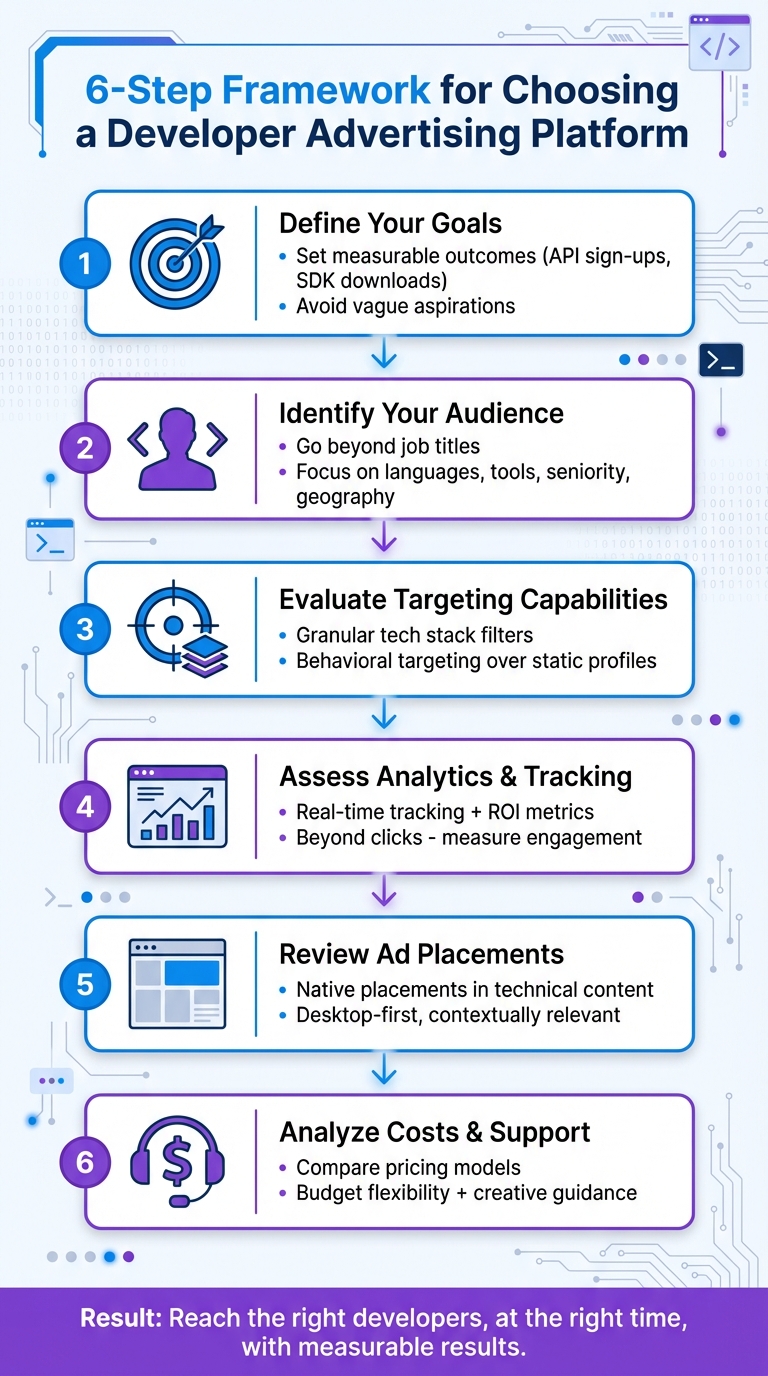 {6-Step Framework for Choosing a Developer Advertising Platform}
Define Your Developer Marketing Goals
Set clear, specific goals for your developer marketing campaign. Forget vague aspirations - focus on measurable outcomes that align with your business objectives. Whether you're aiming to boost API sign-ups, attract contributors to your open-source project, or generate qualified leads for enterprise sales, your goals should directly reflect the actions that drive value for your business.
Key developer actions, such as SDK downloads or GitHub stars, often hold more weight than generic sign-ups. These behaviors require tailored measurement strategies. The developer advertising platform you choose should align with these specific actions and support the unique needs of your product and business model.
The marketing technology landscape has grown dramatically, expanding from 12 tools in 2014 to over 120 potential touchpoints by 2026. This explosion of options makes it essential to define your goals upfront. Without clear objectives, you risk spreading your efforts too thin and failing to evaluate whether a platform's features - like targeting, analytics, or pricing - actually meet your needs .
Identify Your Target Developer Audience
Understanding your audience is crucial. Go beyond broad categories like "frontend developers" or "DevOps engineers." Instead, dig deeper into specifics: What programming languages do they use? Which frameworks are they exploring? What’s their level of experience? Do they work for startups, mid-sized companies, or large enterprises? A platform that’s perfect for reaching junior JavaScript developers at startups might not be effective for connecting with senior infrastructure engineers at Fortune 500 companies.
Geography also plays a bigger role than many marketers realize. If your product involves regional pricing or compliance requirements, you’ll need a platform that can target developers in specific countries or even states. On the other hand, if your tool is designed for a global audience, you’ll want a platform with international reach. Consider whether your campaign requires hyper-local targeting for meetups and events or broader exposure for a globally relevant API.
Seniority within the developer community impacts both your messaging and your choice of platform. Senior engineers and decision-makers often engage with different types of content and value propositions compared to early-career developers. Some platforms are better at reaching individual contributors through technical tutorials, while others excel at connecting with engineering leaders who manage budgets. Define your audience with precision so you can tailor your campaign to their needs and roles.
Use these insights to establish detailed, measurable objectives for your campaign.
Set Measurable Campaign Objectives
Once you’ve pinpointed your audience, turn your business goals into actionable metrics. For example, if your goal is product adoption, specify what success looks like: Is it 1,000 new trial sign-ups? A 25% boost in monthly active developers? Or 500 qualified leads for your sales team? These concrete targets will help you identify the platform features that matter most, whether it’s CRM integration, advanced conversion tracking, or engagement metrics beyond simple clicks.
Different campaigns call for different measurement strategies. A new developer tool may focus on awareness metrics like content engagement or documentation page visits. An established platform entering a new language ecosystem might prioritize sign-ups from developers with specific technical expertise. For enterprise tools, tracking longer sales cycles with multiple touchpoints - such as interactions across a buying committee - becomes critical.
Your choice of metrics should directly shape your platform selection. For example, if you need to monitor developers from their first ad click all the way to API key activation and successful integration, you’ll require robust analytics and seamless integrations. On the other hand, if your focus is on driving webinar sign-ups or conference attendance, simpler conversion tracking may suffice. Nail down your measurement needs upfront - adjusting analytics mid-campaign can be a headache and waste valuable resources.
sbb-itb-e54ba74
Evaluate Audience Targeting Capabilities
Advanced targeting is what sets successful developer campaigns apart. To connect with this audience, you need more than surface-level demographics - you need insights into their technical behaviors, tools, and career stages. Basic filters won’t cut it if you’re trying to reach backend engineers working with specific frameworks or senior architects evaluating infrastructure tools.
The key? Granular tech stack filters. These allow you to target developers based on the specific programming languages, frameworks, libraries, and tools they actively use. Instead of broad categories, focus on technologies like Python, Django, or PyTorch. As markepear.dev explains, developers are "both diverse and complex but devs do share some specific characteristics... allergic to 'marketing' and advertising, skeptic by nature, pragmatic and practical, tribal" . This means your targeting has to feel relevant and authentic, not like a generic marketing pitch.
Equally important are seniority and role filters. A junior frontend developer has completely different priorities and decision-making power compared to a principal engineer or an engineering director. Your platform should help you distinguish between individual contributors exploring tools and senior leaders making purchasing decisions. This level of precision ensures your message resonates with the right audience at the right stage of their career.
Targeting by Interests and Tools
Behavioral targeting consistently outperforms static profile data. Developers often list technologies they no longer use or only know at a basic level . What really matters is what they’re actively engaging with - what they’re reading, which repositories they’re following, and which tools or frameworks they’re exploring. Platforms that analyze real-time interactions provide far more effective targeting than those relying on outdated resume data.
It’s also crucial to focus on developers during discovery moments rather than transactional searches. For example, when a developer is troubleshooting an error through a search engine, they’re unlikely to engage with ads - they’re in problem-solving mode. But when they’re exploring a developer platform for new tools or trends, they’re more open to discovering solutions. Contextual relevance transforms your ad from an interruption into a helpful resource.
Be specific with your technical criteria. Naming exact technologies - like "layer caching" or "distributed PyTorch" - demonstrates expertise and naturally filters out irrelevant audiences . Tailor your targeting to the tools and ecosystems your ideal customers already use. For instance, if you’re promoting a testing framework, target developers who follow or use complementary tools like Cypress or Jest.
Finally, consider how geographic targeting can enhance your technical filters.
Global and Local Reach Options
Geographic targeting needs to strike a balance between broad reach and precision. If your developer tool has global appeal, you’ll want a platform that connects with developers worldwide. But if your product involves regional pricing, compliance, or localized support, you’ll need the ability to narrow your focus to specific countries, cities, or even tech hubs. The best platforms offer both international reach and detailed location filters .
Intent-based localization takes this a step further by combining location data with technical interests . This ensures you’re not just targeting developers in a specific area but those actively exploring technologies or solving problems your product addresses. For localized campaigns, align your landing pages with the technical use cases mentioned in your ads . For instance, if you’re targeting PHP monitoring in a specific region, your landing page headline should reflect that exact scenario.
For hyper-local efforts, use platforms that allow radius-based targeting around tech hubs. This approach ensures you’re reaching the right developers in the areas that matter most.
Assess Platform Analytics and Performance Tracking
Once you’ve set clear campaign objectives, having strong analytics becomes essential for improving the performance of developer ad campaigns. Good analytics don’t just show you what happened - they help explain why it happened and guide your next steps. Without this clarity, you risk wasting budget without knowing what’s working or what needs fixing.
Fragmented dashboards can be a headache, wasting time and increasing the chance of errors. Instead, unified systems that integrate with attribution tools like AppsFlyer, Adjust, or Branch provide detailed insights. These tools help you track which channels, creatives, and audiences are delivering actual results. This is especially crucial for developer-focused campaigns, where the path from ad impression to conversion often involves multiple stages and technical considerations.
Real-Time Campaign Tracking
Waiting on delayed reports can slow you down. Real-time tracking, on the other hand, lets you respond to issues or opportunities as they arise. For example, if a specific creative starts underperforming or an audience segment shows unexpected engagement, quick visibility allows you to pivot your strategy before small issues snowball into bigger problems.
Managing campaigns in real time also helps prevent overexposure and keeps your assets fresh. For niche audiences, like senior Rust developers, overexposure can quickly turn interest into irritation. Real-time tools can also flag budget pacing issues, ensuring you don’t overspend too early in the month or leave money on the table.
Automation plays a big role here. For instance, if a particular visual or headline stops resonating with developers, automated systems can detect the drop-off and prompt you to update the creative. This kind of automation can save teams up to 20 hours a week, freeing up valuable time for strategic planning instead of manual tracking tasks.
While real-time tracking is great for immediate adjustments, it’s equally important to measure long-term campaign success through ROI and engagement metrics.
ROI and Engagement Metrics
Basic metrics like click-through rates don’t always tell the whole story. It’s more impactful to focus on metrics that directly tie to business outcomes - things like cost per qualified lead, conversion rates by seniority level, and lifetime value (LTV) by traffic source.
Platforms that consolidate creative data across multiple networks can provide detailed insights, such as creative-level ROAS (Return on Ad Spend) and LTV metrics. This helps pinpoint which ad variations are attracting the most valuable developers. For example, a campaign aimed at junior developers trying free tools will measure success differently than one targeting CTOs evaluating enterprise-grade solutions. Segmenting by role, tech stack, and engagement level ensures you’re reaching the right people in the right way.
Integrating with tools like GA4 further enhances attribution accuracy. Imagine a developer clicks your ad, explores your documentation, joins your Slack community, and converts weeks later. Proper attribution ensures you credit the right touchpoints, so you don’t mistakenly pause campaigns that are actually driving high-value leads.
Review Ad Placement Options and Integration Features
When planning your ad campaigns, it's crucial to think about where and how your ads will appear. The right placements and integration features can make your campaigns feel seamless, while the wrong choices risk alienating your audience - especially developers, who often dismiss traditional advertising outright. These decisions also directly impact how well you can turn analytics into actionable strategies.
Native Ad Placements
Native ads, such as in-feed ads or post-page ads, are designed to blend into the content they're surrounded by, rather than interrupting it. This approach is particularly effective with developers, who are quick to tune out anything that feels overly sales-driven. Ads that align with the content flow foster trust and engagement, with native-style ads delivering 35% higher engagement rates compared to standard display ads.
Another key factor is timing and context. Developers spend most of their workday on desktop devices - evaluating tools, testing APIs, or deploying environments. That means desktop ad placements should be a top priority, ensuring your ads are visible when developers are actively engaged in their workflows.
The messaging in your ads is just as important as the placement. Clear, concise headlines that directly reference specific tools or challenges work far better than vague marketing language. For instance, if you're targeting Cypress users, mention Cypress explicitly in your ad rather than relying on generic phrases like "better testing solutions." As Daphna Giniger from daily.dev explains:
"If marketing isn't anchored to fast, frictionless user wins, it's dead on arrival - no matter how creative the execution".
Integration for Campaign Management
Integration features can significantly streamline campaign management, saving time and reducing errors. Platforms that support API integrations, for example, allow you to automate data sharing between your CRM, analytics tools, and ad platform. This eliminates repetitive manual tasks and ensures data consistency. In fact, leveraging API integrations can save marketing and analytics teams between 80 and 100 hours per week.
For maximum efficiency, opt for platforms offering REST or GraphQL APIs. These tools enable automation for tasks like campaign creation, audience updates, and creative rotations, while also supporting real-time optimization through attribution tools. This level of integration aligns perfectly with the detailed analytics discussed earlier, ensuring every interaction with your ads contributes to actionable insights.
Managing campaigns across multiple channels can be overwhelming, but centralized platforms simplify the process. By consolidating creative assets and performance metrics into a single dashboard, you reduce the hassle of switching between tools. This is especially important as programmatic advertising continues to grow - by 2026, it’s expected to account for 90% of global display ad spending. Automation and integration are driving this growth, making it easier to handle even the most complex campaigns.
Analyze Cost-Effectiveness and Support
After narrowing down platforms based on targeting and analytics, it's time to crunch the numbers. This involves evaluating how pricing, budgeting, and support align with your campaign goals. Budget constraints make it essential to choose a platform whose pricing structure supports your objectives. Equally important is the level of support offered - expert guidance can often determine whether a campaign succeeds or falls flat.
Compare Pricing Models and Budget Flexibility
Understanding a platform's pricing structure is key. Some platforms charge fixed prices, offering predictable costs, while others use usage-based fees tied to impressions, clicks, or API calls, which can fluctuate. A growing number of platforms now use hybrid models, combining a base fee with performance-based charges. In fact, 22% of SaaS businesses are expected to adopt this model by 2024, achieving 25% higher net revenue retention rates as a result .
Budget expectations vary widely. Small and medium-sized enterprises (SMEs) typically spend between $25,000 and $100,000, while larger corporations may allocate anywhere from $100,000 to $1,000,000 . When comparing platforms, don’t just focus on the upfront cost - factor in potential additional fees as well . As app developer Simon Lee wisely notes:
"The cheapest option upfront often becomes the most expensive choice in the long run" .
To manage costs effectively, consider setting a "not-to-exceed" clause to avoid budget overruns . Tools like a Tech Campaign ROI Estimator can also help you predict conversions and profitability before launching, ensuring your budget is aligned with achievable outcomes . For developer marketing budgets, a typical breakdown might allocate 25-30% to high-impact events (such as hackathons), 15-20% to content marketing, and another 15-20% to online programs .
But cost alone isn’t everything - creative support can be just as crucial in driving campaign success.
Access to Creative Guidance and Support
Once you've clarified cost models, take a closer look at the creative and strategic support available. Effective creative guidance can transform technical advertising into impactful, audience-focused content . Platforms that offer resources like best practices for crafting technical headlines, clear labeling, and mobile-friendly ad copy can help you create campaigns that truly connect with your audience . Real-time optimization tools, such as A/B testing and performance feedback, ensure you can fine-tune your campaign as it progresses.
Seek out platforms that provide strategic planning tools like audience targeting planners, budget calculators, and ROI estimators . These self-service tools simplify decision-making and help you hit the ground running. For developers, access to expert guidance can significantly reduce the learning curve and ensure campaigns align with their technical preferences . As Daphna Giniger from daily.dev aptly puts it:
"Great Products Are Still the Only Developer Marketing That Matters. Developer marketing only works when the product delivers immediate, obvious value."
Platforms offering structured onboarding, hands-on tutorials, and direct vendor support can make a world of difference, particularly when navigating complex targeting options or integrating with your existing marketing tools . This level of assistance ensures you're not left to figure things out on your own, giving your campaigns a stronger foundation for success.
Why daily.dev Ads Works for Developer Advertising
The success of daily.dev Ads in developer advertising comes down to three core strengths: precision targeting, native ad formats, and a trusted ecosystem. These elements combine to deliver exceptional results for campaigns aimed at developers.
Precision Targeting for Developer Campaigns
daily.dev Ads uses real-time data on developers' technical interactions - like what they read, click, follow, or save - to create detailed, signal-rich profiles. This lets you fine-tune your campaigns based on factors like programming languages, frameworks, tools, libraries, career stages, or even specific regions. For example, you could promote a new testing framework to developers who follow Cypress and Jest, or showcase cloud security tools to backend engineers in targeted locations.
What sets daily.dev apart is that it connects with developers during their exploratory sessions, not just transactional searches. Instead of users quickly leaving after finding a specific answer, daily.dev attracts developers who come to learn and explore. These sessions often occur on desktop during work hours, allowing your ads to reach developers in their professional workflow - whether they’re using their IDE, terminal, or browser. This desktop-first approach aligns with how developers work, making it especially effective for B2B developer tools.
Adding another layer of precision, you can target by seniority. This ensures your campaign speaks directly to the right audience, whether it’s junior developers or senior Site Reliability Engineers, whose needs can differ significantly. Combined with this targeting, native ad formats help your message blend seamlessly into the developer’s trusted content environment.
Native Placements for Maximum Visibility
daily.dev Ads uses native ad formats, such as in-feed ads and post page ads, that integrate naturally into the developer experience. These ads appear alongside technical content that developers already trust, boosting engagement without interrupting their workflow. To maximize impact, use clear, technical headlines and transparent labeling in your ads. A/B testing different copy variations can help you identify which value propositions resonate most with your audience. Ads that feel relevant and well-placed are more likely to build trust and generate meaningful engagement.
A Trusted Environment for Developer Advertising
Trust is a critical factor in developer advertising, where skepticism toward promotional content is common. daily.dev creates a trusted space for over 1 million developers to stay updated on technical trends. With carefully curated content and strong community standards, the platform ensures that ads feel informative rather than intrusive. When your ads appear alongside this curated content, they gain credibility from the platform’s reputation.
Maintaining technical accuracy and transparency in your ad copy is key to sustaining this trust. By combining precise behavioral targeting, desktop-first engagement, and a trusted ecosystem, daily.dev Ads creates the perfect conditions for impactful developer campaigns.
Wrapping It Up
When choosing an advertising platform, it’s all about finding one that fits your campaign goals and offers the tools you need. Features like precision targeting and native ad placements ensure your message reaches developers based on their genuine interests while blending seamlessly with trusted content. Add real-time analytics to track performance and tweak campaigns, plus cost-efficient pricing and expert guidance, and you're set to maximize your efforts.
The key to success lies in matching platform capabilities with clear objectives. Whether you’re promoting a testing framework or boosting brand awareness, using behavioral targeting and native placements ensures your ads connect with developers in meaningful ways.
daily.dev Ads is a great example of this approach. It connects with developers during their exploratory moments - those times when they’re actively learning and assessing new tools. This creates the perfect environment for driving impactful results.
As Daphna Giniger from daily.dev puts it:
"Developer marketing only works when the product delivers immediate, obvious value" .
The right platform doesn’t just amplify your message; it ensures it reaches the right audience - engaged developers. By aligning your platform choice with well-defined goals, precise targeting, and clear messaging, you can craft campaigns that resonate and deliver measurable returns.
FAQs
Which goal should I track first?
To understand how effectively your campaign resonates with your target audience, start by monitoring developer engagement. Pay attention to key metrics such as click-through rates (CTR), conversions, API calls, and documentation views. These indicators reveal how well your messaging and content are driving interaction. By analyzing this data, you can fine-tune your strategies and ensure your campaign achieves tangible results.
What targeting filters matter most?
When it comes to connecting with developers, tech stack segmentation is a game-changer. This means targeting based on the programming languages, frameworks, and platforms they use. Why? Developers naturally gravitate toward solutions that complement their specific tools and workflows.
By zeroing in on filters that match their preferences and day-to-day needs, you’ll not only grab their attention but also increase engagement. Tailoring your approach to their tech environment makes all the difference.
How do I measure ROI beyond clicks?
To truly assess ROI beyond just clicks, it's essential to focus on developer engagement metrics. Keep an eye on things like how often APIs are called, the number of documentation views, and activity on platforms like GitHub. Additionally, track product usage indicators such as SDK implementation rates, feature activation levels, and onboarding completion rates.
These metrics give you a clearer picture of technical adoption and community growth. By analyzing them, you can better understand the actual impact of your campaigns and make adjustments to improve results.