

Generating developer leads isn't like traditional B2B strategies. Developers often avoid ads, ignore cold emails, and prefer self-guided research using documentation, code samples, and peer recommendations. To succeed, focus on data-driven, high-intent strategies that align with how developers evaluate tools. Here’s the core approach:
- Define your Ideal Developer Profile (IDP): Identify roles, tech stacks, industries, and behaviors that match your best customers.
- Track engagement signals: Monitor actions like API key creation, documentation visits, or trial sign-ups to qualify leads.
- Use developer-focused platforms: Leverage tools like daily.dev Ads to reach developers with native, targeted campaigns.
- Simplify signups: Offer free trials, sandbox environments, or open-source versions to reduce friction.
- Optimize lead scoring: Combine fit (e.g., seniority, tech stack) with behavior (e.g., pricing page visits) to prioritize outreach.
::: @figure 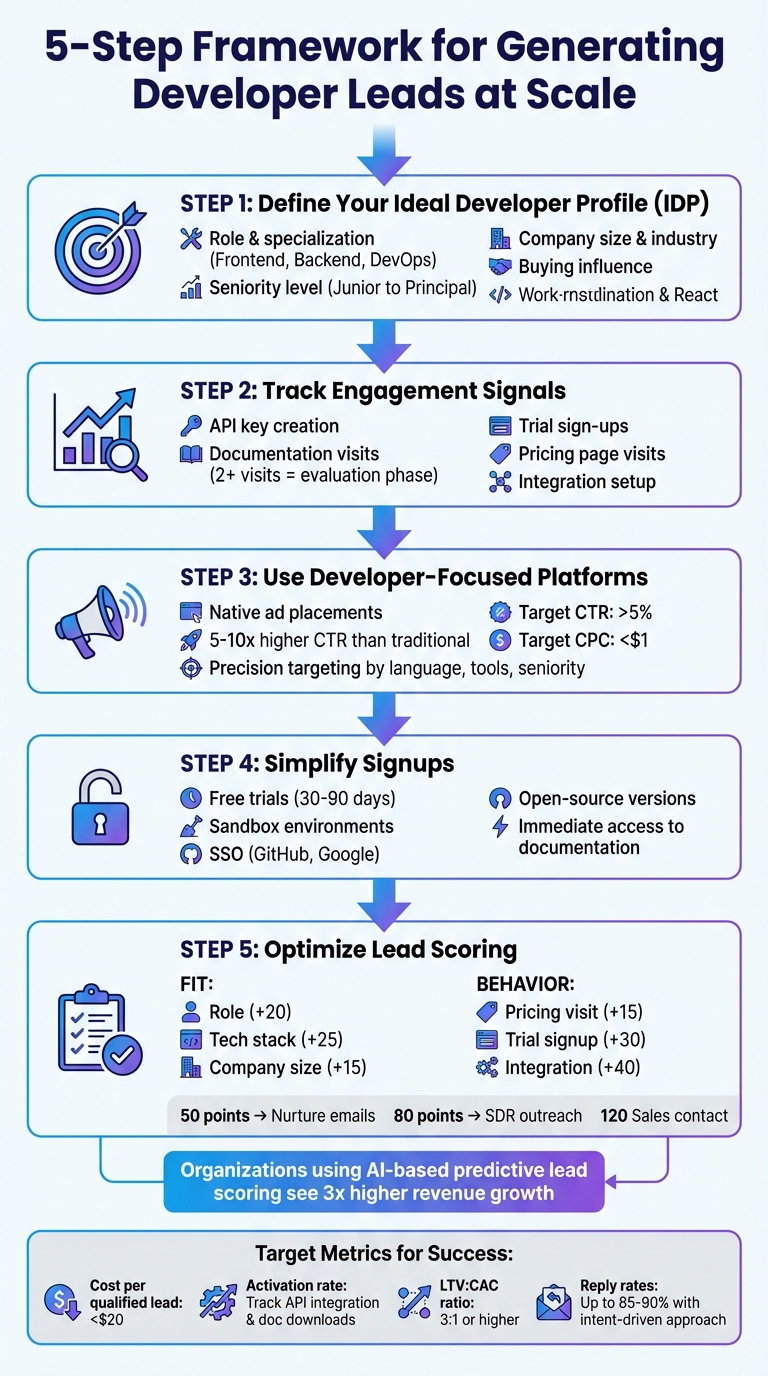 {5-Step Framework for Generating Developer Leads at Scale}
Define Your Target Developer Profile
To generate developer leads effectively, you need to identify exactly who you're aiming for. An Ideal Developer Profile (IDP) serves as a specialized version of a buyer persona, focusing on technical aspects like role, tech stack, seniority, and how much influence the developer has in decision-making. Without this clarity, you risk wasting resources on prospects who aren't a good match for your product.
Analyze which developer roles, company types, and industries deliver the best outcomes - whether that's higher lifetime value or shorter sales cycles. For example, a backend engineer at a Series B SaaS company will approach decisions differently than a DevOps lead at a Fortune 500 corporation. Dive into your product analytics to uncover which segments adopt features quickly, engage deeply, and stick around longer. Research shows that organizations using AI-based predictive lead scoring see revenue growth nearly three times higher than those relying on basic demographic models .
Once you've identified your high-value segments, set clear criteria to qualify leads. Look for developer behaviors that signal genuine interest, such as frequent visits to your pricing or integration pages, downloading API documentation, signing up for trials, or attending webinars. These actions are far more telling than a single form submission. A solid lead-scoring model should blend fit criteria (e.g., U.S.-based, uses your target tech stack, works at a mid-market company) with engagement signals (e.g., multiple documentation visits, setting up a sandbox environment, joining your developer community). Collaborate with your sales team to agree on what makes a lead ready for outreach, and regularly refine your scoring model based on performance data.
Build an Ideal Developer Profile (IDP)
Start by documenting the traits of your best U.S.-based customers. Your IDP should cover key factors like:
- Role and specialization: Frontend, backend, full-stack, DevOps, or platform engineers
- Seniority: Junior, mid-level, senior, staff, or principal
- Tech stack and languages: Examples include Node.js, Python, Kubernetes, and React
- Company size: Startup, mid-market, or enterprise
- Industry focus: SaaS, fintech, healthtech, or e-commerce
- Buying influence: Individual contributor, technical lead, engineering manager, or architect with budget authority
Unlike traditional buyer personas, developer profiles need to address technical preferences and community habits. Understand where your target developers discover tools - whether it's GitHub, Stack Overflow, technical blogs, or through peer recommendations. Also, note how they prefer to evaluate products, such as exploring free tiers, accessing open-source repositories, or testing sandbox environments.
It's equally important to identify traits that signal a poor fit. For instance, if your product isn’t ideal for certain industries, deployment models, or company stages, record that information. For example, while junior developers at early-stage startups may churn quickly, senior engineers at more established companies might become long-term users. These insights help fine-tune your budget allocation and campaign priorities, ensuring you focus on the most promising segments.
With this detailed profile in hand, you can start refining your approach to target high-value developer segments.
Use Customer Data to Find High-Value Developer Segments
Leverage your CRM and product analytics to pinpoint developer segments that drive the best outcomes for your business. Measure metrics like lifetime value, win rates, activation rates, feature adoption, and sales cycle length by segment . Segments with high LTV and strong close rates deserve more of your acquisition budget than those with longer sales cycles and lower retention, even if the latter group seems larger.
Look for patterns in how different segments interact with your platform. Which features do they use first? How quickly do they complete onboarding? Which groups generate the most referrals or community buzz? These insights can help you refine your ideal customer profile and focus on audiences that resemble your most successful users.
Use behavioral scoring to assess engagement levels. Track how developers interact with your content - like which parts of a technical white paper they read, which webinar topics generate the most questions, or which documentation pages lead to trial sign-ups. Sync these signals with your CRM to segment leads by both fit and behavior, prioritizing campaigns for those with the highest intent and likelihood of conversion.
Set Criteria for Qualified Developer Leads
Create a lead-scoring framework that combines fit and behavior to determine when a developer is ready for sales outreach. Assign points to fit attributes (e.g., target role +20, mid-market company size +15, uses your tech stack +25, non-target industry −10) and behavioral signals (e.g., pricing page visit +15, documentation download +20, trial signup +30, integration setup +40) . Establish thresholds for action - for example, 50 points might trigger nurture emails, 80 points could prompt SDR outreach, and 120 points might signal immediate sales contact.
Go beyond demo requests by incorporating low-friction qualifying events like API key creation, sandbox environment setup, or repeated visits to documentation. Pay attention to high-intent behaviors, such as multiple visits to pricing, case studies, or integration pages within a short timeframe, and set up alerts for these activities .
Lastly, ensure your lead-scoring criteria align with your sales team’s expectations. Regularly review closed-won and closed-lost data to confirm that your scoring model accurately predicts conversions. Be prepared to adjust your criteria as you learn what works best. As your product and market evolve, your qualification framework should adapt to stay relevant.
sbb-itb-e54ba74
Create a Developer-Focused Value Proposition
Developers don’t have time for fluff. They’re looking for clear, no-nonsense explanations of how your product works and what specific problems it solves. Your value proposition needs to spell out the technical issue your product addresses and how it fits into their existing workflow. Here’s a key stat: 8 out of 10 people only read the headline of a value proposition, and the average attention span online is just 8 seconds . That means you have mere seconds to grab their attention and prove your product’s worth.
Traditional marketing wisdom says, "sell the sizzle, not the steak." But when it comes to developers, the opposite is true. Developer marketer swyx puts it perfectly:
"Talk benefits, not features' doesn't work! Developers are sick of vague promises and wary of black boxes. Instead: Demo - reach Wow! in <10 mins; Explain how it works; Show how real companies use in prod" .
Focus on features and measurable outcomes instead of generic promises. For example, skip phrases like "build better software, faster", and go with specifics like "reduce build times by 50%" or "type-safe automated migrations." Numbers and clear technical gains make your product stand out.
Write Clear, Technical Messaging for Developers
When crafting your messaging, explain how your product works, not just what it does. Developers want to understand the mechanics before they’ll trust your solution. In such a competitive space, you need to highlight what makes your product different. Whether it’s "more scalable", "open-source", or "zero-config deployment", this defining characteristic - your "onlyness" factor - helps developers quickly categorize your tool and remember it .
To make your position instantly clear, use anchoring. For example, if a well-known competitor exists, frame your product as "open-source Firebase alternative" or "Stripe for embedded payments." These comparisons provide instant context. For tools aimed at improving common developer tasks, try phrases like "X for developers" - for instance, "video infrastructure for developers" instead of just "video platform" .
Address common hesitations upfront. Concerns like vendor lock-in, steep learning curves, or integration challenges can be deal-breakers. Acknowledge these worries in your messaging and explain how your product overcomes them .
Also, consider where your audience is in the adoption curve:
- Innovators want to dive into the underlying tech.
- Early adopters need to see specific features.
- The early majority looks for proven results and social proof .
Your homepage might focus on early adopters with detailed feature descriptions, while case studies can win over the early majority by showcasing real-world success.
Design Offers That Convert Developers
Once your messaging is locked in, create offers that encourage developers to try your product without jumping through hoops. Developers value hands-on experience, so provide ways for them to test your product in real-world scenarios. Free tiers with generous limits, API credits, sandbox environments, or extended trials (30-90 days instead of the usual 14) give them the time and space to evaluate your tool properly. These low-pressure options often bring in better leads than gated demos or "contact sales" forms.
Your offers should address developers’ practical, social, and emotional goals. For example:
- A free tier that helps them ship faster solves a functional need.
- Shareable benchmarks or case studies help them justify their choice to teammates, addressing a social need.
- Reliable performance and detailed documentation provide the emotional reassurance that their code is secure .
By aligning your offers with these needs, you’re not just selling a tool - you’re helping developers achieve their goals.
Format Pricing and Incentives for US Developers
Transparency is key when it comes to pricing. Developers prefer straightforward, usage-based pricing models with no hidden fees. Instead of vague pricing like "starts at $99/month", show specifics: "100,000 API calls for $99/month" or "$0.0099 per request after 10,000 free requests monthly." This clarity builds trust and encourages self-service .
Design your pricing tiers with real-world scenarios in mind. For example, show what a startup with 50,000 monthly active users would pay versus a mid-sized company with 500,000 MAUs. Cost calculators can also help developers estimate their specific usage. And for annual plans, show both the monthly and total costs (e.g., "$99/month billed annually ($1,188/year)") to align with how US businesses typically evaluate software expenses.
When offering incentives, keep them simple and actionable. Examples include:
- "$500 in free credits for new signups."
- "20% off your first three months when you upgrade by March 31, 2026."
These offers create urgency without being overly aggressive. For open-source contributors or active developer communities, consider programs with extended free tiers or discounted rates. These groups often become your most loyal advocates and referral sources. By structuring pricing and incentives with developers in mind, you set the stage for scalable growth through developer-friendly campaigns.
Use daily.dev Ads to Reach Developers at Scale
Once you've nailed down your value proposition and pricing, the next step is connecting with the right developers. This is where daily.dev Ads steps in - a platform designed specifically to engage developers where they naturally spend their time: discovering new tools, reading tech content, and keeping up with industry trends.
What daily.dev Ads Brings to Developer Marketing
daily.dev Ads is tailored for reaching developers through native ad placements that integrate seamlessly into curated tech news and content. These ads appear directly in the feed where over 1 million developers go daily to explore tools and stay updated on trends.
The platform offers precision targeting based on developer-specific attributes, such as programming languages, tools, and seniority levels. Ads take on native formats like sponsored posts, carousels showcasing tool features, or embedded videos. These formats feel like part of the content developers are already consuming, which explains why native ads on daily.dev achieve 5-10x higher click-through rates (CTR) than traditional banners. Instead of feeling intrusive, they come across as natural content recommendations .
This performance-focused approach aligns perfectly with today’s emphasis on return on investment (ROI). It allows you to directly attribute leads and revenue to your ad spend, making it easier to measure success and refine campaigns.
Precision Targeting for Developer Campaigns
The real strength of daily.dev Ads lies in its developer-specific targeting options. You can filter audiences by seniority (junior, mid-level, senior), programming languages (JavaScript, Python, Rust, Java), tools and frameworks (React, AWS, Docker), and even geographic regions. For example, if you’re running a US-focused campaign, you can target developers on the East or West Coast to make sure your budget is spent on the most relevant audience.
Getting started is simple: create an account, link your billing in USD, and define your audience. For instance, you could target senior Node.js developers in the US who work with cloud tools. Start with a $100 daily budget to collect enough data for evaluation without overspending. Use A/B testing on 3-5 audience segments to figure out which combinations yield the best results. Keep an eye on your dashboard metrics - CTR above 5% is a good benchmark - and adjust your targeting as you gather insights .
Here’s an example: A SaaS tool company targeting Python developers in the US used carousel ads to showcase integration demos. The result? An 8% CTR and 2,500 qualified leads in just one month, with a cost of $0.50 per click . Another success story involves a cloud provider targeting senior AWS developers. Their campaign achieved 10,000 daily impressions and attributed $50,000 in revenue through tracked conversions .
Building Scalable Campaigns with Native Ads
When creating ads, focus on technical and value-driven messaging rather than marketing fluff. Developers respond better to substance. Use concise headlines like "Boost your React app performance by 40% with our API - free trial for senior devs", paired with code snippets, benchmarks, or demo screenshots. Include calls-to-action that emphasize hands-on experience, such as "Try Demo" or "Start Free Trial."
For scalability, structure your campaigns in phases. Begin with a $500 weekly budget and test 3-5 audience segments. Once you identify high-performing segments, scale them up to $5,000+ weekly with automated bidding. Focus on metrics like cost per qualified lead (aim for under $20). Review engagement data weekly, stop low-performing segments, and expand to similar audiences. For example, if JavaScript developers show strong results, test TypeScript developers next. This phased approach can lead to 10x growth while maintaining lead quality .
Track key performance indicators such as CTR (>5%), cost per click (<$1), and conversion rate (>10%). Use UTM parameters and pixel tracking with tools like HubSpot or Salesforce to tie revenue back to specific campaigns. This multi-touch attribution helps you understand which ads are driving not just clicks, but actual revenue .
One key tip: avoid overly promotional language. Developers tend to ignore hype and gravitate toward ads that highlight practical benefits. For example, "cut deployment time by 50%" is far more effective than vague promises. Also, make sure your ads are localized for US audiences - use US date formats (MM/DD/YYYY), commas for thousands (e.g., 10,000), and pricing in dollars. These small details can make a big difference in building trust with your target audience .
Next, focus on optimizing your lead capture and qualification processes to get the most out of these campaigns.
Improve Lead Capture and Qualification
Getting developers to click on your ad is just the beginning. What happens next determines whether you gain a valuable lead or waste your budget. Developers are quick to abandon anything that feels like a hassle - if your signup process comes across as a sales gimmick, they’ll leave without a second thought. The trick is to create a seamless experience that respects their time and aligns with their natural way of evaluating tools.
Design Simple Signup Flows for Developers
Developers care about functionality, not fluff. Keep your signup form straightforward and focused. Forget multi-step forms asking for unnecessary details. Instead, stick to essentials like an email address or maybe a GitHub username. Better yet, make it even easier by offering single sign-on (SSO) options through platforms like GitHub or Google.
The best way to win their trust is by reducing barriers. Skip the “Contact Sales” forms and instead offer something they can dive into immediately, like a free trial, a sandbox environment, or even an open-source version of your product. Include technical documentation right on the signup page so they can start assessing the tool right away. If you’re offering an API, add code snippets and integration guides to make the process smoother.
These streamlined signup flows not only respect developers’ preferences but also naturally integrate with event-based lead qualification, ensuring you focus on the most interested users.
Set Up Event-Based Lead Qualification
Once you’ve simplified the signup process, the next step is using event-based signals to qualify leads. This method separates casual browsers from serious prospects by tracking meaningful interactions. Monitor key actions like repeated visits to documentation, repository forks, package downloads, or other technical engagements with your product.
Develop a scoring system that combines static attributes (like tech stack or seniority) with dynamic behaviors (like CLI usage or pull requests). For example, you might assign:
- 25 points for a senior developer title
- 10 points for a matching tech stack
- 50 points for requesting a technical brief
Set clear thresholds to guide your outreach. Leads scoring above 80 can move to direct engagement, while those scoring between 40 and 60 might enter nurturing campaigns. Sync this data with your CRM and marketing tools in real time, and set up automated alerts for high-value actions. For instance, if a developer who fits your Ideal Developer Profile installs your CLI or visits your API documentation twice in one week, your team can act immediately.
This intent-driven approach can yield incredible results, with reply rates reaching as high as 85-90% . Regularly review and refine your scoring system with input from sales - conversion data can help you adjust thresholds and improve accuracy. Remember, only 47% of sales-accepted leads typically become fully qualified, so ongoing adjustments are crucial .
Pay special attention to documentation engagement. Developers who visit technical docs two or more times are likely in the evaluation phase, making them excellent candidates for outreach. Prioritize recent actions, as signals from the last 180 days carry more weight than older activity that might no longer be relevant .
Track, Optimize, and Scale Your Lead Generation
Once you've fine-tuned your signup and qualification processes, the next step is to dig into the data. Tracking and improving every stage of your funnel is the key to scaling effectively. The goal? Focus on quality over sheer volume when it comes to developer leads - because not all leads are created equal.
Track Key Metrics for Developer Lead Programs
Start by crunching the numbers on your cost per signup (total ad spend ÷ signups). Then, shift your attention to cost per qualified lead (CPQL) - a metric that shows how much you're spending on leads that actually meet your criteria. For instance, if you're shelling out $150 per qualified developer lead, you need to know if those leads are activating and converting.
Keep an eye on your activation rate, which measures how many signups take critical actions, like integrating an API or downloading documentation. This tells you if you're attracting engaged developers or just casual visitors. Another important metric is time-to-qualification, which tracks how long it takes for a signup to become sales-ready. This insight helps you forecast your pipeline and spot any bottlenecks.
Set up a dashboard to pull all these metrics together, along with revenue-focused KPIs like customer acquisition cost (CAC), lifetime value (LTV), and the LTV:CAC ratio. A ratio of 3:1 or higher is a strong indicator that you're scaling sustainably. Add alerts to flag any unusual metric shifts so you can address issues quickly.
Finally, connect these metrics directly to your campaigns with structured attribution.
Attribute Leads and Revenue to daily.dev Ads
To understand the impact of your daily.dev Ads, attribute every lead and the revenue they generate back to specific campaigns. Use structured UTM parameters to tag your ads. For example:
utm_source=daily.dev&utm_medium=native_ad&utm_campaign=developer_leads_q1_2026&utm_content=api_integration_offer
This tagging system tracks which campaigns are driving traffic into your funnel. By syncing your analytics platform with your CRM, you can map the entire customer journey - from ad click to signup to conversion. When a developer signs up via a daily.dev Ad, their UTM data should automatically transfer to your CRM, giving you a clear view of campaign performance. This integration highlights not just which ads drive leads but also which ones lead to revenue.
Use real-time ROI tracking to pinpoint which ads are delivering results. Adjust your strategies based on this data, and make sure to account for the longer sales cycles typical of developer-focused campaigns.
With attribution locked in, focus on refining your approach through continuous testing and adjustments.
Build a Repeatable Optimization Process
Establish baseline metrics for your daily.dev campaigns, then roll out a structured testing process. Experiment with different technical messages, offer types, and targeting strategies. Use predictive analytics to identify high-converting prospects, and prioritize those leads through predictive scoring.
Segment your developer audience by factors like experience level, preferred tech stack, and specific use cases. Review campaign performance weekly, comparing results against your CPQL and activation rate targets. If a campaign's CPQL exceeds your benchmark by 25% for two straight weeks, pause it and shift the budget to better-performing campaigns.
Keep detailed records of which combinations of messaging, offers, and targeting resonate most with developers. Expand on these winning strategies systematically. By relying on data rather than guesswork, you can turn your lead generation efforts into a scalable, repeatable process that delivers measurable results.
Conclusion
This guide lays out a clear path to transform developer lead generation into a dependable, data-focused process. It starts with understanding your audience - using real customer insights to define precise developer targeting. From there, craft technical messaging that resonates with developers and leverage daily.dev Ads to deliver that message effectively. These ads offer precision targeting and native formats that naturally fit into a developer's daily routine.
Looking ahead to 2026, the goal should shift from chasing sheer volume to creating qualified demand. Developers need to be reached where they are, and daily.dev Ads is the tool to do just that, capturing their attention during the critical research phase. Pair this with streamlined signup processes and event-based qualification strategies to identify high-value leads, as outlined earlier in this guide.
Once leads are in the funnel, focus on simplicity. Use intuitive signup flows and track key metrics like cost per qualified lead, activation rate, and LTV:CAC ratio. These metrics will help you understand what’s effective. The precision targeting and real-time tracking offered by daily.dev Ads provide the clarity needed to attribute every lead and revenue dollar back to your campaigns, giving you a crystal-clear view of ROI.
Sustainable growth hinges on continuous optimization. Test different messages, offers, and targeting strategies. Use predictive analytics to rank leads and focus on those with the highest conversion potential. Regularly review campaign performance - cutting what doesn’t work and doubling down on what does. This iterative, data-driven approach turns lead generation into a scalable and predictable process.
With daily.dev Ads delivering the targeting accuracy, seamless placements, and tracking capabilities essential for success, you’ll have the foundation to build a lead generation system that evolves with your business. Stick to the basics, let the data guide you, and scale your results effectively.
FAQs
What signals best predict a developer lead will convert?
When it comes to predicting developer lead conversions, two major indicators stand out: engagement with technical content (like tutorials or code samples) and interaction with tools or APIs. Developers are far more likely to take action when the content directly addresses their specific problems - think workflow improvements or solving technical bottlenecks.
Metrics such as time spent exploring content or participation in demos and talks provide a much clearer picture of genuine interest than basic click-based metrics. These deeper insights reveal how relevant and valuable the content is to the developer's needs, making them more reliable for predicting conversions.
How do I design a signup flow developers won’t abandon?
To create a signup flow that developers will stick with, prioritize simplicity, clarity, and building trust. Start by streamlining the process - cut unnecessary steps and offer developer-friendly options like OAuth or GitHub sign-ins. Make sure to clearly highlight the benefits of signing up and be upfront about how their data will be used. The flow should also be quick, optimized for mobile, and written in a way that aligns with developers' technical way of thinking.
How do I measure ROI from daily.dev Ads end-to-end?
To gauge the ROI of daily.dev Ads from start to finish, focus on tracking essential metrics like Click-Through Rate (CTR), conversion rates, Cost Per Click (CPC), and Cost Per Thousand Impressions (CPM). Evaluate the value generated - such as leads or conversions - against your total advertising spend. Leverage real-time analytics to keep an eye on performance and make adjustments when necessary, ensuring your campaign stays fine-tuned for the best possible ROI.