

To grow a developer tool using paid media, focus on precision targeting and platforms developers trust. Here's how:
- Target Precisely: Segment developers by experience, programming languages, tools, and location. Junior developers may prefer tutorials, while senior developers look for scalability and integrations.
- Use Developer-Centric Platforms: Platforms like daily.dev Ads and Stack Overflow let you reach developers in their natural environments. daily.dev Ads integrate into content streams and email digests for higher engagement.
- Craft Clear, Technical Ads: Skip the fluff. Use code snippets, annotated screenshots, and direct language to highlight your tool's benefits.
- Track Metrics That Matter: Measure activation rates, cost per activated user, and lifetime value rather than just clicks. Developers often need 7–15 touchpoints over 90–180 days before converting.
- A/B Test Campaigns: Run variations of headlines, visuals, and calls-to-action to find what resonates.
Paid media for developer tools works best when ads are relevant, technical, and solve specific problems. Focus on measurable outcomes like signups, SDK downloads, or API usage to ensure your campaigns deliver real results.
Know Your Developer Audience and Set Clear Goals
Before diving into paid media campaigns, it’s crucial to know exactly who you’re trying to reach and what you want them to do. Developers are not a one-size-fits-all group - a junior JavaScript developer learning React has very different needs compared to a senior DevOps engineer managing complex systems. If you don’t target precisely, you risk wasting your budget on irrelevant impressions and low conversions .
When you align your audience segments with clear campaign goals, the results can be far more impactful. For example, Moesif used behavior-based retargeting, while CircleCI focused on remarketing to users who had interacted with specific actions, like making their first API call or visiting the pricing page. These targeted approaches outperformed generic campaigns by 2–5× .
Segment Your Developer Audience
Breaking your audience into meaningful segments is key. Think in terms of experience level, preferred programming languages, tools they use, and even their location. This allows you to craft campaigns that directly address their pain points.
Experience level plays a big role in how you communicate. Junior developers often respond to ads that feature tutorials, learning resources, or straightforward onboarding processes. On the other hand, senior developers are more interested in details about enterprise scalability and integration capabilities. Platforms like LinkedIn are great for targeting senior developers, while Reddit (e.g., r/devops) works well for reaching both juniors and seniors .
Programming languages and tools also offer opportunities for precise targeting. For instance, you could reach JavaScript developers on Twitter by using Node.js-related keywords or target Python developers on Google Ads with search terms like "Pandas tutorial." Moesif saw success by creating look-alike audiences based on competitors’ followers, such as Twilio, which made their campaigns 2–3× more effective than broad targeting .
Location matters too, especially if your campaign focuses on U.S. developers. Tech hubs like San Francisco, Seattle, and Austin are prime areas to target. Using geo-filters in Google Ads or Twitter’s location data can help you zero in on these hotspots. And don’t forget to tailor your campaigns to U.S. conventions - use dollars ($), MM/DD/YYYY date formats, and imperial measurements to connect with your audience .
Once you’ve nailed down your segments, it’s time to set objectives that match each stage of your marketing funnel.
Set Measurable Campaign Objectives
Vague goals like "increase awareness" won’t cut it. Instead, focus on specific, trackable metrics tied to meaningful developer actions. For example, rather than just tracking clicks, measure sign-ups using pixel events, free trial starts through Google Analytics, or upgrades from free to paid plans. Actions like API calls after signup or SDK downloads are much better indicators of genuine interest .
Your objectives should align with the different stages of your funnel. For top-of-funnel efforts, track metrics like views of technical content (e.g., tutorial videos). In the middle of the funnel, focus on lead generation from developer communities. At the bottom, aim for conversions - turning pricing page visitors into trial users or upgrading free users to paid plans. Moesif, for instance, tracks users who complete their "first API call" and then retargets them, aiming for a 10–20% increase in engagement .
Using developer-specific metrics - like GitHub stars, documentation views, SDK downloads, or active participation in forums - helps you measure real interest rather than vanity metrics. This approach ensures your campaigns drive meaningful results.
sbb-itb-e54ba74
Use daily.dev Ads to Reach Developers
When it comes to connecting with developers, daily.dev Ads offers a platform designed to deliver results. With a user base of over 1 million developers engaging with technical content daily, this platform ensures your ads reach the right audience. By combining clearly defined audience segments, campaign goals, and a developer-focused environment, daily.dev Ads can help you get the most out of your advertising efforts.
What makes daily.dev Ads stand out? Ads are seamlessly integrated into a developer-centric ecosystem, appearing alongside curated articles, tutorials, and industry updates. This natural placement ensures your message fits into the content developers are already consuming, enhancing the likelihood of meaningful engagement.
Why Choose daily.dev Ads for Developer Tools?
The platform excels at precision targeting, allowing you to reach developers based on their specific tech stacks, experience levels, and even the tools they use. Instead of casting a wide net, you can zero in on the developers who are most relevant to your product.
For example, daily.dev Ads leverages professional data - like work history, education, and open-source contributions - to refine targeting. If your ideal audience includes developers working with Python, Kubernetes, or React, you can target them directly. This eliminates guesswork and ensures your budget is spent on impressions that count.
Another advantage is the platform’s native ad formats, which blend naturally into the content developers are already engaging with. Ads feel like an organic part of the experience rather than an interruption, leading to higher engagement rates.
Ad Formats That Deliver
daily.dev Ads offers three main ad placements, each tailored to different stages of the developer journey:
In-feed ads: These appear directly in developers’ personalized content streams, making them perfect for building awareness. As developers scroll through technical articles, your ad becomes a part of their browsing experience.
Post page ads: Displayed when developers click to read a full article, these ads target users who are already deeply engaged. This makes them ideal for promoting tools that align with the technical topics being explored.
Personalized digest ads: Delivered via curated email digests, these ads reach developers directly in their inboxes. They’re tailored to individual interests, offering an additional opportunity to reinforce your message.
Each format offers unique benefits, so you can choose the one that aligns best with your campaign goals.
Advanced Targeting Options
daily.dev Ads provides a range of targeting options to help you fine-tune your campaigns:
Programming language targeting: Focus on developers using specific languages or frameworks, like JavaScript libraries, Python tools, or other technologies.
Experience level filtering: Tailor your messaging based on developers’ career stages, from junior-level coders to seasoned professionals.
Geographic targeting: Narrow your audience to specific regions or tech hubs in the U.S., such as San Francisco, Seattle, Austin, or New York, for highly localized campaigns.
Technology-specific targeting: Go beyond languages to target developers using specific tools like AWS, Docker, or Kubernetes, ensuring your ads resonate with their workflow.
Create Ads That Appeal to Developers
When crafting ads for developers, it's essential to strike a balance between technical credibility and clear, actionable benefits. Developers tend to favor ads that respect their expertise and offer practical solutions to their challenges. To resonate with this audience, avoid generic marketing jargon and instead focus on precision and authenticity. Show them how your tool fits into their workflow and addresses specific pain points they encounter daily.
The best ads don’t feel like ads - they feel like resources. Developers are naturally skeptical of traditional sales tactics, so your creative should blend into their environment. Use visuals and messaging that demonstrate functionality, such as code snippets or annotated screenshots, and ensure there’s a low-friction way for developers to verify your claims. Whether through detailed documentation or hands-on testing, make it easy for them to explore your tool on their terms.
Write Copy That Addresses Developer Needs
Your ad copy should follow a simple but effective formula: identify the problem, present your solution, and back it up with evidence. Speak directly to the challenges developers face, and explain how your tool can make their lives easier. For example, instead of vague claims like "Revolutionary API management", go for specifics such as "Cut debugging time by 50% with one-click error resolution" or "Integrate seamlessly into your CI/CD pipeline without code changes."
Use technical language that demonstrates an understanding of their tools and workflows. Phrases like "real-time monitoring", "zero-config setup", and "API analytics" show that your product is designed with developers in mind. For instance, CircleCI used phrases like "Scale your builds effortlessly" in remarketing ads to re-engage users, while Moesif highlighted "Track API usage to push integrations" to address specific concerns around free tier limits.
Avoid overpromising or using exaggerated claims - developers value straightforward, no-nonsense communication. Include links to technical documentation, API references, or sandbox environments so they can immediately verify your tool's capabilities. Offering free trials or open-source versions can further reduce friction and encourage them to test your product hands-on. Pair your precise messaging with visuals that bring your tool to life.
Use Visuals to Show Your Product
Developers care more about functionality than flashy designs. Skip the stock images and focus on authentic demonstrations of your product. High-quality screenshots of your UI, annotated diagrams showing integrations, or before-and-after visuals (e.g., "Messy logs → Clean insights") can effectively showcase your tool’s value.
Code snippets are especially effective in developer ads. Short, functional examples can clearly show how your tool works and how it fits into their workflow. For instance, lightweight explainers or memes featuring code screenshots have performed well on platforms like Reddit by matching the tone and style of the community. Similarly, Modal's YouTube ads used "5-minute deployment" video tutorials to drive adoption through practical demonstrations.
Keep your visuals simple but detailed. Developers prefer static banners, native in-feed content, or quick-loading text links over intrusive formats like popups. The goal is to let them quickly assess your tool’s utility without wading through unnecessary design elements or marketing fluff.
Test Different Ad Variations
A/B testing is crucial to find out what resonates with your audience. Test different headlines, visuals, and calls-to-action (e.g., "Try Demo" vs. "View Docs") to see what drives the best results. Run 2–4 variations at a time for 7–14 days, tracking metrics like click-through rates, conversion rates, and engagement (e.g., demo starts or documentation views).
Focus on metrics that matter for developer tools. A strong click-through rate would be above 1–2%, while conversion rates to signups should aim for 5–10%. Keep your cost per signup under $50, and monitor how developers engage with your tool after the initial click.
Experiment with technical details to refine your approach. For example, you can test ad placements or try different conversion events to see what resonates most. Use the data to scale successful variations and continue iterating to match developers’ preferences effectively.
Track and Improve Campaign Performance
::: @figure 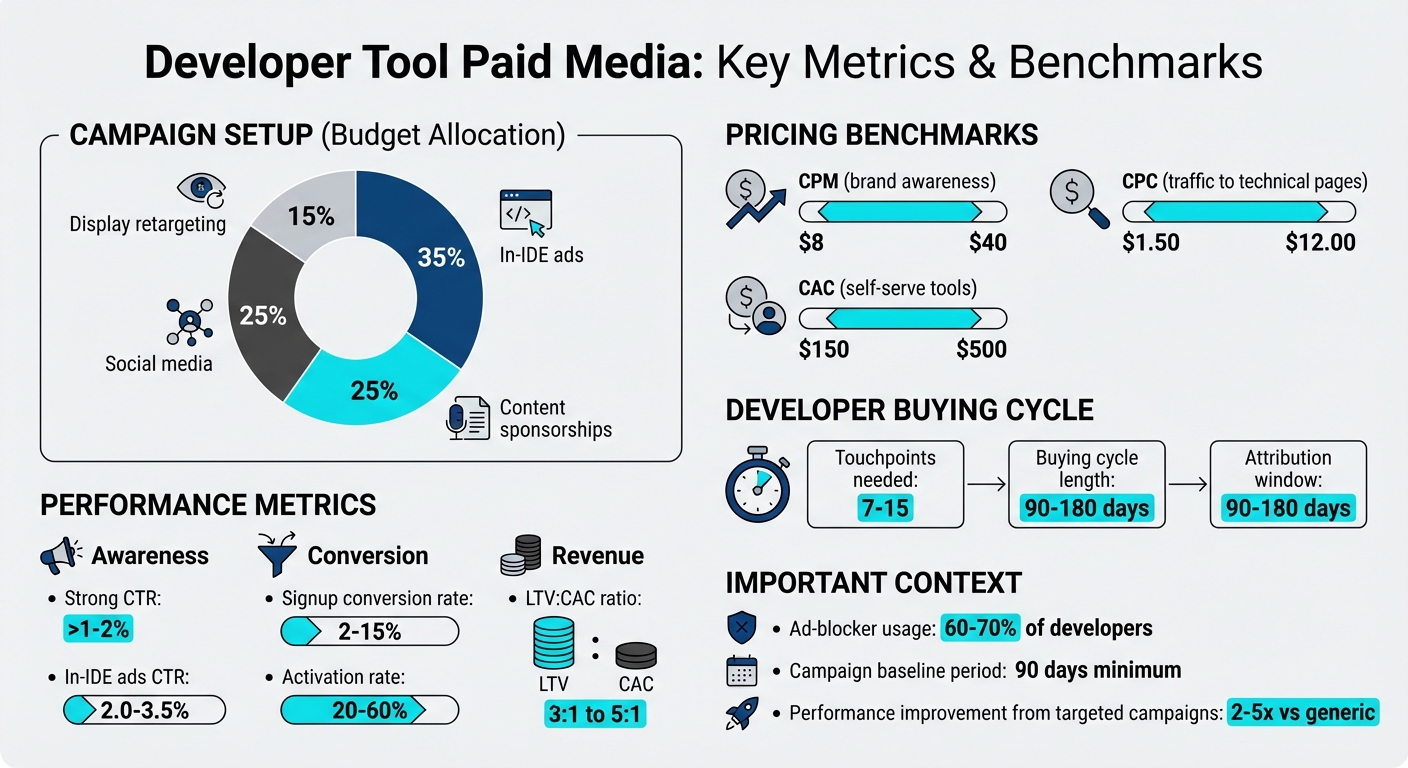 {Key Metrics and Benchmarks for Developer Tool Paid Media Campaigns}
After your ads are live, it’s time to monitor their performance. The goal? Pinpoint which campaigns are driving product adoption and which are draining your budget. This kind of data-focused approach is key to squeezing the most ROI out of your advertising efforts. Keep in mind that developers often interact with 7–15 touchpoints over buying cycles that last anywhere from 90 to 180 days .
Set Up Your First Campaign
Start by building on your segmented audience and clear objectives. Your first campaign should focus on collecting reliable data, not just immediate results. Begin with a modest budget and distribute it across three to four channels for 60–90 days. Avoid making frequent adjustments during this period; this will give you a clean baseline to work with. A typical budget allocation might look like this:
- 35% to in-IDE ads
- 25% to content sponsorships
- 25% to social media
- 15% to display retargeting
When setting your campaign goals, use CPM for brand awareness (with rates often ranging from $8 to $40) and CPC for driving traffic to technical pages (typically $1.50 to $12.00). If your focus is self-serve developer tools, aim for a customer acquisition cost (CAC) between $150 and $500 .
To track campaign performance effectively, use consistent UTM parameters (e.g., utm_source, utm_medium, utm_campaign, etc.). This will help you identify which ads are driving the most valuable actions. Also, direct traffic to targeted landing pages - like documentation, integration guides, or sandbox environments - rather than a generic homepage. These pages should continue the conversation sparked by your ads.
Track Important Metrics
To evaluate your campaigns, measure key metrics across different stages:
- Awareness: Impressions and viewability
- Engagement: Click-through rate (CTR) and time spent on site
- Conversion: Activation rates and CAC
- Revenue: Lifetime value (LTV) and return on ad spend (ROAS)
For developer tools, a strong CTR is usually above 1–2%, with in-IDE ads often achieving 2.0–3.5%. Signup conversion rates typically range from 2% to 15%, but the real focus should be on activation - when users complete their first meaningful action. Healthy activation rates generally fall between 20% and 60%.
Since 60–70% of developers use ad-blockers, impression counts and cookie-based tracking may not tell the full story. To compensate, track brand search volume and direct traffic trends. Use multi-touch attribution - preferably a position-based (U-shaped) model - to fairly credit both early discovery and final conversions. Extend your attribution window to 90–180 days to account for the longer buying cycles typical in this space. Aiming for an LTV:CAC ratio between 3:1 and 5:1 can help ensure sustainable growth .
These metrics will guide you in identifying areas for improvement and deciding where to increase your investment.
Adjust and Scale Your Campaigns
Once you’ve gathered 90 days of baseline data, it’s time to analyze and refine. Focus on scaling campaigns that deliver the best value by reallocating your budget to channels with the lowest cost per activated user and the highest lifetime value. Don’t just chase the lowest cost per click - dig deeper into what’s driving meaningful results.
To test scalability, try incrementality experiments. For example, increase spending by 50% on top-performing campaigns to see if conversions grow proportionally. If not, it may indicate that the channel is hitting saturation .
Next, fine-tune your targeting using performance data. Incorporate technical terms and specific technology names like "PyTorch" or "layer caching" into your ads. This not only filters out irrelevant audiences but also signals expertise to developers. If you notice a successful user journey - say, from blog posts to documentation to signups - double down on campaigns that replicate that path.
Protect your brand by running branded search campaigns on Google to prevent competitors from bidding on your product name. For retargeting, consider YouTube pre-roll ads aimed at users who’ve visited high-intent pages, such as pricing or documentation sections. Be specific in your messaging - phrases like "5ms video load time" resonate more with developers than vague claims like "better performance."
As you scale, keep a close watch on metrics like activation rates and LTV to ensure they stay consistent as your spending grows. This will help you maintain efficiency while expanding your reach.
Conclusion
Growing a developer tool with paid media isn’t about pushing sales - it’s about helping developers solve real-world challenges. The strategies discussed here emphasize shifting from traditional advertising to campaigns that educate and align with how developers discover and adopt new tools.
Start by honing in on precise audience segmentation and setting clear, measurable goals. Break down your audience by programming languages, seniority, and unique needs. With platforms like daily.dev Ads, you can reach over a million developers with targeted messaging. Tailor your campaigns to focus on specific tools, languages, and experience levels, ensuring your message connects with the right audience at the right moment.
When crafting ad copy, keep it clear and technical. Highlight practical features through code snippets, links to documentation, or sandbox environments. Experiment with variations to see what resonates, but always prioritize technical accuracy over flashy presentation - developers value authenticity.
Track the metrics that matter. Go beyond clicks to measure activation rates, lifetime value, and cost per activated user. Allow campaigns at least 90 days to collect baseline data, then adjust budgets toward channels that perform best. Since developer buying cycles often span 90–180 days, extend your attribution windows to capture the full impact of your efforts.
FAQs
How do I pick the best activation event to track?
When selecting activation events, aim for those that reflect genuine user engagement and tie directly to your product's objectives. Look for actions such as API calls, documentation views, SDK usage, or feature activations. These activities show clear developer interaction with your product.
By tracking these metrics, you can better understand how effectively your ads are driving adoption and fostering growth within your community. This approach ensures your campaigns are fine-tuned to deliver a strong return on investment (ROI).
What budget should I start with for paid media?
Experts suggest allocating 15-20% of your total marketing budget to start, though this can be adjusted depending on your specific goals and target audience. For campaigns aimed at developers, platforms like daily.dev Ads set a minimum spend of $5,000 to ensure precise targeting and a meaningful reach.
It's wise to begin with a test budget - $5,000 is a practical starting point - and refine your strategy based on performance data. Just make sure your product is fully prepared to convert leads before committing to a larger ad investment.
How long until paid media shows real results?
Paid media campaigns often show measurable results quickly, typically within 3 to 7 days of launch. Metrics like click-through rates (CTR) and conversions begin to surface during this time. However, for a more accurate understanding of return on investment (ROI), it’s best to allow 2 to 4 weeks. This period gives the campaign time to optimize and refine its targeting as it learns more about the audience. Regular monitoring and fine-tuning during this phase are key to achieving the best outcomes.