

LinkedIn is the go-to platform for reaching technical decision-makers like CTOs, engineering managers, and architects. With 82% of B2B social media leads coming from LinkedIn and a visitor-to-lead conversion rate of 2.74%, it’s a top choice for promoting developer tools. The platform’s detailed targeting options - such as job titles, skills, and company size - make it ideal for connecting with professionals who influence or control purchasing decisions.
However, LinkedIn isn’t perfect for engaging individual developers, who are more active on platforms like GitHub or Stack Overflow. Additionally, LinkedIn’s high cost per click ($8–$10) and cost per lead ($75–$150) mean it’s best suited for enterprise-level campaigns. To maximize results, focus on high-quality leads, use technical content that resonates, and pair LinkedIn with developer-native platforms for broader outreach.
Here’s what you’ll learn:
- How to target decision-makers using LinkedIn’s filters (job titles, skills, seniority).
- Why technical content like case studies and architecture breakdowns works best.
- The most effective LinkedIn ad formats for developer tools.
- Tips for measuring ROI and balancing LinkedIn with other platforms.
For B2B developer tool marketing, LinkedIn is essential for reaching decision-makers, but combining it with developer-focused channels ensures you reach both buyers and users effectively.
::: @figure 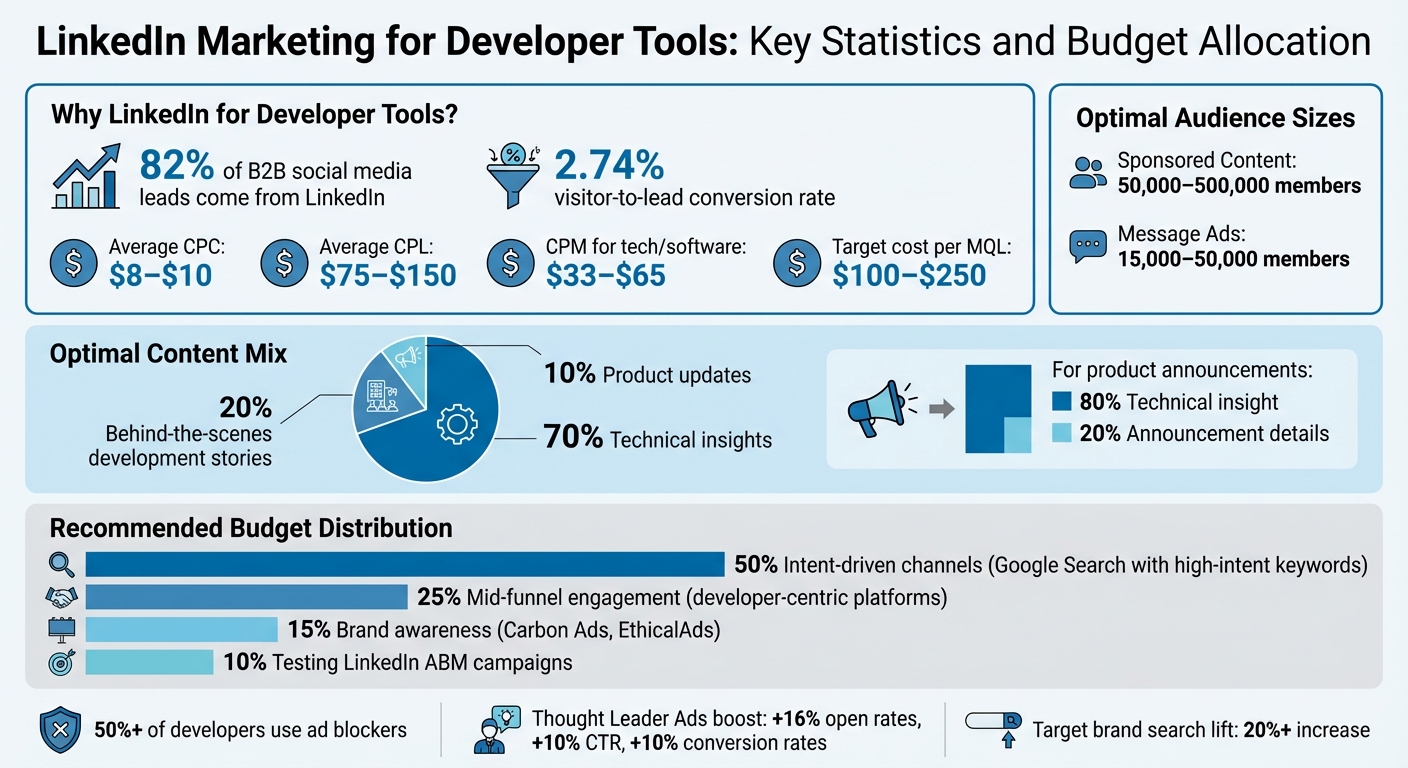 {LinkedIn Marketing Statistics and Budget Allocation for Developer Tools}
LinkedIn Audience Targeting for Developer Tools
LinkedIn's targeting uses OR logic within categories and AND logic across them . For example, you can target "DevOps Engineer", "Site Reliability Engineer", or "Infrastructure Engineer" under job titles, then combine that with a specific skill like "Terraform" to ensure your audience has the expertise your tool requires. This approach creates a solid foundation for more detailed strategies involving job titles, skills, and company-specific filters.
Job Title and Skills Targeting
Targeting by job title is an effective way to reach decision-makers. However, job titles can vary significantly between companies - roles like "Lead Developer", "Engineering Lead", and "Principal Engineer" may all describe similar responsibilities . To maximize reach, consider including both current and past holders of relevant titles. For instance, someone who previously worked as a "Senior DevOps Engineer" might now hold a leadership position with purchasing authority .
Skills targeting is another way to ensure you're reaching the right audience. A profile might list a title like "Engineering Manager" but include technical skills such as "Kubernetes", "AWS", or "Python" . Pairing skills with seniority levels - like combining "Kubernetes" with "Manager" or "Director" - helps you zero in on those who not only understand your product but also have the authority to make purchasing decisions.
Beyond targeting job titles and skills, refining your audience by company size and seniority can help you focus on the right decision-makers.
Company Size and Seniority Filters
Filtering by company size ensures your campaign aligns with your ideal customer profile. For example, tools designed for enterprise developers should target companies with 1,000+ or 10,000+ employees, while tools for startups might focus on the 11-200 range . Seniority filters, such as Manager, Director, VP, or CXO, help you connect with those who have purchasing power. However, it's important not to overlook individual contributors who influence decisions.
Irina Easton highlights this common misstep:
"A common targeting mistake is to over target director and executive audiences, while leaving out the critical individual contributor decision influencers" .
To cover all bases, include senior individual contributors and managers in your targeting. For instance, combining the "Engineering" or "Information Technology" job functions with "Director" or "VP" seniority broadens your audience while maintaining relevance .
When setting up Sponsored Content campaigns, aim for an audience size between 50,000 and 500,000 members to ensure consistent delivery and algorithm optimization. For Message Ads, smaller, more focused audiences of 15,000 to 50,000 members tend to perform better .
LinkedIn Group Targeting
Group targeting is a great way to connect with professionals who actively engage in technical communities. By targeting members of LinkedIn groups focused on engineering or development topics, you can reach developers and decision-makers already interested in subjects relevant to your tool. However, as of May 15, 2024, Member Groups will no longer be a targeting option for the European Economic Area (EEA) or Switzerland .
For U.S.-based campaigns, group membership can still be a valuable addition to job title and skills targeting. Just be sure to combine it with other filters to maintain precision and avoid diluting your audience.
sbb-itb-e54ba74
Content That Performs on LinkedIn for Developer Products
LinkedIn's professional environment makes it the perfect platform to connect with both technical professionals and decision-makers. To strike the right balance, aim for a 70/20/10 split in your content strategy: 70% technical insights, 20% behind-the-scenes development stories, and 10% product updates. This formula keeps your content informative and engaging without coming across as overly promotional.
Technical Content That Resonates
Developers value precision and substance over vague claims. For instance, instead of saying, "We improved database performance", share specifics like, "Reduced Postgres query time from 3.2 seconds to 180 milliseconds using a composite index". Details like these establish credibility and immediately grab the attention of engineers who are quick to spot generic marketing language.
"The moment your marketing feels like marketing, you've lost them."
– Postiv AI
LinkedIn favors content that holds readers' attention. Structuring posts with a clear problem-solution narrative works well. Start by outlining the challenge, walk through the attempted fixes, and conclude with the results. This not only keeps your audience engaged but also signals to LinkedIn's algorithm that your content is worth promoting.
Deep Dives and Industry Expertise
Sharing in-depth technical analyses and insights positions your team as industry experts. Include architecture diagrams, toolstack visuals, or combined "Code + UI" examples - like an API call paired with the resulting interface - to make your content both credible and shareable.
Lead with the problem to draw readers in. Headlines like "Tired of debugging flaky CI pipelines?" are far more engaging than ones that start with your product name. Since developers often skim, use single-sentence paragraphs, bulleted lists for key points, and bold text to highlight essentials. When comparing tools, be transparent about trade-offs and costs rather than presenting your solution as the only option.
These insights naturally transition into compelling case studies.
Case Studies and Product Announcements
For product announcements, stick to an 80/20 rule: 80% technical insights and 20% announcement details. This approach transforms what could feel like a sales pitch into content that offers genuine value to technical audiences.
"Every product announcement should be 20% announcement, 80% technical insight about why you built it that way."
– Jan van Musscher, Technical Founder
Case studies shine when they follow a clear problem–attempt–solution structure. Start by setting the stage with the customer's challenge, walk through the technical hurdles, and end with measurable outcomes. Replace generic testimonials with concrete metrics, such as GitHub stars, npm downloads, or quotes from engineers at respected companies. For example, CircleCI saw a 65% reduction in cost-per-lead by directing users to self-serve demos instead of gated forms.
Use soft CTAs that respect developers' preference for autonomy. Phrases like "This is open source, MIT licensed" or "View the docs" tend to perform better than hard sells like "Book a demo." Developers appreciate the freedom to explore on their own terms. Pairing these CTAs with visuals such as code snippets, terminal screenshots, or GIFs of your product in action can demonstrate value far more effectively than words alone.
Beyond promoting your product, showcasing your engineering culture can further enhance trust and engagement.
Engineering Culture and Hiring Content
Content that highlights your engineering team's culture and hiring practices does double duty: it attracts both potential customers and top talent. Developers trust their peers more than brands, so hearing directly from your team carries more weight than polished marketing messages.
"Your GitHub profile tells them you can code. Your LinkedIn presence tells them you can communicate, which turns out to matter quite a lot."
– ShipPost
Sharing real development challenges and architecture trade-offs resonates more than overly polished success stories. Write as if you're a senior engineer explaining a solution to a colleague - use technical terms without over-explaining, and skip exaggerated phrases like "revolutionary" or "game-changing". Encourage your team, from founders to engineers, to share these stories personally. Posts from individuals often see stronger engagement and help CTOs or Engineering Managers assess communication skills and cultural fit.
LinkedIn Ad Formats for Developer Tools
When targeting technical decision-makers, picking the right LinkedIn ad format is just as important as defining your audience. With average CPMs for tech and software industries ranging from $33 to $65, LinkedIn is pricier than other platforms, making ad format selection critical to achieving a strong ROI.
Sponsored Content and Video Ads
Sponsored Content shows up directly in the LinkedIn feed and is ideal for building awareness at the top of the funnel. For developers, visuals matter. Instead of generic stock photos, use engaging visuals like code snippets, terminal screenshots, or architecture diagrams. Highlight new features or functionality through these visuals to capture attention.
Video ads should be short - around 15 seconds - and include subtitles since many developers browse with the sound off. Focus on showing how your product addresses a specific technical challenge rather than delivering broad branding messages. One standout option here is Thought Leader Ads, which let you sponsor posts from engineers or CTOs on your team instead of your company page. These posts feel more authentic, and with this format, you can boost open rates by 16%, click-through rates (CTR) by 10%, and conversion rates by 10%.
To complement feed-based ads, LinkedIn also offers direct messaging options that are highly effective for Account-Based Marketing (ABM).
Message Ads and Conversation Ads
Message Ads deliver personalized outreach directly to a user's inbox when they’re active on LinkedIn. These ads are particularly effective for high-value ABM campaigns targeting specific accounts. Keep the message concise - under 500 characters - and focus on one technical pain point. Introduce yourself briefly and explain why your message is relevant to avoid coming across as a recruitment pitch.
Conversation Ads take the interaction further by creating a multi-layered conversation tree. This format lets prospects navigate through relevant technical content based on their interests. For example, they can select their tech stack (like AWS, Azure, or GCP) and receive tailored case studies or documentation. These ads are a great way to provide personalized, technical information while engaging prospects in a more interactive way.
Both formats complement feed-based strategies by delivering targeted and personalized messaging directly to potential customers.
Document Ads for Technical Resources
Document Ads are particularly effective for promoting technical resources like whitepapers, benchmark reports, or product documentation. These ads allow prospects to preview a few pages of the content directly in their feed. To encourage downloads, make sure the preview is high quality and compelling. Downloads are typically gated through a Lead Gen Form.
However, gating comes with trade-offs. Developers often prefer ungated documentation as it builds trust and credibility before they’re asked for their email address. Since the cost per Marketing Qualified Lead (MQL) for developer tools on LinkedIn is typically between $100 and $250, it’s crucial to focus on lead quality over quantity. Also, ensure the document is mobile-friendly - use large fonts and avoid multi-column layouts, which can be tough to read on smaller screens.
These ad formats work best when integrated into a broader technical marketing strategy, helping you maximize engagement and reach on LinkedIn.
Measuring LinkedIn Marketing ROI for Developer Products
Given LinkedIn's higher advertising costs, it's crucial to focus on metrics that directly influence ROI. With average CPMs ranging from $33 to $65 in tech industries and a target cost per MQL (Marketing Qualified Lead) between $100 and $250 , the emphasis should be on generating high-intent leads. LinkedIn plays a key role in the extended, multi-touch purchase journeys typical of developers, which makes prioritizing lead quality over sheer volume essential.
Prioritizing Lead Quality Over Volume
Since LinkedIn is pricier than many other platforms, the quality of leads is far more important than the number of leads generated. The goal should be to attract leads that align with your Ideal Customer Profile (ICP) and are more likely to convert into booked meetings . One of the best ways to gauge lead quality is by tracking the booked-meeting rate, as it reflects whether the leads are actionable. LinkedIn's advanced targeting tools are particularly effective at ensuring your ads reach the right audience .
Beyond just generating leads, it's equally important to assess how these high-quality prospects contribute to the overall sales pipeline.
Pipeline Attribution and Brand Awareness Metrics
Developer purchase journeys are rarely straightforward - they often involve multiple touchpoints. For instance, a prospect might see a LinkedIn ad, engage with additional content later, and eventually convert through a direct search weeks down the line. Relying solely on last-click attribution can undervalue LinkedIn's role in the mid-funnel stage .
To better understand LinkedIn's impact, consider using post-signup surveys with questions like "How did you hear about us?" Additionally, consistently apply UTM parameters to track how LinkedIn campaigns contribute across different stages of the pipeline. For brand awareness campaigns, monitor brand search lift - campaigns should aim to achieve at least a 20% increase in brand-related searches . This provides a clearer picture of how LinkedIn influences overall visibility and interest.
Conclusion
When to Use LinkedIn vs. Developer-Native Platforms
LinkedIn and developer-native platforms each play distinct roles in a well-rounded marketing strategy. LinkedIn is your go-to for targeting technical decision-makers - think CTOs, engineering managers, and architects. These are the people who hold the purse strings and make final decisions. If your product is a high-value B2B SaaS offering, LinkedIn’s precise targeting capabilities make it a key player for account-based marketing (ABM) campaigns and driving pipeline growth . However, this approach doesn’t always resonate with hands-on developers.
For engaging individual developers - those directly using your tool - developer-native platforms are far more effective. Platforms like daily.dev Ads connect you with over 1 million active developers as they browse technical articles, explore new tools, and stay updated on industry trends . While LinkedIn excels at delivering high-quality leads through targeted content, developer-native channels thrive at reaching developers in their natural flow of work.
To make the most of these platforms, align your budget with their strengths. A phased budget strategy might look like this: allocate 50% to intent-driven channels like Google Search with high-intent keywords, 25% to mid-funnel engagement on developer-centric platforms, 15% to brand awareness campaigns on channels like Carbon Ads or EthicalAds, and 10% to testing LinkedIn ABM campaigns . This approach balances LinkedIn’s higher CPMs (ranging from $33–$65) with more cost-efficient options that engage developers directly where they work.
It’s worth noting that developers often prefer ads that respect their privacy and fit seamlessly into their workflows. With over 50% of developers using ad blockers, ads integrated into documentation sites, IDEs, or content feeds tend to perform better than traditional social media ads . By leveraging LinkedIn to reach decision-makers and platforms like daily.dev Ads to connect with individual developers, you ensure your marketing efforts effectively target both the buyer and the user.
FAQs
How do I target both decision-makers and influencers on LinkedIn?
To connect with both decision-makers and influencers effectively, take advantage of LinkedIn's advanced targeting features. For decision-makers, zero in on criteria such as job titles, seniority levels, company size, industry, and specific skills. When targeting influencers, focus on groups they belong to, company followers, or roles like engineers and product managers.
Pair these targeting strategies with compelling content like thought leadership pieces or case studies to grab attention. Additionally, leverage tools like matched audiences and website retargeting to refine your approach and reach the right people with precision.
What should I post on LinkedIn to appeal to technical buyers?
To connect with technical buyers on LinkedIn, focus on sharing content that showcases your expertise while addressing their specific challenges. Prioritize posts that emphasize thought leadership, share insights into engineering culture, or highlight product launches. Case studies and technical tutorials that tackle practical problems are especially effective. Authentic, detailed posts - like in-depth technical breakdowns or success stories from developers - tend to resonate strongly. Adding visuals, such as videos or product demos, can further boost engagement and help establish trust with this audience.
How can I measure LinkedIn ROI beyond last-click conversions?
To truly gauge LinkedIn ROI beyond just last-click conversions, focus on engagement metrics such as developer interactions, content views, and the depth of engagement with your content. It's also important to assess pipeline attribution, examine the quality of leads, and measure brand lift to get a clearer picture of how your campaigns are performing on a broader scale.