

Relying on one marketing channel is risky. Developers interact with 5–7 platforms daily, like GitHub, Stack Overflow, and Reddit. A single-channel strategy limits your reach and fails to engage this diverse audience effectively. Multi-channel marketing ensures your message meets developers where they are, builds trust through repetition, and drives better results.
Here’s what you’ll learn:
- Why single-channel marketing underperforms for developers.
- How to align content types with platforms like YouTube, Reddit, and daily.dev.
- Steps to create unified messaging across 5–7 channels.
- Timing strategies for pre-launch, launch, and sustain phases.
- Tools like HubSpot, daily.dev, and UTM tracking to streamline campaigns.
Key takeaway: Developers need consistent, tailored messaging across multiple touchpoints. A well-coordinated multi-channel strategy increases engagement, improves conversions, and strengthens your brand presence in the developer community.
::: @figure 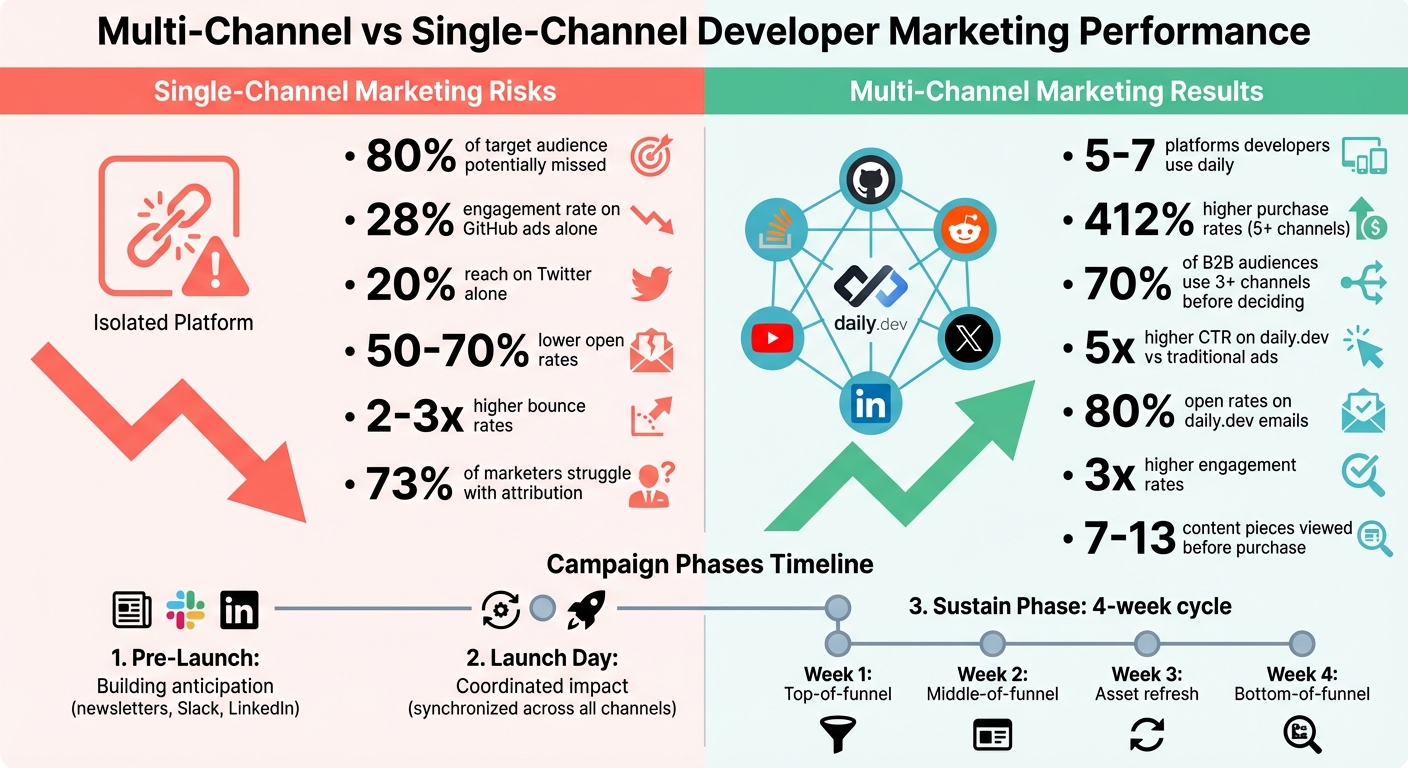 {Multi-Channel vs Single-Channel Developer Marketing Performance Comparison}
Why Developers Need Multi-Channel Marketing
Where Developers Spend Their Time Online
Developers don’t stick to just one corner of the internet. On average, they engage with 5–7 specialized platforms every day. GitHub is a major hub, with over 100 million active users managing code repositories and collaborating on projects. Stack Overflow is another staple, as 88% of developers visit it weekly for troubleshooting, according to the 2023 Developer Survey.
Beyond those, platforms like Reddit (with communities such as r/programming) and Twitter (now X) serve as spaces for real-time updates and networking. Developers also turn to YouTube, tech podcasts like Syntax.fm, and tools like daily.dev for tutorials and curated news. Each platform serves a specific purpose - whether it’s solving coding problems, learning about new tools, or keeping up with trends. This variety underscores why focusing on just one channel can weaken your marketing strategy.
Problems with Single-Channel Marketing
Developers’ diverse online habits highlight the risks of relying on a single platform. If you stick to just one channel, you could miss out on reaching up to 80% of your target audience. For example, GitHub ads typically engage about 28% of developers, while Twitter reaches only about 20%. That leaves a huge portion of the developer community untouched.
But the challenges don’t stop at reach. Campaigns limited to one platform often face 50–70% lower open rates and 2–3 times higher bounce rates compared to multi-channel approaches. Developers are known for cross-verifying information across different sources, so relying on a single platform can breed skepticism. Research shows that 70% of B2B audiences, including developers, interact with three or more channels before making a decision. A single-channel approach not only lowers conversion rates but also creates attribution gaps, making it harder to track ROI effectively.
sbb-itb-e54ba74
Matching Content Types to Developer Channels
Content-to-Channel Mapping Examples
Every platform has its strengths, and matching your content to the right channel can make or break engagement. For instance, YouTube is ideal for screen recordings, walkthroughs, and detailed technical breakdowns. On the other hand, Reddit thrives on discussions - perfect for sharing technical challenges, asking for feedback, or joining threads like r/programming.
Twitter (X) works best for quick, digestible updates like technical threads, code snippets, or real-time news about releases and bug fixes. Meanwhile, daily.dev shines when used for in-feed ads to announce products, launch developer tools, or share documentation. Its email newsletter also provides a space for developers to explore curated updates at their own pace.
Stack Overflow, while not a traditional marketing channel, offers opportunities to sponsor tags or engage in problem-solving discussions, placing your brand in front of developers when they're actively seeking solutions.
The bottom line? Your content needs to fit the platform. A 15-minute tutorial won’t resonate on Twitter, while a short product update is out of place on YouTube. Here's a stat to back this up: brands using five or more coordinated channels see 412% higher purchase rates compared to single-channel campaigns . Matching your content format to the channel's strengths is a must for driving engagement.
Choosing Channels Based on Campaign Goals
Once you've considered content formats, focus on your campaign goals to guide channel selection. For awareness and technical discussions, platforms like Stack Overflow, Reddit, and Twitter are excellent for fostering peer-to-peer conversations . If you're aiming for acquisition and growth, prioritize channels with broader reach.
For targeting decision-makers like CTOs or engineering leads, LinkedIn is a strong choice. It allows you to connect with adjacent personas who influence purchasing decisions . Additionally, events and webinars are powerful tools for relationship building and providing deep technical insights, especially when showcasing complex integrations or workflows .
Darren Yuen from Iron Horse sums it up well:
"Developer marketing channels are places where peer-to-peer conversations and true engagement takes place. Think of these as 'watering holes' where developers can meet up to work through specific issues."
– Darren Yuen, Iron Horse
Before you invest in a channel, confirm that developers are already discussing your product or related topics there. If no conversation exists, it’s likely not the best place to allocate your resources .
Building a Unified Campaign Across 5-7 Channels
Creating Your Core Campaign Message
Before diving into multiple platforms, you need a central message that ties everything together. Think of this as the foundation of your campaign - a core promise that seamlessly connects a tweet to a YouTube tutorial. This message should clearly communicate your value proposition while being adaptable to different formats.
Start by identifying your messaging pillars - three to five key ideas that support your main message. For instance, if you're launching a developer tool, these pillars could focus on its technical features, ease of integration, performance metrics, and community support. Once you've nailed these down, document them in a messaging framework. This framework should outline how each pillar translates across various channels. For example:
- A performance benchmark might turn into a detailed blog post with graphs.
- On Twitter, it could be a quick stat in a thread.
- For daily.dev, it might become a visual comparison in an in-feed ad.
The goal is to ensure that every channel communicates a unified message. Research shows that campaigns grounded in a unified data foundation perform better . Your core campaign message should be versatile enough to fit different formats while staying consistent enough for developers to instantly recognize its promise.
Once your central message is solidified, the next step is to adapt it for each platform without losing its essence.
Adapting Messaging Without Losing Consistency
Adapting your message doesn’t mean watering it down. Instead, it’s about reshaping tone and format while keeping the core ideas intact. For example, a technical specification might take the form of:
- A code snippet on Twitter.
- A step-by-step walkthrough video on YouTube.
- A detailed documentation link in a daily.dev email.
The key is to align your message with the strengths of each channel while ensuring the core promise remains clear. Multi-channel campaigns that successfully adapt their messaging often see higher engagement and conversion rates compared to single-channel efforts. Pairing formats - like combining in-feed ads with email newsletters - can amplify results when done right.
To stay organized, create a messaging matrix. This tool outlines the format, tone, and call-to-action for each channel. For developer-focused campaigns, this could mean:
- Deep technical discussions on Stack Overflow.
- Conversational updates on Twitter.
- Visual product demos on YouTube.
- Curated announcements on daily.dev.
This matrix ensures your team knows how to tailor content for each platform without straying from the central message. It’s worth noting that 73% of consumers expect brands to understand their unique needs , and developers are no different. They’ll quickly spot disconnected messaging or recycled content that feels out of place. Consistency, paired with thoughtful adaptation, is what makes a campaign truly resonate.
Campaign Timing: Pre-Launch, Launch, and Sustain Phases
Once you've nailed down your central message, the next step is aligning your campaign timing to amplify your integrated developer marketing efforts. Timing matters - dumping all your content at once can lead to developer fatigue. Instead, think of your campaign as three waves, each with its own role and mix of channels.
Pre-Launch: Building Anticipation
The pre-launch phase is all about sparking interest without overwhelming your audience. Focus on high-engagement platforms where developers already hang out, like tech newsletters, Slack groups, and LinkedIn communities. These spaces allow you to tap into an engaged audience without starting from scratch.
Manuel Weiss, a former marketing leader at Codeship, showed how effective this approach can be. His small team of four managed to generate 85,000 e-book leads and over 1 million annual blog readers by carefully planning promotional waves with a content calendar. Start with broad, top-of-funnel content like e-books or detailed guides to attract attention and build a retargeting audience for later phases.
Newsletter sponsorships are another powerful tool. For $1,000–$2,000 per quarter, you can get your message in front of the right eyes. Also, take the time to survey your audience early on. Understanding their preferred communication style and frequency will help you plan for more touchpoints during the launch phase .
Launch Day: Creating a Coordinated Impact
Launch day is your big moment, and precision is key. The goal is to create a synchronized wave across multiple channels - newsletters, social media, daily.dev in-feed ads, and community posts - all within the same window. This coordinated effort maximizes visibility and reinforces your core message.
A shared content calendar is essential for keeping marketing and sales efforts aligned. Misalignment can lead to missed opportunities or even harm your brand.
"Misalignment between marketing and sales can be quite detrimental to your brand" .
Tailor your messaging for each channel but ensure everything goes live simultaneously. Collaborating with external partners, like newsletter sponsors or podcasts, can amplify your reach. As your launch wave peaks, the focus shifts to maintaining momentum.
Sustain Phase: Keeping the Energy Alive
The sustain phase is where you keep developers engaged long after launch day. Publishing content is just the start - consistent follow-up is what keeps the momentum going . Organize this phase into monthly cycles, with each week focusing on a specific part of the funnel:
| Phase Week | Content Focus | Primary Goal |
|---|---|---|
| Week 1 | Top-of-Funnel (E-books, Guides) | Awareness and lead generation |
| Week 2 | Middle-of-Funnel (Problem-focused) | Consideration and intent building |
| Week 3 | Asset Refresh/Cross-Reference | Re-engaging missed leads |
| Week 4 | Bottom-of-Funnel (Webinars, How-tos) | High-intent sales conversations |
Retargeting ads play a big role here. They’re budget-friendly, with costs starting as low as $100–$150 per month, and you only pay when developers click. Rotate 2–3 ad creatives each month to avoid fatigue.
"Keep it fresh by rotating 2-3 ads every 30 days, and pay attention to which assets are actually helpful" .
Also, exclude developers who’ve already converted. Overloading them with repetitive ads can hurt your brand’s image .
With AI overviews now appearing in nearly half of search results, relying on organic search alone isn’t enough. A consistent, multi-channel presence is crucial to staying visible where developers are most active .
Repurposing Content Across Multiple Channels
Repurposing content is a smart way to expand your reach without overwhelming your team or budget. Instead of creating brand-new material for every platform, you can take one strong piece and reshape it for different channels, tailoring it to fit each platform's style and audience expectations.
Content Repurposing Methods for Developers
The trick is to adjust your content so it aligns with the tone and purpose of each platform while keeping your main message intact. For example:
- Twitter/X: Share quick updates, insights, or bite-sized code snippets. Keep it concise and engaging.
- LinkedIn: Focus on professional topics like thought leadership, industry trends, or major announcements.
- GitHub Discussions: Use this space for in-depth technical conversations and community engagement.
- Reddit and Hacker News: Stick to ungated, highly useful technical content to respect the norms of these communities.
- Slack Communities: Use these groups to gather feedback and foster discussions rather than overtly promoting your work.
Instead of recycling the same call-to-action on every channel, create a connected narrative. For instance, Manuel Weiss shared this strategy:
"In week one, we promote ebook number one, and then in week two, we promote another thing, but we also reference in a message eBook 1 from last week: 'Hey, if you missed it last week, eBook 1.'"
This kind of thoughtful adaptation keeps your content fresh and helps maintain long-term interest.
Keeping Content Fresh While Staying On-Message
To avoid overwhelming your audience, use retargeting settings to exclude developers who have already interacted with a specific asset. This ensures they aren't repeatedly shown the same promotions.
You can also tailor content to specific developer communities. For example, craft Ruby-focused material for Ruby developers and Python-specific content for Python enthusiasts. A targeted approach like this keeps your messaging relevant and engaging. Codeship demonstrated this by maintaining a twice-weekly newsletter for 120,000 subscribers, ensuring each message delivered real value by regularly surveying their audience.
Tracking Developer Journeys Across Channels
When running a multi-channel developer campaign, understanding which touchpoints lead to conversions is essential. It’s one thing to manage campaigns across platforms like GitHub, daily.dev, or Twitter, but measuring their actual impact is a different challenge. Without proper tracking, it’s impossible to know whether a GitHub discussion or a Twitter thread played a role in a sign-up or trial. The challenge is real - 73% of marketers struggle with attribution . This isn’t surprising when you consider that developers typically engage with 7 to 13 pieces of content before making a purchase decision .
Here’s an example: a developer might click on a UTM-tagged link in your daily.dev ad, visit your site, and then return three days later via a Google search to sign up. If you don’t connect these interactions, you’re left counting clicks instead of understanding the full journey . Tracking these interactions across the pre-launch, launch, and sustain phases is crucial to grasp the complete picture of your campaign’s impact.
Setting Up UTM Parameters for Channel Tracking
UTM parameters are vital for identifying where your traffic comes from. These tags, added to URLs, help analytics platforms pinpoint the source of your visitors. The five standard UTM parameters are:
- utm_source: Identifies the platform (e.g.,
daily.dev,github). - utm_medium: Specifies the channel type (e.g.,
paid_social,newsletter). - utm_campaign: Tracks the specific initiative (e.g.,
q2_api_launch). - utm_term: Focuses on keywords or audience segments (e.g.,
python_developers). - utm_content: Differentiates creative variants (e.g.,
sidebar_banner).
Consistency is key. For example, tagging one link as "Facebook" and another as "facebook" will fragment your data since UTM parameters are case-sensitive. Standardize on lowercase and avoid spaces - use hyphens or underscores instead to prevent URL encoding issues .
Here’s a quick reference for setting up UTM parameters in a developer campaign:
| Parameter | Purpose | Example Value |
|---|---|---|
utm_source |
Platform | daily.dev, github |
utm_medium |
Channel type | paid_social, newsletter |
utm_campaign |
Specific initiative | q2_api_launch |
utm_term |
Keywords/audience | python_developers |
utm_content |
Creative variant | sidebar_banner |
Avoid using UTM parameters on internal links, as this can overwrite original referral data . As KISSmetrics puts it:
"If 20% of your campaign links are mistagged, 20% of your attribution data is wrong - and you will never see an error message" .
To minimize mistakes, use a centralized spreadsheet or a UTM link generator with dropdown menus to enforce naming conventions .
Using Multi-Touch Attribution Models
Once you’ve set up proper tracking, the next step is deciding how to assign credit when a developer interacts with multiple channels before converting. Many tools default to last-click attribution, which gives all the credit to the final touchpoint. While simple, this method undervalues top-of-funnel content like blog posts or educational videos . For developer tools with sales cycles of 2–8 weeks, this approach can distort your data.
Multi-touch attribution models offer a better way to distribute credit across the journey:
- Linear attribution: Spreads credit evenly across all touchpoints, providing a balanced view .
- U-shaped attribution: Assigns 40% credit to the first interaction, 40% to the last, and 20% to everything in between. This works well when discovery and conversion are the most critical moments .
- W-shaped attribution: Adds a third milestone, giving 30% each to the first touch, lead creation (e.g., form submission), and final conversion. This model is ideal for complex B2B journeys with clear marketing-to-sales transitions .
Choose an attribution model that aligns with your sales cycle. For instance, if developers typically take 60 days to move from first visit to purchase, but your attribution window only covers 30 days, you’ll miss key early-stage interactions . Running parallel models - such as last-click, U-shaped, and linear - can help you identify undervalued channels at the top of the funnel .
Integrating your tracking with a CRM like HubSpot or Salesforce allows you to connect online interactions with offline sales or closed deals . And don’t forget, over 60% of online transactions involve multiple devices . To piece together a unified developer journey, you’ll need tracking systems that link anonymous sessions to identified users through sign-ups or logins .
For campaigns with high conversion volumes (300+ per month), data-driven attribution models use machine learning to calculate the likelihood that each touchpoint contributed to a conversion . But if you’re just starting out, simpler models will do the job.
This level of detailed attribution ensures your multi-channel campaigns yield insights you can act on, laying the groundwork for smoother workflow management with developer marketing tools.
Tools for Managing Multi-Channel Developer Campaigns
Running a multi-channel developer campaign without the proper tools can feel like debugging code without an IDE - frustrating and inefficient. Once tracking and attribution are in place, you’ll need platforms that help manage campaigns across channels like GitHub, daily.dev, and Twitter, even if you don’t have a dedicated operations team.
Marketing Automation Platforms: HubSpot, Marketo, ActiveCampaign, and Brevo
Automation tools are key for designing workflows that fit seamlessly into developers’ routines. Here’s a breakdown of popular platforms:
HubSpot Marketing Hub: Known for its flexibility, HubSpot includes a visual workflow builder that supports complex journeys triggered by events like a developer’s first API call or sandbox deployment. Its Breeze AI feature creates technical content and optimizes send times. Pricing starts at free for 1,000 contacts, with Professional at $890/month and Enterprise at $3,600/month .
Marketo Engage: Ideal for enterprise teams, Marketo offers account-based marketing (ABM) features and multi-touch attribution. It’s particularly suited for managing larger buying committees. Pricing starts at $895/month for Growth and $3,195/month for Prime . While powerful, it may be overkill for smaller campaigns.
ActiveCampaign: A budget-friendly option, ActiveCampaign offers strong automation features, including predictive sending and A/B testing tools. Pricing begins at $29/month for Lite and $149/month for Professional. With over 900 integrations, it connects easily to developer-centric tools .
Brevo: A solid choice for budget-conscious teams, Brevo’s free tier supports unlimited contacts and up to 300 emails per day. The Business plan, at $65/month, adds support for email, SMS, and WhatsApp - great for sending updates, alerts, or event reminders .
Automation tools with predictive AI are especially valuable, as developers tend to engage more with personalized technical content than generic emails. For instance, platforms like HubSpot’s Breeze AI or Adobe Sensei can analyze which code examples resonate most with specific audiences. For teams needing custom solutions, tools like the corteX SDK allow you to build AI-powered marketing agents using a simple installation command: pip install cortex-ai .
The shift toward AI-driven orchestration is transforming multi-channel campaigns. Platforms now predict conversion likelihood and generate tailored technical content, often delivering ROI within 60–90 days .
Setting Up Efficient Campaign Workflows
Selecting the right platform is just the first step. To run cohesive developer campaigns, you need workflows that align with how developers engage.
Replace outdated Marketing Qualified Lead (MQL) tactics with workflows focused on Product Qualified Leads (PQLs) and activation metrics - like time-to-first API call or sandbox deployment. Segment workflows based on technical attributes, such as programming language or framework, rather than job titles. This approach improves conversion rates and reduces wasted ad spend .
Accurate tracking is critical. Use server-side tracking APIs to monitor real-time developer behavior while maintaining privacy compliance. These APIs provide insights even when ad blockers are in use . Track micro-conversions like first code snippet execution or API integration, as these actions better reflect genuine engagement than traditional metrics .
For content delivery, focus on providing practical resources. For example, instead of gating whitepapers behind forms, send ready-to-run code snippets after a developer visits your documentation page. When launching projects across multiple platforms, consider a 30-day automation plan that syncs GitHub updates, forum posts, and native ads on platforms like daily.dev. Automate email sequences, social posts, and ad campaigns based on product milestones rather than arbitrary dates .
| Workflow Component | Traditional Marketing Approach | Developer-Centric Approach |
|---|---|---|
| Lead Qualification | Gated content / MQLs | Free trials / PQLs / Activation metrics |
| Content Focus | Buzzwords / Benefits | Working code / Documentation / Sandboxes |
| Targeting | Broad demographics | Tech stack / Programming language |
| Tracking | Browser-based cookies | Server-side APIs / Product actions |
| Channel Mix | General social media | Native ads / GitHub / Newsletters |
The key is integrating marketing efforts into developers’ existing workflows. For example, if you’re promoting an API, prioritize clear documentation and marketplace listings over sales calls. Similarly, when running ads on platforms like daily.dev, tailor workflows to accommodate the high-intent desktop sessions developers typically favor .
Lastly, streamline onboarding in your automation sequences. Developers often prefer self-serve options like sandboxes, free trials, and detailed technical documentation over scheduling demos. Removing friction at every step ensures a smoother experience for your audience .
Using daily.dev as Your Campaign Anchor Channel
daily.dev acts as the centerpiece of your multi-channel campaign by aligning your messaging across platforms like GitHub, Stack Overflow, Reddit, and Twitter. With over 1 million active developers engaging daily, its personalized news feeds aggregate content from the platforms you're already leveraging . This makes daily.dev an ideal tool for ensuring a consistent campaign message across all channels. Instead of managing each platform as a separate entity, daily.dev helps you create a seamless experience for developers throughout their day. This approach ties into a broader multi-channel strategy, reinforcing your message at every stage of the developer's journey.
What makes daily.dev such a strong anchor is its existing role in developers' routines. Developers turn to it for tech news, so when your in-feed ad appears alongside articles about React or Node.js, it feels like a natural part of their experience. This relevance pays off: click-through rates on daily.dev can be up to 5x higher than traditional display ads because the ads align with how developers prefer to consume content .
Running In-Feed Ads on daily.dev
In-feed ads on daily.dev integrate seamlessly into developers' personalized feeds, appearing alongside the news and updates they already value. To make an impact, focus on creating ads that bring genuine value rather than coming across as overly promotional. For instance, a headline like "Boost Your Dev Workflow with Our API – Free Tutorial Inside" resonates more than a generic product pitch .
daily.dev allows you to target ads based on specific audience segments such as tech stack (e.g., React, Node.js), job role, or location. This level of precision ensures your message reaches the right developers. To optimize performance, test different ad creatives every week and use UTM parameters like ?utm_source=dailydev&utm_campaign=devlaunch to track specific results .
Here’s an example of success: one campaign attributed 25% of total sign-ups to daily.dev, with additional engagement driven by retargeting efforts .
Connecting with Developers Through daily.dev Email
In addition to in-feed ads, daily.dev email digests offer another way to extend your campaign's reach. These curated emails, featuring sponsored content alongside tech news, boast 80% open rates among opted-in users . They’re an effective way to keep your campaign active post-launch, offering quick updates that link back to your broader content across platforms.
Using the daily.dev advertiser portal, you can create email campaigns with pre-designed templates and target segmented audiences. Sending weekly emails during the sustain phase works well, and you can integrate tools like HubSpot or Customer.io for automation. Track performance with UTMs such as ?utm_medium=email_dailydev to see how email engagement contributes to conversions . When paired with other efforts like Reddit discussions or GitHub repositories, daily.dev emails can double engagement by reaching developers through multiple channels .
Conclusion
Reaching developers effectively requires more than just a single-channel approach - it demands a well-coordinated multi-channel strategy. Developers frequently navigate platforms like GitHub, Stack Overflow, Reddit, Twitter, YouTube, and daily.dev throughout their day. To connect with them, your campaign must deliver a consistent core message across 5–7 channels, while adapting content to suit each platform. For instance, a comprehensive YouTube tutorial could be transformed into a concise and engaging Reddit thread.
Timing is just as crucial as channel selection. Consider starting with pre-teasers on platforms like Twitter and Reddit, followed by a synchronized launch on YouTube and daily.dev. Keep the momentum alive with follow-up activities like podcast mentions or Stack Overflow Q&A sessions. To refine your strategy, track the performance of each channel and identify what’s driving conversions. Tools such as HubSpot, Marketo, and Customer.io can streamline workflows, while regular team syncs ensure your messaging stays consistent across all platforms.
A strong anchor for your campaign, such as daily.dev, can unify your multi-channel efforts. In-feed ads on daily.dev allow you to engage developers during their typical routines, while email digests ensure your campaign remains active even after launch. When combined with other channels, this approach can drive engagement rates up to three times higher than single-channel campaigns . Additionally, the platform’s ability to target developers based on their tech stack and job role ensures your message reaches the right audience.
To get started, map your channels to align with campaign goals and repurpose your core content for each platform. Use developer-specific KPIs - like GitHub stars, Stack Overflow mentions, and daily.dev click-through rates - to measure the impact of your efforts and fine-tune your strategy.
FAQs
Which 5–7 channels should I start with for my developer campaign?
Developers are active across various platforms, each offering unique ways to connect and engage with them. Here are 5–7 channels where you can effectively reach developers:
Stack Overflow: A go-to platform for developers seeking answers to technical questions. Engaging here can help you establish credibility by providing helpful insights.
Reddit: Home to countless developer-focused communities (like r/programming or r/webdev), Reddit allows for discussions, sharing resources, and connecting with niche audiences.
Twitter: Many developers use Twitter to share updates, discuss industry trends, and connect with peers. It’s a great channel for quick interactions and staying on top of tech conversations.
LinkedIn: Ideal for professional networking and sharing thought leadership content. Developers often use LinkedIn to stay updated on industry news and career opportunities.
daily.dev Ads: This platform curates developer-focused content, making it a great place to advertise and share resources that align with their interests.
YouTube: Tutorials and how-to videos are highly popular among developers. YouTube provides an opportunity to showcase your expertise while offering valuable learning content.
Podcasts: Many developers tune into tech-focused podcasts during their commutes or downtime. Sponsoring or being a guest on relevant podcasts can help you reach this audience in a more personal way.
By leveraging these platforms, you can engage with developers in spaces they already trust and frequent. Each channel serves a different purpose, whether it's answering questions, sharing knowledge, or building professional connections.
How do I keep messaging consistent while tailoring content for each platform?
To connect effectively with developers, focus on delivering technical depth, clarity, and relevance in your messaging. Tailor your approach to suit the platform you're using:
- GitHub or Stack Overflow: Dive into detailed technical insights. These platforms thrive on in-depth explanations, code snippets, and problem-solving discussions that demonstrate expertise.
- Twitter or Reddit: Keep it concise and engaging. Short, thought-provoking posts or quick tips work well here, sparking discussions or sharing knowledge in a digestible format.
Whatever the platform, ensure your content aligns with your campaign goals. Whether you're aiming to provide value or build trust, always adapt your tone and format to meet audience expectations. Avoid redundancy by keeping your messaging fresh and relevant for each platform.
What’s the simplest way to track multi-touch attribution across channels?
Tracking multi-touch attribution across channels becomes much easier when you use person-level analytics combined with UTM parameters. By applying multi-touch models, you can assign credit to each touchpoint more precisely, giving you a complete view of the developer journey throughout your campaign.