

Native ads work because they blend seamlessly with platform content, making them feel less intrusive. For developers, this approach is critical since they often use ad blockers and dislike overly sales-driven language. The key to effective native ads for developers lies in clear, technical messaging that respects their workflow and offers real value.
Key Takeaways:
- Focus on technical accuracy: Highlight specific features like API compatibility or version support.
- Avoid sales-heavy language: Use direct, no-nonsense communication.
- Optimize for mobile: Keep headlines concise (60-100 characters) and ensure responsive design.
- Be transparent: Label ads as "Sponsored Content" to build trust.
- Test and refine: Use A/B testing to improve headlines, CTAs, and ad performance.
Platforms like daily.dev, with over 1 million developers, allow precise targeting based on programming languages, seniority, and tools. Native ads here achieve 5-10x higher click-through rates than traditional display ads when they are relevant and well-crafted. To succeed, focus on delivering clear, actionable insights tailored to developers' needs.
::: @figure 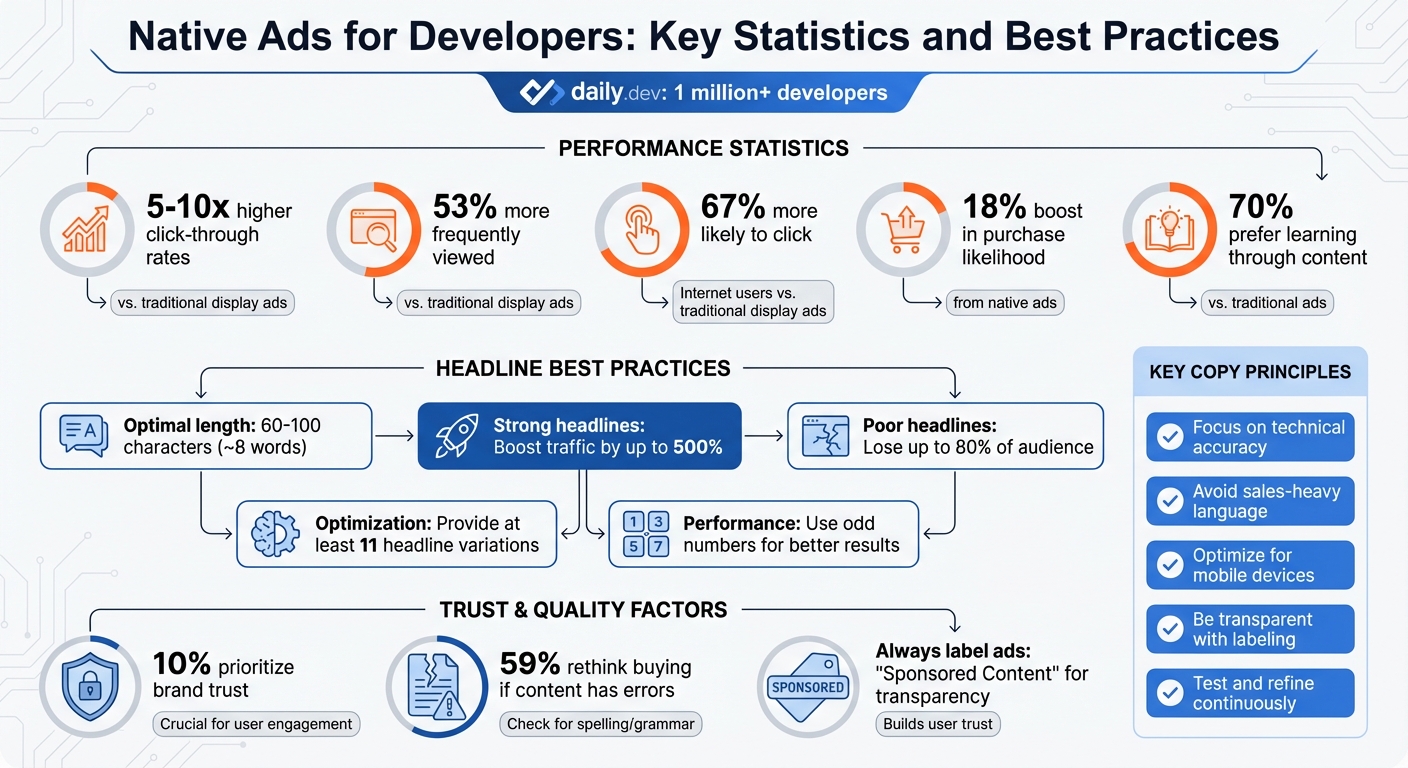 {Native Ads for Developers: Key Statistics and Best Practices}
Core Principles for Writing Developer Ad Copy
When crafting ad copy for developers, keeping it concise and genuine is essential. Your goal is to make the ad feel like a natural part of their experience, not an unwelcome interruption. Below are key principles to help your ad integrate seamlessly into daily.dev's developer-focused environment. You can even tailor your campaigns with precision targeting to reach specific developer segments.
Match the Platform's Design and Tone
Your ad should look and sound like it belongs. On platforms like daily.dev, editorial headlines typically range from 60 to 90 characters. Mimicking this length helps your ad blend in naturally.
Tone is just as important as design. A technical audience appreciates direct, no-nonsense language, while a more relaxed developer community might respond better to a conversational tone. For example, "Build better apps" is more impactful than "Better apps can be built". Use active voice and familiar calls-to-action (CTAs) to keep your message engaging.
Visually, ensure logos and images resize properly without distortion. Subtle touches, like drop shadows or slightly different background colors, can help your ad stand out without being intrusive. Research shows that native ads are viewed 53% more frequently than traditional display ads.
Once your design aligns with the platform, focus on presenting your message with clarity to build trust.
Be Clear and Transparent
Honesty is non-negotiable for developers. Clearly label ads as "Sponsored Content" to establish credibility. This isn’t just about complying with FTC regulations - it’s about earning trust. Around 10% of users prioritize brand trust, and developers are particularly averse to anything that feels misleading.
Adding an advertiser byline (e.g., "By [Your Brand]") further builds transparency. Some platforms even require disclosure in both the feed and on the landing page.
Avoid clickbait or exaggerated claims. As advertising legend David Ogilvy famously said:
On average, five times as many people read the headlines as they read the body copy. It follows that unless your headline sells your product, you have wasted 90 percent of your money.
A misleading or overhyped headline not only wastes resources but also harms your reputation. Instead, back up claims with specific and verifiable data. Remember, 59% of consumers might rethink buying from a brand if its content has spelling or grammar errors, so proofread carefully.
With a foundation of trust and authenticity, the next step is ensuring your ad performs well on mobile devices.
Optimize for Mobile Devices
Given that many developers consume content on mobile devices, your ad must be optimized for smaller screens.
Keep headlines short to prevent them from being cut off on mobile. Mobile users tend to scan rather than read, so address their pain points right away. Hook them within the first few sentences before they scroll past.
Use white space effectively. Shorter, well-spaced messages are easier to read on small screens. This approach can boost engagement, as 67% of internet users are more likely to click on a native ad than a traditional display ad.
Additionally, ensure your landing page is mobile-responsive and directly tied to the ad's message. The transition from ad to landing page should feel seamless. Test mobile layouts to identify what works best. A clear, action-driven CTA - like "Install", "Learn More", or "Get Started" - encourages clicks without coming across as overly aggressive.
How to Write Native Ads for daily.dev Ads
daily.dev's native ad placements - whether in-feed or on post pages - are designed to seamlessly integrate into the developer content stream. To get the best results, your ad copy needs to speak directly to developers, offering clear and actionable value. With daily.dev's advanced targeting options, you can reach developers based on their seniority, preferred programming languages, or tools. Crafting messages that resonate with this audience is key to driving engagement. Here’s how to write headlines and copy that grab attention and deliver results.
Write Headlines That Grab Developer Attention
Your headline is the first thing developers see - make it count. A strong headline can boost traffic by up to 500%, while a poorly crafted one can cause you to lose up to 80% of your audience . To ensure visibility across all placements, aim for headlines that are about 60 characters or 8 words long .
Start your headline by addressing your target audience directly. For example, use phrases like "Frontend Developers:" or "Backend Engineers:" to establish immediate relevance. Including numbers or lists in your headline - such as "7 VS Code Extensions That Save Hours" - can set clear expectations. Odd numbers tend to perform better in headlines .
Formatting tools like brackets and colons can also improve readability. Examples like "[Guide] Optimize React Performance" or "CI/CD Pipelines: 3 Mistakes to Avoid" stand out in a content feed . Negative framing or posing questions can create a stronger emotional connection. Headlines like "Are You Making This Common API Design Mistake?" are particularly effective .
When setting up your campaign, provide at least 11 headline variations . This gives daily.dev's platform the flexibility to optimize for different placements and contexts, improving overall performance. And remember, avoid clickbait - overhyped titles can harm trust and damage your reputation .
Write Body Text That Shows Value
Developers tend to skim content, so your body text needs to get straight to the point. Use a soft-sell approach that informs rather than pressures. Start with a clear, active statement like "Automate deployments in minutes" instead of a passive one like "Deployments can be automated."
Speak directly to your audience by including phrases that highlight who the product is for, such as "Built for backend engineers" or "Ideal for DevSecOps teams." Back up your claims with data or specifics. For example, instead of saying "Developers love this tool", say "Over 500 DevOps teams rely on this tool to streamline CI/CD pipelines" .
Empathetic questions can also grab attention. For instance, "Struggling with flaky tests?" or "Spending hours debugging?" resonate with developers' daily challenges. Incorporating numbers, like "3 ways to optimize SQL queries" or "Reduce build time by 40%", sets clear expectations and adds credibility .
Make sure your body text aligns with the landing page it links to. Consistency builds trust and reduces bounce rates.
Create CTAs That Address Developer Needs
Developers respond best to CTAs that are clear and outcome-focused. While generic phrases like "Learn More" can work, CTAs that emphasize productivity or results are more effective. Examples include "Improve Build Speed", "Simplify Integration", or "Start Automating."
Use action-oriented language that highlights what developers will gain. Instead of a vague "Get Started", try something more specific like "Try the API Sandbox" or "Download the CLI Tool." Words like "Install", "Deploy", or "Test Drive" feel natural in a technical context and encourage engagement.
Keep your CTAs short, mobile-friendly, and easy to understand. Experiment with different variations to identify which ones resonate most with your audience on daily.dev. Testing is key to finding the right balance between engagement and clarity.
Common Mistakes to Avoid
Developers are quick to spot inconsistencies, dismiss overblown claims, and value transparency above all else. Recognizing these common pitfalls can help you create ad copy that aligns with daily.dev's expectations and resonates with its audience. Here's what to keep in mind when crafting native ads.
Don't Use Sales-Heavy Language
Developers favor clear, technical communication over flashy marketing jargon. Phrases like "the number one secret" or "revolutionary breakthrough" can come across as clickbait and hurt your credibility . Instead of saying, "This tool will change your life", go for something precise, like "Reduce deployment time by 30% with automated rollbacks."
Studies show that swapping out generic sales language for specific, actionable benefits leads to higher engagement and better conversion rates . The takeaway? Highlight what your tool or service actually does rather than relying on empty buzzwords.
Also, avoid creating a false sense of urgency unless there’s a genuine time-limited offer . Calls-to-action (CTAs) that lack clear benefits tend to underperform. Keep in mind that 70% of consumers prefer learning about products through content rather than traditional ads .
Once you’ve nailed the right tone, ensure your ad's design and messaging stay consistent with your landing page.
Keep Your Style Consistent
Your ad should feel like a natural part of daily.dev, not a jarring interruption. When ads clash visually or use a tone that doesn’t match the platform, they come across as intrusive . Use daily.dev’s fonts, spacing, and overall design style to make your ad blend seamlessly into the feed.
Consistency should also extend to your landing page. If your ad promises "3 ways to optimize SQL queries", make sure that exact content is front and center when users click through. Mismatched messaging can confuse users and increase bounce rates . Pay close attention to details, and proofread thoroughly to maintain a polished, professional image.
Always Disclose Your Ads
Being upfront about sponsored content isn’t just a good practice - it’s non-negotiable. Clearly label your ad as "Sponsored" or "Ad" to meet FTC guidelines and earn your audience's trust . Developers are discerning and will quickly spot attempts to disguise promotional material as editorial content.
"Transparency helps readers distinguish between paid and organic content, which is crucial for maintaining a positive relationship with consumers." - Cyrus Jabbari, Outbrain
Leverage daily.dev’s ad attribution features to ensure your disclosure is both visible and aligned with the platform's design . Avoid creating ad elements that mimic navigation controls, as this can erode trust and harm your credibility . Trust is hard to earn and easy to lose, so handle it with care.
sbb-itb-e54ba74
Testing and Improving Your Ad Copy
Creating effective ad copy isn’t a one-and-done process - it requires continual testing and tweaking. By combining clear, developer-focused messaging with data-driven insights, you can refine your approach to deliver real results. Developers interact with ads in diverse ways, so what clicks with one group might miss the mark with another. Regular testing helps identify what works and sets the stage for ongoing improvement.
Run A/B Tests Regularly
When running A/B tests, focus on one element at a time. Changing too many variables at once makes it hard to pinpoint what’s driving the results . Start with your headline. As David Ogilvy famously said:
When you have written your headline, you have spent eighty cents out of your dollar .
For example, test a technical narrative against a bulleted list of features to see which approach grabs developers' attention . Experiment with engaging power words like "Proven", "Effective", or "Simple" in your headlines. Numbers can also make a big impact - phrases like "Reduce deployment time by 30%" often outperform their wordy counterparts, such as "Reduce deployment time by thirty percent" .
To gather reliable data, let your tests run for 1–2 weeks . As AdEspresso puts it:
Testing is the only way to find out what resonates for your specific audience, products and brand. Without careful testing, you're running campaigns on assumptions .
Over time, consistent A/B testing can lead to significant savings. Some advertisers have reported cutting ad costs by as much as 75% through methodical testing .
Once you’ve identified the winning elements, track their performance to fine-tune your strategy.
Monitor Performance Metrics
Keep an eye on the metrics that matter most for developer-focused campaigns. For instance:
- Click-through rate (CTR): Gauges how well your headline and hook are connecting with your audience.
- Conversion rate: Measures whether your ad copy aligns with your value proposition.
- Cost per conversion: Tracks the financial efficiency of your ads.
- Bounce rate: Highlights any mismatch between your ad copy and landing page content .
Don’t just stop at clicks. One case study demonstrated how clear, targeted copy helped triple online sales .
Learn from Developer Feedback
Pay attention to how developers interact with your ads. High bounce rates could mean your ad promise isn’t matching the landing page experience . Similarly, if you notice ad fatigue setting in, it’s time to refresh your messaging .
Experiment with specific calls-to-action (CTAs) like "Start Free Trial", "Get API Key", or "Explore Docs" instead of generic options like "Learn More" . You might also try using negative framing. For instance, "How to Avoid Security Vulnerabilities" could resonate more than "How to Secure Your Code" .
Finally, don’t underestimate the power of proofreading. A staggering 59% of users say they’d think twice about purchasing from a brand if its content contains spelling or grammar mistakes . Double-checking your work can make all the difference.
Conclusion
Creating effective native ads for developers hinges on three key elements: transparency, aligning with their interests, and ongoing refinement. Developers value honesty and meaningful content far more than flashy or exaggerated pitches. As Anahid Basmaijan from AdRoll points out, native ads succeed because they inform consumers at the moments when they’re most open to receiving information .
Here’s why native ads work so well: Consumers view native ads 53% more often than traditional display ads, and these ads lead to an 18% boost in purchase likelihood . Even more compelling, 70% of consumers prefer learning about products through content rather than through traditional advertising methods . This means your ad copy must do more than just sell - it needs to educate.
Transparency is a cornerstone of trust. With nearly 1 in 10 people emphasizing that trust in a brand is more important than ever, clearly labeling your native ads with "Ad" or "Sponsored" badges is a simple yet effective way to bolster credibility . Quality matters too - errors in your ads can quickly erode the trust you’ve worked to build .
Testing is where good campaigns transform into outstanding ones. Regular A/B testing of headlines, calls to action (CTAs), and body copy helps pinpoint what resonates most with your audience. David Ogilvy famously said:
On average, five times as many people read the headlines as they do the body copy. It follows that unless your headline sells your product, you have wasted 90 percent of your money .
This underscores the importance of refining every element of your message through consistent testing.
The formula for success with developer-focused native ads is straightforward: combine design that fits seamlessly with the content, use clear and direct language, and commit to relentless testing. When paired with the precision targeting of daily.dev Ads, this approach ensures campaigns that deliver technical accuracy, genuine value, and meaningful engagement - ultimately driving developers to take action.
FAQs
How can I create native ads that resonate with developers?
To connect with developers through native ads, it’s crucial to address their specific needs and technical expertise. Think of them as a knowledgeable audience, not casual consumers, and craft your messaging accordingly. Use precise, industry-relevant terms like APIs, SDKs, or CI/CD pipelines, and emphasize measurable benefits. For instance, mention how your product can “cut deployment time by 40%” or “generate API documentation instantly.” Skip the buzzwords and instead back up your claims with solid data, such as uptime percentages or performance benchmarks. Developers appreciate straightforwardness, so keep your messaging clear and to the point.
Strategically place your ads where developers are most likely to encounter them during their workflow. Contextual targeting works well here - position your ads alongside content they’re already interacting with to make your message feel natural and relevant. Opt for formats like in-feed or post-page ads that integrate smoothly into the platform’s design. Don’t forget to run A/B tests to fine-tune elements like copy, visuals, and calls-to-action. By prioritizing relevance, clarity, and honesty, you’ll be better positioned to earn the trust and engagement of this discerning audience.
What are the best practices for creating ad headlines that appeal to developers?
To catch a developer's attention, ad headlines need to be clear, concise, and relevant. Developers make split-second decisions on whether to engage, so your headline has to speak their technical language and immediately highlight the value.
Tips for crafting developer-focused headlines:
- Keep it short: Aim for around 60 characters for better readability and compatibility across platforms.
- Focus on the value: Highlight the problem you're solving or the benefit you're offering - skip mentioning your company name.
- Use proven formats: Try structures like "How to...", lists ("3 ways to optimize your CI pipeline"), or brackets ("[Free] Kubernetes guide").
- Be specific: Include metrics or results developers care about, like "Boost app speed by 30% in 5 minutes."
- Mention tools and frameworks: Reference relevant tech, languages, or frameworks, such as "React 18: Performance tips you need."
- Create curiosity or urgency: Make it compelling without being vague or overly salesy.
When running daily.dev Ads, tailor your headlines to match your target developer persona. Think about their experience level, preferred tools, or programming languages. Testing multiple headline variations is key - platforms like daily.dev can optimize these for different placements. By keeping your headlines sharp, technical, and benefit-driven, you’ll increase engagement and click-through rates.
How can I make native ads more effective on mobile devices?
To craft effective native ads for mobile users, start by keeping your message short and compelling. Stick to concise headlines - ideally under 100 characters - that clearly highlight a key benefit or call-to-action. Mobile users tend to skim quickly, so make every word count. Pair your text with high-quality images that are optimized for mobile. Keep file sizes small (under 150 KB) to ensure fast loading and avoid frustrating delays.
Make sure your ad design is responsive and user-friendly. Use layouts that adjust seamlessly to different screen sizes, choose fonts that are easy to read (at least 14 px), and provide enough spacing (minimum 44 px) around tap targets to prevent accidental clicks. Don’t just rely on theory - test your ads on real mobile devices to catch any design flaws and confirm they look great across various screen dimensions.
Lastly, prioritize speed and personalization. Preload assets to cut down on load times, and tailor your ads to match your audience’s preferences, like their device type or browsing habits. A fast-loading, relevant ad doesn’t just enhance the user experience - it also drives higher engagement and boosts conversions.