

Reaching developers with PPC ads is tough but doable. Developers block ads, ignore flashy pitches, and prefer hands-on product trials over sales calls. Traditional PPC strategies often fail due to high ad blocker use, low conversion rates, and expensive, broad keywords like "API" or "cloud." But with the right approach, PPC can drive results.
Here’s what works:
- Use platforms like daily.dev: Native ads bypass blockers and target developers by tech stack.
- Stick to long-tail Google keywords: Focus on specific searches like "X vs Y" or "how to build X."
- Retarget high-intent users: Re-engage visitors from docs or pricing pages.
- Craft technical ad content: Show code snippets, product screenshots, and clear value props.
- Track activation metrics: Measure API calls, deployments, or CLI downloads - not just signups.
Budget tips: Start small (e.g., $5,000 on daily.dev) and scale only after proving activation rates above 5%. Avoid broad targeting and focus on developer habits for better ROI. PPC works best as part of a broader strategy, so combine it with content marketing and community engagement.
Why Traditional PPC Doesn't Work for Developers
Ad Blockers and Banner Blindness
Ad blockers can slash your reach by as much as 30-50% before your campaign even gets off the ground. While only about 10-15% of the general population uses ad blockers, developers are far more likely to install them. And even when developers do see your ads, they’ve trained themselves to ignore them. This phenomenon, known as banner blindness, is almost second nature for this audience. Between technical ad blockers and this ingrained habit of tuning out display ads, traditional PPC formats often fall flat. To engage developers effectively, you need ad formats that feel organic and align with how they discover new tools.
High CPCs and Low-Quality Traffic
Broad keywords like "API", "database", or "cloud" can cost a staggering $10-$30+ per click - and that’s just the start of the problem. These terms often attract researchers, students, or casual browsers, not serious buyers. Charles Cook, VP of Marketing at PostHog, summed it up perfectly:
"Paid ads is a slightly scary area because it is very easy to waste a bunch of money doing stuff that doesn't work. And a lot of it doesn't work."
PostHog found that Google Display ads drove irrelevant conversions and even bot traffic, prompting them to steer clear of the platform altogether. The situation worsens when you factor in poor conversion rates. Generic keywords may drive clicks, but they often lead to expensive traffic that leaves without engaging further.
Sales-Averse Behavior and Long Sales Cycles
Developers are notoriously sales-averse. They skip demo forms and prefer to evaluate products independently through documentation and hands-on trials. This self-directed research process can take weeks or even months, during which developers may encounter your brand multiple times before taking action. This makes attribution a nightmare. Cook highlighted this challenge:
"Everyone who works at a tech company basically thinks they are immune to ads because they are super good at internetting... Your quantitative attribution data... will seem to back this up."
In September 2023, PostHog added a simple free-text field to their sign-up forms, asking users, "How did you hear about us?" The results were eye-opening. Many users who appeared as "direct" traffic in analytics tools actually cited "ad on Google" as their source. This exposed how traditional tracking methods were significantly underreporting ad performance.
Next, we’ll explore PPC strategies tailored to overcome these developer-specific hurdles on a platform-by-platform basis.
sbb-itb-e54ba74
What Works: Platform-by-Platform PPC Strategies
::: @figure 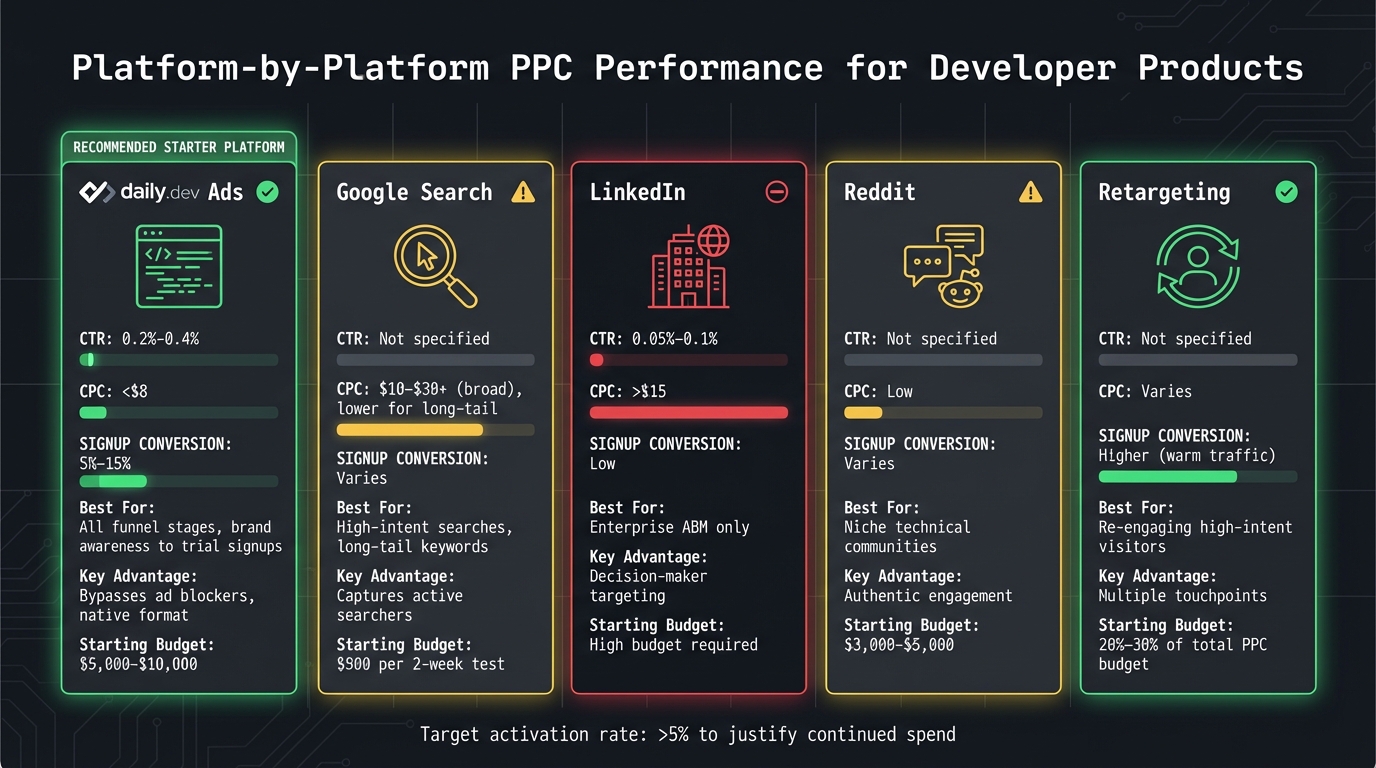 {PPC Platform Performance Metrics for Developer Products Comparison}
When it comes to PPC (pay-per-click) strategies for reaching developers, not all platforms deliver the same results. The best channels are those that align with how developers find tools - whether through technical searches, trusted communities, or native content formats. Here's a breakdown of what works, platform by platform.
daily.dev Ads: Native Formats That Get Around Ad Blockers
daily.dev Ads stands out for its ability to deliver PPC campaigns directly within developers' content feeds and email digests as native posts. This setup bypasses ad blockers, making it highly effective.
The platform offers precise targeting, allowing you to reach developers based on their tech stack, including programming languages, frameworks, and seniority. This minimizes wasted spend on irrelevant audiences. You can expect click-through rates (CTRs) between 0.2%–0.4%, cost-per-click (CPC) under $8, and signup conversion rates of 5%–15%. It works well across the marketing funnel, from building brand awareness to driving trial signups.
To make the most of daily.dev Ads, focus on targeting tech stacks that align with your product. Use screenshots or code snippets in your ads and include clear calls to action like "Try free" or "View docs." Beyond signups, track key actions like the first API call or deployment to measure success. Start with a testing budget of $5,000–$10,000, and if results are promising with activation rates above 5%, scale up to $30,000–$50,000.
Next, let’s look at how Google Search thrives on long-tail keyword strategies.
Google Search: Stick to Long-Tail Keywords
Google Search can be a powerful tool for reaching developers, but only if you avoid broad keywords that attract low-quality traffic and drain your budget. Instead, focus on long-tail keywords that signal high intent, such as "how to build X", "X vs Y", or "X tutorial." These searches often come from users actively looking for a solution.
Manually manage your keywords to avoid ineffective automated suggestions. Start by bidding on your own brand keywords to protect against competitor ads, then branch out into product-specific terms. Avoid spending on keywords where you already rank in the top three organic results. Direct traffic to relevant resources like documentation or tutorials, and use negative keywords to filter out irrelevant clicks. Begin with a small budget - around $500 per two-week experiment - to gather insights before scaling your campaigns.
Once you’ve nailed search strategies, LinkedIn becomes a key player for enterprise-focused efforts.
LinkedIn: Best for Enterprise ABM
LinkedIn is primarily useful for enterprise-level account-based marketing (ABM) campaigns. With CPCs often exceeding $15 and low click-through rates (0.05%–0.1%), LinkedIn's targeting - based on job titles rather than actual tool users - makes it less effective for most developer products. However, for enterprise offerings, it can be a valuable channel.
Use ABM lists to target specific companies and focus on decision-makers like managers and directors. Offer in-depth resources such as research reports or comprehensive guides to attract this audience. Keep in mind that LinkedIn's high costs mean you’ll need a significant budget to see meaningful results.
Reddit: Lead with Value in Promoted Posts
Reddit's developer communities are known for their skepticism toward advertising, but you can succeed with promoted posts if you provide real value. Instead of pitching your product directly, focus on content that solves developers' problems - like tutorials, comparison guides, or free tools.
Target specific subreddits to reach niche technical audiences, and ensure your content feels authentic. Engage in the comments, be open to feedback, and avoid coming across as overly promotional. Testing budgets should range from $3,000 to $5,000. While Reddit offers low CPC, there’s a higher risk of community pushback, so use it as a supplementary channel rather than your primary PPC driver.
Retargeting: Stay on Developers’ Radar
Developers typically need multiple touchpoints before converting, making retargeting a critical piece of any PPC strategy. While traditional retargeting methods can be blocked by ad blockers, daily.dev offers native retargeting formats that re-engage developers who’ve visited your documentation or product pages.
Focus on retargeting high-intent visitors from pages like documentation, pricing, or signups. Offer trials instead of demos, limit impressions to 3–5 per week to avoid oversaturation, and use sequential messaging to guide users from awareness to consideration and trial. Allocate 20%–30% of your PPC budget to retargeting, and track these campaigns all the way to activation to measure their true ROI.
PPC Strategy by Budget and Growth Stage
Your PPC game plan needs to evolve as your budget grows. A strategy that works at $5,000 won't cut it when you're managing $50,000. The trick is to invest in what you know works, instead of scattering funds across too many channels before gathering enough data.
Early Stage: <$10,000 Budget
If you're just starting out, focus 100% of your PPC budget on daily.dev. This single-channel approach helps you validate whether PPC is a good fit for your developer-focused product.
At this stage, your key metric is activation rate. Aim for at least 5% activation to justify continuing your PPC efforts. Keep a close eye on metrics like cost per click (CPC), click-through rate (CTR), signup conversion rates, and - most critically - how many signups actually activate. If you're getting clicks but users aren't engaging with your product, the issue likely lies with your product or onboarding process, not your PPC strategy.
Start with a test budget of $5,000–$10,000. If you can't hit a 5% activation rate after experimenting with targeting and creative, pause your PPC spend. Use that time to refine your product-market fit before putting more money into ads.
Once you achieve consistent activation rates above 5%, you're ready to scale.
Growth Stage: $10,000–$50,000 Budget
After validating your PPC approach, it's time to expand and optimize. At this stage, diversify your channel mix to improve customer acquisition costs (CAC). Here's a suggested split:
- 50% to daily.dev (your proven channel)
- 30% to Google Search, focusing on long-tail keywords
- 20% to retargeting for re-engaging site visitors
Keep a close watch on CAC, your LTV:CAC ratio (aim for greater than 3:1), and activation rates to ensure you're growing sustainably. Track CAC separately for each channel - success on daily.dev doesn't guarantee the same results on Google Search. Developers often take time to make decisions, so use 30–60 day attribution windows to capture their full research process.
Continue testing new ad creatives and landing pages while holding onto high-performing tactics. For example, if daily.dev delivers an 8% activation rate at $6 CPC, keep your budget steady there while you experiment with the other 50%.
Scale Stage: >$50,000 Budget
When you're working with a larger budget, a multi-channel approach becomes essential. Allocate your funds strategically across channels:
- 40% to daily.dev
- 25% to Google Search
- 20% to retargeting
- 10% to developer newsletters
- 5% to LinkedIn ABM (if you're targeting enterprise customers)
Apply the lessons learned in earlier stages to allocate funds efficiently while broadening your PPC reach. Your metrics should now include blended CAC (across all channels), multi-touch attribution (to understand how channels interact), and pipeline contribution (especially for enterprise deals). For instance, a developer might first find you on daily.dev, do further research via Google, and finally convert after seeing a retargeting ad. You need to track this entire journey.
The challenge at this stage is maintaining efficiency as you scale. Monitor each channel's performance individually. For example, if LinkedIn's CAC starts climbing beyond your target while daily.dev remains cost-effective, shift your budget accordingly. Use cohort analysis to understand long-term user behavior - while Google Search might have a higher $12 CPC, those users could show stronger retention, making the cost worthwhile in the long run.
Ad Creative That Converts Developers
When targeting developers, your ad creative needs to deliver clear, technical value right away. Developers are quick to dismiss flashy visuals or vague claims. Instead, they want to see how the product works and understand its value in seconds. If you can’t deliver that, they’ll scroll past without a second thought.
Show Product Screenshots and Code Examples
Developers respond to real, technical visuals like product screenshots, code snippets, and architecture diagrams. These elements grab attention because they demonstrate functionality. On the other hand, generic stock photos of "business professionals" are a surefire way to lose their interest.
For example, if your product automates database backups, show the exact three lines of syntax-highlighted code that make it happen. Include specific metrics like "50ms p99 latency" to back up your claims. Avoid generic phrases like "blazing fast", which do nothing to build credibility.
| Ad Element | What to Avoid | What to Use Instead |
|---|---|---|
| Visuals | Stock photos of "business people" | Product UI screenshots or architecture diagrams |
| Copy | "Revolutionary AI-powered platform" | "Automate PostgreSQL backups in 3 lines of code" |
| CTA | "Contact Sales" or "Request Demo" | "Read the Docs" or "Try the Sandbox" |
| Code | Pseudo-code or generic text | Syntax-highlighted, functional code snippets |
| Focus | Broad marketing benefits | Specific technical pain points and integrations |
By using visuals that show the product in action and including functional code examples, you’ll immediately resonate with your target audience.
Write Clear Value Props and CTAs
Developers want straightforward, no-nonsense messaging. Clearly state what your product does and how it solves specific problems. For instance, "PostgreSQL backups in 3 lines of code" is far more effective than "Simplify your database management." Buzzwords and jargon can erode trust, so stick to concrete language.
Your calls-to-action (CTAs) should reflect how developers prefer to interact with products. Instead of saying "Request demo" or "Contact sales", go with options like "Start free trial", "View docs", or "Try the sandbox." Developers want hands-on access, not a sales pitch. If your ad highlights a specific feature, ensure the CTA leads directly to trying out that feature.
Match Landing Pages to Ad Content
Consistency between your ad and landing page is critical. If your ad mentions Python, the landing page should immediately showcase Python examples. Similarly, if you promise API documentation, don’t make users dig through a demo request form to find it.
Use URL parameters to tailor landing page content based on the ad a developer clicks. For example, an ad targeting React developers should lead to a page with React-specific code samples - not generic ones. This seamless transition shows that you understand their needs and reduces friction, making it easier for them to engage with your product.
Make sure the landing page delivers on the ad’s promise within one click. Developers don’t have the patience to search for the technical details or code examples you advertised. Skip the marketing fluff and lead with the essentials: technical specs, performance metrics, and working examples.
Up next, we’ll dive into how to track these creative elements from the moment a developer clicks to their activation.
How to Measure and Attribute Developer PPC
Clicks and impressions alone won't tell you if your campaign is working. When it comes to developer-focused products, you need to track activation events - key technical actions that show someone is actively engaging with your product. Think beyond landing page visits and focus on metrics like documentation views, CLI tool downloads, API calls, and completed integrations. These milestones are essential for understanding developers' extended decision-making processes and tackling the attribution challenges we’ve discussed.
Now, let's dive into the metrics that truly reflect developer engagement and campaign performance.
Track These Metrics
To get a clear picture of performance, monitor a mix of cost-related and engagement-driven metrics. While standard metrics like CPC and CTR are still important, developer engagement metrics like signup and activation rates are where the real insights lie. Here’s what to track:
| Metric | Target Benchmark | What It Tells You |
|---|---|---|
| Cost Per Click (CPC) | < $8 | Whether you're spending efficiently to drive traffic |
| Click-Through Rate (CTR) | 0.2% - 0.4% | If your ad messaging resonates with developers |
| Signup Conversion Rate | 5% - 15% | How effectively your landing page converts visitors |
| Activation Rate | 20% - 40% | The percentage of signups who start using your product |
| LTV:CAC Ratio | > 3:1 | Whether your campaigns are profitable long-term |
Among these, activation rate is the standout metric. It measures the percentage of signups who take meaningful steps, like making their first API call or deploying an integration. A healthy activation rate falls between 20% and 40%. If it’s below 10%, it’s a sign you may have onboarding issues to address.
Also, keep a close eye on your LTV:CAC ratio. A ratio above 3:1 indicates that your campaigns are driving growth sustainably.
Use 30-60 Day Attribution Windows
Developers rarely convert on their first interaction. On average, they need 5 to 10 touchpoints before signing up, and the entire journey - from signup to activation to driving revenue - can take weeks or even months. If you’re relying on a short 7-day attribution window, you’re likely missing out on many conversions your campaigns are influencing.
To capture the full picture, extend your attribution windows to 30-60 days. This allows you to track how developers move through awareness, activation, and revenue stages over time. Cohort analysis is another valuable tool here - it lets you see how users from different PPC channels perform not just in the first week, but over the long haul.
Ask 'How Did You Hear About Us?'
Attribution data isn’t perfect. Developers often use ad blockers or switch devices during their research, leaving gaps in your tracking. A simple post-signup survey can help fill these gaps. Ask one optional question: "How did you hear about us?" Provide multiple-choice answers to make it quick and frictionless.
This qualitative feedback can validate your attribution data and highlight discrepancies. For example, if 30% of users say they found you through a particular channel, but your analytics only show 15%, it’s a sign your tracking might be incomplete. Surveys can also uncover insights your analytics miss, like users discovering you through a mix of search ads and community recommendations.
Mistakes to Avoid in Developer PPC
Running PPC campaigns for developer-focused products requires a sharp approach to avoid wasting your budget. The most common pitfalls come from misunderstanding developers' needs, casting an overly wide net, and focusing on the wrong metrics. To succeed, your messaging and targeting must align with developers' technical expectations.
Avoid B2C Tactics
Developers are quick to dismiss marketing gimmicks. Phrases like "Limited time offer!" or "Only 3 spots left!" can feel insincere to an audience that prioritizes technical precision over flashy promotions. Tactics that work for consumer products - like countdown timers or fear-based messaging - can erode your credibility with this group.
Instead, lean into technical accuracy. Highlight exactly what your product does with specifics like "50ms p99 latency" or "PostgreSQL backups in 3 lines of code." When it comes to CTAs, replace "Request a demo" with options like "Start free trial" or "View docs." Developers prefer to explore tools independently rather than sit through sales calls. It’s worth noting that B2B tech PPC campaigns already convert at a lower average rate of 1.7% compared to the general benchmark of 2-5% . Using consumer-style tactics only worsens this challenge.
Don't Target Too Broadly
Casting a wide net with keywords like "API" or "cloud" may seem like a good idea, but it often results in wasted ad spend. A React developer, for example, has no interest in a backend monitoring tool, and a Python data scientist won’t click on ads for mobile app frameworks. This kind of broad targeting leads to high costs per click (CPCs), low click-through rates (CTRs), and poor conversions because your ads are reaching people who don’t need your product.
Instead, focus on specific tech stacks and tools that your ideal users work with. If your product is a Kubernetes monitoring tool, target developers who actively use Kubernetes - not just anyone who writes code. This precise targeting not only reduces wasted spend but also improves your ad relevance, which can positively impact your Quality Score and CPCs.
Don't Ignore Activation Metrics
Tracking signups alone provides little insight into the success of your campaigns. A signup doesn’t guarantee that someone will actually use your product. Developers often explore multiple tools before committing to one. If your campaigns are optimized solely for signups, you’re likely spending money on users who never engage beyond creating an account.
To measure true engagement, track activation events such as documentation views, CLI downloads, first API calls, or completed integrations. These metrics give a clearer picture of whether users are genuinely engaging with your product. Aim for an activation rate of 20%-40% among signups. If your rate falls below 10%, the issue may lie with your onboarding process rather than your traffic. Additionally, extend your attribution windows to 30-60 days, as developers often require 5 to 10 touchpoints before making a decision . Shorter attribution windows may miss conversions influenced by your campaigns.
By focusing on precise messaging, targeted outreach, and meaningful activation metrics, you can create PPC campaigns that resonate with developers and deliver better results. The table below outlines common mistakes, why they fall short, and how to improve.
| Mistake | Why It Fails | Better Approach |
|---|---|---|
| B2C Urgency Tactics | Developers value accuracy; "limited time" feels insincere | Highlight technical details and offer free trials |
| Broad Targeting | Reaches irrelevant audiences and wastes budget | Focus on specific tech stacks and frameworks |
| Signup-Only Tracking | Signups don’t guarantee engagement | Track metrics like first API call or completed integration |
Conclusion
Running PPC campaigns for developer-focused products requires a tailored approach. Developers are known for blocking ads and taking longer to convert, so success hinges on understanding and aligning with their unique habits. When done right, PPC can deliver a strong return on investment.
The key is straightforward: engage developers where they're most open to interaction. Platforms like daily.dev Ads avoid common pitfalls like ad blockers and banner blindness by blending seamlessly into developers' content streams. Pairing this with focused tech stack targeting - like promoting React-specific tools directly to React developers - creates a level of relevance that generic ad networks simply can't achieve. This method not only grabs attention but also enables precise, technical messaging that resonates.
Your creative execution and measurement strategy are just as critical as the platform you choose. Highlight specific technical details - for example, "50ms p99 latency" - rather than relying on vague buzzwords. Measure success with activation metrics such as first API calls or completed integrations. As Charles Cook from PostHog points out, paid ads should complement other marketing efforts, not dominate them. PostHog dedicates just 10% of their marketing time to ads, with over 80% focused on content creation . This shows that PPC is most effective as part of a broader, well-rounded strategy.
Prioritize long-tail, high-intent keywords on Google Search instead of costly, broad terms. Use longer attribution windows, like 30–60 days, to account for developers' extended decision-making processes. Split your budget evenly between awareness and conversion campaigns. And because developers often ignore ads, qualitative feedback, such as "How did you hear about us?" surveys, can be invaluable for proving ROI .
Start small with $500–$1,000 two-week tests to identify what resonates . Once you discover the winning formula - whether that's native ads, long-tail keywords, or content that provides real value - scale up only after confirming activation and technical credibility. By aligning your PPC strategy with how developers think and behave, you ensure every dollar is spent effectively.
FAQs
What activation event should I optimize for?
Optimizing for the first API call or deployment/integration as the activation event is crucial. Developers tend to do extensive research and often need several touchpoints with your brand before making a decision. By focusing on this milestone, you’re measuring genuine engagement rather than superficial interactions.
How do I choose long-tail keywords that show real intent?
When planning your keyword strategy, it's smart to focus on specific, high-intent queries like "how to build X" or "X vs Y." These types of searches are made by users who are actively researching solutions and are likely closer to making a decision.
On the flip side, avoid targeting broad terms like "API" or "dev tools." While these might seem appealing, they often come with high costs and attract lower-quality traffic. By zeroing in on high-intent keywords, you’re more likely to connect with users who are ready to engage in a meaningful way.
How can I attribute PPC when developers take weeks to convert?
To properly attribute PPC for developers dealing with long conversion cycles, it’s important to go beyond just tracking clicks. Focus on monitoring key actions such as API calls, deployments, or integrations - these are often critical milestones in the developer's journey.
Additionally, cohort analysis can provide valuable insights by following users from their initial signup through activation and eventually to revenue generation. This allows you to see how different groups progress over time.
Don’t overlook the power of surveys either. Asking users how they discovered your product can fill in gaps and provide context that data alone might miss. Together, these methods help you capture the entire journey and ensure your attribution is as accurate as possible.