

Building an open source project is only half the battle - getting people to notice and contribute is the real challenge. Here's the truth: without promotion, your project risks going unseen. This guide provides a 30-day plan to help you launch effectively, attract users, and grow a community. From polishing your GitHub repository to coordinating a multi-platform launch, every step is covered to ensure your project gets the attention it deserves.
Key Takeaways:
- Pre-Launch Preparation: Optimize your GitHub repository with a clear README, demo visuals, and contributor-friendly labels. Build initial buzz by engaging with niche communities and influencers.
- Launch Day Strategy: Post on platforms like Hacker News, Reddit, and Twitter during peak hours (Tuesday–Thursday, 8–10 AM PT). Tailor your messaging for each platform to maximize engagement.
- Post-Launch Momentum: Respond to feedback promptly, publish tutorials or comparison articles, and identify ways to improve based on user input.
- Sustained Growth: Create integrations, produce weekly content, and engage directly with your audience to maintain interest and attract contributors.
Pro Tip: Timing and community interaction are crucial. A well-timed launch and active engagement can drive thousands of views, stars, and contributions.
Follow this plan to ensure your open source project stands out in a crowded ecosystem.
::: @figure 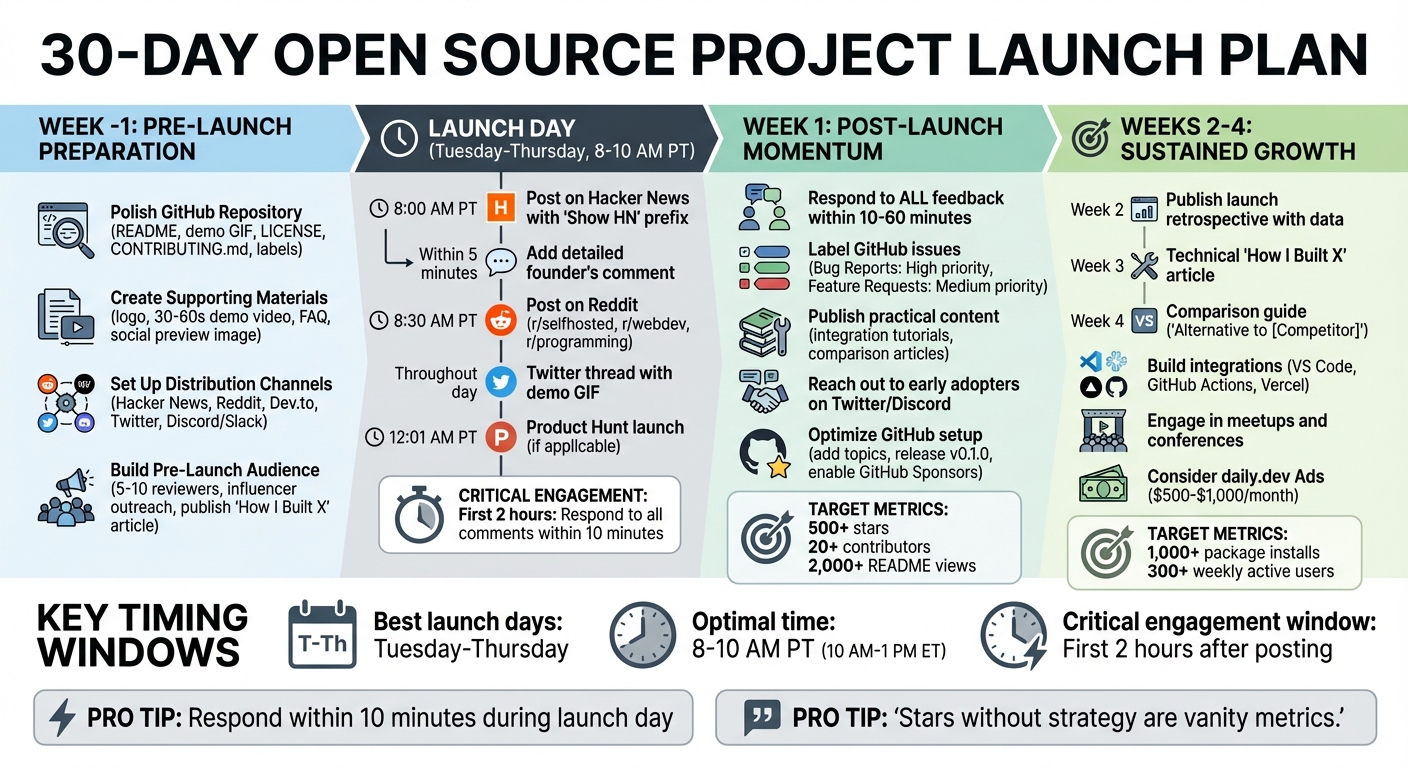 {30-Day Open Source Project Launch Timeline and Checklist}
Pre-Launch Week: Preparing Your Project
The week leading up to your launch is all about setting the stage for success. It’s not about obsessing over every detail but ensuring that your first visitors immediately grasp what your project does and why it matters. Think of your GitHub page as your landing page, your supporting materials as your pitch, and your distribution channels as the megaphone to amplify your message.
Polish Your GitHub Repository
Your GitHub repository is often the first impression people get of your project, so make it count. Start with a README that clearly explains what your project does, how to use it, and the license it operates under. Open with a one-line description that positions your tool effectively - something like "Open source alternative to X" can instantly provide context . Enhance this with a demo GIF or screenshot that showcases your project in action. For CLI tools, tools like Terminalizer or Asciinema can help you create clean recordings.
Be sure to include:
- A LICENSE file (popular options include MIT, Apache 2.0, or AGPL-3.0).
- A
.gitignorefile to keep your repository clean. - A
CONTRIBUTING.mdfile to guide new contributors. - Labels like "Help wanted" and "Good first issue" to encourage collaboration.
- Repository Topics for better discoverability.
- Shields.io badges showing build status, license type, and download counts .
Keep installation instructions simple - ideally, a single command like npm install project-name should stand out. If your project competes with existing tools, include a comparison table with stats and features. Hard data is much more convincing than marketing fluff. For instance, Ciphey used detailed comparison tables and GIFs to highlight its advantages over competitors like CyberChef, which helped it gain traction and attract contributors .
Once your repository is polished, it’s time to create materials that make your project stand out.
Create Supporting Materials
Visuals and concise messaging can spark interest quickly. Design a logo using a template that’s visually appealing and pairs well with your project’s slogan for instant recognition . Refine your one-liner until it’s sharp and memorable. Don’t forget to add a social preview image to your GitHub repository - this is what people see when your link is shared on platforms like Twitter or LinkedIn.
"Talk is cheap. Show me the code." – Linus Torvalds
Create a 30–60 second demo video with captions to showcase real-world usage . Also, draft an FAQ section that answers common questions about installation, compatibility, and use cases. If your project has a commercial tier, be transparent about the differences between the free and paid features - this builds trust early on .
These materials will form the backbone of your distribution efforts.
Set Up Distribution Channels
Focus on platforms where developers hang out. These include:
- Hacker News ("Show HN")
- Relevant subreddits like r/selfhosted, r/webdev, r/programming, or r/sideproject
- Dev.to
Update your Twitter profile with a bio that clearly communicates what you’re building. Join Discord or Slack communities relevant to your niche to share your launch and provide support.
For Hacker News, prepare an opening comment that outlines your motivation, technical stack, current limitations, and the kind of feedback you’re looking for. This acts as an FAQ and sets the tone for the discussion. For Reddit, tailor your posts to match each community’s rules. Timing is crucial - on Hacker News, the first 30–60 minutes after posting are critical for visibility.
Setting up these channels now ensures a strong launch and continued engagement afterward.
Build a Small Pre-Launch Audience
Start building buzz by sharing your progress and technical insights on social media. Reach out to 5–10 trusted friends or colleagues to review your README, landing page, and initial posts. Their feedback can help you catch confusing language or gaps in information.
Introduce your project to key influencers in your niche a few weeks before launch. Additionally, consider publishing a "How I built X" article on platforms like Dev.to or Hashnode 1–2 days before launch. This ensures your content is indexed by search engines and visible on platforms like Google Discover when traffic peaks. For example, in February 2025, Eason, the founder of Usertour, used this approach. By sharing progress on r/selfhosted and r/webdev before posting a "Show HN" on Hacker News, they earned over 1,200 GitHub stars within three months .
sbb-itb-e54ba74
Launch Day: Coordinated Multi-Platform Push
Launch day is all about timing and strategy. It’s the bridge between all your pre-launch efforts and the critical first week of momentum. The first two hours are especially crucial - this is when early engagement can drive algorithmic visibility and set the tone for your launch .
Choose the Right Launch Time
Timing is everything. Aim to launch between Tuesday and Thursday, ideally from 10:00 AM to 1:00 PM ET (7:00 AM to 10:00 AM PT). This window aligns with peak activity for developers while avoiding the chaos of Mondays and the slower traffic of Fridays and weekends. If Hacker News is part of your plan, prioritize an 8:00–10:00 AM PT slot to tap into their busiest hours.
For Product Hunt, start at 12:01 AM PT to take advantage of the platform’s full 24-hour voting cycle. This means you’ll juggle an overnight Product Hunt launch alongside your morning posts on Hacker News and Reddit.
Once you’ve nailed down your timing, it’s time to adapt your strategy for each platform.
Platform-Specific Launch Strategies
Each platform has its own quirks and audience preferences. Understanding these nuances can make or break your launch.
Hacker News: Use the "Show HN" prefix in your title and focus on the problem your project solves - skip the clickbait. Within five minutes of posting, follow up with a detailed founder’s comment. This should explain your motivation, the tech stack you used, current limitations, and the feedback you’re looking for. Think of it as an FAQ that also shows your dedication to engaging with the community.
Reddit: Frame your post as "I built X to solve Y" instead of a generic promotional pitch. Find niche subreddits like r/selfhosted, r/webdev, or r/programming that match your audience. Tailor your tone to each subreddit’s culture, and don’t forget visuals - screenshots or a demo GIF can go a long way in earning credibility.
Twitter: Use a thread format to tell your story. Start with a hook that introduces your project, explain the problem you’re solving, and showcase your solution with a demo GIF. End with a clear call-to-action. Tag relevant accounts and developers, but keep it genuine - nobody likes spam.
Dev.to and Hashnode: Share a technical blog post titled something like "How I built X." Dive into your architecture, challenges, and lessons learned. Publish this 1–2 days before your launch so it’s already indexed and ready for the spike in traffic.
By tailoring your approach for each platform, you can maximize engagement and make a stronger impression.
Coordinate Your Launch Sequence
The key to a smooth launch is a well-structured rollout. Start with Hacker News as your anchor. Once your post is live and your founder’s comment is up, move to Reddit about 30 minutes later. This staggered timing helps you manage feedback without being overwhelmed and keeps your project visible throughout the day. On Twitter, maintain activity by sharing updates, responding to mentions, and amplifying posts from others discussing your launch.
Engagement is critical - respond to comments within two hours to show you’re active and invested. This not only builds goodwill but also boosts your post’s visibility in algorithms. For instance, when the browser extension Sidekick launched in 2026, the founder personally answered over 100 questions on Hacker News, acknowledged technical limitations, and kept the discussion going. This effort led to 487 upvotes, over 120 comments, and 2,000 signups within just 48 hours .
"Stars without strategy are vanity metrics. Stars with intent are business drivers." – Iris, former COO, AFFiNE
Avoid trying to game the system with mass-upvoting; platforms are quick to flag manipulation. Instead, ask 10–20 trusted colleagues to engage authentically. Lastly, make sure your landing page or demo can handle a traffic surge. Use reliable monitoring tools to catch any downtime immediately.
Week 1: Maintain Post-Launch Momentum
The first week after launch is crucial for turning initial excitement into ongoing interest. This is the time to show that your project is here to stay. The buzz from launch day can fade quickly, so the focus now should be on engaging with your audience, providing actionable content, and refining your project based on feedback.
Respond to All Feedback
Answer every GitHub issue, social media comment, and community question during this week. It’s more than just good etiquette - it signals that your project is alive and well. During the first few days, aim for the 10-minute rule, where you respond to comments within 10 minutes whenever possible. Ignoring feedback can hurt your visibility in discovery feeds .
Take Steven Tey’s launch of Dub.co as an example. This open-source link management tool gained massive traction by responding to all 210 comments on launch day. The result? 1,085 upvotes, a spot as #1 Product of the Day, Week, and Month, and 663 new signups in one day - eight times the usual daily average .
Engage with your audience by asking follow-up questions like, “What feature would improve your experience?” This not only deepens the interaction but also helps you identify patterns in feedback. For example, recurring GitHub issues can guide your immediate development roadmap . Engaged users are far more likely to become loyal contributors or even paying customers .
"Time is finite, we only get one life, so value those people who are willing to spend some of their precious resources on you." – Aaron Francis, Maintainer of Sidecar
Here’s a quick guide to prioritizing feedback:
| Feedback Type | Priority | Recommended Action |
|---|---|---|
| Bug Reports | High | Acknowledge quickly; tag as "Good First Issue" if simple |
| Launch Comments | High | Reply within 10-60 minutes to keep momentum |
| Feature Requests | Medium | Look for recurring themes to shape your roadmap |
| General Praise | Low | Thank them and ask about their use case |
Once you’ve addressed the immediate feedback, shift your attention to creating content that highlights the practical value of your project.
Publish Practical Content
To keep the momentum going, produce content that shows users how to solve real problems with your project. Think integration tutorials, comparison articles, and architecture deep-dives. Instead of just announcing features, focus on creating "how-to" guides. For instance, use tools like Terminalizer or Asciinema to make GIF demos for command-line tools, and screencast the setup process for web-based projects.
Content that demonstrates practical usage - like side-by-side comparisons with benchmarks or real-world examples - can drive adoption more effectively than just listing features. For example, every minor release (like v0.1.4) is an opportunity to share updates. Pair a concise changelog with a demo video and share it on platforms like r/selfhosted or r/reactjs. These updates can reignite interest and attract new users .
Reach Out to Early Adopters
Directly connect with developers who might benefit from your project. Search Twitter for complaints or frustrations related to the problem your project solves, and introduce your solution. Join relevant Discord servers or Slack communities, but focus on providing value rather than self-promotion.
"It might be intimidating at first to interact with people you don't know, but you have to do it if you want to grow." – Segun Adebayo, Maintainer of Chakra UI
Ask potential users about their specific use cases. Their feedback can uncover edge cases, help you prioritize features, and build relationships with future power users or contributors. During this first week, spend about 80% of your time building and 20% on community management, gradually shifting to a 50/50 split as your project grows .
Optimize Your GitHub Setup
Use the feedback from your launch to fine-tune your GitHub repository. Add relevant topics and tags to improve discoverability in GitHub search. Even if your project is still in its early stages, releasing version 0.1.0 signals that you’re serious about maintaining it. If you’re open to donations, enable GitHub Sponsors, and set up CI/CD pipelines (e.g., GitHub Actions or CircleCI) to automate testing and builds.
Update your README to address common questions from launch feedback. If users had issues with installation, add troubleshooting tips. If they asked for comparisons, include performance metrics or feature advantages . Tools like all-contributors can publicly recognize contributors, encouraging more participation .
"If you find it's hard to document a particular feature, that's probably a sign that it's too complicated and you need to simplify it." – Aaron Francis, Sidecar maintainer
Projects with over 1,000 stars tend to attract more corporate interest and sustained contributions . While hitting that milestone may not happen this week, the groundwork you lay now will make it achievable in the future. By optimizing your repository and engaging with your community, you’re setting your project up for long-term success.
Weeks 2-4: Build Sustained Growth
After getting that initial buzz, the next step is to make your project a lasting part of the community and everyday workflows. The focus here is on turning the excitement of your launch into steady, long-term growth. This means producing consistent content, creating integrations for platforms like VS Code, GitHub Actions, or Vercel, and expanding your network beyond your immediate circle. The idea is to shift the narrative from "new kid on the block" to "we're here for the long haul."
Create a Content Schedule
Commit to publishing one targeted blog post each week, focusing on real-world use cases. For Week 2, consider writing a launch retrospective. Share raw data - traffic sources, conversion rates, and lessons learned. For example, Tally, a no-code form builder, gained 695 upvotes during its 2021 launch and doubled its user base. By 2023, they surpassed 1,000 upvotes and tripled their weekly signups .
In Week 3, dive into the technical side with a "How I Built X" article. Then, in Week 4, create a comparison guide aimed at "Alternative to [Competitor]" search queries. These high-intent keywords are gold for attracting developers actively seeking new tools. Share your posts on platforms like Dev.to, Hashnode, and Medium to improve visibility and indexing. Pair these articles with short demo videos or screencasts to cater to different learning preferences. This steady flow of content not only builds engagement but also sets the stage for discussions and integration launches.
"One of the biggest mistakes I see is the use of too much technical terminology... what people really care about is why they should use it." – Segun Adebayo, Maintainer, Chakra UI
Build Integrations and Partnerships
Creating plugins or extensions for platforms like VS Code, GitHub Actions, or Vercel can make adoption easier and boost your project's visibility. These integrations can be showcased in platform-specific marketplaces, such as the VS Code Marketplace or the GitHub Actions directory. Use the launch of these integrations as an opportunity to re-engage your community. Additionally, submit your project and integrations to curated "Awesome Lists" and open-source directories to improve SEO.
A great example of this approach is Eason's Usertour, a developer-focused product tour builder. Launched in February 2025, it gained over 1,200 GitHub stars in just three months. The secret? Clear documentation and active community involvement .
While technical integrations can expand your project's reach, the real key to long-term success lies in building a strong and engaged community.
Engage with the Developer Community
Get involved in local meetups, pitch talks at conferences (even short lightning talks can make an impact), and collaborate with developer advocates for guest posts or podcast appearances. Sharing the journey of your project - complete with its challenges and behind-the-scenes moments - adds a personal touch that resonates with others. On GitHub, label beginner-friendly tasks as "Good first issue" to encourage new contributors. Projects with over 1,000 stars often see sustained contributions and even attract corporate interest .
Consider daily.dev Ads for Targeted Reach
Once you've built some organic traction (solid documentation, 50+ stars, and real-world use cases), daily.dev Ads can help amplify your growth. With a reach of over 1.6 million developers, this platform allows for precise targeting based on tech stack, seniority, and programming languages. Their native ad placements blend seamlessly into content feeds, ensuring visibility without being intrusive. Budgets start at $500–$1,000 per month, making it an accessible option for projects with limited funding. Use daily.dev Ads to complement the momentum you've already built through content and integrations.
When to Use Paid Promotion
Paid promotion can be a powerful tool, but timing is everything. It works best as a way to amplify proven organic growth, not as a shortcut to success. Before you invest in paid campaigns, make sure your project already has solid traction.
Key Milestones to Hit Before Investing
Paid campaigns should only come into play once your project has demonstrated real user interest and engagement. Here’s what you should have in place before scaling with paid promotion:
- Version 0.5+ stability: Your project should be stable and supported by detailed documentation.
- 50+ organic GitHub stars: This signals genuine interest from the community.
- 3–5 documented use cases: Real-world examples from actual users show the project’s value.
- An active community: Regular interaction, such as responses to pull requests and issue resolutions, is essential.
"Paid acquisition without organic validation is burning money. Prove value with real users before scaling." – Iris, Former COO, AFFiNE
Take Vince’s example: he focused on organic strategies for OpenSaaS.sh, growing it to 6,000 GitHub stars before incorporating paid promotion .
Budget Guidelines for Paid Campaigns
Once you’ve hit these milestones, you can start exploring paid promotion. Here’s a breakdown of typical budgets and their goals:
- $500–$1,000/month: Use platforms like daily.dev Ads or developer-focused newsletters to grow visibility and build an early community.
- $2,000–$5,000/month: Expand to multi-channel campaigns aimed at increasing package installs and driving engagement on platforms like Discord and Slack.
- $8,000+/month: Focus on broader awareness and deeper engagement, especially for projects targeting enterprise or commercially-backed audiences .
Plan your budget over 60 days:
- 35% for community growth (focus on early weeks).
- 40% for adoption and integrations (mid-campaign).
- 25% for commercial conversions (later stages).
Active community members are five times more likely to convert to paid plans compared to passive users .
Common Paid Promotion Pitfalls to Avoid
When using paid promotion, it’s just as important to know what not to do. Avoid these mistakes:
- Spamming communities: Developers value genuine interaction, not aggressive self-promotion.
- Buying fake metrics: Paying for GitHub stars or engagement undermines your credibility.
- Purchasing email lists: This breaches trust and often violates platform rules.
- Restricting access to key resources: Open source thrives on accessibility, so don’t gate documentation or features behind lead capture forms.
Common Launch Mistakes to Avoid
When you're gearing up for a launch, knowing what to sidestep can make all the difference. Even the most promising open source projects can falter due to avoidable missteps. These blunders usually fall into three main areas: technical setup, marketing execution, and community management.
Technical Setup Mistakes
Think of your GitHub repository as your project's front door - it needs to make a strong first impression. A great README should include a concise one-line description, visuals like GIFs or screenshots, and code examples that showcase immediate value. Skipping these essentials can hurt your credibility. In fact, poor documentation is one of the top reasons developers lose interest in open source projects .
Another common error is spending too much time perfecting features before launch. Instead of waiting for a flawless product, focus on releasing a testable MVP (Minimum Viable Product) to gather early feedback and validate your idea . Also, failing to tag beginner-friendly tasks can discourage new contributors from getting involved.
Marketing Execution Mistakes
Timing is everything when it comes to launching. If you release your project on a Friday afternoon or in the middle of the night (Pacific Time), it’s likely to get lost in the shuffle . For better visibility, aim to launch on Tuesday or Wednesday mornings between 7:00 AM and 10:00 AM Pacific Time, especially on platforms like Hacker News and Reddit .
Another pitfall? Overloading your messaging with jargon or buzzwords. Developers want straightforward answers: What does your tool do, and why should they care? Avoid "drive-by promotion", where you drop a link and vanish - this gives the impression that your project is inactive or that you're not open to feedback . On platforms like Hacker News, clear and honest titles tend to perform better than clever or clickbait-style alternatives .
But even with a solid technical foundation and clear messaging, how you engage with your community can make or break your launch.
Community Management Mistakes
Early feedback is a gift - how you respond to it can determine your project's trajectory. Reacting defensively to criticism is a quick way to alienate potential supporters. Instead, thank people for pointing out issues and ask for more details. This approach fosters collaboration rather than conflict .
"Time is finite, we only get one life, so value those people who are willing to spend some of their precious resources on you." – Aaron Francis, Maintainer, Sidecar
Ignoring early feedback, even if you can't address it immediately, can signal that your project is unmaintained. Acknowledging input within 24 to 48 hours shows that you're engaged and serious about your project . Also, don’t underestimate the value of non-code contributions. Whether it's better documentation, design tweaks, or community support, these efforts can significantly boost your project's growth. Interestingly, active community members are five times more likely to convert to paid or enterprise tiers compared to passive users .
Your 30-Day Launch Checklist
Here’s a streamlined 30-day action plan to help you execute your launch effectively while tracking usage, contributions, and engagement.
Week –1 (Pre-Launch):
Get your GitHub repository in top shape. Update the README with a concise one-liner about your project, a demo GIF, and detailed installation instructions. Add CONTRIBUTING.md and CODE_OF_CONDUCT.md to encourage collaboration. Set up spaces for community interaction, like Discord or GitHub Discussions, and pick a permissive license (MIT or Apache 2.0 are great options).
Launch Day (Tuesday–Thursday, 8–10 AM PT):
Kick things off on Hacker News with a "Show HN" post - be sure to add a detailed comment within five minutes of posting. About 30 minutes later, share your project on Reddit (try subreddits like r/programming or r/selfhosted) and start a Twitter thread to keep the conversation going.
Weeks 1–4 (Post-Launch):
Respond to all feedback within 24–48 hours to show you're actively maintaining the project. Label issues as "Good First Issues" to attract new contributors. Publish a technical blog post each week showcasing real-world use cases for your project. AFFiNE’s journey from 0 to 33,000 GitHub stars between 2022 and 2024 is a great example of how a structured launch and distribution plan across 50+ channels can drive success .
Measure Success After 30 Days:
Set clear goals to evaluate your progress. Aim for:
- 500+ GitHub stars
- 20+ contributors
- 2,000+ README views
By week 4, target 1,000+ package installs and 300+ weekly active users. Hitting at least two out of these three key metrics - usage, contributions, or community engagement - indicates that your project has found product–market fit.
"Stars without strategy are vanity metrics. Stars with intent are business drivers." – Iris Carrot, Former COO, AFFiNE
This checklist serves as your guide to monitor progress and refine your approach for even greater success.
FAQs
When should I launch my open source project?
When you're ready to launch your open-source project, aim for a v0.5+ stage. At this point, your project should include solid documentation, a clear value proposition, and a functional prototype or MVP. This way, it's prepared to attract meaningful feedback and encourage adoption.
Do I need Product Hunt for an open source launch?
Product Hunt isn’t a must for launching an open-source project, but it can give your project a boost in visibility and generate backlinks. That said, only a small fraction of launches actually get featured on the platform. Those that do, however, often experience a noticeable spike in traffic and engagement.
If your project is a library or CLI tool, platforms like Hacker News or Reddit might be better suited for reaching your target audience. These communities often have a more engaged and relevant user base for such tools.
What if my launch flops?
If your launch doesn’t go as planned, don’t stress - this happens more often than you might think. Use it as a chance to learn. Take time to figure out what didn’t work, adjust your documentation, tweak your outreach strategy, and stay connected with your audience. The key is to focus on delivering value and gradually building momentum. Success often comes from consistent, steady effort over time.