

Tracking developer ads is tricky. Problems like incomplete data, API updates, mismatched metrics, and privacy restrictions can ruin campaigns and waste budgets. Fixing these issues means setting up accurate tracking, integrating first-party data, and using hybrid methods like server-side tracking to bypass blockers. Platforms like daily.dev Ads simplify this by offering precise targeting and real-time metrics for developer audiences.
Key Takeaways:
- Common Problems: Incomplete data, integration errors, and metric discrepancies.
- Fixes: Use Google Tag Manager, hybrid tracking (client + server), and audit pipelines.
- First-Party Data: Connect CRM data for better attribution.
- Best Practices: Automate monitoring, avoid hardcoding, and normalize data early.
- Platform Solution: daily.dev Ads targets developers accurately with real-time feedback.
These strategies ensure better tracking accuracy and campaign performance.
Common Data Problems in Developer Ad Tracking
Developer ad campaigns often face several data-related challenges that can drain budgets and distort performance metrics. Below, we’ll break down the most common issues, from incomplete data to integration errors and real-time tracking discrepancies.
Incomplete Data and What Causes It
One major challenge for developers is incomplete data, which can stem from a variety of sources:
API updates can wreak havoc on data integrity. For instance, when platforms like Google or Meta update their APIs - such as deprecating fields or changing authentication requirements - it can break tracking systems unexpectedly. A notable example occurred in February 2026 when Google Ads API changes caused
REQUIRED_FIELD_MISSINGerrors due to the omission of thenamefield inad_grouprequests. Often, these issues go unnoticed until conversion tracking stops working entirely.Configuration errors are another culprit. Even when APIs are functioning correctly, misconfigured settings - like mismatched attribution models, unintended filters, or incorrect tracking setups - can result in fragmented or missing data. Testing with small, controlled datasets (e.g., a single customer ID) can help pinpoint whether the issue is a temporary bug or a setup mistake.
Data silos also present a challenge, especially in fast-moving, agile teams. When teams collect and manage data in isolation, it can lead to poor communication, redundant efforts, and ultimately, flawed decision-making.
Integration Errors Between Platforms
Integration issues between platforms can further complicate tracking efforts:
OS-level privacy restrictions often interfere with tracking. For example, in September 2023, developers using the Google Mobile Ads Unity Plugin on iOS 16.6 reported ad load failures with the error "Error Code 1: No ad to show" when users denied App Tracking Transparency (ATT) permissions. This wasn’t a bug but a direct result of stricter privacy controls.
Script optimization tools can unintentionally block essential tracking scripts. Publishers using services like Ezoic’s script optimizer encountered
advads_tracking_methods is not definederrors because necessary tracking code was removed. Similarly, JavaScript optimization plugins like WP Rocket or Autoptimize can block tracking scripts unless they are manually whitelisted.Platform quotas can impose hard limits on tracking. For instance, Google Analytics limits events to 500 per session and 20 per page load. High-intensity tracking - like eCommerce or video tracking - can exceed these quotas, causing ad impressions to go unrecorded. Additionally, ad blockers, which are used by 20% to 60% of website visitors, can further reduce the accuracy of recorded impressions.
Real-Time Tracking Discrepancies
Even when systems appear to function properly, discrepancies in real-time tracking can create confusion:
Methodological differences between platforms can skew data. For example, Google Ads attributes conversions to the day of the ad interaction (click or impression), while third-party analytics tools log conversions by the day the event occurred. These differences make it difficult to compare daily performance metrics.
Processing latency means that "real-time" data is rarely instantaneous. Conversion data might take hours - or even up to 24 hours - to appear in dashboards. Gartner estimates that bad data costs U.S. companies at least $12.9 million annually, with organizations experiencing around 400 data incidents per year. This results in 2,400 hours of data downtime and over $2.6 million in operational losses.
Attribution model conflicts can inflate conversion totals when multiple platforms claim credit for the same event. For example, one platform might use a 7-day click attribution model, while another relies on last-click attribution. Additional factors like time zone mismatches, differences in bot traffic filtering, and the higher likelihood of developer audiences using ad blockers or privacy-focused browsers can further exacerbate these discrepancies. These inconsistencies make it harder to make timely, data-driven decisions and optimize campaigns effectively.
Addressing these challenges is critical to improving tracking accuracy and campaign performance, which we’ll explore in the next section.
sbb-itb-e54ba74
Practical Solutions to Developer Ad Tracking Problems
::: @figure 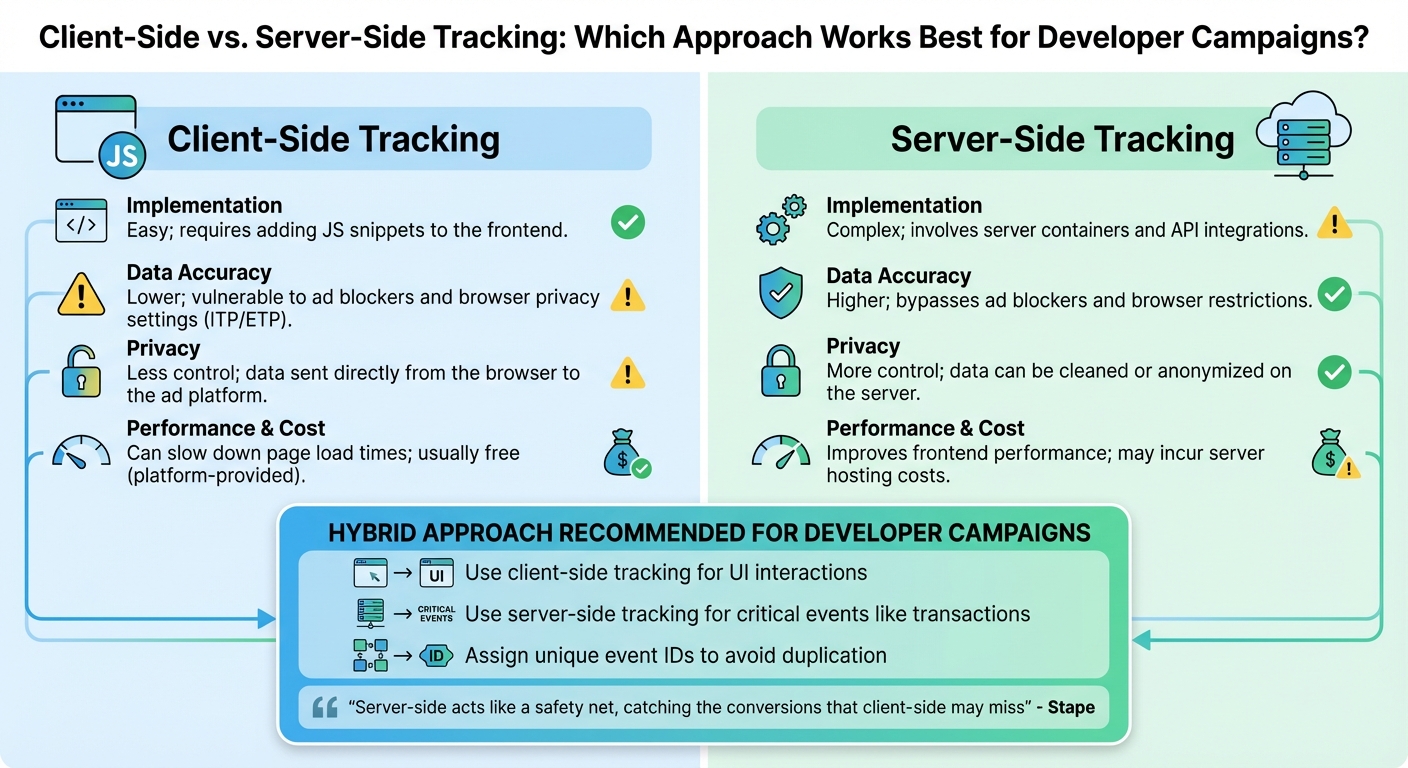 {Client-Side vs Server-Side Ad Tracking Comparison for Developers}
When you know what's causing your tracking issues, fixing them becomes much simpler. The trick lies in setting up the right technical framework, selecting the best tracking method, and properly linking your first-party data sources.
Setting Up Accurate Tracking for Developers
Start by installing gtag.js or Google Tag Manager (GTM) in your site's header to ensure the tracking code loads on every page. Use event-based tracking - like window.gtag('event', 'conversion') - to capture key actions such as purchases or sign-ups. To avoid duplicate tracking, include a unique transaction_id in purchase events.
For better attribution, use middleware to capture GCLIDs from URL parameters and store them in a first-party cookie or localStorage. Google suggests keeping GCLIDs for up to 90 days to ensure they’re available for conversion tracking later . If you're working with Next.js, a lightweight solution involves using middleware to grab the GCLID from searchParams, set it in a cookie, and redirect users to a clean URL .
Add ValueTrack parameters - like {campaignid}, {device}, and {keyword} - to your tracking templates for more detailed insights. When setting up these templates in Google Ads, always place {lpurl} at the start to avoid breaking landing page URLs due to incorrect character encoding. Replace spaces with %20 or hyphens to ensure compatibility .
To comply with privacy regulations, integrate a Consent Management Platform (CMP) and enable Consent Mode to adjust tracking behavior based on user preferences. For example, you can set ad_storage to 'denied' for users who opt out. Additionally, activate Enhanced Conversions by sending hashed first-party data (like email addresses or phone numbers) with conversion events. This step helps ad platforms match user interactions more accurately, even when cookies are unavailable.
Once your tracking is in place, compare tracking methods to determine the best fit for your developer campaigns.
Client-Side vs. Server-Side Tracking: A Comparison
After installing the basics, it's time to weigh the two main tracking approaches. Client-side tracking uses JavaScript tags in your website to collect data directly from the browser. It’s simple to implement but can be blocked by ad blockers or browser privacy features like Safari's Intelligent Tracking Prevention (ITP). On the other hand, server-side tracking moves data collection to your server, where it’s processed and enriched before being sent to analytics platforms.
Because developers often use ad blockers, client-side tracking alone can result in data gaps. A hybrid strategy - combining both methods - can improve accuracy. Server-side tracking works around browser-level restrictions, making it a reliable option. As Joe Maurer from Matomo explains:
Server-side tracking typically classifies cookies as first-party data, which is less susceptible to blocking by browsers and ad blockers .
Here’s a quick comparison of the two approaches:
| Feature | Client-Side Tracking | Server-Side Tracking |
|---|---|---|
| Implementation | Easy; requires adding JS snippets to the frontend | Complex; involves server containers and API integrations |
| Data Accuracy | Lower; vulnerable to ad blockers and browser privacy settings (ITP/ETP) | Higher; bypasses ad blockers and browser restrictions |
| Privacy | Less control; data sent directly from the browser to the ad platform | More control; data can be cleaned or anonymized on the server |
| Performance & Cost | Can slow down page load times; usually free (platform-provided) | Improves frontend performance; may incur server hosting costs |
For developer campaigns, a hybrid approach works best. Use client-side tracking for UI interactions and server-side tracking for critical events like transactions. To avoid duplication, assign unique event IDs when using both methods. As Stape puts it:
Server-side acts like a safety net, catching the conversions that client-side may miss .
Using First-Party Data Integration
Once your tracking is solid, take it further by integrating first-party data. This can significantly improve attribution by connecting ad clicks to backend events. For example, the Google Ads API lets you upload "Offline Conversions" by matching stored GCLIDs from your CRM with backend events, such as a lead becoming qualified . This helps ad platforms see the full value of a lead beyond the initial click.
To streamline this process, consolidate data from multiple sources - CRMs, internal databases, and ad platforms - into a single data warehouse. Assign data stewards to create a shared data language so both marketing and engineering teams can interpret metrics consistently. Use a data dictionary to document column purposes and business terms, ensuring CRM data is correctly mapped to ad campaign IDs.
For real-time data transfers, rely on integration platforms that ensure exactly-once semantics to avoid duplicates or missing data. Modern platforms can handle large volumes - some process up to 7 GB/s with latencies under 100ms . Use Change Data Capture (CDC) to load data incrementally as changes occur in source systems. This strategy avoids overwhelming your infrastructure and reduces risks of timeouts, unlike bulk processing. By breaking data into smaller, manageable segments, you maintain high performance while ensuring real-time tracking accuracy.
Best Practices for Reliable Data Integration
Once your tracking system is in place, the work doesn't stop there. Keeping your data accurate and dependable requires ongoing audits, automated monitoring, and vigilance to prevent small errors from snowballing into major issues.
Auditing and Monitoring Data Sources
Regular audits are your first line of defense against data drift. Schedule routine checks to ensure data pipelines are running on time without delays or bottlenecks that could disrupt your data flow . When you're dealing with large volumes of data, even minor inefficiencies can quickly escalate.
Automated alerts are essential. These systems notify your team the moment something breaks, allowing you to resolve issues quickly and avoid data gaps . Validate your data for accuracy and consistency right after it's collected - before it moves into downstream systems. This step ensures bad data doesn't contaminate your entire database .
Evaluate your data quality across six key dimensions: completeness, consistency, conformity, accuracy, integrity, and timeliness . Tracking data lineage - understanding where your data comes from, how it's been transformed, and where it's stored - makes it easier to debug discrepancies . For ad tracking, include summaries of filtered rows to see how much data is excluded due to privacy constraints . Also, avoid querying "today's data" in ad platforms, as incomplete processing can lead to missing information .
Avoiding Common Integration Mistakes
Once your audits are in place, focus on sidestepping common pitfalls that can derail your data integration efforts. For example, hardcoding API endpoints or credentials isn't just risky - it can lead to broken integrations when moving between development, staging, and production environments. Instead, store API keys and endpoints using environment variables or centralized configuration files. This approach keeps your integrations secure and adaptable.
Another frequent mistake is neglecting error handling. Without it, network issues or API rate limits can cause silent data loss. Build systems with failure in mind by adding automated retry logic and detailed logging.
Neal Ford put it best:
Computers are designed to perform simple, repetitive tasks. As soon as you have humans doing repetitive tasks on behalf of computers, all the computers get together late at night and laugh at you .
Manual data curation is one such repetitive task - and it doesn't scale well. Instead, rely on automated pipelines and real-time ETL tools to handle large data volumes efficiently. Continuous Integration (CI) can also help by triggering automated builds and tests with every code update, catching errors before they escalate . Kent Beck's rule applies here: "No code sits unintegrated for more than a couple of hours" .
| Pitfall | Impact | Recommended Fix |
|---|---|---|
| Hardcoding Credentials | Security risks and broken links in different environments | Use environment variables and centralized configs |
| No Error Handling | Silent data loss during network or API issues | Add retry logic and detailed logging |
| Inconsistent Data | Broken analytics and reporting chaos | Normalize schemas with data mapping tools |
| Manual Data Curation | High error risk and slow processes | Use automated pipelines and real-time ETL systems |
| Tightly Coupled APIs | High maintenance costs and lack of flexibility | Keep APIs and integration logic modular |
| Large Data Overload | System slowdowns and higher costs | Use incremental loading and load balancing |
To ensure data consistency, normalize it early using schemas or mapping tools, so it arrives in a structured format at your tracking platform. This practice helps address challenges like API changes or platform inconsistencies. Additionally, maintain a data dictionary to document columns and tables, and create a data glossary with clear definitions of business terms. This shared understanding ensures that teams - from marketing to engineering - are aligned when analyzing metrics, paving the way for more advanced tracking systems .
How daily.dev Ads Solves Data Problems for Developer Campaigns
Once you've implemented solid practices for data integration and monitoring, the next step is choosing the right platform. daily.dev Ads offers a unique combination of first-party data accuracy and a developer-centric environment that eliminates many of the common issues like data corruption. This platform directly addresses the tracking errors and integration challenges we've discussed earlier.
Precision Targeting for Developer Audiences
With a strong foundation in data practices, daily.dev Ads takes targeting to the next level. The platform relies on first-party data gathered from genuine developer interactions within its ecosystem. By avoiding third-party cookies and inferred audience data, it delivers unmatched accuracy. This means you’re reaching developers based on their actual professional interests, not assumptions.
The platform's targeting options are incredibly detailed. You can tailor your campaigns to specific seniority levels (e.g., Junior, Senior, Lead), programming languages, and even frameworks or tools that developers actively use. This level of granularity is a game-changer. For instance, if you're promoting an enterprise-level solution, you can target decision-makers, or if you’re marketing educational content, you can connect with early-career developers. The data is drawn from developers’ real-time content consumption, not outdated demographic profiles. So, if you’re advertising a Kubernetes monitoring tool, you can aim your campaign at developers currently engaging with container orchestration topics - not just anyone who casually browsed a DevOps blog months ago.
To make the most of these targeting capabilities, align your ad content with the filters you select. For example, if you’re focusing on Python developers interested in machine learning, ensure your messaging and visuals resonate with that specific audience. This alignment minimizes wasted impressions and ensures the engagement data you collect is meaningful. Beyond targeting, daily.dev Ads enhances accuracy with its real-time feedback capabilities.
Real-Time Metrics and Trusted Environment
daily.dev Ads stands out with its ability to provide instant access to campaign metrics. This real-time visibility allows you to catch discrepancies early - before they snowball into bigger problems. For example, if your conversion API reports 50 clicks but the daily.dev dashboard shows 200, you’ll immediately know there’s an issue in your tracking pipeline. This feedback loop is essential for maintaining consistency with the monitoring and auditing practices discussed earlier.
The platform operates within a trusted ecosystem of over 1 million daily active developers. Ads are seamlessly integrated as native cards within the feed, a space developers already use for learning and discovery. This setup ensures that your engagement metrics - like clicks, impressions, and time spent - come from a verified professional audience. You won’t have to worry about bot traffic or accidental clicks from unqualified users. You’ll also have full transparency into where and how your ads appear, giving you confidence in the data you’re collecting.
Conclusion
Data tracking problems in developer advertising can significantly affect your revenue. With brands losing around 21% of their ad budgets due to poor targeting, even minor tracking errors can lead to major setbacks. The strategies outlined here - from establishing a solid tracking framework to deciding between client-side and server-side methods - highlight one key takeaway: accurate data is the backbone of any successful campaign.
This makes proper integration a non-negotiable part of your strategy. As Vlad Rișcuția, Engineering Leader at Microsoft, explains:
The quality of all analytics and machine learning outputs depends on the quality of the underlying data.
To ensure success, your tracking systems, integrations, and platforms must operate seamlessly together. Regular audits, thorough validation processes, and real-time monitoring are critical to catching and fixing issues before they escalate into costly problems.
Adopting first-party data is no longer optional. As brands increasingly refine their personalization efforts, relying on outdated tracking methods can leave your campaigns struggling to stay relevant. Platforms like daily.dev Ads address these challenges by combining first-party data precision with a trusted developer network. With access to over 1 million daily active developers, this platform ensures your tracking reflects genuine professional engagement.
To drive better results, focus on implementing strong tracking systems, auditing your data sources frequently, and choosing platforms that prioritize precision. These steps are key to unlocking campaign success.
FAQs
How can I tell whether missing conversions are caused by setup errors or privacy blockers?
When conversions seem to vanish into thin air, the first step is to dig into real-time ad performance data. Look for any inconsistencies or unusual patterns that might offer clues.
One common culprit is setup errors. These happen when tracking is misconfigured, leading to incomplete or incorrect data. Thankfully, a quick review of your configuration can usually pinpoint and resolve the issue.
Another challenge comes from privacy blockers. These tools stop tracking scripts from running, which can severely limit the data you collect. To confirm if this is the problem, keep an eye out for data collection failures or use privacy compliance tools to identify where tracking might be blocked.
When should I use server-side tracking instead of client-side tracking for developer audiences?
When data accuracy, privacy compliance, and overcoming ad blockers matter most, server-side tracking is the way to go. It delivers reliable data, enhances attribution, and works seamlessly with current systems. This approach is especially useful for developer-focused campaigns that demand precision and adherence to privacy standards.
What first-party data should I send to improve attribution without violating consent rules?
When aiming to improve attribution while staying within the boundaries of consent rules, focus on sharing first-party data. This includes information like user interactions, engagement metrics, and behavioral signals. For example, you might track how much time users spend on tutorials or how often they click on specific code samples.
Always ensure that any data you collect aligns with privacy regulations and respects user consent preferences. Compliance isn't just a legal necessity - it's a way to build trust with your audience.