

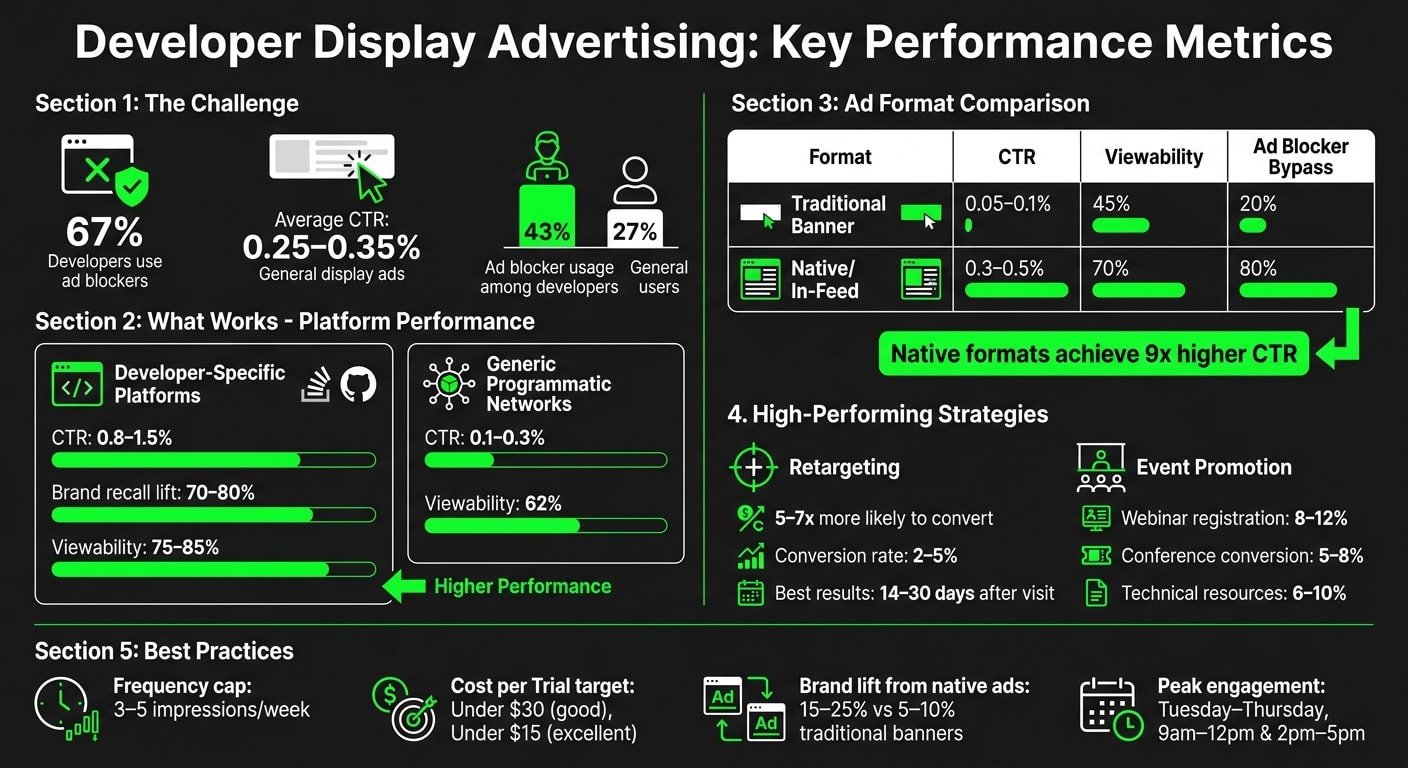
Developers are tough to reach with display ads. Why? 67% use ad blockers, and click-through rates (CTR) average just 0.25–0.35% - far below other professional audiences. Ads often interrupt their workflow, feel irrelevant, or rely on mobile placements when developers primarily work on desktops. But here’s the good news: when executed thoughtfully, display ads can deliver real results.
Here’s what works:
- Target the right platforms: Ads on trusted developer hubs like Stack Overflow and GitHub achieve 0.8–1.5% CTR, significantly outperforming generic networks.
- Leverage retargeting: Developers who’ve visited your site are 5–7x more likely to convert with retargeting ads. Conversion rates can hit 2–5%.
- Promote tech-focused events/resources: Webinars and conferences see 5–12% conversion rates when ads highlight technical details and practical value.
- Use native formats: Native ads blend into developer feeds, bypass 80% of ad blockers, and achieve CTRs up to 9x higher than traditional banners.
Key takeaways? Keep your ads technical, concise, and visually relevant (think code snippets, dark mode designs). Focus on metrics like view-through conversions and brand lift, not just CTR. And always prioritize developer-specific platforms over broad programmatic networks.
Effective developer advertising isn’t about volume - it’s about relevance and precision.
When Display Ads Work for Developer Audiences
Display ads can resonate with developers when they’re precisely targeted and tied to clear, relevant use cases. While cold prospecting often falls flat, three approaches tend to deliver solid results: building brand awareness on platforms developers trust, retargeting visitors who’ve already shown interest, and promoting events or technical resources. These strategies align with a broader effort to engage technical audiences effectively through display advertising.
Building Brand Awareness on Developer Platforms
Brand awareness campaigns succeed when developers encounter ads while casually browsing rather than during focused coding sessions. Platforms like Stack Overflow, GitHub, and other developer hubs can deliver a 70–80% lift in brand recall for technical tools, particularly when ads are shown consistently during work hours. This is when developers are more likely to explore new tools and technologies.
Ads placed on developer-specific platforms achieve click-through rates of 0.8–1.5%, significantly higher than the 0.1–0.3% seen on generic programmatic networks. The difference? Developers don’t dislike ads - they dislike irrelevant ones. When ads align with their technical interests and appear on platforms they trust, engagement naturally increases. To avoid overexposure, stick to frequency-capped campaigns with 3–5 impressions per user. While these campaigns build recognition, retargeting takes it a step further by converting that awareness into action.
Retargeting Developers Who've Visited Your Site
Retargeting is where display advertising truly shines for developer audiences. Developers who’ve already visited your site are 5–7 times more likely to convert when they encounter retargeting ads. These campaigns typically drive conversion rates of 2–5%, significantly outperforming cold ads, with the best results occurring within 14–30 days of the initial visit.
For example, in Q2 2024, Vercel ran retargeting ads on Stack Overflow and GitHub aimed at site visitors. The campaign delivered a 3.2x return on ad spend (ROAS) and boosted free-tier signups by 28%, adding 12,000 new users over 90 days. Ads featured Next.js code snippets, connecting directly with developers’ technical interests. Success here hinges on maintaining frequency caps of 3–5 weekly impressions. Exceeding 8–12 impressions in a week can reduce engagement by 40–60%, so it’s crucial to avoid overwhelming users. Beyond conversions, retargeting can also drive engagement with events and technical content.
Promoting Events and Technical Resources
Display ads are also effective for encouraging developers to sign up for webinars, conferences, or download technical resources. Webinars on emerging technologies often generate registration rates of 8–12% from ad traffic, while technical conferences see conversion rates of 5–8%. Resources like API documentation, code samples, and whitepapers typically convert at 6–10%.
A great example: GitHub promoted its Universe conference in October 2023 using display ads on platforms like Dev.to and Hashnode. The campaign resulted in 15,000 registrations, with 45% coming directly from ads at a cost of $18 per acquisition - well below the $35 industry average. The key to success? Ads highlighted speaker credentials and detailed technical tracks, avoiding generic event promotion. For best results, launch event campaigns 8–12 weeks ahead of the date, ramping up intensity 4–6 weeks before. Early-bird messaging tends to boost registration rates by 15–20% compared to last-minute pushes.
Why Display Ads Often Fail with Developers
Display ads often miss the mark with developers because they treat them like general consumers, rely on irrelevant placements, and overuse repetitive ads. These missteps highlight the need for better developer marketing strategies, which we’ll dive into in the next section.
Generic Messaging That Doesn't Speak to Developers
Developers are quick to spot marketing fluff. Overly polished visuals, like stock photos of people pointing at screens, and vague promises such as "transform your workflow" tend to fall flat. Ads like these typically see click-through rates of only 0.25–0.35%, far below the 0.8–1.2% that more targeted, technical messaging can achieve . Without elements like code snippets or architecture diagrams, ads lack the technical credibility developers expect. This disconnect likely contributes to the fact that 67% of developers use ad blockers .
Wrong Placements and Disruptive Ad Formats
Developers are especially sensitive to where and how ads appear. Pop-ups, auto-play videos, or full-page interstitials are particularly frustrating, especially when they interrupt focused work sessions. Ads placed on non-developer sites or generic platforms like news outlets or social media also feel out of place, reducing their relevance. Overusing disruptive formats not only irritates developers but can harm your brand’s reputation, making it synonymous with spam and poor targeting .
Showing the Same Ad Too Many Times
Repetition can backfire quickly. Experts suggest limiting ad frequency to 3–5 impressions per day to strike a balance between visibility and user experience . However, many campaigns ignore this, bombarding developers with the same ad repeatedly. This overexposure not only reduces engagement but also risks alienating developers, pushing them to avoid your brand entirely. It reinforces the perception of spam, increases ad-blocker usage , and wastes your budget on impressions that no longer deliver results . Fixing these issues is key to creating ads that developers will actually engage with.
Creative and Placement Best Practices for Developer Display Ads
Developer ads need to feel authentic and technically relevant - developers are quick to dismiss anything that feels generic or out of step with their workflow. Building on earlier discussions of targeting and messaging, this section dives into designing compelling creatives and selecting strategic placements.
How to Design Ads Developers Will Click
To grab a developer's attention, your ads need to resonate with their daily tools and environments. Code snippets are a powerful visual hook. A short, 3–5 line React snippet or an API call example instantly signals relevance. Similarly, technical diagrams, such as API flowcharts, lend credibility that stock photos simply can’t.
Dark mode design is a must. According to Stack Overflow's 2024 survey, 70% of developers prefer dark themes. Ads with light backgrounds can feel intrusive, while dark mode designs blend seamlessly. Use a background like #1e1e1e with high-contrast text (#ffffff) or code accents (#00ff00), ensuring a contrast ratio of at least 4.5:1 for accessibility. For instance, JetBrains' IntelliJ IDEA campaign in Q1 2024 used native in-feed ads on daily.dev, featuring code refactoring demos. The result? A 0.47% CTR, 12% conversion to downloads, and 3x ROAS from 500,000 impressions targeting 50,000 developers.
Keep the copy concise and technical - 20 words or fewer. Focus on measurable benefits. Headlines like "Reduce build times by 40%" or "Query Postgres 10x faster" outperform vague claims. GitLab’s "Merge Faster" ad, paired with a code snippet, achieved a 4.2% CTR on developer-focused platforms, proving that developers respond to specifics over marketing fluff.
Choosing Developer-Focused Ad Placements
Once you’ve nailed the creative, where you place your ads can make or break your campaign. Developer-native sites such as Stack Overflow, GitHub, dev.to, and Reddit's r/programming are ideal. They deliver 5–7x higher engagement compared to programmatic placements - think 2.1% CTR versus just 0.3% . These platforms attract developers actively seeking solutions, making your ads feel helpful rather than intrusive.
However, there’s a tradeoff: quality versus scale. Developer-focused sites reach smaller audiences (around 10 million monthly users) but boast 90%+ developer composition. In contrast, programmatic networks can scale to billions but with less than 20% relevance. While CPMs on developer platforms are about 20% higher, the return on ad spend (ROAS) is 3x better . A balanced strategy might allocate 70% of your budget to high-quality placements for awareness and brand building, with 30% reserved for programmatic retargeting.
Native and In-Feed Formats vs. Traditional Banners
Ad format plays a huge role in how developers interact with your ads. Traditional banners are largely ignored - 95% of the time, to be exact. In contrast, native formats achieve 9x higher CTRs, ranging from 2–5% compared to just 0.2–0.5% for banners . Why? Native ads integrate seamlessly into developer feeds, appearing as content cards with subtle "Sponsored" labels rather than screaming "ad."
| Ad Format | Avg CTR (Developers) | Viewability | Ad Blocker Bypass Rate |
|---|---|---|---|
| Traditional Banner | 0.05–0.1% | 45% | 20% |
| Native/In-Feed | 0.3–0.5% | 70% | 80% |
For example, GitHub’s 2023 Copilot campaign on Stack Overflow featured dark-mode banners showcasing live code completion in sponsored leaderboard placements. It delivered a 28% boost in sign-ups - 45,000 new users from 2 million impressions at a 0.32% CTR. Native ads also bypass 80% of ad blockers on platforms like daily.dev, ensuring your message reaches developers despite their heavy use of blockers . The secret? Make your ads look like organic posts. Use thumbnail code previews, concise hooks, and link to deep technical resources instead of generic landing pages.
Measuring Success and Overcoming Challenges
Metrics That Matter Beyond Click-Through Rate
Focusing only on click-through rates (CTR) gives an incomplete picture of campaign performance. Metrics like view-through conversions (VTCs) and brand/search lift provide a broader understanding of impact. While average CTRs hover between 0.05% and 0.1%, VTCs capture users who see an ad but convert later - whether through direct visits or searches - within a 1 to 30-day timeframe. This is particularly relevant for developer tools, where audiences often conduct significant research before making decisions.
Take JetBrains' Q4 2023 campaign as an example. Using native tool recommendation cards on Stack Overflow, they reached 500,000 developers. While the CTR was 0.08%, VTCs accounted for a 28% conversion rate, ultimately driving $1.2 million in sales and delivering a 3x return on ad spend (ROAS) .
Brand lift and search lift provide additional layers of insight. Brand lift studies, often conducted via geo-holdout tests or surveys, measure changes in awareness, consideration, and intent. During AWS's 2024 re:Invent promotion, Amazon used LinkedIn native ads featuring code snippets to target developers. The campaign achieved an 18% increase in brand awareness among 5,000 surveyed developers and a 22% boost in search lift, with branded queries rising from 15,000 to 18,300 daily . For developer campaigns, native ad formats typically yield a brand lift of 15–25%, compared to 5–10% for traditional banners .
To track VTCs, use platforms like Google Ads or Campaign Manager 360, setting attribution windows of 7–14 days for quick actions or up to 30 days for longer sales cycles. For search lift, monitor branded search volume spikes in Google Analytics 4. For more details, check out our resources on developer ad KPIs, trends, and insights and native ad metrics: what to track and why.
Next, we’ll tackle challenges like ad blockers and viewability issues that can complicate campaign performance.
Working Around Ad Blockers and Viewability Problems
Technical challenges such as ad blockers and viewability issues can significantly impact ad delivery. According to the 2023 Stack Overflow Developer Survey, 43% of developers use ad blockers compared to 27% of general users . This means over 40% of traditional banner impressions may never reach their intended audience. Programmatic campaigns on the open web can lose up to 45% of their reach to tools like uBlock Origin.
To address this, prioritize native and in-feed ad formats that blend seamlessly with content rather than appearing as traditional ads. These formats are rendered server-side, often as feed posts with subtle "Sponsored" labels, making them less likely to be blocked . For instance, daily.dev’s native ad format integrates into developer feeds, bypassing ad blockers and achieving a 1.2% CTR across 10 million monthly developer impressions. Similarly, Vercel’s native campaign reached 1.2 million developers with less than a 5% block rate, resulting in an impressive 8% CTR.
Viewability is another critical factor. Industry-wide, roughly 62% of display impressions fail to meet the Interactive Advertising Bureau (IAB) standard of having at least 50% of ad pixels visible for one second. Developer platforms perform better in this area - Stack Overflow reports viewability rates above 75%, and native developer feeds typically range between 70% and 85% . To ensure high viewability rates, focus on developer-focused platforms and audit campaigns with tools like Integral Ad Science or Moat.
For further details on overcoming ad blocker challenges and improving viewability, visit our guide on why developers block most ads and what makes them care again.
Conclusion: Building Effective Developer Display Campaigns
Key Takeaways for Developer Display Advertising
Creating successful developer display campaigns requires a tailored approach that prioritizes context over broad reach. Developers are more likely to engage when ads appear within their workflow - think technical publications or developer-specific feeds. These targeted placements consistently outperform generic programmatic campaigns. For example, native formats in developer-focused environments achieve CTR rates of 1.2% or higher, compared to traditional display ads, which hover between 0.25%–0.35%.
What really works? Authenticity. Developers are quick to dismiss generic marketing but respond well to ads that speak their language. Incorporate elements like code snippets, terminal screenshots, and concise, technical copy instead of relying on flashy buzzwords. Additionally, when measuring success, go beyond CTR. Metrics like view-through conversions, brand lift, and search lift provide a clearer picture of how your campaigns are influencing developers' longer decision-making processes. Retargeting campaigns also shine here, achieving CTRs of 0.8%–1.2% - a significant improvement over cold prospecting.
Ad blockers remain a hurdle, but native and in-feed formats are a smart workaround. These formats integrate seamlessly into developer content, maintaining high viewability and avoiding disruption. Platforms like Daily.dev demonstrate how native ad formats can bypass ad blockers while delivering strong performance.
With these insights, it's time to focus on actionable strategies for your campaigns.
Next Steps for Your Display Campaigns
To maximize results, prioritize quality over quantity. A smaller, well-targeted audience in the right technical context will yield better conversions than casting a wide net. Here's a suggested budget breakdown:
- 50% for intent capture through search
- 25% for mid-funnel placements on developer-specific platforms
- The remaining 25% for brand building and testing.
Keep your creatives fresh - update them every 3–4 weeks to avoid ad fatigue in tight-knit developer communities. Experiment with different ad formats, as native cards, in-feed placements, and sponsored content often outperform traditional banners. For performance tracking, focus on Cost per Trial (CPT) as a key metric. Aim for under $30 for solid performance and under $15 for exceptional results.
Timing also plays a critical role. Developer engagement peaks in January and September, with the most active days being Tuesday through Thursday, particularly between 9 a.m.–12 p.m. and 2 p.m.–5 p.m. local time. Use a 30–90 day attribution window to capture long-term signals, and include post-signup surveys to uncover "dark funnel" insights like word-of-mouth referrals that traditional analytics might miss.
FAQs
When should I use banner ads vs. native in-feed ads for developers?
When deciding between banner ads and native in-feed ads, it all comes down to your objectives.
Banner ads are a solid choice if you're aiming to boost brand awareness or retarget users on developer-focused platforms. However, they do come with hurdles like ad blockers and often lower engagement rates.
On the other hand, native in-feed ads shine when it comes to blending naturally into content. They tend to drive higher engagement, avoid ad blockers, and are perfect for sharing relevant technical content directly within a developer's workflow.
How do I retarget developers without causing ad fatigue?
To keep developers engaged and avoid ad fatigue, it's essential to create ads that feel relevant, technical, and respectful of their workflow. Developers appreciate ads that align with their interests, so focus on contextual native ads, educational content, and visuals like code snippets that resonate with their daily tasks.
Keep ad frequency in check to prevent overexposure, and narrow your targeting to specific developer personas or the tools they've interacted with. By ensuring your ads are both useful and contextually appropriate, you can maintain their trust and avoid becoming intrusive or annoying.
What metrics should I use to measure developer display campaigns beyond CTR?
To truly measure the success of developer display campaigns, it's essential to look beyond just click-through rates (CTR). Metrics like conversion rate, view-through conversions, brand lift, search lift, engagement depth, lead quality, and activation rates paint a fuller picture of how well the campaign resonates with your audience and drives meaningful results.