

Developers are turning to video as their top learning tool, with 62% preferring long-form content like tutorials and walkthroughs. Platforms like YouTube dominate this space, offering solutions for coding challenges, tool comparisons, and system architecture insights. Embedding videos boosts engagement, with session durations 2.6x longer than text-only pages.
Here’s a quick breakdown of what works:
- Live coding sessions: Short, real-time coding demos (10–15 minutes) show problem-solving in action.
- Architecture deep-dives: Detailed breakdowns of system designs for senior developers.
- Tool comparisons: Highlight differences and practical benefits to help developers make decisions.
- Short-form content: Use YouTube Shorts for quick tips or code snippets, driving viewers to long-form resources.
Key tips for success:
- Optimize YouTube titles/descriptions with clear keywords and timestamps.
- Use chapters to improve accessibility and search visibility.
- Focus on technical accuracy over flashy production.
- Repurpose videos into blogs, social posts, and tutorials to maximize impact.
Start creating videos that solve developer problems, and use platforms like YouTube Shorts and daily.dev Ads to reach your audience effectively.
Video Formats That Work for Developers
When it comes to creating video content for developers, the format matters as much as the content itself. The most effective formats address real-world problems, dive deep into technical topics, and provide actionable takeaways.
Live Coding Sessions
Watching someone code in real-time builds a connection that polished tutorials often lack. Developers value seeing the real process - complete with typos, debugging, and problem-solving. These unscripted moments feel relatable and provide a genuine look into workflows. Short, focused sessions like "Build X with Y" (10–15 minutes) are especially effective. Viewers can follow along, pause, or rewind to apply the techniques themselves, making this format both practical and engaging .
Architecture Deep-Dives
For senior developers and decision-makers, architecture-focused videos are a goldmine. These videos tackle topics like scaling systems or comparing protocols (e.g., gRPC vs. REST) . They often feature engineers sketching out system designs on a whiteboard or breaking down complex decisions step by step. Interviews with experts, typically 30–45 minutes long, also resonate with this audience by delivering the in-depth technical analysis they crave .
Tool Comparisons and Build Tutorials
Choosing the right tool can be overwhelming, and that's where comparison videos shine. By showcasing differences in performance, usability, and specific scenarios, these videos help developers make informed decisions. A "you’ve been doing this wrong" angle can spark curiosity, while moments that showcase dramatic improvements - like reducing 20 lines of code to just 3 - grab attention and encourage sharing . These formats not only educate but also inspire developers to rethink their approaches.
sbb-itb-e54ba74
YouTube SEO for Developer Content
::: @figure 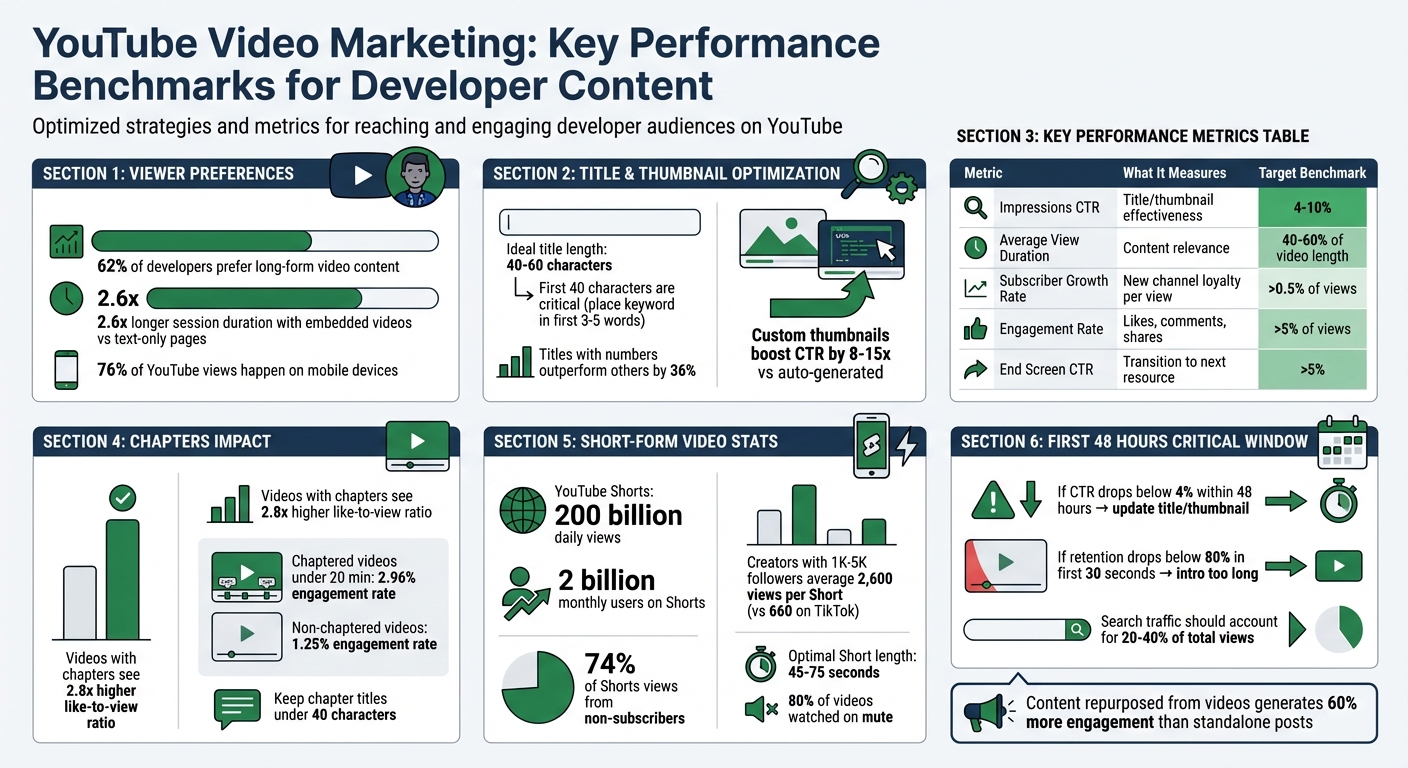 {YouTube Video Marketing Metrics and Benchmarks for Developers}
Once you've nailed down your video formats, the next step is optimizing your content for YouTube's search algorithm. Great videos are only part of the equation - making them discoverable is just as important. To connect with developers searching for solutions, you need to align your content with both YouTube's algorithm and the search habits of your audience. A solid SEO strategy ensures your videos show up when developers need them most.
Writing Titles and Descriptions
Your video title is prime real estate. The first 40 characters need to pack a punch, with the primary keyword placed in the first 3–5 words. This approach not only helps with search rankings but also avoids truncation on mobile devices, where 76% of YouTube views happen . Titles between 40–60 characters are ideal, as anything beyond 70 characters will get cut off on mobile screens. Be direct - instead of vague phrases, clearly outline the problem you're solving (e.g., "How to Fix NPM Install Errors") . Adding context in brackets, like "[2026 Update]" or "[Tutorial]", can boost click-through rates, and titles with numbers outperform others by 36% on average .
"Keywords get you into the race, but click-through rate and watch time determine whether you win it. The algorithm rewards videos that people actually want to watch." - YouTube Creator Academy
For descriptions, focus on the first 150–160 characters, as this is what appears in search results and before the "Show More" button . Use this space to clearly summarize the video's value. After that, expand to at least 200–300 words using a consistent structure: start with a hook, provide a summary, include bulleted takeaways, add timestamps, link to resources (like GitHub repositories), and finish with a call-to-action and 3–5 relevant hashtags . Developers expect direct links to any GitHub repositories or documentation you mention . If your click-through rate (CTR) drops below 4% within 48 hours, update your title and thumbnail to prompt a re-evaluation by the algorithm .
Using Chapters, Cards, and End Screens
Chapters make your video more accessible and boost its visibility in search. YouTube indexes chapter titles as searchable text, which can help your video show up in Google Search as "Key Moments" for specific queries . To use chapters effectively, start the first one at 0:00, include at least three chapters, and ensure each is at least 10 seconds long . Avoid generic labels like "Introduction" and opt for descriptive ones like "Configuring Webpack for React" or "Debugging NullPointerExceptions" .
Videos with chapters often see a like-to-view ratio up to 2.8× higher than those without. For videos under 20 minutes, chaptered content achieves an engagement rate of 2.96% compared to 1.25% for non-chaptered videos . This structure allows developers to jump straight to the part they need.
"Chapters take five minutes to add, they improve viewer experience, they boost SEO visibility in both YouTube and Google search, and they provide structural data that helps the algorithm understand your content more precisely." - Edward Wood, YouTube Strategist
Keep chapter titles under 40 characters to avoid truncation on mobile. Use the final chapter to guide viewers to related resources or other videos. End screens with clear calls-to-action should aim for a CTR above 5% . These tools not only enhance engagement but also help track conversions.
Analytics: Views vs. Conversions
Views alone don't tell the whole story. YouTube prioritizes viewer satisfaction, measured through retention and CTR, over sheer view counts . A video with 50,000 views but poor retention could harm your channel more than a 5,000-view video with strong engagement.
Monitor your CTR closely - a range of 4–10% is typical, with anything above 6% signaling strong performance . For videos with a CTR below 4%, revisit the title and thumbnail for improvement . Custom thumbnails can boost CTR by 8–15× compared to auto-generated frames .
When it comes to conversions, focus on metrics like Subscriber Conversion Rate (aim for 0.5–2% of views), Save Rate (keep it above your channel average), and End Screen CTR (target over 5%) . Here's a quick summary of key benchmarks:
| Metric Type | What It Measures | Target Benchmark |
|---|---|---|
| Impressions CTR | Title/thumbnail effectiveness | 4–10% |
| Average View Duration | Content relevance | 40–60% of video length |
| Subscriber Growth Rate | New channel loyalty per view | >0.5% of views |
| Engagement Rate | Likes, comments, shares | >5% of views |
| End Screen CTR | Transition to next resource | >5% |
Pay special attention to your "Search terms" report to uncover the technical queries driving traffic to your content. Search-based views often indicate higher intent - for example, "how to deploy Next.js to AWS" suggests a more targeted need than casual browsing . Ideally, search traffic should account for 20–40% of your total views .
The first 48 hours after publishing are crucial. YouTube evaluates performance signals, like retention and CTR, from your subscribers before deciding whether to promote the video further . If your retention rate drops below 80% in the first 30 seconds, it could mean your intro is too long or doesn't deliver on the promise of the title .
Short-Form Video for Developer Products
Short-form video has become an effective way to reach developers. Platforms like YouTube Shorts attract massive attention, with over 200 billion daily views from 2 billion monthly users, and 74% of those views come from non-subscribers . While most developers (62%) prefer long-form content for in-depth learning , short-form videos act as an entry point, introducing them to your product or channel. Think of short-form videos as a spark that piques interest, while long-form content builds deeper engagement.
The trick is to use short-form videos as "seeds" that guide viewers to more detailed resources like tutorials, documentation, or product pages . Developers often save these quick videos for later reference, especially if they include handy tips like keyboard shortcuts, CLI aliases, or code refactoring techniques.
When it comes to developer products, YouTube Shorts outshines TikTok in both reach and longevity. For instance, creators with 1,000–5,000 followers average 2,600 views per Short on YouTube, compared to just 660 views on TikTok . Shorts also benefit from SEO, as they’re indexed on Google and referenced by AI platforms, giving them a longer shelf life - weeks or even months - unlike TikTok’s typical 24–48-hour window. For B2B developer tools, YouTube Shorts builds professional credibility, while TikTok is better for broader awareness campaigns . Let’s dive into some actionable tips to make short-form videos work for you.
Quick Tips and Code Snippets
The best short-form content for developers delivers those "aha" moments. For example, showing how to refactor a 20-line function into just 3 lines can be a game-changer .
"The single most viral coding Short format is 'you have been doing this wrong' - take a common pattern that developers accept as standard and show a better alternative; the emotional reaction (mild embarrassment + relief) is a powerful sharing trigger." - FluxNote
To make your videos effective, ensure your code is easy to read on mobile. Use a minimum 20pt font size, high-contrast themes like Dracula or Night Owl, and focus on specific code blocks instead of showing the entire IDE. Record your screen at 2x resolution and downscale for sharper text, and highlight the cursor to guide viewers' attention .
Keep your videos between 45–75 seconds to allow enough time for technical explanations without losing attention. Start with a strong hook in the first 1–3 seconds - use a curiosity gap (e.g., "Here’s why your API is slow") or the popular "you’ve been doing this wrong" format . Since 80% of videos are watched on mute , always include subtitles and pair each Short with a pinned comment linking to a GitHub repo, documentation, or a related tutorial.
Once you’ve nailed concise coding demos, you can experiment with adapting your content for TikTok’s trend-driven style.
TikTok-Style Content for Developers
TikTok can be a great platform for showcasing developer tools, but it requires a specific approach. The platform thrives on trends, so tailoring your content to align with those trends is key. The emerging 2026 "quiet flex" aesthetic - which emphasizes raw, unpolished content - resonates with developers who value authenticity over flashy production . Just as authentic demos work in long-form content, raw TikTok videos help establish a genuine connection.
"If your user persona is a CTO, I don't think it's gonna be on TikTok. It's probably going to be more on LinkedIn... YouTube Shorts is the better option - thought leadership, tool demos, and case study teasers." - Kevin Blanco, Senior DevRel Advocate, Appsmith
Focus on solving problems rather than entertaining. Short demos, debugging tips, and workflow hacks work well. Use TikTok’s "edutainment" style to teach something highly specific, like "3 Git commands you didn’t know existed", while keeping the pace engaging .
If you’re cross-posting content, make sure to remove TikTok watermarks before uploading to YouTube Shorts. Watermarks can lead to algorithm penalties on YouTube . Also, tailor your captions: YouTube Shorts thrives on keyword-rich descriptions for SEO, while TikTok performs better with short, catchy captions .
Track metrics that matter for each platform. On YouTube Shorts, focus on post-view actions like profile clicks or engagement with related content. For TikTok, completion rates and shares are key indicators. Use this data to identify what resonates, then expand successful Shorts into full tutorials or blog posts to maximize their impact .
Production Quality vs. Authenticity
Let’s dive into how production quality and authentic demos play distinct roles in building developer trust. Developers value technical accuracy far more than polished visuals. While it’s tempting to assume that high-end production is a must for video content, developers care more about depth, clarity, and practical solutions than fancy graphics or cinematic effects . Striking the right balance between production value and authenticity is critical, especially in developer-focused YouTube marketing. The real challenge is knowing when to invest in polished production and when to let authenticity take the lead.
When Production Quality Matters
High-quality production shines during the Discovery stage of a developer's journey. This is especially true for product launches and company overview videos. Polished, visually engaging content helps establish credibility when developers are first introduced to your tool . In fact, enterprise-level videos that prioritize clear, concise, and well-structured content often see better completion rates. The focus here isn’t on entertainment but on making sure the instructional design is spot-on .
In developer content, "production quality" doesn’t mean flashy effects - it’s about functional clarity. This includes:
- Using IDE presentation mode for demos.
- Increasing font sizes to at least 20pt for better readability.
- Opting for high-contrast themes like Dracula or Night Owl, which reduce viewer fatigue and improve comprehension .
While sleek production can grab attention initially, it’s the raw, authentic content that often builds lasting trust with developers.
Why Developers Prefer Authentic Demos
When it comes to trust, nothing beats simplicity. Developers gravitate toward screen recordings and live demos because they show the product in action - warts and all. These formats build credibility by showcasing real-world scenarios, including how your tool handles edge cases and solves practical problems.
Even basic "talking head" videos or straightforward screen captures can drive impressive results. For example, relevant, expert-led content can boost search impressions by 300% within 30 days . Additionally, custom videos generate 3x more engagement than generic stock footage, as developers value authentic, hands-on expertise . The key? Keep it simple. Focus your energy on delivering accurate, problem-solving content instead of worrying about flashy transitions or background music. As Jake Ward, Co-founder of Data Protocol, puts it:
You need to NOT make it distracting, and you're good to go .
Measuring Video Marketing Impact
When evaluating the success of your video marketing efforts, it's crucial to go beyond simply counting views. The real challenge lies in connecting video performance metrics to meaningful outcomes like brand awareness, demo requests, or even pipeline growth. Developer behavior often complicates this process. For instance, a developer might watch a video on their phone, share it on Slack, and then have a teammate sign up days later on a desktop. This makes traditional "last-click" attribution unreliable .
To get a clearer picture, align your metrics with the developer journey. For example, during the Discovery phase, focus on views and reach. In the Evaluation phase, track click-throughs and demo requests. And in the Learning phase, monitor tutorial completions. This approach helps you identify which videos spark awareness and which ones push developers further down the funnel .
Metrics for Awareness and Lead Generation
For awareness campaigns, metrics like total views and unique reach give you an idea of your audience size. But a better indicator of success is engagement velocity - how many views your video gets per hour. A velocity of over 5,000 views per hour often suggests your content is gaining traction in developer communities .
When it comes to lead generation, avoid relying solely on vanity metrics. As Milica Maksimović, Co-founder and COO of Literally.dev, points out:
Someone scrolling past your social media post without properly noticing it still counts as an impression .
Instead, focus on behavioral data. For instance, track clicks to your homepage, documentation, or product pages. Tools like YouTube Studio Analytics can help by providing traffic source data and audience retention curves, showing exactly where viewers lose interest .
A key benchmark to aim for is an average view duration of 50% to 60% . Additionally, monitor "Subscribers Gained Per Video" to see which videos are turning casual viewers into loyal followers .
Tracking Conversions with UTM Tags
UTM parameters are indispensable for linking video views to conversions. Add these tags to every link in your video descriptions, cards, and end screens. This allows analytics platforms to attribute sign-ups or demo requests to specific videos .
Keep in mind that 30% to 70% of your developer audience might be invisible to traditional tools like Google Analytics due to ad-blockers . To address this, consider using privacy-focused tools like Plausible, which are less likely to be blocked by developer-focused browser extensions . You can also leverage the YouTube Data API v3 to track video stats like views, likes, and comments, as well as monitor regional performance to understand where developer interest is strongest . The API lets you batch up to 50 video IDs per request, helping you make the most of your daily 10,000-unit quota .
For large-scale tracking, automate the process with a cron job to fetch video stats every few hours. Use SQLite in WAL mode to handle concurrent reads and writes efficiently . Pay close attention to the first 48 hours of a video's release. If your click-through rate (CTR) is below average, consider updating the thumbnail or title immediately . When running paid promotions, such as daily.dev Ads, use unique UTM tags to compare the effectiveness of paid traffic versus organic discovery.
Repurposing Video Across Channels
Video content is a powerhouse for engagement and conversions, but its potential doesn't stop there. Repurposing video content allows you to extend its reach and impact across multiple platforms. For example, a 10-minute developer video can produce roughly 1,400 words of content. A single YouTube tutorial typically generates 1,300 to 1,500 words of spoken content - enough to fuel a blog post, several social media threads, and multiple short clips .
Here's the thing: video and search audiences often don't overlap. While videos excel at capturing attention in visual formats, search engines like Google are far better at indexing text. That means turning your video into a blog post can help you tap into long-tail organic search traffic that the video alone might miss .
The numbers back it up: content repurposed from videos garners 60% more engagement than standalone original posts . Developer Olamide Olaniyan sums it up perfectly:
Every video you've ever made is a blog post waiting to happen .
This flexibility makes video content a goldmine for repurposing into other formats.
Converting Videos to Blogs and Social Posts
To start, you'll need a detailed transcript. YouTube's official captions are a great option, offering 95% to 99% accuracy with proper punctuation. Alternatively, AI tools like OpenAI Whisper provide 93% to 97% accuracy at a cost of approximately $0.006 per minute . Steer clear of YouTube's auto-generated captions - they often miss the mark on technical jargon and punctuation . A clean, accurate transcript ensures that technical terms are correctly captured and makes your content easier to adapt.
Once you have a transcript, you can enhance it by adding code snippets, step-by-step guides, and explanations to address potential technical questions. Adjust your video title for search intent - think about changing something like "3 freelance hacks" to "How to Get Freelance Clients: 3 Proven Methods That Work in 2026." Embedding the original video in the blog post is another smart move. It increases YouTube watch time while creating a content loop for your readers .
For social media, break the content into 8 to 12 key insights to craft Twitter/X threads. Start with a strong hook, include valuable takeaways, and end with a call-to-action linking back to your video . On LinkedIn, focus on professional insights using short paragraphs, bullet points, and bold headers to keep posts scannable . For platforms like TikTok, Reels, or Shorts, extract 30 to 90-second vertical clips that highlight memorable moments, such as "The biggest mistake people make with [tool]" .
Promoting Videos with daily.dev Ads
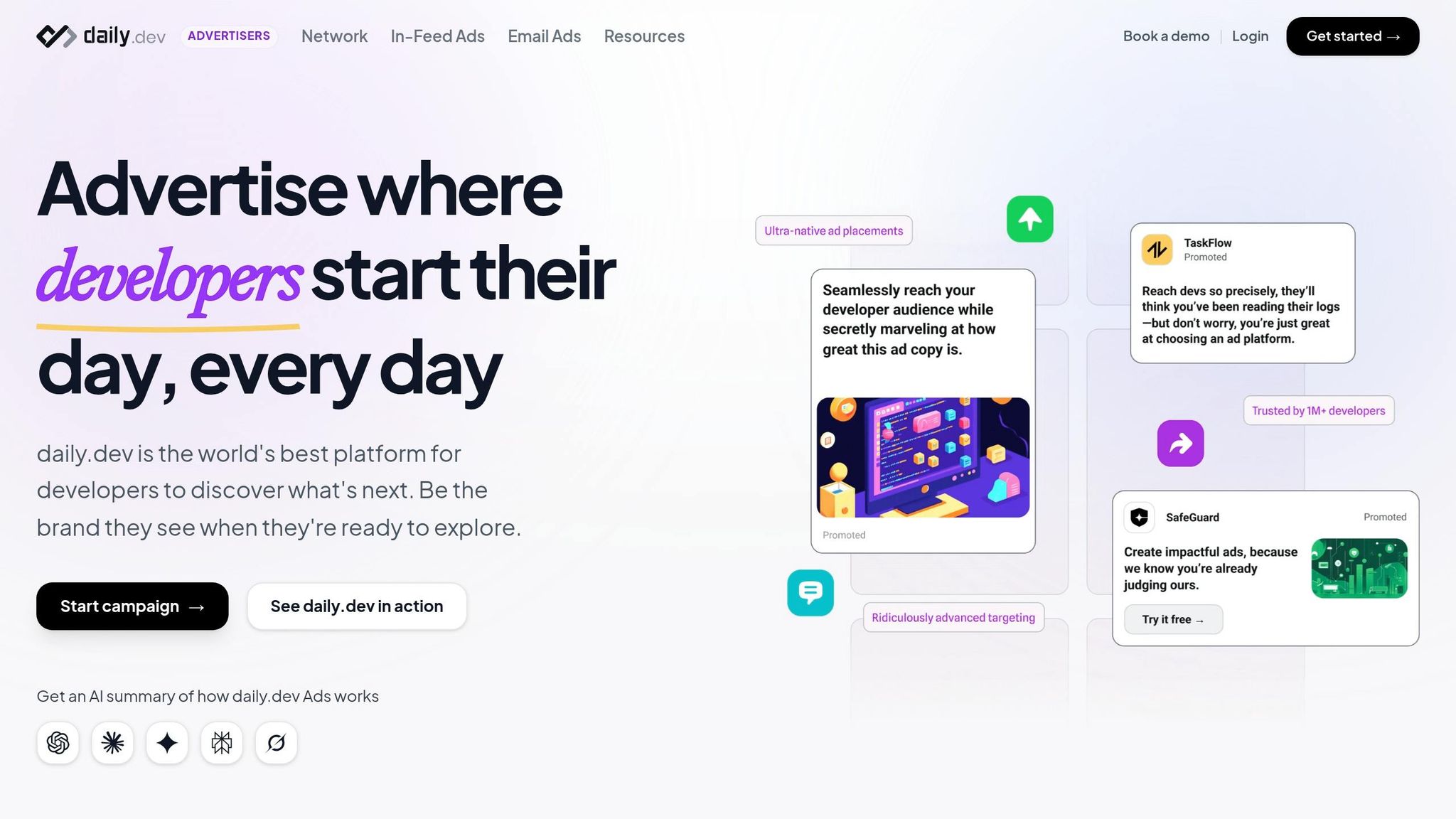
Once you've repurposed your video content, take it a step further by promoting it to the right audience. daily.dev Ads allow you to reach over 1 million developers, targeting specific criteria like seniority, programming languages, and tools. These native ad placements, such as in-feed ads or post page ads, integrate seamlessly into daily.dev's trusted developer ecosystem, where content is both expected and appreciated.
You can promote your repurposed blog posts with embedded videos or link directly to YouTube tutorials. The platform's real-time performance tracking helps you identify which video topics resonate most with different segments of the developer community. This data allows you to fine-tune your content strategy and targeting for even better results.
Conclusion
Video marketing for developers isn't about flashy tricks or gimmicks - it’s about delivering real, technical value with a sense of authenticity. Developers gravitate toward content that dives deep into tutorials or explores system architectures rather than polished, commercial-style videos. In fact, 62% of developers identify video as their go-to learning method. The secret lies in aligning your content with their journey, from introductory overviews to in-depth guides for advanced scaling.
It’s not about high-end production but about meaningful content. Even a straightforward "talking head" video can significantly increase search impressions within 30 days if the information is technically sound and relevant. Developers aren’t looking for entertainment; they’re after solutions to real-world challenges. Prioritize clear audio and visuals that support the content rather than distract from it.
But creating the video is just the beginning - effective distribution is what amplifies its impact. One video can be transformed into a blog post, several social media updates, and short clips. Embedding videos in technical articles can even increase session durations by 2.6×. Short-form platforms like YouTube Shorts or TikTok are great for building awareness, while long-form videos help establish trust and drive conversions.
Finally, focus on metrics that matter. Don’t just track views or likes - dig deeper to see how your videos influence product adoption or contribute to your sales funnel. Use UTM tags to link views to sign-ups, and consider platforms like daily.dev Ads to target over 1 million developers based on their seniority, preferred programming languages, and tools.
Developers are already turning to video for solutions. Make sure your content delivers the technical insights they’re searching for.
FAQs
Which developer video format converts best?
When it comes to developer-focused video content, three formats stand out: live coding, architecture deep-dives, and tool comparisons. Why? Because they provide developers with exactly what they're looking for - practical, actionable insights.
Live Coding: Watching code come to life in real-time is both engaging and educational. It allows developers to see problem-solving in action, learn new techniques, and pick up tips they can immediately apply.
Architecture Deep-Dives: These videos go beyond surface-level knowledge, breaking down the structure and design of systems. Developers value the opportunity to explore the "why" behind decisions and understand how different components interact.
Tool Comparisons: Developers are always on the lookout for tools that can make their workflows smoother. Side-by-side comparisons help them evaluate options and choose what best fits their needs.
By focusing on these formats, you can create content that aligns with developer interests while delivering real value.
What should I track beyond views on YouTube?
Tracking more than just views is essential when assessing the impact of your video content on developers. Pay close attention to developer engagement metrics such as:
- API calls: A clear indicator of how often developers are interacting with your platform.
- Documentation views: Shows interest in learning more about your tools or services.
- SDK downloads: Demonstrates developers’ intent to integrate your solutions.
- Sandbox sign-ups: Reflects hands-on exploration of your offerings.
- GitHub activity: Tracks contributions, forks, or stars, highlighting community involvement.
- Feature activation: Measures how successfully developers are adopting specific features.
These metrics provide deeper insight into how effectively your content drives developer awareness and adoption.
How can I turn Shorts viewers into users?
To turn Shorts viewers into active users, focus on crafting engaging content paired with clear, actionable prompts. For example, include links to tutorials or long-form content that allow viewers to dive deeper into your offerings.
You can also repurpose your Shorts by transforming them into detailed blog posts or guides, providing additional context and value. Make sure your titles, descriptions, and chapters are optimized for SEO to draw in the right audience. Finally, include direct calls-to-action or links within your content, encouraging viewers to explore and try out your developer tools or services.