

Webinars are one of the best ways to connect with developers in 2026. Why? Developers value technical depth, live problem-solving, and real-time Q&A - things static content can’t provide. Unlike blog posts or pre-recorded videos, webinars allow developers to interact, ask questions, and validate solutions on the spot.
Here’s what works:
- Live coding sessions: Show code in action, including debugging and optimizations.
- Architecture reviews: Dive into technical decisions with clear problem-solving frameworks.
- AMAs with engineers: Offer direct access to your technical team for detailed Q&A.
To promote effectively:
- Use platforms developers trust, like GitHub Discussions, Reddit, and technical newsletters.
- Avoid cold emails or LinkedIn InMail - developers often ignore these.
Boost attendance:
- Simplify registration with minimal fields and clear CTAs.
- Send reminders leading up to and on the day of the event.
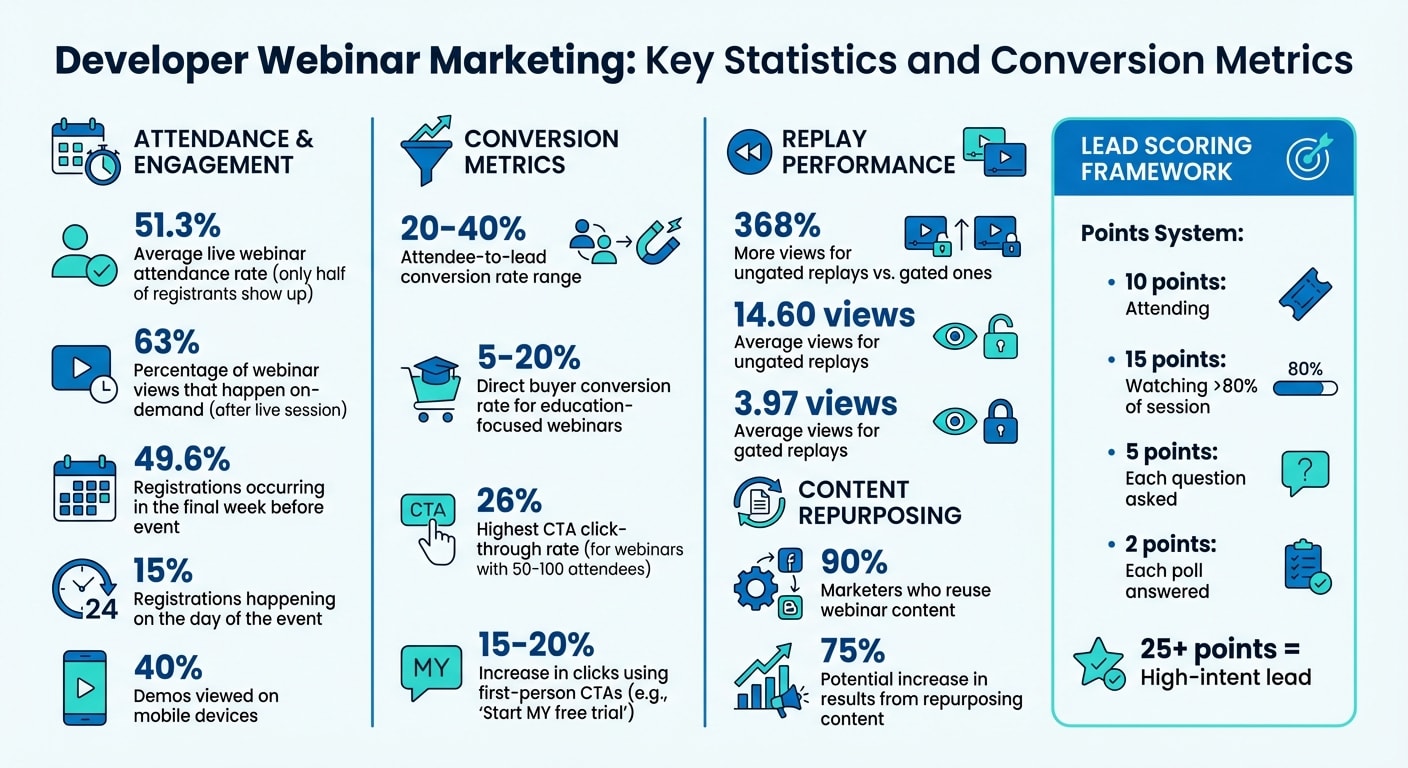
- Offer on-demand replays - 63% of webinar views happen after the live session.
Post-webinar:
- Segment attendees by engagement (e.g., time watched, questions asked) for tailored follow-ups.
- Use lead scoring to prioritize high-intent leads for immediate outreach.
- Repurpose webinar content into blog posts, short videos, or FAQs to extend its reach.
Webinars aren’t just about driving sign-ups - they’re a tool for building trust, showcasing expertise, and identifying high-intent leads.
Why Webinars Work for Developer Audiences
Developers care more about substance than flashy presentations. Unlike pre-recorded product tours or polished slide decks, webinars offer something unique: the chance to see code in action, dig into edge cases, and question architectural decisions - all in real time. This hands-on, interactive approach matches how developers naturally assess tools: by testing and validating them directly.
Webinars also provide valuable engagement data. Every poll, Q&A session, and chat interaction generates insights about your audience. For example, a developer who watches 95% of a session and asks multiple technical questions shows far more interest than someone who leaves after five minutes . By integrating this data into lead-scoring systems through webhooks, your webinar platform becomes a powerful tool for identifying high-intent leads.
Let’s break down why live demos, interactive Q&A, and in-depth technical discussions resonate so strongly with developers.
Developers Prefer Live Demos and Q&A
Live demos and Q&A sessions are the backbone of developer-focused webinars. Here’s why they work so well:
Live demos: Developers want to see how your product solves real problems. Showing actual code in action - complete with familiar stacks and real-world data - builds credibility that no marketing copy can match. Developers are looking for the full picture: how your API integrates with their tools, how it handles errors, and what the day-to-day user experience looks like.
Q&A sessions: These allow developers to dig deeper, exploring edge cases and validating whether your solution fits their specific needs. To manage complex questions effectively, route live Q&A through internal tools like Slack so your engineering team can assist with detailed answers. And don’t forget: nearly 40% of demos are viewed on mobile devices, so ensure your IDE settings (like font size) are optimized for smaller screens.
Technical Depth Over Surface-Level Content
Developers appreciate content that goes beyond surface-level features. They want to see detailed breakdowns of architectures, workflows, and tool comparisons. Structuring your webinar with a "Problem → Solution → Value" approach is much more effective than simply listing features. When addressing technical questions, the "Because, Therefore, But" framework can help you deliver clear and logical answers.
The format of your webinar also matters. For example:
- Demo branching: Let developers choose their own path for a more personalized, in-depth exploration. This works especially well for high-intent buyers who need specific technical insights.
- Demo showcases: These provide a comprehensive overview of multiple features and are ideal for stakeholders ready for a deeper technical evaluation.
Both approaches cater to experienced developers who value autonomy and technical rigor, outperforming basic linear walkthroughs .
This commitment to technical depth ensures your webinars not only engage developers but also set the stage for meaningful conversions.
Webinar Formats That Work for Developers
When it comes to webinars for developers, the focus needs to be on practical, hands-on learning rather than polished presentations. Developers are less interested in flashy demos and more drawn to authentic, technical content that mirrors how they evaluate tools and solve problems. These formats are designed to foster deeper engagement by aligning with developers' expectations.
Live Coding Sessions
Live coding sessions are all about showing the real process of building and troubleshooting code in real time. Watching code come together, including the inevitable debugging and corrections, offers an authenticity that no marketing pitch can replicate. It’s a chance to demonstrate genuine problem-solving skills, which resonates strongly with developers.
For maximum impact, structure your session to cater to a broad audience. Start with a straightforward implementation that beginners can follow, then gradually introduce optimizations and complex scenarios for more experienced participants. For instance, you could begin by integrating an API with basic functionality, then move on to advanced topics like error handling, rate limiting, or caching techniques. This layered approach ensures everyone stays engaged.
Rather than focusing on abstract concepts, aim to build a fully functional application during the session. Whether it’s a simple UI or a command-line tool, showing the end-user experience your code enables is far more compelling than static JSON blobs or YAML configurations. This hands-on format delivers the kind of interactive, technical depth developers crave.
Architecture Reviews and Tool Comparisons
When developers evaluate tools or technologies, they want to understand the reasoning behind technical decisions. Architecture reviews and tool comparisons are perfect for this, as they dive into the "why" as much as the "what."
For architecture reviews, use a clear Problem → Solution → Value framework. Begin by presenting a specific challenge - like “our team spent 5 hours a week manually updating records” - then walk through your solution and highlight the measurable benefits. This structured narrative helps developers relate your approach to their own challenges.
Tool comparisons should be equally transparent. Highlight not only the strengths of your tool but also its limitations and ideal use cases. Developers respect honesty, and acknowledging areas where your product might not be the best fit builds trust. To make the session even more engaging, let attendees choose which features or comparisons they want to explore. This interactive approach ensures the content remains relevant and tailored to their interests.
Ask Me Anything with Engineering Teams
An AMA session with your engineering team gives developers a rare chance to interact directly with the people who build and maintain your product. This format cuts through marketing fluff, providing an open forum for detailed questions about implementation, roadmap decisions, and potential limitations.
To make the most of these sessions, collect key technical questions ahead of time via email and use live tools to gather real-time queries during the event. This preparation ensures your team can offer thoughtful, well-informed responses. When answering, use a clear framework like "Because, Therefore, But" to explain decisions: for example, “We chose PostgreSQL because we needed ACID compliance, therefore we can ensure data consistency, but this comes with higher infrastructure costs for high-write workloads.”
These sessions not only address developers' pain points but also showcase your team’s expertise, creating a more authentic and engaging experience.
How to Promote Webinars to Developers
Promoting webinars to developers requires a thoughtful approach, as this audience tends to be skeptical of traditional marketing tactics. Developers gravitate toward platforms they trust and use regularly, so your strategy should align with their preferences.
Start your promotion two to three weeks before the webinar. This gives developers enough time to plan and ensures your event doesn’t get lost in their busy schedules . Early promotion also allows you to build momentum, as last-minute efforts often lead to poor attendance. Highlight what makes your webinar unmissable - whether it’s exclusive technical insights or direct interaction with your engineering team . Once you’ve nailed down your timeline, focus on selecting the right channels to connect with your audience.
Channels That Drive Developer Registrations
Developer communities are goldmines for promoting webinars. Platforms like Stack Overflow, GitHub Discussions, and niche Discord servers are spaces where developers already engage in technical discussions. To succeed here, you’ll need to offer value first - answer questions, share useful insights, and establish credibility before mentioning your event.
daily.dev Ads is another excellent option for reaching developers. These native in-feed ads blend seamlessly with curated technical content, making them less intrusive and more effective. With targeting options like programming languages, seniority levels, and specific tools, you can ensure your message reaches the right audience.
Twitter/X is also a strong contender for webinar promotion. Use relevant hashtags and technical communities to share content like code snippets or previews of the topics your webinar will cover. Reddit’s programming subreddits can drive registrations too, but tread carefully - most subreddits require active participation before you promote anything, and self-promotion without context often gets downvoted.
Technical newsletters are another powerful channel. These newsletters cater to engaged developer audiences who have already opted in to receive technical content. Whether it’s a language-specific newsletter or a broader developer-focused publication, include a brief agenda or highlight key takeaways to entice readers .
Channels That Don't Work for Developers
Some channels simply don’t resonate with developers. Cold emails and LinkedIn InMail, for example, are notoriously ineffective. Developers are bombarded with generic messages daily, and these impersonal approaches often get ignored or deleted. They also clash with the authentic, technical communication developers value.
Another common misstep is relying on a single channel. Even if one platform performs well, a multi-channel strategy is essential for maximizing visibility . Combine social media, community engagement, and targeted ads to keep your webinar in front of developers without overwhelming them with repetitive messaging.
Improving Registration and Attendance Rates
Getting developers to register for your webinar is only part of the challenge. The bigger hurdle? Turning those registrations into actual attendees. According to industry data, only 51.3% of registrants show up for live sessions . That means nearly half of your audience misses out. The upside is that much of this drop-off stems from issues like a clunky registration process or scheduling conflicts - problems you can address with the right strategies. Here's how you can make it easier for developers to sign up and show up.
Simplifying the Registration Process
Developers value simplicity. If your registration process feels like a chore, they’ll likely abandon it. To keep things streamlined, your registration page should have a 1:1 attention ratio - a single page with one clear action . Remove distractions like navigation menus or external links, and keep the focus on signing up.
Only ask for the essentials, like an email address. Every extra field increases the chances of someone quitting midway . If you need to segment your audience, use a simple dropdown menu. For example, ask, "What are you most interested in learning?" with options like "API integration", "performance optimization", or "security best practices" .
Also, make the form feel less overwhelming. Use a call-to-action button that expands to show the form - this small change can reduce hesitation.
Timing matters too. With 49.6% of registrations happening in the final week and another 15% on the day of the event , automated reminders are crucial. Send them one day before, one hour before, and right as the event starts. Highlight perks like exclusive live Q&A sessions or technical deep dives to make the event feel unmissable .
Providing On-Demand Replays
Not every developer can attend live, and that's okay. Offering on-demand replays ensures your content reaches a broader audience. In fact, 63% of webinar views happen on-demand . Even better, replays without a registration gate get 368% more views than gated ones - 14.60 views compared to 3.97 on average .
Here’s how to make the most of replays: send the recording to all registrants right after the live event ends. For attendees, include bonus materials like slides, code repositories, or links to related documentation. For those who missed it, send a quick summary of the event’s highlights, along with a link to the replay .
Don’t forget to update your webinar landing page. Swap the registration form with a "Watch Replay" button to keep capturing traffic long after the event is over .
Converting Attendees into Leads and Customers
The real work of conversion starts after the webinar wraps up. Attendee-to-lead conversion rates generally fall between 20% and 40% , while direct buyer conversion for education-focused webinars tends to range from 5% to 20% . Just like a smooth registration process improves attendance, thoughtful and targeted follow-ups can significantly boost post-webinar conversions. The trick? Segmenting attendees based on their engagement. For example, someone who stayed for the entire 90 minutes and asked multiple questions isn’t the same as someone who left after 15 minutes.
Post-Webinar Follow-Up Sequences
To make your follow-ups count, group attendees by their engagement levels. Use metrics like how long they stayed, the number of questions they asked, and their participation in polls to assign them to high, medium, or low intent categories. For scoring, you could assign:
- 10 points for attending
- 15 points for watching over 80% of the session
- 5 points for each question asked
- 2 points for every poll answered
A score above 25 generally signals a high-intent lead, which means they’re ready for immediate, personalized outreach.
| Lead Category | Engagement Signal | Follow-up Action |
|---|---|---|
| High Intent | >80% attendance, asked questions, joined polls | Add to CRM; notify sales via Slack; offer a technical deep-dive session. |
| Medium Intent | 50–80% attendance, viewed demo | Send automated emails with session recording, slides, and relevant resources. |
| Low Intent/No-Show | <50% attendance or just registered | Email a recording link and invite them to the next event or community group. |
For high-intent leads, real-time Slack or CRM alerts can help your team act quickly. These attendees are primed for a deeper conversation. Medium-intent leads might benefit from technical resources like quick-start guides, GitHub repositories, or API explorers, which allow them to test what they learned. For low-intent leads or no-shows, a recording with timestamped highlights lets them jump straight to the parts that interest them most. This personalized approach ensures every lead gets something relevant, setting the stage for future engagement.
Attendee-Only Offers and Incentives
Exclusive offers can encourage attendees to take the next step. Webinars with 50–100 attendees tend to achieve the highest CTA click-through rates at 26% , so how and when you present the offer is crucial. Instead of showing the full price upfront, try the "Stack & Close" method: introduce each part of the offer - like software access, technical resources, and support - individually to build value before revealing the total cost .
"Once they experience that 'aha' moment and think 'this could work for me,' your CTA becomes a natural next step, not a sales pitch." – Tomasz Bolcun, Brand Manager, ClickMeeting
For those who aren’t quite ready to commit, offer a "safety-net" incentive like a free technical audit, assessment, or resource template to keep them engaged . Time-sensitive bonuses, like extended trial periods or extra implementation support for sign-ups within 48 hours, can also motivate action. Using first-person CTAs (e.g., "Start MY free trial") has been shown to increase clicks by 15%–20% . Finally, customize the webinar's exit page to feature one last strong CTA or a link to extend trial access .
Measuring Webinar Performance
After fine-tuning your registration and conversion strategies, the next step is understanding your webinar's real impact. Simply counting registrations won't give you the full picture. The key is to focus on metrics that reflect active participation rather than passive sign-ups. For example, tracking live chat activity, Q&A participation, poll responses, and resource downloads provides a much clearer view of audience engagement . Similarly, metrics like average viewing duration and attention scores can help distinguish truly interested leads from those who tune out early .
Tracking Engagement Metrics
Use your existing scoring system to assign value to key engagement actions, such as attending the webinar, submitting questions, or participating in polls . This method helps you automatically sort attendees by their level of interest. Additionally, tools like webhooks (e.g., registration.created, event.ended) can feed engagement data directly into your CRM, streamlining the process .
Don't overlook the technical side of things. Metrics like connection stability, load times, and audio/video quality directly influence drop-off rates and overall conversions . Analyzing the types of questions submitted during the session can also uncover content gaps. For example, questions about implementation details might indicate a need for more technical documentation . Combining these technical metrics with pipeline tracking gives you a more comprehensive understanding of your webinar's performance.
Measuring Pipeline Impact
To gauge your webinar's impact on the sales pipeline, keep an eye on metrics like demo requests, trial sign-ups, and CRM attribution for attendees . Using UTM parameters on registration links can help identify which promotion channels attract the most engaged participants, rather than just high registration numbers. Often, channels that bring in fewer but more engaged attendees prove more valuable than those with high sign-up rates but low follow-through .
For leads who show strong interest - like those who stay for over 80% of the session and ask technical questions - consider setting up real-time notifications (via tools like Slack) so your sales team can act quickly . Leads with moderate interest, on the other hand, might benefit from automated follow-ups that include the webinar recording, slides, and links to relevant resources . Beyond tracking these metrics, you can maximize your webinar's value by repurposing its content.
Repurposing Webinar Content
About 90% of marketers reuse webinar content to maximize its reach , and doing so can increase results by up to 75% without a significant boost in costs . Start by transcribing the webinar, which can serve as a foundation for blog posts, social media snippets, and SEO-optimized pages . High-engagement Q&A segments can also be turned into standalone FAQ posts or "Ask Me Anything" video clips .
Tailor your repurposed content to different stages of the sales funnel. For instance, short video clips (15–60 seconds) work well for awareness campaigns on platforms like daily.dev Ads, while in-depth blog posts are ideal for the consideration phase . You can also transform audience questions into a "Question of the Day" series to keep engagement alive . With 63% of webinar views happening on-demand rather than live , hosting the recording on a gated landing page can help you continue generating leads long after the event.
"AI is really good at analyzing and transcribing, so you can easily turn one webinar into 50 clips for your blog, sales materials, and social channels." – Piotr Smietana, Director of Brand and Marketing Creative, Superside
AI tools can help you identify themes and extract impactful quotes that work well as standalone social content . For audio content, ensure speakers describe visuals during the recording, so it remains accessible when repurposed as a podcast .
Conclusion
To ace developer webinar marketing, you need a well-rounded strategy that balances technical depth with data-driven follow-up. The key to success lies in prioritizing substance over flashy presentations. Formats like live coding sessions, architecture reviews, and AMAs with your engineering team resonate far more with developers than slide-heavy sales pitches or gated content that lacks transparency about the technical insights being offered.
Promotion plays a major role in this strategy. Platforms like developer communities, Twitter/X, Reddit, and daily.dev Ads tend to yield better results compared to cold emails and LinkedIn InMail. A great example of this in action is Codeship's marketing team, which, between 2014 and 2018, implemented a systematic monthly cycle. Their efforts - spanning ebooks to webinars - resulted in 15,000 webinar registrations, 85,000 ebook leads, and over 1 million annual blog readers .
Webinar interactions should be treated as structured data events. By leveraging APIs and webhooks, you can capture details like attendance duration, Q&A participation, and poll responses. Feeding this data into your CRM allows for dynamic lead scoring in real time. High-intent leads can be flagged for immediate sales follow-up, while medium-intent participants can enter technical nurturing campaigns .
Once you've optimized for conversions, focus on repurposing your content to extend its reach. Turn webinars into blog posts, short videos, or FAQs to keep generating leads. UTM parameters can help you pinpoint which promotion channels bring in the most engaged participants - not just the highest registration numbers .
The ultimate goal? Build a repeatable system that captures engagement data, automates follow-ups, and fine-tunes your strategy to keep developers engaged and coming back for more.
FAQs
How long should a developer webinar be?
A developer webinar is best kept to around 60 minutes. This timeframe strikes a balance, allowing enough room for detailed content, interactive Q&A sessions, and engaging presentations. At the same time, it avoids exhausting the audience or losing their focus. Keeping things concise and to the point ensures developers remain interested and involved from start to finish.
What should I show in a live coding demo?
A live coding demo is a fantastic way to not only show your product in action but also to connect with your audience on a deeper level. The key? Follow a clear, simple flow: Problem → Solution → Value. And make it as real and interactive as possible.
Start with the Problem
Begin by presenting a relatable, real-world challenge your audience might face. For example, let’s say you’re demonstrating a tool that simplifies API integration. You could start with something like:
"Imagine you’re building a web app and need to integrate multiple APIs quickly. But you’re stuck managing authentication tokens, inconsistent data formats, and endless debugging. Sound familiar?"
This sets the stage and grabs attention because the audience can see themselves in that scenario.
Dive into the Solution
Now, roll up your sleeves and jump into the code. Show how your product tackles the problem step by step. Keep it hands-on and practical. For instance:
- Write or modify actual code in real-time.
- Use realistic data or examples that mimic what your audience might encounter.
- Highlight any time-saving features or shortcuts.
If your product is a library for API integration, demonstrate how it simplifies token management or normalizes data with just a few lines of code. Walk them through the process, explaining as you go.
Here’s a quick example:
const apiClient = new YourProductAPI({
  apiKey: 'your-api-key',
  baseURL: 'https://api.example.com'
});

// Fetch data with minimal setup
apiClient.get('/users')
  .then(response => console.log(response.data))
  .catch(error => console.error('Error:', error));
While coding, explain the why behind each step. For instance, you might say, "Notice how the API client automatically handles retries and error logging. This means you can focus on building features, not debugging requests."
Show the Value
Finally, tie it all together by demonstrating the tangible results. What’s the payoff? Did you save time? Reduce lines of code? Solve a complex problem in minutes? Use metrics or visual feedback to make the benefits clear.
For example, you could show:
- A working app or feature live on the screen.
- A comparison of "before" and "after" code snippets.
- Performance improvements, like faster load times or reduced errors.
Make It Engaging
To keep your audience involved, consider adding interactive elements:
- Use a sandbox environment where they can try the code themselves.
- Pause for questions or feedback during key moments.
- Share a downloadable code snippet or GitHub repo so they can explore later.
By the end of the demo, your audience should not only understand how your product works but also why it’s a game-changer for their specific needs. Done right, live coding isn’t just a presentation - it’s an experience.
How do I score webinar engagement in my CRM?
To measure webinar engagement effectively within your CRM, focus on tracking key metrics such as:
- Attendance rates: Who showed up and stayed engaged throughout the session.
- In-webinar participation: Look at actions like questions asked, responses to polls, and activity in the chat.
- Post-event actions: Monitor follow-up behaviors like downloading content, signing up for trials, or scheduling demos.
The best way to streamline this process is by integrating your webinar platform with your CRM. This allows you to sync all engagement data - attendance, interactions, and follow-ups - into custom fields or activity logs. By doing this, you can not only identify high-potential leads but also evaluate how webinar engagement contributes to driving deals forward in your pipeline.