

Developers don’t want fluff - they want solutions. To create a blog that resonates with them, you need to focus on solving real problems, providing accurate technical content, and building trust. Here's what works:
- Understand developers' needs: Define personas based on their tools, challenges, and search behaviors.
- Solve problems, not sell: Offer tutorials, integration guides, and error fixes without pushing products. Accuracy is critical.
- SEO for developers: Use forums like Stack Overflow and GitHub, not just keyword tools, to find high-intent topics.
- Track what matters: Measure engagement (like scroll depth) and conversions (API activations, sign-ups) over impressions.
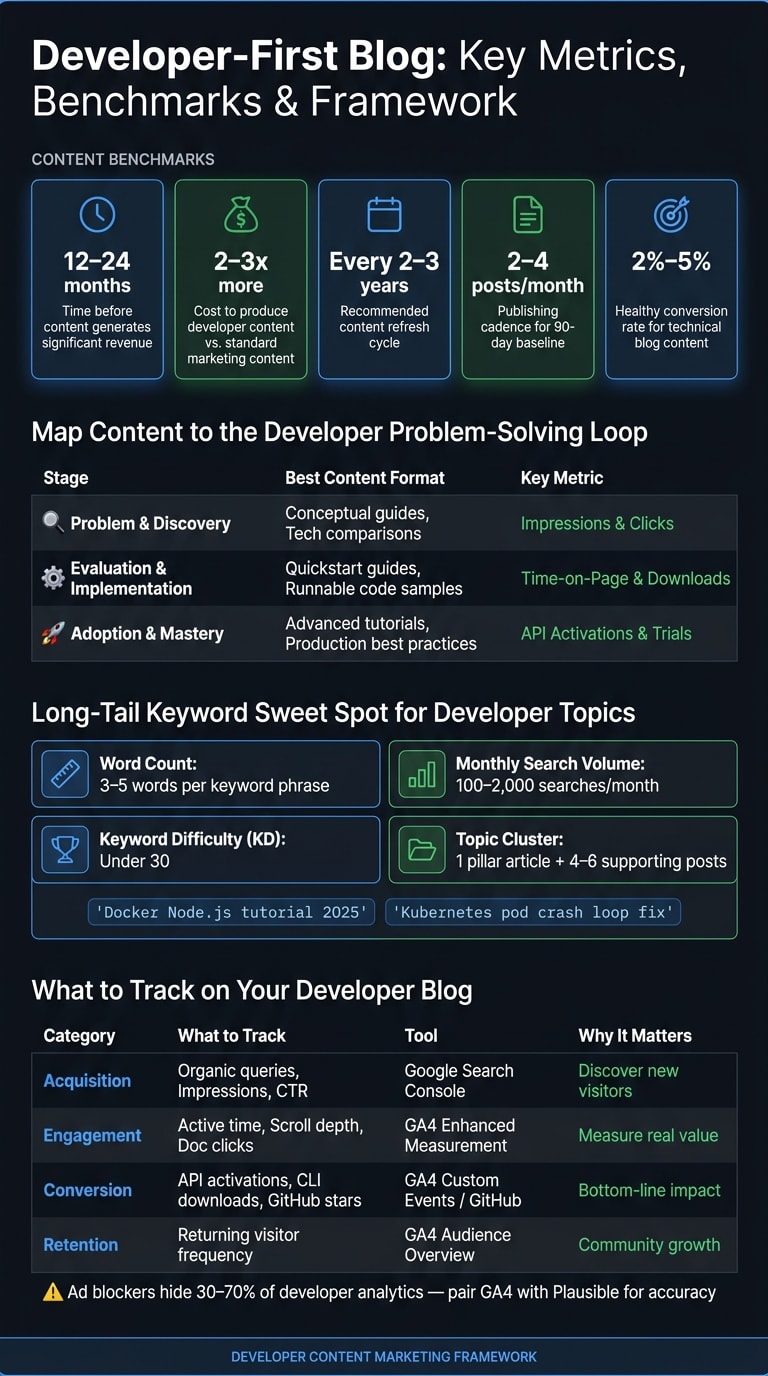
- Keep content fresh: Update posts every 2–3 years to maintain relevance.
This guide shows you how to create content that ranks on search engines, engages developers, and drives meaningful conversions for your business.
Understanding Developer Audiences and Content Goals
How to Define Developer Personas
Many developer personas miss the mark because they focus on surface-level details like job titles or company size. These factors rarely reveal what truly matters: technical context. What tools and technologies do developers use daily? Where do they encounter roadblocks? What do they search for when troubleshooting an issue, like a broken CI/CD pipeline, in the middle of the night?
The best way to get this right is by using the developer ethnographer method. This involves immersing yourself in the spaces developers frequent, such as Stack Overflow, GitHub Issues, Hacker News, and subreddits like r/devops or r/programming . Pay close attention to the exact phrases developers use when describing their problems, like "YAML indentation breaking my pipeline" or "managing state in large React apps." Your own engineering team can also be a goldmine of insights. They understand the challenges your product addresses and know how developers articulate those challenges .
Create a pain point backlog that outlines specific issues your content will address. Every persona you build should reflect the precise language developers use. Missteps like calling a library a framework can immediately signal to your audience that you don’t fully grasp their world .
These detailed personas will help you map out the developer journey and align your content with their specific needs.
Mapping the Developer Journey and Search Intent
Developers don’t follow the typical marketing funnel. Instead, they operate in a problem-solving loop, and your content needs to align with their position in that loop. Think of their journey in three stages:
| Journey Stage | Developer Question | Best Content Format | Key Metric |
|---|---|---|---|
| Problem & Discovery | "How do I achieve [outcome]?" | Conceptual guides, technology comparisons | Impressions, Clicks |
| Evaluation & Implementation | "How do I use [product] for [problem]?" | Quickstart guides, runnable code samples | Time-on-Page, Downloads |
| Adoption & Mastery | "What’s the most efficient way to do [advanced task]?" | Advanced tutorials, production best practices | API Activations, Trials |
Once you’ve identified the stages, define success metrics that match the content’s purpose at each phase. For example, a developer exploring "What is Kubernetes?" isn’t ready for a free trial offer. Instead, a low-commitment option like subscribing to a newsletter or downloading a reference guide is more appropriate. As Ashley McClelland, Partner at ércule, explains:
"The blog post CTA, as you're done finishing that piece of content, should be the next most logical step."
One critical point: don’t gate technical documentation or how-to guides behind lead-gen forms. Developers searching for quick solutions are unlikely to tolerate barriers like these .
Setting Measurable Goals for Your Developer Blog
To measure the success of your blog, start by aligning its goals with your business objectives. As Meg Scarborough, CEO and Founder of Megawatt, notes:
"The bottom line is, your SEO priorities should align with your business goals, product type, sales cycle, and available resources."
The metrics you prioritize will depend on your product. For example:
- Open-source projects: Focus on community growth and engagement metrics like organic traffic, backlinks, and tutorial interactions.
- Commercial developer tools: Pay closer attention to bottom-of-funnel metrics such as API activations, trial sign-ups, and conversion rates.
For technical blog content, a healthy conversion rate usually falls between 2% and 5%. If your rate is below 1%, it may signal a mismatch between your content and audience .
A practical way to start is by establishing a 90-day baseline. Publish consistently - aim for two to four posts per month - and focus on building traffic before shifting your attention to conversions in months four through six . Beyond basic metrics like page views, track deeper engagement signals such as scroll depth and time spent on code blocks. These indicators reveal whether your content is genuinely solving problems, not just attracting clicks.
Creating SEO-Optimized Developer Content That Delivers Value
How to Find Developer-Centric Topics Worth Writing About
To create content that resonates with developers and aligns with SEO goals, focus on topics that combine technical relevance with search intent. While keyword tools can be helpful, they often fall short when it comes to developer-specific queries. As Nate Matherson, Co-founder & CEO of Positional, explains:
"Developers are often the smallest sample population in these tools. So a lot of the times, the keyword tool, I don't even care if it says zero traffic. I'm like, I know for a fact this gets searched a bunch."
This is where community research becomes invaluable. Platforms like Stack Overflow, GitHub Issues, and developer-focused subreddits provide insight into real-world questions and pain points. Combine this with tools like Google Autocomplete and "People Also Ask" to uncover the exact phrases developers are searching for. Internal support data can also reveal recurring issues that are worth addressing.
When using keyword tools like Ahrefs ($99/month) or SEMrush ($139/month), prioritize long-tail keywords - phrases with 3–5 words that have monthly search volumes between 100 and 2,000 and a Keyword Difficulty (KD) score under 30. For example, queries like "Docker Node.js tutorial 2025" or "Kubernetes pod crash loop fix" reflect high intent and are easier to rank for than broader terms. Additionally, look for competitor content that’s outdated (5+ years old). These are great opportunities to create updated, more accurate versions and capture existing search traffic.
Once you’ve compiled your topics, organize them using the Topic Cluster method. This involves creating one comprehensive pillar article supported by 4–6 shorter posts targeting related, lower-difficulty keywords. This approach establishes topical authority, helps search engines understand your expertise, and supports both ranking and conversion efforts.
Structuring Blog Posts for Developer Readability
After identifying the right topics, you need to structure your posts in a way that appeals to how developers consume content. Developers often scan for the specific solution they need rather than reading linearly, so your structure needs to accommodate this behavior.
Start by answering the query directly in the first paragraph. This not only satisfies search intent but also increases your chances of securing a featured snippet. Use a clear heading hierarchy (<h2> through <h4>) to break up content into logical sections, making it easy to navigate. Include 2–5 internal links in each post to improve topical authority and aid search engine crawlability. For competitive keywords, aim for 1,500–2,500 words, while long-tail topics can be covered in 800–1,200 words.
"SEO content is documentation for strangers. You already write README files and PR descriptions - this is the same skill, optimized for Google." - Finder Launch
Code snippets are a critical component of developer content. Every tutorial should include tested, copy-and-paste code examples along with the environment setup required to run them. Testing your code ensures that developers won’t encounter unexpected errors, which can erode trust and drive them away. A well-structured post that balances readability with technical depth is key to ranking well and keeping developer readers engaged.
Adding Practical Examples and Step-by-Step Instructions
The best developer tutorials are those that lead to a working solution. To achieve this, every tutorial should follow a consistent structure that ensures readers can complete the process successfully:
| Tutorial Component | Purpose |
|---|---|
| Problem Statement | Clearly define the technical issue being addressed |
| Prerequisites | List the tools, versions, and environment settings needed |
| Code Snippets | Provide runnable, copy-and-paste examples |
| Troubleshooting | Cover common errors and edge cases |
| Outcome | Show what success looks like, visually or with examples |
One effective but often overlooked tactic is to include exact error messages in your content. Developers frequently paste stack traces or error messages directly into search engines. If your post contains these precise phrases, you’ll rank higher for those queries and attract readers who are actively seeking solutions.
Lastly, don’t forget about your internal resources. Documents like README files, API documentation, and GitHub pull request descriptions are rich in technical depth and can be repurposed into public-facing tutorials. The foundation is already there; the challenge is reshaping it for a broader audience. This not only supports your SEO efforts but also helps convert developers who are searching for specific solutions.
Measuring and Improving Blog Performance
Setting Up Analytics for a Developer Blog
Tracking developer traffic comes with unique challenges. Standard analytics tools like Google Analytics often underreport this audience, with ad blockers hiding at least 30% of developer activity. If cookie consent is required, this number can jump to 70% . Milica Maksimović, Co-founder and COO of Literally.dev, explains it best:
"Developers block ads. And if they're blocking ads, they're also blocking your analytics."
To counter this, consider pairing Google Analytics 4 (GA4) with a GDPR-compliant tool like Plausible to get a fuller picture of your traffic.
Next, focus on tracking developer-specific actions in GA4 as conversions. In the Admin panel, set up key events like API activations, documentation clicks, CLI downloads, and newsletter signups. Enable Enhanced Measurement to automatically capture actions like scrolls, outbound clicks, and file downloads. Don't forget to link GA4 with Google Search Console for deeper insights into search queries driving traffic to your blog.
These steps lay the groundwork for more detailed performance analysis, as discussed in the next section.
How to Analyze Content Performance
With tracking in place, shift your focus from vanity metrics to meaningful engagement indicators. Milica Maksimović highlights the problem with surface-level metrics:
"Impressions are the worst vanity metric you can think of. Someone scrolling past your social media post without properly noticing it still counts as an impression."
Instead, prioritize post-landing behaviors that reveal how users interact with your content. The table below outlines key metrics to track and the tools to use:
| Metric Category | What to Track | Tool |
|---|---|---|
| Acquisition | Organic search queries, impressions, CTR | Google Search Console |
| Engagement | Active engagement time, scrolls, doc clicks | GA4 (Enhanced Measurement) |
| Conversion | API key activations, CLI downloads, GitHub stars | GA4 (Custom Events) / GitHub |
| Retention | Returning visitor frequency | GA4 (Audience Overview) |
A useful tip: Filter your Search Console reports by your brand name to separate branded traffic from non-branded traffic. This helps you identify new visitors discovering your content for the first time.
Using Data to Update and Improve Blog Posts
Analytics data isn't just for tracking; it's a powerful tool for refining your content. Early performance metrics are particularly revealing. For example, posts that achieve an early impression peak are 3.2 times more likely to succeed, while those with zero impressions have an 84% chance of never surpassing 50 monthly sessions . If a post underperforms early, revisit its title tags and meta descriptions immediately.
For sustained improvement, monitor content performance over 30, 60, and 90-day intervals. Posts with high impressions but low click-through rates (under 2% for rankings in positions 6–10) might need more engaging title tags or meta descriptions. If a post drives traffic but lacks engagement, consider refining headers, adding better code examples, or updating technical details. When multiple posts compete for the same keyword, consolidating them into a single, stronger guide and applying 301 redirects can help maintain rankings.
Adam DuVander, Founder of EveryDeveloper, emphasizes the importance of consistent updates:
"Developers will keep coming back to sites that regularly and frequently publish content relative to the problems they want to solve."
Developer-focused content tends to lose relevance within 2–3 years, often becoming outdated entirely by year 5 . Set up GA4 alerts to notify you of a 30% or greater drop in organic traffic. These alerts can signal ranking issues or technical problems, allowing you to act quickly. Regular updates ensure your blog stays relevant and aligned with the evolving needs of your developer audience.
Integrating daily.dev Ads with Your Blog Content Strategy
Matching Blog Topics to daily.dev Ads Campaigns
Focus on promoting blog posts that address specific developer challenges, target particular tech stacks, and include a clear call-to-action (CTA). Evaluate posts based on their relevance to developers, alignment with intent, and readiness to convert. Posts that cater to mid-funnel and bottom-funnel stages often perform better since developers at these stages are already aware of their problems and actively seeking solutions.
"Campaigns perform better when the audience and context match the message." - daily.dev
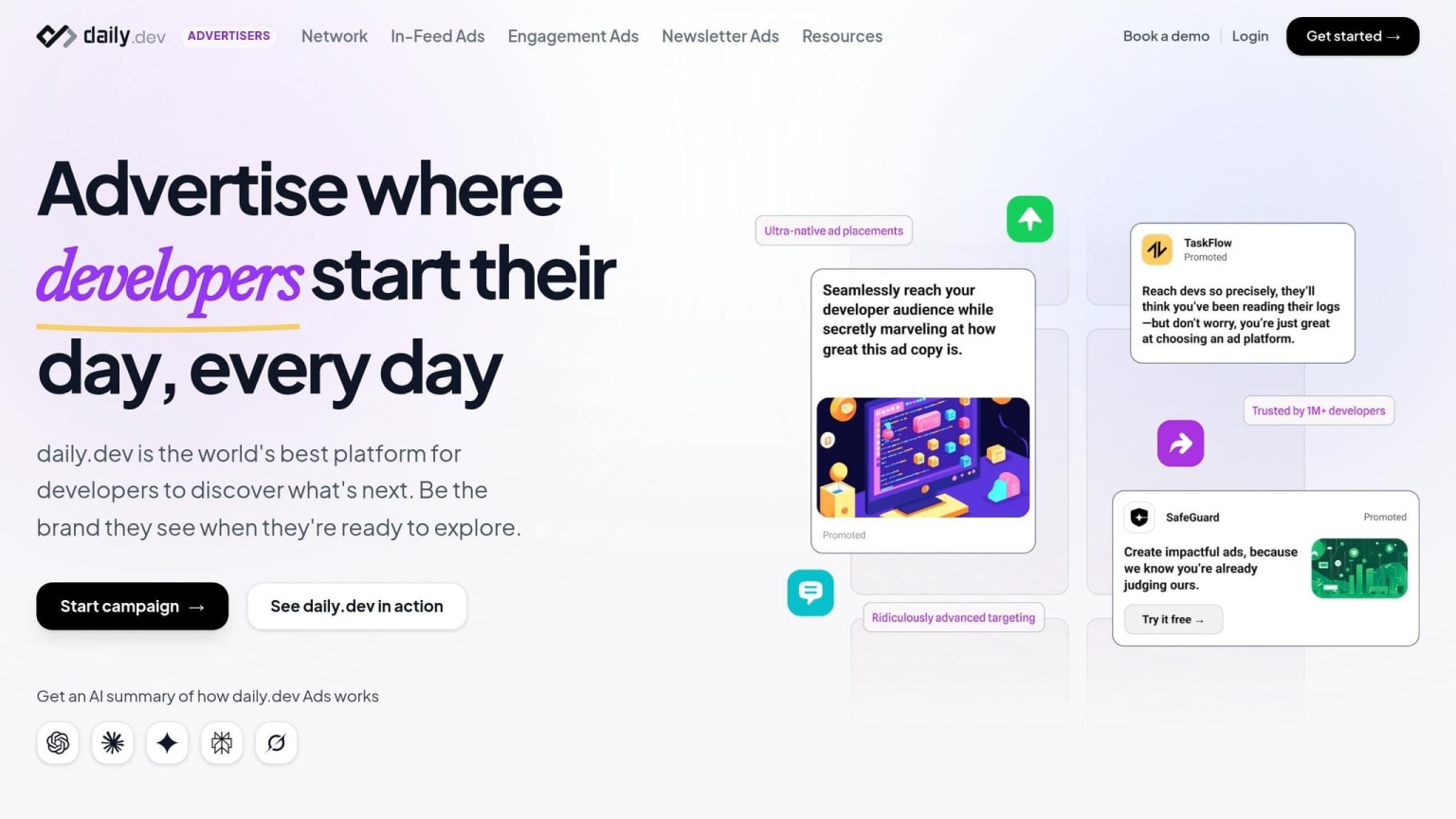
With daily.dev reaching over 1 million developers, you can fine-tune your targeting by seniority, programming language, and tools like Docker, Kubernetes, or VS Code. For example, a post about structured logging in Node.js can be shown directly to backend engineers using that stack - maximizing relevance and click-through rates (CTR). Use this targeted approach to design campaigns that drive developers toward meaningful actions.
Building Campaigns Around Blog Content
Start by identifying the developer action you want to encourage and work backward. For instance, if your goal is for developers to "create a free account and send their first API request", your blog post should guide them through a real-world implementation that makes signing up feel essential.
Organize the content to deliver immediate value: list prerequisites upfront, include copy-pasteable code snippets early, and place an inline CTA after the first major step. Ensure that your ad creatives reflect the blog’s value proposition. For example, an ad saying, "Set up centralized logging in 15 minutes (with code)" is more effective than a generic prompt. Use action-driven CTAs tailored to the funnel stage, such as "Read the guide" for awareness or "Get your free API key" for conversions.
Native ads styled to match developer platforms typically see better engagement, especially when they link to educational content like tutorials, benchmarks, or case studies. Direct ad traffic to the blog post itself, allowing the content to do the heavy lifting. This type of structured, actionable content not only drives more conversions but also positions your blog as a reliable resource for developers.
Using Campaign Data to Improve Content and Ads
Once your campaign is live, use data insights to refine both your content and ad strategy. Tag ad URLs with UTM parameters (e.g., ?utm_source=dailydev&utm_medium=native_ad&utm_campaign=node_logging_guide) to track key metrics like session engagement, scroll depth, and downstream actions such as API key sign-ups or trial starts .
Pay close attention to two key patterns. If CTR is low but engagement is high, adjust the ad headline to emphasize the most compelling outcome upfront. On the other hand, if CTR is high but bounce rates are climbing, the blog post may not be delivering on the ad’s promise quickly enough - move code examples higher in the content and trim unnecessary introductions.
Leverage daily.dev’s targeting data, such as active roles, programming languages, and seniority levels, to fine-tune the technical depth of future posts. For example, content resonating with Senior Engineers might need a different approach to engage mid-level developers . This feedback loop - where ad performance informs content improvements - helps transform one-off campaigns into a sustainable, growth-focused content strategy.
Conclusion: Building a Developer Blog That Ranks and Converts
Creating a developer blog that stands out means shifting your approach - stop thinking like a marketer and start thinking like a problem-solver. Developers approach search engines like tools; they type in a problem and expect a clear, accurate solution. Every blog post you write should aim to be the most practical and straightforward answer to a genuine technical question.
Patience is key here. Content marketing takes time to show results - typically 12 to 24 months before it generates significant revenue . And developer-focused content? It’s no secret that it costs 2 to 3 times more to produce than standard marketing content . But this is an investment, not a quick win. Treat your blog as a long-term asset that gains value over time. Nate Matherson, Co-founder & CEO of Positional, emphasized the importance of developer keyword research:
"Developers are often the smallest sample population in these tools. So a lot of the times, the keyword tool, I don't even care if it says zero traffic. I'm like, I know for a fact this gets searched a bunch."
The roadmap to success is clear: immerse yourself in developer forums to identify new challenges, focus on solutions with working code, align your calls-to-action (CTAs) with the reader’s stage in their journey, and revisit your content regularly to keep it relevant.
To maximize the reach of your content, use targeted distribution strategies. Platforms like daily.dev Ads allow you to zero in on developers based on their role, seniority, and tech stack. This pairing of precise distribution with high-value content creates a feedback loop - your ads inform your content strategy, and your content drives better ad performance. That’s how you build momentum instead of stalling out.
"Make your site fast. Make it easy to read. If it's readable and navigable for humans, then likely Google knows how to crawl it." - Karl Hughes, CEO, Draft.dev
FAQs
How do I pick blog topics developers actually search for?
When picking blog topics that resonate with developers, it's all about focusing on what they need and why they’re searching. Start by understanding their search intent - are they looking for solutions, tutorials, or insights? Then, dive into their technical requirements.
Keyword research is your best friend here. Look for terms with high search volume but low competition. These could include topics like specific programming languages, popular frameworks, or common troubleshooting questions.
To dig deeper, explore platforms where developers hang out. Check GitHub issues, API documentation, and developer forums for recurring challenges or questions. By addressing these real-world problems in your content, you’ll not only stay relevant but also improve your search rankings and connect with what developers are actively seeking.
What should I track to prove the blog drives sign-ups?
Tracking developer engagement metrics is key to understanding how your blog impacts sign-ups and overall user interaction. Keep an eye on API call frequency, GitHub activity, documentation views, and product usage indicators like SDK implementation rates and feature activation. These data points reveal how developers engage with your resources and tools, offering valuable insights into the effectiveness of your content.
How do I update old posts without losing rankings?
To give your old posts a new lease on life without jeopardizing their rankings, start by identifying posts that already generate impressions or traffic. These are your best candidates for a refresh.
Next, reassess the search intent behind the topic. Are readers looking for something different now? Update titles, introductions, and meta descriptions to align with what users are searching for today. If certain sections feel thin or outdated, expand them with examples or step-by-step details to add more depth.
Don't forget the technical side of things. Fine-tune on-page elements like headings and images, and check for broken or outdated internal links. Once everything is polished, republish the post to signal freshness to search engines.
This process helps improve both the relevance and quality of your content while keeping its current rankings intact.