
Want better results from developer events? Focus on what developers do after the event, not just how many show up. Forget badge scans and giveaways - track meaningful actions like API trials, SDK downloads, or community sign-ups. This article explains how to:
- Set clear goals: Define specific, measurable outcomes (e.g., 15 qualified meetings with engineering leads).
- Choose the right events: Target audiences that align with your product, even if it's a smaller meetup.
- Engage developers: Use hands-on demos and live coding sessions to solve real problems in under 10 minutes.
- Follow up fast: Same-day follow-ups increase response rates by 34%.
- Measure ROI: Use metrics like cost per action, pipeline multiple, and developer engagement to assess success.
Events can consume up to 40% of a marketing budget, but with proper planning, tracking, and follow-up, they can drive real business outcomes. Let’s dive into how to make every dollar count.
Pre-Event Planning: Getting Ready Before the Event
Getting everything in place before an event is crucial for achieving the outcomes you’re aiming for. A solid pre-event plan ensures your team shows up with clear objectives, the right tools, and messaging that resonates.
Setting Goals and Metrics
It’s not about how many leads you collect - it’s about what developers actually do. Did they sign up for a free API account? Download your SDK? Join your Slack or Discord community? These actions speak louder than a badge scan.
Start by defining your primary goal. Is it product adoption, generating pipeline, boosting brand awareness, or collecting product feedback? Be specific. Instead of a vague goal like “get more leads,” aim for something measurable, like “book 15 qualified technical meetings with engineering leads from fintech companies.” This clarity helps you gauge success when the event ends.
Here’s a simple formula to determine how many leads you need:
Leads needed = Target revenue ÷ Average deal size ÷ Close rate.
Also, calculate your cost per meaningful action to measure efficiency. For instance, if an event costs $800 and results in 20 API signups, each signup costs $40.
| Goal Type | Key Metric | Tracking Method |
|---|---|---|
| Product Adoption | API signups / SDK downloads | Unique QR codes / UTM links |
| Community Growth | New Slack/Discord members | Event-specific invite links |
| Pipeline Generation | Qualified meetings / opportunity value | CRM integration / lead formula |
| Brand Awareness | Social mentions / content shares | Hashtag tracking / social monitoring |
| Product Feedback | Feature requests / UX insights | Post-session surveys / booth notes |
Choosing the Right Events
Not every conference is worth the investment. A large event might attract thousands but only deliver 60 truly engaged attendees.
Focus on finding the right audience. Are you targeting professionals tackling daily work challenges, hobbyists working on side projects, or community influencers active on GitHub? Your product’s technical focus also matters. For instance, if your tool supports JavaScript, you’re not limited to JavaScript-specific events - you could explore broader community meetups.
Event size plays a role, but bigger isn’t always better. Large conferences, like WeAreDevelopers World Congress, provide access to CTOs and tech leaders, while smaller gatherings, like DevOps Days, create opportunities for meaningful connections. For startups with tighter budgets, hosting a side event - like a dinner or happy hour - near a major conference can deliver better results than an expensive booth. Take Tofu’s Growth Lead Livia Han, for example. During HubSpot's Inbound conference in September 2025, she organized a private dinner for 18 guests, which drew a waitlist of 250. Every attendee was at the Director level or above.
"If I had all the budget in the world, I'd still choose a satellite event over a 50-100K booth. You don't need the biggest stage; you need the right people in the room." - Livia Han, Growth Lead, Tofu
Once you’ve picked the right event, make sure your messaging and tracking systems are ready to capture every valuable interaction.
Preparing Your Messaging and Tracking Tools
Your booth has seconds to grab attention. Developers aren’t looking for a long list of features - they want to know how your tool solves their problem. A headline like “Deploy 10x faster” is far more compelling than a detailed description of your architecture.
Set up your tracking tools before you leave for the event. This includes configuring event-specific UTMs, creating short links, and integrating your lead capture system with your CRM. If you wait until after the event, you risk losing key data from the first 48 hours.
For booth demos, ensure they’re prepped to deliver a clear success moment in under 10 minutes. That hands-on experience is what sticks with attendees and drives follow-up actions.
In-Event Engagement: Getting Developers to Interact
Once your goals are set and tracking tools are ready, the next challenge is engaging developers on the event floor. How well you connect with them in real time determines whether your efforts stand out or get lost in the crowd.
Running Hands-On Demos and Sessions
Developers tend to tune out traditional sales tactics. Instead, they’re drawn to interactive experiences like live coding sessions, hands-on demos, and quick workshops. These formats let them tackle real challenges in under 10 minutes, followed by a clear invitation to try your product.
"Developers don't hate marketing – they hate aggressive, in-your-face sales pitches and fluff." - Mike Stowe, Director of Developer Marketing, RingCentral
The most impactful demos focus on solving a single problem quickly and effectively. For example, after showing how your tool addresses a specific issue, you can immediately encourage attendees to sign up for a trial or explore further.
Even with a modest budget, you can create engaging experiences. Permit.io proved this at the WeAreDevelopers conference in Berlin in July 2024. Their booth featured a retro setup - complete with a CRT monitor, 90s-style keyboard, and webcam - for under $1,000. Visitors could generate vintage-style playing cards featuring their own faces, drawing long lines that rivaled booths with far more expensive displays.
"Don't put the product at the forefront; put people first. If you think about your booth as an entertaining experience... you will stand out from every other booth that is trying to market a product or get your email." - Daniel Bass, Community Manager, Permit.io
After captivating developers with these experiences, it’s essential to systematically capture and qualify their interest.
Collecting and Qualifying Leads
Not all leads are created equal. A quick badge scan doesn’t carry the same weight as a developer who spends 15 minutes at your booth asking about API rate limits. To make the most of your interactions, use a funnel approach that segments attendees based on their level of engagement. For instance:
- Some visitors may only show casual interest (awareness).
- Others might take small actions, like starring your GitHub repo or signing up for your newsletter (low commitment).
- A smaller group will dive into a technical demo or ask detailed questions (high intent).
Permit.io applied this strategy at WeAreDevelopers 2024, focusing on engagement quality rather than just the number of badge scans. This approach led to stronger long-term relationships and community growth.
To qualify leads on the spot, ask insightful questions like, “What problem are you trying to solve right now?” instead of generic openers like, “What do you do?” This helps uncover their intent more effectively. When exchanging contact information, offer something valuable in return, such as a best-practices guide, an invite to a technical workshop, or an extended trial.
Timing is crucial when following up. Research shows that same-day follow-ups have a 34% response rate, while waiting four days or more drops that to just 5%. Integrating your lead capture tool with your CRM ensures automated follow-ups can be triggered within hours.
This structured approach to lead segmentation allows you to adapt and optimize your strategy during the event.
Using Live Data to Adjust on the Fly
Once you start gathering leads, real-time data becomes your best friend. Treat each day of the event as a live experiment. Assign two-person teams at your booth: one handles technical discussions, while the other records detailed notes about pain points, interests, and next steps.
At the end of each day, rank your interactions to identify top leads for immediate follow-up through LinkedIn or text. As one team put it:
"The lead remembers who you are on Day 0. By Day 3, you're just another vendor in a sea of post-conference emails." - GTMStack Team
Keep an eye on which demos or sessions generate the most engagement, whether it’s through GitHub stars, QR code scans, or live signups. Use this data to tweak your booth pitch or adjust staffing for the next day. If foot traffic slows, consider hosting an impromptu micro-workshop or AMA session to draw in more developers and showcase your team’s expertise.
Small adjustments like these, made in real time, can add up over the course of a multi-day event and significantly boost your results.
| Data Point to Capture | Real-Time Action |
|---|---|
| Pain point discussed | Record via voice memo or CRM note immediately |
| Content interest | Note which demo or asset resonated most |
| Engagement depth | Track GitHub stars or newsletter signups on the spot |
| Next step agreed | Confirm verbally: "I'll send X by Tuesday - fair?" |
Post-Event Follow-Up: Turning Engagement into Results
Following up after an event is your chance to turn the connections you've made into meaningful results. To do this effectively, timing and personalization are key. A well-executed follow-up bridges the gap between pre-event planning and in-event engagement, ensuring that your efforts lead to tangible outcomes. Here's how to make it count.
Prioritize Leads
Not all leads are the same, so your follow-up strategy shouldn't be either. Tailor your responses based on what each person did during the event. For example, a developer who signed up for an API key or downloaded your SDK will need a different approach than someone who simply picked up a sticker.
Here's an important insight: ~60% of event pipeline value often comes from advancing deals already in progress rather than from brand-new contacts. This means that existing prospects who attended your event are just as valuable - if not more so - than new leads.
And timing is everything. The faster you follow up, the better your chances of engagement:
| Follow-Up Timing | Response Rate |
|---|---|
| Same-day | 34% |
| Next-day | 21% |
| 2–3 days | 11% |
| 4+ days | 5% |
To capture interest while it's fresh, automate your CRM workflow so high-priority leads get a follow-up sequence within hours.
Building Developer Relationships After the Event
Your outreach should reflect the actions and interests of the developers you met. For those who participated in hands-on demos, send resources that directly build on their experience - like extended trials, API credits, or tutorials that expand on what they learned. For attendees with more general interest, a simple thank-you email with a session recording and a feedback survey (using tools like Typeform or SurveyMonkey) keeps the conversation open without overwhelming them.
A two-step email sequence can be particularly effective. Start with a thank-you and survey, then follow up a few days later with a clear next step - like an invitation to an upcoming workshop, a relevant tutorial, or a link to join your developer Slack or Discord community.
"Leads are people you want to do something. Relationships are built with people who want to do something for you." - Mike Stowe, Director of Developer Marketing, RingCentral
Beyond individual outreach, your event content can continue to work for you long after the event is over.
Repurposing Event Content for Broader Reach
Don't let your event content gather dust - it can have a much longer life. Session recordings, slides, and code samples can be turned into blog posts, tutorials, or bite-sized video clips to reach a wider audience. Sharing written versions of your talks on platforms like Dev.to or relevant subreddits can also help you connect with engaged developer communities.
Short video snippets are another great way to drive traffic back to the full session recording. You can even use the recordings as semi-gated resources in your post-event email campaigns, helping you further qualify leads who interact with them.
Measuring and Reporting Developer Event ROI
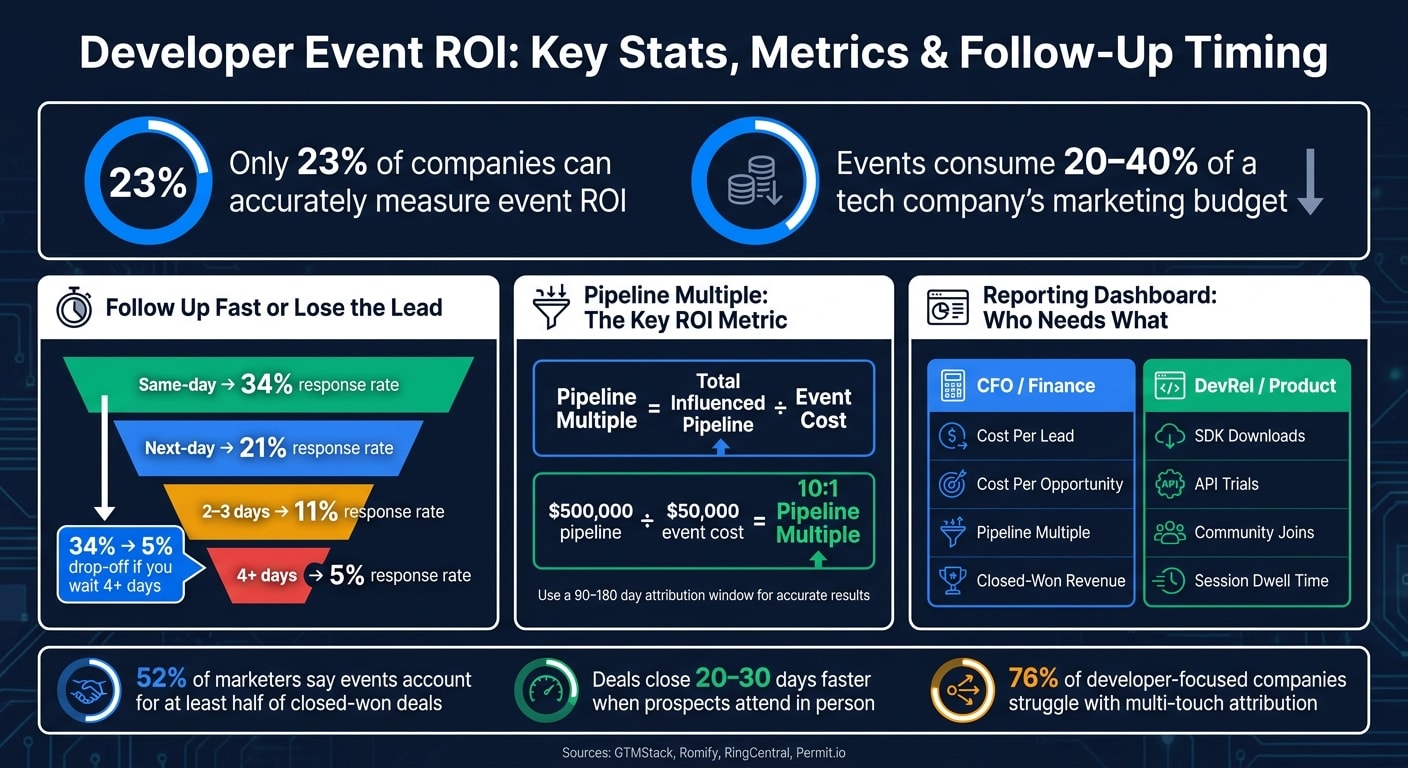
It turns out that only 23% of companies can accurately measure the return on investment (ROI) for events . Meanwhile, events can eat up as much as 20% to 40% of a tech company’s marketing budget . The silver lining? With a structured approach, tracking ROI becomes much more straightforward.
Building a Unified Measurement Framework
To truly understand event ROI, you need a framework that ties together three key elements: total event costs (like booth fees, travel expenses, and staff time), engagement data (such as leads, session attendance, or SDK downloads), and revenue impact (deals that were sourced or influenced). This creates a comprehensive picture of an event’s performance.
Post-event actions - like API key activations, free trial signups, or community memberships - are crucial indicators of genuine interest. These behaviors often reveal more than just attendance numbers. Since developer sales cycles tend to be lengthy, focusing on metrics like the Pipeline Multiple can offer clearer insights. The Pipeline Multiple is calculated by dividing the total influenced pipeline value by the event cost. Ben Jablow, CEO of Romify, explains it best:
"This treats qualified opportunities as value in progress. If you spend $50,000 on an event and can attribute $500,000 in qualified pipeline, you're looking at a 10:1 pipeline multiple – even if no deals have closed yet."
Don’t forget to include the value of content generated at the event - like session recordings, demos, and testimonials - in your ROI calculations. These assets hold production value and contribute to the overall benefits of the event . Additionally, ensure that your metrics are accurately attributed to the event to capture its full impact.
Attributing Results to the Right Events
Attribution remains a tricky challenge. Developers often learn about tools through indirect channels like GitHub, private Slack groups, or peer recommendations. In fact, 76% of developer-focused companies struggle with multi-touch attribution .
To address this, use event-specific UTMs, unique QR codes, and include a “How did you hear about us?” field in your forms. These strategies help track data from “dark social,” which accounts for about 80% of social shares that lack referrer data .
For B2B developer tools, a W-shaped attribution model works better than first- or last-touch models. This model distributes credit across three key points: the initial interaction, the lead conversion, and the opportunity creation stage. It ensures events get proper recognition for moving deals forward . Consolidate all this data into reusable dashboards for ongoing analysis and refinement.
Setting Up Reusable Reporting Dashboards
Reusable dashboards save time by eliminating the need to rebuild reports after every event. The most effective dashboards serve two main audiences: financial stakeholders (who need metrics like fully loaded costs, pipeline ROI, and closed-won revenue) and DevRel and product teams (who focus on developer engagement metrics like API trials, community joins, and session dwell time) .
| Dashboard Layer | Key Metrics | Primary Audience |
|---|---|---|
| Financial Efficiency | Cost Per Lead, Cost Per Opportunity, Event Costs | CFO / Finance |
| Revenue Impact | Pipeline Multiple, Closed-Won Revenue, ROI % | CFO / CMO |
| Developer Engagement | SDK Downloads, API Trials, Community Joins | DevRel / Product |
| Quality Benchmarks | NPS, Lead Quality Score, Registration-to-Attendance Rate | CMO / DevRel |
To capture delayed impacts, set an attribution window of at least 90 days - or even 180 days for enterprise-level deals . Automating data syncing between your event platform and CRM (like Salesforce or HubSpot) can also reduce manual errors . Finally, conducting 30/60/90-day pipeline reviews ensures you can track how event leads progress through the sales funnel over time .
Conclusion: Key Steps for Better Developer Event ROI
To get real results from developer events, it’s all about preparation, tracking, and follow-through. Start by defining what success looks like before the event even begins. Then, focus on monitoring key developer behaviors and following up quickly after the event wraps up. These steps set the stage for measurable outcomes.
"What did developers do after the event ended? Did they sign up for a free account? Did they join your developer community? Did they download the SDK or try the API? That behavior is what determines whether an event was actually valuable."
The numbers back this up: 52% of marketers say that events account for at least half of their closed-won deals, and deals often close 20–30 days faster when prospects attend in person . But to achieve these results, you need clear goals, accurate attribution, and to follow up within 24 to 48 hours.
Another key metric to focus on is cost per conversion rather than the total event budget. Calculate it by dividing the total cost of the event by the number of meaningful developer actions (like signups, API trials, or community memberships). This approach helps compare event efficiency. For example, a small $300 meetup with the right audience can deliver better results than a $75,000 sponsorship at a massive conference. MuleSoft experienced this firsthand when they shifted their investment from large Java conferences to smaller, targeted community events .
FAQs
Which developer actions should I track to prove event ROI?
To measure the ROI of an event, focus on tracking specific developer actions. These might include signing up for accounts, joining communities, downloading SDKs, testing APIs, interacting with content, sharing feedback, or taking part in sessions or activities. These actions highlight genuine engagement and provide measurable results.
How do I choose the right conference or meetup for my product?
To kick things off, set clear goals for what you want to achieve - whether that's building brand awareness, generating leads, or increasing developer engagement. Once you've nailed down your objectives, dive into researching events to ensure they match your target audience and align with your product's focus. Pay attention to details like attendee demographics, the event's relevance to your industry, and its overall reputation.
Next, explore the sponsorship or participation options available. Look for packages that not only fit your budget but also support your specific goals. By aligning these elements, you'll be in a stronger position to maximize your ROI and keep your growth strategy on track.
What’s the fastest post-event follow-up process that actually works?
The quickest way to make your post-event follow-up count is by focusing on what developers do, not just how many showed up. Pay attention to actions like creating accounts, joining your community, or testing out your API or SDK. These behaviors tell you more about your event’s success than attendance numbers ever could.
Once the event wraps up, send out personalized messages that mention their participation. Add useful resources or incentives to keep them engaged. This method helps you gauge the event's success through real developer activity, making your follow-up both efficient and effective.