
Migration marketing targets developers who are already comparing tools and ready to switch. Instead of focusing on broad awareness, it zeroes in on high-intent users searching for terms like "X vs Y." This strategy works by creating detailed, honest comparison pages, migration guides, and offering incentives like migration credits or onboarding support to simplify the switch.
Key takeaways:
- Developers value transparency: Acknowledge competitor strengths and focus on your tool's standout features.
- Comparison content is crucial: Use factual data, clear tables, and specific use cases to guide decisions.
- Migration guides reduce friction: Break steps into phases with actionable instructions and code examples.
- Incentives ease transitions: Offer credits, discounts, and automated tools to offset migration costs and time.
- Timing matters: Launch campaigns when competitors raise prices, deprecate features, or face reliability issues.
Why Migration Marketing Works for Developer Tools
Migration marketing focuses on developers actively seeking alternatives, often searching for terms like "X vs Y" to address frustrations with their current tools. These users are already at the decision-making stage, representing bottom-of-the-funnel traffic. They’re not just exploring options - they’re looking for solutions. This creates a unique opportunity to connect with developers by addressing their pain points through clear, honest comparisons.
Solving Developer Problems
Developers typically switch tools due to issues like unpredictable pricing, missing features, performance limitations, or poor support. Migration marketing works by tackling these frustrations head-on with transparent solutions. For instance, New Relic appeals to developers unhappy with Datadog's pricing by emphasizing its own price transparency. By using terms like "peak usage" and "overages", New Relic speaks directly to teams that prioritize cost predictability .
To pinpoint these pain points, companies often turn to Voice of Customer data from platforms such as Reddit, Hacker News, and G2 reviews . A great example is Convex, which recognizes Firebase as an industry pioneer but differentiates itself by focusing on three specific technical themes that provide a modern alternative .
By addressing these concerns directly, migration marketing not only solves immediate problems but also helps establish credibility with developers through honest and relatable messaging.
Building Trust with Honest Marketing
Developers value transparency and factual comparisons. They’re quick to dismiss overly promotional claims and expect content that acknowledges both strengths and weaknesses. For example, creating a comparison table where your product dominates every category can backfire - developers will fact-check your claims and lose trust if they detect bias .
Instead, trust is built by recognizing where competitors excel. Meilisearch sets a strong example by providing multiple comparison tables that openly highlight areas where it falls short. This level of objectivity resonates with developers who value honesty over marketing fluff .
How to Create Comparison Content That Converts
Creating comparison content that resonates with developers requires more than just listing features. The goal is to provide a clear, honest assessment that helps readers determine which tool fits their specific needs. Structuring your comparisons around meaningful technical differences and maintaining transparency are key to building trust.
Writing Factual Product Comparisons
Start with a clear verdict right at the beginning - within the first two or three sentences. Developers often skim for quick answers, and offering a recommendation upfront helps them decide whether to continue reading. This approach also boosts the chances of your content being referenced by platforms like ChatGPT or Perplexity .
Rather than overwhelming readers with every feature, focus on one to three standout differentiators. For example, Convex’s Firebase comparison acknowledges Firebase’s pioneering role but then zeroes in on three specific architectural differences . This method respects competitors while highlighting your tool’s strengths.
Support your claims with credible, third-party data. Include elements like G2 ratings, GitHub stars, performance benchmarks, or developer testimonials to back up your points . New Relic’s comparison with Datadog is a great example - it incorporates pricing graphs and uses industry-specific language like "peak usage" and "overages" to address common developer concerns about cost unpredictability .
Frame your recommendations around specific use cases instead of declaring an overall winner. As Draft.dev explains:
"A good comparison doesn't say 'Use tool X because it's the best'. A good comparison says 'Use tool X if this is your use case, and use tool Y if this is your use case'."
This nuanced approach helps developers make informed decisions and avoids coming across as biased.
Using Comparison Tables
Tables are a powerful way to summarize your comparisons, but they need to go beyond basic checkmarks. Instead of a simple "yes/no", provide detailed descriptions. For instance, write "250+ native integrations" rather than just a checkmark . This level of detail gives developers the information they need to evaluate features thoroughly.
Consider adding a "Why It Matters" column to explain the practical significance of each feature. Ably does this effectively in their Pusher comparison, helping developers understand how differences impact their workflows .
Be transparent by including rows that highlight competitor strengths or your tool’s limitations. Meilisearch’s documentation does this well, openly admitting where they fall short. This honesty builds trust and credibility with technical audiences . On the flip side, a table where your product dominates every row can come across as biased and may alienate readers.
Here’s an example of how to structure an effective comparison table:
| Comparison Factor | What to Include | Why Developers Care |
|---|---|---|
| Pricing | Tiers, per-user costs, scaling fees | Helps estimate Total Cost of Ownership (TCO) |
| Key Features | Core capabilities and unique differentiators | Shows if the tool meets functional requirements |
| Integrations | Compatibility with existing tech stacks | Determines ease of implementation |
| Support | Documentation quality and response times | Critical for troubleshooting production issues |
Keep tables easy to read on mobile devices by limiting them to two or three columns, with criteria listed as rows. This ensures your content remains accessible across all platforms.
Writing Migration Guides That Help Developers Switch
A well-structured migration guide can make switching tools less daunting by breaking the process into clear, actionable steps. Developers need straightforward instructions for tasks like data migration, code changes, and testing to ensure a smooth transition.
Breaking Down the Switching Process
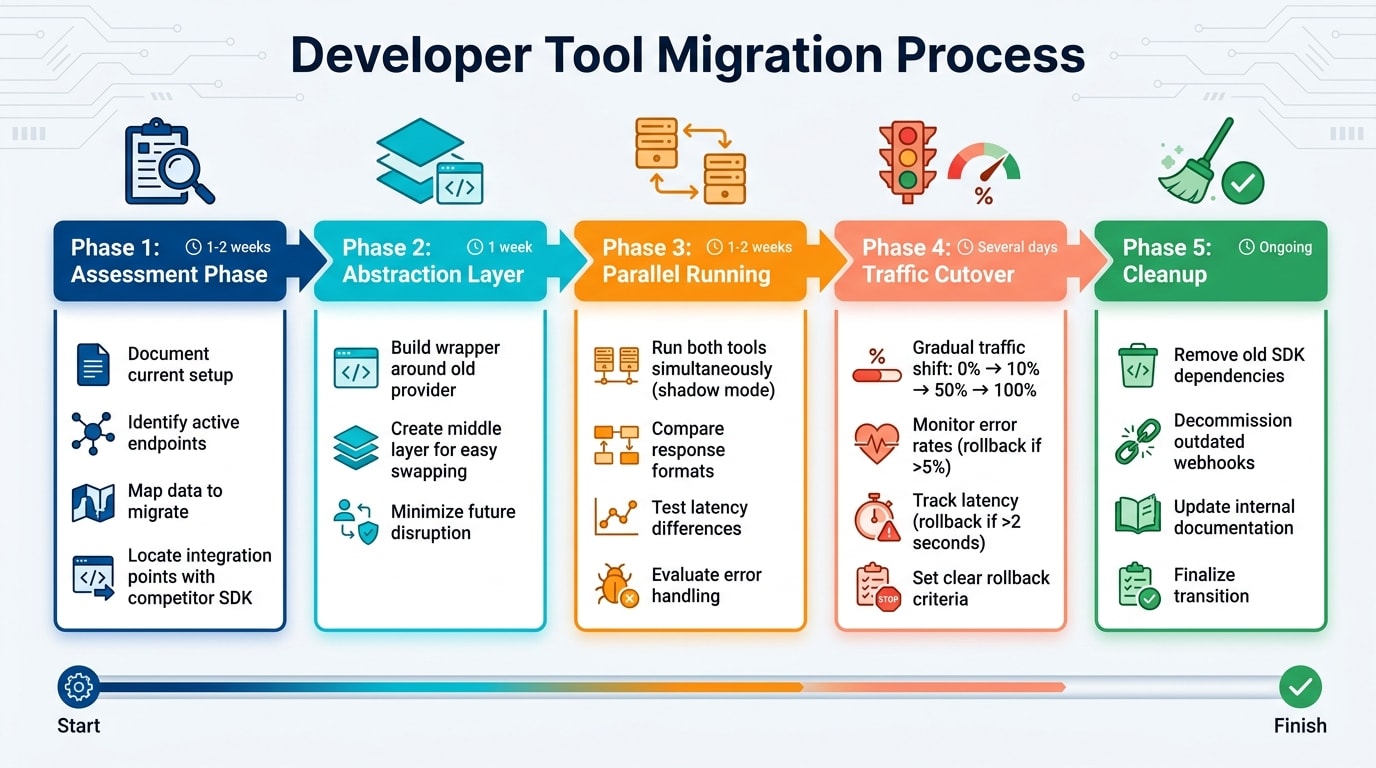
An effective migration guide divides the process into distinct, manageable phases. Here's a suggested framework:
Assessment Phase (1–2 weeks): Start by documenting the current setup. This includes identifying active endpoints, the data to be migrated, and integration points with the competitor's SDK. This step helps define the migration's scope.
Abstraction Layer (1 week): Build a wrapper around the old provider’s functionality. This simplifies the final switch by creating a middle layer that can later be swapped out with minimal disruption.
Parallel Running Phase (1–2 weeks): Run both the old and new tools simultaneously in a shadow mode. Use this time to compare response formats, latency, and error handling between the two systems.
Traffic Cutover Phase: Gradually shift traffic in stages - starting with 0%, then moving to 10%, 50%, and finally 100%. Spread this over several days and set clear rollback criteria, like an error rate exceeding 5% or latency going over 2 seconds, to ensure a quick recovery if problems arise.
Cleanup Phase: Once the transition is complete, remove dependencies on the old SDK, decommission outdated webhooks, and update internal documentation to reflect the new setup .
By following these phases, developers can tackle the migration process step by step, minimizing risks and ensuring a smoother experience.
Making Migration Easy
To make the transition even easier, provide developers with clear, practical code examples. Use a "before and after" format to show how functionality in the competitor's tool translates to your SDK. For instance:
Offer Python or CLI scripts to handle data migration tasks, such as normalizing exported data. Examples might include stripping phone number formatting, merging name fields, or mapping status fields (e.g., converting HubSpot's "Lifecycle Stage" to your tool's equivalent status field) .
Include a preview feature that allows developers to visualize their own data in your tool's interface before they commit to creating an account. This can help them feel more confident about the switch.
Using Incentives to Encourage Switching
Switching tools often comes with challenges like time investment, disruption to established workflows, and the energy required to adapt. These non-monetary costs are a big reason why 78% of developers cite "migration difficulty" as their primary reason for sticking with their current tools - even when they know better options are available . Strategic incentives can ease this transition by addressing financial and technical barriers, making the switch less daunting.
Offering Migration Credits and Discounts
Financial incentives are particularly effective when they help offset the costs of transitioning. One common challenge is the overlapping expense of paying for both the old and new tools during the migration period. In fact, 56% of business software buyers say cost is the main obstacle to switching . By covering these dual expenses, companies can eliminate a key sticking point.
Migration credits can be used to cover early termination fees or subsidize the cost of running both tools during the transition. Structuring these incentives around specific milestones - rather than offering blanket discounts - encourages teams to fully commit to the migration process. For example, in 2024, General Mills managed to complete a data lake migration to Google Cloud 30% faster than expected. This was achieved by leveraging automated migration services and efficient management practices . Time-sensitive offers can also create a sense of urgency, helping teams overcome delays in decision-making.
Providing Hands-On Onboarding Support
Beyond financial help, personalized onboarding can significantly reduce the fear of productivity loss that often accompanies switching tools. A smooth onboarding process makes a big difference - customers are 76% more likely to deepen their relationship with a vendor within the first year if their initial experience is positive . However, organizations frequently underestimate the effort required for migration by 40%–60% .
One effective approach is offering implementation credits, which can be used for certified partners or professional services to handle initial setup. Robin Percy, CTO of OpsGuru, highlighted the value of such programs:
"The AWS MAP Program has been a cornerstone of OpsGuru's approach to accelerating innovation for our customers on AWS while de-risking their migrations from legacy platforms" .
This type of dedicated support can ease the learning curve associated with new APIs and workflows, helping teams adapt more seamlessly.
Automating Data Import
Manual labor is one of the biggest hurdles in migration, with 83% of such projects either failing or exceeding their budgets due to these challenges . Automated migration tools can significantly reduce this burden. For example, when Abhishek developed uform to rival Typeform, he included a one-click tool that converted existing Typeform URLs into functional replicas. This feature eliminated the need for manual data entry, helping the product grow to $11,000 in monthly recurring revenue and attract 35,000 registered users .
Pre-built connectors and change data capture (CDC) tools also simplify the process, reducing the need for custom scripts and ensuring minimal downtime . In July 2024, Google Ads engineers used an AI-powered migration toolkit to transition unique ID types from 32-bit to 64-bit integers across thousands of locations. The AI handled 80% of the code modifications, cutting the migration time in half . These tools, equipped with features like data validation and schema mapping, ensure data integrity while reducing the need for developers to create custom verification processes.
When to Launch Migration Campaigns
Timing plays a huge role in the success of migration campaigns. Developers need convincing reasons to switch tools, and the most effective campaigns happen when developers are already questioning their current options. This could be due to pricing changes, reliability concerns, or forced migrations caused by feature deprecations or other disruptions .
Targeting Developers When Competitors Slip Up
When competitors make missteps, it opens up opportunities to attract their users. For example, if a competitor eliminates a free plan or raises prices unexpectedly, developers often start looking for alternatives . Reliability issues, like major outages, can also push users to seek more dependable solutions . Similarly, when features are deprecated or companies are acquired, entire user bases may be forced to migrate under tight deadlines .
To capitalize on these moments, it’s critical to monitor such events in real time. Tools are available for as little as $0.10 per month to track competitor pricing pages and notify you of changes . Social platforms are another valuable resource - search for phrases like "[Competitor] alternative" or "why is [Competitor] so expensive" to spot frustrated developers . Once you identify these moments, act quickly by deploying targeted comparison content and migration guides to capture their attention.
These events often push developers into the decision-making phase, where they’re actively evaluating their options.
Reaching Developers During Decision-Making
When developers search for terms like "Alternative to [Tool]" or "[Product] vs [Competitor]", they’re already deep in the decision-making process. This stage represents high-intent traffic, as these developers have committed to exploring other options . These searches typically occur during a 30-day evaluation window, a period when developers are intensely comparing solutions . Well-crafted comparison pages targeting these keywords can achieve conversion rates of up to 23%, which is nearly four times higher than the average landing page .
To succeed here, it’s essential to be visible during these critical evaluation periods. Platforms like daily.dev Ads allow you to target developers based on the tools they use and their seniority level, ensuring your migration campaigns reach the right audience at the right time. However, timing is everything - avoid launching campaigns during high-pressure periods. Developers generally prefer a 30-day buffer before major events to ensure a smooth transition . This approach aligns perfectly with the targeting capabilities of daily.dev Ads, making it easier to connect with decision-makers when they’re ready to make a move.
Running Migration Campaigns on daily.dev Ads
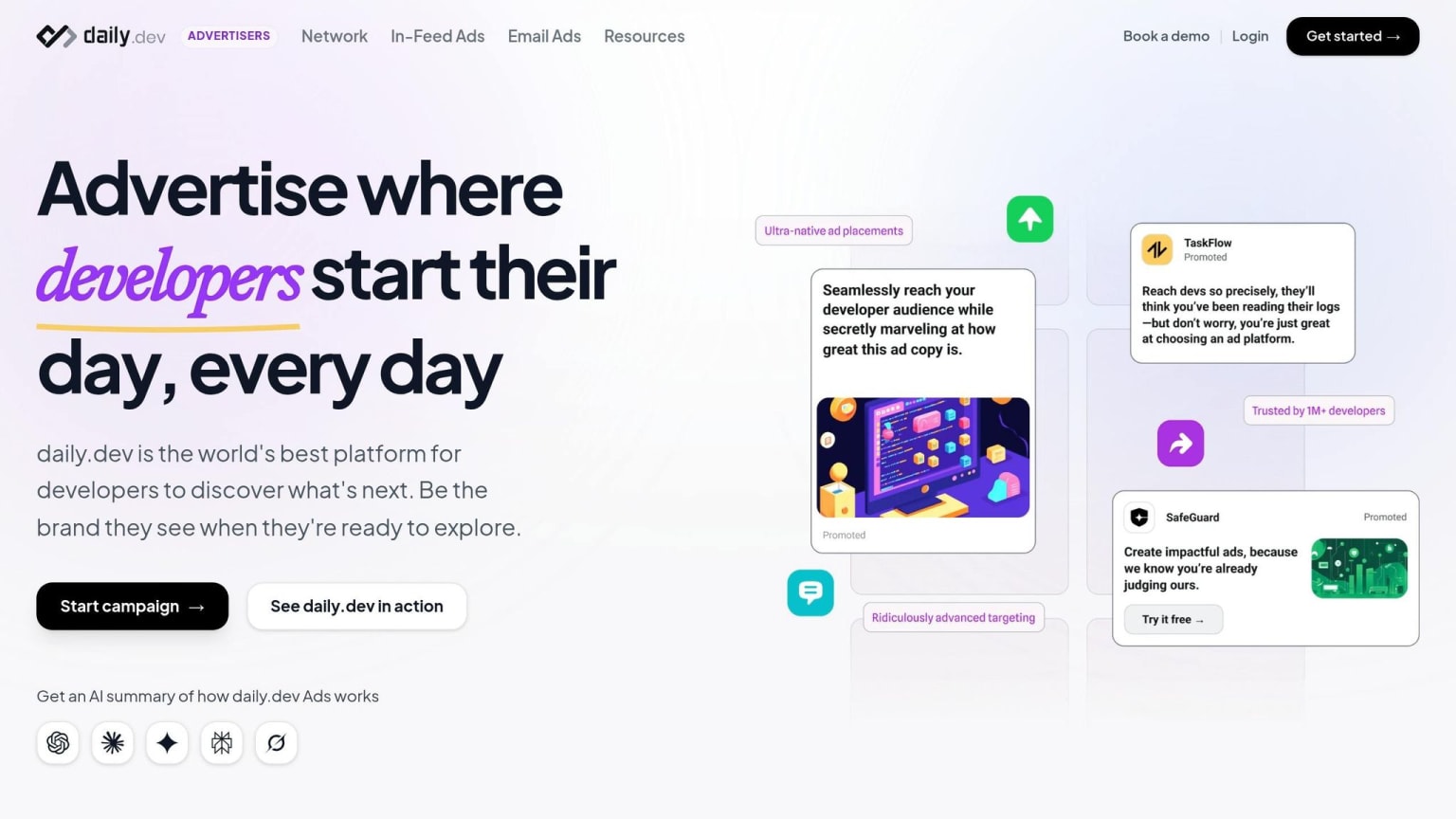
Once you've prepared your migration content and chosen the right launch timing, daily.dev Ads offers a direct path to connect with over 1 million developers. This platform is perfect for reaching developers actively exploring alternatives, completing your migration marketing funnel by showcasing comparisons and guides to an engaged audience. With precise targeting, you can create messages that resonate deeply with developers.
Targeting Developers by Tools and Seniority
With daily.dev Ads, you can target developers based on the tools they use, their programming languages, and even their seniority. This flexibility allows you to design campaigns that zero in on senior engineers using a competitor's database tool or junior developers working with a framework you're aiming to promote.
For migration campaigns, targeting by seniority is especially important. Developers at different experience levels have distinct priorities. Senior engineers and technical leads often care about API compatibility, data integrity, and overall costs, while junior developers focus more on ease of adoption, accessible documentation, and strong community support. Tailor your ad messages accordingly - highlight migration credits and concierge onboarding for senior developers, while offering step-by-step guides and tutorials for junior developers.
Getting Your Ads Seen
daily.dev uses native in-feed ad placements, seamlessly integrating your ads into developers' content feeds alongside the technical articles and news they already consume. This ensures your migration campaigns appear naturally as developers explore topics related to their tech stack, catching them when they're in a learning or decision-making mindset.
Beyond in-feed ads, the platform also provides post page ads, which are displayed when developers read specific articles, and personalized digest ads, delivered through curated content. With real-time performance tracking, you can monitor which targeting strategies and ad placements are driving the most engagement - whether that's downloads of your migration guides or trial signups. This data empowers you to fine-tune your campaigns for maximum impact, reinforcing your migration content throughout the developer's decision-making journey.
Conclusion
Migration marketing connects with developers at a key moment - when they’re actively exploring alternatives and looking for straightforward, reliable information. The strategies outlined here share a common thread: developers value transparency over flashy promises. By recognizing competitor strengths, offering clear benchmarks, and using third-party validation, you can establish the trust needed to drive conversions. When developers find resources like migration guides and comparison pages genuinely helpful - complete with linked documentation and standalone instructions - these tools can account for 20–30% of sign-ups. Add incentives that ease the switch, and the results speak for themselves .
Timing is everything. Launch migration campaigns when competitors falter - whether it’s due to pricing shifts, service outages, or deprecated features. These moments are when developers are most likely to evaluate alternatives, making your comparison content especially effective. This approach can yield conversion rates as high as 23% .
To create a winning migration strategy, focus on these three pillars:
- Fair comparisons: Highlight trade-offs and tailor the content to specific use cases.
- Detailed migration guides: Include code examples, automation tools, and a step-by-step process.
- Strategically timed campaigns: Target developers during critical decision-making periods.
Platforms like daily.dev Ads can take your migration efforts further by reaching over 1 million developers. With targeting based on tools, programming languages, and seniority, along with native in-feed placement and real-time tracking, your campaigns will reach developers who are actively engaging with technical content and weighing their options. By pairing honest, useful content with well-timed execution, you can turn competitors’ users into loyal advocates.
FAQs
How do I choose the right 'vs' keywords to target?
When developers are evaluating tools, they often search for terms like "X vs Y" or "alternatives to X." These queries signal that they're actively comparing options and are close to making a decision.
To capture this audience, focus on keywords that emphasize specific use cases or key features where your tool stands out. For example, if your product excels in speed, scalability, or ease of integration, highlight those strengths clearly.
It's also important to keep your content honest. Be upfront about the scenarios where your product is the ideal choice. This transparency not only builds trust but also ensures you're attracting users who are genuinely a good fit for what you offer.
By aligning your content with migration marketing principles, you can engage users who are already considering a switch and guide them toward choosing your solution.
What’s the fastest safe way to run a migration with minimal downtime?
Migrating systems quickly and safely while keeping downtime to a minimum takes careful planning. Begin by evaluating the scope, dependencies, and potential risks involved in the process. A phased approach, such as using parallel systems or feature toggles, can help you test changes without disrupting operations.
Automating data imports can save time and reduce errors, and scheduling the migration during low-traffic periods minimizes the impact on users. Once the migration is complete, closely monitor the system to catch and resolve any issues as soon as they arise. The key to a smooth transition lies in thorough preparation and smart timing.
Which incentives actually motivate developers to switch tools?
Developers are driven by perks that simplify and lower the cost of switching to a new tool or platform. Some key incentives include migration credits, concierge onboarding, and data import tools, all designed to tackle technical challenges and save time. Timing plays a big role too - developers are more likely to make a switch when their current tools fall short, such as during pricing changes, outages, or feature deprecations. Offering clear and practical benefits can make the transition feel smoother and far more enticing.