

Want to succeed on AWS, Azure, or VS Code marketplaces? Here's the key: Optimize your product listing to improve visibility, drive traffic, and boost conversions. These platforms are essential for reaching developers, but competition is fierce.
Key Takeaways:
- Visibility matters: Use targeted titles, descriptions, and keywords to rank higher in marketplace searches and external search engines.
- Visuals drive engagement: High-quality screenshots and short videos can increase conversions by up to 80%.
- Pricing strategies work: Free trials and pay-as-you-go models attract more customers.
- Reviews build trust: Verified reviews influence buyer decisions and improve search rankings.
- Traffic isn’t automatic: Use external marketing (blogs, ads, and social media) to drive visitors to your listing.
Actionable Tip: Regularly track metrics like impressions, click-through rates, and conversions to refine your strategy. These steps ensure your product stands out and converts in competitive developer marketplaces.
How to Optimize Your Marketplace Listing
When it comes to developer marketplaces, your listing is your storefront. Every detail, from the title to the pricing model, needs to clearly communicate why your product is the best solution for developers' needs. Here's how to make your listing stand out.
Writing Titles and Descriptions That Work
Your title does double duty: it appears in marketplace searches and serves as the HTML title tag for search engines like Google. For platforms such as AWS and Azure, stick to title case, include your brand name, and avoid using internal jargon or exaggerated claims . If you're offering consulting services on Azure, follow this specific format: [Offer Name: [Duration] [Offer Type]] .
The short description is just as critical. For AWS, you’re limited to 350 characters, so focus on highlighting features, benefits, and practical applications . On Azure, the first few sentences - often featured in search results - should explain what your product does, who it’s for, and the specific problem it solves . Since half of all search queries are four words or longer , make sure to naturally include relevant long-tail keywords.
AWS also lets you submit up to three keywords or phrases (with a combined limit of 250 characters). Avoid repeating words already in your title, as titles are automatically indexed . You can also add up to three "Highlights" in bullet points to emphasize your top selling points . Keep your text concise, use short paragraphs, and break up content with bullet points to make it easier to scan .
Pair all of this with well-chosen screenshots to elevate your listing even further.
Using Screenshots and Graphics Effectively
Visuals like screenshots and videos can show off your product in ways words can't. Each image should focus on a single feature . Avoid cramming multiple messages into one visual - clarity is key. Use sharp, high-quality graphics with high-contrast text to ensure everything is easy to see .
When capturing screenshots, only include interface elements relevant to your product. Remove distractions like taskbars or ribbons . If a particular feature needs emphasis, use callouts or magnified sections to draw attention . For AWS and Microsoft platforms, standard screenshot dimensions are 1280×720 pixels, but Microsoft also recommends including at least one image at 1366×768 pixels with a file size under 1024 KB .
Videos are another powerful tool. They can boost conversions by up to 80% . Keep videos short - 60 to 90 seconds is ideal . The most effective videos focus on how your product solves customer challenges, positioning the user as the hero rather than promoting your company . Before uploading, rename your media files to include relevant keywords (e.g., "cloud-security-dashboard.png" instead of "screenshot1.png") to improve search visibility . And always double-check that no personal or private information is visible in your visuals .
With your visuals in place, the next step is to nail down a pricing strategy that converts interest into action.
Choosing the Right Pricing Model
Your pricing structure can make or break your listing’s success. Offering free trials is a proven tactic - they can triple the number of paying customers . Trial periods typically range from 7 to 90 days, giving users enough time to see the value of your product before committing .
Pay-as-you-go (PAYG) pricing is another effective option, especially for startups or customers with fluctuating needs. This model charges based on actual usage, whether hourly, monthly, or by another metric . Tiered pricing is also popular for addressing different customer segments. For example, you might offer a Standard tier at $1,000 per month for 1,000 API calls and a Pro tier at $2,500 per month for 10,000 API calls . For enterprise customers, keep top-tier pricing private and encourage them to contact you for custom offers .
Private offers can speed up enterprise sales by allowing tailored pricing, customized End User License Agreements (EULAs), and specific compliance terms - all without making these details public . Using standard marketplace contracts instead of custom EULAs can shorten sales cycles by up to 80% . Be clear about your pricing metrics, whether it’s per API call, per user, or something else, to ensure customers understand the value they’re getting . Finally, keep an eye on competitor pricing and factor in marketplace fees to maintain a competitive edge .
Getting Reviews and Ratings
Reviews and ratings do more than just build trust - they play a key role in determining where your listing appears in search results. Verified reviews are especially important for achieving higher visibility. Many customers filter search results by star ratings and verified reviews, which means a listing with only a handful of reviews - or none at all - might struggle to compete.
Just like well-crafted listing descriptions and attention-grabbing visuals, managing reviews strategically boosts both your product's visibility and its credibility. AWS Marketplace helps foster trust by adding "Verified Purchase" labels to reviews, along with details like the reviewer's job title, industry, and company size . The platform also pulls in reviews from third-party sites like G2 and PeerSpot. While these external reviews are displayed separately and don’t impact your AWS star rating average, they still offer valuable insights for potential buyers .
By focusing on gathering positive reviews, you can further solidify your product's reputation and appeal.
How to Get More Positive Reviews
Timing is everything when it comes to asking for reviews. The best time to request feedback is right after a successful transaction . AWS Marketplace supports this by prompting buyers to leave a review 30 days after their purchase . To maximize your review count, make sure to claim your product pages on third-party platforms like G2 and PeerSpot. Reviews collected on these platforms will automatically appear on your AWS listing .
Simplify the review process by offering multiple ways for users to provide feedback, such as written reviews, voice recordings, or even scheduled calls . Encourage reviewers to share specific details about their experience, like their job role, industry, and how they used your product. This helps potential buyers see how your solution might fit their needs. If you offer a free version of your product in exchange for a review, make sure the reviewer discloses this to comply with transparency rules .
While increasing positive reviews is essential, addressing negative feedback is just as important.
Responding to User Feedback
Managing negative reviews requires tact and professionalism. Always respond thoughtfully, acknowledge the issue, and explain the steps you’re taking to resolve it. This shows your commitment to customer satisfaction . Platforms like JetBrains even allow you to mark reviews as "resolved" once the issue has been addressed, which can prevent them from dragging down your overall rating .
For technical issues, direct users to a bug tracker or a dedicated support email . Set up email notifications for new reviews so you can respond quickly, signaling to buyers that you’re engaged and proactive. If a review mentions a missing or broken feature, consider updating your screenshots or demo videos to better communicate your product’s capabilities and avoid similar complaints in the future .
Increasing Traffic to Your Listing
Optimizing your listing is just the beginning - getting the right people to see it is equally important. Since platforms like AWS Marketplace focus on procurement rather than discovery, you'll need a solid Go-To-Market strategy to bring in traffic . The same holds true for Azure and VS Code; visibility won't happen on its own.
Using Paid Advertising
Each marketplace has unique advertising options and tracking tools. For Azure, you can use parameters like ocid and utm_term to monitor the performance of paid campaigns .
AWS offers a different approach with programs like AWS ISV Accelerate, which increases your visibility with AWS Sales teams and provides cash incentives for AWS Account Managers to promote partner solutions . The AWS Marketplace Academy also provides training on retargeting tactics to help drive demand for your product . Additionally, you can collaborate with your Business Development Manager to request social media amplification through AWS Marketing teams, giving your product a broader reach .
For VS Code extensions, traffic often comes from external sources like documentation and GitHub . This makes external promotion especially crucial for developers working on these extensions.
If you're looking beyond marketplace ads, daily.dev Ads is another option. It allows you to reach over a million developers with campaigns targeted by seniority, programming languages, and tools. This precision ensures your ads reach developers who are already in need of your solution, driving qualified traffic directly to your listing.
Bringing in Traffic from External Sources
Paid ads are just one piece of the puzzle. Organic traffic from external sources often brings visitors with a higher intent to convert. Announce your product through blogs, social media platforms (e.g., tag @awsmarketplace on X), and press releases. Use dedicated landing pages with clear calls-to-action like "Buy with AWS" or "Try Free with AWS" to make it easy for users to take the next step .
Technical content marketing is a powerful tool for developer-focused products. Tutorials that demonstrate how your solution can address common challenges - especially when paired with platform services like AWS Lambda or Azure Functions - can attract developers actively searching for answers . A significant amount of marketplace traffic comes from external search engines like Google or Bing, so optimizing your product titles and descriptions with relevant keywords is critical for organic discovery .
To guide users directly to your product page, use deep link formats like https://aws.amazon.com/marketplace/pp/prodview-[ID] in your marketing materials. This avoids sending them to a general search result, streamlining their path to your listing .
You can also take advantage of co-marketing programs like the AWS Partner Network (APN) or the Microsoft Marketplace Go-To-Market Toolkit. These initiatives provide access to co-branded social media assets and amplification opportunities .
"Your AWS Marketplace presence should complement greater partnership efforts established by your participation in the APN" .
Tracking and Improving Performance
Once you've driven traffic to your listing, the next step is keeping tabs on how it's performing and making adjustments where needed. Analytics dashboards are your go-to tools here, giving you the data you need to focus on what matters most.
Metrics You Should Track
To understand how your listing is doing, you'll want to keep an eye on a few key metrics:
Discovery metrics: These show how easily people can find your listing. For example, track impressions (how often your listing shows up in the top 20 search results), clicks, and click-through rate (CTR) to measure visibility. AWS offers these insights via the "Search Performance" dashboard in its Seller Prime program .
Traffic source analysis: This breaks down where your visitors are coming from. Look at traffic from seller-led marketing (like paid ads and email campaigns), organic discovery (search results on the marketplace), and external links. This breakdown helps you figure out which channels are delivering the best conversion rates .
Funnel conversion tracking: This is about following the customer journey - from viewing your listing to making a purchase. It helps you identify where potential buyers drop off. For Azure, failed deployment metrics can highlight technical issues that stop users from completing an installation .
Usage and engagement metrics: These are especially important for SaaS and VM products. Track metrics like normalized usage hours (adjusted for VM vCPU count), metered usage units, and the ratio of active to churned customers. Azure suggests monitoring customer retention at specific intervals - Day 0, 2, 14, and 20 - to assess long-term product value .
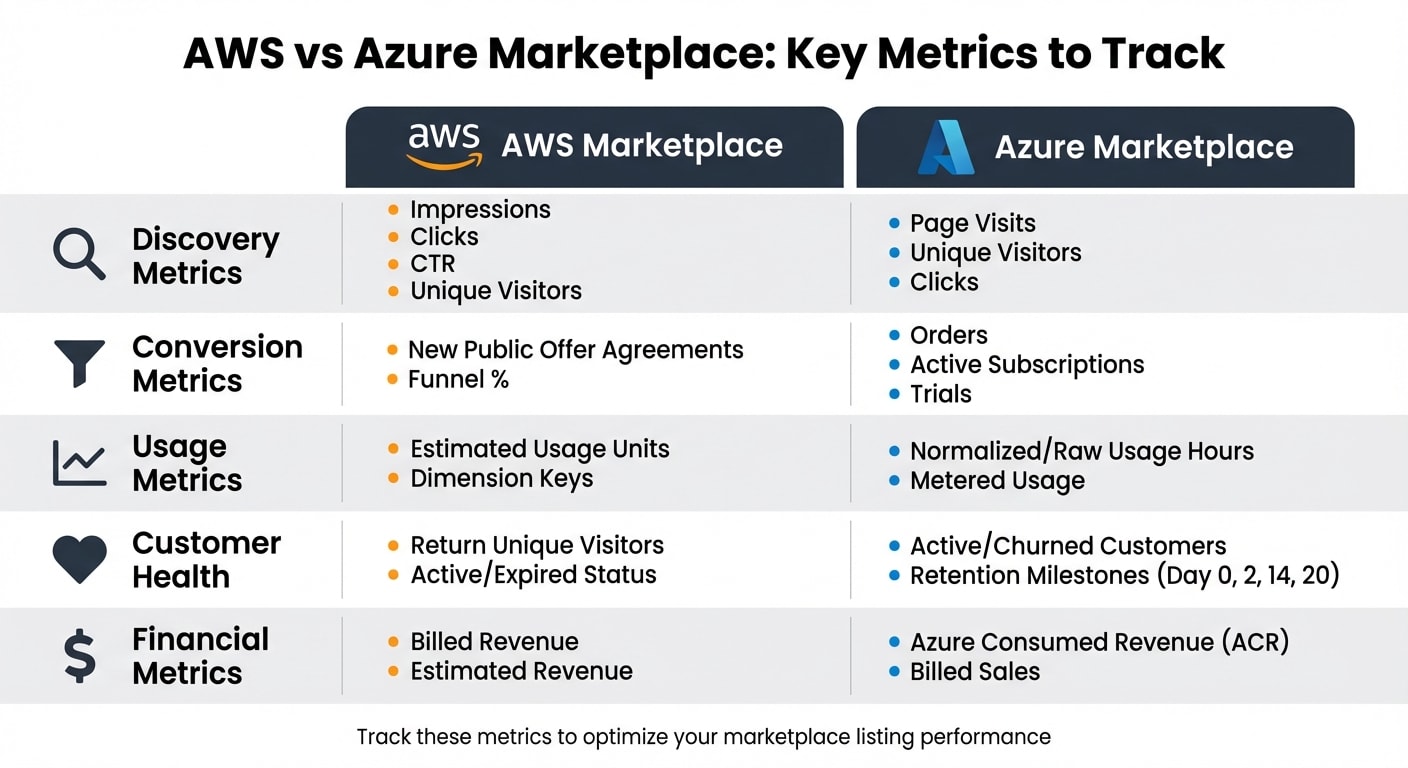
Here's a quick comparison of metrics across AWS and Azure marketplaces:
| Metric Category | AWS Marketplace | Azure Marketplace |
|---|---|---|
| Discovery | Impressions, Clicks, CTR, Unique Visitors | Page Visits, Unique Visitors, Clicks |
| Conversion | New Public Offer Agreements, Funnel % | Orders, Active Subscriptions, Trials |
| Usage | Estimated Usage Units, Dimension Keys | Normalized/Raw Usage Hours, Metered Usage |
| Customer Health | Return Unique Visitors, Active/Expired Status | Active/Churned Customers, Retention Milestones |
| Financial | Billed Revenue, Estimated Revenue | Azure Consumed Revenue (ACR), Billed Sales |
Use this data to identify areas for improvement and take action to optimize your listing.
Using Analytics to Improve Your Listing
Analytics can do more than just show you numbers - they can guide your strategy for improvement.
Keyword performance analysis: AWS dashboards let you compare your current keywords to "top-performing" ones (those in the top five customer searches) and "recommended" ones (terms used for similar products). Each recommendation includes an "estimated traffic gain %" to help you prioritize which keywords to adopt first .
Funnel drop-off analysis: This helps you figure out where potential customers are leaving the process. For example, if you have high traffic but low procurement, it might mean your pricing model is too complex. If users abandon the configuration page, your setup process might need to be simplified. Azure users can also leverage failed deployment metrics to spot technical barriers .
Traffic attribution: Knowing which campaigns are driving the best traffic is key to smart spending. Use UTM parameters and Microsoft's OCID tracking codes to measure the quality of traffic from external campaigns. Metrics like "return unique visitors" can also show how well your retargeting efforts are working .
To keep your listing relevant, update it every three to six months or after major product updates. Refresh visuals and value propositions to stay current. A/B test your visuals - CTR data can reveal which screenshots and demo videos resonate best with your audience .
"Cloud providers qualify your solution before listing you on their marketplaces so your buyers don't have to... That ultimately translates into better buyer conviction at the decision-making phase." - Trunal Bhanse, CEO, Clazar
Conclusion
To succeed in developer marketplaces, maintaining a focused and consistent approach to listing optimization is essential. Whether you're listing on AWS Marketplace, Azure Marketplace, or VS Code, the core principles stay the same: use targeted keywords in your titles and descriptions, showcase your product with high-quality visuals, and reduce barriers to purchase with standard contracts and flexible pricing options.
The numbers speak for themselves. Features like standard contracts, free trials, and verified reviews can shorten sales cycles and improve conversion rates - making it crucial to actively manage reviews .
Leverage your analytics tools to pinpoint what’s working. Track keyword performance, identify where users drop off in the funnel, and analyze traffic sources to focus your efforts where they’ll drive the most impact.
It's important to note that developer marketplaces are more often used for procurement rather than discovery . That means driving external traffic is key. Use your blog, social media, and PR efforts to send qualified leads directly to your listings. This combination of optimizing listings and generating external traffic forms a powerful strategy for success in developer marketplaces. Together, these efforts create a reliable channel for consistent revenue growth.
FAQs
Which marketplace should I launch on first?
Launching on AWS Marketplace is a smart move for increasing visibility and driving sales. It provides access to a massive customer base, a well-established ecosystem, and valuable tools like promotional programs and search optimization features. By starting here, you can build a solid foundation before branching out to platforms like Azure Marketplace, which is better aligned with reaching Microsoft Azure users. Thanks to its extensive resources and dominant market share, AWS Marketplace is often the go-to starting point for developers.
What keywords should I target for my listing?
Target primary keywords that directly highlight your product's core purpose or benefit. Make sure these are woven seamlessly into your title, description, and metadata to maintain a natural flow. Then, incorporate secondary keywords that align with your niche or product features to attract a wider audience. Use keyword research tools to identify high-traffic, relevant terms that resonate with your target market. By carefully choosing and integrating these keywords, along with crafting well-optimized titles and descriptions, you can boost your product's visibility both in marketplace searches and on external search engines.
How do I track installs and conversions?
To keep tabs on installs and conversions, take advantage of the analytics dashboards offered by each marketplace. For example, the AWS Marketplace Insights dashboard provides data on installs, activations, and overall performance. Similarly, the Microsoft Marketplace Insights dashboard lets you analyze key metrics like installs and conversions. These tools are essential for evaluating how effective your listings are, gaining insights into user engagement, and fine-tuning your strategies.