

Reaching developers effectively requires meeting them where they are - on platforms like GitHub, Stack Overflow, and Twitter. Multi-channel campaigns help brands connect with developers across these spaces, boosting brand recall and engagement by 2–3x. Developers prefer ads that solve real problems, like code snippets or tool integrations, rather than generic promotions.
Key takeaways:
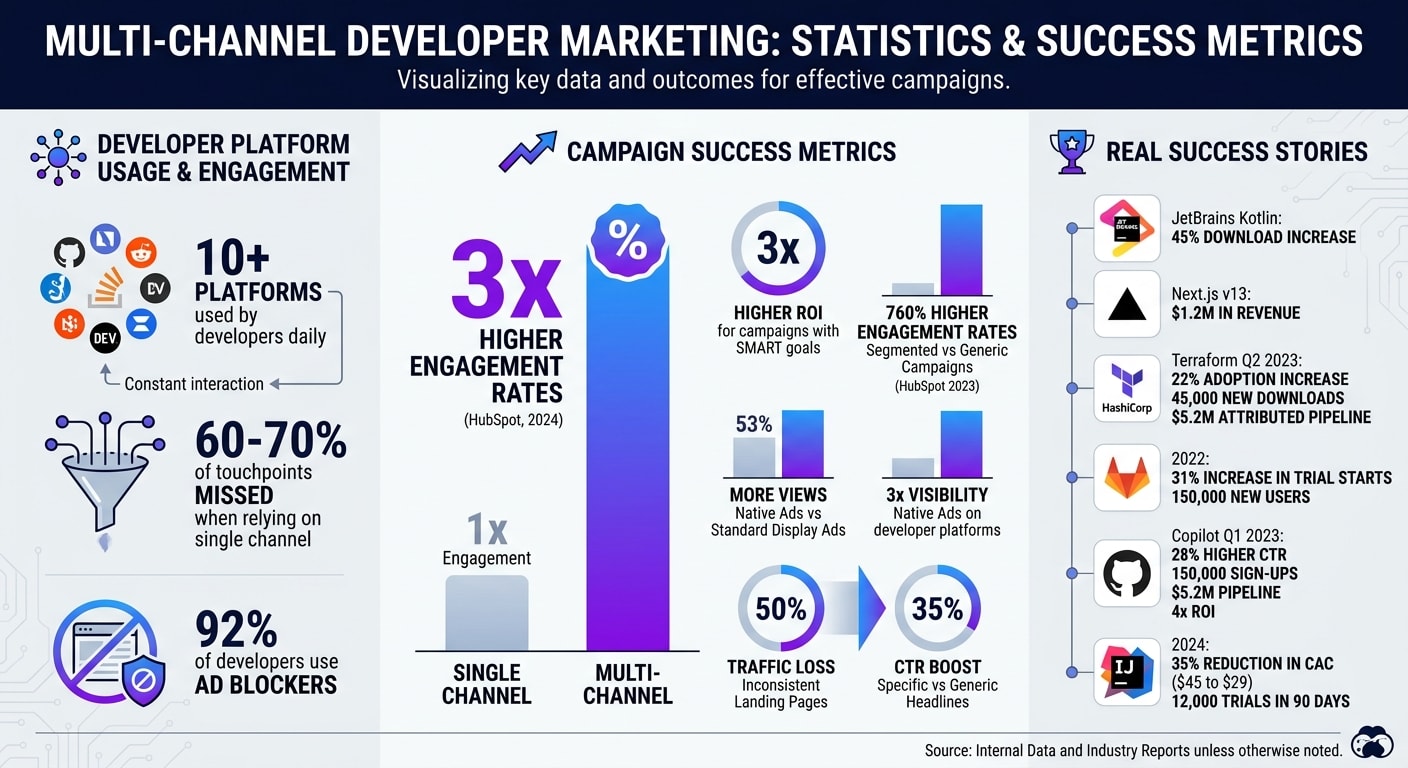
- Developers use over 10 platforms daily, so relying on one channel misses 60–70% of touchpoints.
- Multi-channel campaigns achieve 3x higher engagement rates compared to single-channel efforts (HubSpot, 2024).
- 92% of developers use ad blockers, making authentic, technical content crucial.
- Success stories: JetBrains' Kotlin campaign saw a 45% download increase, and Vercel’s Next.js v13 campaign drove $1.2M in revenue.
How to succeed:
- Set clear goals (e.g., increase sign-ups by 20% in Q2).
- Build detailed personas by role, seniority, and tools.
- Use native ads on platforms like daily.dev to match developers’ workflows.
- Track performance and refine strategies in real time.
Multi-channel strategies ensure consistent visibility and measurable results, making them essential for developer marketing.
Building the Foundation for Developer-Focused Multi-Channel Campaigns
Launching a successful multi-channel campaign for developers starts with solid groundwork. Without clear goals, well-defined personas, and a consistent message, your campaign could miss the mark and waste your budget. The preparation you put in directly impacts whether your campaign achieves results or falls flat.
Setting Clear Campaign Goals
Start by establishing SMART goals - Specific, Measurable, Achievable, Relevant, and Time-bound. These give you clear targets to aim for, like increasing sign-ups by 20% in Q2, driving 500 developers to a webinar by March 15, or boosting product adoption among backend engineers by 15% within 90 days. Data from 2023 shows that 82% of B2B marketing campaigns fail due to vague objectives, but campaigns with SMART goals deliver three times higher ROI.
Take HashiCorp's Q2 2023 campaign as a prime example. They set a precise goal: increase Terraform adoption by 15% among cloud infrastructure teams. They tracked progress using GitHub stars, downloads, and trial activations. Their campaign spanned LinkedIn ads, GitHub sponsorships, and webinars, and the results spoke for themselves: a 22% adoption increase, 45,000 new downloads, and $5.2 million in attributed pipeline.
Your goals should align with the developer journey. Early-stage campaigns might focus on boosting newsletter sign-ups or GitHub stars. Mid-funnel campaigns could aim for trial activations or documentation views. At the bottom of the funnel, the focus shifts to conversions - tool installations, event registrations, or paid upgrades. Use analytics to monitor progress and adjust weekly.
Clear goals not only guide your strategy but also set the stage for building targeted personas and crafting effective messaging.
Understanding Developer Personas
Developers are far from a one-size-fits-all audience. A junior frontend developer learning React has completely different needs than a senior DevOps architect managing Kubernetes clusters. Research backs this up: segmented campaigns see 760% higher engagement rates compared to generic ones, according to HubSpot's 2023 Developer Marketing Report.
Create 3-5 detailed personas based on role, seniority, programming languages, and tools. For example:
- Junior Full-Stack Developer: 0-2 years of experience, uses JavaScript and Node.js, frequents dev.to and Reddit, and looks for tutorials.
- Senior DevOps Engineer: 5+ years of experience, skilled in Kubernetes and AWS, active on LinkedIn and GitHub, and interested in advanced tools.
- Mobile App Developer: Focuses on React Native or Swift, follows Stack Overflow and Twitter, and needs platform-specific solutions.
GitLab’s 2022 campaign is a great example of this approach. They segmented their audience by role and seniority, targeting Site Reliability Engineers separately from junior developers. Their goal was to increase trial starts by 25% with a unified value proposition: "End-to-End DevSecOps." They used forum posts, YouTube demos, and Slack integrations to deliver tailored content. The result? A 31% increase in trial starts and 150,000 new users.
Use real-world data to build these personas. Platforms like daily.dev for Business allow targeting by seniority, programming languages, and tools. Combine this with GitHub activity, Stack Overflow surveys, and npm download trends. The more specific your personas, the more effectively you can tailor your messaging to resonate with each group.
Once your personas are ready, ensure your messaging speaks directly to their unique needs.
Creating a Unified Value Proposition
A unified value proposition is the glue that holds your campaign together. It should address a specific developer problem while staying aligned with your business goals. Think of GitHub’s tagline: "Build software better, together" or Vercel’s: "Develop. Preview. Ship." - short, developer-focused, and memorable.
Vercel’s 2024 campaign for Next.js 14 is a perfect case study. Targeting frontend developers using JavaScript and TypeScript, their goal was to grow sign-ups by 30%. Their message was clear: faster builds, simpler deployments, and better performance. This message appeared consistently across Twitter threads (with code examples), dev.to posts (deep technical dives), and email nurture sequences (migration guides). The results? A 42% increase in sign-ups and 1.2 million deployments in the first month, driven by Vercel CMO Guillermo Rauch.
Your value proposition should answer three key questions:
- What problem does this solve?
- Why should developers care?
- How does it fit into their workflow?
Before rolling it out, validate your message with feedback from over 100 developers through pre-campaign surveys. If it doesn’t resonate during testing, it won’t perform well in the campaign. Keep the message technical, straightforward, and focused on solving real developer challenges - not generic marketing jargon.
Integrating Developer Ads Across Channels
When rolling out ads for developers, it's essential to maintain a clear, consistent message while tailoring your approach to each platform. Every channel has its own quirks and audience behaviors, so the trick is to stay flexible without losing your core identity. The ultimate aim? Reach developers where they already spend their time - whether it’s on LinkedIn during a coffee break, scrolling through Twitter threads, or catching up on the latest tech news on daily.dev.
Adapting Messaging for Different Channels
LinkedIn thrives on professional, in-depth content. This is the place to highlight tools that improve productivity, enhance career growth, or streamline team collaboration. Use formats like long-form posts or carousel ads to show how your product fits into a developer's workflow. For instance, promoting an IDE? Focus on features that simplify debugging, backed by testimonials from experienced engineers.
Twitter is all about brevity. With its 280-character limit, your message needs to be punchy and direct. Use hashtags like #DevOps or #JavaScript to boost visibility, and include concise, actionable content like code snippets or quick hacks. For example, a tweet promoting a CI/CD tool could say: "Deploy in 5 minutes, not 5 hours. Try our pipeline automation - free for 30 days. #DevOps #Automation." Data shows that tweets using developer-specific terms like "API" or "open source" can achieve 18% higher click-through rates.
Developer platforms like daily.dev require a more tailored approach. These platforms attract developers actively searching for technical resources, not casual networking. Ads here should be segmented by factors like seniority, preferred languages, or tools. For example, a campaign targeting mid-level Python developers with a debugging tool saw a 40% boost in click-through rates when delivered via personalized digests tailored to their tech stack. Ads that feel like part of the platform’s content - rather than intrusive interruptions - tend to perform best.
Once your messaging is dialed in, it’s time to focus on how to integrate those ads seamlessly into each platform’s content flow.
Using Native Ad Placements
Native ads are designed to blend into the user experience, making them feel less like ads and more like helpful content. Unlike banner ads that scream for attention, native placements fit naturally into the platform’s flow. On daily.dev, for instance, in-feed ads sit alongside curated developer news, while post-page ads target developers who are already engaged with technical content. These types of ads generate 53% more views compared to standard display ads, and on developer platforms specifically, they deliver three times the visibility without disrupting the user experience.
Take GitHub’s Q1 2023 campaign for Copilot as an example. They ran a multi-channel effort across LinkedIn (sponsored posts), Twitter (promoted tweets), and daily.dev (in-feed ads), all focused on AI coding efficiency. This campaign, led by GitHub’s Head of Developer Marketing Alex Smith, resulted in a 28% higher click-through rate, 150,000 sign-ups, and $5.2 million in pipeline value, achieving a 4x ROI. The native ads on daily.dev stood out because they matched the platform’s editorial tone, making them feel like valuable resources rather than sales pitches.
JetBrains followed a similar strategy in 2024 for IntelliJ IDEA. They ran native ads on daily.dev alongside LinkedIn and Twitter campaigns, all centered on the message "Boost Productivity 2x." By adapting their approach - technical deep-dives for daily.dev, professional carousels for LinkedIn, and quick tips for Twitter - they cut their customer acquisition cost by 35%, reducing it from $45 to $29, and secured 12,000 trials in just 90 days.
After selecting the right native formats, the next step is ensuring a consistent message across all platforms.
Maintaining Consistency Across Touchpoints
Once you’ve tailored your messaging and chosen your ad formats, it’s critical to deliver a unified experience across every channel. Keep your core value proposition, visuals, and calls-to-action (CTAs) consistent, even as you adapt the format for different platforms. For example, if your daily.dev ad promises "Scale your code effortlessly", make sure that same phrase appears in your LinkedIn post and on your landing page.
To streamline this process, create a central asset library using tools like Notion or Figma. Document your narrative, tone, key phrases, and design elements to ensure everyone on your team stays aligned. Inconsistent landing pages can lose up to 50% of traffic, so it’s crucial that your landing page reflects the technical specs and CTAs from your ads. If your ad highlights API integrations, make sure they’re front and center on the landing page.
Use UTM parameters to track performance and shared KPIs like lead quality, conversion rates, and pipeline value. A/B test follow-up emails that echo your ad copy - this can help retain 20% more leads. Be cautious about overloading your messaging with platform-specific jargon, which can fragment your message. Instead, run iterative reviews before launching your campaign. Test your ads with a small group of developers to gather feedback and refine your approach. When consistency is baked into your workflow from the start, scaling becomes much easier.
Optimizing Campaign Performance for Developer Audiences
Once you’ve set clear goals and crafted tailored messaging, the next step is keeping your campaign on track. That means monitoring performance and making adjustments as you go.
Using Real-Time Performance Tracking
Keep an eye on key metrics like click-through rates (CTR), engagement, conversion rates, and cost per acquisition (CPA). When targeting developers, dive deeper into tech-specific data - like which programming languages or seniority levels are driving the most engagement. Platforms like daily.dev Ads let you track unique metrics such as in-feed engagement, post-page views, and ad performance in personalized digests. These insights help you identify underperforming ads quickly, allowing you to pause them and redirect your budget toward what’s working best.
Leverage the right tools for actionable insights. Google Analytics offers a broad view across channels, while tools like LinkedIn Campaign Manager and Google Ads provide channel-specific data in real time. For developer-specific campaigns, the daily.dev Ads dashboard offers granular insights, such as engagement by seniority, tool preferences, or even how far users scroll in their feed - details general dashboards often miss. Setting up alerts for sudden drops in CTR or spikes in CPA can help you respond immediately.
These metrics also set the stage for effective A/B testing.
A/B Testing for Developer Ads
Run tests with two or three variations of each campaign element - messaging, visuals, or audience targeting. For instance, you could compare messaging like "Boost your Python workflow" versus "Scale React apps 2x." For visuals, test a code snippet against an infographic. And for targeting, you might pit junior developers against senior engineers or JavaScript fans against Rust enthusiasts. To get meaningful results, run your tests for 7–14 days and aim for at least 1,000 impressions per variation.
Tailor your tests to developer-specific needs. Junior developers might respond better to tutorials and beginner-friendly resources, while senior engineers often value messaging around advanced features or enterprise scalability. For example, if targeting Python developers, try highlighting debugging tools in one variation and deployment automation in another. In one campaign, swapping a generic headline like "Cloud Tools" for something more specific - "Kubernetes Mastery" - boosted CTR by 35%. Even better, targeting senior developers doubled the conversion rate.
Refining Campaigns Based on Analytics
Use the data from your tests to fine-tune your strategy. Attribution models - linear or data-driven - can help you understand the full developer journey. For example, a developer might first see an ad on daily.dev, then engage with a LinkedIn post, and finally convert after clicking a Twitter thread. This approach helps you see which channels assist conversions, not just which ones drive the first click.
Act on your data to keep developers engaged. Review metrics weekly to get a clear picture of cross-channel performance. If you notice high CTRs but low conversions, it might be time to optimize your landing page or shift your budget to better-performing channels. Document what works (and what doesn’t) in a shared template so your team can replicate successes and avoid past mistakes. Wrap things up with monthly post-mortem reviews to tie your results back to your campaign goals. Use these insights to refine your developer personas and improve future campaigns.
Conclusion: Scaling Developer Marketing with Multi-Channel Campaigns
Developer marketing thrives on three core principles: planning, consistency, and data-driven optimization. It all starts with setting clear goals and truly understanding your developer audience - whether you're speaking to mid-level JavaScript developers or seasoned engineers. A clear and unified value proposition ensures your message resonates across every channel, from in-feed ads to email campaigns .
Consistency is what builds trust. Your message should be tailored to each platform - whether it's quick tips for social media or detailed blog posts - but the tone and visuals must stay aligned. Using style guides and conducting cross-channel audits can help maintain this alignment across all your marketing efforts .
Optimization is the secret to turning good campaigns into outstanding ones. Keep an eye on real-time metrics like click-through rates (CTR) and engagement levels, then adjust your strategies based on those insights. Platforms designed for developer audiences make this process even smoother.
For example, daily.dev Ads offers native ad placements such as in-feed, post-page, and personalized digest ads. With access to over 1 million developers and real-time performance tracking, this platform allows for precise targeting and continuous improvement - key components for scaling campaigns effectively.
FAQs
Which channels should I include first in a developer multi-channel campaign?
Start by targeting the platforms where developers naturally spend their time. These include daily.dev, Stack Overflow, and niche communities like Reddit. These spaces are hubs for technical discussions and problem-solving, making them ideal for connecting with developers. Prioritize platforms that encourage meaningful interactions and help establish credibility, as trust is key when engaging this audience.
How can I market to developers when most use ad blockers?
To effectively reach developers who use ad blockers, it's all about delivering content that resonates with their technical mindset and values. Developers appreciate ads that are precise, transparent, and genuinely helpful.
Consider platforms like daily.dev Ads, which offer native formats such as in-feed and digest ads. These formats blend naturally into their daily workflows, making them less intrusive and more engaging.
To build trust and capture their attention, focus on community-driven content, authentic testimonials, or interactive formats like tutorials. These approaches can encourage meaningful engagement without resorting to the interruptive nature of traditional advertising.
What metrics best prove multi-channel ROI for developer ads?
Key metrics to assess the performance of developer ad campaigns across multiple channels include:
- Conversion Rates: This measures how many users take a desired action, such as signing up or downloading, after interacting with your ad.
- Engagement: Tracks user interaction with your content, like comments, shares, or time spent on a page, indicating how compelling your message is.
- Click-Through Rate (CTR): The percentage of users who click on your ad, reflecting its relevance and appeal.
- Cost Per Click (CPC): Shows how much you're spending for each click, helping you gauge cost efficiency.
- Return on Investment (ROI): Evaluates the overall profitability of your campaign, ensuring your efforts align with business goals.
These metrics provide a clear picture of your campaign's effectiveness and whether it's meeting your objectives.