
Running PPC campaigns for developer products is challenging because developers are skeptical of traditional marketing. They prefer exploring a product's functionality themselves rather than relying on sales pitches. Success in this space hinges on targeting high-intent keywords, managing costly bids, and crafting technical, developer-friendly landing pages. Here's what you need to know:
- Keywords: Focus on niche searches like "API monitoring tool" or "CORS error fix" instead of broad terms. Use negative keywords to filter out irrelevant traffic (e.g., "free", "tutorial").
- Bidding: Start with manual CPC for control over costs. Transition to automated bidding only after achieving consistent conversions.
- Landing Pages: Include code samples, API documentation, and clear pricing. Avoid generic designs and marketing jargon.
- Metrics: Track long-term engagement like API calls or pricing page visits, not just immediate sign-ups. Use a 90-day attribution window for better ROI measurement.
This strategy ensures your PPC campaigns deliver real results by aligning with developers' preferences and decision-making processes.
How to Research Keywords for Developer PPC
Creating an effective PPC campaign for developer-focused products requires a precise and targeted keyword list. Developers search differently than general consumers, so your strategy needs to align with their habits. Broad terms like "software development" or "API tool" might seem like a good starting point, but they often come with high costs and low returns. Instead, focus on niche keywords that reflect how developers actually search when evaluating tools. Here are four key categories to guide your research.
Documentation Queries
Developers frequently rely on product documentation to evaluate tools. This makes documentation-focused keywords a goldmine for capturing high commercial intent. For example, terms like "API monitoring tool" or "SaaS boilerplate" attract serious buyers rather than casual researchers . These queries often include modifiers like "tool", "service", "platform", or "API", which signal that the searcher is looking for solutions, not basic information.
To refine your keyword list, stick with phrase match as your default setting . This approach allows your ads to appear for relevant variations, such as "uptime monitoring tool" or "best uptime monitoring service", while filtering out irrelevant searches like "uptime monitoring tutorial." Additionally, use negative keywords like "free", "tutorial", "how to", "github", "reddit", "jobs", and "salary" to exclude non-buyers .
Comparison Searches
Comparison keywords are ideal for reaching developers who are actively evaluating solutions. These searchers are often building shortlists and are ready to make decisions. Phrases like "[Tool A] vs [Tool B]" or "best [category] for [use case]" are common examples . If you offer an error tracking tool, for instance, targeting queries like "Sentry vs Rollbar" or "best error monitoring for Node.js" can be highly effective.
Tools like Semrush or SpyFu can help you identify these comparison searches . You can also explore Google's "People Also Ask" section to uncover related questions developers are searching for . The key is to align your landing page with the query. If someone searches for a comparison, direct them to a dedicated page that highlights side-by-side features, rather than your homepage .
Error-Message Keywords
Developers often search for solutions to specific technical problems, making error-message keywords another high-intent category. These keywords target developers who are actively troubleshooting and need immediate answers. Examples include "CORS error fix", "MongoDB connection timeout", or "React hydration mismatch."
You can find these keywords by monitoring platforms like Reddit, Quora, and technical forums where developers share and discuss issues . Regularly review your Search Term Report to see which error codes or troubleshooting phrases triggered your ads . Add relevant ones to your campaigns and exclude irrelevant ones as negative keywords.
Integration-Specific Terms
Integration-related keywords attract developers looking for tools that work seamlessly with their existing tech stack. For example, terms like "form builder for React", "Shopify upsell app", or "fintech API integration" combine a specific service with a particular platform or vertical . These queries often have lower costs per click - ranging from $8 to $25 - while delivering higher buyer intent .
"The niche determines whether paid ads are your most efficient pipeline channel or your most expensive marketing mistake." - Peter Korpak, 100signals
When targeting integration-specific keywords, be cautious about using trademarked names in your ad copy to avoid potential platform bans . Ensure your landing pages include technical documentation or architecture diagrams to demonstrate compatibility.
Once you’ve refined your keyword strategy, the next step is to implement bidding strategies that maximize the value of these high-intent terms.
Bidding Strategies for Technical Keywords
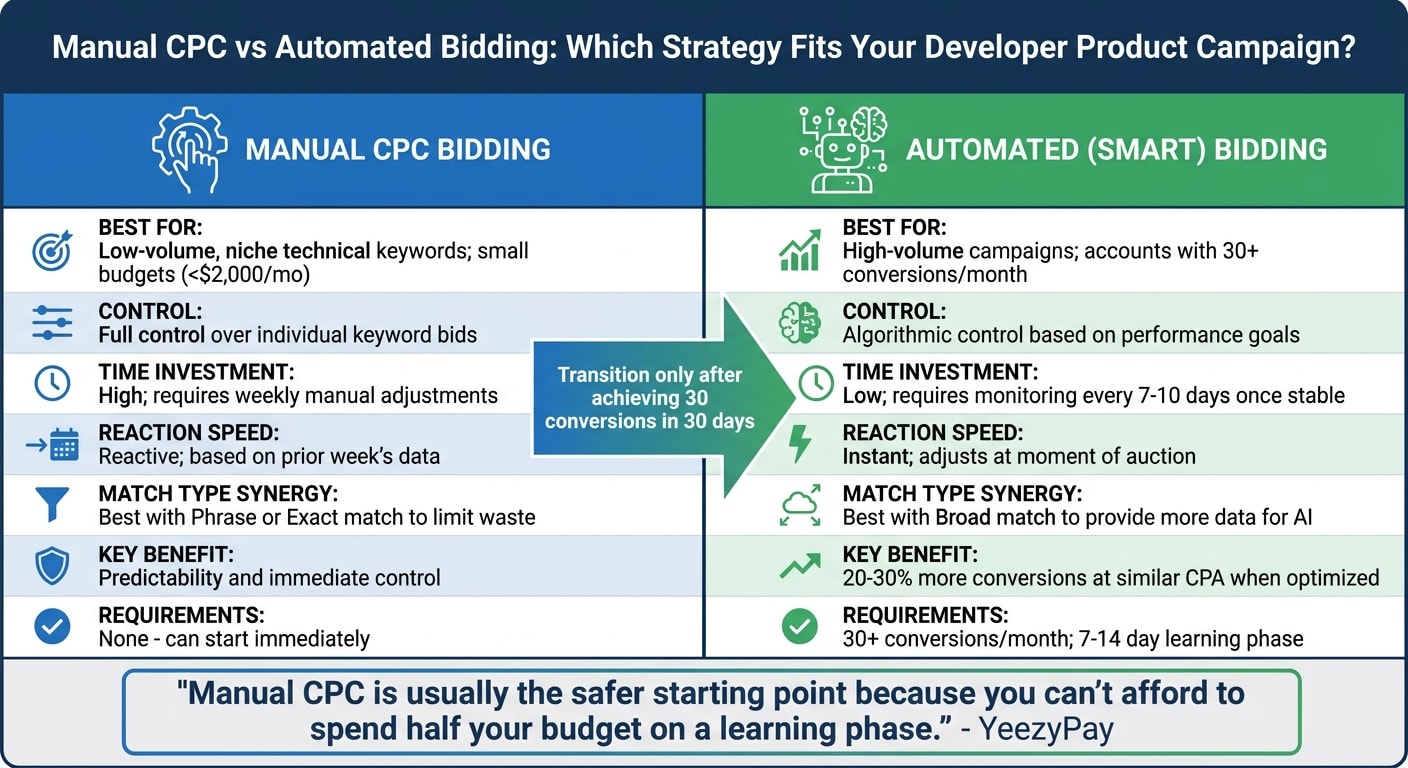
When it comes to developer-focused campaigns, once you've nailed down your targeted keyword research, choosing the right bidding strategy becomes essential. Technical keywords often come with challenges like low search volume, high specificity, and fluctuating costs per click. For many developer products, starting with manual control is often the safer bet.
Manual CPC Bidding
With manual CPC bidding, you have direct control over the maximum amount you're willing to pay for each click on your technical keywords . This strategy is particularly effective for niche terms like "CORS error fix" or "MongoDB connection timeout", which might only see 5–15 searches per month. For example, you can set a bid of $12.00 per click and rest assured that you'll never pay more than that.
The biggest perk? Predictability. Unlike automated bidding, which relies on algorithms that need time (and data) to learn, manual bidding gives you immediate control. Automated strategies typically require at least 30 conversions per month to perform well . If you're working with a smaller budget - say under $2,000 per month - or your campaign is still new and generating fewer than 30 conversions, manual bidding is the better option.
"Manual CPC is usually the safer starting point because you can't afford to spend half your budget on a learning phase." – YeezyPay
Manual CPC works best when paired with phrase and exact match keywords . For instance, targeting a term like "fintech API integration", which may cost $8–$25 per click , allows you to tightly control your spend and avoid wasting money on irrelevant variations. To fine-tune your campaigns, review your Search Terms report weekly. Use negative keywords like "jobs", "tutorial", and "free" to filter out non-buyers .
That said, manual bidding requires consistent attention. Weekly bid adjustments are necessary to maximize conversions from niche technical keywords. Once your campaign gains momentum, automated bidding can help scale your efforts.
Automated Bidding
Automated bidding strategies, such as Target CPA or Maximize Conversions, hand over control to Google's algorithms. These algorithms adjust bids in real time, factoring in elements like device type, location, time of day, and user behavior . When it works well, Smart Bidding combined with broad match can yield 20% to 30% more conversions at a similar cost per acquisition compared to manual bidding with exact match .
However, automated bidding isn't without its challenges. It requires a 7–14 day learning phase, during which performance can fluctuate and costs might spike . If you're working with a small budget, such as $100 for a test campaign, this learning period can eat up 30% to 50% of your monthly spend before the algorithm optimizes your campaign.
| Feature | Manual CPC Bidding | Automated (Smart) Bidding |
|---|---|---|
| Best For | Low-volume, niche technical keywords; small budgets (<$2,000/mo) | High-volume campaigns; accounts with 30+ conversions/mo |
| Control | Full control over individual keyword bids | Algorithmic control based on performance goals |
| Time Investment | High; requires weekly manual adjustments | Low; requires monitoring every 7–10 days once stable |
| Reaction Speed | Reactive; based on the prior week's data | Instant; adjusts at the moment of the auction |
| Match Type Synergy | Best with Phrase or Exact match to limit waste | Best with Broad match to provide more data for the AI |
When transitioning to automated bidding, it's wise to set a maximum CPC limit to avoid overspending . Only make the switch once you've consistently achieved at least 30 conversions in a 30-day period . Until then, think of your initial spend as an investment in gathering data - learning which technical keywords drive conversions, not just clicks .
Landing Page Optimization for Developers
Even with well-targeted keyword research and refined bidding strategies, a PPC campaign can falter if the landing page doesn't resonate with developers. Developers value technical depth over flashy marketing - they'll decide within seconds if your product is worth their time. Once your bidding is optimized, the landing page must deliver clear, technical value.
Show Code Samples and API Documentation
Developers want to dive straight into the technical details. Replace stock photos and generic visuals with product UI, architecture diagrams, and code snippets. These elements speak directly to developers, while decision-makers like CTOs and VPs need measurable, technology-specific results to justify their interest .
Your headline should align perfectly with the search query and ad copy. For example, if someone searches "fintech API integration" and clicks your ad, the landing page headline should explicitly say "Fintech API Integration." Avoid vague titles like "Your Trusted Tech Partner" - this level of precision builds trust and improves your Quality Score, which in turn lowers your cost-per-click .
Make technical specifications easy to access. Instead of burying them in PDFs or lengthy documentation, present them in a searchable, structured format. Consider side-by-side comparisons of API endpoints, performance metrics, and technical requirements. Add niche-specific social proof, such as: "Reduced transaction latency from 340ms to 18ms for healthcare clients" .
Simplify the page by removing unnecessary navigation and links. Keep developers focused on a single technical offer, like "Book a technical architecture review" or "Start free trial (no credit card required)".
Display Pricing Clearly
In addition to technical details, pricing transparency is a must for earning developers' trust. Clear pricing accelerates decision-making and filters out users who aren't serious buyers . A dedicated "Plans & Pricing" section can help you avoid wasting your PPC budget on users just looking for free or open-source tools .
Highlight low-risk entry points, such as "Starts at $XX/month" or "Cancel anytime", to make it easier for developers to test your product . If pricing depends on usage or is tailored for enterprise clients, at least display a starting tier. Forcing users to fill out forms for basic pricing info can frustrate them and drive them away.
Finally, remember that even a 1-second delay in page load speed can reduce conversions by up to 7% . Ensure that any pricing mentioned in your ad copy is reflected exactly on the landing page to create a seamless, frustration-free experience .
Writing Ad Copy for Developers
When crafting ad copy for developers, technical accuracy is non-negotiable. Developers tend to be skeptical of marketing fluff, so your messaging needs to be grounded in specifics and demonstrate a deep understanding of their technical world.
Focus on clear, measurable features rather than vague promises. For example, instead of saying "Fast video streaming", highlight specifics like "5ms video load time." Use technical terms such as "layer caching", "PyTorch", or "MFA" to show that you genuinely understand the tools and challenges developers deal with daily. This approach builds trust and credibility.
Generic headlines like "Your Trusted Technology Partner" won’t cut it. Instead, lean into quantifiable outcomes. A headline like "Healthcare Software Development - 47 HIPAA-Compliant Systems Delivered" communicates results that resonate with technical audiences. Research shows that technical, results-driven messaging can outperform generic corporate language by 2–3× in engagement. Pair this with a specific call-to-action like "Book a 30-minute technical architecture review", which can convert 15–25% better than generic prompts like "Contact Us".
When using ad platforms like Google Responsive Search Ads, make full use of the available space - fill all 15 headline slots and 4 description slots. Ad extensions, such as Sitelink and Callout extensions, are particularly effective for developers. Use them to highlight technical specs like "REST & GraphQL", "99.9% Uptime SLA", or "No Credit Card Required". Headlines that address pain points directly, such as "Stop Fighting Config Files" or "Deploy in 1 Command", can drive engagement. For developer-focused search ads, a healthy click-through rate typically falls between 3% and 8%.
How to Allocate Your PPC Budget
When planning your PPC budget, aim for a strategic distribution instead of spreading it evenly across channels. A helpful framework is the 70/20/10 rule: allocate 70% to proven platforms like Google Search, 20% to newer opportunities such as Reddit or LinkedIn, and 10% to experimental channels like developer-native platforms. This method ensures you’re balancing immediate results with future growth.
Budget allocation should follow a 90-day maturity model. Start by focusing on high-intent platforms during the first 30 days. In the next 30 days (days 31–60), shift some attention to demand creation on channels like LinkedIn. Finally, during days 61–90, explore experimental platforms once you’ve established a steady performance baseline. This phased approach works well for developer-focused products, which often have longer evaluation cycles.
"A perfectly sized budget allocated poorly performs worse than a smaller budget allocated strategically."
– Rodney Warner, Connective Web Design
The main distinction lies in demand capture versus demand creation. Platforms like Google and Bing are ideal for capturing developers actively searching for solutions, while Reddit and LinkedIn help create demand by engaging developers earlier in their journey. For products with long evaluation cycles, using both approaches is essential. Search ads deliver quicker conversions, while community-focused platforms build awareness that eventually feeds your sales funnel.
It’s also crucial to track pipeline-to-spend ratios rather than just focusing on cost-per-lead. Assess each channel’s contribution to closed deals and reallocate funds quarterly based on which platforms generate qualified leads and paying customers. Let’s break down how to allocate your budget across major platforms.
Google Ads and Bing Ads
Google Ads should receive the biggest slice of your initial budget, typically $3,000–$4,500 per month (about $100–$150 daily) for developer-focused products. This platform is a powerhouse for capturing high-intent traffic from developers actively searching for solutions.
Spend 60–70% of your Google Ads budget on niche vertical keywords rather than broad terms. For example, phrases like "fintech API integration" or "healthcare software development agency" are more cost-effective, ranging from $10 to $30 per click. In contrast, broad terms like "software development company" can cost $25–$80 per click and often attract less relevant traffic.
Bing Ads, while smaller in search volume (about 15–20% of Google’s), offers lower cost-per-clicks and is worth testing with 10–15% of your search budget. Its audience tends to be slightly older and enterprise-focused, which can complement your Google Ads efforts.
Another key area to invest in is retargeting through the Google Display Network. Allocate $500–$1,500 per month for this purpose. Retargeted ads often perform significantly better than standard display ads, with up to 10 times more clicks and conversion rates up to 70% higher. This strategy helps capture potential customers who didn’t convert on their first visit.
Reddit Ads
Reddit offers access to developer communities at a fraction of the cost - averaging $0.44 per click compared to $10–$80 on Google. Start with an experimental budget of $500–$1,000 per month, targeting subreddits like r/devops, r/kubernetes, or r/webdev, where developers actively discuss tools and solutions.
Reddit is better suited for demand creation rather than direct conversions. Developers on this platform are often in research mode, so your ads should provide genuine value - share technical resources like documentation, comparison guides, or architecture diagrams rather than directing them to a generic sales page. Track engagement metrics like GitHub visits or documentation views instead of focusing solely on sign-ups. Building trust on Reddit usually takes 60–90 days, but it can significantly contribute to your pipeline over time.
daily.dev Ads
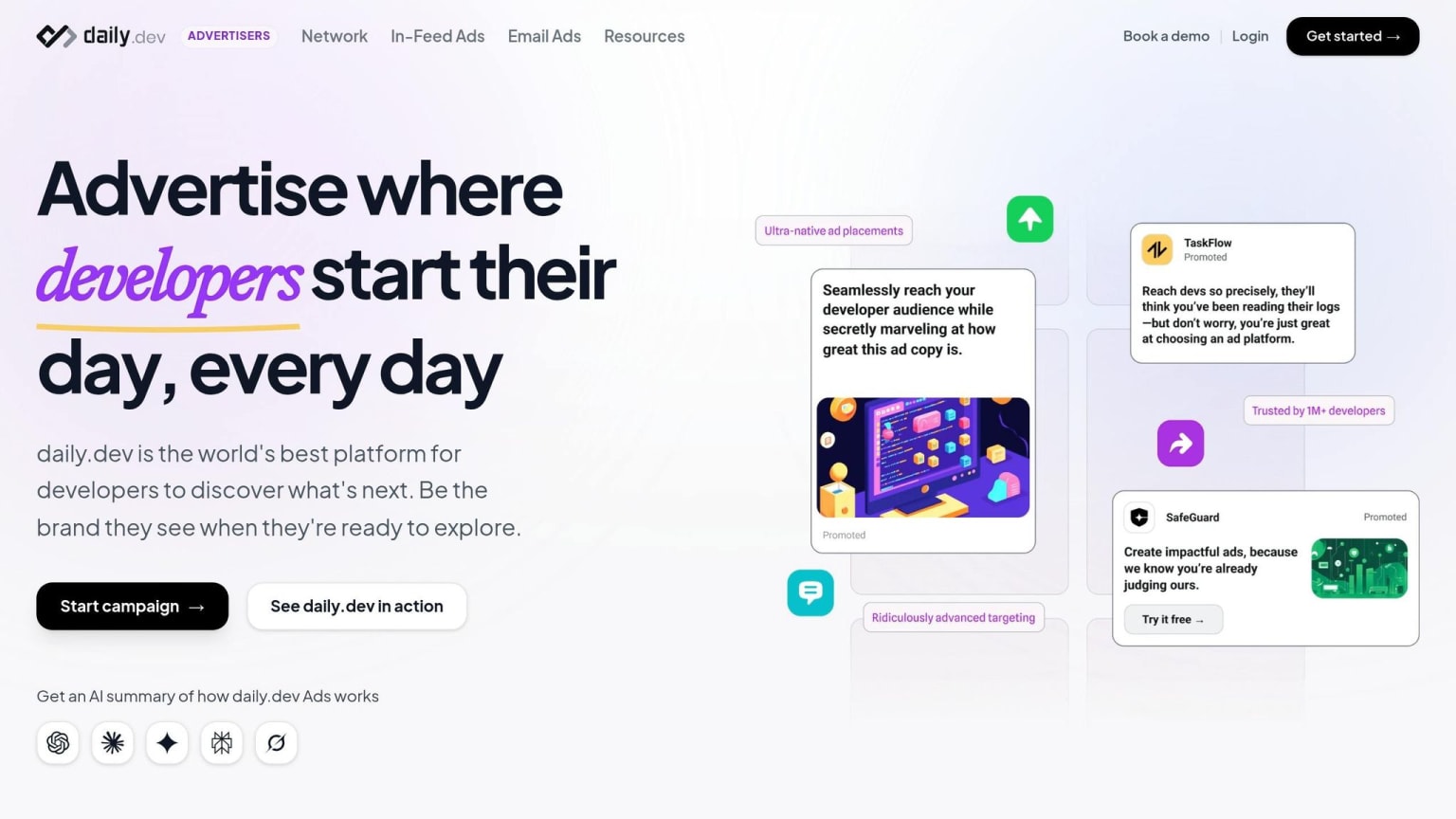
daily.dev Ads allow you to reach over 1 million developers as they browse curated technical content. Unlike search ads, which target active intent, daily.dev focuses on developers during their learning phase, making it ideal for raising awareness among those not yet searching for your product.
This platform offers precise targeting based on seniority, programming languages, and tools. For example, you can target senior backend developers using Python and PostgreSQL or frontend engineers working with React and TypeScript. Ads appear alongside relevant content, ensuring they resonate with your audience.
Once your core search and retargeting campaigns are in place, allocate 5–10% of your PPC budget to daily.dev Ads. Use these campaigns to educate developers about your product category, then retarget engaged users through platforms like Google or LinkedIn. Focus on tracking micro-conversions such as documentation views, pricing page visits, or GitHub stars. Developers discovered through daily.dev often take longer to convert but show strong engagement during their research phase.
Measuring PPC ROI for Developer Products
Once you've fine-tuned your keywords and bidding strategies, the next step is measuring ROI effectively. For developer-focused PPC campaigns, this process requires a tailored approach. Since the average conversion window is around 90 days , your attribution model needs to account for the entire customer journey - not just the initial interaction.
Start by adjusting the Google Ads attribution window from the default 30 days to 90 days. Then, implement Offline Conversion Import (OCI) by capturing the Google Click ID (GCLID). This lets you link revenue back to specific keywords, even if the sale closes months after the initial click .
Instead of focusing solely on immediate Cost Per Lead (CPL), shift your attention to metrics that reflect long-term value, such as the pipeline-to-spend ratio. Peter Korpak from 100signals highlights this shift in perspective:
"The meaningful metric for dev agency paid ads is cost per qualified meeting and pipeline-to-spend ratio - not CPL or impressions, which optimize for the wrong outcomes."
For example, a lead costing $300 might seem steep at first glance, but if it converts into a $150,000–$500,000 contract, the investment clearly pays off .
If your product generates fewer than 30 monthly conversions, focus on tracking micro-conversions like documentation views, pricing page visits, or extended session durations . These smaller actions, often indicators of early engagement, provide valuable data for automated bidding algorithms while you work toward larger-scale conversions. A good Click-Through Rate (CTR) for developer product search ads typically falls between 3% and 8% .
During the first three months, make it a habit to review your Search Terms report weekly and refine your negative keywords. Apply the "3x Rule": pause any keyword that spends more than three times your target cost-per-conversion without delivering a single conversion .
Here’s a quick guide to tracking and improving key metrics over time:
| Timeframe | Metric to Watch | B2B/Dev Benchmark | Action if Underperforming |
|---|---|---|---|
| Week 1 | CTR | 3–6% | Revise ad copy; check keyword relevance |
| Month 1 | Cost per Lead (CPL) | $30–$80 | Optimize landing page; simplify forms |
| Month 2 | MQL Rate | 30–50% of leads | Tighten targeting; add negative keywords |
| Month 3 | Cost per Opportunity | $200–$600 | Review keyword intent; adjust bidding |
Common PPC Mistakes to Avoid
Did you know that many developer agencies stop their Google Ads campaigns after spending $15,000–$30,000? The reason? Poor pipeline results caused by structural targeting issues . These missteps can derail even the most well-thought-out PPC strategies.
One of the biggest pitfalls is targeting overly broad keywords. For example, generic terms like "software development company" can cost $25–$80 per click and often attract job seekers or students rather than serious buyers . On the other hand, more specific keywords like "fintech API integration" are not only cheaper - costing $8–$25 per click - but also tend to bring in higher-quality leads . To avoid wasting your budget, stick to phrase and exact match types. Broad match keywords often trigger ads for irrelevant searches, leading to unnecessary spending.
Another common issue is failing to use negative keywords. Without them, you could lose 30–50% of your budget on irrelevant traffic . From the start, exclude terms like "free", "tutorial", "jobs", "salary", "github", and "open source." Then, make it a habit to review your Search Terms report weekly to fine-tune your exclusions.
Sending traffic to generic landing pages is another costly mistake. Peter Korpak from 100signals explains:
"The landing page is the link between ad spend and pipeline. A dev agency sending Google Ads traffic to a generic homepage wastes 50-70% of every click."
To avoid this, make sure your landing page headline matches your ad headline. Ditch navigation menus, include technical elements like code samples or architecture diagrams, and use a clear, actionable CTA like "Read the Docs" or "Start Free Trial." Avoid vague buttons like "Contact Us." Developers are less likely to engage with pages filled with stock images or marketing jargon - they want to see how your product works, not sift through fluff .
Finally, misinterpreting performance metrics can undermine your campaigns. Many focus on Cost Per Lead (CPL), but this can be misleading. A $300 lead might seem expensive until it converts into a $150,000 contract . Instead, prioritize metrics like pipeline-to-spend ratio and cost per qualified meeting. Vanity metrics like impressions or cheap clicks might look good on paper but don’t necessarily translate into pipeline growth. By focusing on the right data, you can ensure your PPC efforts drive meaningful results.
Conclusion
Running PPC campaigns for developer products requires a sharp, technically focused strategy. Developers aren't swayed by flashy marketing; they want clear technical details, transparent pricing, and immediate access to documentation. As the CodeToCash team aptly states:
"Google Ads rewards discipline more than creativity. Set up correctly, add negatives aggressively, let data accumulate before making decisions, and double down only on what's already working."
Start small with manual CPC bidding and niche keywords like "fintech API integration" (typically $10–$30 per click). This approach helps you carefully manage your budget before scaling. Transition to automated bidding strategies only after hitting 30 conversions per month . Stick to phrase and exact match keywords to avoid irrelevant clicks from job seekers or students.
When crafting your ads, focus on driving traffic to technical resources like documentation, code samples, or API references instead of generic homepages. Pairing precise ad headlines with matching landing page H1s can improve your Quality Score significantly, potentially reducing ad costs by 20–30% . This alignment not only saves money but also builds trust with a technically savvy audience.
To track success, prioritize metrics like pipeline-to-spend ratios and cost per qualified meeting over simple cost-per-lead figures. Allocate an initial learning budget of $100–$500 to identify which keywords and ad variations deliver results before scaling up . Every detail - from bidding strategies to landing page content - should cater to the logical, detail-oriented mindset of developers. This focused approach ensures your PPC efforts generate a strong pipeline and deliver measurable returns.
FAQs
How can I find high-intent developer keywords with enough search volume?
To find high-intent developer keywords with a decent search volume, hone in on specific, technical phrases. These might include documentation-related queries, error messages, or integration-focused terms. Aim for keywords with at least 100 monthly searches and a competition level that's not too overwhelming. Keep your list updated to stay aligned with shifting trends. Niche terms like Kubernetes, Python, or GraphQL often strike a good balance between intent and search volume, making them great candidates to target.
When should I switch from manual CPC to automated bidding for dev tool keywords?
Once you're hitting at least 30 conversions per month, it's time to switch to automated bidding for developer tool keywords. This amount of data gives automated strategies the foundation they need to work effectively.
Until you reach that threshold, stick with manual CPC or use a maximize conversions strategy with a bid cap to maintain control over costs.
Developer tool keywords typically have longer evaluation cycles and lower search volumes. Automated bidding can handle these nuances, helping improve ROI once the system has enough data to optimize properly.
What should I track as “conversions” if my dev product takes 60–90 days to buy?
Tracking conversions is essential to understanding how well your ads are driving user engagement. Focus on actions like sign-ups, tool downloads, or any other steps users take after interacting with your ad that indicate interest or involvement.
For campaigns with longer sales cycles, consider using attribution models tailored to this timeline. Models like pipeline value or delayed conversions can help you measure the impact of your efforts over a longer period, typically spanning 60–90 days. These approaches provide a clearer picture of how your ads contribute to long-term results.