

Your pricing page is where developers decide if they’ll pay for your tool - or move on. Developers scrutinize pricing like a code review, focusing on transparency, technical details, and clear costs. 78% of developers say clear pricing is critical, and SaaS companies with transparent pricing see 2–3× higher demo requests. The average SaaS pricing page converts 3–5% of visitors, but top-tier pages hit 7–10%. Here's how to improve your pricing page:
- Use clear pricing models: Options like per-seat, usage-based, hybrid, or open-core pricing should align with how developers use your tool.
- Design a smart free tier: Offer meaningful value (e.g., API access, local development) while gating advanced features like SSO or team tools to encourage upgrades.
- Optimize page layout: Include transparent pricing, interactive calculators, and comparison tables to simplify decisions.
- Test and refine: A/B test changes like toggles, CTAs, and tier structures to track long-term metrics like trial-to-paid conversions and retention.
Developers value self-serve options and dislike hidden costs. A clear, data-driven pricing page builds trust and drives conversions.
Why Developers Examine Pricing Pages More Carefully Than Other Buyers
Developers approach pricing pages with the same level of scrutiny they would apply to a code review. This meticulous mindset comes from their technical expertise and past experiences with unclear costs or hidden limitations.
When developers land on a pricing page, they don't think in terms of abstract business tiers. Instead, they calculate costs based on technical metrics like API calls or compute hours. They need to predict their expenses accurately using their specific usage patterns. If they can’t model these costs beforehand, trust is lost, and they’re likely to move on. This technical, no-nonsense approach also makes developers resistant to traditional marketing strategies. In fact, 67% of developers express negative feelings toward companies employing high-pressure sales tactics.
Aline Lerner, Co-founder of interviewing.io, explains it well:
"Developers can smell marketing BS from a mile away. They don't respond well to psychological tricks - they respond to genuine value."
Patrick McKenzie adds:
"Developers don't mind paying for value, but they hate feeling like they're paying for marketing."
This analytical approach makes them dismissive of anything that feels like fluff. It highlights the importance of creating pricing pages that focus on clarity and empower developers to make informed decisions independently.
Transparency is non-negotiable here. A whopping 78% of developers say that clear pricing is a key factor in their buying decisions. Unlike traditional B2B buyers who might be swayed by urgency or social proof, developers evaluate pricing through the lens of resource consumption. They want to see clear limits, understand exactly what they’re paying for, and self-qualify without hurdles. Meet these expectations with precise, technical details, and you’ll earn their trust - and their business.
Pricing Models for Developer Tools
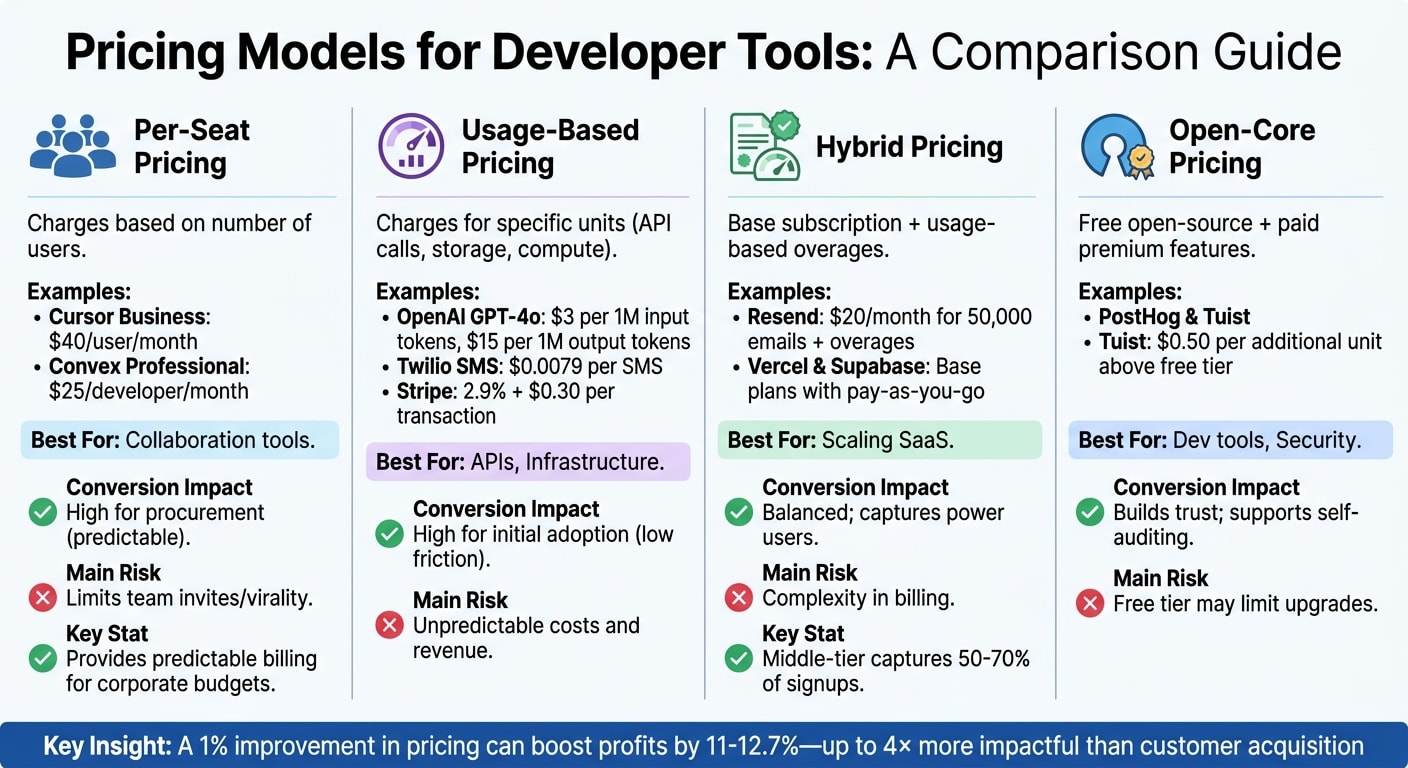
Choosing the right pricing model is a key decision that can influence how developers adopt your tool. It’s all about finding the right balance between how users perceive value and the friction they experience when deciding to convert.
Per-Seat Pricing
This model charges based on the number of users accessing the tool, making it ideal for products that thrive on team collaboration. For example, Cursor’s Business tier costs $40 per user per month, while Convex’s Professional plan is priced at $25 per developer monthly .
Per-seat pricing provides predictable billing, which appeals to corporate procurement teams managing budgets tied to headcount. However, this predictability can backfire. Teams may engage in "seat hoarding" to avoid extra costs, slowing down the organic, bottom-up adoption that many developer tools depend on .
Usage-Based Pricing
Usage-based pricing focuses on charging for specific units of value, like API calls, storage, or compute hours. OpenAI, for instance, charges $3 per 1 million input tokens and $15 per 1 million output tokens for GPT-4o. Twilio bills $0.0079 per SMS, and Stripe takes 2.9% plus $0.30 per successful transaction .
This model is attractive to developers because it lowers the entry barrier and eliminates the need for upfront commitments. It’s especially popular in areas like AI, infrastructure, and databases . However, the unpredictability of costs can be a downside. Developers may face unexpected bills during spikes in usage, and providers might experience revenue fluctuations .
Hybrid Pricing
Hybrid pricing combines a base subscription fee with usage-based overages. For example, Resend charges $20 per month for 50,000 emails, with additional costs for extra usage. Similarly, Vercel and Supabase offer base plans with included limits and pay-as-you-go options for overages .
This model offers a stable revenue base while allowing flexibility for growth. When done right, the middle-tier plan often becomes the most popular, capturing 50–70% of signups . The challenge lies in clearly communicating how overages work. If users can’t easily estimate their total costs, trust can erode .
Open-Core Pricing
Open-core pricing provides a free version of the tool, often open-source, while charging for premium features, managed hosting, or enterprise capabilities like SSO and audit logs. PostHog and Tuist are examples of companies using this approach, with Tuist charging $0.50 per additional unit above the free tier .
This model builds trust by letting developers audit the code, self-host, and test the tool’s value before committing to payment. It aligns with open-source values while offering a clear path to paid features. The risk, however, is that the free tier might offer so much value that users don’t feel the need to upgrade . To counter this, it’s crucial to reserve advanced features - like collaboration tools, security, and SLA guarantees - for paid tiers.
| Model | Best For | Conversion Impact | Main Risk |
|---|---|---|---|
| Per-Seat | Collaboration tools | High for procurement (predictable) | Limits team invites/virality |
| Usage-Based | APIs, Infrastructure | High for initial adoption (low friction) | Unpredictable costs and revenue |
| Hybrid | Scaling SaaS | Balanced; captures power users | Complexity in billing |
| Open-Core | Dev tools, Security | Builds trust; supports self-auditing | Free tier may limit upgrades |
Your pricing model does more than just generate revenue - it shapes your entire go-to-market strategy. Research shows that a 1% improvement in pricing can boost profits by 11–12.7%, making pricing adjustments up to four times more impactful than customer acquisition for driving growth . The key is to align your pricing model with the way your product delivers value, rather than focusing solely on revenue potential.
Up next, we’ll look at how designing a free tier strategically can enhance conversions by balancing accessibility with incentives to upgrade.
Free Tier Design: What to Include and What to Gate
Your free tier is more than just a giveaway - it’s your chance to build trust and encourage conversions. In the world of developer tools, freemium plans are the norm, with 100% of developer tools offering one. The real challenge? Striking the right balance between delivering value and nudging users toward upgrading .
To start, your free tier should include functional API access with reasonable rate limits and robust documentation - a feature 79% of developers consider critical . Full local development capabilities are also a must. For instance, GitHub Copilot allows users 2,000 completions per month for free, giving developers a meaningful taste of its capabilities before they decide to upgrade . Similarly, Mux’s free tier includes 10 on-demand uploads and 100,000 delivery minutes, enabling users to build and test video applications without immediately hitting a paywall .
What to Gate
Some features are better reserved for paid plans, especially those that cater to organizational needs. Think SSO, SAML, audit logs, and advanced security compliance. These aren’t essential for individual developers but are often required during procurement. Collaboration tools, in particular, are a strong driver of upgrades - gating team-oriented features like team permissions, code review workflows, and advanced project management can lead to 35% more conversions compared to gating only technical capabilities .
Scaling Access with Usage
A smart approach is to offer a baseline level of free resources and allow users to unlock advanced features as they grow. Pinecone, for example, provides 2 GB of storage and one project in its free tier. Paid plans then unlock hybrid search capabilities and expanded storage, offering a natural progression that feels aligned with user needs . This method avoids making the free tier feel overly restrictive, which can frustrate users.
"For developers, value must be proven, not promised. Your free tier isn't just a marketing tool - it's the foundation of trust that makes conversion possible." – Monetizely
Highlight Premium Features
One effective strategy is to visually display premium features in the free tier interface - grayed-out options work well. This makes the benefits of upgrading crystal clear, whether it’s removing "Made with [Product]" branding or accessing enhanced security features. Tools that clearly segment features this way see 3.5x higher conversion rates than those that rely on arbitrary limitations .
Pricing Page Layout Best Practices
Your pricing page layout plays a critical role in earning developers' trust and convincing them to commit. Unlike traditional B2B buyers, developers don't rely on sales calls. Instead, they scrutinize your pricing page, analyzing every detail for clarity and honesty.
A great layout answers three essential questions immediately: What will this cost me? What do I get? Can I trust this? Anything beyond that risks distracting or confusing potential users. Let’s break down the core elements that support these needs:
Transparent Pricing Displays
Developers value clear, straightforward pricing. For example, Stripe’s transparent rate of 2.9% + 30¢ per transaction sets a strong precedent for clarity .
For developer tools, it's crucial to display exact resource limits with precise details. Avoid vague terms like "fair usage" or "unlimited*" - these only create doubt. Instead, be upfront about what users are paying for.
If you offer annual pricing, highlight the savings clearly, such as "Save 20%" or "2 months free." The standard discount is 16.7% (equivalent to two months free) . Monday.com’s pricing page demonstrates this well, building trust by being upfront about discounts.
Interestingly, mid-tier pricing benefits from precise numbers. A plan priced at $79 feels more deliberate than one at $80 . However, for enterprise tiers, round numbers like $1,000 or $5,000 convey professionalism and confidence.
Interactive Pricing Calculators
When using a usage-based pricing model, an interactive calculator is a must-have. Developers want to estimate costs based on their specific needs before making a decision. Twilio, for example, provides separate calculators for voice, SMS, and video, allowing users to input their expected usage and view detailed cost breakdowns instantly .
Interactive sliders are another great tool. Monday.com’s seat-count slider updates monthly and annual costs in real time, making it easy for users to see pricing for different team sizes . This feature also helps qualify serious buyers who are actively exploring costs.
To enhance transparency, link your calculator directly to documentation explaining how usage is metered. Some companies, like Fly.io, integrate pricing details into their technical docs, helping developers understand costs alongside API references .
Feature Comparison Tables
Comparison tables should simplify decisions, not overwhelm users . Stripe’s table, for instance, uses a four-column layout with 12 visible rows, grouping features into themes like "Core", "Security", and "Support." Secondary details are collapsed, keeping the table clean and focused .
Organize features into logical categories such as "Core", "Collaboration", "Security", and "API Limits." Replace generic checkmarks with specific numbers for clarity - "3 projects" is far more informative than a checkmark, and "100,000 events/month" conveys more precision than "High volume" .
Webflow takes it a step further by adding tooltips to explain technical terms like "Bandwidth" and "Form submissions" directly within the table . For mobile users, consider stacking tier cards vertically or using an expandable "Compare plans" section to prevent frustrating horizontal scrolling issues .
"The best pricing pages don't make people choose. They make one option feel obviously correct. If someone has to think hard about which tier to pick, your tiers are too close together or your feature differentiation isn't clear enough." – CodeToCash Team
Keep your comparison table concise, focusing on 8–10 meaningful differentiators. Avoid clutter by hiding features included in every plan, but provide a full technical spec sheet in an expandable "View Full Comparison" section for those who want to dive deeper .
The Enterprise Tier: Contact Sales vs. Self-Serve
When it comes to enterprise pricing, the strategy you choose - self-serve or sales-led - must align with the complexity of buyer needs and their readiness to engage. Developers overwhelmingly favor clear, upfront pricing, with 69% of B2B buyers expressing frustration with opaque "Contact for pricing" models . However, enterprise deals often involve unique requirements like custom contracts, security reviews, or volume discounts, which can’t always be addressed with a one-size-fits-all approach.
Self-serve enterprise pricing is ideal for products with predictable costs and standardized features. Data shows that companies with self-service options grow 2–3× faster and recover customer acquisition costs (CAC) within 5–7 months, compared to 9–12 months for sales-led models . But there’s a trade-off: while self-serve models typically see a median annual contract value (ACV) of around $250/month and churn rates of 5–7%, sales-led models boast higher ACVs - over $1,500/month - and lower churn rates of 3–5% .
A hybrid model offers the best of both worlds. Use "Contact Sales" for complex needs like custom integrations, on-premise deployments, or legal negotiations, while publishing transparent pricing for more straightforward cases . For the Enterprise tier, listing a "starting at" price alongside key features - such as SSO, dedicated support, and SLA guarantees - can justify the need for a direct conversation .
"Developer-buyers will go to a competitor with transparent pricing rather than book a demo. Show the number." – CodeToCash
Interestingly, your Enterprise tier can serve a dual purpose. Beyond direct revenue, it acts as a psychological anchor, making your mid-tier "Pro" plan appear more affordable and appealing . Even if only a few customers opt for Enterprise, its mere presence on the pricing page influences how buyers perceive the value of all tiers. The challenge is to balance transparency with the complexities of enterprise needs, meeting developer expectations while addressing the nuances of larger deals.
This thoughtful approach to enterprise pricing lays the groundwork for testing and refining your strategy through A/B experiments.
A/B Testing Your Pricing Page
Transparent pricing displays and interactive tools are essential, but testing is what ensures your pricing page messaging converts as effectively as your product details.
While pricing page tests have a 15% win rate - the lowest among major page types - successful tests can deliver some of the largest revenue boosts . The reason? Changing a pricing page doesn't just affect clicks; it alters the contractual relationship with every new customer. This makes testing a high-stakes but high-reward endeavor.
To truly understand the impact of your changes, focus on downstream metrics - not just top-of-funnel activity. Avoid declaring a winner based solely on clicks or initial signups. Instead, track metrics like trial-to-paid conversion rates, 30-day Monthly Recurring Revenue (MRR), and 90-day churn to assess long-term outcomes [46,48]. For developer-focused products, pay attention to signals like time to first API call or visits to documentation from the pricing page. These metrics show whether your pricing clarity helps or hinders technical adoption .
Tests should run for at least 4–6 weeks to capture the full funnel impact, including paid conversions [44,46]. Use consistent hashing for authenticated user IDs so users see the same prices across devices and sessions - showing different prices can erode trust . To avoid disrupting your billing system, set up duplicate plans with test prices instead of creating temporary Stripe objects .
From quick presentation tweaks to structural overhauls, here’s how you can optimize your pricing page.
Quick Tests with High Impact
Start with small changes that don’t alter your pricing structure. For example, repositioning the annual vs. monthly toggle can lead to a 25% to 35% increase in annual plan signups when annual billing is the default and savings are clearly communicated [33,47]. Even something as simple as tweaking your CTA copy can make a difference - specific phrases like "Start Free Trial - No Card Needed" often outperform generic ones like "Sign Up" [9,46].
Other quick wins include:
- Highlighting your recommended tier: Use visual cues like badges, colors, or size differences to draw attention to a specific plan [44,47].
- Adding social proof: Place testimonials or recognizable company logos near your primary CTA buttons to boost conversions by 10% to 20% [33,47].
- Contextualizing usage limits: For developer tools, frame limits in relatable terms. For instance, instead of "100,000 events", say "Enough for a mid-sized app with 5,000 daily active users" to help developers estimate costs programmatically .
These adjustments are straightforward yet impactful, but more complex experiments can drive even bigger results.
Complex Tests with High Impact
Structural changes to your pricing page can address deeper issues like decision paralysis or unclear value propositions. For instance, simplifying your pricing tiers - reducing four or more options down to three - can cut abandonment rates by 18% [33,47]. Groove HQ implemented this strategy and added a comparison page, resulting in a 358% increase in free trial conversions .
You can also experiment with pricing model shifts, such as moving from a per-seat model to usage-based or hybrid pricing. These tests often require longer cycles since they fundamentally change how customers perceive value . For complex usage-based products, consider adding an interactive pricing calculator - developers want to estimate costs before committing .
Another idea? Reorganize your comparison tables. Instead of listing features alphabetically, group "growth drivers" like collaboration tools, API access, and integrations at the top. This makes it easier for customers to see which features align with their goals .
When measuring success, go beyond click-through rates. Track metrics like Revenue Per Visitor (RPV) and 90-day retention to get a clearer picture of the impact [46,48]. Top-performing B2B SaaS teams convert about 40% of pricing page leads from Marketing Qualified Leads (MQLs) to Sales Qualified Leads (SQLs) . And remember: even a 1% improvement in pricing can increase operating profit by 11% - a much higher gain compared to improving acquisition (3.2%) or retention (6.7%) .
"A/B testing a button color is low-stakes... Testing a pricing page is fundamentally different because the experiment doesn't end when the user closes the tab - it creates a contractual commitment." – Yaro Labs
Pricing as Competitive Positioning
Your pricing strategy does more than just generate revenue - it communicates your place in the market. For example, a $6/month price tag suggests a lightweight tool aimed at hobbyists, while a $99/month starting point signals a feature-rich platform designed for professional teams .
This positioning is critical because 56% of developers prioritize tools that boost productivity, while only 5% focus on reducing costs . Developers are willing to pay for tools that clearly demonstrate their value. Offering transparent, self-serve pricing can set you apart from competitors that hide costs behind "Contact Sales" buttons .
To align pricing with value, tie your charge metric to how developers use your product - whether that’s API calls, compute units, or successful outcomes. If your tool has an open-source version, position your paid tier as a time-saver. For instance, frame it like this: "Skip 2 weeks of setup for $99" .
"The competitive pricing strategies that tend to work are not the ones that undercut everyone on price. They are the ones that connect the price structure to the value structure - so that the pricing page itself tells the story of why you exist." – Seeto.ai
Your pricing also influences the type of customers you attract. Lower prices often draw cost-conscious users who may require more support and have lower conversion rates. On the other hand, higher prices tend to attract customers with established budgets who see enough value in your product to invest . Developer tools with exceptional user experiences can even justify charging 15–30% more than competitors, thanks to the value they deliver .
Driving Pricing Page Traffic with daily.dev Ads
Once your pricing page is optimized, the next step is to attract the right audience. daily.dev Ads connects your product with over 1 million developers who are already engaging with technical content. Unlike general ad networks, this platform offers a focused acquisition channel tailored to developers, supporting the transparency and detailed breakdowns they expect from your pricing page .
With daily.dev Ads, you can fine-tune your targeting to reach specific developer personas - whether it's solo developers or engineers in large enterprises. Filters like seniority, preferred programming languages, and tool preferences help ensure that the visitors arriving at your pricing page are highly qualified and more likely to convert. These users are already in a technical mindset, making them more receptive to your product .
Developers on daily.dev are consistently consuming professional content, which means your ad appears during a critical phase of their decision-making process - when they're actively evaluating and comparing solutions. Since developer tools typically convert 3–8% of trial users into paying customers, it's clear that driving quality traffic is far more impactful than simply driving volume. This precise targeting aligns with your transparent pricing and technical clarity, helping to boost conversions .
To further enhance results, consider these strategies:
- Use a three-tier pricing structure with a "Most Popular" badge that can drive 50–70% of signups.
- Offer no-card-required trials to minimize friction for developers coming from daily.dev.
- Highlight an annual billing option prominently, as annual customers churn 3–5x less than those on monthly plans .
Finally, make sure your messaging resonates with developer expectations. As Monetizely explains:
"Developer tool pricing anchors work best when emphasizing transparent usage-based tiers, generous free limits that prove value before payment, and technical specificity. Developers distrust opacity and respond to metered pricing aligned with their mental models of resource consumption." – Monetizely
Conclusion
Turning free users into paying customers for developer tools relies heavily on trust, clarity, and technical alignment. Developers scrutinize pricing pages just as meticulously as they review code. When 78% of developers say transparent pricing is a key factor in their purchasing decisions , and 62% of B2B buyers disqualify vendors who obscure pricing , it’s clear: hiding costs can sink your conversion rates.
Your pricing model plays a central role. Whether it’s usage-based, per-seat, hybrid, or open-core, the structure must align with how developers perceive value. Pricing tiers should reflect technical metrics like API calls or compute hours rather than arbitrary feature limitations. Developers are generally fine paying for extra resources but dislike being charged for basic functionalities they feel should come standard . This approach naturally extends to how your pricing page is designed.
A well-thought-out pricing page minimizes friction. Tools like interactive calculators, comparison tables, and links to detailed technical documentation build trust. Aline Lerner, Co-founder of interviewing.io, sums it up perfectly:
"Developers can smell marketing BS from a mile away. They don't respond well to psychological tricks - they respond to genuine value" .
Offering a free tier that provides real value is another way to win developers over. Let them build meaningful projects before asking for payment. The upgrade path should be intuitive and self-serve, with clear triggers like data limits or project caps that make it obvious when it’s time to pay. This transparency in your free tier lays the foundation for ongoing improvement through testing.
Pricing isn’t static - it requires constant fine-tuning. Regular A/B testing and strategic adjustments ensure your pricing page evolves with market expectations. Paired with targeted traffic from tools like daily.dev Ads, a well-optimized pricing page can become your most effective tool for driving conversions.
FAQs
Which pricing model fits my developer tool best?
The right pricing model hinges on your product's features, target audience, and objectives. Usage-based pricing - such as charging for API calls or resource consumption - works well because it aligns costs with actual usage, offering clarity and fairness. Developers also tend to appreciate tiered or freemium models, especially those with generous free tiers, as they help establish trust and pave the way for conversions. Transparent and predictable pricing is key to building confidence and driving adoption, particularly for developer-focused tools.
What should I include in a free tier to drive upgrades?
To encourage upgrades, focus on features that demonstrate value while naturally guiding users toward premium options. Provide API access with fair usage limits, allowing developers to test and explore without restrictions. Implement resource caps like bandwidth or storage and feature restrictions such as advanced analytics or increased quotas to create a clear path for upgrading. Be upfront about these limits and clearly outline the advantages of upgrading to build trust and emphasize the additional benefits.
What metrics should I use to A/B test a pricing page?
When it comes to A/B testing a pricing page, focusing on specific elements can have a noticeable impact on conversion rates and overall performance. Some of the most important areas to test include:
- CTA copy and placement: Experiment with the wording and positioning of your call-to-action buttons to see what drives the most clicks.
- Default billing toggles: Test whether showing monthly or annual billing by default leads to better engagement.
- Feature presentation: Adjust how features are displayed - this could mean reordering, rewording, or even highlighting particular benefits.
- Pricing layout: Elements like comparison tables or interactive calculators can make pricing clearer and more appealing.
Optimizing these factors can directly improve metrics like MQL-to-opportunity conversion rates and revenue per visitor. Additionally, using clear HTML tables and schema markup can make your page easier for AI tools to scrape and for buyers to research, which can indirectly enhance your results.