

Developers search differently than casual users. They focus on solving specific issues, like error codes or API problems, rather than browsing products. This means traditional SEO strategies often miss the mark for developer tools. Here's how to make your content rank where it matters most:
- Target specific queries: Developers often search for exact error messages or technical terms. Optimize your content to address these directly.
- Use the right platforms: Focus on Google, GitHub, and forums like Stack Overflow, where developers actively look for solutions.
- Optimize documentation: Well-structured, searchable documentation pages are your best tool for driving traffic. Use clear URLs, detailed troubleshooting guides, and integration tutorials.
- Leverage structured data: Implement schema types like
HowToandTechArticleto improve visibility in search results. - Monitor and adjust: Use tools like Google Search Console to track performance and refine your strategy based on developer behavior.
Understanding Developer Search Behavior
How Developers Search: Problem-Solving and Specific Queries
Developers don’t casually browse - they’re on a mission. When something breaks, they head straight to Google (or GitHub, or Stack Overflow) armed with the exact error message they just encountered. They’ll copy and paste stack traces, function names, or configuration flags directly into the search bar. Queries like TypeError: Cannot read property 'map' of undefined or ECONNRESET upload are prime examples of developers trying to solve a problem quickly - often to unblock their workflow.
"Developer search behavior is problem-first, not product-first. They don't Google 'top API management platforms'; they Google error messages, GitHub issues, or curl commands." - Pavel Buyeu, Senior SEO & AI Expert
This means your content strategy needs to align with how developers think and search. Speak their language - not the polished marketing tone you’d use on a homepage. For instance, if your tool generates a 429 rate limit error, create content targeting queries like "why is my API returning 429", because that’s exactly what they’ll search for.
Mapping Search Intent for Developer Tools
The intent behind a developer’s query dictates the type of content they’re looking for. Generally, their search behavior falls into these categories:
| Search Category | Example Queries | Intent Type |
|---|---|---|
| Problem Solving | "ECONNRESET", "how to fix retry logic", "TypeError on map" |
Informational / Troubleshooting |
| DX Resources | {company} api docs, {company} cli reference, {company} status |
Transactional / Navigational |
| Comparison | "{tool} vs {competitor}", "best message queue tools", "{tool} alternatives" |
Commercial Investigation |
| Integration | "{tool} with React", "{tool} docker image", "{tool} python sdk" |
Implementation |
Understanding where a query fits in this table helps you decide what type of content to create. For example, someone searching "webhook retry failing after 500" is looking for a debugging guide with detailed root-cause analysis - not a high-level product overview. Meanwhile, a query like "Next.js auth with JWT" calls for a hands-on integration tutorial complete with working code examples.
Keyword Research for Developer Audiences
Traditional keyword tools often fall short when it comes to developer-focused content. Why? Many tools don’t capture enough data from engineers, so terms that show zero monthly search volume in platforms like Ahrefs can still drive meaningful traffic.
The best sources for developer keywords aren’t traditional tools - they’re technical spaces where developers naturally discuss their challenges. These include GitHub issues, support tickets, API documentation, and Stack Overflow threads. Mining these sources gives you authentic, problem-focused phrases that developers already use. These phrases can make excellent page titles or headings.
Use the "copy-paste" test: if a developer would copy and paste a phrase directly into Slack or Google when troubleshooting, it’s worth targeting. Pair this approach with Google Search Console data to uncover queries your site already ranks for but hasn’t fully optimized. Then, create dedicated pages around those terms. For broader discovery, tools like Ahrefs can help identify comparison or integration keywords. Look for keywords with difficulty scores under 20 and at least 100 monthly searches - but treat these volume estimates as a baseline, not a limit.
Structuring Your Website for Developer SEO
Building Documentation Hubs and API References
A well-organized site structure is the backbone of effective developer SEO. Developers typically expect documentation to be located in predictable paths like /docs/ and /api/. By giving each API endpoint its own unique, indexable URL (e.g., /docs/api/resource/action), you make it easier for Google to surface specific endpoints in response to "how-to" searches, rather than grouping everything under a single, overwhelming page.
"Dev audiences don't engage like consumers. They search for error messages, specific functions, or edge-case use cases. You need your technical documentation and changelogs to be indexed and optimized like real content - not an afterthought." - Brodie Clark, Independent SEO Consultant
Companies like Stripe and Supabase use their documentation as a key acquisition tool, creating pages tailored to specific developer tasks. Axiom takes a similar approach, combining product-focused landing pages (e.g., "automate web form filling") with documentation pages aimed at task-specific queries (e.g., "How to Automate Web Forms") . This dual strategy ensures developers find exactly what they need when they need it, while also driving search performance. A structured approach like this naturally leads to technical improvements that further enhance SEO outcomes.
Technical SEO Best Practices for Developer Sites
Technical SEO is essential for ensuring your site performs well and meets developers' needs. Many documentation sites overlook basic optimizations , but addressing these fundamentals can give you an edge.
Here are some key technical practices to focus on:
- Rendering: Use server-side rendering (SSR) or static site generation (SSG) to deliver fully rendered HTML to search engines, complete with metadata and internal links. Avoid relying on client-side rendering, as it can limit the visibility of your public-facing documentation .
- URLs: Stick to clean, user-friendly URLs. Use lowercase letters, hyphenate words, and avoid unnecessary stop words. To prevent duplicate content issues caused by trailing slashes or query parameters, include
<link rel="canonical">tags on every page. - Performance: Aim to meet Google's Core Web Vitals benchmarks - Largest Contentful Paint under 2.5 seconds, Interaction to Next Paint under 200ms, and Cumulative Layout Shift below 0.1 . Set performance budgets for your documentation pages and automate the creation of XML sitemaps to ensure new pages are indexed quickly .
Once these technical basics are in place, you can layer on structured data to further improve your search visibility.
Using Structured Data for Better Search Visibility
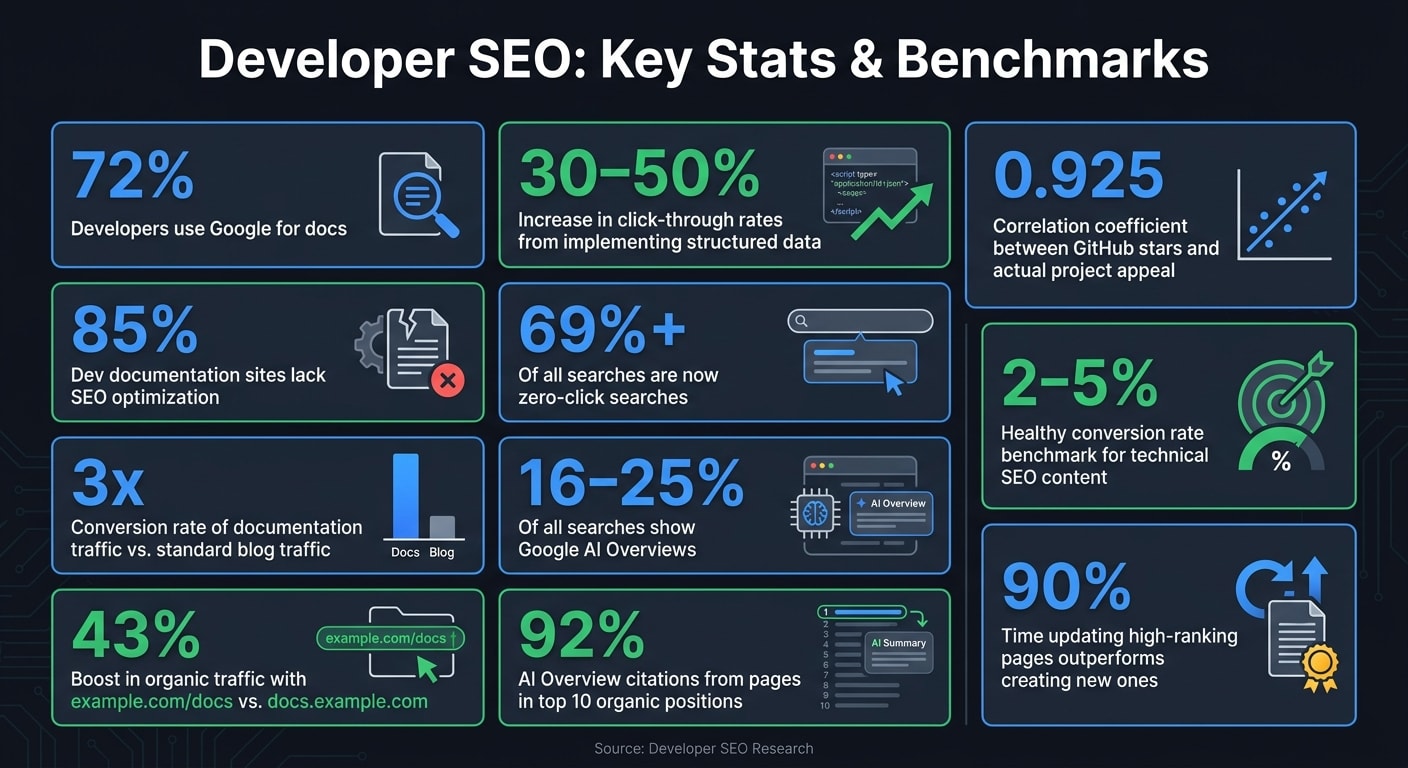
Structured data is a powerful tool for capturing developer-specific searches. It enables search engines to better understand your content and can unlock rich results that drive higher click-through rates. In fact, implementing structured data can increase click-through rates by 30–50% compared to standard search results .
To make the most of structured data, use JSON-LD in the <head> section of your pages. Here are some of the most relevant schema types for developer tools:
| Schema Type | Best Use Case | Key Benefit |
|---|---|---|
WebApplication |
Main tool landing pages | Identifies the page as a functional utility |
TechArticle |
API references and conceptual guides | Highlights technical depth and the appropriate proficiency level |
HowTo |
Integration tutorials and quickstarts | Displays numbered steps directly in search results |
FAQPage |
Error message and troubleshooting pages | Creates expandable snippets that can dominate search results |
BreadcrumbList |
Documentation sub-pages | Shows site hierarchy (e.g., Docs > API > Auth) in search results |
One important tip: only use FAQPage markup for genuine question-and-answer content. Converting standard headings into questions just to trigger this schema can result in penalties from Google. Additionally, if your documentation is versioned, ensure you use canonical tags to indicate the current version. This prevents older versions from fragmenting your authority or competing for the same rich result slots .
Optimizing Content for Developer Platforms
To effectively reach developers, focus your efforts on the platforms they rely on for solutions: Google, GitHub, and forums. Each platform operates differently and demands a tailored strategy.
Google: Task-Based and Troubleshooting Content
Developers often turn to Google when they need answers, with 72% relying on it as their main tool for finding documentation . Yet, 85% of developer documentation sites lack any SEO optimization . That’s a major gap - and an opportunity.
When developers search, they’re not using broad terms like "best API tool." Instead, they’re typing queries like "webhook retry failing after 500" or even pasting stack traces. To capture this audience, create pages that directly address these specific issues. Use the exact error string in the title, explain the problem, provide a code-based solution, and offer prevention tips. These pages attract developers actively looking for help, and they’re ready to act. In fact, documentation traffic for developer tools converts at three times the rate of standard blog traffic .
Another tip: start tutorials with a clear answer within the first 40–80 words. This approach increases your chances of appearing in Google AI Overviews, which now show up in 16–25% of all searches . As Ilya Grebnov from Grafana Labs explains:
"We treat SEO like product onboarding. Each article should move the reader closer to trying the product - whether that's cloning a repo or pasting a command."
One structural change can also make a big difference: hosting your docs at example.com/docs instead of docs.example.com. This setup can lead to a 43% boost in organic traffic , as subfolders inherit the main domain’s authority, unlike subdomains, which Google treats as separate sites.
While Google requires content tailored to specific tasks, GitHub demands attention to README files and repository metadata.
GitHub: Crafting SEO-Friendly READMEs and Wikis
For many developers, your GitHub README may be their first impression of your project. In fact, it often outranks your official website for technical queries . Sarah Dayan, Staff Engineer at Algolia, emphasizes this:
"We treat the GitHub README as our alt-homepage. It's often the first thing developers read. So we write it like we're onboarding someone right there."
GitHub’s internal search prioritizes the repository name, About section, and topic tags - not the README content. To optimize:
- Keep the About section concise (120–250 characters) and front-load it with primary keywords. This text often appears as the meta description in search results .
- Add 5–15 topic tags that cover your tech stack (e.g.,
react), purpose (e.g.,authentication), and other relevant terms .
Inside the README, use headings that reflect common developer questions, such as "How to install..." or "How to configure...". Include a quick-start code block that developers can copy and paste directly. Finally, link back to your full documentation hub - this not only drives traffic but also passes search authority to your main site .
Optimizing your GitHub presence strengthens your overall SEO strategy by driving qualified referral traffic to your documentation hub.
Stack Overflow and Forums: Engaging Developers Directly
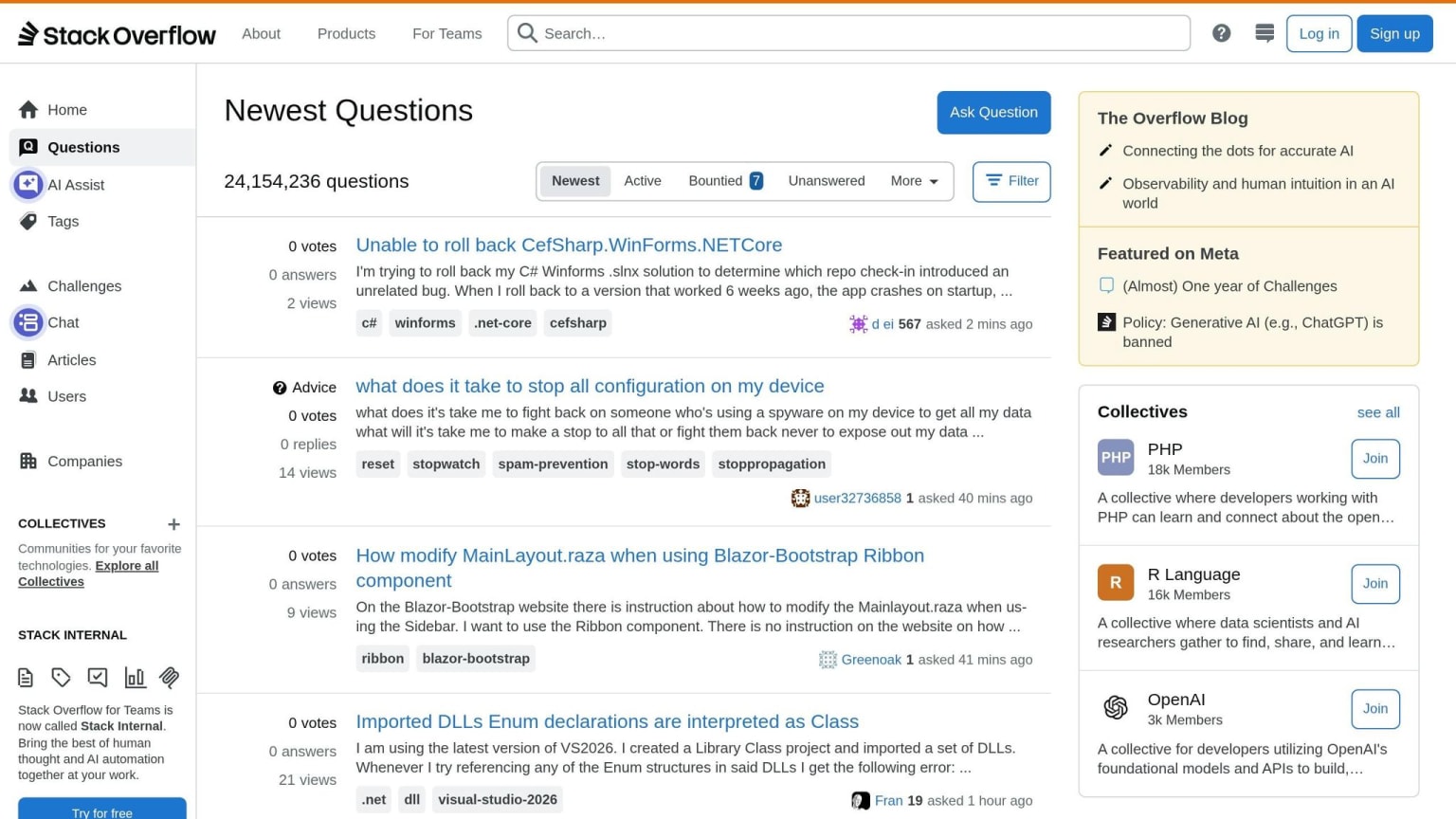
Forums like Stack Overflow and Reddit are essential for expanding your reach. Answering questions on these platforms boosts both your visibility and credibility. These discussions increasingly dominate search results, with Reddit threads and Stack Overflow answers often appearing where long-form articles once did . AI tools like ChatGPT and Perplexity also frequently cite forum discussions, with 92% of AI Overview citations coming from pages already ranking in the top 10 organic positions .
When contributing to forums, start with a direct answer to the question. Use precise technical terms - write "Next.js App Router" instead of vague phrases like "the framework." Then, link to your official documentation for further details. Pavel Buyeu, an SEO expert, highlights the value of this approach:
"When your library or API gets referenced in Stack Overflow threads, it not only boosts credibility - it often leads to highly relevant referral traffic and sometimes even sitelinks in search."
Forum participation isn’t just about engagement; it’s also a goldmine for keyword ideas. The questions developers repeatedly ask can reveal high-intent phrases that traditional SEO tools often miss . By addressing these questions, you can refine your content strategy and better serve your audience.
Measuring and Improving Your Developer SEO
Tracking Performance Across Search Platforms
If you're serious about SEO, you need to measure it. For developer tools, this means looking beyond just Google and considering other platforms where developers interact.
Start with Google Search Console (GSC). It's free and provides key insights like rankings, impressions, and click-through rates (CTR) for every page. To stay ahead, use the GSC API to automate your monitoring. This way, you can catch ranking dips before they snowball into bigger issues . Don’t forget to monitor Core Web Vitals, particularly INP (Interaction to Next Paint), which should stay under 200ms to keep your rankings healthy .
On GitHub, metrics like stars, forks, and issues give you a sense of your project's popularity. Interestingly, GitHub stars have a strong correlation (0.925 coefficient) with actual project appeal . And since Google is GitHub’s biggest traffic driver , optimizing your repository pays off in terms of broader SEO performance.
A newer frontier is AI visibility. As of May 2026, Google AI Overviews appear in 16–25% of searches . To ensure your content is showing up, test tools like ChatGPT, Perplexity, and Claude with developer-focused queries. If your content isn’t surfacing, it’s a sign you need to restructure your pages to provide clear, extractable answers .
By covering multiple platforms, you can ensure your SEO strategy stays relevant to developer needs and habits.
Prioritizing Fixes Based on Developer Impact
Not every underperforming page deserves your attention. Start by focusing on pages with high impressions but low CTR in GSC. These are pages that Google is already showing, but developers aren’t clicking. Often, the solution is simple: rewrite the title or meta description to better match the query.
Talia Wolf, a Conversion Expert, emphasizes the importance of authority in technical spaces:
"For devtools, SEO isn't just about keywords - it's about authority within technical communities. Search engines can now pick up on cues like GitHub activity, technical backlinks, and structured docsets."
Beyond clicks, connect your SEO efforts to product activation metrics. Tools like PostHog, Segment, or Amplitude can help track whether a developer who visited a troubleshooting guide actually signed up, cloned a repo, or ran a CLI command . A healthy conversion rate for technical SEO content is usually between 2% and 5% . If you’re falling short, it could mean your content isn’t matching user intent or isn’t guiding readers toward the next step effectively.
Also, use your support logs and GitHub issues to identify gaps in your content. If developers frequently report a specific problem, make sure your troubleshooting page addresses it - and that it ranks well .
By aligning your data with developer behavior, you can refine your strategy and focus on what matters most. Once you’ve improved key pages, consider using targeted advertising to give them an extra boost.
Complementing SEO with Targeted Advertising
Organic SEO is a long game, but targeted advertising can give you immediate visibility with the right audience.
Platforms like daily.dev Ads are designed specifically for developers. Instead of generic display ads, daily.dev places your content directly in the feeds developers use to stay updated. This ensures your tool reaches engineers actively engaging with technical content, not just casual browsers.
Targeted advertising doesn’t just drive traffic - it reinforces your SEO efforts. Brand mentions and referral traffic from ads can help signal credibility to search engines, indirectly boosting your organic rankings over time.
Think of SEO and advertising as two complementary strategies. SEO builds steady, long-term visibility, while advertising helps you bridge the gap and get noticed faster. Together, they create a balanced approach to reaching developers where they are.
Conclusion: Key Takeaways for Developer Tool SEO
SEO for developer tools requires a tailored approach that aligns with how engineers search for solutions. Unlike typical consumers, developers don’t browse for products - they look for answers to specific problems. If your content doesn’t fit into that workflow, it risks being overlooked.
Here’s what stands out: Documentation is your most powerful SEO tool. A staggering 72% of developers rely on Google to find documentation , yet 85% of documentation sites lack any SEO optimization . This gap is a huge opportunity. Simple adjustments, like hosting your docs at yourdomain.com/docs instead of a subdomain, structuring content to address real error messages, and implementing proper schema markup, can significantly boost rankings. These small technical tweaks can make a big difference in how your content performs.
But it doesn’t stop at Google. Every platform where developers interact - GitHub, Stack Overflow, changelogs - should be treated as part of your search strategy. Each touchpoint plays a role in making your tool easier to find and use.
The SEO landscape is also evolving quickly. Zero-click searches now account for over 69% of all queries , and Google AI Overviews appear in 16–25% of searches . To stay visible, your content needs to be structured clearly. Use concise definitions, tables, and FAQs to make it easy for AI engines to pull accurate answers. Updating existing high-ranking pages often outperforms creating new ones on the same topic - 90% of the time, in fact . These practical tactics are most effective when informed by technical expertise.
Here’s a crucial insight: SEO for developers isn’t just a marketing job. As Phil Leggetter, former Head of DevRel at Ably, wisely said: "You can't outsource technical credibility. If your SEO strategy doesn't involve the people building and using the product, you'll miss what developers actually search for - and care about." By collaborating with engineers, DevRel teams, and support staff, you can ensure your content addresses the real questions developers are asking.
FAQs
How do I find developer keywords if tools show zero volume?
When keyword tools indicate zero search volume for developer-related terms, it's time to shift gears and explore other strategies. Start by digging into customer questions from support tickets, forums, or platforms like GitHub. Developers often approach search engines with problem-first queries, so understanding their pain points is key.
Focus on long-tail technical queries - these may have low search volume but often come with high intent. Crafting detailed solutions, complete with code examples and step-by-step tutorials, can help you connect with this niche audience and drive highly relevant traffic to your content.
Should my docs live on a subdomain or in a /docs folder?
When it comes to SEO, hosting your documentation in a subfolder (e.g., example.com/docs) often outperforms using a subdomain (e.g., docs.example.com). Here's why:
- Domain Authority Boost: Subfolders benefit directly from your main domain's authority. That means all the backlinks and SEO signals your main site has built up will also support your docs.
- Unified SEO Signals: Search engines treat subdomains as separate entities. This means you'd need to build authority for the subdomain from scratch, which can require significant extra effort.
- Simplified SEO Management: Keeping everything under one domain makes it easier to manage your SEO strategy. It creates a more cohesive structure that search engines - and users - can navigate more easily.
For developer-focused content, this approach ensures better visibility and helps your documentation rank higher in search results.
What schema markup actually helps developer docs rank?
Schema markup can significantly improve the rankings of developer documentation by adding structured data such as FAQ, HowTo, and Product schemas. These types of schema help search engines better understand your content and can enhance rich snippets, making your pages more visible in search results. To effectively reach technical audiences, choose schemas that align closely with the purpose and format of your content.