

In 2026, marketing AI coding tools requires a new approach. Developers now adopt tools quickly, often deciding within minutes of testing. The market is competitive, with tools like Cursor, Copilot, and Claude Code dominating. Developers prioritize performance, transparent benchmarks, and peer recommendations over traditional marketing tactics. Here's what you need to know:
- Tool Categories: AI-native IDEs (e.g., Cursor), IDE plugins (e.g., Copilot), terminal agents (e.g., Claude Code), and niche/local tools (e.g., Apfel).
- Developer Preferences: Fast setup, clear benefits, and honest comparisons. Metrics like SWE-bench scores, latency, and privacy policies are key.
- Discovery Channels: Peer-driven platforms (Twitter/X, YouTube, Hacker News), daily.dev, and IDE marketplaces.
- Retention Strategies: Deliver a "first win" quickly post-installation, such as completing a complex task. Track metrics like activation rate, DAU/MAU, and task success rates.
Quick Tip: Developers value transparency. Share clear, data-backed benchmarks and avoid overpromising. Highlight specific strengths and address limitations openly.
The AI Coding Tool Landscape and How Developers Buy
Categorizing AI Coding Tools in 2026
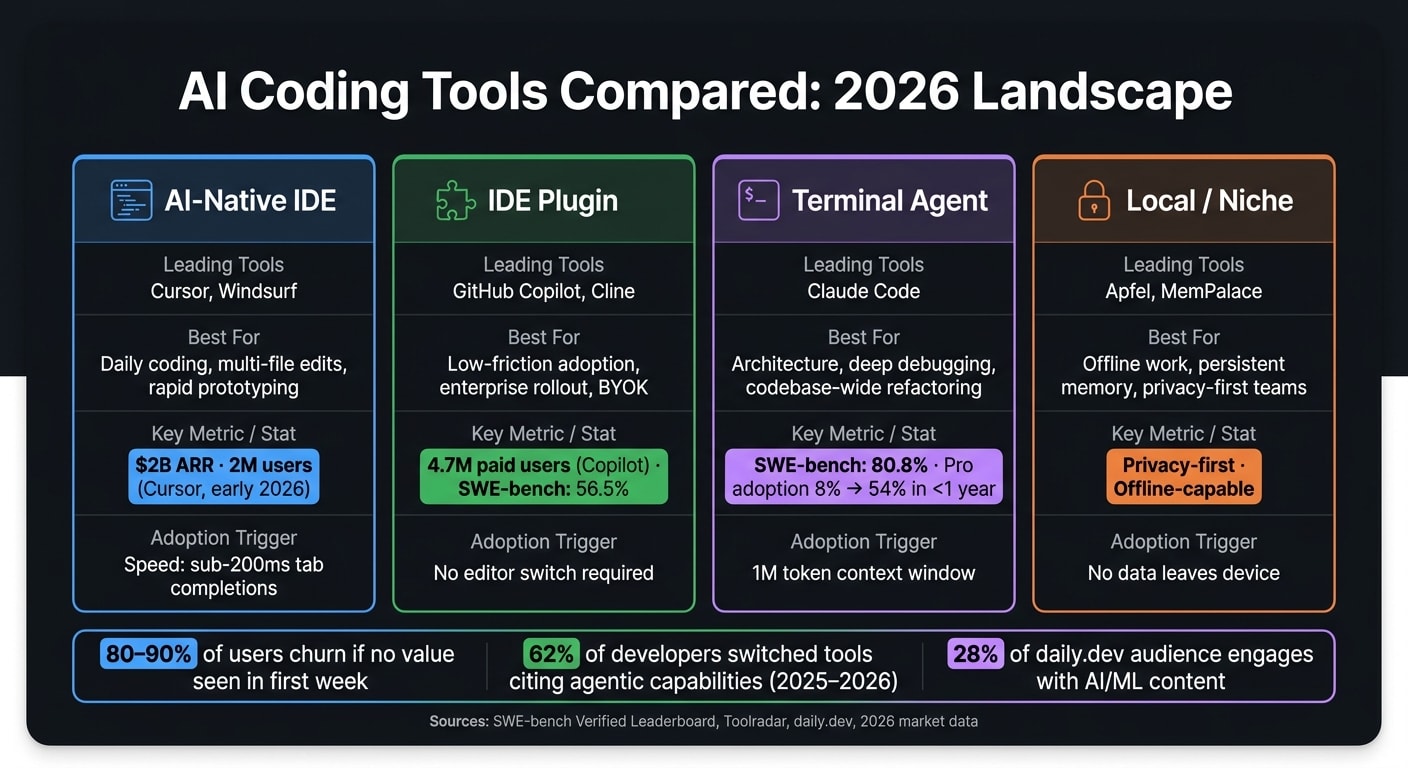
The AI coding tool market has evolved into four clear categories, each tailored to different workflows and developer needs.
AI-native IDEs like Cursor and Windsurf are complete editors, essentially VS Code forks rebuilt from scratch with AI at their core. These tools excel at handling multi-file orchestration, making them a go-to for daily development tasks and rapid prototyping. Startups and individual power users especially favor them. Cursor, for instance, hit 2 million users and achieved $2 billion in annual recurring revenue (ARR) by early 2026 .
IDE plugins such as GitHub Copilot and Cline (formerly Claude Dev) integrate seamlessly into existing editors like VS Code, JetBrains, and Xcode. Copilot leads the pack with 4.7 million paid users , largely due to its ease of adoption - it doesn't require developers to switch editors. Cline, on the other hand, offers an open-source, model-agnostic approach, enabling teams to switch between models like GPT-5, Claude, Gemini, or DeepSeek. This flexibility appeals to teams that want full control over their AI stack .
Terminal agents like Claude Code operate entirely in the command line, bypassing GUIs and editors altogether. These tools can analyze entire codebases, execute bash commands, and perform complex refactoring autonomously. Claude Code (Opus 4.6) achieved an impressive 80.8% on the SWE-bench Verified leaderboard and saw its professional adoption rate skyrocket from 8% to 54% in less than a year . Senior engineers often rely on these tools for tackling particularly challenging problems.
Local and niche tools fill out the landscape by addressing specialized needs. Apfel, for example, provides offline AI coding for developers who prioritize privacy, while MemPalace introduces persistent memory to AI agents via the Model Context Protocol (MCP). While these tools cater to smaller audiences, they often inspire strong loyalty among their users.
| Category | Leading Tools | Best For |
|---|---|---|
| AI-Native IDE | Cursor, Windsurf | Daily coding, multi-file edits, rapid prototyping |
| IDE Plugin | GitHub Copilot, Cline | Low-friction adoption, enterprise rollout, BYOK |
| Terminal Agent | Claude Code | Architecture, deep debugging, codebase-wide refactoring |
| Local/Niche | Apfel, MemPalace | Offline work, persistent memory, privacy-first teams |
These categories provide a clear framework for understanding how developers approach and adopt AI coding tools.
How Developers Discover and Adopt AI Coding Tools
The way developers find and choose AI coding tools is shaped by the unique nature of each category. Their decision-making process is quick and hands-on - they install a tool, test it with a single prompt, and decide almost immediately whether to keep it.
Discovery happens largely through peer-driven channels. Platforms like Twitter/X often spark viral moments - a short video showing a 3-hour refactor completed in 2 minutes can result in 100,000 new trials from a single post . YouTube plays a key role in verifying such claims, with trusted creators like Primeagen, Theo (t3.gg), and Fireship influencing their audiences by highlighting both the strengths and weaknesses of tools. Hacker News also serves as a credibility booster, especially when technical launch posts demonstrate deep expertise in the problem space.
Meanwhile, daily.dev acts as a consistent discovery platform. Developers use it regularly to stay updated, with 28% of its audience specifically engaging with AI/ML content . Unlike one-off launch posts, daily.dev ensures tools remain visible over time through articles on model updates, framework changes, and benchmark comparisons.
"Developers do not click on ads. They click on solutions to their problems." - daily.dev
Evaluation happens quickly, often through benchmarks like SWE-bench scores or direct head-to-head comparisons. Developers pay close attention to where a tool struggles, not just where it excels. Tools that openly acknowledge their limitations often earn more trust. Many developers now use multiple tools simultaneously - for example, relying on Cursor for daily IDE work while turning to Claude Code for complex terminal-based tasks.
Adoption boils down to a single "magic moment" - a successful, complex task completed during the first session. If the tool doesn't deliver that win almost immediately, it’s uninstalled. With no switching costs, the critical window between installation and activation is where tools either succeed or fail.
Positioning Your AI Tool Against Cursor, Copilot, and Others
What Developers Expect From Leading AI Coding Tools
Developers rely on specific metrics to evaluate AI coding tools, and these benchmarks often make their way into discussions on platforms like Slack and Hacker News. For instance, Claude Opus 4.6 scored an impressive 80.8% on SWE‑bench Verified , while GitHub Copilot earned 56.5% on the same test . Windsurf, with its 40.08% SWE‑1.5 score , promotes a speed advantage of being 13 times faster than competitors. Another critical feature is context window size - Claude Code's massive 1 million token context allows it to analyze an entire codebase in one go, a feat that many model-dependent tools struggle with during large-scale refactoring. Latency also plays a key role, with Cursor setting the bar with sub-200 ms tab completions .
Privacy has become a major factor in decision-making. When GitHub Copilot updated its default policy in 2026 to train on user code unless explicitly opted out, many teams shifted toward tools offering absolute no-training guarantees, such as Cursor's Business tier and Claude Code's Max subscription . For industries like fintech or healthcare, features like SOC 2 compliance and on-premises deployment are non-negotiable.
These criteria set the foundation for defining how your tool can stand out.
Choosing and Communicating Your Competitive Differentiators
To stand out in this competitive space, your messaging must highlight where your tool excels. Developers expect clear answers, so focus on one area where your tool offers a measurable advantage - whether that's deeper integration with IDEs, superior reasoning capabilities, advanced agent features, or enterprise-grade security. Trying to claim expertise across all these areas risks weakening your credibility, as developers tend to see through broad, unsupported claims.
For example, Windsurf emphasizes its unmatched speed, while Claude Code focuses on reasoning depth and user satisfaction, boasting a 91% CSAT score and an NPS of 54 as of early 2026 . Cline, on the other hand, differentiates itself with model-agnostic functionality, allowing teams to seamlessly switch between GPT‑5, Claude, Gemini, or DeepSeek without disrupting workflows .
"The safest decision is not to crown one universal winner. It is to match the tool to the project stage, team maturity, and risk profile." - Aminah Rafaqat, Technical Writer, API DOTS
Once you've chosen your angle, back it up with concrete, verifiable details. For instance, instead of saying your tool is "faster", specify that it is "13× faster on SWE‑1.5 benchmarks" . Instead of claiming "better privacy", state that your tool offers "No training on your code, ever, on all paid tiers - ensuring SOC 2 compliance." These precise claims not only resonate with developers but also provide the confidence engineering leads need to present your tool to their CISOs, strengthening your position in the market.
Content Formats That Help Developers Evaluate AI Coding Tools
Building Benchmarks and Workflow Demos
When it comes to evaluating AI coding tools, developers lean heavily on reproducible tests rather than flashy marketing claims. The most effective demos focus on a single, clear task - for instance, "Build a React counter component" - and compare how different tools handle it side by side. A great example of this approach comes from GoCodeLab in April 2026. They tested two tools on the same task: Claude Code completed it in 8.2 seconds at a cost of $0.03, while Windsurf's Cascade engine finished in just 3.1 seconds . This kind of direct, data-driven comparison is far more persuasive than a list of features.
Beyond speed tests, you can showcase your tool’s depth and reliability with more complex demos. For example, a demo that involves refactoring over 40 files highlights how well your tool handles reasoning and multi-file orchestration. These tests demonstrate robustness by showing your tool’s ability to manage large-scale tasks effectively, especially when competitors falter. Pair these demos with real-world scenarios, like startup latency, moments when the tool seeks clarification, or when it generates subtle bugs. Developers are bound to encounter these edge cases eventually, so addressing them upfront shows transparency and builds trust.
"The model is just the engine - the agent architecture is the chassis." - AgentMarketCap
Incorporate SWE-bench Verified scores into your demos as an industry benchmark. For instance, if your tool scores 65% on SWE-bench while a competitor scores 56.5%, highlight that difference and link to the public leaderboard. On the other hand, if your tool doesn’t excel on SWE-bench but outperforms in areas like latency or token efficiency - as seen with Claude Code using 5.5x fewer tokens than Cursor on similar tasks - lead with those strengths. These benchmarks, combined with live demos, give developers the concrete evidence they need to make informed decisions.
Publishing Honest Product Comparisons
Transparent, data-backed comparisons resonate strongly with developers and are key to earning their trust. Avoid creating comparisons where your tool dominates every category - developers will see through that and dismiss the credibility of your claims. Instead, focus on balanced evaluations that reflect real-world trade-offs.
A great way to add authenticity is by including a "Skip if..." section. For example: "Skip Cursor if you're committed to JetBrains IDEs" . This kind of detail shows a deep understanding of the tools and their intended audiences. It’s also crucial to move beyond basic pricing comparisons. While Pro tiers may appear affordable at $10–$20 per month, serious users often face costs of $100–$400 per month due to token overages and model multipliers . Highlighting these nuances shows you’re addressing the needs of heavy users.
"AI-generated code ships with known vulnerabilities at a rate near one-in-two, regardless of tool." - Afterbuild Labs
Security is another area where honest comparisons can shine. Developers already expect high standards for privacy and performance, so addressing these concerns is essential. For example, the 2026 GitGuardian report revealed that developers using AI autocomplete tools were twice as likely to commit API keys and credentials . A thoughtful comparison should not only highlight these risks but also explain how each tool’s data training policies - such as opt-in versus opt-out - impact enterprise teams. This kind of analysis provides engineering leads with the context they need to make well-informed decisions.
Distribution Channels for Reaching AI Tool Buyers
Getting your AI tool in front of the right audience is crucial for adoption. Developers are already active on specific platforms, so your goal is to meet them there with messaging that clicks.
Optimizing Your Listing on IDE Marketplaces
Platforms like the VS Code Marketplace and JetBrains Marketplace attract developers ready to install tools, not just browse. If someone searches for "AI code assistant" or "Copilot alternative", they’re already interested. Your listing needs to make an immediate impact. Use clear, compelling language in your title and description. For example: "AI code completion with multi-file refactoring and SOC 2 Type II compliance."
Speed matters. Developers expect tools to work almost instantly. If your setup process takes less than three minutes, highlight that with phrases like: "Functional in under 3 minutes, no API key required." Developers will appreciate this clarity upfront.
If your tool has strong performance metrics, such as a high SWE-bench score or superior token efficiency, showcase those results with a link to the data. This reinforces your tool’s credibility and ease of use, making it stand out in a crowded marketplace.
Once your marketplace presence is solid, it’s time to extend your reach to trusted platforms developers frequent.
Using daily.dev Ads to Reach Developers Reading About AI Tools
daily.dev is a go-to platform for developers staying updated on tech trends, new tools, and engineering insights. The AI/ML segment on daily.dev has seen a 156% growth in engagement, with 28% of its audience actively exploring topics like LLMs, RAG, and ML engineering . These are hands-on engineers evaluating solutions for real-world challenges.
The platform’s ads integrate seamlessly with relevant content, ensuring your message lands in the right context. As a daily.dev representative explains:
"Ads only work when the context makes sense." - daily.dev
For instance, placing ads next to articles about Claude model updates or Cursor releases ensures your tool is seen when developers are thinking about their needs. You can also target by seniority through daily.dev for Business, focusing on team leads and senior engineers - 30% of the audience has 7+ years of experience. Since most developers install tools on their desktops, prioritize desktop ad placements over mobile .
When crafting ad copy, lead with a specific problem your tool solves. For example: "Refactoring 40 files? See how [Tool] handles it in one command." This approach is far more effective than generic claims like "The AI coding tool built for developers."
Beyond ads, newsletters and events offer additional ways to connect with developers.
Reaching Developers Through Newsletters and Conferences
Developer newsletters are a reliable way to reach an engaged audience. Platforms like Techpresso, which has over 550,000 tech professionals , and Devshot, tailored for engineers, are excellent for creating awareness. For big launches, a dedicated email blast can work wonders. For more technical content - like explaining how your tool handles extended context windows - a native advertorial format might be the best fit.
Conferences are another key opportunity. Events like the AI Engineer Summit, AI Engineer World's Fair, and GitHub Universe attract engineers already interested in AI tools. But skip the passive booth sponsorships. Instead, focus on interactive experiences. As Toolradar Editorial puts it:
"Hosted workshops + hands-on demos beat passive booth sponsorships. Let developers test at the event." - Toolradar Editorial
A 30-minute workshop where attendees can refactor a live codebase offers a hands-on experience that sticks, leading to faster adoption of your tool.
Activation, Retention, and Metrics After Install
Getting Developers to Their First Win Fast
Once developers install your tool, the clock starts ticking. The first few minutes are critical - this is when you either hook them or lose them.
"Developers who struggle to install and configure your tool within 3 minutes abandon." - Toolradar Editorial
The key to retention lies in delivering a "first win" - a quick, satisfying success that shows the tool's value immediately. For example, guiding users through tasks like "Refactor this function" or "Generate a React component from this spec" can make all the difference.
To make this seamless, automate essential processes like codebase indexing the moment the tool launches. If your tool uses embeddings or tree-sitter to understand project structures, kick off this process in the background. This way, the AI is ready to deliver results without requiring manual setup, ensuring developers can jump straight into action.
Once you've secured that first win, it's time to dive into the numbers to track performance and retention.
Metrics to Track for Growth and Retention
To understand how well your tool is performing post-installation, focus on these metrics:
| Metric | What It Measures |
|---|---|
| Time to First Edit | How quickly users accept their first suggestion after installation |
| Activation Rate | Percentage of users reaching a key milestone (e.g., first pull request) |
| Stickiness (DAU/MAU) | Frequency of monthly users returning daily - an indicator of habit formation |
| Agent-Task Completion Rate | Success rate of autonomous tasks like "fix this bug" |
| N-Day Retention | Percentage of users returning exactly N days after installation |
A high DAU/MAU ratio signals that users are forming habits with your tool. On the other hand, a low ratio suggests they’re trying it but not sticking around - likely because your tool’s "magic moment" isn’t hitting home. Research shows that 80–90% of users churn if they don’t see value within the first week . For context, a 7% Day-7 retention rate is what separates top-tier products from the rest .
Another critical metric is the agent-task completion rate, which evaluates how well your tool's advanced features perform. This is especially important as 62% of developers who switched tools in 2025–2026 cited agentic capabilities as their main motivation . Tracking this helps you understand whether your most sophisticated features are delivering the value users expect.
Measuring Revenue Impact Across the Funnel
While activation and retention metrics are essential for understanding user behavior, revenue metrics paint the bigger picture of your tool’s financial success.
Installs alone won’t pay the bills - it’s the upgrades and team-wide adoption that drive revenue. The most important metric here is install-to-paid conversion, which measures how many free users upgrade to a Pro tier. Compare this against what developers typically pay for similar tools to ensure your pricing aligns with market expectations .
Team expansion is another revenue driver. Often, a single senior engineer who adopts your tool can advocate for its adoption across their entire team or organization. For example, Booking.com rolled out AI tools to over 3,500 engineers and reported a 16% boost in development throughput within months . Wins like this can transform individual installs into lucrative enterprise deals.
To refine your acquisition strategies, track which accounts eventually convert to Business or Enterprise tiers. Then, trace those conversions back to their original acquisition channels. If a specific ad placement or newsletter sponsorship consistently leads to enterprise deals, that’s where you should focus your marketing budget.
Conclusion: A Practical Marketing Plan for AI Coding Tools
The AI coding tool market in 2026 is moving at lightning speed. Cursor has surpassed $2 billion in ARR with over 1 million paid users , while Claude Code skyrocketed from an 8% to a 54% market share among professional developers in less than a year . These impressive numbers aren’t random - they’re the result of teams nailing developer-focused marketing from the very beginning.
The takeaway here is straightforward: developers value transparency over flashy promises. That means sharing real benchmarks, even if it means pointing out where your tool doesn’t excel, showcasing actual workflows on real-world codebases, and being crystal clear about pricing. Cursor’s June 2025 pricing misstep - where they shifted to usage-based credits without clear communication - sparked backlash and led to a public apology from their CEO . It’s a lesson in the importance of upfront communication.
"Publish benchmarks honestly (including where you lose). Developers respect vendors who are honest about capabilities." - Toolradar Editorial
Getting your tool in front of the right audience is just as critical as the tool itself. Developers actively look for insights on platforms like daily.dev and the VS Code Marketplace, making these channels prime real estate for reaching potential users. Behavioral targeting on daily.dev, for instance, allows you to connect with engineers based on what they’re currently exploring, rather than relying on outdated profile data . This precision is tough to achieve with broader, less focused channels.
And remember, the journey doesn’t stop at installation. The true growth drivers are activation, retention, and team-wide adoption. A single senior engineer who quickly finds success with your tool can influence their entire organization to consider a Business or Enterprise plan. To make that happen, invest in seamless onboarding, track meaningful metrics, and map every enterprise deal back to its origins. That’s how you create a marketing plan that continues to deliver results over time.
FAQs
What’s the fastest way to prove my tool beats the hype?
The fastest way to show what your tool brings to the table is by using honest benchmarks and live demos that reflect real-world use. Emphasize standout features like multi-file refactoring, agent-driven workflows, or speed. Be upfront about any tradeoffs, and use clear, measurable comparisons to illustrate how your tool performs in practical, everyday scenarios.
How do I engineer a “first win” in under 3 minutes?
If you're looking to score a "first win" with AI coding tools in under 3 minutes, the key is to start small and focused. For instance, you can use GitHub Copilot to generate a straightforward function based on a prompt. Alternatively, ask an AI assistant to debug a minor coding issue, like fixing a Python loop or tweaking a snippet of code.
These quick, actionable results - whether it's creating a function or solving a tiny bug - can give you an instant sense of progress and build momentum for tackling larger tasks.
What metrics predict paid upgrades and team adoption?
Key factors to consider are usage costs, including overages and token consumption, security features like SSO and audit logs, and team-based pricing on a per-seat basis. These elements play a major role in shaping decisions around enterprise adoption and scaling teams.