

AI/ML developers are a unique audience that demands precision and technical clarity in advertising. Traditional B2B strategies often fail with this group because they prioritize measurable, hands-on value over generic marketing claims. Here's how to craft campaigns that resonate:
- Focus on Technical Specificity: Highlight metrics like latency, token costs, or model performance instead of vague terms.
- Segment by Role: Tailor messages for AI Engineers, ML Engineers, Research Scientists, and Data Scientists based on their unique needs.
- Prioritize Hands-On Access: Offer sandboxes, API keys, or open-source repositories instead of traditional demos.
- Track Meaningful Metrics: Go beyond clicks; measure actions like API calls, documentation views, or sandbox activations.
- Use Developer-Centric Placements: Ads integrated into developer workflows perform better than interruption-based formats.
This approach builds trust and drives meaningful engagement with a highly technical audience.
Setting Campaign Objectives and Metrics
Aligning Business Goals with Campaign Objectives
Before diving into ad copy, it’s crucial to define what success looks like. For AI/ML developer audiences, forget the usual B2B playbook. Instead of chasing form fills or MQLs, your focus should be on technical validation - the point where a developer actively tries your product.
Why? Because AI/ML sales cycles are notoriously long, often stretching 6–18 months. In fact, 73% of AI software purchases involve several technical stakeholders who prioritize performance metrics over quick decisions . If you only aim for immediate conversions, you’ll miss the critical evaluation stages developers go through. Instead, align your campaign goals with where developers are in their decision-making process.
| Business Goal | Campaign Objective | Preferred CTA |
|---|---|---|
| Drive product adoption | Sandbox signups / API key provisioning | "Get API Access" / "Try It Free" |
| Build brand awareness | Documentation views / content engagement | "Read the Docs" / "View Benchmarks" |
| Generate qualified pipeline | Technical resource downloads | "Download the Architecture Guide" |
For example, a sandbox signup carries much more weight than a whitepaper download - it shows a deeper level of evaluation.
Key Metrics to Track
Once you know your objective, focus on metrics that reveal how developers are engaging with your content. While impressions and clicks provide directional insight, they don’t capture the full picture for this audience. Instead, prioritize metrics tied to engagement depth.
- Top of the funnel: Impressions and click-through rates (CTR) help you assess whether your creative and targeting are resonating.
- Mid-funnel: Metrics like documentation views, API access requests, and time spent on technical pages give insight into meaningful engagement.
- Bottom of the funnel: Sandbox activations and code downloads are the strongest indicators of conversion. A developer who runs your curl command provides far more value than several others who simply clicked your ad and left.
By focusing on these metrics, you can better understand how developers interact with your product at each stage of evaluation.
Setting Baselines for a Technical Audience
Generic benchmarks won’t work with AI/ML developers. This is a niche, high-intent group, so expect your performance metrics to differ from broader B2B campaigns - and that’s perfectly fine.
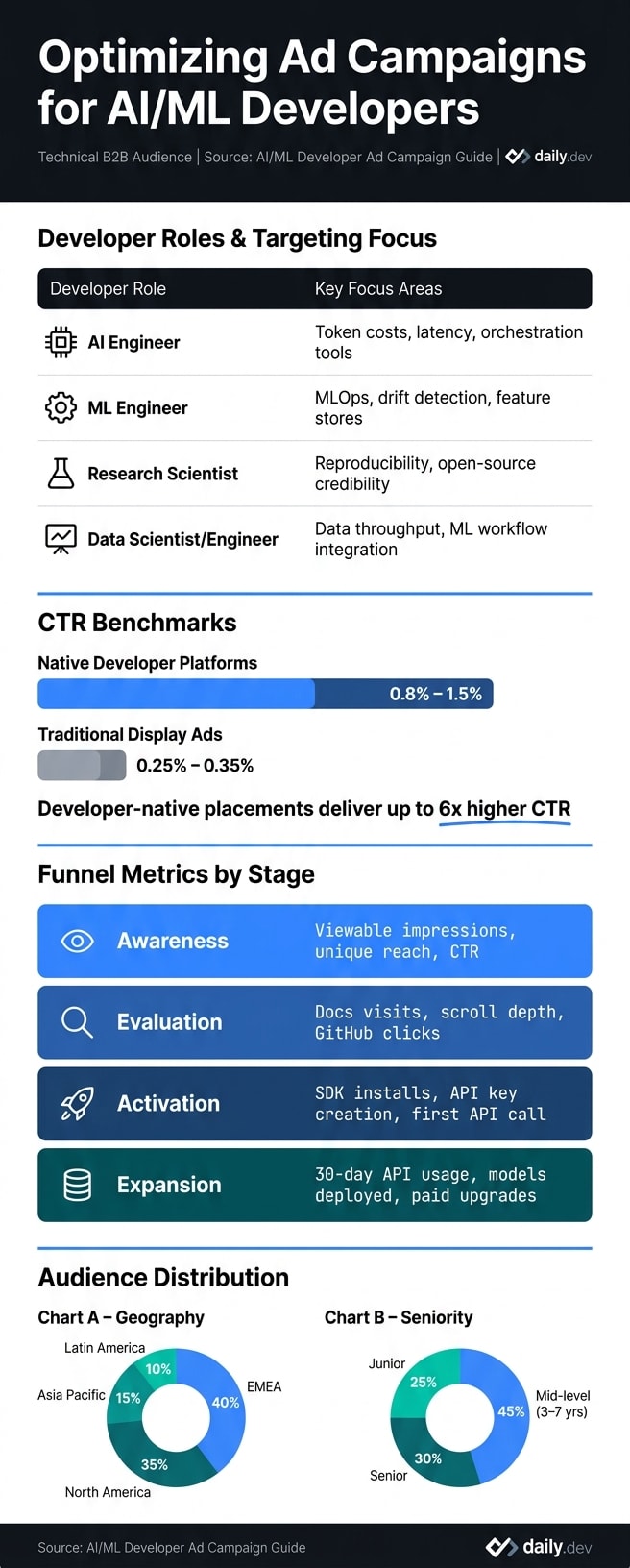
For instance, native developer platforms typically see CTRs between 0.8% and 1.5%, far higher than the 0.25% to 0.35% range for traditional display ads. This difference highlights the power of placing ads within a developer's workflow, rather than relying on interruption-based methods. Use these figures as a starting point and refine them based on live data from your first 2–4 weeks.
Here’s a practical tip: segment your baseline by role. An ML Engineer exploring an MLOps tool will engage differently than a Research Scientist browsing open-source materials. Tracking engagement by role will give you clearer, more actionable insights.
Segmenting and Targeting AI/ML Developers
Once your metrics are set, the next step is ensuring your ads reach the right audience. AI/ML developers aren't a one-size-fits-all group - they represent a variety of roles, each with its own priorities, tools, and workflows. Effective segmentation is key to boosting your campaign's performance.
Targeting by Developer Role
Avoid lumping all AI/ML developers into a single category. Each role has unique technical needs, and your messaging should reflect that:
| Role | Focus Areas to Highlight |
|---|---|
| AI Engineer | Token costs, latency, orchestration tools |
| ML Engineer | MLOps, drift detection, feature stores |
| Research Scientist | Reproducibility, open-source credibility |
| Data Scientist/Engineer | Data throughput, ML workflow integration |
For example, AI Engineers care about token costs and latency, while ML Engineers are more concerned with drift detection and feature stores. Using a generic message for both groups won't resonate. Instead, craft tailored copy that speaks directly to the pain points of each role. Once you've segmented by role, refine your targeting further by considering the tools and languages these developers rely on.
Targeting by Tech Stack and Tool Preferences
The tools developers use daily provide valuable insight into their priorities. Python remains the dominant language in AI/ML, making it a natural focal point for campaigns. However, Go and Rust are gaining traction in high-performance inference infrastructure, while Java and Kotlin are still critical for enterprise teams managing ML workloads.
If you're marketing an MLOps tool, an ad referencing platforms like Kubeflow, MLflow, or Seldon will perform better than one with a generic tagline like "streamline your ML pipeline." Platforms like daily.dev Ads allow you to target developers based on the programming languages and tools they follow, ensuring your message reaches the right audience. Additional factors like geography and experience level can further refine your strategy.
Targeting by Location and Seniority
Geography plays a major role in developer targeting. Globally, developers are concentrated in Europe and North America, with EMEA accounting for about 40%, North America 35%, Asia Pacific 15%, and Latin America 10% .
Seniority is another important factor. Mid-level developers (3–7 years of experience) make up the largest segment at 45%, followed by senior developers at 30% and junior developers at 25% . Senior and staff-level engineers often have greater influence over tool adoption decisions, making them a valuable target group. While focusing on higher seniority tiers may reduce the overall volume of leads, it can significantly improve the quality of your pipeline.
Building Ad Creatives That Work for AI/ML Developers
When creating ad creatives for AI/ML developers, it's crucial to focus on clear, technical value. This audience often views marketing fluff with skepticism, so your messaging needs to be precise and grounded in real-world metrics.
Writing Clear Value Propositions
Steer clear of vague claims like "the most powerful ML platform" or "best-in-class inference." Instead, let the numbers do the talking. Developers respond to specifics, such as "p99 latency under 50ms" or "3x faster builds" - metrics that directly address their challenges .
A simple formula can help: [Action] + [Metric] + [Timeframe]. For example: "Cut build times by 80% in one afternoon." This approach sets clear expectations and highlights tangible benefits.
Your call-to-action (CTA) should be just as specific. Replace generic phrases like "Learn more" with actionable options such as "See the docs", "View demo," or "Try the sandbox." These tailored CTAs align with how developers prefer to explore tools and lower the barrier to engagement. In fact, this kind of developer-focused messaging can boost click-through rates by 2–4× compared to generic tech ads .
Using Native Ad Placements Effectively
A mix of native ad placements works better than relying on just one format. Here’s how different formats can serve your campaign:
| Ad Format | Best Use Case | Engagement Strength |
|---|---|---|
| In-Feed Native | Brand awareness and product discovery | High visibility in personalized feeds |
| Post Page | Technical deep-dives and detailed info | High contextual relevance during research |
| Digest Ads | Personalized tool recommendations | Targeted outreach via curated summaries |
Platforms like daily.dev Ads offer these native formats in a developer-centric environment. Native ads blend seamlessly with relevant content, making them more engaging.
"Developers ignore banners. They pay attention to native content." - daily.dev for Business
Running A/B Tests on Your Creatives
Testing is where campaigns often see the biggest improvements. For effective A/B testing, tweak only one element at a time - such as the headline, CTA, or a technical detail - to pinpoint what works best.
For native ad campaigns, start with 10–15 creative variations. This gives the platform's algorithm enough options to learn which messages resonate with specific developer audiences . Allow each variant to gather at least 1,000 impressions for an initial read, and 5,000+ impressions for actionable insights .
Run tests for 7–14 days to account for differences in weekday and weekend browsing habits . To make reliable decisions, aim for a 95% confidence level and at least 100 conversions per variant . Making decisions based on insufficient data is a common reason campaigns underperform.
Once you’ve optimized your creatives, track campaign performance closely to refine your strategy further.
Tracking Performance and Improving Campaigns Over Time
Once your creatives are live, the next step is to focus on tracking meaningful actions that indicate product adoption, especially for AI/ML developers.
Measuring Developer-Specific Engagement
Metrics like CTR (click-through rate) and CPC (cost per click) don’t tell the whole story when targeting a technical audience. What truly matters is what developers do after they click. These post-click actions reflect the validation process developers use to assess your product.
To measure success effectively, align your metrics with the different stages of the developer journey:
| Funnel Stage | Metrics to Track |
|---|---|
| Awareness | Viewable impressions, unique reach, CTR |
| Evaluation | Docs page visits, scroll depth, whitepaper downloads, GitHub clicks |
| Activation | SDK installs, API key creation, first successful API call |
| Expansion | 30-day API usage, models deployed, paid tier upgrades |
Use UTM parameters for all campaign links and ensure your authentication system records signup sources. This allows you to trace backend events (like model_deployed or api_key_created) back to specific campaigns. Your North Star metric should focus on something actionable, such as "activated AI/ML developers per $1,000 spent", ensuring you prioritize real engagement over vanity metrics.
"Developers do not click on ads. They click on solutions to their problems." - daily.dev
These metrics will help pinpoint which audience segments or campaigns need refinement.
Using Performance Data to Adjust Campaigns
Once you’ve gathered enough data, analyze performance by segment - such as roles (ML engineer, data scientist, MLOps), seniority, tech stack, or ad placement. For example, a senior MLOps engineer might respond well to messaging about cost-per-inference benchmarks, while a junior data scientist may prefer a "5-line quickstart" approach.
Set clear data thresholds before making changes. For example:
- Collect at least 1,000 impressions and 30–50 clicks per ad group.
- Ensure 20–30 conversions per segment before drawing conclusions.
When reallocating budgets, increase spending on top-performing segments gradually - by no more than 20–30% at a time - to avoid disrupting the learning phase of ad algorithms. Pause segments that show both high cost-per-activation and low 30-day retention, as these can drain your budget without delivering real value.
If specific platforms, like daily.dev Ads, result in higher SDK downloads at a lower cost per activation, focus your incremental budget on these high-performing channels instead of spreading resources too thin. This data-driven approach ensures consistent optimization.
Building a Regular Optimization Schedule
A steady, structured review process is far more effective than sporadic adjustments. Here’s a suggested schedule to keep campaigns on track:
- Weekly: Review key KPIs for each campaign and segment. Pause underperforming ads, make small bid or budget tweaks, and check for creative fatigue.
- Monthly: Analyze cohort activation and retention by acquisition source. Rotate or refresh creatives and test one or two new hypotheses.
- Quarterly: Reevaluate your personas, value propositions, and channel mix. What resonated in one quarter might not be as effective in the next.
The ideal campaign duration depends on your goals. For beta access campaigns, 2–3 weeks is often enough to evaluate signups and early usage. Larger initiatives, like launching a new tool, may require 8–12 weeks to gather reliable data on awareness and trial activations .
Conclusion: Building Ad Campaigns That Resonate with AI/ML Developers
Connecting with AI/ML developers effectively boils down to one key principle: respect their technical expertise and their need for precision. Broad messaging, vague ROI claims, and generic targeting often fall flat. Instead, a focused four-step strategy - Define, Segment, Create, Optimize - can help craft campaigns that truly engage this audience.
Start by narrowing your audience based on role, tech stack, and seniority. For instance, the priorities of a senior MLOps engineer managing Kubernetes pipelines are vastly different from those of a junior data scientist experimenting with Jupyter notebooks. Once you’ve refined your targeting, develop creatives that highlight specific, measurable value: think training throughput benchmarks, seamless integration details, or even a functional code snippet. Avoid buzzwords - they’re easy to ignore. Concrete, actionable information? That’s what earns clicks.
A common mistake to watch out for: treating AI/ML developers as one homogeneous group. ML engineers, data scientists, and research scientists all have distinct roles and priorities. Tailoring your messaging to these differences is essential for maximizing campaign performance.
Placement matters, too. Ads integrated into developer-focused environments - like the in-feed and post-page options offered by daily.dev Ads - blend seamlessly with the trusted technical content developers already consume. This context is crucial for engaging such a discerning audience.
"Developers ignore banners. They pay attention to native content." - daily.dev Ads
Finally, remember that success with AI/ML developers isn’t about a single campaign. Top-performing teams treat their efforts as iterative, logging experiments, reviewing optimizations every two weeks, and tracking deeper metrics like SDK installs, documentation engagement, and model deployments - not just clicks. This consistent, data-driven approach is what separates campaigns that build momentum over time from those that fizzle out after one run.
FAQs
What should my North Star metric be for AI/ML developer ads?
When it comes to measuring the success of your ad campaigns, conversion rate is the metric that truly matters. It tells you whether those ad clicks are actually driving the outcomes you care about - whether that's generating qualified leads, signups, or purchases. In short, it gives you a clear view of how effectively your ads are achieving their purpose.
Sure, metrics like click-through rate (CTR) can provide helpful insights, but they only tell part of the story. A high CTR might mean your ads are grabbing attention, but if those clicks don’t translate into meaningful actions, it’s not a win.
By prioritizing conversion rate, you can fine-tune critical elements like your targeting, landing pages, and ad creatives. This ensures your campaigns are not just getting clicks but delivering real, measurable results.
How can I track API calls and SDK installs to a specific ad campaign?
To monitor API calls and SDK installs tied to a specific ad campaign, use UTM parameters to track referral traffic effectively. Pair this with integrating your CRM into an analytics platform to get a complete view. Make sure to store first-touch referrer data for anonymous users so you can connect their initial visits to future actions.
The daily.dev analytics dashboard offers insights by linking technical content engagement to key conversion events. Additionally, metrics like authentication rates and endpoint usage help confirm attribution and measure product adoption.
What’s the fastest way to validate messaging for different AI/ML roles?
The quickest way to understand how different groups interact with your technical content is through split-testing. AI engineers, ML teams, and research scientists often have unique focuses - whether it’s MLOps, latency, or reproducibility. Experiment with variations in your messaging, visuals, and calls-to-action to see what resonates most. Platforms like daily.dev Ads allow you to segment audiences by factors like seniority, programming languages, and tools. Analyze performance daily and adjust your approach to better meet the specific needs of each group.