

Creating a developer waitlist isn’t just about collecting emails - it’s about building trust and showcasing your tool’s technical value. Developers care about solving real problems, so your waitlist needs to reflect that. Here’s how you can make it happen:
- Focus on Technical Content: Share code snippets, API examples, or architecture breakdowns directly on your waitlist page. Developers want to see exactly how your tool fits their workflow.
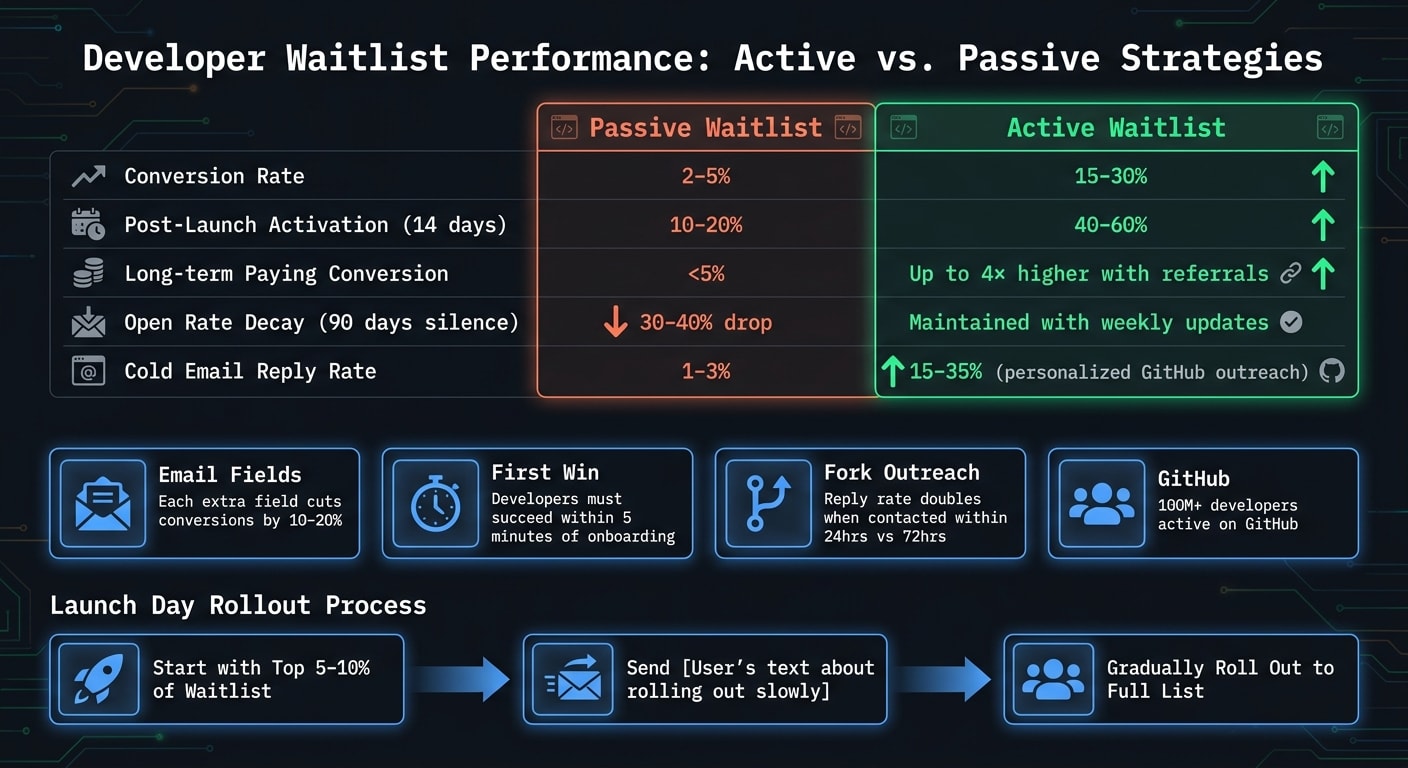
- Keep Sign-Up Simple: A single email field works best. Adding extra fields can reduce sign-ups by 10–20% per field.
- Be Transparent: Tell users what happens after sign-up - show their queue position and explain the next steps.
- Leverage GitHub: Use GitHub stars, forks, and issues to identify engaged developers. Reward these actions with early access or other perks.
- Engage Before Launch: Publish technical blogs, share RFCs, and send weekly updates to keep your waitlist active and informed.
- Offer Meaningful Incentives: Skip swag. Developers value early access, recognition, or technical contributions over generic rewards.
The key? Build trust by showing technical depth and keeping communication open. A strong waitlist isn’t just a list - it’s a community ready to engage with your product.
Key Elements of a Developer Waitlist Page
To get developers to hand over their email, your waitlist page needs to prove your tool’s worth. This means skipping vague marketing fluff and focusing on technical details. While typical "coming soon" pages convert at 2–5%, those that highlight real product value - like code previews or specific features - can achieve conversion rates of 15–30% .
Show Code Snippets and API Features Up Front
Developers approach tools like they approach documentation: they want to see exactly what the tool does before committing. A flashy tagline or generic hero image won’t cut it. Instead, put a CLI command, API call, or a code snippet front and center. Even a short GIF that demonstrates your tool in action is better than vague promises.
Details matter. For example, saying "AI-powered form backend with 99.9% spam detection" is far more convincing than "the smartest form tool on the market" . The goal is to make developers think, "I know exactly what this tool does and how it fits into my workflow."
Developer-Focused Sign-Up
The fewer fields in your sign-up form, the better. Research shows that adding extra fields can slash conversion rates by 10–20% per field . Stick to just an email address for the initial sign-up. You can always gather more details later - like their tech stack or use case - through progressive profiling. A streamlined form builds trust, and clarifying the next steps after sign-up strengthens it even more.
Be Clear About What Happens After Sign-Up
What happens after someone signs up? This is where most waitlists either thrive or fail. Show users their position in the queue right away (e.g., "You’re #2,847 in line"), and explain how the waitlist works. Let them know when access will roll out, how many users will be onboarded per wave, and if there’s a way to move up the line .
"The silent period between 'I joined your waitlist' and 'you finally launched' is where most waitlists die." - LaunchList
A well-managed waitlist can convert 40–60% of subscribers into active users within 14 days of launch. In contrast, a neglected one sees conversion rates drop to just 10–20% . Setting clear expectations upfront - and following up with weekly technical updates - keeps your audience engaged and prevents your waitlist from fizzling out.
Using GitHub to Build Waitlist Engagement
Once you’ve crafted a strong waitlist page, GitHub can take your pre-launch engagement efforts to the next level. For dev tool founders, GitHub isn’t just a code repository - it’s a powerful platform to tap into real developer interest. With over 100 million developers active on GitHub , the activity on your public repository provides invaluable insights into how your product resonates with its target audience.
Use Public Repos to Gauge Interest
Developer actions on your GitHub repo speak louder than surveys. A star shows awareness, a fork signals hands-on testing, and issues or pull requests reveal a deeper commitment to integrating your tool. These interactions allow you to track and nurture potential early adopters, even before sending out a single marketing email.
"Don't chase raw star counts alone. The best beta targets are usually found in repos with rising forks, active contributors, and issue conversations that reveal unresolved pain." - Maya Chen, Senior SEO Content Strategist
One critical metric to watch is fork velocity. If forks are increasing faster than stars, it’s a clear sign that developers are actively testing your code rather than just bookmarking it. These users are your top beta candidates. Similarly, issue activity is a goldmine for feedback - developers often surface pain points or questions that can shape your onboarding process and product roadmap.
Here’s a quick breakdown of GitHub signals and how to leverage them:
| Key GitHub Signals | What It Tells You | How to Use It Pre-Launch |
|---|---|---|
| Stars | General interest and awareness | Gauge top-of-funnel demand |
| Forks | Developers testing your code | Identify high-priority beta candidates |
| Issues | Pain points and challenges | Refine onboarding and roadmap plans |
| Pull Requests | Active integration efforts | Pinpoint high-intent beta users |
Once you’ve identified these demand signals, act quickly to capitalize on them.
Get Developers to Star and Contribute
Transform GitHub engagement into waitlist growth by tying stars and contributions directly to early access. Developers respond well to tangible rewards, like faster access to a tool they’re already exploring, rather than generic incentives like swag.
When someone forks your repo, follow up within 24 hours. Send them something useful, like a relevant code snippet, an SDK tip, or a tailored architecture doc. Timing is critical - messages sent within 24 hours of a fork have double the reply rate compared to those sent after 72 hours . Be specific in your outreach: mention the action they took (“I noticed you forked our Terraform provider”) instead of sending a generic email. This personal approach can drive reply rates of 15–35%, far outpacing the 1–3% typical of cold emails .
"Give before you ask. The content that built the waitlist never asked people to sign up. It gave them something useful, genuine, or interesting. The signups were a byproduct of trust." - Yash, Founder, Step2Dev
Another effective tactic is adding a live GitHub star counter to your waitlist page. This taps into developers’ preference for peer validation over marketing claims. A growing star count serves as subtle social proof, showing that other engineers are already evaluating and endorsing your project.
Pre-Launch Content Strategy for Developers
When you're building developer tools, creating a strong pre-launch content strategy is key to turning casual interest into serious technical engagement. While GitHub signals can show you who is interested, your content strategy is what sparks that interest in the first place. The best pre-launch content for developer tools isn’t flashy or promotional - it’s technical, straightforward, and genuinely helpful.
Write Technical Blog Posts and Architecture Notes
The most effective pre-launch content explains how your tool works and why you made certain technical decisions. This could include architecture breakdowns, CI/CD patterns, database schema choices, or infrastructure trade-offs. Developers value this kind of transparency because it shows that the team behind the tool understands real-world challenges.
For example, in March 2026, Yash, the founder of Step2Dev (an AI DevOps assistant), built a waitlist of over 300 developers without spending a dime on ads. His strategy? Publishing three posts a week on LinkedIn and long-form articles on DEV.to. These posts covered topics like AWS IAM architecture and CI/CD patterns. Interestingly, one candid post about a production outage gained 40x more reach than his typical technical posts. A single "Show HN" submission, where he openly discussed what the product could and couldn’t do, brought in 60 sign-ups alone .
Being open about mistakes or challenges, like sharing detailed post-mortem analyses, often resonates more with developers. It sparks meaningful technical discussions and builds trust. Posting from a personal profile rather than a company account also makes the content feel more authentic - like one engineer sharing insights with another.
This approach naturally leads to more collaborative efforts, such as sharing RFCs, which deepen technical credibility even further.
Share RFC-Style Design Documents
RFCs (Request for Comments) are another great way to earn trust and engage your audience before launch. These documents outline a technical decision or proposed design and invite feedback from the community. Publishing RFCs demonstrates your technical expertise while encouraging readers to actively participate in shaping your project.
"Being transparent about technical decisions built trust." - Yash, Founder, Step2Dev
An effective RFC doesn’t need to be perfect. It just needs to clearly explain what you’re building, the trade-offs you’ve considered, and the questions you’re still working through. Platforms like GitHub, DEV.to, or even niche subreddits are perfect for sharing these documents with developers already interested in your space. When you directly reach out to ideal customer profiles (ICPs) for feedback on an RFC, you can expect a 15–30% reply rate - a response rate far better than any cold pitch .
| Content Type | Best Platform | Developer Value |
|---|---|---|
| Long-form Architecture Notes | DEV.to / Technical Blog | Shows expertise and builds transparency |
| "Build in Public" Updates | X (Twitter) / LinkedIn | Demonstrates progress and personalizes your brand |
| RFCs / Design Docs | GitHub / Public Repos | Invites feedback and fosters trust |
| Show HN / Product Demos | Hacker News | Tests product-market fit with a discerning audience |
The real power of this content isn’t about directly asking for sign-ups. Instead, it’s about building trust and credibility. When developers trust you, they’re far more likely to sign up - and convert - when your launch day arrives.
Referral Incentives That Work for Developers
Building on the engagement sparked through GitHub, referral incentives can amplify developer interest even further. By leveraging the trust established through detailed product previews and GitHub interactions, you can create referral programs that reward technical contributions and resonate with developers.
Standard referral programs, like offering gift cards or branded swag, often fail to attract developer sign-ups. Instead, focus on delivering what developers genuinely care about: access.
"The incentive was not a $10 credit or a t-shirt. The incentive was access - the thing they already wanted." - Trace Cohen, Value Add VC
Access-based referral programs tend to outperform static waitlists significantly, converting 2–4× better than passive sign-up pages . A great example is Robinhood’s pre-launch campaign in April 2013. They showed users their exact position in line and allowed referrals to bump their rank. This strategy led to an incredible 1 million sign-ups within the first 24 hours .
Offer Early Access for GitHub Stars
Rewarding GitHub stars is a smart way to strengthen both engagement and referral efforts. Actions like starring your repository, opening an issue, or forking a project demonstrate genuine interest while also providing visible social proof. By tying these actions to queue positions - such as moving someone up 100 spots for a GitHub star - you can encourage developers to participate more actively.
Reward Feedback and Technical Contributions
Acknowledging developer feedback and technical contributions with tiered rewards fosters loyalty and builds long-term relationships. Here’s an example of how you can structure incentives:
- 1 referral or GitHub star: Boost queue position by 100 spots.
- 5 referrals: Grant early Pro access.
- 25 referrals or a significant contribution: Earn a spot in the launch credits.
These types of rewards tap into developers’ desire for recognition and status within their technical circles .
| Reward Tier | Action Required | Value for Developers |
|---|---|---|
| Early Access | 1 referral or GitHub star | High - direct access to the tool |
| API/Compute Credits | 5–10 referrals | High - tangible workflow utility |
| Name in Launch Credits | 25+ referrals or major contribution | Very High - peer recognition and status |
| Founding Member Status | Feedback or pre-launch contribution | High - sense of belonging and loyalty |
One practical tip: if you include a public leaderboard, make sure to implement strong fraud detection measures from the start. Blocking disposable email addresses and using rate-limiting tools are essential. Developers will quickly notice if the system is being gamed, and once trust is lost, it’s hard to regain .
How to Nurture Your Developer Waitlist
Getting sign-ups is just the first step; keeping those developers engaged until launch is where the real work begins. If you go silent for too long, you risk losing their interest. Studies show that waitlists can see a 30–40% drop in effective open rates after just 90 days of no communication . Worse, if users aren’t activated within three months, conversion rates can plummet below 10% . Regular, detailed updates can keep your audience engaged and build their trust over time.
"A subscriber who hears nothing for 8 weeks has forgotten you. Send a real update every 1–2 weeks: progress, screenshots, asks." - LaunchList SaaS Playbook
Send Weekly Technical Progress Updates
Developers appreciate updates that go beyond surface-level announcements. A weekly email that dives into milestones, technical decisions, or even challenges can go a long way. For example, share details about a new API endpoint, a performance improvement, or even a schema change you debated, along with your reasoning. Here’s a simple structure you can follow:
- Week 1: A welcome email that includes a referral link.
- Weeks 2–3: Share a meaningful technical decision, feature update, or screenshot.
- Weeks 4–6: Provide updates on how close you are to launch.
Don’t forget to include each subscriber’s current queue position in every email. Adding their referral link keeps the referral system active and encourages them to share. Developers respond well to transparency, especially when you share not just wins but also setbacks. Honest updates - rather than overly polished announcements - tend to drive much higher engagement rates .
Communicate with a Focus on Product Progress, Not Hype
The tone of your communication matters just as much as the content. Developers can spot generic, hype-filled language from a mile away. Phrases like “exciting updates coming soon” or “we’re working hard for you” don’t inspire confidence - they suggest you don’t have anything concrete to share.
Instead, write as if you’re talking to a fellow developer. Be candid about what’s working, what’s broken, and what decisions you’re still grappling with. Ask for their feedback on a specific feature or trade-off. This kind of honest, product-first communication makes subscribers feel like insiders. And when they feel involved, they’re far more likely to convert when you launch .
Using daily.dev Ads to Reach the Right Developers
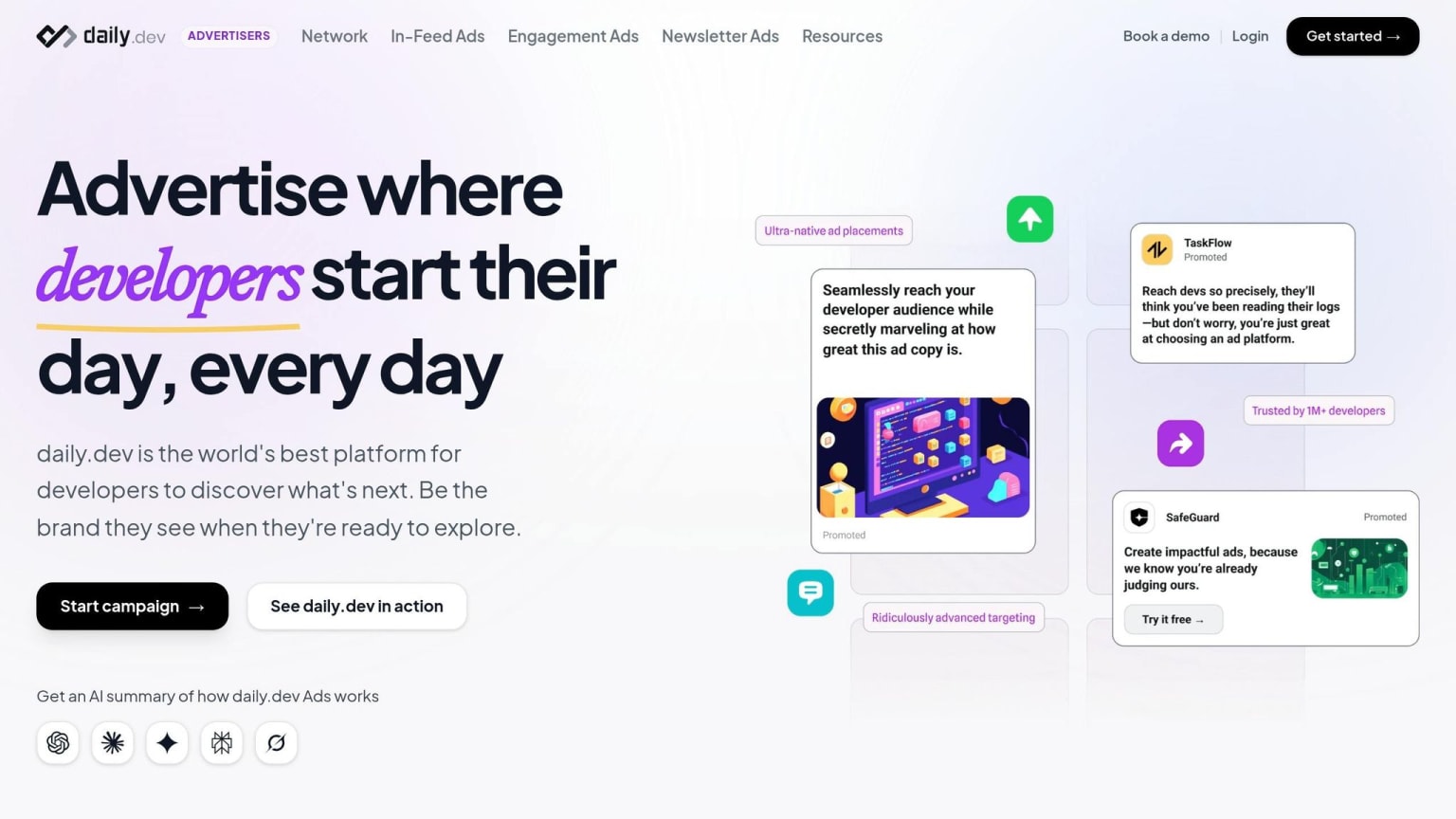
Building credibility through organic content and GitHub engagement is essential. But when you're looking to grow a waitlist quickly, you need to get your tool in front of developers who are already in a technical mindset. That's where daily.dev Ads shine - they connect you with over 1 million developers while they're actively consuming technical content, not casually scrolling through a general social feed. This targeted approach ensures you're reaching developers based on their immediate interests.
Target Developers by Tech Stack and Interests
daily.dev Ads rely on contextual targeting, which means ads are displayed based on the content a developer is engaging with, rather than personal tracking data. For instance, if a developer is reading about Kubernetes or distributed systems, your DevOps tool ad will appear. This approach aligns with what developers value most:
"For devs, the most important thing is that the ad is relevant to their problem right now." - markepear.dev
You can refine your audience further by filtering for programming languages, tools, seniority levels, or specific interest tags. This precision is especially important for pre-launch campaigns. Instead of gathering thousands of irrelevant sign-ups, you can focus on attracting a smaller pool of highly relevant early adopters who are more likely to use your tool.
When crafting ad copy, aim for specificity and technical depth. Phrases like "layer caching for Docker builds" or "5ms p99 latency" are far more impactful than generic terms like "faster deployments." Using technical language not only grabs the attention of the right developers but also filters out those who are less likely to engage.
Use Native Ad Placements to Fit Developer Browsing Habits
Developers tend to approach traditional advertising with skepticism. Flashy banners or animated pop-ups often feel intrusive and can erode trust. In contrast, daily.dev's native ad formats - such as in-feed ads and post page placements - blend naturally into the developer's browsing experience.
To make the most of this format, stick to static visuals and concise, problem-focused text. Avoid animations and focus on clearly addressing a specific technical pain point. For example, if your ad highlights "zero-config OpenTelemetry tracing", ensure your landing page mirrors that exact language in its headline. Any disconnect between the ad and the landing page can lead to higher bounce rates. By aligning your ad messaging with your broader pre-launch strategy, you create a seamless experience that speaks directly to a developer's technical challenges and needs.
Converting Your Waitlist on Launch Day
After spending time building anticipation and sharing regular updates with your waitlist, launch day is when all that preparation gets put to the test. It’s not just about having a large waitlist - it’s about how effectively you turn that interest into actual usage. The way you roll out access can make or break your launch.
"The waitlist is not the finish line. It's the runway." - Tahseen Rahman, Software Engineer & Indie Hacker
Design an Onboarding Flow That Removes Friction
To ensure a smooth launch, let users in gradually - around 5–10% of your waitlist per week. This staggered approach helps you manage server load, identify any bugs, and maintain a high-quality experience. Start with your most engaged users: those who opened every update, clicked through your technical docs, or referred others. These users are more likely to dive in quickly, provide valuable feedback, and create early buzz for the next wave.
The email granting access plays a big role in this process. A subject line like "You're in" has been shown to drive open rates of 60% to 70%. Keep the email concise and to the point. Avoid unnecessary marketing fluff - your users already know why they signed up. Focus on one clear call-to-action that gets them directly into the product.
Once they’re in, the onboarding flow should be seamless and set them up for success right away.
Get Developers to Their First Win in 5 Minutes
Developers need to experience value almost immediately. If they can’t achieve something tangible - like a successful API call, a rendered component, or a passing command-line test - within 5 minutes, they’re unlikely to come back. Your onboarding process should be laser-focused on delivering this quick win.
For your initial cohort of 20–50 users, consider offering hands-on support. This could be a live walkthrough or a direct Slack or Discord channel where a founder is available to help. While this approach won’t scale as your user base grows, it’s a great way to uncover pain points and refine the experience before opening the floodgates to a larger audience.
Track time to first win as your key metric on launch day. If most users aren’t hitting a meaningful milestone within that 5-minute window, it’s time to streamline your onboarding process. Don’t rely on adding more documentation - simplify the steps instead. This immediate success reinforces the trust you’ve built during pre-launch and proves that your product delivers on its promise.
Conclusion: Turning Your Waitlist Into a Launch Asset
A developer waitlist serves as the backbone of your early community. The key difference between a waitlist that thrives and one that fades away lies in a few core practices: focus on delivering technical value before asking for sign-ups, maintain honest, product-centered communication, and treat each subscriber as a potential advocate rather than a passive name on a list.
Waitlists that incorporate referral systems tend to perform much better, while inactivity can quickly lead to disengagement. In fact, passive waitlists often see fewer than 5% of users converting to paying customers. Consistent interaction is crucial to keeping your list engaged. As Lenny Rachitsky aptly states:
"A big list that you don't activate quickly has an expiration date. In short, waitlists rot." - Lenny Rachitsky
The real game-changer is viewing your waitlist as a two-way relationship. Developers who receive honest updates on architecture, witness tangible progress, and feel like valued insiders are far more likely to engage quickly, share their experiences, and remain loyal users. The same transparent communication and meaningful updates that built your waitlist are the tools that ensure your launch succeeds. This trust, earned through clarity and technical authenticity, transforms a waitlist into a true asset. It lays the groundwork for a smooth launch and early success.
When launch day arrives, all that effort pays off. The ultimate goal isn’t just a long list of names - it’s a community of developers who understand your product, believe in your mission, and can achieve their first success with it in under five minutes. That’s the kind of engagement that drives long-term growth.
FAQs
What should I include on a developer waitlist page?
When designing a developer waitlist page, focus on elements that grab attention and drive action. Start with a headline that emphasizes clear benefits - something that immediately tells visitors why they should sign up. Pair this with a concise value proposition that highlights what makes your product or service worth their time.
To build trust, include social proof. This could be testimonials from early adopters, a live signup counter, or even logos of companies already using your product. These elements help reassure visitors that others see value in what you’re offering.
Keep the signup process simple. A minimal form - just an email field - is ideal for reducing friction. After someone signs up, show them their waitlist position and provide referral links to encourage sharing. Adding options to share via email or social media can amplify your reach.
Lastly, create a sense of urgency. Use signals like countdown timers or highlight limited spots to push visitors toward immediate action. And don’t forget to clearly outline any rewards for signing up, such as early access or exclusive features. These perks can make all the difference in turning interest into conversions.
How do I use GitHub signals to prioritize early access?
To make the most of early access using GitHub signals, pay close attention to metrics like forks, contributor growth, and issue activity. These metrics go beyond stars to reveal actual experimentation and engagement. Focus on repositories where contributor numbers are increasing, commits are frequent, and discussions around issues are active. By prioritizing these signals, you can pinpoint communities that are genuinely invested in your product, ensuring early access goes to developers who are truly engaged.
What’s the fastest way to get users to a first win after launch?
The quickest approach is to use a cohort-based, phased release strategy combined with targeted onboarding. Begin by inviting small groups - around 5–10% of your waitlist - to ensure users stay engaged and enjoy a smooth experience. Focus on showcasing the core value within the first five minutes, such as highlighting key features or integrations, to give users an immediate sense of accomplishment. Consistent, transparent updates can also drive adoption and create ongoing momentum for growth.