

Pricing developer tools isn’t just about numbers - it’s about trust, growth, and aligning value with cost. Here’s a quick breakdown of what matters most when setting up your pricing strategy:
- Free Tiers: Designed for growth, but must encourage upgrades. Focus on activation (e.g., first API call) over sign-ups. Set clear usage limits to drive conversions without subsidizing non-payers.
- Key Pricing Models:
- Seat-Based: Charges per user, ideal for team tools.
- Usage-Based: Scales with consumption (e.g., API calls), but needs predictable revenue safeguards.
- Tier-Based: Predefined plans (Free, Pro, Enterprise). Requires careful feature and limit balancing.
- Hybrid: Combines base fees with usage, offering flexibility but adding complexity.
- Paid Plans: Match plans to user needs - from self-serve to enterprise. Use clear pricing pages and metrics like activation milestones to guide upgrades.
- Repricing: Be transparent and give ample notice. Learn from examples like Heroku’s backlash and Vercel’s smooth transition.
- Avoid Mistakes: Don’t focus solely on sign-ups, ignore free-tier limits, or surprise users with unexpected charges.
Key Insight: Regular pricing experiments can boost revenue by up to 80%. Developers value fairness, clear communication, and pricing that reflects real product value. Align your pricing with user trust and product growth to build lasting relationships.
Key Pricing Models for Developer Tools
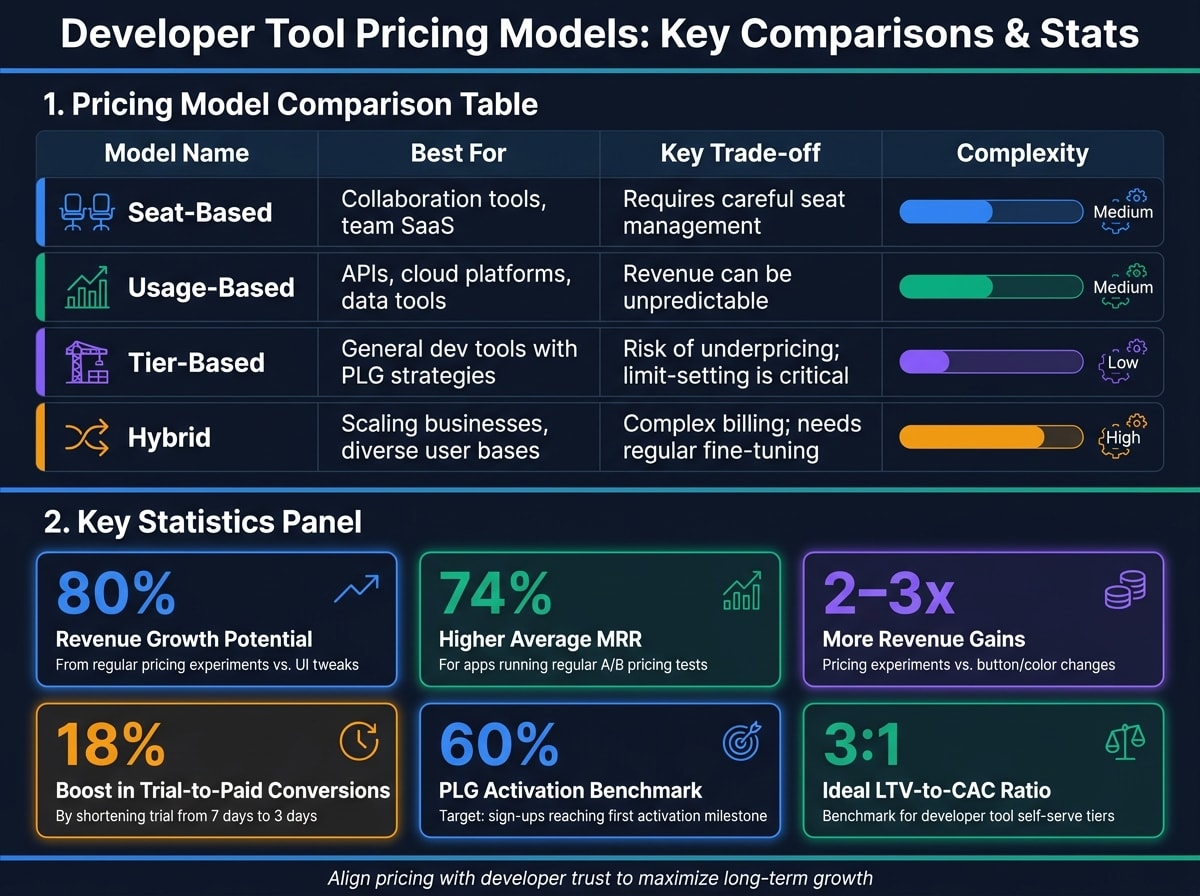
Picking the right pricing model is crucial for balancing value delivery, scalability, and predictable revenue. Here's a breakdown of popular pricing models, their strengths, and the challenges they bring, to help you decide what works best for your developer tool.
Seat-Based Pricing
Seat-based pricing charges per user, making it ideal for tools where value grows with team size - like code review platforms, documentation tools, or developer hubs. The logic is simple: as more team members use the tool, its overall utility increases.
However, managing seats can get tricky. Adding a user usually results in an immediate prorated charge, while removing one often takes effect only in the next billing cycle and requires manual adjustments . This approach works best for teams with steady growth and tools where collaboration is the main driver of value. It also builds trust by keeping costs aligned with actual usage.
Usage-Based Pricing
This model charges based on consumption metrics - like API calls, compute time, data processed, or messages sent. It's a popular choice for APIs, cloud services, and data pipelines because it directly ties costs to the value provided. While this approach feels fair, it can lead to unpredictable revenue. To address this, many companies introduce minimum charges or prepaid credits to stabilize income.
Usage-based pricing emphasizes transparency and scalability, both of which are highly valued by developers.
Tier-Based Pricing
Tier-based pricing divides users into predefined categories - typically Free, Pro, and Enterprise - each offering specific features at a set price. It's a common strategy for general-purpose developer tools, especially those with a product-led growth (PLG) approach . Users often start with a free plan, hit a limit, and then upgrade.
The challenge lies in setting tier limits. Misjudging these can either discourage adoption or lead to subsidizing users who never convert. Additionally, many tools charge less than the value they provide , meaning there's often room to increase prices without hurting conversions - especially if the focus is on boosting average revenue per user (ARPU) rather than just growing the user base. Well-structured tiers build trust and credibility, ensuring long-term relationships with developers.
Hybrid Pricing Models
Hybrid pricing combines a flat base fee for core features with additional charges for extra usage. This model offers cost predictability for buyers while allowing revenue to scale with usage . Though it adds complexity to billing, it strikes a balance between predictable costs and growth potential. For businesses serving diverse customer segments, hybrid pricing can be highly effective - especially when clearly communicated. It shows a commitment to growing alongside developers rather than imposing rigid costs.
| Pricing Model | Best For | Key Trade-off |
|---|---|---|
| Seat-Based | Collaboration tools, team SaaS | Requires careful seat management |
| Usage-Based | APIs, cloud platforms, data tools | Revenue can be unpredictable |
| Tier-Based | General dev tools with PLG strategies | Risk of underpricing; limit-setting is critical |
| Hybrid | Scaling businesses, diverse user bases | Complex billing; needs regular fine-tuning |
Designing a Free Tier That Converts
When it comes to developer tools, the free tier is often the starting point for building relationships with developers. It’s one of the strongest tools for growth - but only when it’s designed to encourage conversions. A well-thought-out free tier allows developers to explore your product without risk, while a poorly designed one can end up supporting users who never plan to pay.
How Free Tiers Drive Developer Adoption
A free tier eliminates the barriers to trying a product, giving engineers the chance to achieve their first success at their own pace . That initial success - whether it’s a deployment, an API call, or a query that works - is the true beginning of the user journey. It’s far more important than simply filling out a sign-up form.
This is why activation is the key metric to watch, not just sign-up numbers . Activation happens when a developer completes a significant action, like making their first API call or deploying a project. A good benchmark for product-led growth (PLG) is to aim for about 60% of sign-ups reaching this activation milestone .
Clearly defined usage limits also play a role in guiding users toward paid plans.
Setting Limits That Push Users Toward Paid Plans
Usage limits in a free tier serve as natural prompts for upgrading. Take PostHog, for instance - it offers a free tier with a cap of 1 million events . This limit is generous enough for developers to create meaningful projects but tight enough to encourage upgrades as their product grows. Similarly, Sentry’s “free for small teams” tier helps small groups get started, with the expectation that larger teams will need to pay as they expand .
The most effective upgrade triggers are usage-based milestones. These could be things like hitting a cap on API calls, needing to add a second team member, or requiring access to integrations . These triggers feel natural rather than forced. Meanwhile, feature gating - reserving elements like SSO, advanced security, or team management for paid plans - can add another layer of motivation for professional users .
Another tactic that’s often overlooked is trial length optimization. Research shows that shortening a trial period from 7 days to 3 days can increase trial-to-paid conversions by up to 18% . The shorter timeline creates urgency, keeping your product at the forefront of users’ minds. By addressing these elements, your free tier can drive both growth and revenue.
Free Tier Mistakes to Avoid
Focusing on sign-ups instead of activation is a common pitfall. High sign-up numbers might look impressive but don’t necessarily mean your free tier is working. Instead, track meaningful activation events server-side, as these are better indicators of success. Regularly testing and refining free tier limits is also essential .
Another mistake is setting limits and never revisiting them. Market conditions and cost structures evolve, and what seemed reasonable at launch could later result in subsidizing users who have no plans to upgrade. Treat your free tier limits as a dynamic part of your pricing strategy, subject to testing and adjustment. Apps that conduct regular A/B testing on pricing and paywalls see 74% higher average MRR, and pricing experiments often yield 2–3x more revenue gains than superficial changes like button colors or UI tweaks .
"The mistake most teams make is stopping a test as soon as they see a conversion dip. Conversion is not the goal. Revenue is the goal." - Maxim Borisik, Product Manager at Adapty
When analyzing free tier experiments, focus on the variant that delivers the highest ARPU (average revenue per user), even if it results in fewer overall conversions . A slight drop in the number of paying users is acceptable if those who do convert bring in significantly higher revenue.
Structuring Paid Plans: From Self-Serve to Enterprise
Each pricing plan should cater to a specific audience - whether that's individual developers, engineering teams, or large enterprises.
When to Introduce Paid Tiers
Timing is everything. Before rolling out paid tiers, use activation data to confirm that users are ready to pay. A solid framework is to monitor a Day 3–7 activation window . If a user hits a milestone during this period - like inviting teammates, connecting a third-party tool, or surpassing a usage threshold - that's your signal to act. For self-serve users, this could trigger an in-app upgrade prompt. For enterprise prospects, it’s a cue to hand off to sales .
The numbers need to add up too. Your self-serve tier’s Annual Contract Value (ACV) should cover your acquisition costs. A good benchmark for developer tools is a 3:1 LTV-to-CAC ratio . For instance, if your self-serve plan brings in $50/month per customer, your CAC shouldn’t exceed $600. These metrics lay the groundwork for structuring both self-serve and enterprise plans effectively.
Enterprise Pricing: Features and Contract Structures
Once your self-serve pricing is validated, you can scale up with enterprise contracts. These should emphasize both enhanced features and trust. Enterprise buyers often look for extras like SSO, SLAs with uptime guarantees, audit logs, dedicated account management, and annual invoicing .
To keep things consistent, standardize annual contracts and offer volume discounts based on seat numbers or committed usage. This avoids inconsistent pricing and helps protect your margins. For seat adjustments during the contract period, implement prorated billing. This way, teams can add seats without delay, minimizing friction .
Shifting from a product-led growth (PLG) model to a sales-led approach doesn’t have to be abrupt. Many successful developer tools, like Vercel, allow enterprise conversations to grow naturally from self-serve usage. Sales teams can step in when an account reaches a specific usage level or team size. This method keeps the developer-friendly vibe intact while giving your sales team a clear opportunity to engage.
Pricing Page Design That Works
Once your plans are structured, your pricing page should make these distinctions clear. A common mistake is hiding self-serve options or leading with a "Contact Us" button, as though every visitor is an enterprise customer. Instead, "Contact Us" should be reserved for your fourth tier. Start with individual and team plans, enabling developers to choose without needing to talk to sales - an essential aspect of a PLG strategy.
How you present your plans matters. Place your most feature-rich plan at the center of the page and label it "Most Popular." This draws attention and helps position the other tiers as logical alternatives. Show the monthly equivalent for annual plans - like "$83/mo billed annually at $996" - to make the yearly commitment feel more manageable. This approach can increase LTV without hurting conversions .
"The winner is whichever variant has the highest ARPU, not the highest conversion rate." - Maxim Borisik, Product Manager, Adapty
Keep your pricing page simple: three visible tiers and an enterprise option. Too many choices can overwhelm users, particularly developers who often prefer straightforward pricing. Each tier should clearly state who it’s for before diving into features.
Usage-Based Pricing: A Practical Playbook
Usage-based pricing charges customers based on how much they actually use, and the way you implement it can significantly impact customer trust.
Choosing the Right Billing Metric
The billing metric you choose should directly reflect the value your product provides - not just what’s convenient to measure. For example:
- Infrastructure and API tools often rely on metrics like API calls, compute time, or data volume.
- Data tools might focus on query counts or rows processed.
The key is ensuring that as a customer’s usage of this metric grows, so does the value they’re receiving.
It’s also crucial that the metric is technically verifiable. Tracking usage server-side, rather than through front-end events, ensures accuracy and strengthens trust in your pricing. This precision is especially important for developers, who value transparency. Additionally, the chosen metric can act as a clear signal for upgrades - when a user approaches the limits of a free tier, it naturally opens the door for conversion or a sales handoff .
Prepaid Credits vs. Postpaid Billing
Both prepaid credits and postpaid billing models have their own strengths, catering to different user needs and creating distinct revenue patterns.
| Feature | Prepaid Credits | Postpaid Billing |
|---|---|---|
| Revenue Timing | Immediate cash flow upon purchase | Revenue collected after the usage period ends |
| User Experience | Predictable costs; users set their budget upfront | Effortless usage without needing to pre-load funds |
| Complexity | Requires proration for mid-cycle top-ups | Needs real-time usage tracking and clear overage notifications |
| Best For | Budget-conscious teams, startups, individual developers | Growth-stage companies, enterprise clients |
Prepaid credits appeal to teams working with tight budgets, offering them a clear spending limit. On the other hand, postpaid billing aligns better with companies experiencing growth, as it scales naturally with usage. However, postpaid models require clear and timely overage communication to avoid surprising customers with unexpected charges. For scenarios where additional capacity is needed mid-cycle, immediate billing with prorated charges is a common solution, ensuring users get instant access while keeping the process smooth .
Once you’ve chosen your billing model, the next challenge is handling overage communication in a way that preserves customer trust.
Communicating Overages Without Causing Bill Shock
Unexpected charges can quickly undermine trust. To avoid this, your billing dashboard must provide a clear snapshot of:
- Current usage
- Remaining limits
- The next invoice date
This transparency ensures users aren’t left guessing about their upcoming charges.
Real-time alerts are another essential tool. Notify users before they hit their limits, giving them time to adjust usage or upgrade. These alerts should include a straightforward explanation of overage rates to eliminate confusion. Additionally, sending automated email receipts immediately after charges are applied reduces support inquiries and reassures users .
Changing Your Pricing Without Losing Developer Trust
When adjusting pricing in the developer tools space, balancing trust with revenue goals is essential. Developers are highly attentive to pricing changes, and a poorly executed adjustment can damage the trust you've worked hard to build. On the flip side, a thoughtful and transparent approach can actually strengthen that relationship.
When and Why to Reprice
Repricing shouldn't happen just because someone wants to "boost ARPU." It needs to be driven by meaningful reasons - like changes in your costs, a significant improvement in the value your product offers, or a mismatch between your current billing metric and how users actually consume your service.
Before rolling out a price change, validate it through A/B testing. This ensures the adjustment makes sense financially. Research shows that companies running regular pricing experiments see 74% higher average MRR than those that don’t . A small dip in conversion is acceptable if the overall math favors revenue growth. To get reliable results, aim for 200 subscriptions per variant, which typically takes 2–4 weeks .
These principles lay the groundwork for understanding how pricing changes can either maintain or erode trust, as illustrated by real-world examples.
Repricing Case Studies: Heroku, Twilio, Netlify, and Vercel
Let’s look at how some well-known companies have handled pricing changes - both successfully and unsuccessfully.
Heroku: In November 2022, Salesforce removed Heroku's free tier without offering a transition plan for existing users. Hobby projects and open-source initiatives were left scrambling with only 30 days' notice. The backlash was immediate, showing that removing a free tier requires more than a short notice - it demands ample time and robust migration support.
Twilio: Twilio handled a 2023 SMS pricing adjustment more effectively. They attributed the increase to carrier surcharges, communicated the change via email, and offered a detailed breakdown of the costs. With a 60-day adjustment period, Twilio framed the update as a necessary pass-through of external costs, preserving trust with their developer community.
Netlify: In early 2023, a user’s unexpected $104,000 bill from a traffic spike sparked significant criticism. Netlify acted quickly, waiving the charge and introducing spending limits and clearer overage policies. This incident highlighted that trust isn’t just about pricing - it’s about ensuring users feel safe from surprise costs.
Vercel: In 2024, Vercel restructured its team and enterprise tiers with a proactive strategy. They gave 90 days' notice, shared a detailed FAQ explaining the decision, and locked in existing customers' rates for 12 months. This approach minimized backlash while aligning pricing with their ARPU goals.
How to Protect Early Adopter Trust During a Price Change
To maintain trust with early adopters, focus on transparency and fairness. Offer existing customers a 12-month price lock, as Vercel did, and frame increases around the additional value your product now delivers.
Honesty is key. If rising costs are the reason, explain the numbers. If the product has grown, outline the features or improvements made since the original pricing. Developers value straightforward communication and can detect when something feels disingenuous.
When announcing the change, treat it like a product launch rather than a dry notice. Use multiple channels - such as your changelog, blog, direct emails, and platforms like daily.dev for Business - to ensure developers hear the news directly from you. The goal is to control the narrative and communicate proactively, so users aren’t caught off guard by third-party reports or rumors.
Conclusion: Building a Developer-Centric Pricing Strategy
Setting the right price for a developer tool is more than just a financial decision - it’s a key part of how developers experience, adopt, and remain loyal to your product. Companies that succeed in this area approach pricing as a flexible system, constantly testing, refining, and communicating it openly.
Focus on aligning your billing metric with the value users actually get. Create a free tier that encourages meaningful upgrades. Structure your paid tiers to naturally guide users from self-serve options to team plans and, eventually, enterprise solutions. And when it’s time to adjust pricing, be upfront - developers value honesty about costs and benefits far more than a polished sales pitch. These strategies are backed by strong revenue insights.
For example, pricing experiments can lead to as much as 80% revenue growth, compared to only 30% from visual tweaks . This shows why your pricing page deserves the same attention as any major product update.
When rolling out pricing changes, use clear and targeted messaging. Platforms like daily.dev for Business can help spread your message to over 1 million developers, directly in the feed they trust for tools and updates. This not only strengthens developer trust but also solidifies your market presence.
FAQs
How do I choose the right pricing model for my dev tool?
Your pricing model should align with how value grows with usage and who your target buyers are. Here's a breakdown of options:
PLG (Product-Led Growth): Ideal if developers can self-upgrade. Offer a free tier with usage or tier-based limits to encourage adoption and upsell opportunities.
Seat-Based Pricing: Works well for predictable team access. This model charges based on the number of users, making it straightforward for teams to scale.
Usage-Based Pricing: Best when costs are directly tied to consumption. This approach ensures customers pay for what they actually use.
Tier-Based Pricing: Simplifies feature packaging by grouping functionalities into tiers. This makes it easy for buyers to understand what they’re getting at each level.
If your product requires sales involvement, consider adding an enterprise tier to cater to larger, more complex deals.
What free-tier limits actually drive upgrades?
Free-tier limits that encourage upgrades in developer tools often revolve around key usage milestones rather than fixed timeframes. Examples include reaching a team size where additional seats must be purchased, exceeding data or usage limits, or requiring advanced features such as integrations or enhanced security. Developers are most likely to upgrade when these limits directly impact their ability to complete tasks or scale effectively, making the upgrade a necessary step forward.
How can I raise prices without losing developer trust?
To increase prices while maintaining developer trust, transparency is key. Be upfront about why the change is happening and tie it directly to the added value your product or service delivers. Avoid using vague explanations or overly salesy language - developers appreciate clear, straightforward communication.
Use data to guide your decisions. Test different pricing adjustments to find the right balance between boosting your average revenue per user (ARPU) and keeping conversion rates steady. Before launching the new pricing, take time to refine your messaging. Make sure it resonates with the developer community by emphasizing the benefits they’ll gain.
Finally, engage directly with developers in their spaces - whether it’s forums, social media, or other platforms they frequent. This not only reinforces trust but also gives you a chance to explain the reasoning behind the changes and highlight the value of the updated pricing.