
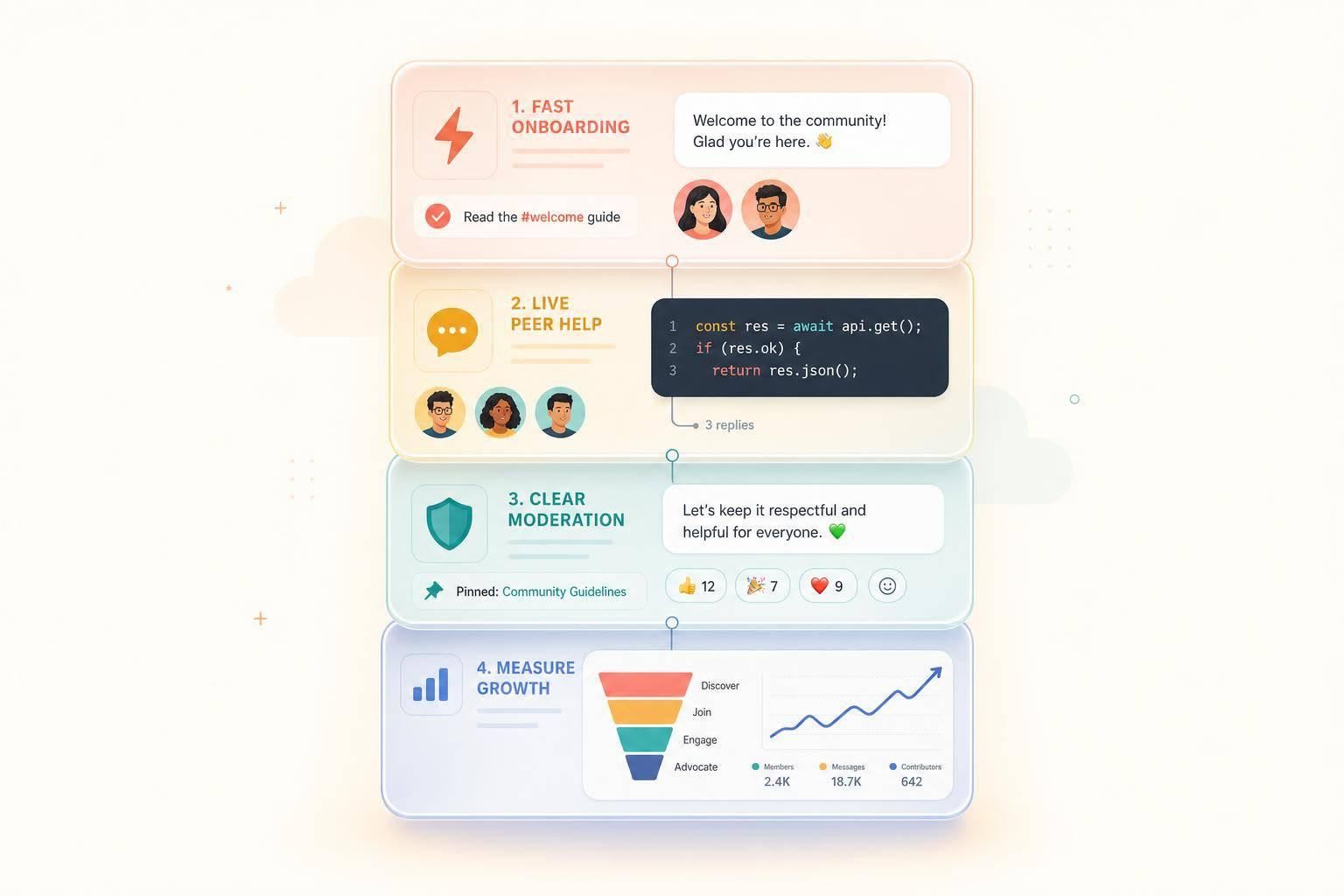
If Slack does not match how your buyers work, the community will stall. If it does, it can cut response time, surface deal signals early, and help turn product interest into trust.
Here’s the short version:
- I’d use Slack when buyers already spend their workday there and need live product talk
- I’d use Discourse when the main goal is searchable answers that last
- I’d use Discord for fast chat with more OSS-style groups
- I’d keep a new Slack workspace small at first, with 6 to 8 channels
- I’d treat the first 7 days as the make-or-break window for activation
- I’d move solved Slack answers into docs or a forum, since free Slack only keeps 90 days of history
- I’d watch a few numbers closely: first-week activation, time to first reply, unanswered questions, peer replies, and pipeline influence
- I’d protect trust by using community activity as a signal, not as a hidden scorecard
A few stats stand out:
- Engaged community members can spend 40% more and churn at half the rate
- Good knowledge systems can cut repeat tickets by 40% to 70%
- High-intent community outreach can book meetings at 29%, vs. 8% for cold email
- A healthy first-week activation target is over 40%
- Unanswered technical questions should stay under 10%
Quick comparison
| Platform | Best use | Main upside | Main limit |
|---|---|---|---|
| Slack | Workday chat for B2B dev buyers | Fits buyer habits and live product talk | Search and history limits |
| Discord | Fast-moving dev groups | High chat activity | Less suited to enterprise buyers |
| Discourse | Lasting technical Q&A | Search-friendly and easier to reuse answers | Slower back-and-forth |
My takeaway: Slack works best when I need live discussion, peer help, and buyer intent signals in one place. But it only works if I keep the space useful, public-facing, and focused on helping developers first.
1. Choose the Right Community Platform for Your Buyer Profile
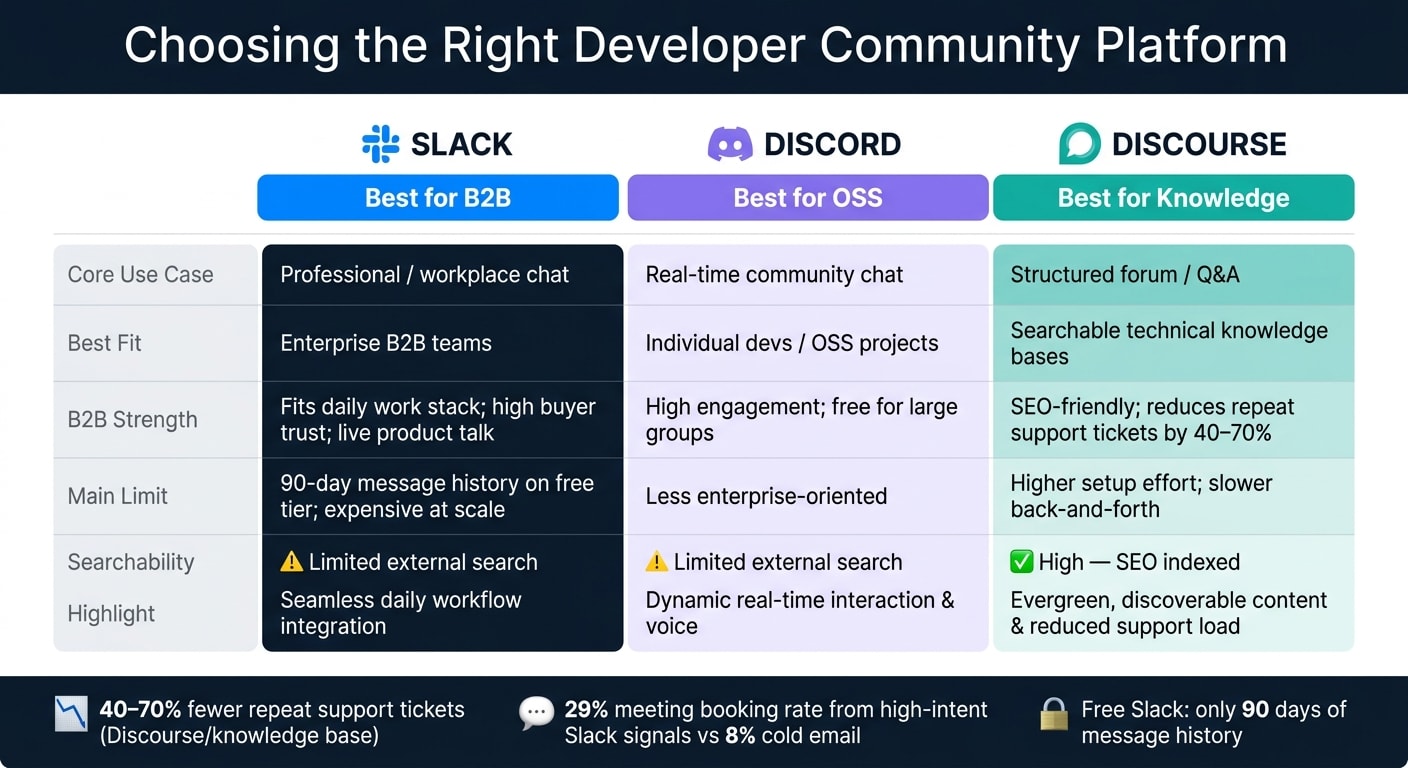
Platform choice puts a cap on how far your community can grow. For a Slack community built around developer tools, that choice shapes whether the space feels natural or awkward. In most cases, the short list is Slack, Discord, or Discourse.
When Slack wins for B2B developer tools
Slack tends to work best when your buyers already live in it during the workday. People are more likely to ask honest questions about their stack, budget, and rollout when those chats happen inside a tool they already use.
That matters because it lowers friction. No extra login. No new habit to build. It just fits into the workday.
And that closeness often reveals buying intent early. When a developer asks "anyone using [tool] for [use case]?" in Slack, that usually points to active evaluation, not casual browsing.
When Discord or Discourse is the better choice

Discord is a better fit for fast-moving OSS-style communities. Discourse works better for technical discussions that need to stick around and support questions that come up again and again.
If your support team answers the same questions every week, a Discourse forum can turn those answers into pages people can find later, which helps cut repeat tickets over time . Slack, by contrast, keeps those answers buried in chat, and its free tier limits message history to 90 days .
A simple platform selection model for marketers and DevRel
Start with the main job your community needs to do: live conversation and relationships or searchable knowledge that lasts.
The table below maps platform behavior to buyer behavior. This mapping helps you advertise to developers by aligning your community strategy with specific audience segments.
| Platform | Core Use Case | B2B Developer Marketing Strengths | Operational Drawbacks | Searchability | Best Fit |
|---|---|---|---|---|---|
| Slack | Professional/workplace chat | Familiarity for B2B buyers; fits daily work stack; high trust | Expensive at scale; 90-day history on the free tier | Limited external search | Enterprise B2B teams |
| Discord | Real-time community | High engagement; free for large groups | Less enterprise-oriented | Limited external search | Individual devs / OSS |
| Discourse | Structured forum | SEO-friendly; reduces support tickets | Higher setup effort; slower interaction | High | Searchable technical knowledge |
Pick one main platform first, then build around it. After that, the next job is making the workspace easy to join, easy to navigate, and worth coming back to.
2. Set Up a Public Slack Workspace That Scales Past 1,000 Members
Channel taxonomy, naming conventions, and search ergonomics
For a new workspace, start small: 6 to 8 core channels is enough. Add more only when a topic keeps coming up. People should know, at a glance, where to ask for help, where to learn, and what might get archived.
A simple channel setup works best when each group has one job:
| Category | Example Channels | Purpose |
|---|---|---|
| Information | #welcome, #announcements, #rules | Read-only onboarding and official updates |
| General | #general, #introductions, #off-topic | Community bonding and broad discussion |
| Support | #help, #troubleshooting, #tips-and-tricks | Technical assistance and bug reporting |
| Product | #feedback, #feature-requests, #product-updates | Roadmap input and changelog sharing |
| Technical | #backend, #frontend, #devops | Deep-dive discussions by domain |
Use clear channel names with prefixes, like #help-sdk, #help-auth, and #feature-requests. That way, members can scan the sidebar and know where things belong without guessing. Channel descriptions should explain the scope in plain English, not try to sound clever. In support and technical channels, keep replies in threads so the main feed stays easy to scan and easier to search later.
A tidy structure helps, but only if people can find answers fast.
Join flow and first-week activation
The first 7 days matter most. If someone joins and does not take part during that first week, they rarely become active later . So onboarding is not just admin work. It’s a product choice.
Think of the first week as a guided path: welcome DM, rules acceptance, GitHub or email verification, intro post, then a first reply. The point is to get people into the community fast without making them feel like they’re moving through a checklist. A pinned prompt like "What are you building?" in #introductions makes that first useful interaction much easier .
You can also use automated role assignment to handle permissions. Give people a New Member role when they join, then promote them after verification or after a set amount of time .
Message retention limits, free-tier tradeoffs, and archive workarounds
Slack’s free tier only keeps 90 days of message history, which means solved answers can vanish fast . In a support-heavy community, that hurts. A great thread about a tough SDK bug might disappear before the next person even thinks to search for it. Then the same question comes back again, and support load starts piling up.
A better setup is to use Slack for live triage, then move solved answers into docs or a searchable forum . One person should own that handoff. If nobody owns it, it usually doesn’t happen. Communities with strong knowledge bases can deflect 40% to 70% of repeat support tickets .
If you want to keep Slack history itself, tools like Linen can archive public channel content and make it searchable outside Slack. It also helps to export archives on a regular basis, so you have options later if you need to migrate or add another layer on top .
Once search is working well, the next step is simpler: give people a reason to come back.
3. Run the Community Like a Product
Weekly programming that drives repeat visits
A Slack workspace gets quiet fast if nothing pulls people back in. The fix is simple: set a steady rhythm and keep it going.
For developer communities, a light weekly cadence tends to work well:
- On Monday, post a “What are you working on this week?” prompt in
#general. That brings real problems to the surface early. - In the middle of the week, share a technical question with an actual tradeoff. That gives people something worth debating.
- On Friday, run a “Show & Tell” thread where members share what they shipped.
You can add biweekly office hours too, with your engineering team taking live questions in Slack or on a linked video call. Keep it loose. Rotate AMA sessions across internal experts and well-known community members so the format doesn’t get old and contributors feel seen.
For partner and customer channels, be direct about the rules from day one: posts need to add technical value. Keep #partners centered on use cases, integrations, and technical wins, not announcements.
Done well, these rituals create repeat visits and clear contribution patterns you can track later.
Turn support threads into shared learning
When someone gets help in a DM or a private ticket, that answer is gone for everyone else. Public channels make the fix easy to find later.
The workflow is pretty simple. If a question shows up in a public channel, answer it in a thread, not in the main feed. When the issue is fixed, end the thread with a short one- or two-sentence summary of what solved it. Then give one person each week the job of scanning resolved threads and flagging anything that should become a doc or FAQ entry. If no one owns that handoff, it usually doesn’t happen.
Communities with active peer support and solid knowledge bases can deflect 40% to 70% of repeat support tickets . That cuts repeat support work and gives the team more time for higher-value tasks. Good early health signals are a thread resolution rate above 80% and a self-solved ratio above 60% .
That only works if moderators keep threads public, easy to read, and on-topic.
Moderation rules developers will respect
Rules matter most when sales, partners, and customers all share the same workspace. A developer Slack community should feel like a technical space tied to the product, not a marketing channel. That starts with governance.
Use a short code of conduct and keep only the rules that matter:
- No unsolicited DMs
- No promotional posts outside designated channels like
#shameless-plugs - No “RTFM” replies to genuine questions
If sales reps join the community - and they should - they need to show up as peers first. That means replying in public, adding something useful, and only following up in private 24 to 48 hours later when there’s a clear reason.
Moderator burnout is a real operational risk, especially once you’re past 1,000 members. Rotate moderation across staff on a set schedule, keep a private moderator channel for check-ins, and promote trusted community members to help with common questions .
"The best communities feel like belonging, not performing." - The Growth Terminal
Once the workspace has steady activity and clear norms, you can start seeing which members are becoming buyer-side champions. From there, the next move is linking community activity to account signals and pipeline.
4. Connect Slack to Pipeline and Measure What Matters
Buyer-side champions, account signals, and the sales handoff
Once your workspace is up and running, use it to spot buying intent and see if the community is helping move deals forward. The goal isn't to chase form fills. It's to watch for patterns.
Pay close attention when:
- multiple people from the same company join
- one member starts asking about pricing, procurement, integrations, or proof for a given use case
Those are strong account-level signals, and they’re worth a closer look.
When you see a high-intent signal, start in the thread. Answer the question, add context, and be useful. Then wait 24–48 hours before sending a DM, and only do that if the thread still points to an active deal . That follow-up should feel like one peer helping another, not a sales rep peeking through the blinds.
High-intent signals can turn into booked meetings at 29%, compared with 8% for cold email . But that gap only holds when outreach feels helpful instead of monitored.
Core community metrics and practical benchmarks
Vanity metrics like total members or total messages sent don’t tell you much. What matters is behavior.
| Metric | Slack-Specific Definition | Benchmark / Target | Why It Matters |
|---|---|---|---|
| Weekly Active Contributors | Members who post, reply, or react in a week | 20–30% healthy; 35–40% excellent | Measures stickiness |
| First-Week Activation | % of new members who post or reply within 7 days | > 40% | Shows onboarding health |
| Time to First Response | Average time for a question to get a reply | < 24 hours; < 4 hours best-in-class | Drives trust and retention |
| Unanswered Question Rate | % of technical questions with zero replies | < 10% | High rates signal a ghost town |
| Peer-to-Peer Reply Rate | Member-to-member replies vs. staff replies | 5:1 ratio or higher | Shows the community can sustain itself |
| Influenced Pipeline | Deals in CRM with at least one community touchpoint | 15–25% of total pipeline | Demonstrates GTM contribution |
If first-week activation drops below 20%, fix onboarding before you spend more on growth . Otherwise, you’re pouring water into a leaky bucket.
Sourced pipeline, influenced pipeline, and trust safeguards
Sourced pipeline means the community was the first meaningful touchpoint. Someone joined, got value, and later became a customer without any earlier sales contact. Influenced pipeline means the community helped during an active deal. Maybe a champion got a question answered in #help. Maybe a skeptical engineer saw peers back the product. Maybe an objection was handled in a public thread .
Track both in your CRM. Tag the source, engagement type, and signal date so RevOps can run attribution reports without guesswork. Mature programs often see 15–25% of total pipeline influenced by community touchpoints .
Just don’t treat community activity like surveillance data. People joined to get help and learn from peers, not to be scored behind the scenes. Use community activity as a signal, not a dossier. The main job of the space should stay the same: help people and make peer learning easy.
Conclusion: Build for Developer Trust First, Then Scale What Works
After platform choice, onboarding, programming, and measurement, one thing matters most: whether Slack fits the way your buyers already work. If your ICP is enterprise teams and B2B SaaS buyers who like a familiar, workday-friendly setup, Slack is a strong match. But let’s be clear: channel design won’t save a poor platform fit.
When the fit is there, the basics start to stack up. A Day 7 retention rate above 40% is a good sign that onboarding is working .
There’s also real pipeline upside here, but it’s easy to lose. Engaged Slack community members spend 40% more on products and churn at half the rate of non-members . That kind of lift sounds great on paper. In practice, it falls apart fast when the community starts to feel like a sales machine.
Unsolicited DMs, vendor pitches inside help channels, or hard follow-up after a single signal can burn trust in no time. And once that trust slips, no engagement dashboard is going to patch it up.
Build for developer trust first. Then scale the parts that keep improving activation and pipeline.
FAQs
How do I know if Slack is the right fit for my developer audience?
Slack makes sense when your audience includes B2B professionals, enterprise teams, or operators who already work together in real time. It’s strongest as a place for community connection and fast support. It’s not the best choice for a long-term knowledge base that people can find through search.
Before you launch, talk to 5 to 10 customers and make sure your buyers actually use Slack to get peer advice. That step matters. If they lean toward async, long-form discussion, or they need content that shows up in search, a forum platform may be the better pick.
What should I set up first in a new Slack community?
Before launch, research your audience and define a clear value proposition around a peer-driven problem, not your product.
Then set up the basics:
- 4–5 core channels: #introductions, #wins, #questions, #feedback, and #off-topic
- Clear channel descriptions
- A pinned message in #introductions that explains who should join and why
- A welcome message with rules and intro instructions
- Daily monitoring
One more thing: disable default emoji reactions. It’s a simple move, but it helps steer people away from low-effort engagement.
How can I measure Slack’s impact on pipeline without hurting trust?
Use a signal-source mindset, not a promotional one. Treat Slack as a place to learn and build relationships, not a channel for broadcasts.
Focus on high-value signals, such as:
- tool evaluation
- competitive comparisons
- implementation challenges
Then connect those signals to your CRM records, along with the thread and its context.
Protect trust by taking part, not watching from the sidelines. Reply in the public thread first. Then, if it makes sense, follow up directly after you’ve shown yourself to be a helpful peer.
Measure outcomes like influenced pipeline, response time, and member activation.