

MCP servers have transformed how AI tools integrate with developer workflows. Introduced in November 2024 by Anthropic, the Model Context Protocol (MCP) is an open standard that simplifies tool integration for AI models. Instead of building custom integrations for every tool, developers can now create a single MCP server compatible with platforms like Claude Desktop, Cursor, and VS Code.
- Why it matters: MCP adoption has exploded, with SDK downloads growing from 100,000 per month in late 2024 to 97 million by early 2026. Over 15,900 GitHub repositories now support MCP, with major companies like Microsoft and Stripe onboard.
- Opportunity: For companies, MCP servers offer a direct channel to embed tools into developers' workflows, bypassing traditional marketing challenges.
- This guide: Learn how to craft standout MCP server listings, optimize discoverability, plan launches, and track performance metrics to ensure your server becomes the go-to solution in its category.
Start here to make your MCP server indispensable for developers.
How to Build a Strong MCP Server Listing
Choosing a Clear, Workflow-Oriented Name
The name of your server is often the first impression developers get, so it needs to be clear and relevant to their needs. Focus on naming your server based on its connection or automation function rather than internal processes.
Examples of effective names include server-postgres, GitHub MCP, or Notion MCP - these align with common search terms developers use when looking for integrations. If your server supports multiple tools or workflows, consider names like marketing-content-automation, which emphasize end-to-end task support. Avoid vague names like process-data or do-thing, as they fail to trigger the AI's semantic matching effectively.
For servers that are part of a larger ecosystem, maintain consistency by using a shared prefix across listings, such as google-maps-grounding-lite, to build recognition as you expand. At the tool level, use action-oriented verbs like search, find, validate, or publish - these reflect how developers naturally phrase their requests.
A well-thought-out name lays the groundwork for descriptions that clearly communicate your server's purpose.
Writing Descriptions That Communicate Value
Your server's description isn't just for human readers - AI models also rely on it to understand and match your tool to user requests. When a developer asks tools like Claude or Cursor to complete a task, the AI matches the request to available tool descriptions.
"The description field is the single most important factor in whether the AI agent calls your tool correctly. The agent performs semantic matching between the user's natural language request and the available tool descriptions." - marianmeres
Be specific about what your tool does, what it returns, and when it should be used. Highlight the unique advantage your tool offers. A server with around five well-described tools often performs better than one with 50+ poorly explained tools, which can lead to ambiguous routing and errors . If your server does require a larger set of tools, use MCP's "Tool Search" feature to reduce token overhead - from about 77,000 tokens to just 8,700 tokens, an 85% reduction . This keeps your server efficient and avoids cluttering the model's context window.
Clear, detailed descriptions make it easier for developers to set up and use your server, especially when paired with visual aids.
Using Screenshots and Configuration Examples
Developers often decide whether to install a server within seconds, so visual aids can make a big difference. Pair a strong name and clear description with screenshots and examples to make your listing more appealing. Include a simple, copy-paste install command, such as an npx one-liner or an "Add to Cursor" button, to streamline the setup process.
Additionally, provide a JSON configuration snippet for at least two popular clients, like Claude Desktop and Cursor. Make sure to clearly list required environment variables and their expected values - this removes guesswork and reduces the risk of setup abandonment. For servers with more complex workflows, take advantage of the 2026 MCP Apps feature, which allows tools to return an interactive UI handle. This feature renders a sandboxed iframe directly in the chat, replacing long blocks of plain text with a user-friendly interface .
Where Developers Discover MCP Servers
Official Directories and Galleries
The official MCP Registry is the go-to platform for discovering and distributing MCP servers. By early 2026, it hosted nearly 9,700 servers and over 28,000 version records, making it an essential resource for developers exploring new integrations . Its rapid growth highlights its central role in the MCP ecosystem.
To maximize visibility in the registry, focus on optimizing your tags and server descriptions. For example, tagging your GitHub repository with mcp-server helps automated crawlers index your work - this tag is already used by over 15,900 repositories . Before submitting, use the MCP Inspector tool to validate your server's capability negotiation and tool schemas. Submissions that fail basic compatibility checks risk being overlooked and can harm your reputation in a trust-driven community.
Beyond the official registry, community-curated lists play a vital role in boosting your server's credibility and exposure.
Community Lists and GitHub Repositories
Community-driven platforms like PulseMCP, MCPMarket.com, and StackPicks provide additional avenues for discovery. For instance, StackPicks offers a searchable directory featuring more than 89 production-ready servers, catering to developers seeking well-vetted options . By early 2026, unofficial registries collectively listed around 17,000 servers - far surpassing the 10,000 servers officially announced by Anthropic in December 2025 .
However, getting featured in these lists requires more than just submitting your server. Curators often test entries rigorously, and poorly documented or unreliable servers are quickly flagged. Developers who excel in these spaces treat their public servers as polished portfolio pieces - well-documented, reliable, and easy to install. As the team behind Delivvo explained:
"Open-source community servers are the single best lead generator for paid private work. Companies that find your name on a popular public server are far more likely to hire you for the internal version they cannot publish." - The Delivvo team
GitHub also serves as a discovery hub beyond just hosting code. Developers often search for "MCP" in SaaS API repositories to identify integration opportunities. By contributing helpful, non-promotional answers to these discussions, you can organically attract interest in your work .
Reaching Developers Through Media Platforms
While directories target active searchers, media platforms help you connect with developers who may not yet know about your server. For example, daily.dev for Business integrates server discovery into developer-focused content feeds, reaching over 1 million developers. This platform allows you to target specific segments, such as AI engineers exploring integration opportunities.
Engagement in Discord communities like Cursor and Claude Desktop also offers high-value opportunities. These spaces are frequented by developers who regularly use MCP-compatible clients. By answering technical questions without overtly promoting your server, you can build recognition and trust even before an official launch .
How to Sequence Your MCP Server Launch
Pre-Launch Testing and Waitlists
Before launching your MCP server, it's crucial to validate everything thoroughly. Start by using Anthropic's MCP Inspector to manually test tool schemas, browse resources, and monitor JSON-RPC traffic in real time. Then, run automated pytest suites with the Client class (FastMCP can simplify this process) to catch any schema issues before they reach your users. Always use read-only API credentials during testing to avoid potential data loss caused by model errors.
While testing, focus on building an early audience. Engage in Cursor and Claude Desktop Discord servers, where you can answer technical questions honestly and build trust within the community. This kind of direct interaction creates credibility that a landing page alone can't provide. Once testing is complete and you have an engaged waitlist, move on to public directory submissions.
Directory Submissions and Public Launch
When you're ready to launch, submit your server to platforms like MCP Registry, PulseMCP, MCPMarket.com, and StackPicks all at once. This coordinated effort creates a brief but impactful window where your server appears "new" across multiple directories simultaneously. For each submission, include a one-click install button to make adoption seamless. Pair this with a Show HN post and a short demo video demonstrating your server solving a real-world workflow problem - avoid trivial examples. A one-click install feature can significantly reduce drop-off rates between discovery and adoption .
This synchronized launch strategy paves the way for sustained engagement and sets your server up for long-term success.
Running Targeted Campaigns to Drive Adoption
After your public launch, maintaining momentum is key. The details you refined earlier - like naming, descriptions, and configurations - now play a critical role in driving adoption through targeted outreach.
One effective approach is GitHub social listening. Monitor SaaS API repositories for mentions of "MCP" and contribute helpful, non-promotional responses. Developers who engage through GitHub discussions are often more likely to adopt your server .
For paid strategies, consider daily.dev for Business, which allows you to target AI engineers by attributes like seniority, tools, and programming languages. This platform is particularly useful for reaching developers who are exploring new integrations but haven't yet searched directories. Additionally, adding a .mcp.json file to your public GitHub repository can encourage organic adoption. When other developers clone your project, tools like Claude and Cursor will prompt them to activate your server automatically, leading to team-level adoption without extra marketing expenses .
"The most expensive thing you can do with MCP right now is wait until you understand everything before you start." - AINetizens
Tracking Performance and Iterating on Your MCP Server
Key Metrics to Track
Getting your MCP server up and running is just the beginning. What truly matters is how well it's performing and how often it's being used.
The most critical signal to monitor is tool-call telemetry - essentially, which tools are being called, how often, and how reliably they perform. A tool that’s enabled but rarely used wastes valuable space in the context window and adds unnecessary maintenance work. On the other hand, tools that are frequently called but fail often might indicate issues with their schema or description rather than a coding error.
In addition to call frequency, keep an eye on these key metrics:
- Latency per tool call: How quickly does the tool respond?
- Error rates: How often are calls failing?
- Token overhead per session: Are verbose tool definitions eating into the model's context window?
For instance, using MCP Tool Search can significantly cut down token overhead, reducing it from around 77,000 tokens to 8,700 tokens per session - an 85% drop. This optimization can also improve task accuracy, with benchmarks showing a boost from 49% to 74% .
Here’s a quick reference table for what to track:
| Metric Category | What to Track |
|---|---|
| Engagement | Installs from directory, active sessions, tool call frequency |
| Performance | Latency per call, error rate, success rate |
| Efficiency | Token overhead per session, Tool Search hit rate |
| Reliability | Audit trail completeness, schema validation failures |
These metrics will help you fine-tune your server’s listing and overall functionality.
Using Feedback to Improve Your Listing
Telemetry isn’t just for fixing bugs - it’s a powerful tool for improving how your server is presented to users. If a particular tool isn’t being used much, the issue often lies in its description field. Both developers and AI agents rely heavily on natural language descriptions to determine when and how to call a tool.
"The description field is the single most important factor in whether the AI agent calls your tool correctly." - marianmeres, Author of mcp-server
If telemetry reveals that tools are being called with incorrect arguments, update the description to include clearer "use this when" guidance. Use specific verbs like “search,” “find,” or “look up” to make the tool more discoverable and usable . Similarly, if your server sees plenty of installs but few active sessions, it’s likely that your description is overpromising or failing to communicate the server’s true capabilities.
When making schema updates, use the version parameter (available since v3.2). This ensures clients like Claude Desktop know to fetch the updated definitions, preventing integration issues for users .
Building Trust Through Reliability
Improving your listing is important, but nothing builds trust like consistent, reliable performance. With more than 10,000 active public MCP servers as of late 2025 , standing out means delivering a dependable experience. Developers rarely return to a server that’s let them down.
"Treat observability as a deliverable. Every server should log every tool call, redact sensitive payloads, and emit metrics." - The Delivvo Team
To ensure reliability, maintain a detailed audit trail that logs users, tools, arguments, and results. Translate upstream API errors (like HTTP 429) into model-friendly text so agents can handle failures gracefully . This level of transparency is especially critical for enterprise users, where SOC 2 compliance and procurement processes demand it. Publishing your uptime stats and maintaining a public changelog also signals professionalism and reliability, moving your server beyond a hobby project into a trusted tool.
Monetization Models and How Marketing Supports Them
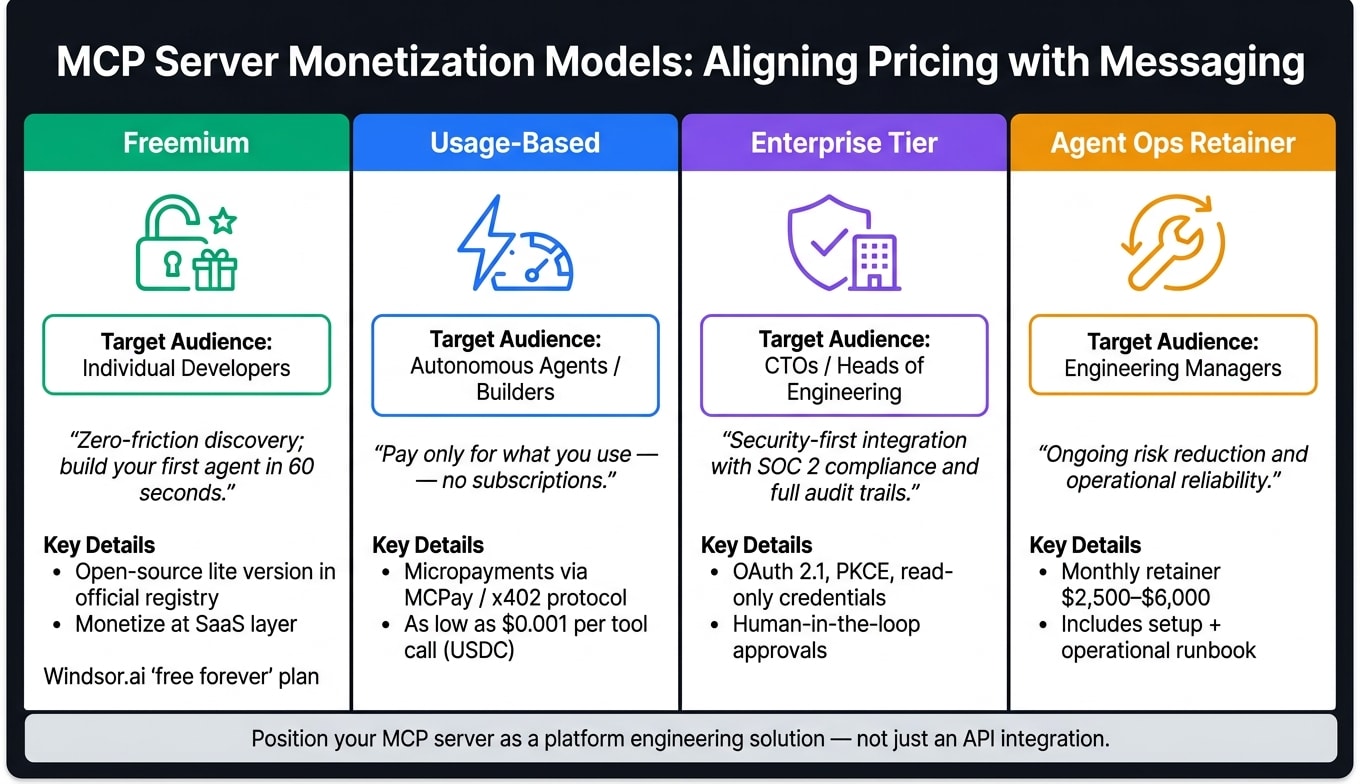
When it comes to establishing your MCP server as a leader in the market, monetization strategies are just as important as listing optimization and launch sequencing.
Freemium and Usage-Based Pricing
Many production MCP servers, like Stripe, Linear, and Sentry, are free to install. Their monetization happens at the SaaS layer, which lowers the barrier to entry and ensures users can get started quickly without hassle . This model makes adoption smoother and provides a clear path for users to upgrade when they're ready.
The freemium model is particularly effective as a lead-generation tool. By offering an open-source "lite" version of your server in the official registry, you can attract developers who might later transition to a more secure, enterprise-level version . Take Windsor.ai, for example - they offer a "free forever" plan for their MCP server but generate revenue through subscriptions for their data connector services .
For a different approach, the pay-per-call micropayment model is gaining traction. With platforms like MCPay and the x402 "Payment Required" protocol, on-chain micropayments (e.g., USDC) can be as low as $0.001 per tool call. This eliminates the need for static subscriptions and API keys, offering a pricing structure that adapts to user needs . These flexible pricing options should directly influence how you tailor your messaging for various audiences.
Positioning for Enterprise Customers
Adoption models are only part of the equation - you also need to customize your strategy for enterprise buyers, who prioritize things like security and deployment reliability over basic functionality.
"MCP integrations are not Zapier zaps. They include security review, auth design, observability, a registry submission, and an operational runbook." - The Delivvo Team
To appeal to enterprise customers, focus on security-first messaging. Highlight features like OAuth 2.1, PKCE, read-only database credentials, and human-in-the-loop approval steps for write operations. Additionally, showcasing SOC 2 compliance and full audit trail capabilities can make or break procurement decisions. Offering a monthly Agent Ops retainer (ranging from $2,500 to $6,000) alongside the initial setup signals a long-term commitment to operational reliability .
Matching Your Messaging to Your Pricing Model
Your pricing model should guide every aspect of your marketing strategy, from how you describe your product in directories to the tone of your documentation landing page. Here's how to align your messaging with your pricing:
| Pricing Model | Target Audience | Core Marketing Message |
|---|---|---|
| Freemium | Individual Developers | "Zero-friction discovery; build your first agent in 60 seconds." |
| Usage-Based | Autonomous Agents/Builders | "Pay only for what you use - no subscriptions." |
| Enterprise Tier | CTOs / Heads of Engineering | "Security-first integration with SOC 2 compliance and full audit trails." |
| Agent Ops Retainer | Engineering Managers | "Ongoing risk reduction and operational reliability." |
It's important to position your MCP server as more than just an API integration. Frame it as a platform engineering solution. This elevates its perceived value and strengthens your case during pricing discussions .
Conclusion: How to Become the Default MCP Server in Your Category
With solid metrics and a clear path to monetization, the next step is positioning your MCP server as the go-to choice in its specific niche.
Focus on a Specific Workflow Category
In a growing and competitive ecosystem, trying to cater to everyone can dilute your impact. The most successful servers focus on a single workflow category instead of attempting to cover multiple bases.
Choose a workflow domain that aligns with your product - whether it’s SaaS Ops, browser automation, vector databases, or another area. Build expertise and depth in that niche. Specialization shows commitment and clarity, while trying to do too much can come across as unfocused. Developers searching for a Postgres or Slack-compatible MCP server want a solution designed for their exact needs, not a generalized tool.
Once you’ve established dominance in a niche, the next step is becoming an integral part of developers' workflows.
Get Embedded in Developer Ecosystems
The most effective way to ensure adoption isn’t just through directory listings - it’s by embedding your server into developers' daily practices. Building on the strategies like optimized listings and targeted campaigns, you can take it further by integrating your server directly into project repositories. For example, using a .mcp.json file ensures automatic adoption whenever a repository is cloned. This creates a seamless onboarding experience for developers.
Additionally, contributing to tutorials and open-source guides enhances credibility. Developers trust tools they see featured in educational resources, and releasing a high-quality open-source version of your server is one of the best ways to spark organic interest.
"Open-source community servers are the single best lead generator for paid private work. Companies that find your name on a popular public server are far more likely to hire you for the internal version." - The Delivvo team
Use Developer Media to Stay Visible
While embedding your tool into workflows drives organic growth, maintaining visibility in developer-focused channels is key to sustaining leadership. As MCP clients, protocols, and developer preferences evolve, staying active in these spaces ensures your server remains a top choice. Publishing content like case studies, protocol updates, and integration guides helps keep your tool relevant and top-of-mind.
Platforms like daily.dev for Business are designed for this kind of visibility. With access to over 1 million developers and the ability to target specific tools, programming languages, and seniority levels, it’s an effective way to share updates about your MCP server and reach AI engineers actively searching for integrations. This complements earlier strategies like targeted campaigns and community engagement. As the Delivvo team aptly noted, "The MCP wave is moving fast enough that the early entrants have an asymmetric advantage." Consistent visibility in developer channels sets apart the leaders in this space.
FAQs
What should my MCP server listing say so AI clients actually use it?
To make your MCP server attractive to AI clients, prioritize clear and detailed descriptions for tools and schemas. When writing docstrings, imagine you're explaining the functionality to a junior developer - keep the language concise yet descriptive to ensure clarity for both tools and their parameters.
Leverage type hints to auto-generate JSON Schemas. To refine these schemas further, use Annotated and Pydantic's Field for adding constraints and additional metadata.
Keep primitives distinct for better organization:
- Functions as tools: Expose specific functions as tools for interaction.
- Resources for read-only data: Use resources to handle static or unchanging data.
- Prompts for workflows: Design prompts to guide and manage workflows effectively.
This separation ensures a structured and efficient setup for AI clients to interact with your server.
How can I get my MCP server to pass the 60-second install test?
Getting users up and running quickly is key. To make onboarding effortless, aim for one-click installation options. For example, an "Add to Cursor" button or a deep-link registry entry can handle automatic client configuration with ease.
If one-click options aren’t feasible, provide users with clear JSON snippets tailored for tools like Claude Desktop or Cursor. These snippets should be straightforward and easy to implement.
To further simplify the setup, consider solutions like remote HTTP servers or a single, simple CLI command (e.g., mcp install). This eliminates unnecessary hurdles and makes the process faster.
Before releasing your tools, always run tests using MCP Inspector. This ensures everything works smoothly and is responsive, saving users from potential frustrations.
Which metrics best predict MCP server adoption after launch?
To understand how well your MCP server is being adopted after launch, focus on tracking active sessions, tool-call patterns, and total installs. These metrics can show which tools are resonating with users and highlight areas where they might encounter challenges. Additionally, keep an eye on telemetry data to quickly identify and resolve performance issues. If your server includes monetization, it’s essential to monitor both usage and revenue events. This will give you insights into how your server fits into everyday workflows. In the MCP ecosystem, building a reputation for reliability and performance is crucial.