
Discord has become the go-to platform for developer-focused communities, surpassing Slack and forums due to its flexibility, role-based access, and persistent chat history. For developer tools, it’s more than a support channel - it’s a way to understand user challenges, build trust, and even drive revenue. Here’s what you need to know:
- Why Discord Works: Developers join to solve problems, not network. The platform’s anonymity and layered access encourage honest participation and technical discussions.
- Server Setup Tips: Organize channels for rules, support, and announcements. Use roles to manage permissions and automation tools for onboarding.
- Engagement Strategies: Start with a small, active group (50–500 members). Use programs like office hours, AMAs, and contributor showcases to keep members involved.
- Revenue Potential: Track DevRel Qualified Leads (DRQLs) and connect Discord data to your CRM. Focus on transitioning high-intent users from community discussions to product adoption.
Discord is a tool for deeper user relationships, not just a Q&A forum. When used effectively, it can transform your developer community into a source of insights and revenue.
How to Set Up a Developer Community Discord Server
The way you set up your server - everything from channel organization to role permissions - plays a huge role in whether members find it useful or leave quickly.
Channel Structure: A Blueprint for Developer Needs
Think of your channels as a layered blueprint: administrative, technical, and community-focused. At the very least, every server should have a #rules channel to set expectations, a #support (or #help) channel to assist newcomers, and an #announcements channel for updates. Beyond these basics, consider adding channels like #show-off-your-work for project feedback. As the community grows, you can include spaces like #brainstorming or #ideas to spark collaboration.
Research shows that users often need 3 to 5 meaningful interactions to shift from being "support seekers" to fully engaged community members . Your channel setup should encourage these valuable interactions early on.
For frequently asked questions (FAQs), use Discord Forum Channels. They keep threads organized and searchable, making it easier for members to find answers without cluttering the server.
Role Hierarchy and Permissions That Keep Things Running
Roles are the backbone of a well-managed server. Assign them based on responsibilities and access needs. For example, engineers and Developer Relations (DevRel) staff should have moderation privileges, while Growth or Sales team members may only need read-only access in technical channels to observe and identify potential leads .
| Role Type | Primary Responsibility | Permission Focus |
|---|---|---|
| Staff (DevRel/Eng) | Technical support & collaboration | High-level moderation, channel creation |
| Growth/Sales Staff | Passive learning & lead handoff | Read-only in dev channels, DM access |
| Volunteer Moderator | Rule enforcement & accuracy | Message deletion, user muting/kicking |
| Community Champion | Peer advocacy & norm setting | Access to beta or inner-circle channels |
| General Member | Peer-to-peer help & learning | Standard post/read permissions |
Identifying a group of 20–50 active members early on is crucial. These Community Champions help shape the server's culture, validate ideas, and influence newer members' behavior . Reward them with perks like early access to features, a private channel for direct communication with the engineering team, or input on roadmap discussions.
Once roles are in place, use automation and moderation tools to keep the server running smoothly.
Onboarding Bots and Code of Conduct Enforcement
Streamline onboarding and maintain a welcoming environment by automating key processes. For instance, require new members to acknowledge the #rules channel before they can post. This step reduces spam and ensures everyone understands the community's expectations . Keep your rules straightforward, developer-friendly, and free of unnecessary jargon.
To handle repetitive questions, consider deploying an AI-powered bot. In 2026, Wasp introduced the Kapa bot, which significantly reduced inquiries like "How does this work?" and encouraged more collaborative discussions . One standout feature of Kapa is its ability to admit when it doesn’t know something:
"The key feature of Kapa is that it can say 'I don't know' when it doesn't have enough knowledge or when it hasn't been trained on a certain topic." - Milica Maksimović, Co-founder and COO, Literally
This honesty builds trust. Developers are quick to lose faith in a bot - and the product it represents - if it confidently delivers incorrect information. A bot that acknowledges its limits can actually enhance the community's credibility.
How to Seed and Sustain Engagement in Your Discord Server
Getting Your First 100–300 Members
To kick off your Discord server, start by inviting your product's most engaged users - think GitHub stargazers, waitlist signups, or those who've submitted active support tickets. A personal touch, like a direct email or in-app message, works much better than a generic "join our Discord" banner. This approach builds trust and makes people feel valued.
Don't aim for sheer numbers right away. A smaller, focused group of 50 to 500 highly engaged developers is much more effective than a massive server with 10,000 passive members. Smaller communities foster trust and meaningful interactions - members recognize each other, recommendations carry weight, and conversations are more engaging. In the first 90 days, prioritize quality over quantity.
A smart way to attract members is by including your Discord invite in your GitHub README or documentation. However, position it as a way to get help or find solutions rather than just "joining a community." Developers often join looking for answers to specific problems, so make sure their first interaction offers enough value to keep them around.
Programs That Keep Developers Coming Back
Turning "question askers" into active participants takes time - about three to five instances of real value, to be exact.
"It actually takes three to five instances of getting real value before someone shifts from the this is a place to ask questions to this is a place I want to spend time mindset." - Milica Maksimović, Co-founder and COO, Literally
Practical, low-effort programs work best for developer-focused communities. For example:
- Weekly office hours with an engineer provide direct access to the team behind the product.
- AMAs with maintainers are great for addressing specific implementation questions.
- A
#show-off-your-workchannel lets developers share their projects and get feedback from peers. - Contributor showcases in a weekly digest highlight community members' projects or PRs, giving them public recognition.
The secret is to make these activities feel like exclusive opportunities rather than marketing efforts. When your engineering team interacts with users as collaborators instead of just offering support, the tone of the community shifts. It grows into a space for meaningful engagement, not just a Q&A forum. While these programs foster ongoing participation, it's also crucial to manage routine tasks efficiently to avoid overwhelming your team.
How to Prevent Burnout and Keep Channels Focused
Once you've built a solid foundation of engaged members, it's important to keep things organized and manageable. Unchecked support queries can quickly overwhelm your DevRel team. Tools like AI bots (e.g., Kapa) can handle routine questions, freeing up your engineers for deeper, more impactful interactions .
Channel focus is another challenge. When off-topic discussions start taking over, engaged members may lose interest. To avoid this, set clear channel guidelines from the start and gently steer conversations back on track if they drift. Create specific channels like #jobs or #marketplace for promotional posts and job ads to keep technical discussions clean and focused.
Your 20–50 community champions - those highly active members who embody the community's values - are vital here. They naturally model the behavior you want to encourage and help maintain the right tone and focus.
"When the people building the product can actually engage with users as collaborators instead of constantly putting out fires, that's when the community starts to evolve into something more than a support channel." - Milica Maksimović, Co-founder and COO, Literally
How to Turn Discord Activity Into a B2B Revenue Pipeline
Discord is often seen as a platform for support, but its true potential lies in transforming community interactions into revenue - all without turning your server into a constant sales pitch.
"The reason most developer communities fail is a lack of business maturity... The community sits in a silo, and only DevRel or support sees what is happening." - Milica Maksimović, Co-founder and COO, Literally.dev
Connecting Discord Data to Your CRM and Sales Pipeline
Once you've built an engaged community, the next challenge is turning that activity into measurable revenue opportunities. A practical way to start is by using unique invite links for each acquisition channel. For example, create one link for your GitHub README, another for your documentation, and a third for email onboarding. This allows you to track where each member is coming from before they even interact in your server.
From there, you can implement a bot or custom integration to log key data - such as join events, role changes, and post frequency - directly into your CRM. This approach not only helps validate engagement but also identifies high-intent users who could become valuable B2B leads.
A critical metric to monitor is DevRel Qualified Leads (DRQLs). These are community members who evolve from asking support questions to actively contributing, such as helping others, sharing integrations, or discussing architecture decisions. Unlike general social activity, contributions like sharing code snippets or debugging insights signal a much clearer intent to purchase .
How to Transition Support Conversations to Sales
Jumping into technical discussions with a generic sales pitch is a surefire way to alienate your community. Instead, the transition to sales should happen outside Discord and be tied to in-product usage milestones. For instance, triggers like inviting teammates, connecting additional integrations, or hitting a free-tier limit (typically around Day 3–7) can signal readiness for outreach .
Internally, your DevRel team can flag these high-intent conversations. Use tools like a shared Slack channel or CRM tags to ensure the sales team has the right context before reaching out. This way, sales can address the specific technical challenges the developer was facing, keeping the interaction relevant and respectful.
Finding and Nurturing Community Champions
Community champions are invaluable. These are the members who not only answer questions before your team can but also build integrations on their own and recommend your tool in other spaces. Look for users who shift from seeking support to offering peer-to-peer help - this demonstrates a strong commitment to your product.
Once you've identified champions, reward them with perks like direct access to your engineering team, early previews of new features, or tailored support. In smaller servers (50–500 members), a single recommendation from a trusted voice can carry far more weight than dozens of comments in a larger, less personal group . This "trust density" becomes a major advantage, but it's crucial to keep these relationships collaborative rather than transactional.
With these strategies in place, the next step is to measure your success and ensure you're avoiding pitfalls that could undermine the value of your community.
How to Measure Success and Avoid Common Mistakes
Once you've set up your community infrastructure, the next step is figuring out how to measure its success and sidestep common issues.
Metrics That Show Community Health and Revenue Impact
Tracking the right metrics is crucial. Simply counting members doesn’t tell you much. Instead, focus on metrics that reflect community health and business impact.
For community health, look at these key indicators:
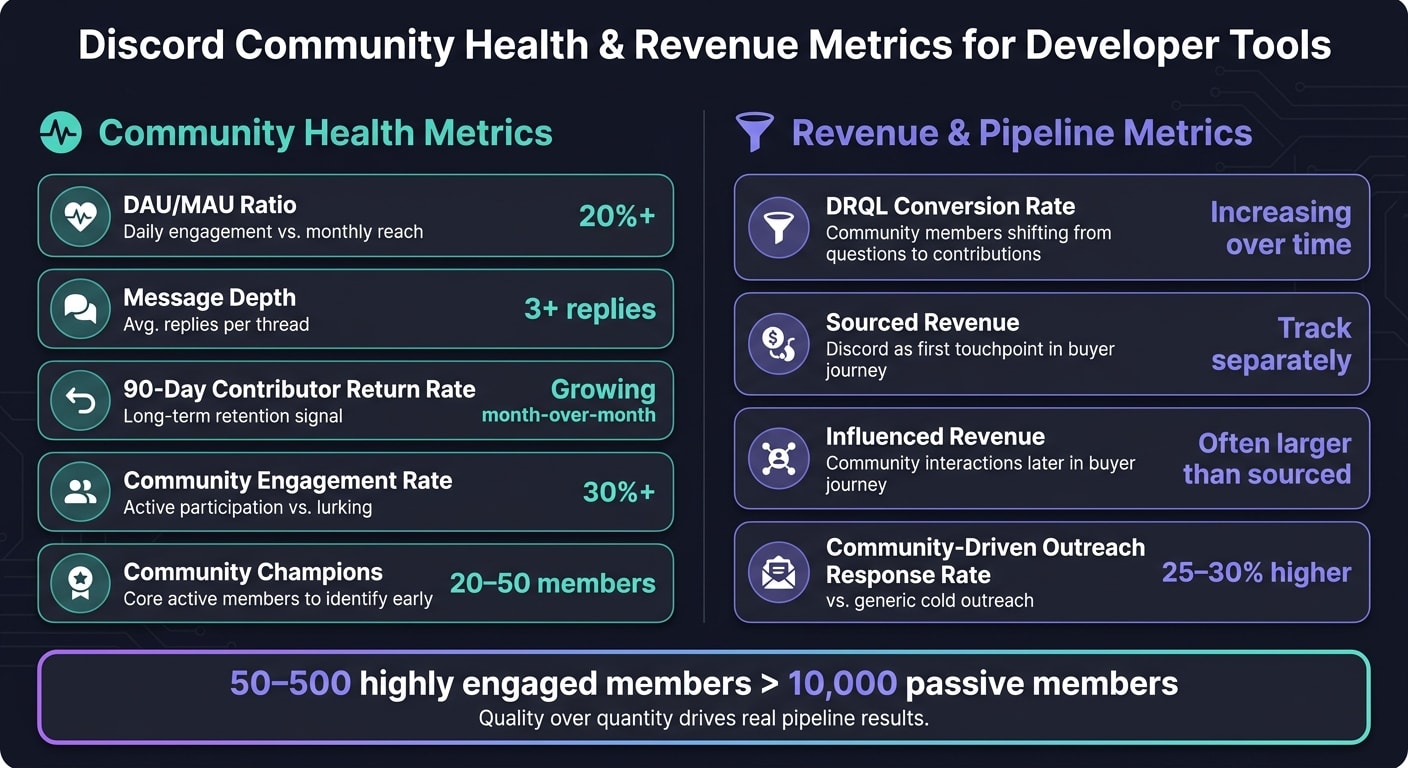
- DAU/MAU ratio: This measures daily engagement compared to monthly reach. A healthy community should exceed 20%.
- Message depth: Conversations with at least 3 replies per thread show meaningful interactions.
- 90-day contributor return rate: A steady increase here signals strong retention and long-term engagement.
On the business side, distinguish between sourced revenue (where Discord was the first touchpoint) and influenced revenue (where community interactions played a role later in the buyer’s journey). Developers often research quietly and convert later, so influenced revenue is often bigger and easier to overlook. Another key metric is the DevRel Qualified Lead (DRQL) rate, which tracks how many members shift from asking questions to contributing answers or sharing integrations - a great indicator of pipeline health.
Here’s a quick snapshot of some essential metrics:
| Metric | What It Measures | Healthy Benchmark |
|---|---|---|
| DAU/MAU ratio | Daily engagement vs. monthly reach | 20%+ |
| 90-day contributor return rate | Long-term relationship building | Growing month-over-month |
| Message depth (avg. replies per thread) | Conversation quality | 3+ replies per thread |
| DRQL conversion rate | Community-to-pipeline efficiency | Should increase over time |
| Community engagement rate | Active participation vs. lurking | 30%+ |
To tie it all together, track sourced and influenced revenue alongside these metrics. This gives you a full picture of your community’s health and its impact on your business.
Common Ways Discord Communities Fail and How to Prevent Them
Without proper planning and engagement strategies, Discord communities can easily fall into a few common traps.
1. Over-reliance on support.
If your community is just a support forum, it won’t sustain long-term engagement. The solution? Create an activation sequence that moves members from asking questions to spending time in the community. For example, ensure new users can complete a "Hello World" experience within 5 minutes of joining, then follow up personally within 1–3 days.
2. Ghost-town servers.
Communities with no clear purpose beyond support often fail. If your internal team is the only one posting, that’s a red flag. A great example of avoiding this is Wasp, a YC-backed startup. They used the Kapa bot to handle repetitive, documentation-based questions, freeing up engineers to engage in higher-value discussions.
3. Mod burnout.
When one or two people handle everything - support, moderation, and programming - it leads to burnout. As Darren Yuen puts it:
"A company should never join if they have no intention of engaging on a regular basis. Developer audiences can always spot imposters."
4. Chasing vanity metrics.
Metrics like GitHub stars can look good but often don’t translate to real engagement. For instance, some teams inflate stars by requiring participants in hackathons to star their repo, but these users rarely contribute further.
What Supabase, Linear, Resend, and Cal.com Teach About Discord Growth
Some of the most successful developer communities - like Supabase, Linear, Resend, and Cal.com - share a few common strategies.
Treat documentation as a key marketing asset.
These companies used their Discord servers as feedback loops to refine their docs, which reduced support needs and boosted user activation rates.Build trust before monetizing.
Supabase and PostHog focused on creating engaged open-source communities before introducing monetization. They built a strong foundation of 20–50 core members who set the tone for later growth.Prioritize quality over quantity.
Linear and Resend intentionally kept their communities small and focused, optimizing for meaningful conversations rather than sheer member count.Highlight contributors.
Cal.com encouraged a culture of creation by showcasing members who built integrations or extensions. This visibility motivated others to contribute, shifting the focus from passive participation to active building.
As Jerome Diaz from Maximize puts it:
"The fastest path to growth isn't targeting the biggest communities. It's dominating the smallest ones that actually matter."
For teams looking to attract qualified developers even before they join, tools like daily.dev for Business can help. By placing your content in front of developers already in learning mode, the transition from reader to community member becomes much smoother.
Conclusion: From Server Setup to Revenue Pipeline
Building a Discord community isn’t just about setting up a server and hoping for the best - it’s about committing to a long-term process rooted in trust, consistency, and a genuine respect for developers' time.
What truly sets successful communities apart from inactive ones is their ability to grow beyond being mere support hubs. Milica Maksimović, Co-founder and COO of Literally, explains it well:
"When the people building the product can actually engage with users as collaborators instead of constantly putting out fires, that's when the community starts to evolve into something more than a support channel."
This evolution creates a foundation for measurable growth. It’s not about chasing large member counts but about aligning tools like automated activation sequences, AI bots (like Kapa), and well-timed sales follow-ups to uncover and qualify revenue opportunities.
Companies like Supabase, Linear, Resend, and Cal.com have shown that smaller, highly engaged communities can have an outsized impact. A single trusted advocate within these groups can drive real results. For instance, community-driven outreach often achieves response rates 25–30% higher than generic cold outreach . That’s the power of trust within a tightly-knit community.
When you approach your Discord server with intention - designing it as an integrated platform rather than just another communication tool - you create a foundation for a strong B2B pipeline. Every step, from setting up the server to programming meaningful engagement, contributes to a system that drives results. Focus on the metrics that matter, like contributor return rates, message depth, and revenue sourced directly from the community. With this mindset, your server can transform from a cost center into a revenue-generating asset.
To take your strategy even further, tools like daily.dev for Business can help you attract qualified developers and strengthen your community ecosystem, ensuring your efforts align with your broader revenue goals.
FAQs
What channels should I create first in a developer Discord?
When creating a developer-focused Discord, start with channels that guide users from seeking help to actively collaborating. Begin by setting up support channels where developers can get quick answers to their troubleshooting questions. These channels serve as a natural entry point for engagement.
Next, introduce spaces for feature ideas, brainstorming sessions, and build-in-public threads. These areas encourage deeper discussions and allow members to share their creative processes. As your community grows, consider adding smaller, specialized channels. These can cater to core members who want to dive into advanced technical topics or share their experiences, helping to build trust and long-term connections.
How can I identify DRQLs in Discord without being salesy?
To spot Developer Qualified Revenue Leads (DRQLs) on Discord without coming across as overly sales-focused, the key is to focus on listening and understanding. Watch for conversations where users discuss technical hurdles, share implementation stories, or talk about their production experiences - these often hint at decision-making and intent.
Engage genuinely by offering assistance or sharing expertise, but avoid pushing any agenda. These natural interactions can help you identify who’s actively working with your tool. By linking this activity to your CRM, you can pinpoint high-intent users who may be progressing toward enterprise-level goals.
What automation should I add before the server gets busy?
To make your developer Discord server run more smoothly, consider automating repetitive support tasks right from the start. For example, you can use an AI bot like Kapa, trained on your documentation, to answer frequently asked questions such as "How does this work?" or "Why is this broken?" This approach allows your engineering team to focus on more critical tasks. Be sure the bot is programmed to admit when it doesn’t have an answer - this helps maintain trust and prevents the spread of incorrect information.