

Marketing a CLI tool is all about reaching developers where they already are and making adoption as easy as possible. Unlike flashy apps, CLI tools rely on practical value, trust, and seamless integration into workflows. Here's the game plan:
Focus on discovery channels developers trust:
Make installation fast and simple:
- Provide one-command installs or lightweight wrappers.
- Publish across multiple package managers to reach a broader audience.
- Offer security measures like checksums and provenance attestations.
Leverage content and community:
- Treat your README as your landing page - clear, concise, and helpful.
- Create tutorials that solve specific problems, not just promote your tool.
- Engage in developer communities (e.g., Discord, GitHub Discussions) and contribute to curated lists.
Use targeted paid campaigns wisely:
- Focus on platforms like daily.dev Ads for precise targeting.
- Highlight measurable benefits and technical advantages in your messaging.
Track adoption and refine:
- Monitor GitHub stars, installs, and "Time to Hello World."
- Use community feedback to improve documentation and onboarding.
Key takeaway: Developers value speed, clarity, and social proof. A well-documented and easily accessible tool, combined with active community engagement, will drive adoption naturally.
How Developers Find CLI Tools
Developers often discover CLI tools in the places they naturally frequent: GitHub, package managers, curated lists, or community platforms like Hacker News. Tapping into these channels is key to reaching your audience effectively.
Key Discovery Channels
GitHub is the starting point for many developers assessing a CLI tool. With over 200 million repositories as of 2026 , it’s where they evaluate a tool's value by checking metrics like stars, commit history, and open issues. Think of your README as your tool's storefront - it must grab attention immediately .
Package managers attract users who are already searching for solutions. Whether it’s npm, Homebrew, or pip, developers using these platforms are looking to improve their workflows. Tools with clear descriptions and strong download numbers are more likely to be picked up.
"Awesome" lists provide long-term visibility. These curated GitHub repositories, like awesome-cli-apps and awesome-devtools, are go-to resources for developers refining their setups. A tool featured in these lists can gain consistent exposure. For example, the creator of Mantra, a CLI for managing environment variables, secured 28 of 41 pull requests into awesome lists within just 10 days .
Community platforms like Hacker News and Discord can generate buzz. A well-timed "Show HN" post can introduce a tool to thousands of developers actively exploring new technologies . Smaller, focused Discord groups are equally valuable, often providing quick feedback and measurable results .
These channels not only help developers discover tools but also lay the groundwork for social proof, which is a critical factor in adoption.
How Social Proof Drives Adoption
Once a tool is discovered, developers look for social proof - signals that confirm its reliability and community support - before committing.
GitHub stars are more than just a popularity metric; they represent trust. A high star count paired with recent commits signals active use, while a neglected repository can raise red flags. However, peer recommendations often carry even more weight:
"A single positive comment from a respected engineer on Hacker News will drive more signups than a Gartner mention." - Ayoub Kaddouri
Open-source code itself serves as a trust signal. Developers can inspect the codebase to ensure there’s no unexpected behavior and evaluate its architecture before adopting it . Labeling issues as "good first issue" also helps, as it demonstrates an active and welcoming community. Over time, contributors who engage with the project can evolve into passionate advocates.
How to Distribute Your CLI Tool Effectively
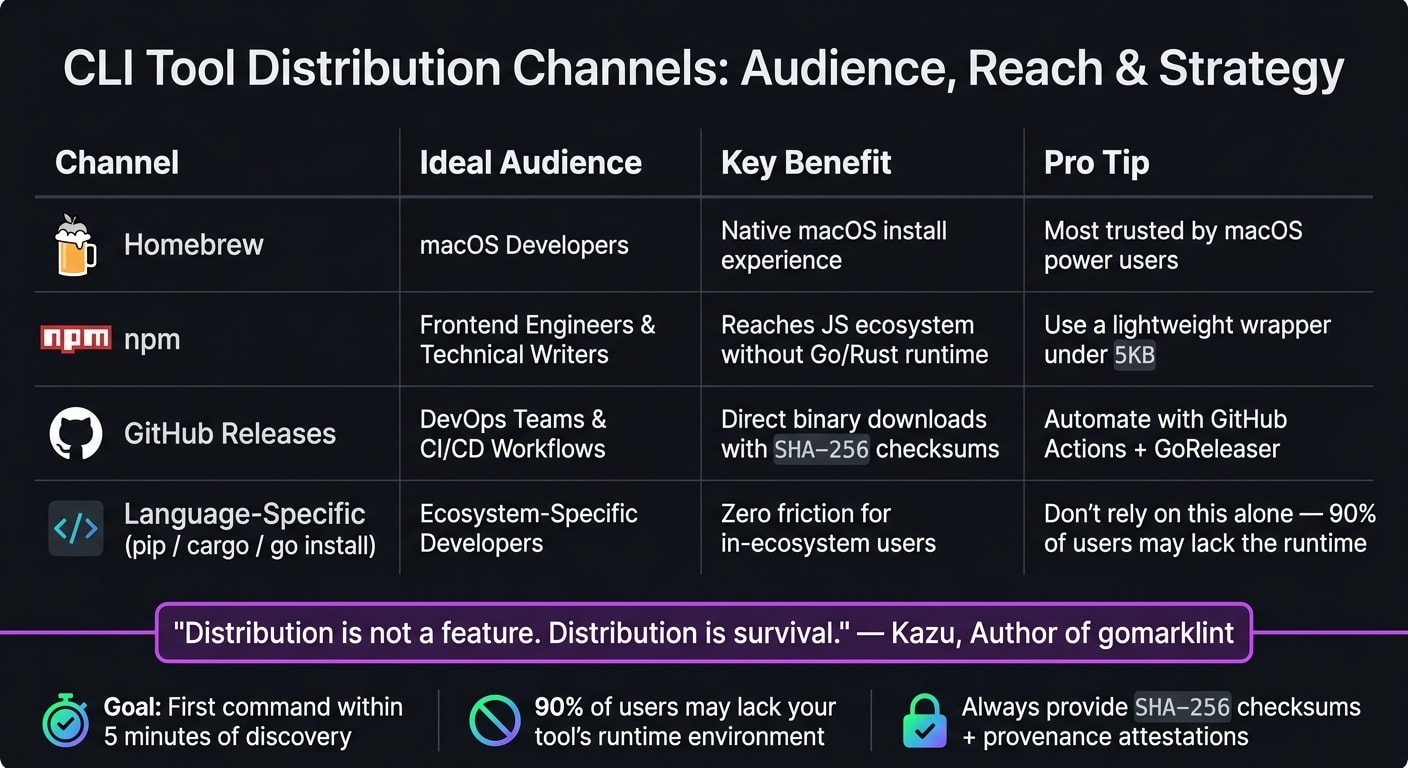
Getting developers to discover your tool is just the first step. The real challenge is making it easy for them to install and use it. Many CLI tools fall short here - not because the tools themselves are flawed, but because the installation process is too complicated or time-consuming.
Choose and Optimize the Right Package Managers
Don't limit yourself to a single distribution channel. Relying exclusively on a language-specific command like go install or pip install can alienate up to 90% of potential users who don’t have the necessary runtime environment set up . Even if your tool is written in Go, consider publishing it on platforms like npm to reach frontend engineers.
"Distribution is not a feature. Distribution is survival." - Kazu, Author of gomarklint
Each package manager serves a different audience, so choose your channels wisely:
| Channel | Ideal Audience |
|---|---|
| Homebrew | Developers on macOS |
| npm | Frontend engineers, technical writers |
| GitHub Releases | DevOps teams, CI/CD workflows |
| Language-specific tools (pip, cargo, go install) | Developers within specific ecosystems |
A great example of this approach is Kazu's gomarklint, a Go-based Markdown linter. In April 2026, Kazu released the tool on four platforms simultaneously: GitHub Releases, Homebrew, npm, and go install. By creating a Node.js wrapper that automatically detected the user's OS and architecture, Kazu made the tool accessible even to those who didn’t have Go installed. The entire release process was automated with GitHub Actions and GoReleaser, triggered by tagging a new version in git .
Beyond traditional package managers, think about listing your tool in integration directories like the GitHub Marketplace, VS Code Extension Marketplace, or Vercel Integrations directory. These platforms attract developers who are actively searching for tools, making them high-value distribution points .
Once you've selected your channels, the next step is to ensure the installation process is as smooth as possible.
Make Installation Fast and Simple
A well-thought-out distribution plan should enable developers to run their first command within five minutes of discovering your tool . Any longer, and you risk losing their interest.
Here’s how to make that happen:
- Publish a lightweight wrapper (under 5KB for npm) that identifies the user's OS and downloads the correct binary. This keeps package sizes small and installation times short .
- Offer a
curl-to-shell one-liner for developers who prefer to bypass package managers or are working in minimal CI environments. Ensure the wrapper forwards exit codes properly, which is crucial for CI/CD use cases . - Avoid gating the installation process behind forms or account signups. A developer’s first interaction with your tool should be running it, not filling out a registration form .
To address security concerns, always provide SHA-256 checksums and use provenance attestations (like npm’s --provenance flag). These steps show that your package was built securely using verified workflows, such as those in GitHub Actions . For developers who inspect what they’re installing, this level of transparency builds trust even before they execute a single command.
Content and Community Strategies for CLI Marketing
Once you've nailed down discovery and distribution, the next step is creating engaging content and fostering active community involvement to boost CLI adoption.
Content That Works for Developer Audiences
When it comes to CLI tools, the best content feels like documentation, not marketing. Developers are usually searching for solutions to specific challenges, not for product names. For instance, a tutorial titled "How to manage secrets across environments" is far more effective than one called "Introducing SecretCLI." The focus should always be on being helpful, even before a developer knows your tool exists.
"Your README, your examples directory, your API reference, and your SDK docs are your LLM marketing." - Joe Karlsson, Developer Advocate, CloudQuery
Think of your README as your CLI tool's landing page. It should include an animated GIF showing a terminal session in action, a one-command installation guide, and a clear table of features. Why? Because the numbers don't lie - developers who view five or more documentation pages are 340% more likely to convert than those who only visit one . This makes a strong case for investing in detailed, runnable examples rather than spending too much time on a fancy marketing website.
With AI coding tools becoming increasingly popular - 73% of engineering teams were using them daily by 2026 - tools like Claude Code and Cursor are playing a bigger role in how developers discover CLI tools. These AI assistants often index GitHub repositories, so having a well-organized README with clear examples is critical for both humans and AI-driven recommendations .
This emphasis on high-quality content naturally leads to the next step: engaging with developer communities.
Getting Your CLI Into Developer Communities
Great documentation is the foundation, but active participation in developer communities is where the magic happens. One of the most effective and low-cost strategies for CLI creators is getting listed in curated resources. Here's a real-world example: In May 2026, a developer known as "gonewx" launched Mantra, a CLI for managing environment variables. Over 10 days, they submitted 41 pull requests to various awesome-* GitHub repositories, with 28 of them being accepted. These listings alone drove about 40 downloads, accounting for 20% of the tool's initial downloads, all from just 2 hours of effort .
"Being listed in an awesome-list is low-key one of the best forms of passive discovery for dev tools. Developers actually browse these lists when they're looking for tools." - Mantra Creator
The secret? Focus on niche lists rather than just the big, general ones. Lists like awesome-shell, awesome-cli-apps, or language-specific ones like awesome-rust attract developers who are already in the mindset of exploring tools. Before submitting your tool, spend 4–6 weeks being genuinely helpful in relevant spaces - Discord servers, Reddit threads, or Stack Overflow discussions. Building trust and technical credibility first makes any mention of your tool feel natural rather than self-promotional . When "gonewx" paired their GitHub submissions with active participation in 15 Discord servers, Discord alone drove around 70 downloads in the same 10-day period .
This kind of momentum can lead to sustained growth. Take the example of Agrici Daniel, who between October 2025 and April 2026 created an ecosystem of 26 interconnected open-source CLI tools. By cross-linking them in each tool's README and including "Related Projects" sections, he achieved 8,135 GitHub stars and 1,412 forks in just nine months - all without a marketing budget . Each tool acted as a gateway to the others.
"Documentation isn't afterthought - it's the product's marketing." - Agrici Daniel, Developer
Using Paid Campaigns to Grow CLI Adoption
Relying solely on organic discovery through curated lists and communities can take time to gain traction. To speed things up, targeted paid campaigns can make a big difference - if you know where and how to use them effectively. Let's explore how daily.dev Ads connects your message with developers already immersed in topics like terminal productivity.
Here’s the challenge: over 60% of developers use ad blockers , and generic programmatic ads often lead to wasted budgets . Paid search isn’t much better for CLI tools either. Developer-related keywords on Google can cost anywhere from $5 to $15 per click , and many developers are naturally skeptical of search ads when it comes to technical tools.
So, what does work? The key is to meet developers where they’re already engaged. daily.dev Ads integrates native in-feed campaigns into a platform that reaches over 1 million developers worldwide. These ads appear in feeds tailored to topics like terminal productivity, shell scripting, DevOps, and automation. This way, you’re not just showing ads to casual browsers - you’re reaching developers actively looking for tools to improve their workflows.
Precision targeting is essential. Focus on factors like seniority, programming languages, and specific tools your audience uses. For instance, if you’re promoting a Rust-based CLI tool, you can target developers interested in Cargo, systems programming, or CLI tooling. This ensures your ad dollars aren’t spent on audiences unlikely to convert. The messaging itself should be sharp and technical, focusing on measurable benefits that resonate with developers.
As Thalia Barrera, Software Engineer and Writer, explains, developers are evidence-driven buyers who do their homework before choosing tools. Use ad copy that highlights clear, technical advantages, like: "Replace your 12-step deployment script with a single command" . Back this up with metrics, such as GitHub stars, to establish credibility.
Tracking and Improving CLI Adoption
Once you’ve launched paid campaigns and community initiatives, the next step is figuring out what’s actually working. The challenge with CLI tools is that standard web analytics don’t quite apply - you’re not looking at page views or form submissions. Instead, you’re tracking installs, command executions, and signals from your developer community.
Metrics That Show CLI Tool Growth
To get a full picture of your CLI tool's performance, focus on three key areas: discovery, adoption, and engagement. These layers capture the entire user journey and help refine the marketing strategies you’ve implemented.
| Metric Category | Key Indicators | What It Tells You |
|---|---|---|
| Discovery | GitHub Stars, documentation traffic, package registry impressions | How well your tool is catching the attention of developers |
| Adoption | Download/install counts, GitHub forks, one-line install success rate | How many developers are actually setting up your tool |
| Engagement | Docs pages per session, star velocity, community activity | How invested users are and whether they’re sticking with the tool |
| Growth/ROI | PQL conversion rate, trial-to-paid rate, word-of-mouth mentions | Whether your tool is gaining traction commercially |
Let’s take GitHub stars as an example. While the total number of stars adds credibility, it’s the star velocity - how quickly stars accumulate - that can really drive growth. A sudden spike in stars can trigger GitHub’s Trending algorithm, creating a snowball effect of organic discovery . To capitalize on this, coordinate a launch push across your Discord, newsletter, and other community channels. This surge in visibility isn’t just a vanity metric; it’s a feedback loop that reveals which distribution strategies are connecting with your audience.
For adoption metrics, download counts from npm, pip, or Cargo are helpful but not perfect - they can be inflated by CI/CD pipelines. To get a clearer picture, pair these numbers with first-command activation rates. A key metric here is "Time to Hello World", which measures how quickly users can successfully complete their first task. If this number is low, it’s a strong sign that your onboarding is effective .
Engagement metrics, like documentation page views, can also tell you a lot. If users are leaving after viewing just one page, it’s a red flag that your documentation structure might need improvement. This isn’t just about adoption; it’s about ensuring users can dive deeper and stick around.
Beyond the numbers, qualitative insights matter too. Feedback from GitHub issues or community discussions can identify pain points in your onboarding process or documentation. Use these insights to refine your strategies and make the tool more accessible.
Using Feedback to Improve Adoption
Pairing raw metrics with direct user feedback is the best way to keep improving. Metrics show you what’s happening, but community discussions and GitHub issues often explain why. For example, if you notice recurring questions in your GitHub Discussions or Discord, it’s likely a sign that part of your onboarding or documentation is unclear. Think of these threads as a free usability test.
One simple but effective tactic: add a "How did you hear about us?" question during your CLI’s first-run setup or sign-up flow. About 52% of developer tool discovery happens through private Slack groups, direct messages, and other hard-to-track "dark social" channels . Without this question, you’re likely underestimating your tool’s reach.
As Joe Karlsson, Developer Advocate at CloudQuery, wisely notes:
"Good data ages better than good writing."
This idea applies directly to your feedback loop. A well-organized GitHub issue template, a pinned roadmap discussion, and a public changelog all show developers that your project is actively maintained. This transparency encourages adoption. In fact, developers who engage in community discussions within their first 90 days have 65% higher retention rates and 40% greater usage expansion . Creating spaces for these interactions isn’t just a nice-to-have - it’s a measurable driver of growth.
Conclusion: What to Focus on When Marketing CLI Tools
Marketing a CLI tool is all about connecting with developers where they already are - on their technical platforms and workflows. Success here hinges on building trust through optimized package listings, clear and concise READMEs, and active community engagement. These aren't standalone tactics; they work together like pieces of a puzzle, creating a cohesive strategy.
Each element plays a specific role. Package manager optimization ensures your tool appears when developers are actively searching for solutions. A well-crafted README on GitHub acts as your primary conversion tool - it's essentially your landing page and discovery asset rolled into one . Meanwhile, workflow-focused content brings in organic traffic by addressing real-world problems developers are searching to solve. Finally, community seeding - whether that’s contributing to awesome-lists, engaging on Discord, or sharing in dotfile repositories - builds long-term visibility that grows naturally over time. Together, these tactics streamline discovery while meeting the high expectations of CLI users.
Ayoub Kaddouri, a Growth Strategist, sums it up perfectly:
"The product IS the funnel. Marketing's job is to get developers to the 'Try' stage. The product has to carry them through Adopt, Expand, and Champion."
Every tactic, from optimizing package managers to engaging with the community, serves one goal: making it easy for developers to adopt your CLI tool. Fast installation, clear documentation, and a tight feedback loop are key to driving that adoption. These principles align seamlessly with the strategies of community engagement and rapid activation mentioned earlier. By marketing with technical precision and straightforward communication, you position your CLI tool as an indispensable part of a developer’s workflow.
CLI users expect speed, clarity, and proven performance. When your marketing reflects those priorities, adoption becomes a natural outcome.
FAQs
Which package managers should I publish my CLI on first?
Start with npm to connect with the largest group of Node.js developers. Once your tool starts gaining momentum, consider branching out to platforms like Homebrew to tap into a wider audience. Make sure your listings are clear, easy to find, and simple to install - this helps encourage more users to adopt your tool.
What should my README include to convert GitHub visitors into installs?
Your README file should serve as the first impression of your project, acting as a go-to resource for anyone interested in understanding, installing, and using your tool. Here's what to include:
Project Name and One-Line Description: Start with a clear, concise project name and a brief description of what the tool does. This helps readers quickly grasp its purpose.
Quick Install Command: Provide a straightforward installation command right at the beginning. Make it easy for users to get started without searching through the entire README.
What the Tool Does: Explain the functionality of your tool in simple terms. Highlight its key features and why it stands out.
How to Install It: Include step-by-step installation instructions. If there are dependencies or specific requirements, mention them clearly.
How to Use It: Offer a working example or a sample use case. This could be a code snippet, a command-line example, or screenshots - whatever best demonstrates how the tool works.
Why to Trust It: Build credibility by explaining why your tool is reliable. This could include details about testing, security measures, or even testimonials from users.
Badges and Links: Add badges for things like build status, license type, or version. Include links to detailed documentation, contributing guidelines, and licensing information for those who want to dive deeper.
A well-structured README not only answers these essential questions but also encourages users to engage with your project confidently.
How can I measure real CLI adoption beyond download counts?
To truly understand CLI adoption beyond just download numbers, it's important to look at engagement metrics. These include activation events like a user's first API call or deployment, as well as ongoing usage stats such as weekly or monthly active users (WAU/MAU).
Community-driven signals also offer valuable clues. For instance, the number of GitHub stars, activity within repositories, or even mentions in dotfiles can indicate growing interest and usage.
Additionally, metrics like time-to-first-success (how quickly users achieve their first meaningful result) and conversion rates from free to paid plans reveal more about user engagement and long-term retention. These data points help paint a clearer picture of how well your CLI is being adopted and used.