

JavaScript developers are a highly technical and discerning audience, with over 65–70% of professional developers using the language daily. However, 70% of developers ignore or block ads that don't address their specific needs. To effectively launch a successful advertisement campaign for this group, personalized ads must focus on their tools, frameworks, and pain points. Here's how to connect with them:
- Understand their roles and tools: Frontend (React, Vue), backend (Node.js), full-stack (Next.js), and DevOps engineers have distinct challenges and preferences.
- Target by mindset and workflow: Developers operate in research mode (evaluating tools) or implementation mode (coding/debugging). Tailor your messaging accordingly.
- Privacy and consent matter: Use transparent, ethical advertising practices that respect developers' privacy.
- Craft precise, technical ad copy: Specificity is key - mention tools, frameworks, and measurable benefits (e.g., "Reduce React bundle size by 40%").
- Use effective platforms: Native ads on developer-focused platforms like daily.dev Ads outperform traditional display ads.
Personalized ads that respect developers' habits and directly solve their challenges are far more likely to engage this audience.
Understanding JavaScript Developers as an Audience
JavaScript developers come in many forms, from frontend engineers perfecting render performance to backend specialists fine-tuning APIs under heavy load. To advertise effectively to this group, you need to understand their work habits, priorities, and what drives their decisions. Let’s break it down by key segments and workflows.
Key Segments Within the JavaScript Developer Community
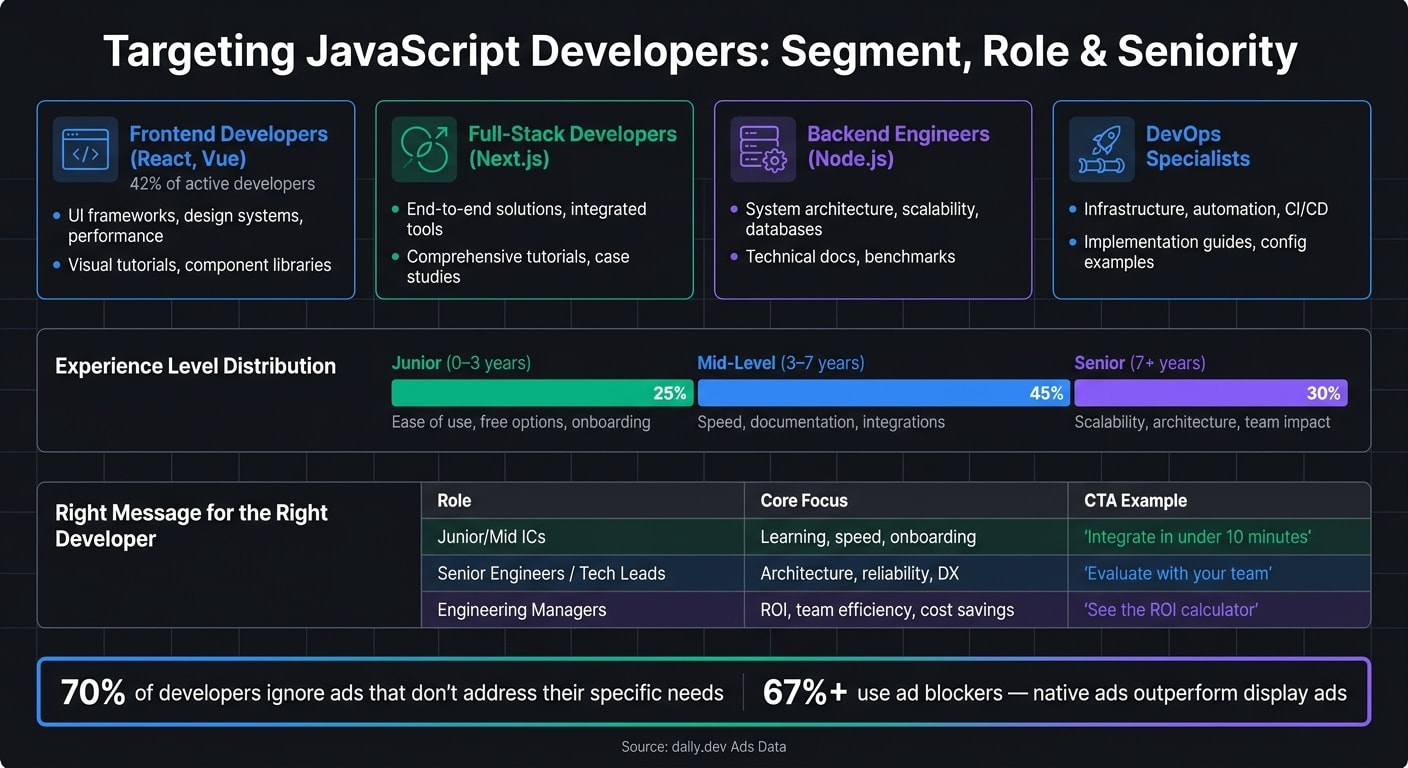
The JavaScript ecosystem is vast, and each segment has its own set of interests and challenges. According to data from daily.dev, 42% of active developers focus on Web/React, Next.js, Astro, and modern frontend technologies . This makes frontend developers the largest group within the JavaScript community. However, full-stack and backend developers also make up a significant portion, each with their own tools and priorities.
| Segment | Primary Interests | Content Preferences |
|---|---|---|
| Frontend Developers (React, Vue) | UI frameworks, design systems, performance optimization | Visual tutorials, component libraries |
| Full-Stack Developers (Next.js) | End-to-end solutions, integrated tools | Comprehensive tutorials, case studies |
| Backend Engineers (Node.js) | System architecture, scalability, databases | Technical documentation, benchmarks |
| DevOps Specialists | Infrastructure, automation, CI/CD pipelines | Implementation guides, configuration examples |
Experience level also shapes their behavior. Developers fall into three main categories: 25% junior (0–3 years of experience), 45% mid-level (3–7 years), and 30% senior (7+ years) . For instance, a junior developer exploring their first state management library will respond to different messaging than a senior engineer evaluating observability tools for production systems.
Knowing these segments and their unique needs is essential to crafting messages that resonate.
Daily Workflows and Tools
JavaScript developers rely on a core set of tools to get their work done. These include:
- VS Code for writing and debugging code
- npm or pnpm for managing packages
- GitHub for version control and code reviews
- Browser DevTools for debugging
- CI/CD pipelines for deploying code
In addition, developers frequently turn to documentation sites, GitHub READMEs, and tech blogs for guidance during their coding process. These habits are important because over 67% of developers use ad-blockers . This means traditional display ads often fail to reach them. Instead, native ads and non-intrusive placements that blend seamlessly into their trusted resources - like documentation or blogs - are far more effective.
Understanding these workflows helps pinpoint where and how to deliver your message.
Developer Mindset and Preferences
JavaScript developers typically operate in two distinct modes: research mode and implementation mode.
- In research mode, they’re evaluating tools, comparing options, and planning their architecture. Ads for tools like state management libraries or deployment platforms can be particularly effective here.
- In implementation mode, they’re focused on writing code, debugging, and shipping projects. During this time, developers are more likely to engage with resources like debugging guides or detailed API references rather than broad marketing pitches.
Technical precision is key. Ads that directly address specific problems - like reducing bundle size, handling async errors in Node.js, or optimizing CI configurations - are far more likely to grab their attention. Aligning your message with their current mindset and workflow is critical to standing out in a crowded space.
These insights into developer habits and preferences form the foundation for effective ad strategies, which we’ll discuss later in this guide.
Core Principles for Personalizing Ads for JavaScript Developers
When creating ads for JavaScript developers, it's essential to focus on their unique workflows and preferences. It's not just about knowing their tools - it's about crafting messages that truly resonate with how they think and solve problems. These principles can help you connect with this audience in a way that feels relevant and respectful.
Aligning Messaging with JavaScript Frameworks and Pain Points
JavaScript developers approach their work with a focus on specific frameworks and challenges. A React developer troubleshooting re-rendering issues has different concerns than a Node.js engineer optimizing API performance. To grab their attention, your messaging needs to address these distinct pain points.
For example:
- Ads targeting Next.js developers could highlight solutions for reducing cold start times or simplifying server-side data fetching.
- Messaging for Node.js backend engineers might focus on async error handling or efficient database connection pooling.
By tailoring your value proposition to the framework or runtime they use, you show that you understand their world and can offer practical solutions.
Once you've nailed the technical focus, the next step is ensuring your approach respects their privacy and data concerns.
Privacy and Consent in Developer Advertising
Developers care deeply about privacy, so transparency and consent are non-negotiable when personalizing ads. The rules around privacy have also become stricter. As of March 1, 2026, the IAB Europe's Transparency and Consent Framework (TCF) v2.3 requires valid TC strings for all ad requests . This means advertisers must work with platforms that handle consent signals correctly before personalizing any campaigns.
For situations where consent isn't granted, Advanced Consent Mode can be a game-changer. It allows for cookieless pings to enable conversion modeling without tracking individuals . This approach balances respecting user choices with maintaining measurement accuracy. Using platforms that support these methods not only builds trust but also demonstrates that you value ethical practices - something developers are quick to notice.
Once you've established trust, the final piece is crafting ad copy that truly speaks to developers.
Writing Ad Copy That Speaks to Developers
Precision is key when writing ads for developers. Vague or generic language will make them scroll past without a second thought. Developers expect specificity and technical accuracy in the content they engage with.
Here’s a quick breakdown of what works and what doesn’t:
| Copy Element | Best Practice | Example |
|---|---|---|
| Technical Terms | Use exact terminology | "Implement CI/CD pipelines" vs. "Set up automation" |
| Language Specificity | Mention specific versions/frameworks | "React 18.2 components" vs. "Web development" |
| Value Proposition | Highlight measurable benefits | "Reduce deployment time by 40%" vs. "Save time" |
| Headline Format | Use brackets for clarity | "[Guide] Optimize React Performance" |
| Call to Action | Focus on outcomes | "Try the API Sandbox" vs. "Get Started" |
Developers also respond well to clear formatting. Headlines that include markers like [Guide], [Docs], or [Benchmark] immediately signal the content's relevance. Similarly, calls to action should emphasize specific outcomes or tasks - like "Explore the API Sandbox" - rather than generic prompts.
How to Target JavaScript Developers Effectively
To make sure your ads reach the right developers, precision is key. Broad targeting not only wastes your budget but also reduces the relevance of your message. By narrowing your focus, you can create campaigns that truly resonate. Here's how you can refine your approach.
Targeting by JavaScript Skills and Frameworks
JavaScript developers often specialize in specific frameworks and tools, so targeting based on these can make a big difference. Instead of focusing solely on the language, drill down into frameworks and tools. For example:
- React: Keywords like "React hooks", "Next.js", "React state management", and "React Native."
- Node.js: Terms such as "Express.js", "NestJS", "Node.js microservices", and "Node.js logging."
- Tooling: Phrases like "Vite HMR", "pnpm monorepo", "ESLint config", and "Jest vs. Vitest."
Each group comes with its own challenges and needs, allowing you to craft targeted messages. For instance:
- A Node.js-focused ad could say: "Detect memory leaks in Node.js microservices before they hit production."
- A Vue-specific ad might read: "Optimize your Vue 3 app's Time to Interactive with real-user monitoring tuned for SPAs and Nuxt sites."
By tailoring your ads to each framework or tool, you show developers that your solution is designed specifically for their problems.
Segmenting by Role and Seniority
A developer's role and seniority level greatly influence what they care about. Whether they're junior-level individual contributors (ICs) or engineering managers, their priorities - and the way you should address them - differ. Here’s a breakdown:
| Segment | Core Focus | Messaging Angle | CTA Example |
|---|---|---|---|
| Junior/Mid ICs | Learning, speed, onboarding | Highlight ease of use, clear documentation, and free options | "Integrate in under 10 minutes" |
| Senior engineers / tech leads | Architecture, reliability, developer experience | Emphasize scalability, team impact, and seamless integrations | "Evaluate with your team" |
| Engineering managers | ROI, team efficiency, incident reduction | Focus on business results, cost savings, and delivery timelines | "See the ROI calculator" |
As daily.dev Ads puts it:
"Developers do not click on ads. They click on solutions to their problems." - daily.dev Ads
For example, a senior engineer exploring observability tools will want details on how your product integrates with their Node.js stack. Meanwhile, an engineering manager will be more interested in how it reduces production issues and supports budget justification.
Using daily.dev Ads for Precision Targeting
daily.dev Ads is designed to reach developers where they already spend their time. This platform allows advertisers to target by programming language, framework, seniority level, and tools, ensuring your ads are seen by the right audience. For example, you can show a React-specific ad to mid-level frontend developers without it being displayed to a DevOps engineer browsing Kubernetes content.
What makes daily.dev Ads stand out is its use of "Exploring Now" signals . These signals help target developers who are actively engaging with relevant content - like React performance or Node.js security. This ensures your ad feels timely and relevant, not disruptive. With native in-feed placements and personalized digest ads, your message integrates naturally into their workflow, maximizing its impact.
Creating Ad Creatives That Resonate with JavaScript Developers
When targeting JavaScript developers, your ad creative needs to address their real-world challenges head-on. It’s not just about grabbing attention - it’s about offering solutions that feel relevant and actionable.
Building Value Propositions Around JavaScript Challenges
The most effective ad creatives focus on solving specific developer pain points, not just touting generic benefits. To craft these, take inspiration directly from discussions on platforms like GitHub, Reddit, and Slack. Translate these challenges into headlines that speak developers' language.
Here’s how common JavaScript issues can translate into clear, solution-oriented value propositions:
| Challenge | Example Value Proposition |
|---|---|
| Large React bundles slowing load times | "Cut your React bundle size by up to 40% without changing your codebase." |
| Node.js memory leaks reaching production | "Detect event loop blocking in real time before it impacts your users." |
| Slow Webpack or Vite build times | "Reduce your Webpack build from 5 minutes to 30 seconds." |
| Migrating a codebase to TypeScript | "Migrate 70% of your JS codebase to TypeScript in 2 weeks with guided automation." |
| Flaky CI pipelines in monorepos | "Parallelize CI for your JavaScript monorepo and cut pipeline runs by 60%." |
These examples work because they name the tools, highlight measurable outcomes, and use terminology familiar to developers. This specificity ensures your messaging feels authentic and directly aligned with their needs.
Ad Formats and Messaging That Work for Developers
Developers are known for high ad-block usage, so disruptive formats won’t cut it. Instead, opt for native, in-feed placements that blend seamlessly into their browsing experience. These formats respect their habits and consistently outperform traditional display ads.
When it comes to structuring your ad copy, keep it concise and to the point:
- Start with a one-line hook: Identify the problem clearly and succinctly.
- Follow with one or two bullet points: Highlight concrete benefits with measurable outcomes.
- End with a developer-friendly CTA: Use phrases like "View docs", "Try in sandbox", or "Run
npm install" instead of generic calls like "Learn more."
Visuals also play a crucial role. A short GIF or a before-and-after screenshot showing your tool’s impact can make a huge difference. For example, a GIF demonstrating your tool in action or a Lighthouse performance improvement screenshot resonates far better than generic stock images.
According to a 2022 Evans Data survey, over 70% of developers prefer learning about tools through technical content like tutorials, documentation, and sample code. Your ad creative should mirror this preference, making it feel like an organic part of their workflow.
Getting Creative Support from daily.dev Ads
Crafting technical, developer-focused messaging can be tricky, especially if your marketing team isn’t immersed in the JavaScript ecosystem. That’s where daily.dev Ads comes in. They offer expert guidance to help you fine-tune headlines, visuals, and CTAs so your ads feel like a natural extension of developer content.
Their native ad placements - like in-feed ads and post-page ads - are designed to blend seamlessly with editorial content. Plus, their audience segmentation options allow you to tailor messaging for specific groups, such as React front-end developers or Node.js backend engineers. This means each group sees ads that speak directly to their stack and challenges, ensuring your creative hits the mark every time.
Measuring and Optimizing JavaScript Developer Ad Campaigns
Key Metrics to Track for Developer Campaigns
When evaluating a JavaScript developer campaign, you need to look beyond clicks and impressions. The real measure of success lies in tracking how developers engage with and use your promoted tool.
Break down your metrics based on the developer journey. At the top of the funnel, impressions and click-through rates (CTR) help you assess initial interest. As developers move deeper, metrics like time spent on your page, scroll depth, and visits to documentation signal genuine curiosity. At the final stages, developer-specific conversions - such as API key activations, SDK installs, first API calls, or production deployments - highlight actual product adoption.
| Funnel Stage | Metrics to Watch | Why It Matters |
|---|---|---|
| Awareness | Impressions, CTR | Measures how far your message reaches and resonates |
| Evaluation | Time on page, docs visits, sandbox opens | Indicates whether developers are exploring your tool seriously |
| Activation | API key creation, SDK installs, first API call | Shows when developers start using your product |
| Expansion | Team invites, paid upgrades, active projects | Reflects long-term engagement and value |
For developer-focused platforms, a CTR between 1% and 3% is solid. If your CTR falls below 0.5%, it might be time to revisit your messaging or ensure your ads align better with developers' needs.
One critical metric to keep an eye on is time-to-first-value (TTFV) - the time it takes for a developer to go from clicking your ad to successfully integrating your tool. Studies show that developers who hit this milestone within a day are 40–50% less likely to churn than those who take longer.
From there, the next step is to refine your campaigns through constant testing and iteration.
A/B Testing and Iterating on Ad Creatives
When targeting JavaScript developers, the smallest details in your ad creatives can make a big difference. Testing variables like headlines, technical depth, and calls-to-action (CTAs) is crucial. Even subtle changes can resonate differently depending on a developer's stack or experience level.
| Testing Variable | Elements to Test | Success Metric |
|---|---|---|
| Headline | Framework-specific ("Ship React apps faster") vs. generic ("Accelerate your JS dev") | CTR, bounce rate |
| Visuals | Code snippets (React/Node.js) vs. architecture diagrams | Engagement rate, time on page |
| CTA | "npm install" vs. "Get free API key" vs. "Try in browser" | Conversion rate, SDK downloads |
| Landing Page | API reference style vs. marketing feature list | Trial activations, retention |
To make your tests reliable, follow these best practices: test one variable at a time, maintain consistent timeframes (to avoid skew from external factors like framework updates), and document every insight. For example, discovering that "Next.js + performance-based messaging boosts activation rates by 30% compared to generic JavaScript messaging" can shape the direction of future campaigns.
Real-Time Campaign Optimization with daily.dev Ads
Real-time tracking is a game-changer for optimizing developer campaigns. Because developer audiences are so specific, ad fatigue can set in quickly if the same creatives are overused.
Platforms like daily.dev Ads offer real-time performance tracking, helping you see how different developer segments - such as React front-end developers, Node.js backend engineers, or full-stack teams - respond to your ads. This tool automatically shifts your budget toward top-performing creatives and provides actionable recommendations on which ads to pause, keep running, or tweak. This reduces wasted spend without requiring constant manual adjustments .
A smart approach is to submit 10–15 creative variants per campaign. This gives the platform enough data to identify what resonates with each JavaScript audience segment .
"Developers ignore banners. They pay attention to native content." - daily.dev
Conclusion and Key Takeaways
When crafting a campaign for JavaScript developers, success hinges on delivering messages that resonate deeply with their specific tools, challenges, and interests. Developers are more likely to engage when your message aligns directly with their framework and addresses their pain points.
Precision is more effective than broad reach. For instance, a focused message tailored to Next.js developers will outperform generic claims about productivity. This principle holds true whether you're marketing a monitoring tool, a testing library, or hosting a developer event - customization is key.
Here are a few guiding principles to keep in mind:
- Segment your audience by framework, role, and seniority before writing any copy.
- Keep messaging technically accurate and steer clear of over-the-top claims.
- Respect developer privacy and consent at every step.
- Embrace iteration - test headlines, visuals, and calls-to-action (CTAs), and refine your approach based on performance data.
Tools like daily.dev Ads make it easier to reach developers effectively by targeting them based on language, seniority, interests, and tools. By personalizing your message to fit seamlessly into their workflow and addressing real challenges, you can advertise in a way that feels genuinely helpful.
FAQs
How do I choose the best developer segment to target first?
To choose the right developer segment for your initial campaign, prioritize behavioral data over static demographics. Start by pinpointing the technical problems your product solves. Then, leverage platforms like daily.dev Ads to reach developers actively engaging with the programming languages, frameworks, or tools tied to those challenges. Tailor your messaging to match their specific needs and expertise. For example, you might focus on Early-Career Coders looking for learning resources or Enterprise Architects who value scalability and return on investment.
What should I do if users don’t give consent for ad personalization?
If users choose not to allow ad personalization, you are required to deliver non-personalized ads. These ads are based on contextual information, such as the content on the website or a user's general location, rather than their behavior or preferences.
To handle this properly, you should:
- Configure ad tags to pause requests until the user's consent decision is known.
- If consent is denied, ensure that non-personalized ads are triggered.
To stay compliant, use parameters like requestNonPersonalizedAds=1 or allow_ad_personalization_signals=false in your setup. These parameters help ensure that ads are served appropriately based on the user's consent choice.
Which conversions matter most for JavaScript developer ads?
When running ads aimed at JavaScript developers, the most impactful conversions are those that demonstrate technical intent and product engagement. Here’s what to focus on:
- Sign-ups from technical pages: These indicate that developers are diving deeper into your resources, showing genuine interest.
- API calls and SDK downloads: Metrics like these reveal active exploration and usage of your tools, signaling serious intent.
- Community mentions: Tracking organic discussions about your product helps gauge traction and interest within developer communities.
For campaigns on platforms like daily.dev Ads, these indicators confirm that your efforts are effectively guiding developers through their decision-making process in a trusted and relevant environment.