

If you want more installs on JetBrains Marketplace, your plugin page, pricing setup, and update history matter as much as the plugin itself.
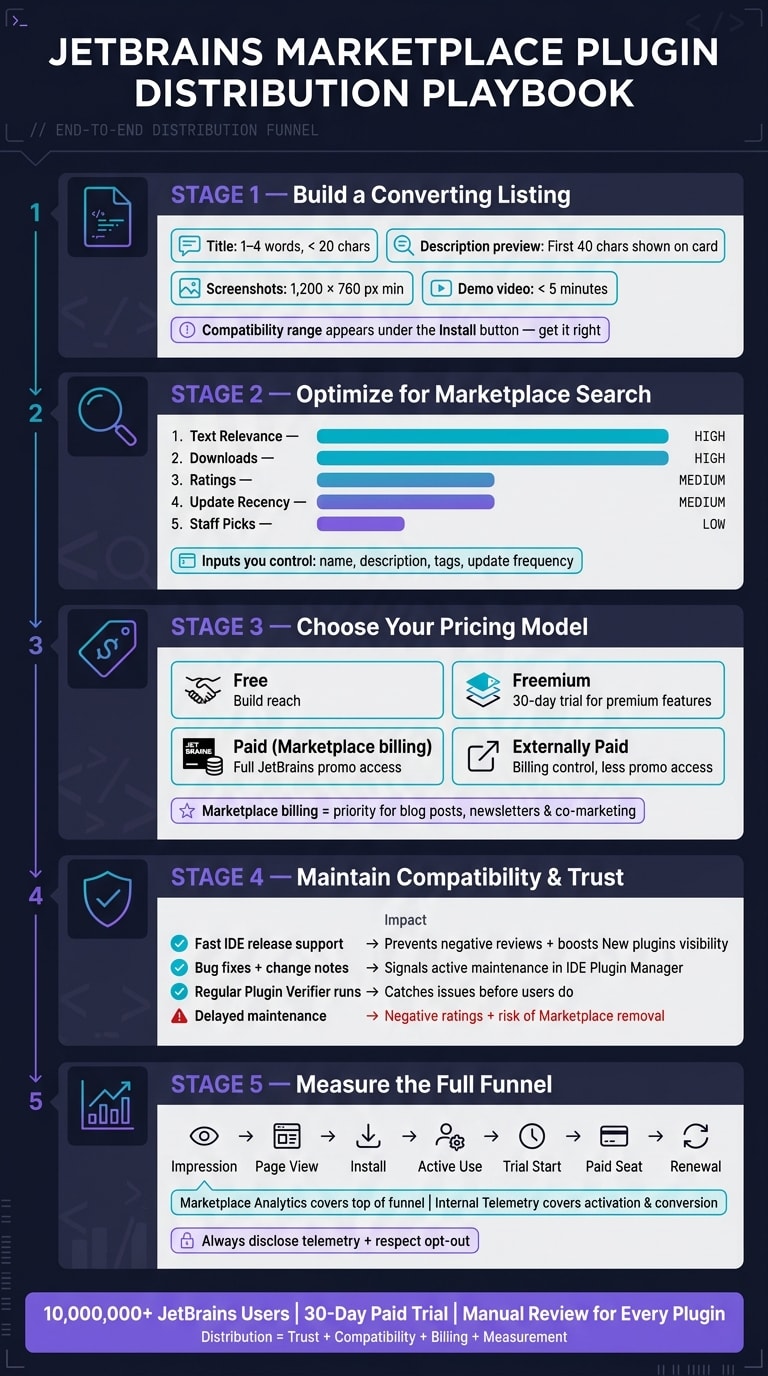
I’d sum it up like this: JetBrains Marketplace is built for serious IDE users, not casual add-on browsing. With 10 million+ users and manual review for every plugin and update, I need to treat distribution like a trust game first, then a conversion job second.
Here’s the short version:
- Trust comes first: users check update history, IDE compatibility, docs, change notes, and telemetry disclosure
- Listings drive installs: title, first 40 characters of the description, tags, screenshots, and supported IDE range all affect clicks
- Search visibility has clear inputs: text relevance, downloads, ratings, update timing, and Staff Pick status
- Pricing affects reach: free, freemium, paid, and external billing each change trials, checkout, and JetBrains promo access
- Maintenance affects growth: compatibility work, Plugin Verifier checks, and release notes help retention, ratings, and renewals
- Measurement needs two layers: Marketplace analytics for top-of-funnel data, plus in-product telemetry for activation and paid conversion
A few numbers stand out right away:
- 10,000,000+ JetBrains users
- 30-day trial for paid plugins
- 1,200 × 760 px suggested screenshot size
- Under 5 minutes for demo videos
- 400+ words for JetBrains Platform Blog guest posts
If I were building a launch plan, I’d keep it simple:
- Write a clear listing with plain metadata and screenshots from inside the IDE
- Set the right compatibility range in
plugin.xml - Pick a billing model based on whether I want JetBrains promo support or outside checkout control
- Ship updates often enough that the plugin looks active
- Track installs, activation, trial starts, paid seats, and renewals
This is the core idea of the article: on JetBrains Marketplace, distribution is not just promotion. It’s also review readiness, compatibility, billing setup, and user trust.
Build a Marketplace Listing That Converts Visitors Into Installs
Once trust signals are in place, the listing has one job: turn intent into installs. JetBrains users move fast, so every field needs to do real work.
Title, Tagline, Categories, and Supported IDE Range
Keep the plugin name short and plain. Aim for 1 to 4 words and, if you can, stay under 20 characters . Say what the plugin does without stuffing the title with filler like "Plugin", "JetBrains", "IntelliJ", or "Support" .
JetBrains shows the first 40 characters of your description on the Marketplace card . That means the first line has to stand on its own as a clear pitch. After that, use bullets to spell out the main value fast . Category tags also matter because JetBrains uses them as search filters .
Be just as careful with the supported IDE range in plugin.xml. That version range appears right under the install button, and people do notice it before they click . If compatibility looks off, installs can drop right there.
Screenshots, Video, Change Notes, and Real Plugin Examples
Your screenshots should show the plugin doing actual work inside the IDE, not sitting behind a logo slide. JetBrains recommends images that are at least 1,200 × 760 pixels and use the default IDE theme, which helps reduce friction for people scanning the page . GIFs are a good fit for short actions. And if the workflow makes more sense on screen than in text, a short demo under 5 minutes tends to work best .
Change notes do more than fill space. They show up in the Marketplace "What's new" area and inside the IDE Plugin Manager . Use <change-notes> for short release notes people can scan in seconds - bug fixes, performance gains, and new features .
Marketplace SEO: Ranking Signals That Affect Plugin Visibility
Good visuals help people decide. Metadata helps them find you in the first place.
Discovery comes from the fields you control: name, description, tags, downloads, ratings, and how fast you ship updates. JetBrains Marketplace search ranks plugins based on text relevance, downloads, ratings, and Staff Pick status .
| Ranking Signal | How It Works | Optimization Priority |
|---|---|---|
| Text Relevance | Matches in plugin ID, name, description, tags, and vendor name | High |
| Downloads | Popularity signal that boosts visibility | High |
| Ratings | Quality signal that boosts visibility | Medium |
| Update Recency | Affects placement in the "New" category | Medium |
| Staff Picks | Manual boost by JetBrains product teams | Low |
JetBrains also uses compatibility metadata to recommend plugins for matching project types . So when you set those declarations correctly in plugin.xml, that metadata becomes a quiet discovery path.
The main levers are simple: metadata, ratings, freshness, and compatibility.
Once the listing starts turning search traffic into installs, promotion and pricing shape how far the plugin can grow.
Promotion and Pricing Beyond the Listing Page
JetBrains-Owned Channels, Community Touchpoints, and Creator Demos
Once your listing starts converting, you can push beyond the Marketplace page and get in front of more people.
JetBrains gives vendors access to owned channels such as the JetBrains Platform Blog. The angle matters. Guest posts and interviews need to teach a workflow fix, not read like a straight plugin ad. Posts must be 400+ words and stay within three self-promotional links . JetBrains also shares approved posts and interviews on its official X account .
A smart move is to tighten the listing first, then use early proof - downloads, reviews, user interest - to back blog and co-marketing outreach. That matters because vendors using Marketplace billing get priority for blog posts and interviews. Plugins that use external checkout can't join some of those programs .
You can also use daily.dev for Business as an extra launch channel. It works well for awareness, especially if you want native placements aimed at people by seniority, language, and tool stack.
Free, Paid, and Trial Pricing Models for JetBrains Plugins
Promotion access and billing model go hand in hand. Put simply, Marketplace billing opens more JetBrains promotion options.
JetBrains supports free, freemium, and paid plugins. Each model does a different job:
- Free plugins help you build reach
- Freemium plugins lock premium features behind a paywall
- Paid plugins come with a 30-day trial
Free plugins can also add a donation link in the Marketplace admin panel. After a user leaves a 4-star or 5-star rating, JetBrains prompts them to donate .
Marketplace Billing, License Servers, and Revenue-Share Math
The billing setup shapes more than payments. It affects checkout, trial handling, and whether JetBrains will help promote the plugin.
Marketplace billing handles checkout, taxes, reseller sales, and commercial licensing. If you run external checkout, you keep billing control, but you get less access to JetBrains promotion . For any paid Marketplace plugin, you also need a Product Code that starts with P and includes 4–15 capital letters .
| Model | Buyer Profile | Support Complexity | Promotional Access |
|---|---|---|---|
| Free | Individual developers, open-source enthusiasts | Low | Visibility via Top Downloaded and Top Rated filters |
| Freemium | Professional users evaluating value | Moderate | 30-day trial for premium features; blog coverage is prioritized for commercial partners using Marketplace billing |
| Paid (Marketplace) | Enterprise and professional workflows | High | Access to JetBrains marketing instruments, including newsletters and lead nurturing |
| Externally Paid | Organizations with existing billing systems | High | Lower priority for JetBrains blog and interview programs |
One small setting can have a big effect: changing release-version or release-date resets active trial licenses. That can be useful when you roll out a major version launch .
Retention as a Growth Lever: Compatibility, Trust, and Measurement
Compatibility Maintenance as a Ranking and Trust Signal
For JetBrains plugins, maintenance is marketing. If your plugin stays compatible, users feel safe keeping it installed. If it doesn’t, trust drops fast, and churn usually follows when JetBrains releases a new IDE version.
That matters because compatibility status shows up right under the Buy or Get button. If you don’t update the compatibility range in plugin.xml, people on the latest IDE versions may assume the plugin is no longer supported .
Run Plugin Verifier against upcoming IDE builds so you catch breakage before users do . Then log each compatibility fix in <change-notes>. Those notes appear in the IDE Plugin Manager, so users can see that the plugin is being actively maintained .
Here’s how maintenance behavior shapes retention and visibility:
| Maintenance Behavior | Ratings & Retention Impact | Marketplace Visibility Impact |
|---|---|---|
| Fast support for new IDE releases | Helps prevent negative reviews and protects trust | Supports visibility in New plugins, where recent updates rank higher |
| Bug fixes and change notes | Signals active maintenance | Change notes are displayed in the IDE and Marketplace |
| Regular Plugin Verifier runs | Catches compatibility issues before users do | Helps maintain a professional listing |
| Delayed or no maintenance | Leads to negative comments and poor ratings that are hard to reverse | Can lower visibility and risk removal from the Marketplace |
Measuring the Funnel From Impression to Active User to Paid Seat
Track the full funnel: impression, view, install, active use, trial start, paid seat, and renewal. Marketplace analytics can show the early steps. Internal telemetry has to cover activation and conversion .
If you don’t instrument your plugin, you miss the questions that drive growth. Which source brings in users who become active fast? What share of trial starters turns into paid seats? How many subscriptions renew?
Marketplace data alone won’t answer that. You need a deliberate telemetry layer inside the plugin so you can connect Marketplace activity with actual product usage. Otherwise, installs look nice on paper, but you still won’t know what turns attention into revenue.
Plugin Telemetry That Respects Developer Privacy Expectations
JetBrains lets users opt out of individual statistics collection . So plugin vendors need to respect that expectation.
Don’t collect telemetry silently. Ask for clear consent, provide a plain Privacy Notice, and collect only the metrics you need: feature use, IDE version, errors, and performance .
It also helps to keep Marketplace analytics and internal telemetry in separate data pipelines. That makes it easier to keep attribution clean between acquisition sources and what users do inside the plugin .
Conclusion: A Practical Distribution Plan for JetBrains IDE Plugins
Taken together, these tactics make up the JetBrains distribution playbook. JetBrains Marketplace tends to reward plugins that feel professional: reliable, compatible, and simple to purchase. That should shape your positioning, pricing, and compatibility plan from day one.
The goal is simple: clear metadata, fast proof of value, and compatibility that looks current. Those signals matter because they affect both conversion and search visibility. And they only improve when you manage them on purpose.
Use JetBrains channels to get early launch reach. Then pick pricing and billing based on how much access to promotion and checkout control you want.
Compatibility updates and privacy-safe measurement aren't just maintenance tasks. In JetBrains Marketplace, they help drive installs and renewals. In plain terms, maintenance is part of marketing.
JetBrains sets a higher bar for review, compatibility, and monetization. So your distribution plan needs to be built on trust from the start. That gap is what separates simply publishing a plugin from building a distribution channel that lasts.
FAQs
How often should I update my plugin?
Update your plugin often. JetBrains Marketplace looks at recent updates when it ranks search results, so newer uploads can help more people find your plugin.
Steady maintenance matters for users too. When your plugin stays in sync with the latest IDE versions, it sends a clear trust signal and can help support better ratings.
For minor updates within a major version, keep the same release date and version parameters so everything stays consistent.
What pricing model fits my plugin best?
The right pricing model comes down to your growth goals and how you plan to make money.
You have four options: free, freemium, fully paid, and externally paid.
- Free: You can offer the product at no cost. This can also include donations if your goal is to build reputation.
- Freemium: Core features are free, and users pay for premium ones.
- Fully paid: Users need to buy the product to access any features.
- Externally paid: You handle subscriptions through your own licensing solution.
By default, both freemium and fully paid include a 30-day trial.
What should I track beyond installs?
Beyond total installs, track a few other numbers that tell the fuller story:
- Plugin page visits and referral sources
- Trial-to-paid conversion for paid plugins
- Ratings and reviews
- Search visibility for your keywords
- Engagement with your documentation and issue trackers
These metrics show how people find your listing, where they drop off, and how your marketplace ranking signals are moving over time.