
Your npm page can drive product growth - or waste attention. If I ship a JavaScript SDK, CLI, or library, I should treat npm as more than a code registry: it shapes discovery, first impressions, active use, and paid conversion.
Here’s the short version:
- Downloads alone can mislead. Publish-day spikes often come from bots, mirrors, and CI, so I should watch the steadier baseline between releases.
- Metadata affects discovery. Package name, description, keywords, repo links, and README preview all help people - and AI coding tools - choose a package.
- The README affects installs. A one-line value statement, install command, and copy-paste example should appear immediately.
- Release habits affect trust. Clean semver, changelogs, prerelease tags, and deprecation notices help teams feel safe upgrading.
- Growth happens outside npm too. GitHub activity, curated lists, integration pages, JSR mirrors, and launch posts can bring steady traffic.
- Business impact matters most. For devtools, free-to-paid conversion often lands around 2% to 6%, so I should track installs, activation, sign-ups, and team invites - not just download totals.
- Security matters. Scoped packages, Trusted Publishing, provenance, and signature checks help reduce supply-chain risk.
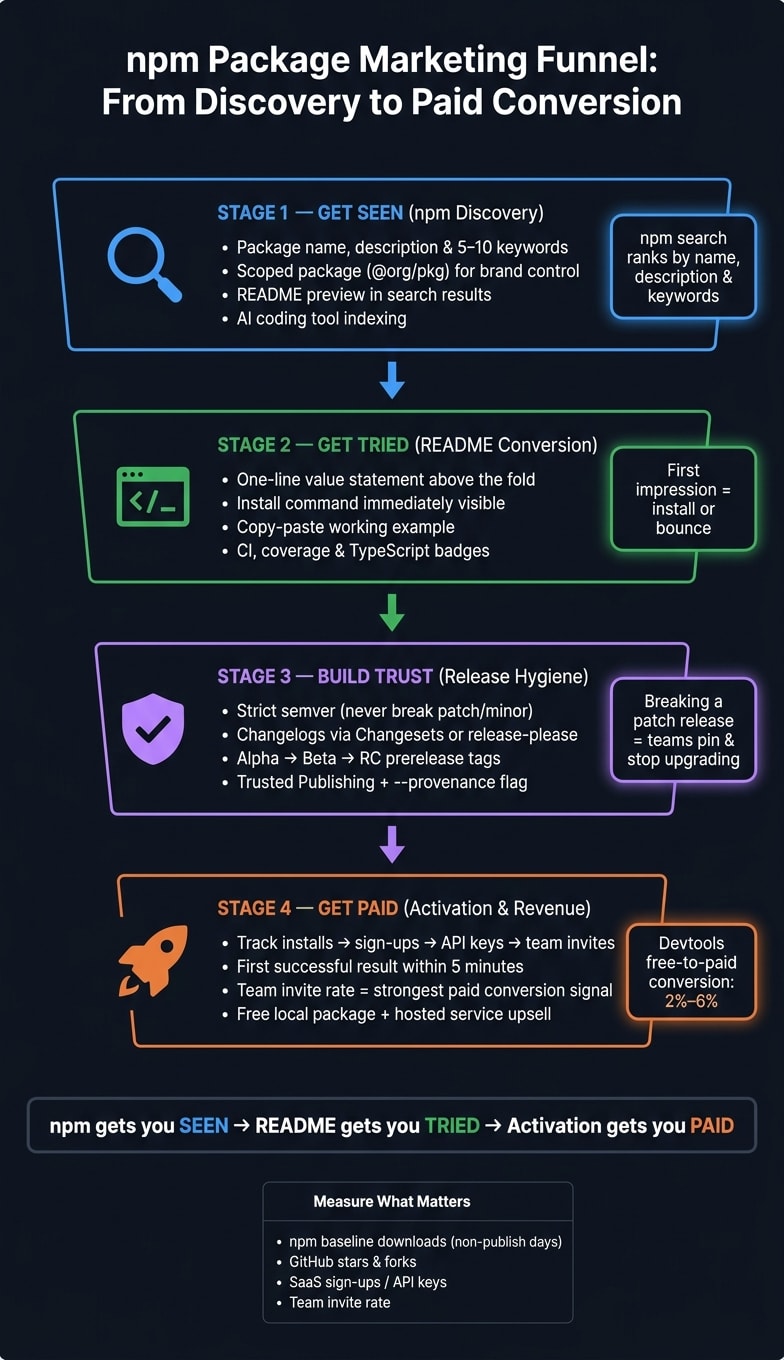
A quick way to think about it: npm gets me seen, the README gets me tried, and product activation gets me paid.
| Focus area | What I should look at | Why it matters |
|---|---|---|
| Discovery | Name, keywords, description, README preview | Helps search and AI tool selection |
| Conversion | Install snippet, fast-start example, badge signals | Helps users reach a first result fast |
| Trust | Semver, changelog, deprecations, provenance | Lowers upgrade fear and review friction |
| Growth | GitHub, launch sites, ecosystem pages | Brings traffic from outside npm |
| Revenue | Sign-ups, API keys, team invites, active use | Connects package usage to pipeline |
If I want npm to help grow a product, I need to manage it like a go-to-market channel - not just a place to publish files.
Use npm itself as a marketing surface
Your npm listing either wins installs or burns impressions. Start there first: search visibility, page copy, and how you read download data.
Read download data and npm trends without misleading yourself
Downloads on publish day often jump because of crawlers and mirrors. Then they fall to a lower baseline. If you want a better read on adoption, look at the steady number between releases.
That baseline tells you more than the launch spike ever will. And if it’s soft, the fastest thing to fix is usually the listing itself.
Optimize package metadata for search visibility and clicks
npm search looks at your package name, description, keywords, repository, homepage, and README preview . Use 5 to 10 relevant keywords. Then write one clear description sentence.
For example:
"Validate TypeScript schemas at runtime with zero dependencies".
A choice that affects all of this early on is whether to publish under a scope. Here’s how the tradeoffs usually look :
| Feature | Scoped (@org/pkg) |
Unscoped (pkg) |
|---|---|---|
| Discoverability | Own namespace; easier to find open names | Heavy competition; many common names are already taken |
| Brand control | Signals the official package | Harder to tell which package is official |
| Security | Lowers typosquatting risk inside the namespace | More exposed to typosquatting variants |
| Default visibility | Private; needs --access public on first publish |
Public by default |
| Best fit | Companies, teams, professional toolkits | Small utilities or personal projects |
Think of these fields as part of every release, not something you set once and forget.
Use npm CLI commands to keep metadata accurate
Metadata gets stale. Check it on every release.
npm view <package> shows how your package appears in the registry. npm search <terms> lets you test keyword ranking. If anything looks wrong, npm pkg set can update fields like the description or repository links in package.json without a full republish.
For scoped packages, npm access public makes the first publish visible. And npm audit signatures checks registry signatures and provenance .
Bake these checks into each release. Once the listing gets the click, the README needs to do the rest.
Turn the README and release flow into conversion assets
Structure the README for first-click conversion
If npm metadata earns the click, the README has to finish the job.
Start with the parts a developer wants right away: a one-line description, the install command, and a minimal working example. Put all of that above the fold so someone can understand the package and try it in seconds . Lead with install, then show the smallest copy-pasteable example that actually runs.
After that quick start, add 2–3 sentences that explain the exact problem you solve and why your approach is better. Then add badges for CI status, code coverage, TypeScript support, and npm version. Those badges act like quick trust signals. They show the package is maintained and used with care . If you ship TypeScript types, make that obvious with built-in types or a types badge.
Use semver, changelogs, and deprecation notices to build trust
Every release either builds trust or chips away at it. If you don't follow semver, teams will pin versions and stop upgrading .
The rule is simple: never ship a breaking change in a patch or minor release. Once that happens, teams start treating your package like a gamble. Some companies will even blocklist it . Here's the right way to match the message to the release type :
| Release Type | Risk Level | Communication Depth |
|---|---|---|
| Patch (1.0.x) | Low | Minimal - bug fixes only |
| Minor (1.x.0) | Medium | Moderate - new features, no breaks |
| Major (x.0.0) | High | High - breaking changes and migration guide |
Before a major release, use alpha, beta, and rc prerelease tags. That gives power users time to test the API before it becomes something teams depend on. You can also use Changesets or release-please to generate changelogs from conventional commits .
If a package or API path is going away, use npm deprecate and include a clear migration message instead of unpublishing. Unpublishing can break dependency chains for everyone downstream, and npm only allows it within 72 hours of the first publish .
Handle peer dependencies and docs sync carefully
Where a dependency lives in package.json sends a message. Shared runtime libraries like React belong in peerDependencies, not dependencies . If you bundle them directly, you can bloat installs and trigger version conflicts. Keeping peer deps explicit lets users bring their own copy of the shared library, which keeps your package lean.
Stale docs can shut down adoption fast. Old install steps or broken quick starts make people lose confidence almost immediately . Update the docs with every release, and link to CHANGELOG.md or GitHub Releases so users can see what changed .
Once the README turns a click into an install, the next step is distribution beyond npm.
Expand distribution and measure real adoption
Grow outside npm with GitHub, lists, integrations, and mirrors
Once your package page is in good shape, the next step is simple: show up where developers already spend time.
Publishing on npm is just the starting line. If you want steady adoption, people need to find your package outside the registry too.
Your GitHub repo is part of the sales page, whether you planned it that way or not. Stars, forks, and issue activity give experienced developers early signals when they're sizing up a package. A repo that looks active and cared for backs up the trust built in the README. It’s all part of the same path from discovery to install.
Outside GitHub, Echo JS is one of the best places to submit JavaScript tools. In March 2026, the creator of textlens found that one Echo JS submission brought in 18 unique visitors and 5 GitHub stars in two days . Lead with the launch story when you post it. Narrative posts often do better than generic tutorials.
Curated awesome lists and ecosystem integration pages can bring in slower, steadier discovery over time. And if your package has a JSR mirror, treat that as another place people can find and install it across registries.
For launches or major releases, daily.dev for Business can get in-feed ads in front of developers fast.
None of this matters on its own, though. Distribution only counts if it turns into repeat use, stars, sign-ups, or API traffic.
Measure adoption beyond downloads
After you expand distribution, you need to separate actual usage from registry noise.
A good rule: look at non-publish days if you want a cleaner read on demand. Release-day spikes are often padded by bots, CI, and mirrors.
| Metric | Pros | Limitations | Best Reporting Use |
|---|---|---|---|
| npm Downloads | Easy to track; shows general growth trends | Heavily inflated by bots, CI/CD pipelines, and mirrors | High-level momentum and vanity social proof |
| Active Projects (GitHub Signals) | High signal of intent; shows real integration and community health | Only captures public repositories; doesn't show private usage | Assessing long-term retention and stickiness |
| SaaS Sign-ups / API Keys | Direct link to business outcomes and revenue | High friction; many developers prefer anonymous or local-only usage | Measuring product-led growth and revenue pipeline |
For CLI tools and SDKs, opt-in anonymous telemetry can help you see active use more clearly, without leaning too hard on download counts.
Connect package usage to pipeline and revenue
Once installs turn into active use, trace what happens next. The goal is to connect package adoption to paid accounts.
One strong setup is a free local package paired with a hosted service for teams that need more scale. The package handles the hello-world moment. The service picks up from there.
Activation speed matters here more than almost anything else. For devtools, the key window is the first 5 minutes - can a developer copy-paste your example, run it, and get a result ?
Track the path from install to first successful use. Team invite rate is the single strongest predictor of paid conversion for developer platforms , so it’s smart to instrument for that early.
Avoid trust-killing mistakes and build a defensible npm growth model
Avoid download manipulation, dependency confusion, and supply-chain shortcuts
Once you can measure adoption, the next job is protecting trust. That means avoiding the mistakes that make technical buyers back away fast.
If people catch you gaming download counts, or your package fails a security review, the damage is hard to undo. Fake installs don't just look bad. They also mess up your reporting and push you toward bad growth calls.
Use a scoped package name to cut down typosquatting and dependency-confusion risk.
Use Trusted Publishing via OIDC, publish with --provenance, and verify releases with npm audit signatures. This setup lets GitHub Actions authenticate straight to npm without storing a long-lived token. Users can then verify the package hasn't been tampered with .
If a version ships broken, deprecate it and release a patch with the fix.
A simple operating checklist for ongoing package growth
Turn these checks into a set release routine.
| Cadence | Task |
|---|---|
| Every release | Run npm pack --dry-run to check published files; publish with --provenance; update CHANGELOG.md with Changesets |
| Monthly | Audit package.json metadata (exports map and engines field); check Bundlephobia for size regressions; review GitHub referrer data and star velocity; pull conversion metrics: installs → sign-ups → team invites |
| Quarterly | Rotate remaining access tokens every 90 days if you're not using OIDC; review exports and published-file hygiene |
FAQs
How long should I wait before judging npm traction?
Don’t judge npm traction in the first few weeks.
Those early numbers can be misleading. Registry crawlers, automated mirrors, and bot traffic often inflate download counts, and it’s common to see downloads fall by 90%+ once the launch buzz wears off.
What should you watch instead? Look for signs that point to actual interest from people:
- Google search traffic to your repository
- A steady daily download baseline that strips out publish-day spikes
- GitHub traffic referrers that show where people are finding you
That tells you a lot more than a big launch-week number ever will.
What should I put at the top of my README?
This package helps developers get from install to first success fast. It removes guesswork by showing the main problem it solves in plain English, then walking straight into setup and a working example. That matters because most people decide whether a tool is worth using in the first few minutes. A short, accurate Hello World lowers friction and helps both people and machines understand what your package does.
Add install steps that people can copy without editing. Show the exact command, note any version or runtime requirements, and mention any setup needed before the example will run. Then include a small, working example for the core use case. Keep it focused: one file, one job, one clear result.
Aim for a Hello World that works in five minutes or less. Use current syntax, keep the code technically correct, and explain just enough so developers, search crawlers, and LLMs can parse the page and understand the tool.
How do I tie npm installs to paid conversion?
Treat your package as the entry point to a managed SaaS product. Keep the open-source package free. Then sell a hosted, usage-based, or enterprise API to teams that want the same outcome without running the infrastructure themselves.
Don’t put installation behind forms or signups. Let developers get the code running in minutes. Offer a free tier so they can test it and see the value fast. And for commerce use cases, support x402 or similar machine-readable marketplaces so in-tool payments feel simple instead of clunky.