
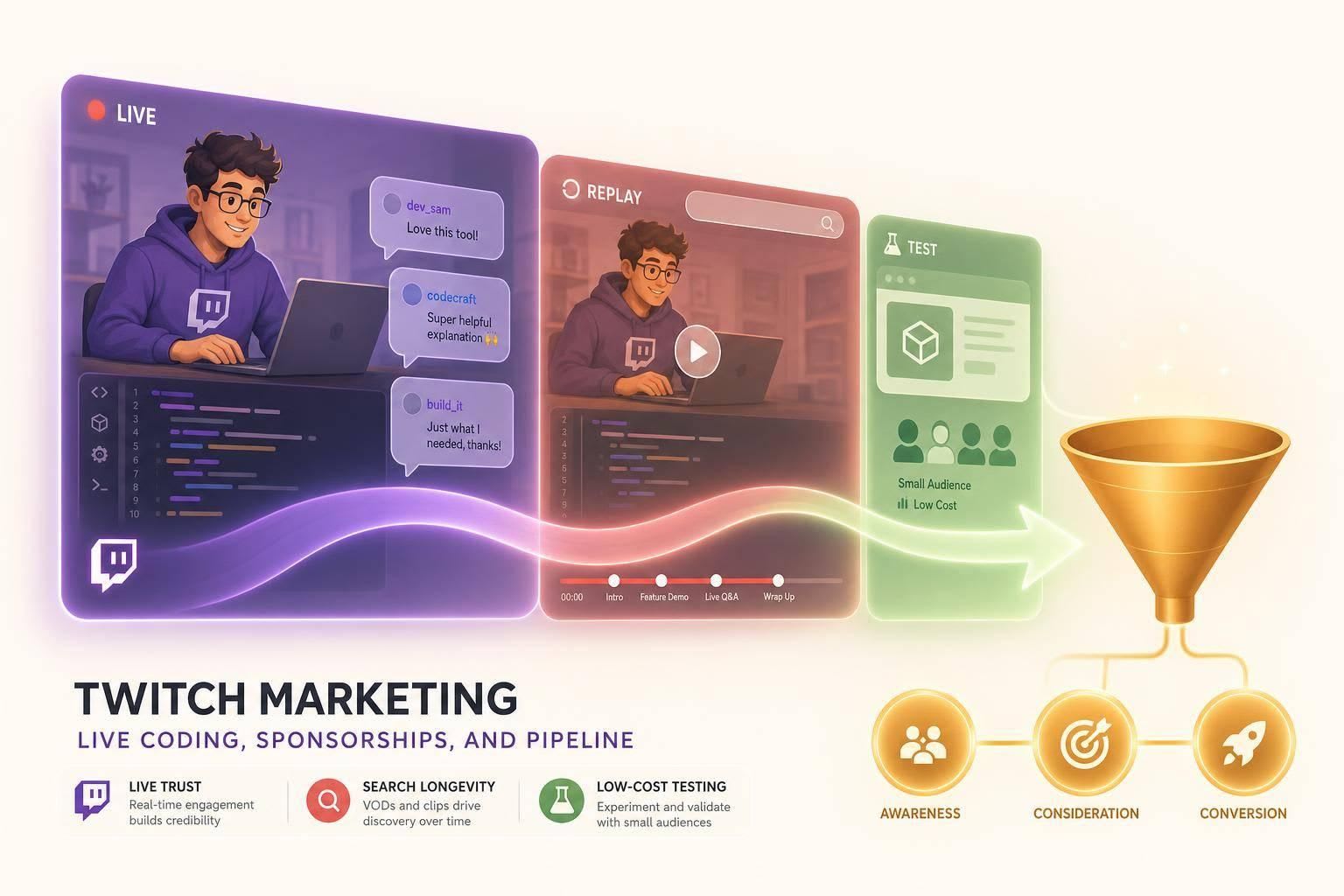
If I had to cut this down to one answer, it’s this: Twitch is best for live product trust, YouTube Live is best for search and long-tail views, and Kick is mostly a low-cost test.
If you sell a developer tool, I’d judge these platforms on four things:
- Developer audience quality
- How long the content keeps working
- How well sponsorships fit live coding
- How easy it is to tie streams to signups
Here’s the short version:
- Twitch works when you want people to watch the tool being used live and ask questions in chat.
- YouTube Live works when you want the stream to keep pulling in traffic through search after it ends.
- Kick can be cheaper, but the dev audience is smaller and brand risk is higher.
- On Twitch, ACV matters more than follower count.
- For live coding, product use inside the workflow beats a scripted ad read.
- Twitch results often show up in a 24–72 hour window, so promo codes + UTMs are the best basic setup.
- Twitch is often a weak fit for director-level buyers or long enterprise sales cycles.
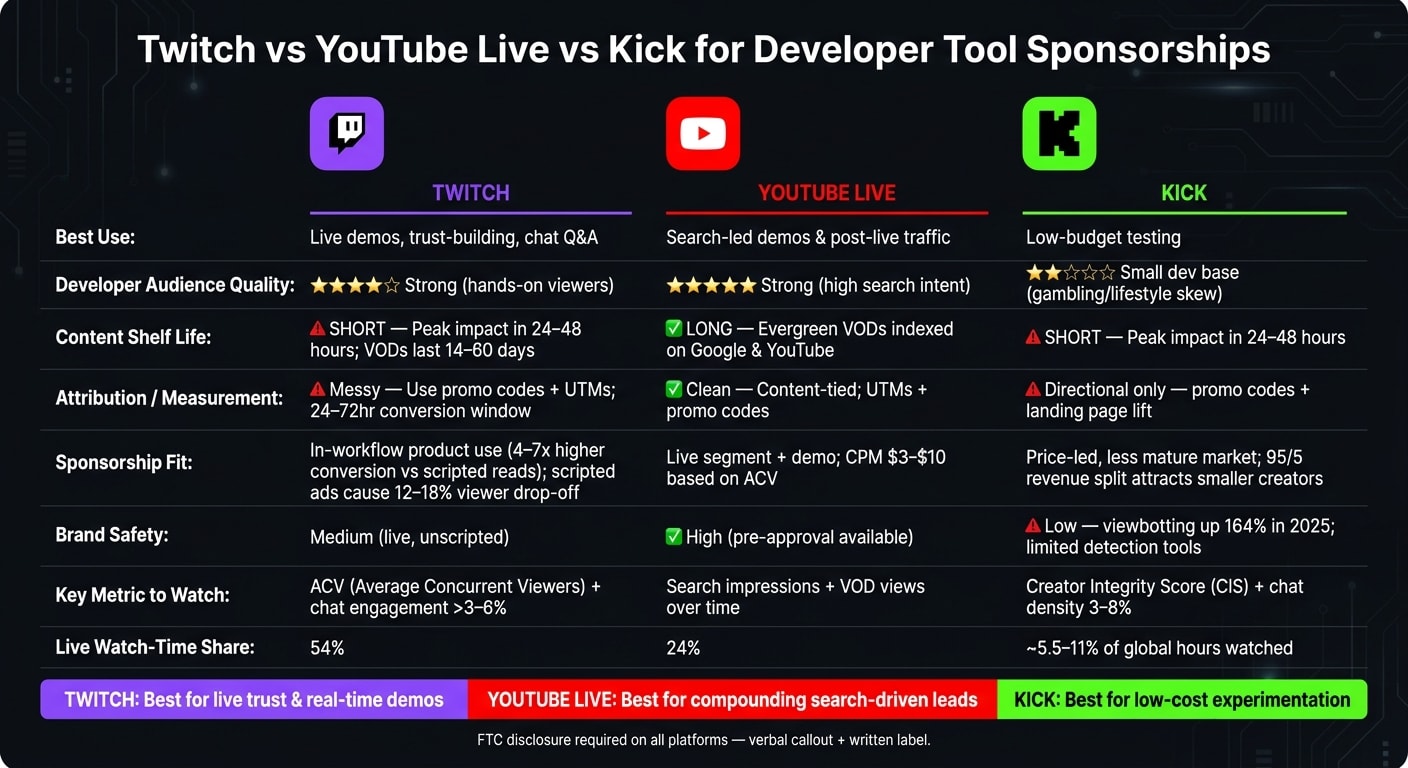
Quick Comparison
| Platform | Best use | Shelf life | Dev audience | Measurement |
|---|---|---|---|---|
| Twitch | Live demos, trust, chat Q&A | Short; most impact in 24–48 hours | Stronger for hands-on viewers | Messier; use codes + UTMs |
| YouTube Live | Search-led demos and post-live traffic | Long; VOD keeps working | Strong intent from search | Cleaner; tied to video |
| Kick | Low-budget testing | Short | Smaller dev base | Directional only |
Bottom line: if your tool needs to be seen in action, Twitch can work well. If you want compounding views from search, YouTube Live is the better pick. If you just want to test at a lower spend, Kick is an option - but I’d be more careful with creator checks and brand review.
That’s the frame I’d use before putting any budget into live coding sponsorships.
1. Twitch
Developer Audience Maturity
Twitch works best when a developer tool needs live trust, real-time demos, and a short path to conversion. Its Software & Game Development category pulls in developers who are actively learning and sizing up tools, not just scrolling by . People show up to watch someone build something for real.
As of 2026, Twitch reports more than 35 million daily active users . That scale makes live coding a strong match for hands-on product demos.
On Twitch, follower count doesn't tell you much. A better signal is Average Concurrent Viewers (ACV), which shows how many people are watching live at the same time . Put more weight on ACV than follower totals. Live audience size matters more than old follows that never come back.
Chat activity is another fast gut-check. Use chat activity above 3% of viewers as a baseline, and above 6% as strong . If chat is moving, the audience is paying attention.
That makes Twitch strongest for live trust, not passive reach.
Discovery and Shelf-Life
Twitch has one big structural problem: discovery. Search on Twitch is weak, and streams don't carry much long-tail SEO value . Most of the impact lands in the first 24–48 hours after a stream .
You can stretch that window by turning VODs into highlights or tutorial clips . Even so, Twitch is a better fit for short, measurable conversion spikes than for awareness that keeps working on its own. Compared with YouTube Live, Twitch wins on live attention but loses on lasting discovery.
That tradeoff is what sets Twitch apart from the other live platforms covered next.
Sponsorship Fit
On Twitch, the best sponsorships feel like product use, not rented ad space.
Scripted ad reads can hurt performance. They can lead to a 12%–18% viewer drop-off, a 34% drop in chat engagement, and 67% of viewers say they mentally tune out during them . That's a pretty clear signal.
What works better is natural, in-workflow use. Your tool should show up inside the streamer's real workflow and get used while they code, debug, or build. Think less "here's my sponsor" and more "I need this tool right now."
When a creator reaches for your product because it solves a real problem on stream, organic product mentions drive 4–7x higher conversion rates than scripted reads . Scripted ads buy a moment. In-workflow use builds trust.
You'll also need clear on-stream disclosure and a matching note in the description to meet FTC and platform rules.
Pipeline Measurability
Once the creator fit is there, measurement becomes the next hurdle.
Attribution on Twitch is real, but messy. A viewer might hear a promo code early, keep watching, and redeem it hours later after seeing the tool used a few more times. That's why unique promo codes often beat tracking links on Twitch; people remember them during long streams .
Extend your conversion reporting window to at least 24–72 hours after the stream to catch that full tail .
Treat Twitch attribution as directional. If traffic lifts during the stream and shortly after it ends, the sponsorship did its job.
A simple setup helps:
- Pair promo codes with UTMs
- Watch site sessions during the live window against your baseline
- Track chat velocity as an attention signal
Taken together, those signals show whether the stream drove signups.
2. YouTube Live
Developer Audience Maturity
Where Twitch wins on live attention, YouTube wins on search intent. People often land on YouTube because they need help with a specific issue, tutorial, or live demo. That means YouTube tends to pull in developers with stronger intent, not just viewers scrolling through a live directory.
For teams trying to reach problem-aware developers, that difference matters. You’re not only showing up where people watch. You’re showing up where they look for answers.
Discovery and Shelf-Life
YouTube VODs stay up by default and are indexed by both YouTube and Google search . So a live coding session doesn’t stop working when the stream ends. It can keep bringing in views and leads months later.
That longer shelf life changes how sponsorship works. Instead of getting value from a single live window, the same stream can keep producing results over time. A searchable VOD can keep driving developer leads long after the broadcast wraps.
Sponsorship Fit
YouTube gives brands more control before a stream goes live, which helps when legal or brand teams need to review content ahead of time. For developer tools, the format that tends to work best is a live segment plus demo. A creator can walk through real code, compare tools, or review a workflow on screen.
That matters because technical proof needs room to land. On YouTube, there’s space for that kind of hands-on explanation, and it works at a CPM of $3–$10 based on ACV .
Pipeline Measurability
Attribution is cleaner on YouTube than on Twitch because conversions connect more directly to a searchable video asset . Use UTM links to track immediate intent, and pair them with promo codes to pick up longer-tail conversions.
The main question stays simple: did the stream drive traffic, signups, and branded search lift?
| Feature | YouTube Live | Twitch |
|---|---|---|
| VOD Shelf-Life | Permanent (evergreen) | 14–60 days |
| Discovery | Search-indexed (Google/YouTube) | Browse & category pages |
| Attribution | Clean (content-tied) | Distributed (time-based) |
| Brand Control | High (pre-approval) | Medium (live, unscripted) |
| Live watch-time share | 24% | 54% |
Kick shifts the comparison from search depth to creator economics and audience quality.
3. Kick
Developer Audience Maturity
Kick still leans heavily toward gambling, IRL, and personality-driven streams. So for developer tools, the live coding crowd is pretty small. The platform accounted for about 5.5% of global hours watched in early 2026, with later estimates closer to 11% . Even so, its pool of developer creators is still much smaller than Twitch’s .
If you sell to working engineers or serve education-focused use cases, Kick is usually a weak match. In that case, who you sponsor matters more than how many people they reach.
Discovery and Shelf-Life
Kick relies mostly on directory-based discovery, and organic discovery is weak . Streams also tend to fade fast, with most of the value showing up in the first 24–48 hours .
That changes how you should look at results. Big impression counts can look nice on paper, but on Kick, tracking conversions matters more.
Sponsorship Fit
Because the creator pool is smaller, the sponsorship market tends to be more price-led and less tested. Kick’s 95/5 split helps pull in smaller creators, but the sponsorship side is still less mature .
The bigger issue is brand safety. Viewbotting jumped 164% across streaming platforms in 2025, and Kick’s detection tools lag behind Twitch’s . Before you sponsor a Kick creator, check third-party verification tools like Creator Integrity Scores (CIS). It also helps to look at chat density in the 3%–8% range as a rough sign that the audience is real and paying attention .
Pipeline Measurability
Attribution on Kick is directional, not exact . A simple setup usually works best:
- Use promo codes for long-stream recall
- Use UTMs for immediate clicks
- Check landing-page lift for delayed signups
| Feature | Kick |
|---|---|
| Market Share | ~5.5% in early 2026, with later estimates near 11% |
| Discoverability | Directory-based; weak organic discovery |
| Audience Maturity | Low; gambling/lifestyle skew |
| VOD Shelf-Life | Short-lived; strongest impact in the first 24–48 hours |
| Brand Safety | Limited tools; higher risk |
How Live Coding Sponsorships Convert
Live coding works because people get to watch the actual work. They see the choices, the mistakes, the debugging, and the fix. And when a tool saves time on stream, that moment lands harder than a polished ad ever could. That kind of visibility makes live coding especially strong for tool evaluation .
Trust gets even stronger when objections are handled on the spot. Chat asks the hard questions. The creator answers in real time. That’s why integrated demos often beat scripted reads: viewers don’t just hear claims, they watch the product hold up under pressure. Authentically integrated products drive 4–7x higher conversion rates than traditional sponsorships .
There’s another piece here: repetition. A single stream rarely does all the work. Repeat streams and VODs create multiple chances for someone to notice, click, and come back within a 7–30 day window. VODs usually add another 10–30% of the original live audience in the days after the stream, which keeps post-stream conversion moving after the live session ends .
Start with 30-day ACV. Then look at chat density. A 3%–8% range is healthy. After that, check stack alignment. If a creator already works in your language ecosystem or in a nearby workflow, the integration will usually feel more natural.
Once creator fit is clear, format and budget shape how far the sponsorship can go.
| Sponsorship Format | Integration Depth | Typical U.S. Cost Range | Funnel Impact | Execution Risk | Best-Fit Budget Tier |
|---|---|---|---|---|---|
| Shoutout / Mention | Low | $100–$500 | Awareness | Low | $0–$5,000 |
Chatbot !command + Panel Link |
Low | $50–$300 | Traffic / Lead Gen | Low | $0–$5,000 |
| Short Integrated Segment (10 min) | Medium | $100–$5,000 | Consideration | Low–Medium | $0–$5,000 |
| Watch-along / Live Tool Review | Medium–High | $500–$10,000 | Consideration / Trust | Medium | $0–$25,000 |
| Hackathon Co-stream | High | $5,000–$25,000+ | Awareness / Acquisition | High | $5,000–$25,000+ |
| Dedicated Sponsored Stream | High | $500–$25,000+ | Awareness / Acquisition | High | $5,000–$25,000+ |
| Multi-week Retainer Campaign | High | $800–$60,000+ | Retention / Trust | Medium | $25,000+ |
If the creator already publishes build-in-public content, treat that as a strong trust signal. Buyers comparing tools tend to put more weight on creators who show their process in public .
Budget changes the playbook quite a bit. With $0–$5,000, nano and micro creators with 10–500 ACV usually give you the most room to test. You can spread that money across a few streamers or put it into one deeper segment with a mid-tier creator. In the $5,000–$25,000 range, macro-tier creators and monthly retainers start to make sense, and repeated exposure begins to stack. At $25,000+, long-term exclusivity deals and community challenge formats come into play .
The strongest campaigns give creators enough material to riff, but not so much that they sound like they’re reading a cue card. Share talking points, demo access, and trial or gift codes. Then step back. Use a promo code, not just a link, because Twitch impact often shows up hours after the stream, and a code is easier to remember . It also helps to pair that with a !tool command, so viewers can jump to the signup page whenever they want without breaking the stream’s flow.
Pros and Cons by Platform
Use Twitch for live trust, YouTube Live for search-driven compounding, and Kick for lower-cost testing. The table below sums up the tradeoffs.
Twitch is often the best pick when your tool needs to be seen in action. People can watch it work, ask questions on the spot, and get a feel for it in a way a polished ad just can't match. The downside is control. Delivery is unscripted, the content fades fast, and attribution tends to bunch up in a tight window right after the stream ends .
YouTube Live works more like a slow burn. It keeps pulling in viewers through search, which makes it a strong fit for complex, considered-purchase tools where buyers want a deep demo before they commit . The tradeoff is simple: it usually doesn't create the same live jolt as Twitch .
Kick is the budget test option. It can cost less, which makes it useful for early experiments, but that lower price comes with more risk. The developer audience is smaller, and brand safety is weaker .
Compliance still matters no matter which platform you choose. The best channel on paper can still fall apart in legal review if disclosure is handled poorly. The U.S. FTC requires paid content to be clearly labeled on every platform: a verbal callout plus a written label on Twitch, and the built-in "Paid Promotion" tag plus a verbal mention on YouTube .
| Platform | Main Advantages | Main Drawbacks | Compliance Considerations |
|---|---|---|---|
| Twitch | Live proof; parasocial trust; long attention window | Ephemeral content; messier attribution; low brand control | Verbal callout + title/description disclosure required |
| YouTube Live | Long-tail SEO; compounds through search; high search intent | Less real-time energy; less able to create a live spike | Built-in "Paid Promotion" tag + verbal mention required |
| Kick | Lower creator rates; fast-growing audience | Higher viewbotting risk; limited brand safety tools; gambling-skewed content | Less standardized; manual disclosure verification required |
Conclusion
Twitch works best when buyers need to see the tool in action. But that only lands if the streamer can use the product in a way that feels natural, not forced.
That trust falls apart when creators lose real freedom. Scripted delivery weakens credibility .
With that in mind, picking a platform is less about reach and more about the job you need it to do. Twitch builds live trust, YouTube Live keeps working through search, and Kick is mostly a lower-cost test channel .
Twitch isn't the best fit when the buyer sits at the director level or when the product relies on a long enterprise sales cycle.
The best mix uses Twitch for trust, then adds another channel for steady reach. Pair Twitch with an always-on awareness channel like daily.dev for Business so you can stay in front of developers between streams. A steady flow of leads usually comes from seeing your brand more than once, not from one live spike.
FAQs
How do I choose the right Twitch creator for my developer tool?
Prioritize engagement over follower count. A steady, loyal audience matters more than a big top-line number. Check whether average concurrent viewers have held steady or moved up over the last 30 days. In many cases, smaller channels with active chat deliver better ROI than larger channels with passive audiences.
Fit matters too. Look at the creator’s tech stack, content quality, and audience. Choose creators who already use your tool, or at least clearly understand it. And instead of defaulting to one-off, heavily scripted promos, lean toward long-term partnerships that feel natural on their channel.
What should I give a streamer before a live coding sponsorship?
Provide the basics they need to show your product in a natural way during the stream:
- clear talking points
- demo accounts
- unique gift or promo codes
Skip the strict script. Let them use the product in their normal coding workflow so their reactions and examples feel natural. That goes a long way with audience trust.
How long should I wait to measure Twitch signup impact?
Don’t judge Twitch signup impact by immediate clicks alone. A lot of the credit shows up later, often across several touchpoints, so conversions can happen hours after someone first sees the stream.
Use a longer attribution window, especially when viewers come back later or remember a promo code after seeing it on recurring streams. Twitch’s community-driven, parasocial dynamic often leads people to act later instead of signing up on the spot.