

Developer marketing has its own language, and if you don’t know the terms, it’s hard to plan campaigns, read reports, or work with DevRel and product teams. This glossary boils the field down to 40 terms that shape how teams reach developers, measure results, and get found in search and AI tools.
Here’s the short version:
- Developers often have major buying influence: 87% of developers in leadership roles affect tech purchases.
- Peer input matters more than broad brand messaging: about 92% of buyers trust peer recommendations more.
- That’s why developer marketing leans on product proof, docs, onboarding, community, and usage signals more than generic lead gen.
If I had to sum up the whole article in one line, it would be this: learn the terms that map to roles, growth models, channels, metrics, and discovery, and the rest of developer marketing gets much easier to follow.
The glossary covers:
- Roles and team lines: developer marketing, DevRel, community management, CLG, B2D, developer advocate, product marketing, DX
- Growth models and funnel terms: PLG, DLG, SLG, PQL, MQL, self-serve, freemium, trial, sandbox, demo, activation event
- Channel language: native ads, display ads, in-feed ads, sponsored content, dark social, dark funnel, read-floor, content syndication
- Measurement and pricing: impressions, CTR, CVR, CPM, CPC, CPE, CPA, ROAS, attribution window, lift tests, cohort analysis
- Search and AI discovery: AEO, GEO, search intent, top vs. bottom of funnel content, evergreen content, topic clusters, technical SEO
Quick takeaway: if you’re new to this space, focus first on who owns what, how growth happens, and which metrics show actual product use. For many dev-focused teams, a PQL or an activation event says more than an email open ever will.
| Area | What it helps you understand | Examples |
|---|---|---|
| Roles | Who does the work | DevRel, community, developer marketing, DX |
| Growth | How users move from interest to use | PLG, DLG, SLG, freemium, self-serve |
| Channels | Where developers find you | native ads, syndication, dark social |
| Metrics | How spend and results are tracked | CPM, CPC, CPA, ROAS, CTR |
| Discovery | How content gets found | AEO, GEO, search intent, topic clusters |
So before I get into the main body, the big point is simple: this is a field where evaluation is often the funnel, and these terms describe the pieces of that process in plain language.
1. Roles and disciplines in the developer ecosystem
Terms 1–9: developer marketing, DevRel, DevRel vs. developer marketing, community management, CLG, B2D, technical evangelist or developer advocate, product marketing vs. developer marketing, DX
Developer marketing often overlaps with DevRel, community, and product marketing. That’s why clear role definitions matter. It helps to start with the roles that shape technical evaluation, because those roles decide how developers are reached and how they make up their minds.
Term 1 - Developer marketing is the practice of reaching software developers, earning their trust, and converting them into users and buyers through channels that respect technical evaluation . With developers, evaluation is often the funnel .
Term 2 - DevRel (Developer Relations) is the function focused on community trust and education. Knowing where DevRel stops and developer marketing starts helps teams avoid duplicate work and blind spots.
Term 3 - DevRel vs. developer marketing is where many new hires get tripped up. Developer marketing focuses on reaching the right developers and helping them evaluate the product. DevRel focuses on community trust and education.
Once ownership is clear, the next issue is simpler: who keeps the community running day to day?
Term 4 - Community management keeps a developer community active, moderated, and responsive. It covers the day-to-day work - discussions, questions, and participation - that keeps a community useful between larger DevRel or marketing efforts.
Term 5 - CLG (Community-Led Growth) is a growth model where the community drives acquisition through peer trust and shared knowledge. For developer brands, CLG works well because developers tend to trust peers more than brand messaging.
Term 6 - B2D (Business-to-Developer) describes a go-to-market motion where developers are the main users or decision-makers. Because developers evaluate before they adopt, B2D campaigns are built to make technical evaluation easier and faster .
Term 7 - Technical evangelist or developer advocate is a distinction that matters in campaign briefs. A technical evangelist is usually marketing-led and focused on public education and awareness. A developer advocate connects the community and product teams in both directions and bridges developer feedback and the product team .
Term 8 - Product marketing vs. developer marketing comes down to audience and output. Product marketing owns positioning and launch messaging across audiences. Developer marketing turns that positioning into developer-specific proof, content, and campaigns .
After acquisition, the next thing that matters is whether interest turns into adoption.
Term 9 - DX (Developer Experience) is the quality of the technical environment developers encounter after first contact with a product. DX includes docs, SDKs, onboarding, and workflows that shape the experience after that first touchpoint .
2. Growth models, channels, and distribution concepts
Terms 10–18: PLG, DLG, SLG, PQL, MQL, self-serve funnel, freemium model, trial vs. sandbox vs. demo environment, activation event
Once roles are clear, the next step is simple: how does the company grow? That choice changes almost everything. It affects what you track, where you spend, and what your message sounds like. It also shapes which channels and offers deserve attention.
Term 10 - PLG (Product-Led Growth) is a bottom-up motion where the product drives acquisition and expansion. The big aim is reducing time to first value - the time it takes a developer to get to a working result. In a PLG motion, direct messaging usually wins. “Get started in 5 minutes” tends to land better than a long feature list.
Term 11 - DLG (Developer-Led Growth) depends on developers finding a tool and pushing it forward inside their company. It leans hard on strong documentation, community trust, and organic traffic. In practice, distribution often comes from technical content and peer spaces like GitHub and Discord.
Term 12 - SLG (Sales-Led Growth) is a top-down motion aimed at senior buyers such as CTOs and VPs of Engineering. Developers still matter here, but the point is to build technical trust that helps close enterprise deals. Messaging usually centers on security, scalability, and ROI.
Term 13 - PQL (Product Qualified Lead) is a developer who has already reached a meaningful product milestone, such as finishing an API integration or running a first successful build. In developer marketing, PQLs are often more useful than MQLs because they point to actual product usage.
Term 14 - MQL (Marketing Qualified Lead) is the older model. It scores a lead based on engagement signals like email opens or whitepaper downloads. That can still help measure interest, but in PLG motions it’s a weaker signal than product behavior.
Term 15 - Self-serve funnel is the path a developer takes from discovery to activation without speaking to sales. In PLG, that path needs to feel smooth. Every extra step can slow people down or make them leave.
Term 16 - Freemium model gives developers a working version of the product at no cost, while paid tiers open up more usage or more features. It lowers the barrier to trying the product and is a common starting point in PLG motions.
Term 17 - Trial vs. sandbox vs. demo environment covers three different ways to let developers test a product.
- A trial is a time-limited version of the real product.
- A sandbox is an isolated environment with test data for safe testing.
- A demo environment is usually a guided, pre-configured walkthrough, often run with sales involved.
Term 18 - Activation event is the action that shows a developer got real value from the product for the first time. That might be a first API call, a first deployment, or a first successful query. Teams that define this well can tune PLG funnels with far more precision. Teams that don’t often end up staring at signup counts and guessing.
Terms 19–28: north star metric, native advertising, display advertising, native vs. display, in-feed ads, sponsored content, dark social, dark funnel, read-floor, content syndication
Once the growth motion is set, channel choice comes next. These are the terms that show up over and over in campaign briefs and planning docs.
Term 19 - North star metric is the single number that best reflects the core value your product gives users. Put another way, it should be the metric closest to actual product value.
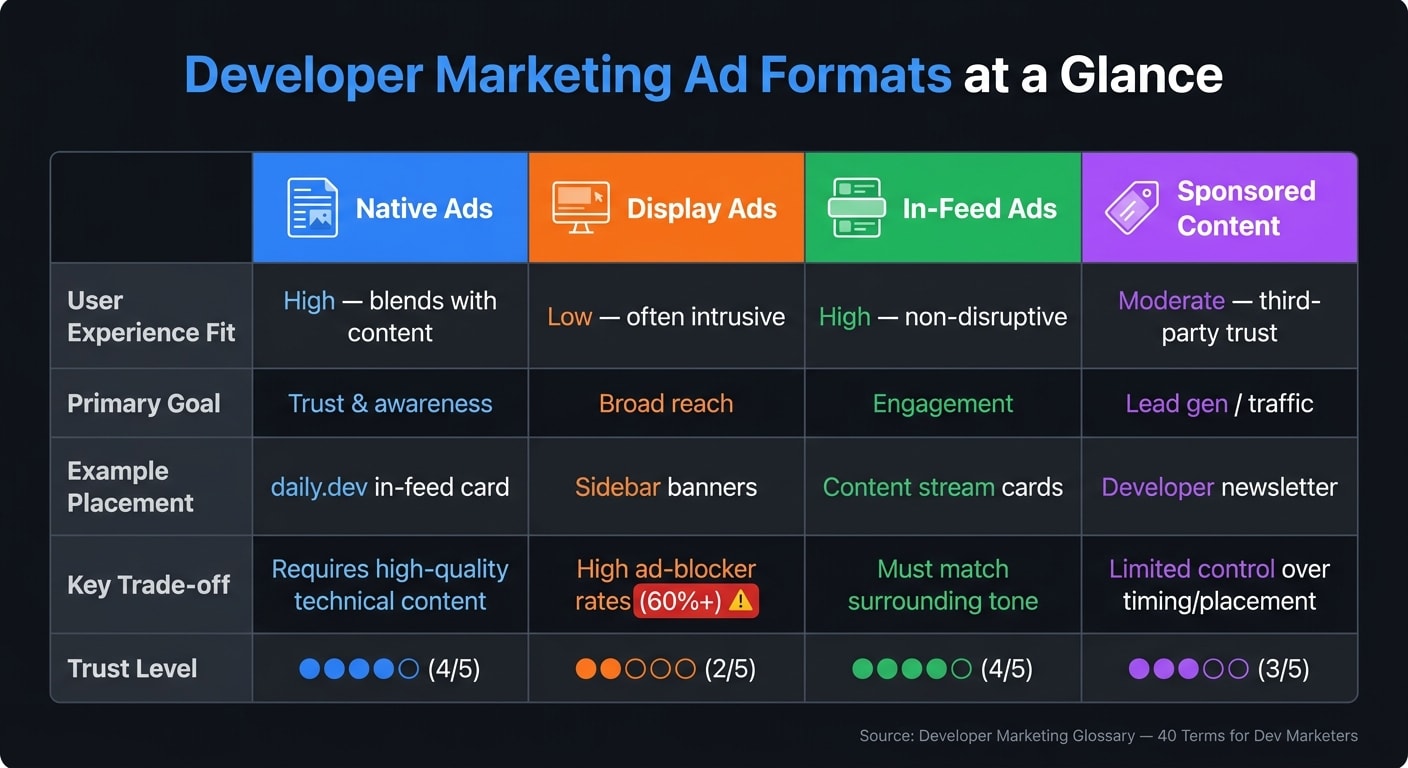
Term 20 - Native advertising is paid content that blends into the editorial setting around it. People often see it as more trustworthy and less intrusive than older ad formats.
Term 21 - Display advertising is the banner-and-sidebar model. These ads are visually separate from the content and sit around it, not inside it. Display can reach broad audiences, but among developers it runs into high ad-blocker rates, often 60%+.
Term 22 - Native vs. display is a practical channel choice that affects both trust and reach. Native ads match the format and tone of nearby content. Display ads stand apart and are easier to spot at a glance.
| Format | User Experience Fit | Primary Goal | Example Placement | Trade-off |
|---|---|---|---|---|
| Native Ads | High; blends with content | Trust & awareness | daily.dev in-feed card | Requires high-quality technical content |
| Display Ads | Low; often intrusive | Broad reach | Sidebar banners | High ad-blocker rates (60%+) |
| In-feed Ads | High; non-disruptive | Engagement | Content stream cards | Must match the surrounding tone |
| Sponsored Content | Moderate; third-party trust | Lead gen / traffic | Developer newsletter | Limited control over timing/placement |
Term 23 - In-feed ads are a type of native ad that appears inside a content stream or ranked feed. On a platform like daily.dev, the ad shows up alongside the articles a developer is already reading. That placement is the whole point - it feels like part of the browsing flow, not a detour.
Term 24 - Sponsored content is editorial content a brand pays to place on a third-party platform or publication. Unlike in-feed ads, it is usually longer-form and appears with the publisher’s label.
Term 25 - Dark social means sharing that happens in private or hard-to-track channels like Slack or Discord. If a developer drops your documentation link into a private chat, that traffic can be tough to trace in analytics.
Term 26 - Dark funnel is the hidden research path a developer goes through before visiting your site or filling out a form. It includes the conversations, opinions, and quiet influence that shape the decision before any tracked touchpoint shows up.
Term 27 - Read-floor is the minimum time on page or scroll depth that suggests someone actually read the content instead of bouncing. Publishers and platforms use read-floor thresholds to screen out low-quality impressions.
Term 28 - Content syndication means republishing your technical content - like tutorials or blog posts - on outside developer platforms such as Dev.to, HackerNoon, or DZone to extend reach. Done carelessly, though, it can create SEO issues, which leads straight to Term 29.
Terms 29–31: canonical republishing, owned vs. paid vs. earned media, always-on vs. burst campaign
Term 29 - Canonical republishing is the method for syndicating content without confusing search engines. If you cross-post a blog post to Dev.to or Hashnode, you add a rel="canonical" tag that points back to the original URL on your own domain. That tells search engines which version to index and rank, so your site builds SEO authority while the content also appears elsewhere .
Term 30 - Owned vs. paid vs. earned media is the basic framework for channel ownership. It helps teams separate channels they control, channels they buy, and attention they get organically. Each one needs its own way of measuring performance.
Term 31 - Always-on vs. burst campaign describes two pacing options for developer marketing spend. An always-on campaign runs all the time at a steady budget to keep awareness up and catch demand whenever it shows up. A burst campaign packs spend into a short period - usually around a launch or event - to drive a spike in attention.
3. Metrics, pricing models, and measurement language
Terms 32–40: impression, CTR, CVR, CPM, CPC, CPE, CPA, ROAS, attribution window
If growth models show how demand gets made, these terms show how campaigns are priced and how performance gets measured.
Term 32 - Impression means one ad view. It does not mean someone read the ad or clicked it. It only means the ad appeared.
Term 33 - CTR (Click-Through Rate) is the share of impressions that turn into a click. If 1,000 people see your ad and 25 click, your CTR is 2.5%.
Term 34 - CVR (Conversion Rate) is the share of clicks that turn into a target action, such as a signup, download, or API key registration. If 15 out of every 1,000 clicks convert, your CVR is 1.5%.
Term 35 - CPM (Cost Per Mille) is what you pay for every 1,000 impressions. A $5.00 CPM means you pay $5.00 for 1,000 ad views, whether anyone clicks or not.
Term 36 - CPC (Cost Per Click) is what you pay each time someone clicks your ad. It shows more intent than CPM. But a click by itself doesn't mean the person converted.
Term 37 - CPE (Cost Per Engagement) means you pay only when someone takes a defined action, such as reading a piece of content or downloading a tool. It helps screen for deeper engagement, but it often costs more than CPM or CPC.
Term 38 - CPA (Cost Per Acquisition) is what you pay for each completed conversion, like a signup, API key registration, or SDK download. The catch? Long developer buying cycles can make attribution messy.
Term 39 - ROAS (Return on Ad Spend) tracks revenue earned for every dollar spent on ads. A ROAS of 4x means you earned $4.00 for every $1.00 spent.
Term 40 - Attribution window is the time period during which a conversion gets tied back to an ad. A longer window can pick up more conversions, but it can also give the ad more credit than it deserves.
| Pricing Model | What You Pay For | When to Use It | Trade-offs for Dev Campaigns |
|---|---|---|---|
| CPM | 1,000 impressions | Brand awareness; launching new tools | High volume but may include low-quality impressions; hard to tie directly to ROI |
| CPC | Individual clicks | Driving traffic to docs or technical blogs | Better intent than CPM; developers may click but bounce if content lacks depth |
| CPE | Specific engagements | Community building; measuring content relevance | High quality signal; harder to scale than CPC or CPM |
| CPA | Completed actions | Lead gen; signups; SDK downloads | Lowest budget risk; highest cost per unit; difficult with long developer research cycles |
Measurement concepts: view-through conversion, lift test or incrementality, first-touch vs. last-touch attribution, cohort analysis
Pricing tells you what you spent. Measurement tells you what that spend actually did.
View-through conversion counts a conversion that happens after someone saw your ad but never clicked it. This can be useful, especially for awareness campaigns. But if the attribution window is too broad, it can overcount conversions.
Lift test (incrementality) compares an exposed group with a holdout group to see whether ads drove extra conversions. Put simply, it helps answer a hard question: did the ad cause the result, or would that conversion have happened anyway?
First-touch vs. last-touch attribution deals with which touchpoint gets the credit. First-touch gives all the credit to the first interaction a developer had with your brand. Last-touch gives all the credit to the final step before conversion. Both are simple. Neither tells the whole story. First-touch can over-credit awareness channels, while last-touch can over-credit bottom-of-funnel channels.
Cohort analysis groups users based on when they first interacted with your product or campaign, then follows their behavior and retention over time. That matters because a campaign that drives signups isn't always driving users who stick around.
4. Search, AI, and content discovery terms
Pricing and measurement show what you spent and what you got back. But that only helps if developers can find your content first. This section looks at how developer content gets discovered, cited, and reused.
AEO (Answer Engine Optimization) is the practice of structuring content so it can be picked as a direct answer in search or voice results. That usually means clear headings, short answers, and structured data.
GEO (Generative Engine Optimization) is about getting your content cited as a source in AI-generated answers and coding assistants.
| Feature | AEO | GEO |
|---|---|---|
| Goal | Provide a direct, singular answer | Be cited as a source in AI-generated responses |
| Where results appear | Featured snippets, voice assistants | AI-generated answers and coding assistants |
| What needs optimization | Structured data, clear headings, FAQ formats | Technical accuracy, structured documentation, code samples |
Put simply: AEO helps you become the answer. GEO helps you become the source behind the answer.
Search intent is the reason behind a query. If a developer searches for "how to authenticate with OAuth 2.0", they usually want help with implementation, not a broad explainer. Matching content to that intent, not just the keyword, is what makes it more useful and easier to find.
There’s also a big difference between top-of-funnel content and bottom-of-funnel content.
- Top-of-funnel content helps developers understand a problem or learn what their options are.
- Bottom-of-funnel content helps them pick a tool, start building, and get something working.
Evergreen content stays useful over time. That said, freshness still matters a lot for release notes, version changes, and security updates. A setup guide from two years ago might still rank, but if the code is out of date, it can send people down the wrong path fast.
Topic clusters and pillar pages are a way to organize content so both people and machines can make sense of it. A pillar page covers a broad topic in depth. Cluster pages go into narrower subtopics and link back to the pillar page. Those internal links help search engines and AI agents understand how each page connects to the rest. They also help support technical SEO and content freshness.
Technical SEO basics for developer content include structured data, a clean site structure, and docs and READMEs that search engines can index. Think of these as the nuts and bolts. If those pieces are messy or blocked, even strong content can be hard to surface.
The conclusion and index pull these terms into one quick reference.
Conclusion and glossary index
After the channel, metric, and discovery terms above, this glossary gives everyone a shared way to talk about the work. Developer marketing needs its own vocabulary because teams plan, measure, and explain campaigns in a different way. Developers size up tools through docs, product proof, and peer trust, not generic pitch decks. Use these terms to keep your team on the same page around developer discovery, evaluation, and conversion.
Shared definitions also make cross-functional work move with less friction. They cut down on back-and-forth over terms like activation event, north star metric, and attribution window. If you need one term fast, use the index below and jump right to it.
This glossary helps keep channel planning, measurement, and content discovery in sync across marketing, product, and DevRel. Bookmark this page, share it during onboarding, and come back to it whenever a term shows up in a brief or dashboard.
Alphabetical glossary index
A Activation event · AEO (Answer Engine Optimization) · AEO vs. GEO · Always-on vs. burst campaign · Attribution window
B B2D (Business-to-Developer) · Bottom-of-funnel content
C Canonical republishing · CLG (Community-Led Growth) · Community management · Cohort analysis · Content freshness · Content syndication · CPA (Cost Per Acquisition) · CPC (Cost Per Click) · CPE (Cost Per Engagement) · CPM (Cost Per Mille) · CTR (Click-Through Rate) · CVR (Conversion Rate)
D Dark funnel · Dark social · Demo environment · Developer advocate · Developer marketing · DevRel (Developer Relations) · DevRel vs. developer marketing · Display advertising · DLG (Developer-Led Growth) · DX (Developer Experience)
F First-touch vs. last-touch attribution · Freemium model
G GEO (Generative Engine Optimization)
M MQL (Marketing Qualified Lead)
N Native advertising · Native vs. display · North star metric
O Owned vs. paid vs. earned media
P Pillar pages · PLG (Product-Led Growth) · PQL (Product Qualified Lead) · Product marketing vs. developer marketing
R Read-floor · ROAS (Return on Ad Spend)
S Sandbox environment · Search intent · Self-serve funnel · SLG (Sales-Led Growth) · Sponsored content
T Technical evangelist / developer advocate · Technical SEO basics · Top-of-funnel vs. bottom-of-funnel content · Topic clusters · Trial vs. sandbox vs. demo environment
FAQs
Where should I start if I’m new to developer marketing?
Start with a content-first approach. Put technical accuracy and useful material ahead of sales-heavy messaging.
Set clear goals tied to technical KPIs. Study your audience. Show up where developers already spend time.
If you're early stage, hire a generalist who can wear a few hats. Then put your energy into hands-on technical content like tutorials and guides. That's the kind of work that helps build trust over time.
How do I know whether to track PQLs or MQLs?
In developer marketing, put PQLs ahead of MQLs when your goal is to track actual product use instead of light interest.
PQLs point to high-intent behavior inside the product. That includes actions like:
- generating an API key
- implementing an SDK
- turning on a feature
- hitting a usage threshold
MQLs, on the other hand, often come from softer signals like clicks or email signups.
That’s the key difference: PQLs usually show real adoption, while MQLs may only show curiosity. If you care about long-term conversion potential, PQLs tend to give you a much clearer read.
What metrics actually matter for dev campaigns?
Developer campaigns should focus on actionable engagement, not vanity metrics. CTR, conversion rate, CPC, and CPM still matter for checking baseline efficiency and spend. But with technical audiences, those numbers only tell part of the story.
The stronger signals are the ones that show what developers actually did.
That can include:
- Time spent with documentation
- API call volume
- Time-to-first-success
- Community signals like GitHub stars
These metrics give you a better read on developer intent and long-term value.