

If I had 90 days to prove developer marketing works, I’d do three things first: define one developer audience, set measurement before launch, and test only three narrow channels.
This plan is built to help me avoid random activity. Instead of trying everything at once, I move in order: ICP first, tracking second, organic test third, then paid and newsletter tests. By the end, I should know what to scale, fix, or stop based on activation, cost, and post-click behavior.
Here’s the short version:
- Weeks 1–2: I define one developer ICP and one main persona by role, stack, company type, and buying influence.
- Weeks 3–4: I set baseline metrics across awareness, activation, and business results.
- Weeks 5–6: I run one organic community test to learn which pain points get replies and follow-up questions.
- Weeks 7–8: I run one paid pilot with one audience, one message, one CTA, and one budget.
- Weeks 9–10: I test one newsletter placement tied to one problem.
- Weeks 11–12: I review the data with a stop / iterate / scale framework.
A few numbers stand out. 57% of developers influence tech purchases, and that climbs to 87% for people in leadership roles. That means I’m not just writing for users. I may also be speaking to managers and approvers. And when I judge channel performance, I should care less about clicks and more about whether people reach a first API call or first deploy.
What I like about this plan is its focus. One segment. One message. One test window. That makes the results easier to read, and it gives me a cleaner next-quarter budget call.
If I want developer marketing data I can use - not just activity I can report - this is the kind of 90-day plan I’d run.
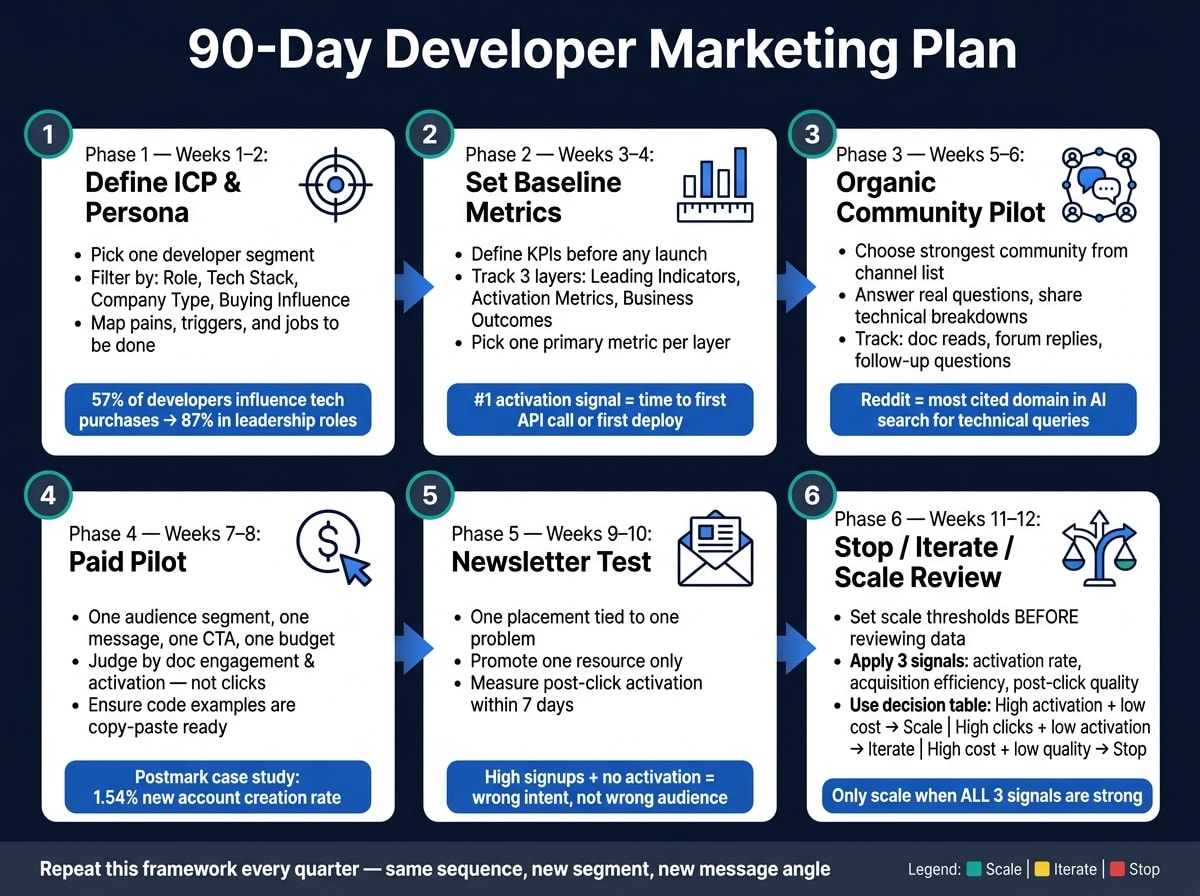
Weeks 1-2: define the developer ICP and persona
Before you spend a dollar or write an ad, get clear on who you're trying to reach. Two weeks isn't a lot of time, but it's enough to build a solid starting point for clean, readable tests.
Pick one developer segment to target first
Don't lump all "developers" into one audience.
Start with one ICP and define it with four filters: role, tech stack, company type, and buying influence. Here's a simple way to frame each one:
| ICP Attribute | Definition Criteria | Measurable Signal |
|---|---|---|
| Role | Job title & seniority | LinkedIn title, GitHub activity |
| Tech Stack | Languages, frameworks, tools | Stack Overflow tags, daily.dev reading history |
| Company Type | Stage, size, industry | Firmographic data, tech install base |
| Buying Influence | User, manager, or executive | Docs views vs. case-study clicks |
This matters more than most teams think. 57% of developers influence technology purchases, rising to 87% for those in leadership roles . That changes who you're writing for. A hands-on user wants one thing. A manager wants another. An approver may care about a totally different set of concerns.
Once you've picked the segment, write down why it buys.
Map pains, triggers, and jobs to be done
Next, spell out what drives behavior:
- Pains: what slows them down day to day
- Triggers: what pushes them to look for a fix
- Jobs to be done: what success looks like in their workflow
Don't make this up. Pull it from sales calls, support tickets, product data, and founder interviews.
The more specific you get, the better your message gets later. If you know the exact moment someone starts searching, your ad copy gets sharper. Your community posts make more sense. Your newsletter angle lands better. These points become the problem statements for your paid, community, and newsletter tests in weeks 5–10. They also become the message angles you test in weeks 5–10.
List where this audience learns and participates
Developers don't all learn in the same places. Some spend time on GitHub. Others are deep in Reddit, Hacker News, Stack Overflow, Discord servers, or language-specific forums .
Your job in week 2 is simple: map where your persona actually spends time. Not where developers in general hang out. Where this group learns, compares options, and checks whether a tool is worth trying.
Focus on the communities and platforms where they already learn and validate products. Reddit is the most cited domain across AI search engines like ChatGPT and Perplexity for technical queries . YouTube is the second-largest search engine developers use to learn new technologies . Those are strong signals for where discovery and validation happen.
Turn that research into a short channel list. Pick the 2–3 places where your persona is most active and most likely to be evaluating tools. That's your starting set for baseline tracking and your first pilot channels in weeks 3–6.
Weeks 3-6: set up measurement, then launch the first pilots
With your ICP and channel list in place, weeks 3-4 are about turning research into a baseline. Then, in weeks 5-6, you put that baseline to work with your first pilots.
Set the baseline and KPI framework before launch
Set your baseline before anything goes live. If you skip this step, pilot results won't mean much later.
Think in three layers:
| Metric Category | Definition |
|---|---|
| Leading Indicators | Awareness and interest signals. |
| Activation Metrics | Product activation milestones. |
| Business Outcomes | Revenue and growth results. |
"The single most predictive activation metric for developer products is how fast a new sign-up gets their first successful API call or first deploy."
For each pilot, pick one primary metric in each layer. That keeps reporting clean and makes it easier to see what's working.
Launch one organic community pilot in weeks 5-6
Start with the strongest community from your week-2 channel list, and stay focused there for two weeks.
The goal isn't to sell. It's to show up and help.
Answer real questions. Share a short technical breakdown. Post something useful that helps a person solve a problem, with no ask attached. Then watch what happens. Which posts get replies? Which questions lead to follow-ups? Which pain points keep coming up?
As Stephanie Morillo, Content Strategist and Technical PM, puts it:
"Developers don't dislike marketing as a practice; they actually dislike gimmicks, irrelevant messaging, and things that don't actually address their problems or their needs."
Pay attention to depth, not just surface activity. Track doc reads, forum replies, and follow-up questions - not clicks alone.
Prepare the paid and newsletter tests with tight scope
While the community pilot is running, lock down the next two test rounds: one audience, one message, one CTA, one budget, and one two-week window.
For the paid pilot, keep it tight. Use one audience and one message. In Postmark's case study, a developer-targeted campaign based on tech stack and seniority drove a 1.54% new account creation rate and later became monthly evergreen spend.
For the newsletter test, choose one placement tied to one problem your persona faces. Don't mix angles. Don't test three messages at once. You want a clean read on whether that single message lands.
Use what you learn here to go into weeks 7-10 with the strongest message and channel.
Weeks 7-10: run one paid pilot and one newsletter test
This is the stretch where the setup starts doing its job. You already have a baseline, a signal from the community, and two tests ready to go. Now it’s time to run them one at a time and keep things tight.
Weeks 7-8: run one paid pilot with one audience and one message
Keep the pilot simple: one audience segment, one message, one CTA, and one two-week window. Use the ICP and problem statement from weeks 1-2 so the pilot stays tightly focused.
Don’t judge the test by clicks alone. Look at what happens after the click. Are people reading docs? Are they making a first API call? If CTR looks high but docs engagement stays low, that’s a warning sign.
If your ad includes code, make sure people can run it as-is. Developers copy and paste. A broken example can kill trust on the spot .
Judge the pilot by doc engagement and activation, not clicks.
Weeks 9-10: test one newsletter placement tied to one problem
Now check whether the newsletter placement you scoped in weeks 3-6 is doing its job. Promote one resource tied to one problem your persona deals with.
Again, focus on what happens after the click. Did visitors read the resource? Did they sign up? Did they reach an activation milestone within 7 days? CTR matters less than post-click activation.
"The single most predictive activation metric for developer products is how fast a new sign-up gets their first successful API call or first deploy."
If newsletter visitors sign up but never activate, the message likely pulled in the wrong intent, not the wrong audience. That signal feeds straight into the week 11-12 scale review.
Compare owned, community, paid, and newsletter signals
By week 10, compare all four channels against the same activation milestone. Then compare each one against the activation baseline you set in weeks 3-4.
Look at conversion quality, not just cost.
| Channel | What It Shows | Key Quality Signal |
|---|---|---|
| Owned | Organic intent and trust | Time on page, first API call |
| Community | Message resonance, pain fit | Discussion quality |
| Paid | Audience targeting accuracy | Account creation rate, docs engagement |
| Newsletter | Problem-message alignment | Post-click activation within 7 days |
This gives you a plain view of which channel earned more budget or effort next quarter.
Weeks 11-12: decide what to scale, iterate, or stop
By week 11, you should have enough pilot data to decide what deserves next quarter’s budget. At this point, the week-10 signal comparison becomes your final filter.
Set clear scale criteria before reviewing results
Set your thresholds before you look at the results. That matters more than it sounds. If you wait until after the review, it’s easy to talk yourself into keeping a weak channel alive.
Use three signals:
- activation rate
- acquisition efficiency
- post-click activation quality
Only scale when all three look strong. If just one signal is strong, iterate instead of pushing more budget into it.
Use a stop-iterate-scale decision table
Use this table to decide the next move.
| Performance Pattern | Decision | Recommended Action |
|---|---|---|
| High activation + low acquisition cost | Scale | Increase budget; expand targeting to similar developer segments |
| High clicks/views, low activation | Iterate | Redirect traffic to ungated docs or a sandbox instead of a gated landing page |
| Low CTR, high activation among clickers | Iterate | Refresh creative with code snippets; test "problem-first" headlines |
| High cost + low activation quality | Stop | Pause the channel; re-evaluate whether your ICP matches that channel's audience |
This gives you a simple way to shape next quarter’s channel mix without overthinking it.
Conclusion: reuse this 90-day template next quarter
Each quarter, run the same sequence again: define one developer ICP and persona, set up measurement before promotion starts, test three narrow pilots across community, paid, and newsletter channels, such as advertising on daily.dev, and scale only the channels that drive real developer behavior.
The framework stays the same. What changes are the inputs: a new segment, a new message angle, or a channel you haven’t tested yet.
FAQs
How do I choose the right developer ICP?
Focus less on broad demographics and more on technographic and behavioral signals.
Start with your audience’s tech stack. Then add behavior signals like GitHub activity, Stack Overflow participation, or engagement with technical content. That gives you a much clearer picture of who you’re talking to and what they care about.
It also helps to segment by role. A DevOps engineer and a front-end developer may work at the same company, but their day-to-day problems are not the same. If your message speaks to each role’s pain points, it’s far more likely to land.
Then test your assumptions. Use A/B tests to check fit, and watch metrics like trial sign-ups and documentation usage. Those numbers tell you fast whether your targeting is on the right track or missing the mark.
What should I track before launching tests?
Before you launch any tests, set up tracking for the core conversions that matter most: signups, trials, and demo requests. Add UTM parameters to every channel too, so you can see where each result came from instead of guessing later.
You should also track cost per signup, trial activation, post-signup "How did you hear about us?" responses, and product-usage signals like API key generation or documentation views. Those signals help connect top-of-funnel traffic to what people do after they join, which is where a lot of the story starts to show up.
When should I scale or stop a channel?
Stop a channel if it keeps falling short after a full test cycle, or if there’s a plain mismatch between the audience and the format.
When a channel does work, put more budget behind it. Use full-funnel numbers like cost per signup, cost per MQL, and pipeline-to-spend ratio to guide that call.
In quarterly planning, move spend toward your top-performing channels and cut back on the weaker ones.