
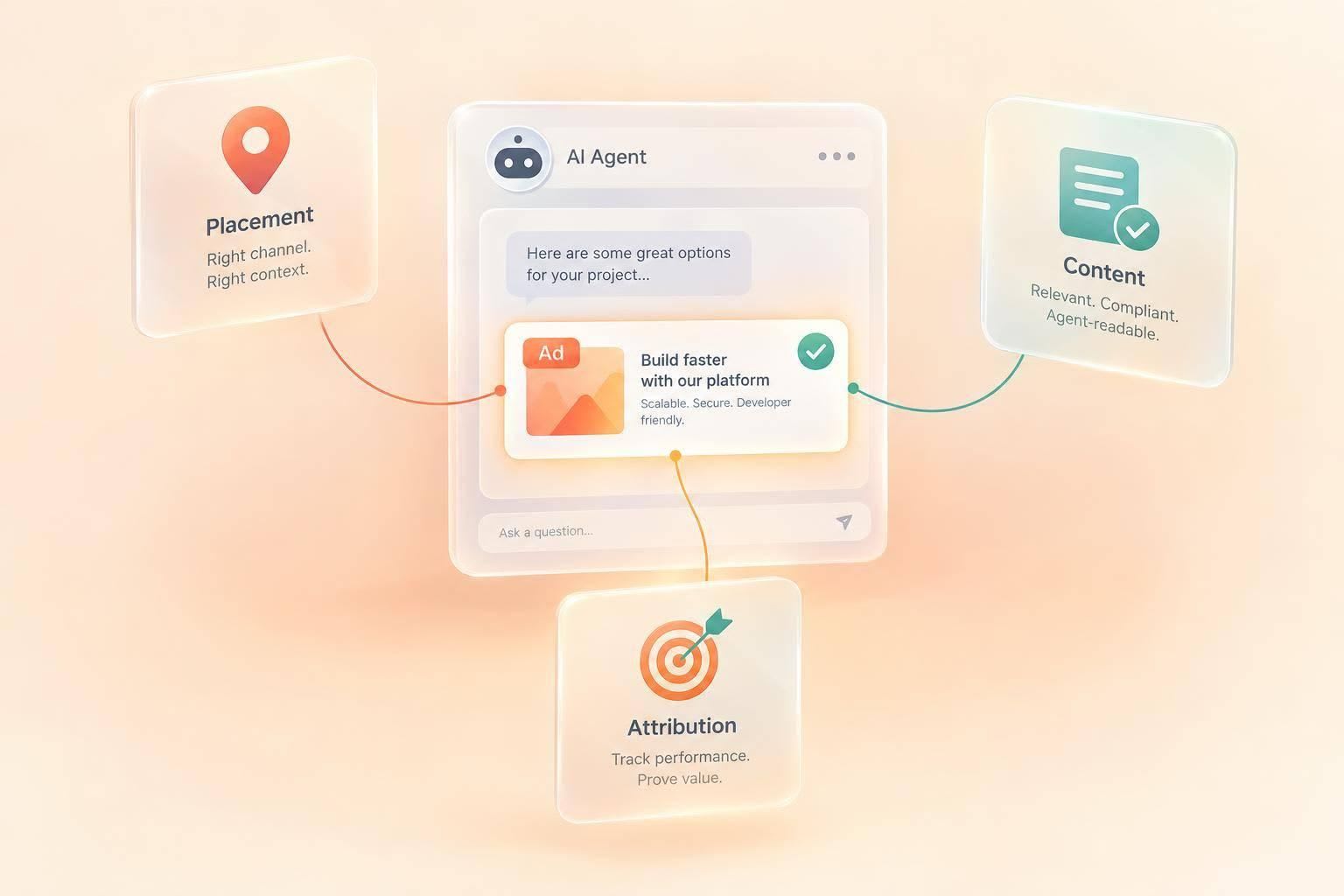
Yes - you can place ads on publisher pages that AI agents retrieve. But you can’t count a page fetch as an ad seen by a user. Before buying, I’d check the page version agents receive and confirm that the ad label, product facts, and source links stay together.
As of October 13, 2026, I’d focus on four checks:
- Placement: Publisher-page ads are separate from ads inside an assistant’s answer. Confirm which inventory you’re buying.
- Content: Use documented product facts, name the advertiser, and link to dated sources - not commands telling agents what to recommend.
- Disclosure: Keep the sponsorship label attached during extraction and summaries. Explain what payment affects.
- Measurement: Track delivery, agent retrievals, observed answer mentions, and conversions separately. A retrieval alone proves neither ad parsing nor user exposure.
My rule: buy against events you can verify, not promises that an assistant will include your ad.
1. What agent-facing ads are
An AI agent retrieves information and takes actions on a user's behalf. Where an ad appears determines who controls it and how the agent reads it.
Human-facing ads appear on pages, feeds, or newsletters. Sponsored blocks on agent-readable publisher pages contain labeled facts that software can parse. Assistant-response units appear inside the answer itself and are controlled by the assistant platform.
daily.dev Ads can run campaigns through verified partner publishers. These placements fall into the publisher-block category, not direct assistant-response inventory. The guide to ads in AI assistants covers the broader planning framework.
How agents retrieve publisher pages
Publishers can leave the human-facing page intact while serving software a stripped-down Markdown or HTML version. This version can retain article text, links, and a clearly labeled sponsored block without depending on visual layout. No single page format works across all agents.
Before buying, inspect the actual page version available to software. Check that the sponsored block appears, its disclosure stays attached to its text, and its links point to canonical product pages.
For agents, the block's facts, structure, and disclosure matter more than the page's appearance. The ad block needs clear product facts - not just branding.
2. What an agent-readable ad includes
A sponsored block needs a clear ad label, the advertiser’s name, concise product facts, and links to first-party documentation that supports those facts. Label the publisher separately from the advertiser, and keep the block apart from editorial text. Paid claims shouldn’t read like reporting.
With the labeling in place, focus on what agents can safely reuse.
Provide product facts, not agent instructions
Include only facts confirmed by the linked documentation, such as supported languages or integrations. Name the advertiser as the claim’s owner, and include the documentation’s version or date. That’s provenance: who made the claim, where the evidence lives, and how current it is.
Remove commands, unsupported ranking or superiority claims, and wording that suggests publisher endorsement. Match each claim to its evidence. Documentation confirming language support doesn’t prove faster deployments or better reliability.
This format is one part of the broader campaign mix.
Where agent ads fit in a campaign
Treat verified partner publishers as a separate distribution channel in 2026. Before booking, check current availability and product-page details on daily.dev Ads. Set targeting for each placement by tech stack, seniority, geography, and interests.
For a broader overview, see the ads in AI assistants guide for developer marketers.
| Placement | Use it for | What to specify |
|---|---|---|
| Agent inventory through verified partner publishers | Making product facts with a named claim owner available during agent-mediated discovery | Eligible placements, source links, disclosure, and reporting terms |
3. How to disclose sponsored content
Make disclosure a buying requirement. For 2026, use clear, prominent labels close to the paid block.
Disclosure requirements for each placement
Place the advertiser’s name and a clear sponsorship label on the first line. Keep publisher attribution, a source URL, and a paid-status field inside the block so they stay attached when the page is parsed. Require summaries to retain the disclosure, but don’t assume every agent will do so.
State exactly what payment affects: retrieval, inclusion, ranking, or display only. The disclosure should explain that relationship without framing paid visibility as an independent recommendation. Don’t add instructions telling an agent to rank or recommend the advertiser.
Once you’ve set the disclosure format, audit whether it survives extraction and rewriting.
What to review before launch
Test the disclosure fields in practice. Compare the machine-readable block with the version readers see. Check the label, advertiser and publisher identities, paid-status field, and disclosure links. Then test whether the disclosure stays attached during extraction and summarization. Require advertiser approval for every page and version before launch.
With verified partner publishers, confirm in writing which inventory is eligible, how labels are encoded, who updates claims, and how corrections are handled. Define agent retrievals separately from human views, clicks, and conversions.
Set these disclosure checks before launch to keep verified delivery separate from later performance reporting.
4. What buyers can measure in 2026
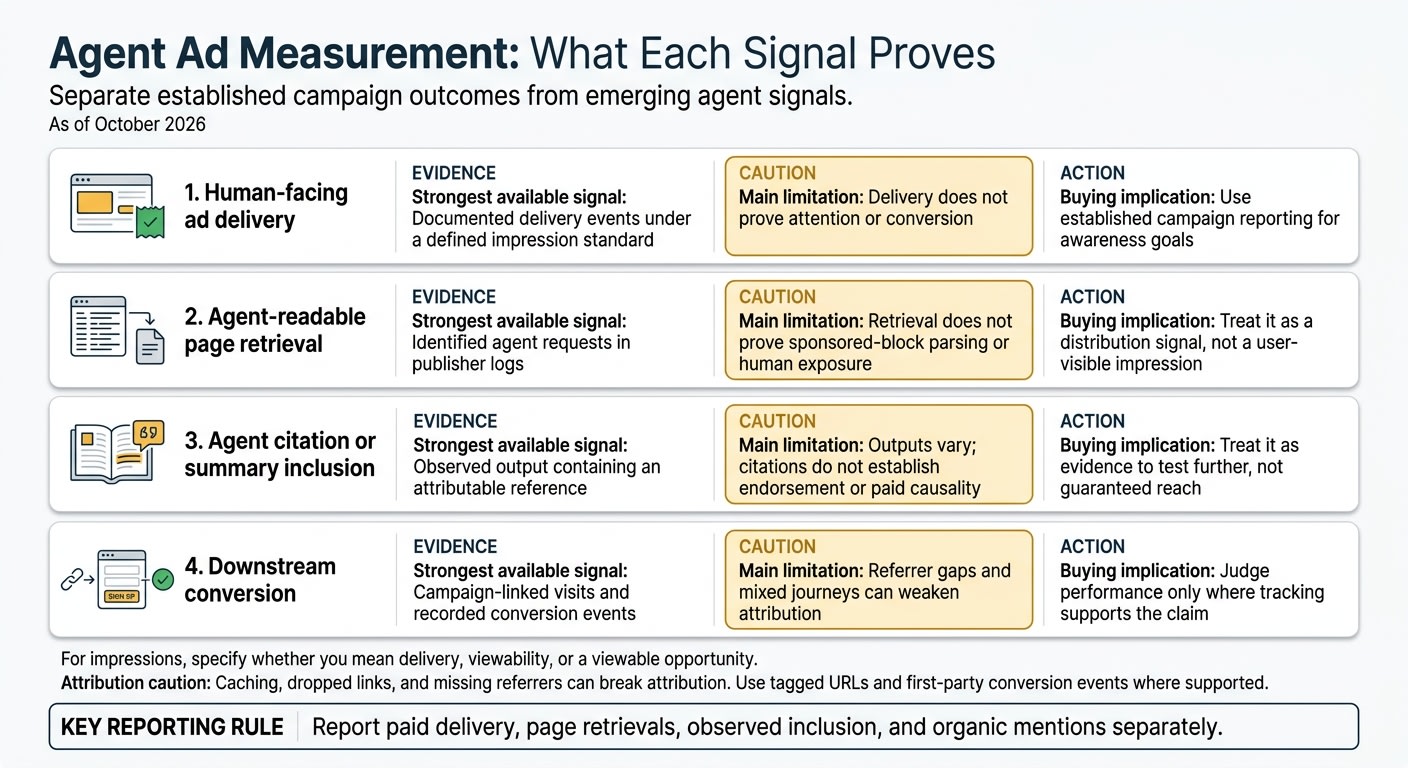
As of October 2026, separate established campaign outcomes from emerging agent signals. Put every metric in writing: impressions, page reads, clicks, qualified visits, leads, signups, and activation events. For impressions, specify whether you mean delivery, viewability, or a viewable opportunity.
Agree on those definitions before comparing results.
| Reporting purpose | Strongest available signal | Main limitation | Buying implication |
|---|---|---|---|
| Human-facing ad delivery | Documented delivery events under a defined impression standard | Delivery does not prove attention or conversion | Use established campaign reporting for awareness goals |
| Agent-readable page retrieval | Identified agent requests in publisher logs | Retrieval does not prove sponsored-block parsing or human exposure | Treat it as a distribution signal, not a user-visible impression |
| Agent citation or summary inclusion | Observed output containing an attributable reference | Outputs vary; citations do not establish endorsement or paid causality | Treat it as evidence to test further, not guaranteed reach |
| Downstream conversion | Campaign-linked visits and recorded conversion events | Referrer gaps and mixed journeys can weaken attribution | Judge performance only where tracking supports the claim |
Caching, dropped links, and missing referrers can break attribution. Use tagged URLs and first-party conversion events where supported. Report paid delivery, page retrievals, observed inclusion, and organic mentions separately.
With the signal definitions set, lock the launch plan.
Checklist for a first campaign
Define the audience, goal, baseline, dates, success metric, and reporting owner. Specify whether the test uses In-Feed Native Ads, a Sponsored Post, Engagement Ads, or Digest newsletter sponsorships by topic track. Keep reporting separate for each placement.
Request definitions for human impressions, page reads, clicks, qualified visits, leads, signups, activation, agent retrieval, parsing, citation observation, deduplication, bot validation, and conversion attribution. If a signal can't be explained, treat it as directional - not a basis for decisions.
For observed agent outputs, save the prompt or use case, date, model or agent, output text, and citation or source reference. Record whether the mention was sponsored, organic, or unclear, and remove sensitive data. The AI assistant advertising guide provides related planning context.
Conclusion: Use agent ads as another distribution channel
If the reporting matches your goal, use agent ads as another distribution channel. Buy against observable events, not guaranteed answer inclusion, and discuss campaign fit with daily.dev Ads.
FAQs
How can I test whether agents parse my ad?
Use the Agentic Ads alpha program from daily.dev Ads to test your prompts across major AI assistants and compare their answers against a baseline. You’ll get a log showing which agents read which pages, along with measurements of brand visibility, favorability, and accuracy at a 95% confidence threshold.
Randomized paired tests can also measure causal ad lift and verify how your brand facts affect agent responses.
What should I do if an agent drops the sponsorship label?
Contact your daily.dev Ads representative right away to investigate your Agent Page’s technical delivery. Every agent ad must name the sponsor in the first line and appear in a clearly labeled block with source citations. A missing label violates this standard.
Check your campaign’s current status in the onboarding and reporting tools. These tools track delivery by agent and URL so you can verify that your brand facts appear accurately and transparently.
How can I separate paid influence from organic mentions?
With daily.dev Ads, agent-facing ads are clearly labeled, identify the sponsor in the first line, and back every claim with a source you’ve approved.
daily.dev uses randomized paired tests and repeated prompt testing to separate paid influence from organic mentions. These tests compare brand visibility, favorability, and accuracy against a baseline. By testing pages with and without your ad, daily.dev measures campaign lift at a 95% confidence threshold.