

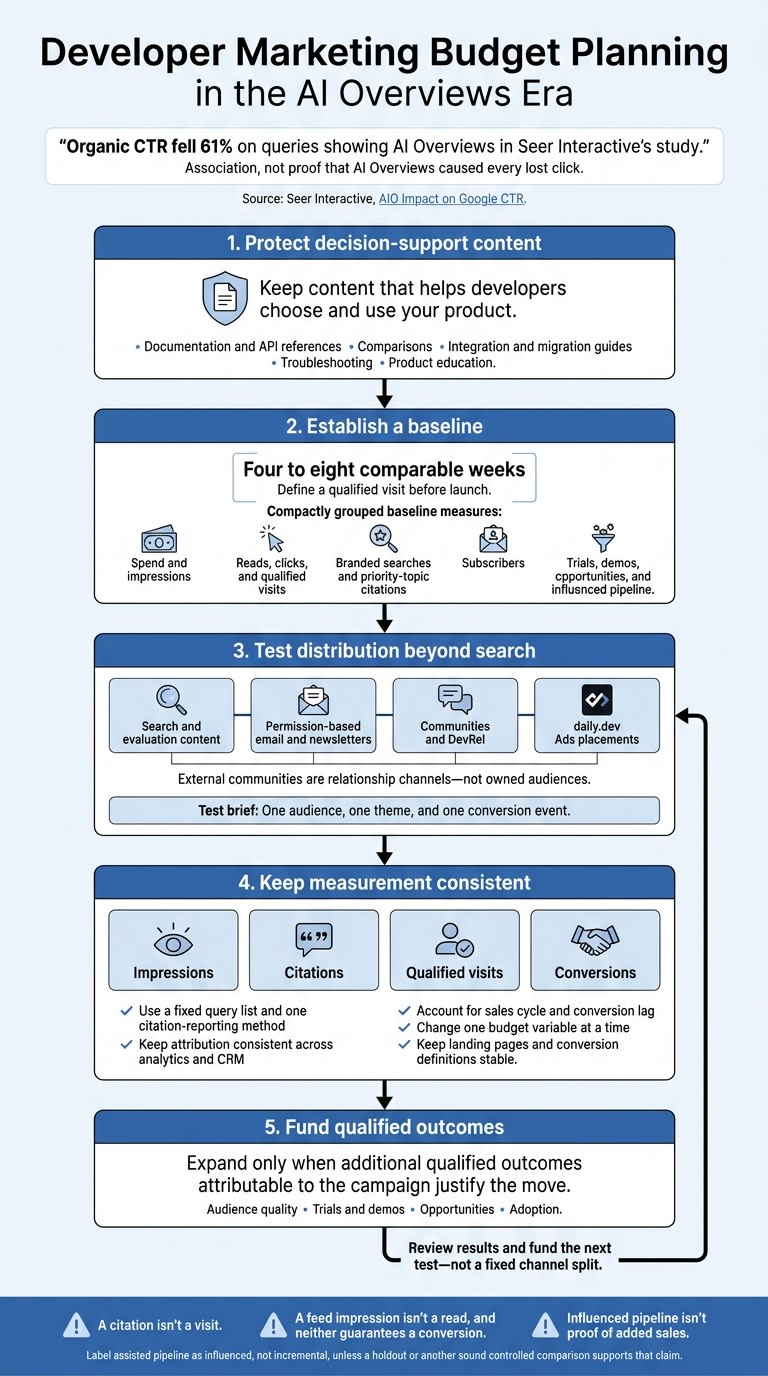
I’d protect content that helps developers choose and use your product - and test other ways to reach them. In Seer Interactive’s study, organic CTR fell 61% on queries showing AI Overviews. That’s a reason to review spending, not abandon search.
Here’s how I’d plan the budget:
- Keep decision-support content funded: documentation, comparisons, integration guides, and troubleshooting pages.
- Test distribution beyond search: permission-based newsletters, communities, and daily.dev feed, sponsored content, engagement, or email placements.
- Measure more than clicks: track qualified visits, AI citations, signups, and pipeline separately.
- Set a baseline before moving money: use four to eight comparable weeks, keep attribution consistent, and change one budget variable at a time.
My rule: fund qualified outcomes, not traffic alone. A citation isn’t a visit, and influenced pipeline isn’t proof of added sales.
1. How AI Overviews change search traffic
Google AI Overviews can answer questions directly in search results and cite pages without sending visitors to them. Your visibility can stay high even as clicks fall. A source mention isn’t a click; Google counts only external clicks from the Overview.
For developer marketers, educational and comparison queries deserve close attention. AI Overviews offer visibility, but they don’t provide a complete path to acquisition.
What lower CTR means for acquisition
Seer Interactive’s “AIO Impact on Google CTR” study was first published on February 4, 2025. Its initial version covered January 2024 through January 2025.
The findings show a relationship between AI Overview presence and CTR - not proof that AI Overviews caused every lost click. Query intent, rankings, seasonality, device mix, brand familiarity, paid placements, and search-result layout can also affect CTR.
Less traffic doesn’t necessarily mean less demand. Before changing spend, group queries by purpose: education, evaluation, implementation, and troubleshooting. Then compare qualified visits, signups, and pipeline across those groups. Track citations alongside clicks in the same dashboard.
Why search visibility and citations still matter
Track impressions, citations, qualified visits, and conversions as four separate outcomes. Search Console includes AI-feature traffic in its overall reporting, so record source appearances separately by date, query, device, location, and cited URL. These measures help you judge whether search still earns its share of spend for developer evaluation content.
Google doesn’t require special schema for AI features. Keep implementation guides, API documentation, migration plans, and security explanations accessible and clearly structured. These pages help people evaluate your product, no matter which channel brings them in. Keep high-value implementation content search-led while distributing broader informational content across more channels.
2. Rebalance your developer marketing budget
As search clicks fall, fund the next test, not a fixed channel split. Shift budget from search-dependent reach toward channels you control. Before moving funds, compare audience fit, control, intent, measurement quality, and downstream outcomes.
| Investment | Best use | Distribution control | Evidence for continued funding |
|---|---|---|---|
| Search and evaluation content | Reach developers doing active research and help them evaluate | Control over the resource, not search exposure | Qualified trials, adoption, and assisted pipeline |
| Permission-based email and newsletters | Build repeatable access to an owned audience | Direct contact, subject to consent and deliverability | Repeat engagement, activation, and retention |
| Communities and DevRel programs | Earn trust and answer technical questions | Limited in external communities; participation must be earned | Useful exchanges, referrals, and product education outcomes |
| daily.dev Ads placements | Reach relevant developers through controlled placements | Paid placement with format-specific delivery terms | Qualified reach, landing-page actions, and qualified conversions |
Keep content that helps developers evaluate your product
Start with pages that help developers decide, implement, or troubleshoot. Protect documentation, API references, integration guides, migration pages, troubleshooting pages, comparison pages, and product education. Review these resources quarterly with DevRel, product marketing, SEO, and product teams.
Keep what supports sales and adoption. Strengthen weak conversion paths with examples, architecture diagrams, implementation requirements, security details, and clear calls to action. Retire overlapping or outdated pages.
Have DevRel validate one authoritative resource, then repurpose it for landing pages, newsletters, webinars, and community posts. Budget for technical maintenance alongside distribution so campaigns don’t send developers to outdated instructions.
Build owned audiences and community trust
Give developers a clear reason to subscribe or participate in permission-based email, customer education, product communities, office hours, webinars, and recurring newsletters. Assign each program one audience and one promise: release education for users, implementation guidance for evaluators, or architecture content for senior engineers.
Start with consistent consent and unsubscribe handling. Set up topic-specific newsletter tracks, reusable audience segments, and campaign links connected to analytics and CRM records.
Measure subscriber quality, attendance, repeat participation, engagement, activation, influenced pipeline, and inactivity - not list size alone. Treat external communities as places to build relationships, not owned audiences. Answer questions, share useful technical material, and follow each community’s norms.
Add targeted feed and newsletter placements
Test daily.dev Ads when you have a useful resource, a clear audience, and a landing page built to convert or educate. Target by tech stack, seniority, geography, and interests.
Use developer marketing resources and distribution-planning tools to plan one audience, one theme, and one conversion event. Before launch, set a review window that fits your sales cycle. Expand only when the test shows additional qualified outcomes attributable to the campaign.
Once the budget mix is set, match each goal to the right daily.dev Ads format.
3. Match daily.dev Ads formats to campaign goals
Choose the format based on your campaign goal - not a promise of clicks. Use this map to turn the budget shift into specific daily.dev Ads briefs. Keep each test focused on one goal and one format.
| Campaign goal | Format | What to plan around |
|---|---|---|
| Recurring feed visibility | In-Feed Native Ads | Sponsored cards in the developer feed. Plan for repeated visibility and promotion, then track impressions, clicks, and downstream conversions. |
| Technical resource distribution | Sponsored Post | Guaranteed feed impressions, a read-floor commitment, and canonical republishing. Use this format for an in-depth technical resource. |
| Contextual recognition | Engagement Ads | Branded Tags, Keyword Spotlights, Custom Upvotes, Tag Page Takeovers, and Stack Placements. Confirm the exact placement, audience, and reporting fields before launch. |
| Topic-specific email exposure | Digest newsletter sponsorships by topic track | A one-week sponsorship across your selected Digest track. Confirm sends, delivery, and click reporting. |
For Sponsored Post, put the read-floor commitment in the insertion order. A feed impression isn't a read, and neither guarantees a conversion. Canonical republishing keeps the original domain as the primary reference. Before launch, confirm the canonical URL, campaign duration, read definition, and make-good terms.
For Engagement Ads, choose the specific context before approving ad copy and visuals. Confirm that context, the topic track, and reporting fields before launch. Digest sponsorship runs in every Digest sent during the booked week.
For each placement, confirm available metrics, delivery commitments, and reporting cadence. Use your own measurement plan to track engaged sessions, qualified leads, and pipeline.
Next, establish baseline impressions, citations, and pipeline before shifting spend.
4. Measure exposure, citations, and pipeline
Once you’ve set the budget mix and daily.dev Ads formats, track the shift from search-led discovery to owned and paid distribution. Seer Interactive’s AI Overviews CTR study shows why citations need separate reporting: content can still earn citations while click-through falls.
Set a baseline before shifting budget
Start with four to eight comparable weeks of data so you can compare performance after the shift. Record spend and impressions; reads, clicks, and qualified visits to evaluation content; branded searches and priority-topic citations; subscribers; and trials, demos, opportunities, and influenced pipeline. Define a qualified visit before launch. Calculate efficiency only when you can rely on both spend and outcome data.
Use a fixed query list and one reporting method to track citations. Record each query’s date, location, language, device, AI Overview presence, brand or URL citation, cited page, and other citations. Apply the same method across reporting periods. Citations alone don’t establish pipeline influence.
Use consistent attribution to test budget changes
With the baseline in place, keep attribution stable. That way, later results reflect budget decisions rather than changes in tracking. Use one lowercase UTM scheme for source, medium, campaign, content, placement, audience, and date. Mirror those values in CRM campaign membership.
Compare last-click conversions with assisted conversions, accounting for your sales cycle and conversion lag. Label assisted pipeline as influenced, not incremental unless a holdout or another sound controlled comparison supports that claim.
Change one budget variable at a time, and keep landing pages and conversion definitions stable. Use the results to decide whether search, owned audiences, or daily.dev Ads deserves more spend.
Conclusion: keep search and broaden distribution
Keep technical content that helps developers evaluate your product. Reallocate budget only when audience quality, trials, demos, and opportunities justify the move. If the audience and goals fit, discuss a daily.dev Ads campaign without committing to a broader budget shift.
FAQs
How can I tell if AI Overviews are reducing qualified demand?
Track branded search volume and AI share of voice. AI Overviews absorb informational clicks, so search click-through rates alone no longer reliably show whether demand is healthy.
Measure product actions with a conversion pixel that supports view-through attribution. Then compare those results against a holdout group to test whether the activity drove additional conversions.
If search traffic drops but qualified activations from discovery channels stay steady, demand is likely shifting toward AI-mediated research - not disappearing.
How much budget should I risk on a distribution test?
Don’t spread a small budget across multiple channels. Choose one discovery platform and one capture channel, such as search targeting three category terms. Run the test for four to six weeks, using one landing page, one audience, and one core message.
Track product-qualified activations, not just clicks. Scale when activation is high and cost per activation is low. Otherwise, test different ad content or landing pages.
How can I test whether daily.dev Ads drives incremental signups?
Go beyond clicks. Install the conversion pixel to link signups and activations to ad placements, including view-through conversions. Then run an incrementality test with a holdout group to estimate how many signups would have happened without the campaign.
Measure success by cost per activation - such as a first API call or deploy - not CPM or CTR alone.