

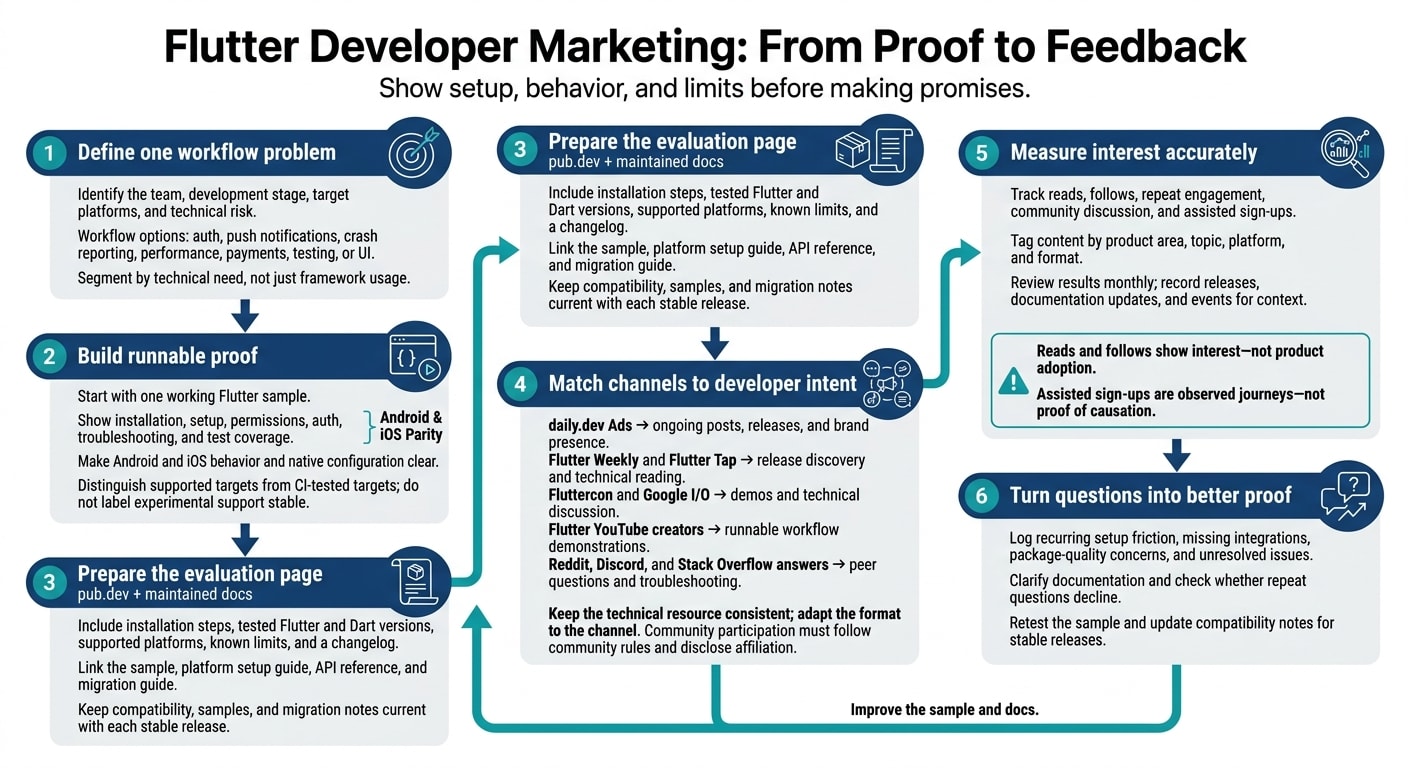
I’d start marketing to Flutter developers with one working sample and clear Android and iOS support details. Before outreach, update your pub.dev page with installation steps, tested Flutter and Dart versions, known limits, and a changelog.
Then build your plan around three questions:
- Who needs the tool? Target the workflow: auth, push notifications, crash reporting, performance, payments, testing, or UI.
- Where can they check it? Use daily.dev Ads and Flutter newsletters for updates, events and YouTube for demos, and community discussions for technical questions.
- What shows it’s working? Track reads, follows, repeat engagement, and assisted sign-ups. Use recurring setup questions to improve your docs.
My rule: show the setup, behavior, and limits before making promises. Keep your samples and support claims current with each stable release - and treat attention as interest, not proof of adoption.
How do I market my developer tool to Flutter developers?
Start with one workflow problem. Define the team, development stage, target platforms, and technical risk. Then walk through installation, setup, permissions, auth, troubleshooting, and test coverage in a standard Flutter app using flutter_test, testWidgets(), and WidgetTester.
Keep your quickstart, API reference, and migration guide in sync. For each stable release, explain what changed, who it affects, and what users should do next. Connect the workflow problem to the team that will buy the tool.
Who Flutter developers are and what they build
Flutter developers use Dart and widgets to build mobile, web, and desktop apps. Native integrations may also require Kotlin or Java on Android and Swift or Objective-C on Apple platforms.
Platform parity shapes how teams evaluate your tool. They need to know what works on each target and where behavior differs. Check Flutter’s current support matrix before listing supported targets. For embedded projects, name the device, operating system, and tested features instead of claiming blanket support.
With teams working across mobile, web, desktop, and native code, the same message won’t work for everyone.
Choose your audience by technical need
Segment by the feature or platform problem a team needs to solve. Mobile teams need help with native setup and releases. Teams moving to web or desktop need clear details on package compatibility, storage, and input behavior.
Package reviewers look at dependencies, tests, API stability, and maintenance. Backend and reliability teams want details on access controls, environments, crash context, and data handling.
Use #flutter and #dart for framework and language intent, #mobile for app builders, and #android or #ios for platform-specific setup. Reserve #react-native for direct cross-platform comparisons.
Combine the programming-language targeting guide with the tech-stack targeting guide to define audiences by both language and technical need.
Where do Flutter developers get their news and discover new tools?
pub.dev is where Flutter developers vet packages. Before installing, they check supported platforms, setup instructions, documentation, changelog, license, and release history. Platform parity is their first filter. Treat the pub.dev page as the main evaluation page: give readers enough detail to assess the integration before sending them elsewhere.
Next, developers look for current updates and proof they can check without much effort.
Flutter Weekly and Flutter Tap are channels for release notes, tutorials, and package announcements. Tie updates to stable releases and something developers can try now. Flutter Tap combines current Flutter updates with tutorials, videos, and new-package recommendations. Fluttercon works well for talks, workshops, and hands-on demos, while Google I/O adds context for major platform and tooling announcements. Repurpose strong technical material into documentation, release posts, videos, and daily.dev posts.
For peer validation, developers turn from announcements to community questions.
Use r/FlutterDev for discussions about the Flutter framework, packages, and app development. Use r/dartlang for Dart language and tooling topics. Check community rules, disclose your affiliation, and answer questions directly. On Stack Overflow, address a specific error or integration problem with a minimal reproducible solution. The answer should help even if the reader never becomes a customer.
Flutter YouTube creators need something they can demonstrate: a runnable project, test credentials or a sandbox, setup instructions, and access to an engineer. Discord communities work well for focused troubleshooting and migration questions. Check each server’s rules before joining the discussion, and link answers to maintained documentation. Disclose sponsorships and keep endorsements factual.
Once developers see a tool in action, they look for a steady source of updates and context.
On daily.dev, developers can follow a verified company page and receive posts and releases in their chosen feed and newsletter. Build that relationship over time through posts, releases, and employer-brand stories.
What do Flutter developers buy and how do they decide?
Flutter developers buy tools that work on both Android and iOS, keep native code to a minimum, and remain easy to maintain after launch.
Mobile backends, auth and push notifications
Developers buy an integration they can maintain, not just a Dart wrapper. Show setup for Android and iOS, auth state changes, token renewal, logout, notification permissions, and background limits. Keep Dart code and native configuration separate. On pub.dev, list supported Flutter and Dart versions, platform coverage, and evidence of maintenance. Package scores help, but developers still need to review the page.
Crash reporting and app performance monitoring
Show what developers can investigate when something breaks. Cover Dart exceptions and native Android and iOS failures. Show how to connect a failure to a release and the actions leading up to it. Document release tagging, symbol handling, stack traces, breadcrumbs, and device context.
For performance monitoring, explain startup timing, network traces, and performance spans. Developers expect the same detail from any SDK that touches production data or revenue.
Payments, analytics and attribution SDKs
A Dart wrapper alone doesn't make a maintained Flutter integration. List the Android and iOS SDK versions the package supports. Explain deep links, consent, privacy controls, identity handling, and sandbox setup. Document cancellations, retries, failed transactions, platform-channel requirements, and native-code limits upfront.
Mobile CI and device testing
Developers judge build tools by what happens when a pipeline fails. Explain Flutter version pinning, dependency locking, Android signing, iOS certificates, and support for widget and integration tests. Specify device and simulator coverage, including how tests handle native permission dialogs.
A failed status isn't enough. Failure reports should include the build command, Flutter version, device, OS, test output, and native logs.
UI kits and design tooling for Flutter
Visual tools need engineering proof, too. Show behavior, not just screenshots. Document Material and Cupertino choices, reusable widgets, theme overrides, and responsive layouts. Cover text scaling, accessibility, dark mode, localization, keyboard behavior, and safe-area behavior. Teams also need runnable documentation, supported Flutter versions, and migration notes for package updates.
How do I market mobile backends, auth and push notifications to Flutter developers?
Start with a runnable Flutter sample that shows the full flow: sign-in, protected data, push registration, notification handling, and deep-link routing.
Show what happens when auth fails, too. Put clear limits on refresh-and-retry attempts, and never log auth or push tokens.
Back up delivery claims with a side-by-side Android and iOS setup table. Cover permissions, native configuration, background limits, denied permissions, token rotation, and fallback sync the next time the app opens.
In the sample README, link to the pub.dev page, platform setup guide, and changelog for the release that matches the sample.
How do I market crash reporting and app performance monitoring to Flutter developers?
For tools used in production, end the demo with a readable failure report - not just a dashboard. Show the full path: install the package, initialize the SDK, trigger a test exception, and verify delivery. Explain how FlutterError.onError, handled exceptions, and async errors reach the SDK. Make the difference between fatal and non-fatal reports clear, including any delivery delays.
Make release and environment details easy to see. Flutter developers need to understand how crash reporting differs between Android and iOS in production. Attach the app version, build number, and development, staging, or production environment. Include the device, operating-system version, Git commit, and app flavor where supported. Show how these fields help pinpoint the first affected release while keeping test failures out of production reports.
Then walk through an investigation. Reproduce the failure, inspect its stack trace and breadcrumbs, filter by release and device, and verify the fix in the next build. Where supported, map Dart errors to Android or iOS native frames. Explain any extra capture setup and symbol files needed to make release traces readable. Include the same limits and symbol guidance on your pub.dev page.
For performance monitoring, start with a slow interaction, then show how to find its cause.
For a slow screen transition, inspect rendering in Flutter’s Performance View and use Dart tracing to investigate the work involved. Compare behavior before and after a change.
Support the diagnosis with these diagnostics or a benchmark run, rather than showing a score on its own.
Build trust by publishing the exact Flutter and Dart combinations you test. For each stable Flutter release, list supported platforms, tested architectures, build modes, and crash SDK plugin versions. Document known limitations, name the affected package versions, and provide workarounds. Spell out when native frames are missing, what symbolication requires, and which features differ across platforms. Keep these notes on pub.dev, too.
How do I build a brand that Flutter developers trust?
Once developers know what your tool does, trust depends on how easily they can check your claims. Treat your pub.dev page as your technical landing page. Explain the problem your tool solves, provide the install command, list supported Flutter and Dart versions, and include a minimal working example. Link to your docs, license, and support.
Be precise about Android, iOS, and other platform support in pubspec.yaml and the README. Separate supported targets from CI-tested targets, and don't call experimental support stable. Keep those distinctions clear in every release note and support page.
Pub Points, likes, and downloads can support your claims, but they aren't proof of quality.
Publish a dated changelog for every stable release and include migration steps for breaking changes. When Flutter ships a stable release, update your compatibility notes so teams can judge the risks of adopting your tool or upgrading.
When comparing approaches, use the same checklist: supported platforms, setup effort, native dependencies, offline behavior, debugging tools, and migration effort. Back up comparisons with documentation or reproducible tests, including the test date and versions.
Carry these proof points into your posts, releases, newsletters, and community threads. For more expert insights on developer marketing, explore our latest industry resources.
Which channels work best for marketing to Flutter developers?
Choose channels based on developer intent. Flutter marketing works best when updates, learning, and peer discussion each have a place.
For Flutter buyers, the strongest channel shows setup, behavior, and Android and iOS differences clearly. Use this table to match each channel to the buyer stage it serves best.
| Channel | Best use | Content format | Strength | Limitation | Role in the plan |
|---|---|---|---|---|---|
| daily.dev Ads | Building a following over time | Company posts and product updates | Verified company page, plus posts, releases, and employer-brand stories in selected feeds and newsletters. | Requires a steady supply of useful developer content | Sustained brand presence and community-building |
| Flutter newsletters: Flutter Weekly, Flutter Tap | Release discovery | Release summaries and technical links | Curated release news and technical reading. | Editorial selection, limited space, and fixed schedules | Release education |
| Fluttercon and Google I/O | Hands-on evaluation | Sessions and event conversations | Live demos, workshops, and direct technical discussion. | Event timing, preparation, and selective speaking opportunities | Building trust and relationships |
| Reddit: r/FlutterDev, r/dartlang | Testing claims with peers | Helpful answers and technical threads | Candid feedback about developer concerns | Community rules and skepticism toward promotion | Peer validation, troubleshooting, and launch discussion |
| Flutter YouTube creators and Discord communities | Evaluating implementation workflows | Walkthroughs and office hours | Visible implementation and direct questions | Creator fit and production time; fast-moving chat and regular moderation | Workflow demos and live Q&A |
| Stack Overflow Ads | Reaching developers during implementation | Sponsored technical placements. | Implementation help in front of developers solving a problem | Broader programming context that requires a clearly relevant message | Problem-specific technical education |
Keep the technical resource consistent, but change the format to suit the channel. Give newsletter editors a short release summary linked to a useful guide. For YouTube, show a complete workflow rather than a feature montage. On Reddit and Discord, answer the question being asked, disclose your affiliation, and check community rules before posting.
Choose only the channels your team can support. A creator walkthrough needs engineering input. Community participation needs someone who can answer follow-up questions. Once you choose a channel, match the format to the proof point.
What is the best way to reach Flutter developers?
Reach Flutter developers through daily.dev Ads, Flutter newsletters, and Fluttercon, and support every message with proof at the package level. Start with the technical need your product addresses. Document platform parity, supported Flutter versions, native dependencies, and the failure it fixes.
Use your mobile-team outreach plan to segment developers, tech leads, and engineering managers. Then choose the channel for each group. Use owned updates, events, and community threads only after the package page shows that your product fits their needs.
Before outreach, complete your pub.dev page with install steps, supported Flutter and Dart versions, platform setup, troubleshooting, and a runnable sample. Each channel can then use the same technical details in a format that suits its audience.
Keep a verified daily.dev company page active, with package names and support claims that match your documentation. When a stable release changes compatibility, publish the update and share its release note through the audience’s preferred channel.
What should your message say?
Lead with the task your package supports - not a broad promise of speed. Use this structure: problem, platforms, proof, limits.
Document platform parity in a table that covers setup, permissions, behavior, background execution, and testing status for Android and iOS. Explain what stays in Dart and what needs native configuration. Avoid “works everywhere” unless you can back up the claim for every target.
Show the same widget or integration on Android and iOS side by side. Include the dependency declaration, initialization code, and relevant native files so developers can compare behavior and reproduce the setup. Use screenshots to illustrate the implementation, not explain it.
Point readers to the pub.dev score, latest release, changelog, supported platforms, and examples. Treat the score as supporting evidence, not proof.
How do I measure marketing to Flutter developers?
Flutter developers judge tools by platform parity and package quality. Track whether those proof points are getting through by measuring reads, follows, community discussion, and assisted sign-ups. Check whether Flutter and Dart posts draw repeat attention, too. Reads and follows show interest - not product adoption.
Tag each post by product area, topic, platform, and format. Keep auth separate from crash reporting, Flutter separate from Dart, and Android-only content separate from iOS-only or cross-platform content. Use consistent tags such as #flutter, #dart, #mobile, #android, #ios, and #react-native where relevant.
Review results monthly. Where data is available, compare reads, follows, and repeat engagement across similar posts. Log release dates, documentation updates, and events to give those results context.
Keep a technical-question log that tracks recurring setup friction, missing integrations, package-quality concerns, and unresolved issues. Use that feedback to clarify your documentation, then check whether the changes reduce repeat questions.
Treat assisted sign-ups as observed journeys, not proof of causation. Record the educational and brand touchpoints that came before each sign-up. Use those patterns to decide what to publish or clarify next.
How daily.dev Ads helps you reach Flutter developers
daily.dev Ads gives you a managed channel to keep Flutter updates in front of developers over time. It includes a verified company page and managed distribution for Flutter releases, product updates, and engineering stories in developers’ feeds and Digest.
The daily.dev team runs one managed plan, handling distribution and reporting. To get started, share the Flutter problem you solve, the developers you want to reach, release dates, approved visuals, destination URL, and a technical reviewer who can check compatibility.
Build your publishing calendar around releases and proof. Share release notes, migration guidance, and implementation stories that clearly explain platform differences. Use your company page to show what works on Android and iOS - and where they differ. Tag posts with #flutter, #dart, #mobile, #android, and #ios.
Keep the technical proof on your pub.dev page and in your docs: installation steps, Android and iOS support, limitations, and a changelog. Use daily.dev to introduce the topic, then direct readers to those resources for the details.
Schedule a conversation to plan a Flutter-focused program, and review daily.dev Ads plans for verified company presence.
Conclusion
Marketing to Flutter developers starts with one problem you can prove you solve. Check platform parity, especially on Android and iOS, and keep your pub.dev page current. Retest the sample app before each stable release so setup, compatibility, and migration notes stay accurate. Bring that proof into every release update.
Tell developers what changed, what still differs, and where to find the latest guidance. Your company’s presence on daily.dev should give Flutter developers a reason to follow: useful posts, release updates, and honest technical answers - not broad promotion.
Measure whether that proof connects through reads, follows, discussions, and assisted sign-ups. Review these signals by topic, platform, and release. Use recurring questions to improve documentation and choose what to publish next.
FAQs
How should I prioritize outreach with a small team?
Focus on daily.dev Ads placements in the feed Flutter developers use to find tools. Also use developer newsletters and communities where developers compare their options.
Flutter developers judge tools with “platform parity” in mind. Show how the tool works on both Android and iOS, make any differences clear, and send traffic from every campaign to your pub.dev page.
How can I distinguish developer interest from adoption?
When marketing to Flutter developers with daily.dev Ads, track reads, follows, and discussions as signs of interest. Measure assisted sign-ups separately: they’re a step toward adoption, but engagement alone isn’t adoption.
Build trust with posts in their feed and the daily.dev Digest. Back them up with stable-release updates and technical evidence of platform parity on pub.dev.
How should I market a package with limited platform support?
Be clear about platform support. Publish a table that shows what works on each target and where support differs. This helps Flutter developers decide whether your package fits their workflow.
Make your pub.dev page the main landing page. Link to its quality score and changelog, and publish updates with every stable release. Focus on what the package does and which features it supports - not on suggesting that every platform offers the same experience.