

To reach game developers in 2026, I’d start with one audience, one technical problem, and one measurable goal - then promote a guide or sample that helps developers test your product.
Here’s the approach I’d use:
- Define the audience: Match your message to the engine, role, project stage, and studio size. Give indies a self-serve path and studio teams the technical and purchasing details they need.
- Share useful technical content: Publish postmortems, devlogs, or integration guides in relevant forums, r/gamedev, itch.io, and approved Discord communities.
- Pay to distribute what works: Test daily.dev Ads, or choose GDC, Twitch, and community sponsorships when live discussion fits your audience.
- Measure product use: Track qualified trials, completed integrations, and active use - not just impressions. Review results weekly and fix setup problems before buying more traffic.
Before spending, I’d check audience availability, community rules, disclosure requirements, and sponsorship dates as of October 14, 2026.
My rule: make the next step easy to test, then measure whether developers take it.
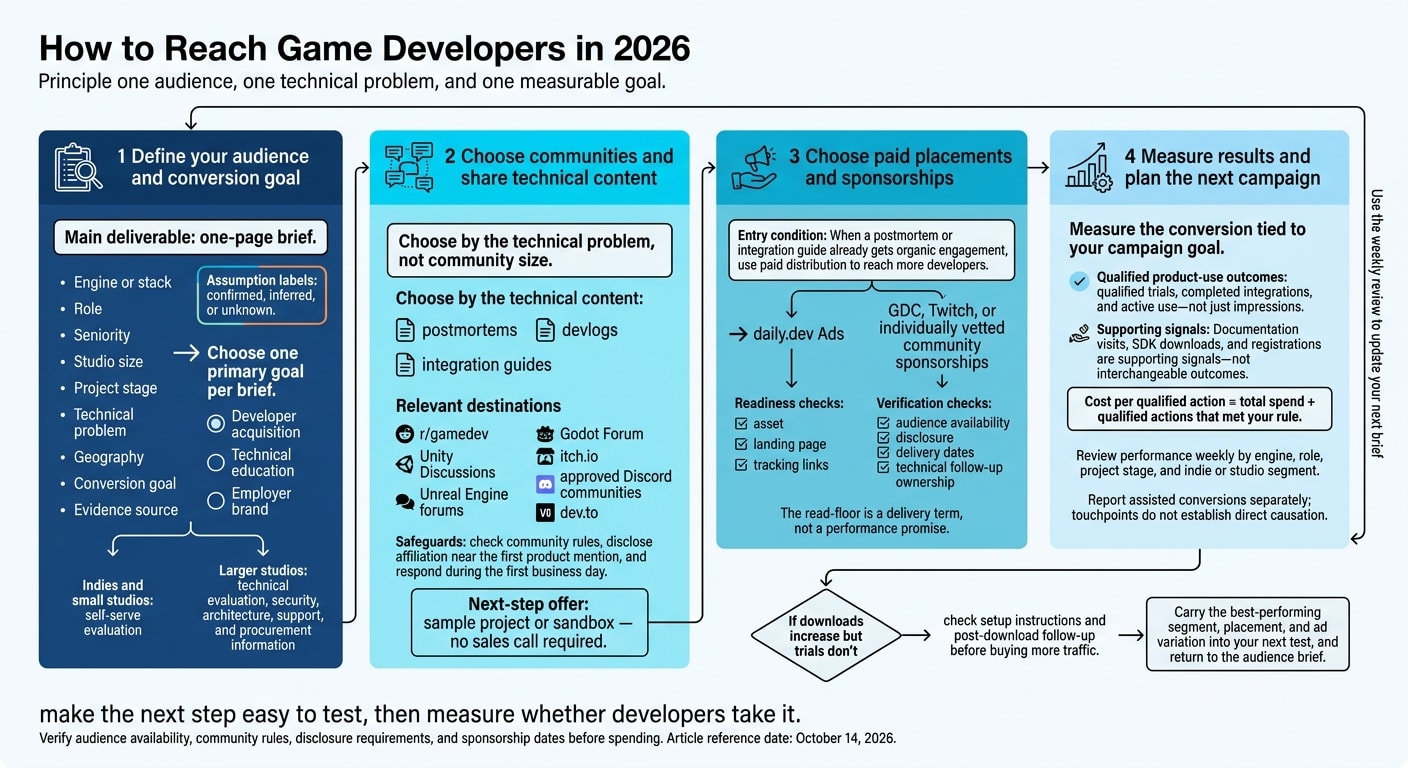
1. Define your audience and conversion goal
Once you’ve chosen one segment, create a one-page brief to guide targeting, messaging, proof, and the next step. Record the engine or stack, role, seniority, studio size, project stage, technical problem, geography, conversion goal, and evidence source.
Back up assumptions with CRM records, product analytics, customer interviews, support tickets, community observations, or public research. Job listings can signal a stack or role, but they don’t show purchase intent. Label each assumption confirmed, inferred, or unknown.
Choose one primary goal per brief. Each goal calls for its own message, landing page, and conversion event:
| Goal | Message to lead with | Primary action to measure |
|---|---|---|
| Developer acquisition | Product value and implementation evidence | Start a trial, request a demo, or begin a qualified product evaluation |
| Technical education | Practical code, documentation, or workflow guidance | Read an integration guide, download documentation, attend a technical session, or complete a proof of concept |
| Employer brand | Engineering work backed by evidence, team practices, and role details | View an engineering role, join a talent community, or apply for a position |
Let that goal shape the buying path.
Separate indie and studio buying needs
For indie developers and small studios, make evaluation self-serve. State which engines you support, link to current setup documentation, provide a working sample, and explain deployment requirements. Only publish setup-time claims you’ve verified. Instead of assuming a fixed budget, ask who approves the purchase and what might block implementation.
Larger studios need security details, architecture documentation, integration evidence, support terms, and procurement information. Give practitioners a technical evaluation path. Give decision-makers evidence about rollout risk and the impact on engineering.
Identify the engine, role, and project stage
Match your proof to the buyer’s engine and workflow:
For Unity programmers, prioritize relevant SDK and integration documentation; for Unreal Engine technical artists, show pipeline compatibility; for Godot developers, provide supported setup steps and a working sample.
Include proprietary stacks in qualification forms. Match the offer to the project stage, too: sandbox access for prototyping, integration validation during production, readiness guidance before launch, and operational evidence for live operations.
Have engineering confirm supported integrations and technical writing confirm the current documentation version. Use the brief to target tech stack, seniority, geography, and interests in daily.dev Ads. Treat studio type and project stage as qualification inputs, then send each audience to one matching next step.
2. Choose communities and share technical content
Find communities that fit your audience
Start where your target developer already asks questions. Choose by the technical problem, not community size. r/gamedev works for broad production questions and postmortems. For implementation issues, use engine forums such as Unity Discussions, Unreal Engine forums, and the Godot Forum. Read recent threads to spot unanswered questions and learn how much detail members expect.
Use itch.io for indie projects, playable prototypes, devlogs, and feedback. Moderated Discord communities can support continued discussions, but only where moderators allow vendor participation and links. Consider GDC for technical sessions, meetings, and sponsorships when the event budget fits your audience. On dev.to, share tutorials and production lessons - not ad copy.
Before publishing, record each community’s rules for ads, links, and commercial posts. If anything is unclear, ask the moderators. Answer the question in the post itself, disclose your affiliation near the first product mention, and assign someone to respond during the first business day. Let community feedback guide the format of your next post.
Create postmortems, devlogs, and integration guides
Match each format to the question it answers. A postmortem should cover the project’s scope, team structure, engine, technical constraints, decisions, outcomes, and lessons learned. A devlog should show implementation progress and tradeoffs through code excerpts, screenshots, or short recordings. An integration guide should solve one workflow problem, with prerequisites, numbered setup steps, troubleshooting, and rollback guidance. Share results only when you can state the test conditions clearly.
Tag each asset with its engine version, role, platform, and stage. Link to maintained documentation, compatibility details, and sample code so readers can check your work. Offer a sample project or sandbox as the next measurable step - no sales call required.
Update the post when reader questions reveal missing steps or compatibility limits. When a format gains traction, reuse it in paid placements and sponsorships.
3. Choose paid placements and sponsorships
When a postmortem or integration guide already gets organic engagement, use paid distribution to put that same asset in front of more developers.
Match daily.dev Ads formats to your goals
Start only when your asset, landing page, and tracking links are ready. With daily.dev Ads, match the format to the action you want: clicks and signups, technical reads, brand association, or repeat exposure.
Before planning a campaign around Godot, Unity, or Unreal Engine, verify that the audience is available.
| Placement | Audience fit | Available controls | Content format | Budget suitability | Primary measurement |
|---|---|---|---|---|---|
| In-Feed Native Ads | Developers evaluating tools or content | Tech stack, seniority, geography, and interests | Article, integration guide, demo, or product page | Test segment | Qualified conversions |
| Sponsored Post | Buyers who need deeper technical context | Guaranteed feed impressions, read-floor commitment, and canonical republishing | Postmortem, devlog, or integration guide | Long-cycle asset | Delivery against the read-floor commitment |
| Engagement Ads | Audiences grouped by technical interests | Branded Tags, Keyword Spotlights, Custom Upvotes, Tag Page Takeovers, and Stack Placements | Format-specific branded placement | Amplification layer | Engagement |
| Digest newsletter sponsorships by topic track | Readers of topic-focused updates | Topic track and timing, subject to availability | Sponsor message linked to an asset | Focused launch | Qualified conversions |
| GDC sponsorship | Studio teams and technical leaders | Package, placement, session scope, and availability | Workshop, session, demo, or meeting activation | Studio campaign | Qualified conversations |
| Twitch technical broadcast | Developers seeking live implementation proof | Host expertise, format, schedule, disclosure, and tracking links | Integration walkthrough or build session | Narrow indie segment | Qualified signups |
| Individually vetted community sponsorship | Relevant forum, Discord, or developer group | Moderator approval, placement, duration, disclosure, and permissions | AMA, workshop, devlog feature, or resource | Tightly defined segment | Qualified conversions |
After choosing a format, finalize tracking, disclosure, and follow-up. The read-floor is a delivery term, not a performance promise. Studio buyers may need more time to evaluate. Have someone ready to answer technical questions before adding placements.
Assess event, creator, and community sponsorships
Use sponsorships when your message needs context, live interaction, or access through an event. For GDC, Twitch, and community opportunities, prioritize qualified technical attention. Check developer relevance and the host’s expertise before focusing on reach.
Put deliverables, tracking links, disclosure language, moderation, lead capture, and reuse rights in writing before committing. Paid Twitch content must use the platform’s branded-content disclosure mechanism and follow applicable advertising rules.
For late-2026 campaigns, confirm that the audience still matches your buying goal. Then check inventory, delivery dates, reporting, and cancellation terms. Ask GDC for current opportunities and event dates rather than assuming a 2026 package is still bookable.
Studio campaigns can consider workshops and meetings if the team can support longer evaluations. Smaller indie campaigns should avoid spreading follow-up effort across several sponsorships.
4. Measure results and plan the next campaign
Track technical engagement and qualified actions
Measure the conversion tied to your campaign goal. Record the event name, qualification rule, owner, tracking method, and reporting window. Documentation visits, SDK downloads, and registrations are supporting signals - not interchangeable outcomes.
Use separate campaign tags for each segment, placement, and ad variation. Connect those tags to consented first-party analytics. Review performance weekly by engine, role, project stage, and indie or studio segment.
Cost per qualified action = total spend ÷ qualified actions that met your rule.
Report assisted conversions separately. They show touchpoints, not direct causation.
Ask sales, DevRel, and support to log integration friction, missing documentation, engine compatibility issues, and security concerns each week. Use those findings to choose one or two fixes for the next review.
If downloads increase but trials don't, check setup instructions and post-download follow-up before buying more traffic. Carry the best-performing segment, placement, and ad variation into your next test.
Review your launch checklist and related persona guides
Use the weekly review to update your next brief, then reset the launch checklist. Recheck audience fit, sponsorship rules, tracking, and follow-up ownership. Set the next weekly review date.
Link only to verified, published persona guides for buyers included in the campaign. Add DevOps, security, or engineering leadership guides only when they match your current buyer group. Explain how each guide relates to the game-development campaign.
Discuss your daily.dev Ads campaign at https://business.daily.dev/schedule/.
FAQs
How much should I budget for an initial campaign?
Start with a small pilot: one discovery placement, such as In-Feed Native Ads, targeting a single tech stack. Many teams run a four- to six-week test with one landing page to measure activation before expanding.
Choose Starter, Growth, or Scale based on your reach goals. The daily.dev Ads team runs your campaign. To set your budget, define the campaign scope and request a quote through the onboarding form.
How can I validate demand before buying ads?
Start with a small, targeted daily.dev Ads test to validate demand before scaling. Run one In-Feed Native Ads campaign for 4–6 weeks, targeting one tech stack and relevant category terms. Install your pixel and build the landing page around signup or the first action you want users to take.
Judge downstream activations - not just clicks. Pair attributed results with a holdout group or geographic split to measure incremental lift. Scale only if the activation rate holds.
When should I scale a game developer campaign?
Scale when activation is working - not just when clicks come in. Start with a focused in-feed test for 4 to 6 weeks, using one audience, one landing page, and an installed pixel. Assess activation first. Then move to a longer-running, category-level program if quality holds steady throughout the campaign.
Postmark went from a pilot to quarterly spending, then to always-on monthly spending as performance held up. context.dev scaled as engagement quality stayed high.