

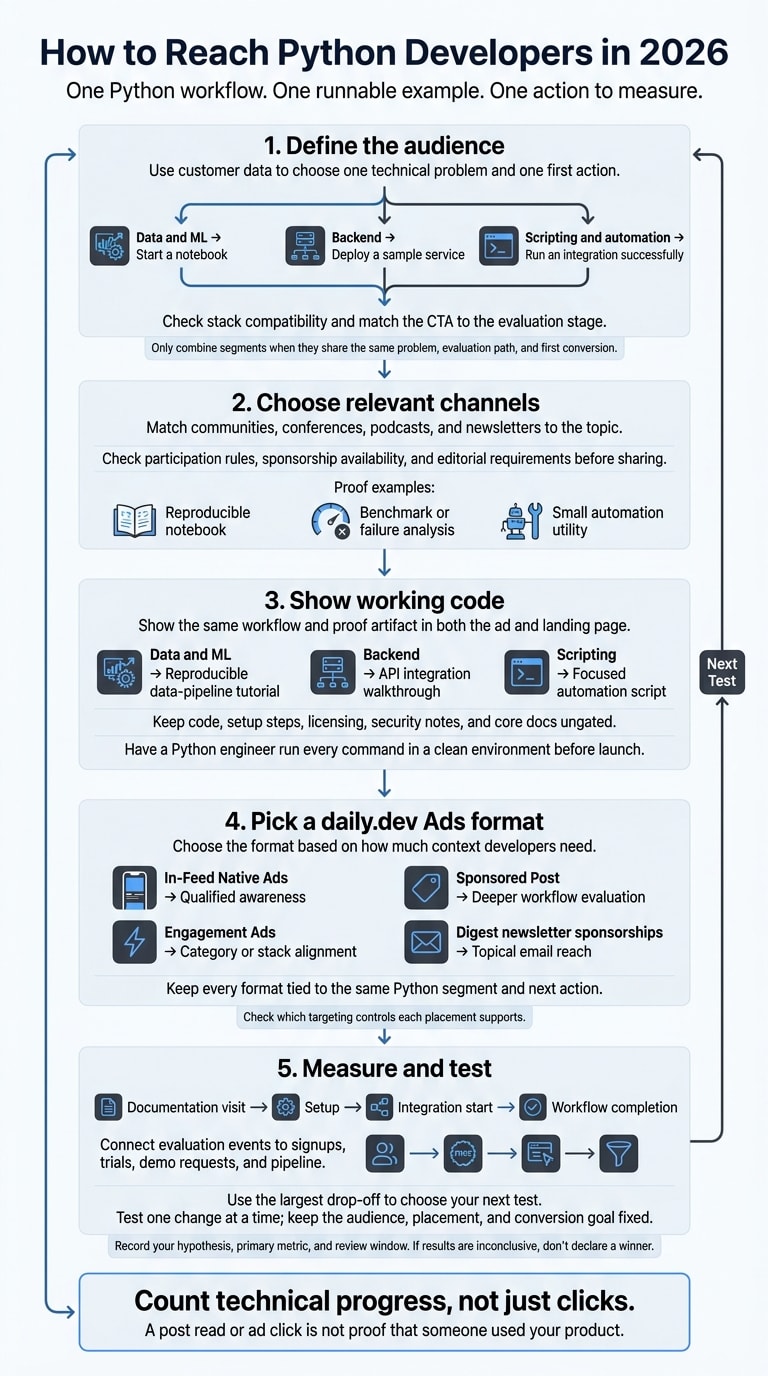
I’d start with one Python workflow, one runnable example, and one action to measure - not a campaign aimed at every Python developer. Choose from 3 groups: data and ML, backend, or scripting. Then give that group a direct path to testing your product.
Here’s the approach I’d use:
- Define the audience: Use customer data to choose a problem, check stack compatibility, and set a goal such as running a notebook or deploying a sample service.
- Choose relevant channels: Match communities, conferences, podcasts, and newsletters to the topic. Check their rules before sharing.
- Show working code: Keep setup steps and core docs ungated. Make the ad and landing page promise the same workflow.
- Pick a daily.dev Ads format: Use feed ads, sponsored posts, engagement placements, or Digest sponsorships based on the context developers need.
- Measure and test: Track completed workflows, trials, and qualified demo requests. Change one variable per test.
My rule: count technical progress, not just clicks. A post read or ad click can start an evaluation - but it isn’t proof that someone used your product.
1. Define your Python audience and goal
Start with your CRM and product data. Look for Python workflows your successful customers use. Then define one technical problem and one first action for each campaign. Use those details to choose the segment with the clearest fit, so your choice rests on customer behavior rather than a broad audience label.
Separate data and ML, backend, and scripting audiences
Choose the segment where your product solves a clear problem. Give it its own message, landing page, and conversion goal. The table below ties each workflow to an evaluation you can measure:
| Segment | Problem to address | Landing-page focus | First conversion goal |
|---|---|---|---|
| Data and ML | Slow or unreliable experimentation, pipelines, or model deployment | Notebook setup, supported data integrations, reproducible workflows | Start a notebook |
| Backend | Difficult API development, scaling, deployment, observability, or dependency management | Framework compatibility, deployment steps, requirements for running the service | Deploy a sample service |
| Scripting and automation | Manual operations, fragile integrations, or repetitive testing and automation | Working scripts, authentication steps, error handling | Run an integration successfully |
Only combine segments when they share the same problem, evaluation path, and first conversion. Once you choose a segment, tailor your proof and setup instructions to its workflow.
Match seniority and tech stack to the buying stage
Match the CTA to the evaluation stage - not seniority alone. Beginners want setup help. Individual contributors (ICs) want compatibility, performance, and debugging support. Technical leads want to assess architecture fit and migration effort, while managers focus on adoption and reliability. Budget owners need answers about security, governance, and procurement.
In 2026, verify supported Python versions, integrations, SDK documentation, and deployment environments before launch. With daily.dev Ads, target by tech stack, seniority, geography, and interests to test a specific audience hypothesis. Python interest alone does not show AI interest or intent to convert.
2. Choose Python communities by topic and participation rules
Use the segment you defined above to choose a community and the kind of proof its members want. Match data and ML topics to notebook discussions, backend topics to architecture and troubleshooting, and scripting topics to automation.
Choose communities where your content solves a problem, not just where it gets seen. Before reaching out, check current participation rules, sponsorship availability, and editorial requirements.
Share practical technical content at conferences and in communities
PyCon US 2026 used separate rules for sponsorship and speaking slots. Treat the published rules as context, not as a guide to available inventory.
For Python Discord and r/Python, read the current self-promotion rules, disclose your affiliation, and get moderator approval where required. Python Discord prohibits unapproved advertising and offers or requests for paid work. Match what you share to the discussion:
Skip vague product claims, gated demos, and sales-first asks. Share a reproducible notebook or evaluation method, a benchmark or failure-analysis write-up, or a small automation utility.
Link to source code or documentation before the product page. This gives members something useful and makes the next click serve a clear technical purpose.
Match podcasts and newsletters to your Python topic
Consider Talk Python for topics that work well as discussions and code walkthroughs. PyCoder’s Weekly fits topics aimed at Python developers, data scientists, and machine learning engineers.
Ask each publisher about audience and topic fit, availability, pricing, copy review, disclosure language, link policy, cancellation terms, and reporting fields. Provide one verifiable technical claim and one clear next action.
Direct readers to documentation, trial activation, or a technical demo request.
Measure documentation visits, trial activations, or completed integrations - not clicks. Use these placements to encourage technical evaluation, then carry that proof onto the landing page.
3. Build Python-focused ads and landing pages
Build one technical asset for each audience segment defined above: Data and ML, Backend, and Scripting. Show the same workflow and proof artifact in both the ad and landing page. Developers should land on exactly what the ad promised.
| Audience segment | Asset to build | Evaluation path |
|---|---|---|
| Data and ML | Reproducible data-pipeline tutorial | Load the source dataset, run transformations, validate results, and inspect the output artifact |
| Backend | API integration walkthrough | Authenticate, send a request, inspect the response, and test error handling and retries |
| Scripting | Focused automation script | Supply input files, set permissions, run the script, and inspect the report, logs, and failure behavior |
Once you've defined the asset, make sure developers can reproduce each step of the evaluation.
Provide runnable code and clear setup steps
Spell out the target skill level, supported operating systems, required accounts, test date, exact Python and dependency versions, environment variables, and input files. Link directly to the docs and API pages used in the example.
Have developers create an isolated environment with python -m venv .venv, then install dependencies with python -m pip install -r requirements.txt. Include platform-specific activation commands where needed and a dependency file with pinned versions or version bounds. Explain how to remove generated files and temporary credentials.
Before launch, have a Python engineer run every command in a clean environment and record the test date. Show the expected output and explain common failures. Test only the Python versions you support, and rerun the tests after major Python or dependency releases.
Replace vague claims with proof
Replace broad integration and framework claims with tested compatibility details and known limits. If you claim better performance, publish the hardware, runtime, dependencies, dataset, workload, and measurement method.
Keep code, setup steps, licensing, security notes, and core docs ungated. Reserve forms for optional implementation help or enterprise discussions.
4. Choose and launch daily.dev Ads placements
Build your placement around one action: completing a Python quickstart, activating a trial, or requesting a qualified demo. Use the technical asset from the previous section, then choose the daily.dev Ads format based on how much context the developer needs.
| Python workflow and next step | Placement | Campaign goal |
|---|---|---|
| Promote a tutorial, SDK page, or trial through sponsored cards in the discovery feed. | In-Feed Native Ads | Qualified awareness |
| Publish a technical guide that leads to documentation or a low-friction evaluation step. Includes guaranteed feed impressions, a read-floor commitment, and canonical republishing. | Sponsored Post | Deeper workflow evaluation |
| Match your workflow to Branded Tags, Keyword Spotlights, Custom Upvotes, Tag Page Takeovers, or Stack Placements. Pick the interaction that fits your category or stack. | Engagement Ads | Category or stack alignment |
| Select a topic track: AI and Machine Learning, Data and Databases, Web Development, or DevOps and Cloud. The sponsorship appears in every Digest sent to that audience during one week. | Digest newsletter sponsorships | Topical email reach |
Keep every format tied to the same Python segment and next action.
For In-Feed Native Ads, align tech stack, seniority, geography, and interests with that segment. Then match the ad copy and visuals to one evaluation step.
Use “Run the example” or “Read the setup guide.”
Match interests to the workflow: AI and Machine Learning or Data and Databases for data and ML, frameworks and cloud tools for backend, and task-specific tools for scripting. Check which targeting controls each placement supports. Don’t assume every format offers the same filters.
Choose Sponsored Post when developers need more product context before evaluation. Before launch, confirm the read-floor commitment, canonical republishing, and wrap-report fields. Reads and impressions measure different things. Delivery alone doesn’t prove technical evaluation or conversion.
Review the linked ad requirements and planning resources, choose one primary placement, and give each placement and segment separate tracking. Record the intended conversion so a newsletter click, post read, and quickstart completion don’t share the same success metric. For help planning your next step, use the daily.dev Ads scheduling page.
5. Measure qualified actions and plan your next test
Track technical evaluation and conversion quality
Once your campaign is live, track actions that signal technical evaluation. A qualified visit should show technical intent tied to one of your three segments: data and ML, backend, or scripting.
Follow the path from documentation visit to setup, integration start, and workflow completion. Connect those events to signups, trials, demo requests, and pipeline using product analytics and your CRM. Respect consent requirements. When attribution is incomplete, label it influenced, not campaign-caused.
Review CTR alongside downstream quality for each segment and placement. Compare cost per qualified visit and completed workflow with your own baseline, and allow time for delayed activation.
Choose one variable for your next test
Let the largest drop-off in the segment, placement, and workflow you measured guide your next test. If people click but don’t engage with documentation, fix the handoff. If they reach setup but don’t start an integration, reduce setup friction.
Test one change at a time. Keep the audience, placement, and conversion goal fixed. Before launch, record your hypothesis, primary metric, and review window. If the results are inconclusive, don’t declare a winner.
Need help choosing your next test? Discuss a Python-focused campaign with daily.dev to refine your audience, message, or measurement plan.
FAQs
How can I choose a Python segment without customer data?
Choose your audience based on what developers are doing now, not customer lists. With daily.dev Ads, use content tags and reading behavior to build Python audiences. Pair Python with backend, scripting, or data/ML interests, then narrow your audience by seniority and geography.
This approach avoids outdated profile targeting and keeps your messaging focused on what developers are actively evaluating.
How much budget should I allocate to my first daily.dev Ads test?
Start with a focused In-Feed Native Ads pilot. Expand only if performance holds. daily.dev Ads handles setup, targeting, ad content, pacing, and weekly reporting. Test multiple variants and move budget toward the winners while the campaign is running.
Share your campaign goal and target segments, and we’ll size your test in a written onboarding plan. Schedule a 20-minute call to map out your first test.
How can I measure conversions that happen weeks after a click?
Before you spend, install the conversion pixel and choose the outcome you’ll track: signup, first API call, or activation. Enable view-through attribution to credit conversions that happen after someone sees the ad without clicking. Use a holdout to check whether the ads drove conversions that wouldn’t have happened otherwise.
Report pixel-attributed conversions across the full post-click window, not just right after the click. daily.dev’s measurement approach includes pixel-based conversion measurement, view-through attribution, and holdouts.