

I’d start with a working example - not a launch announcement. Give developers one task, tested setup steps, and a clear result, such as a rendered component or successful build.
Here’s the approach I’d use:
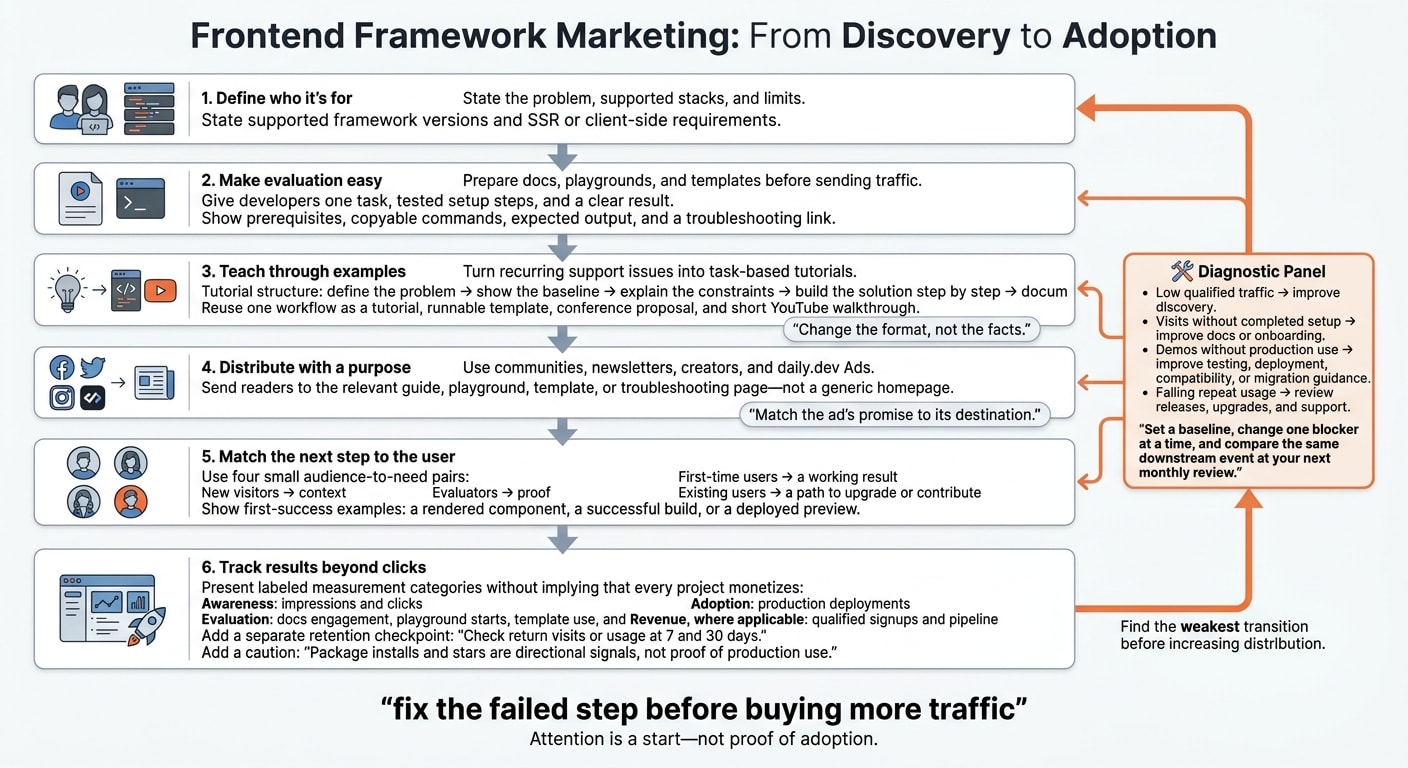
- Define who it’s for. State the problem, supported stacks, and limits.
- Make evaluation easy. Prepare docs, playgrounds, and templates before sending traffic.
- Teach through examples. Turn support questions into tutorials, talks, and videos that explain tradeoffs.
- Distribute with a purpose. Use communities, newsletters, creators, and daily.dev Ads to send readers to the right resource.
- Match the next step to the user. New visitors need context; evaluators need proof; existing users need upgrade help.
- Track results beyond clicks. Measure completed setups, production use, and return activity at 7 and 30 days.
My rule: fix the failed step before buying more traffic. Attention is a start - not proof of adoption.
2. Turn technical lessons into useful content
Once the docs and demos work, turn that material into content people can learn from.
Create tutorials and evaluation guides
Turn recurring support issues into task-based tutorials on accessibility, performance, responsive layouts, migration, and design-system governance. Explain the problem before introducing your library.
Follow a repeatable structure: define the problem, show the baseline, explain the constraints, build the solution step by step, and document tradeoffs. Instead of calling a feature “safer,” show the bug or error through a code diff or test result.
Show observable outcomes: semantic dialog structure, keyboard focus, focus return, Escape behavior, screen-reader announcements, and automated checks; measured performance on low-spec devices; and responsive behavior driven by content, not fixed device widths.
Help evaluators compare options - even when that means deciding against adoption. Explain rendering constraints, runtime costs, migration effort, and when a platform API is enough. Include decision criteria, a baseline implementation, alternatives, limitations, and a rollback path. Publish implementation stories only when readers can publicly verify the architecture, rollout scope, and outcomes.
Reuse lessons in talks and videos
Turn one workflow into a tutorial, runnable template, conference proposal, and short YouTube walkthrough. Reuse the same proof points, claims, and prerequisites in each format.
Change the format, not the facts. Use the talk to explain architecture decisions and failed approaches. Use the video to show intermediate states and debugging steps. Link every format back to the canonical guide, and keep tested versions aligned.
Give creators a tested repository, known limitations, demo requirements, and a fallback if a live dependency breaks. Review technical accuracy, not the creator’s conclusion. Disclose sponsorship clearly, allow independent testing, and don’t require scripted praise.
Maintain one source of truth for claims, examples, and prerequisites across all formats.
3. Reach frontend developers
Talks, creator videos, newsletters, and developer feeds help people discover your project. Your repository and package page help them decide whether to use it. Keep supported versions, licensing, and installation instructions consistent across both. Use those guides to give each channel a clear role: discovery in communities, evaluation in the repo.
With that path in place, use communities and newsletters to bring in the first qualified visitors.
Share through communities and newsletters
Share the tutorials, guides, and demos you’ve already created. Start with the technical answer, then include the project link and your disclosure. Send readers straight to the relevant example or troubleshooting page. For joint tutorials, agree on who owns the integration and documentation updates before publishing.
Treat Bytes and JavaScript Weekly sponsorships as paid placements. Pitch editorial coverage separately. Direct readers to a runnable example or playground - not a generic homepage.
Use the daily.dev #javascript and #react tags for relevant content, and give each placement its own tracking link.
Promote useful assets with daily.dev Ads
After organic channels, use paid distribution to take a more narrowly defined audience through the same evaluation path.
Start with the same evaluation-ready guide, playground, or template on daily.dev Ads. Match the audience’s tech stack, seniority, geography, and interests to the product’s actual requirements. In 2026, state supported framework versions and SSR or client-side requirements before launching a campaign.
| Format | When to choose it |
|---|---|
| In-Feed Native Ads | Introduce a guide, playground, or template through sponsored feed cards. |
| Sponsored Post | Distribute a technical article with guaranteed feed impressions, a read-floor commitment, and canonical republishing. |
| Engagement Ads | Build category visibility through Branded Tags or Keyword Spotlights. |
| Digest newsletter sponsorships by topic track | Promote an asset within a relevant topic track. |
Match the ad’s promise to its destination. If the ad promises a working component, send readers to that component’s runnable example, with a clear path to installation. Measure playground starts and completed evaluation steps - not clicks alone.
4. Match campaigns to adoption stages
Point each campaign toward the next step in the adoption loop. New visitors need context. Evaluators need proof. First-time users need a working result. Existing users need a path to upgrade or contribute.
Choose an asset, channel, and success signal
Use the docs, playgrounds, templates, tutorials, talks, and videos from earlier sections. Give each audience stage its own destination and success signal.
Choose one primary success signal per campaign. Clicks shouldn’t mask a failed setup or an unfinished migration.
| Audience intent | Destination asset | Distribution method | Primary success signal |
|---|---|---|---|
| Discover the framework | Playground | In-Feed Native Ads | Playground starts |
| Migrate an existing project | Version-specific migration guide | Migration-focused content | Successful builds |
| Evaluate enterprise fit | Comparison page with tradeoffs and limitations covering architecture, security, support, and governance | Targeted account outreach | Validation of architecture, security, or support fit |
| Upgrade adoption | Upgrade recipe | Owned channels | Upgraded installations |
| Start contributing | Contributor guide with local setup and starter issues | Open-source communities | First pull requests |
| Evaluate a design system | Accessible component examples | Engagement Ads, such as Branded Tags or Stack Placements | Design-system adoption |
For evaluation, aim for a rendered component, a successful build, or a deployed preview as the first success. Then offer production guidance. For retention, send existing users upgrade help and release material - not beginner messaging.
Keep the path to first success clear
Keep the task consistent from the campaign through the quick start and runnable example. Place prerequisites, copyable commands, expected output, and a troubleshooting link beside the relevant step. Don’t require an account before users get a useful result unless the task requires authentication.
Assign owners for blockers before launch. Documentation fixes unclear instructions. Engineering resolves installation and compatibility failures. Content turns recurring questions into guides.
Set a response deadline and review blockers weekly during the campaign. Repeated server-rendering questions call for a tested example and a dedicated guide. Repeated installation failures call for a version check, clearer prerequisites, and a reproducible issue template.
Use these blockers to shape the measurement plan in the next section.
5. Measure adoption and fix blockers
Track adoption beyond clicks and stars
Use the same funnel that exposed blockers, but measure each step separately: awareness, evaluation, production use, and revenue. Impressions and clicks show attention. Docs engagement, playground starts, template use, and completed quick starts show evaluation. Production deployments show adoption, while qualified signups and pipeline show revenue. Package installs and stars are directional signals, not proof of production use.
In your own analytics, connect each asset and channel to downstream events. Include docs, playgrounds, templates, tutorials, and release notes. Keep evaluation activity separate from first success: completed quick starts show onboarding progress; working demos show proof of concept.
Check return visits or usage at 7 and 30 days. Also track upgrades, returning contributors, issue quality, and median response time. That way, traffic growth won't hide problems with project health.
Once you find the weakest step, fix that handoff first.
Choose what to improve next
Find the weakest transition before increasing distribution. Low qualified traffic points to a discovery problem. Visits without completed setup suggest gaps in docs or onboarding. Demos that don't lead to production use call for better testing, deployment, compatibility, or migration guidance. If repeat usage drops, take a closer look at releases, upgrades, and support.
Throughout 2026, keep supported versions, templates, dependencies, install commands, and compatibility guidance in line with releases. Label examples by version, and test commands in a clean test environment.
Set a baseline, change one blocker at a time, and compare the same downstream event at your next monthly review. If the asset is ready for evaluation, schedule a conversation about daily.dev Ads.
FAQs
How should I split my budget between docs and promotion?
Get your documentation and repository in shape before paying for promotion. Start with a clear README, an install path that takes 30 seconds, and a runnable example that helps developers reach a clear outcome within five minutes.
Once your docs are stable and setup works on a clean machine, put budget toward discovery channels like daily.dev Ads. Keep the copy honest and technical. Use specific benchmarks and code from actual use cases to help turn interest into adoption.
How can I measure adoption without invasive tracking?
Track reads, company page follows, technical discussions, and assisted sign-ups as signs of content influence - not proof of direct conversions.
To measure technical adoption, track starter kit downloads, trial workspace usage, SDK installs, and active projects that use your system. Review community feedback and questions to spot gaps in your documentation or evidence that needs clarification. Check claims against your own documentation and codebase so developers can verify them.
When is my UI library ready for daily.dev Ads?
Your UI library is ready for daily.dev Ads when developers can test your claims in a working sandbox or starter repo with a documented quickstart. Back that up with honest, stack-specific docs that explain server/client behavior and compatibility.
Match the technical detail on your ad landing page to the campaign message. Publish actual bundle size and tradeoffs so developers can check your claims before you ask them to book a demo.