
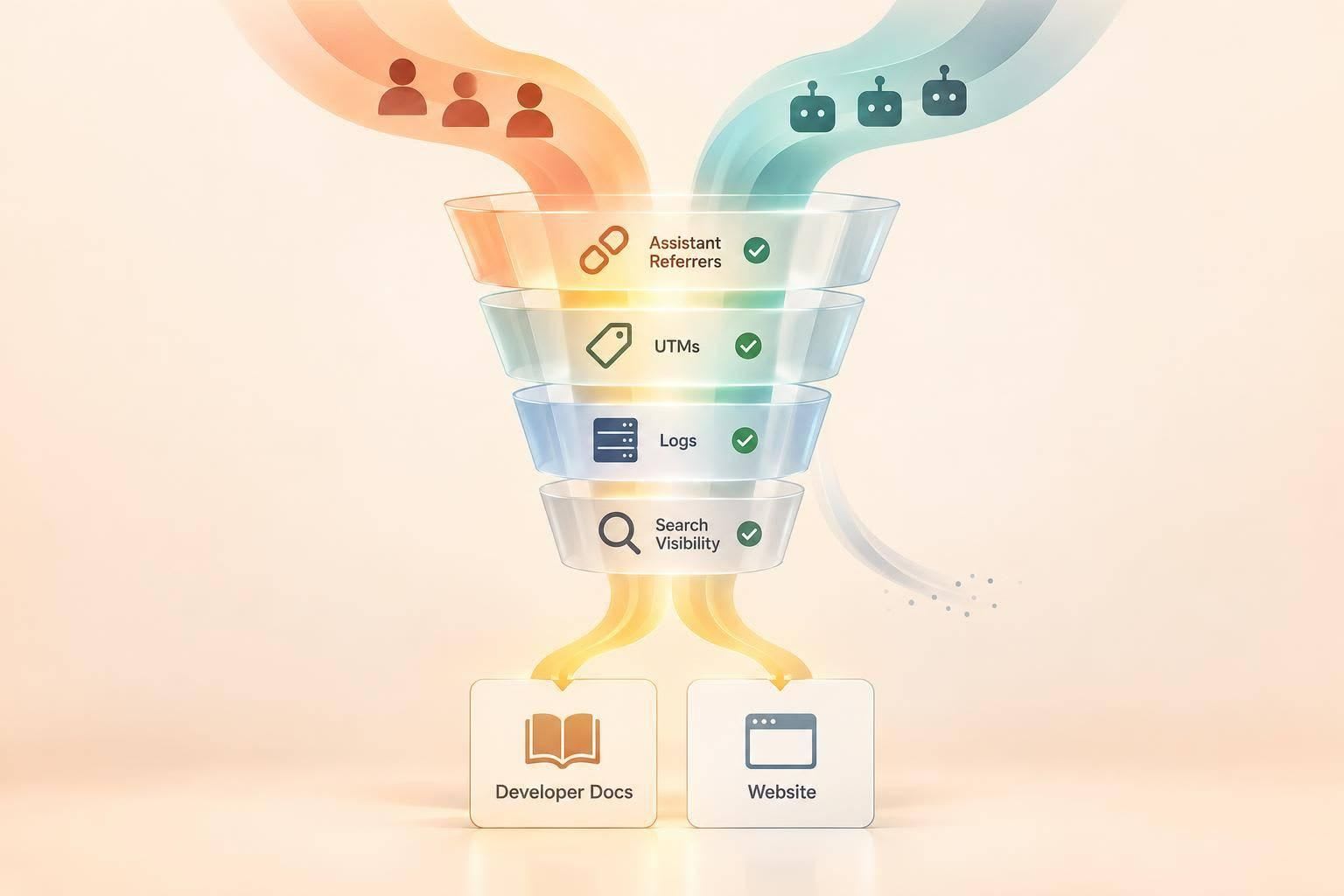
I measure AI assistant referrals by tracking human visits separately from automated fetches and search visibility. Start with identifiable referrals from ChatGPT, Perplexity, and Copilot, keep UTM tags as a separate signal, and connect only human sessions to conversions.
Here’s what I check:
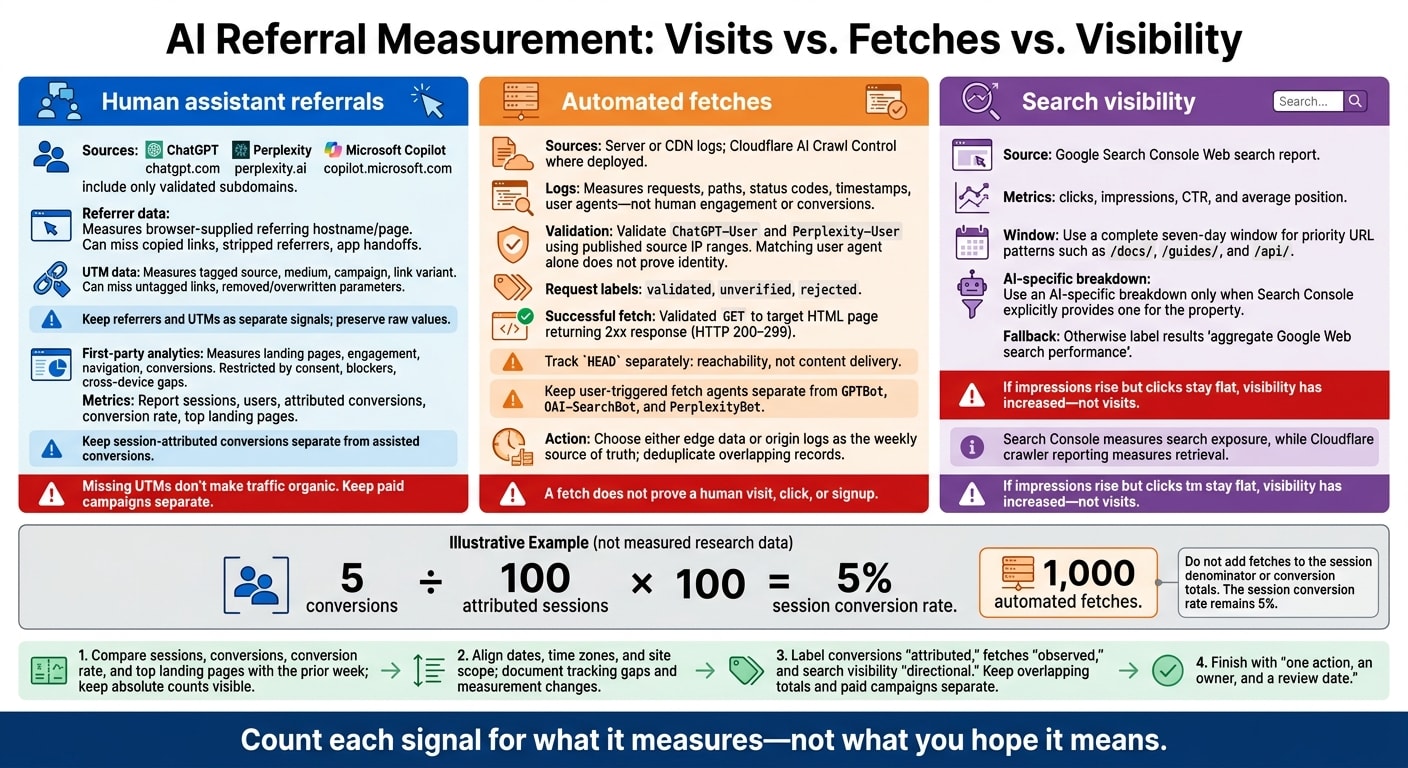
- Attribution: Test referrers, UTMs, redirects, consent settings, and the move from docs to signup. Missing tags don’t make a visit organic.
- Fetches: Validate assistant requests in server or CDN logs. A successful fetch is not proof of a visitor or signup.
- Search visibility: Check current Search Console reports before labeling results AI-specific. Keep Cloudflare crawler counts separate from visits.
- Weekly results: Compare sessions, conversions, landing pages, and tracking gaps. Keep paid campaigns separate and finish with one action, an owner, and a review date.
For example, 5 conversions from 100 attributed sessions gives a 5% session conversion rate. Adding 1,000 automated fetches tells you nothing more about that rate.
My rule: count each signal for what it measures - not what you hope it means.
2. Track assistant referrals and missing UTMs
Place the AI assistants group before the generic referral rule. Match session sources and referrer hostnames for ChatGPT, Perplexity, and Microsoft Copilot: chatgpt.com, perplexity.ai, and copilot.microsoft.com. Include only validated subdomains. Check unfamiliar domains before adding them - a similar name doesn't prove an assistant referral.
Map recognized utm_source values to a normalized assistant field. These include chatgpt, chatgpt.com, perplexity, perplexity.ai, copilot, and copilot.microsoft.com. Keep the raw values, and normalize only variants you've observed. Record the owner, exclusion rules, rule order, timezone, and implementation date. When comparing 2026 results, treat that date as a measurement change - not proof of traffic growth.
Check sources, landing pages, and conversions
Test one URL for each assistant and campaign in a clean browser session. Follow redirects, inspect the final query string, and check the source, medium, campaign, landing page, and conversion events in analytics. Repeat the tests after consent choices and when users move between your site and docs. Confirm that cross-domain measurement or referral exclusions are configured where needed. For links you control, use utm_source, utm_medium, and utm_campaign consistently.
Compare sessions, top landing pages, conversions, and conversion rate by assistant and tagged campaign. Keep session counts visible so readers can judge the rates. Report session-attributed conversions separately from assisted conversions, and name the attribution model and lookback window used for assisted conversions.
Track the share of assistant-referrer sessions without UTMs. Classify visits with no usable referrer or campaign tags as direct or unattributed. If a link you control is missing tags, fix the link template, retest it, and log the correction date.
Choose the right measurement method
When referrer and tag data disagree, keep both signals separate and use the one that fits the decision. Google Analytics campaign documentation explains campaign fields, while Cloudflare AI Crawl Control documentation covers edge-level reporting.
| Method | What it measures | What it misses | Best use |
|---|---|---|---|
| Referrer data | Browser-supplied referring hostname or page | Copied links, stripped referrers, app handoffs | Identifiable assistant referrals |
| UTM data | Tagged source, medium, campaign, and link variant | Untagged links, removed or overwritten parameters | Controlled link and campaign comparisons |
| First-party analytics events | Landing pages, engagement, navigation, and conversions | Consent restrictions, blockers, cross-device gaps | On-site quality and funnel analysis |
| Server or CDN logs | Requests, paths, status codes, timestamps, and user agents | Whether a request led to human engagement or a conversion | Fetch and technical-access verification |
Use these referrer and UTM patterns to flag likely assistant-driven sessions before verifying fetches in server logs.
3. Verify assistant fetches in server logs
When referrals are missing or stripped, server logs can show whether an assistant fetched the page. Use logs to verify access - not to count traffic.
Export request-level logs with the timestamp, time zone, requested URL, referrer, user agent, status, method, region, request ID, cache status, and edge or origin source. Include the client IP where permitted. Keep raw values first. Normalize them only after separating pages, assets, redirects, errors, and duplicates.
Filter ChatGPT-User and Perplexity-User separately. Then check source IPs against the published ranges in OpenAI’s bot documentation and Perplexity’s bot documentation. A matching user agent does not prove identity. Label each request validated, unverified, or rejected, and record the verification date. Update range files on a fixed schedule, noting the documentation date and any exceptions.
Count successful fetches by week and path
Count a successful fetch as a validated GET request to a target HTML page that returns a 2xx response. Track HEAD requests separately: they confirm reachability, not content delivery.
Group results by assistant, ISO week, and canonical docs path. Separate redirects, 4xx and 5xx errors, blocked requests, assets, and API calls. Keep ChatGPT-User separate from GPTBot and OAI-SearchBot, and Perplexity-User separate from PerplexityBot.
Compare logs with analytics without assuming conversions
Match dates, time zones, and site scope before comparing validated fetches with analytics sessions and conversions. A fetch does not prove a human visit, click, or signup. For more on developer marketing trends and engagement strategies, see our latest industry insights.
Deduplicate edge and origin records using a shared request ID. Keep actual retries separate from duplicate log entries. Document retention limits, missing or sampled logs, cached responses, and logging changes.
4. Check search visibility and AI crawl reports
Use Google Search Console to check search visibility and Cloudflare AI Crawl Control, where deployed, to review automated requests. These reports measure visibility and retrieval - not visits. Review them after referral and log checks to separate discovery from retrieval.
Check how Google reports AI search features
In Google Search Console, use your verified property’s Web search report for a complete seven-day window. Export clicks, impressions, CTR, and average position for priority URL patterns such as /docs/, /guides/, and /api/.
Use an AI-specific breakdown ONLY when Search Console explicitly provides one. Otherwise, label the exports as aggregate Google Web search performance, not AI-only performance.
For October 2026 reporting, check Google’s AI features documentation and the reports available for your property. Record the property, date range, reporting time zone, filters, and export date. If impressions rise but clicks stay flat, visibility has increased - not visits.
Search Console shows search exposure. Cloudflare shows crawler access.
Check edge reporting coverage and dates
In Cloudflare AI Crawl Control, confirm the account, zone, proxied hostnames, date range, and time zone. Free plans may show only the last 24 hours in Metrics. Filter by crawler, hostname, and path, then export the filtered metrics when available.
Review total, successful, and unsuccessful requests alongside popular paths. Successful requests return HTTP status codes 200 through 299. Unsuccessful requests include blocked requests and other 4xx or 5xx responses.
Choose either edge data or origin logs as your weekly source of truth - not both. Remove duplicate records before comparing weekly totals, and treat higher crawler volume as a retrieval signal, not traffic.
5. Build a weekly dashboard for campaign decisions
Choose weekly metrics and state attribution limits
Create one row per week with assistant referral sessions and users, attributed conversions, conversion rate, top landing pages, and conversions for those pages. Add a coverage note covering hosts, paths, dates, and consent states.
Label conversions as attributed, fetches as observed, and search visibility as directional. Give ChatGPT-User, Perplexity-User, and Cloudflare AI Crawl Control request counts separate columns. Don't add totals that overlap.
Include AI-specific search metrics only if Search Console exposes a verified AI-specific view for your property. Otherwise, label the field “aggregate Search Console Web data.”
Keep paid campaigns separate from organic assistant referrals
Keep paid campaign traffic in a separate view from organic assistant referrals. For daily.dev Ads, use campaign-specific destination URLs and consistent UTMs.
Give each daily.dev Ads format its own paid view. Keep its paid sessions, conversions, and traffic from verified partner publishers there. Missing UTMs don't make traffic organic - don't relabel that traffic as organic assistant referrals.
Review results and choose the next step
Compare the current week's snapshot with the prior week's, using absolute session and conversion counts. Add percentage changes only when tracking is stable. Annotate UTM changes, consent updates, launches, redirects, and doc updates.
Check tracking gaps before changing a landing page. If attributable visits arrive but don't convert, check the page's next step and conversion tracking.
End each review with one action, an owner, and a review date. Keep fetch increases and search visibility out of conversion totals.
FAQs
How can I estimate AI referrals with missing attribution?
When referrers are missing, use four signals to fill the gaps: UTM parameters on docs and key landing URLs where possible; server-log user agents such as ChatGPT-User and Perplexity-User to estimate automated traffic; AI-related reporting in Search Console to check visibility; and Cloudflare AI crawl analytics. Track these weekly in a simple dashboard.
Treat AI retrievals as a rough signal of distribution - not proof of conversions. Credit conversions only when first-party events reliably match pixel or UTM tracking.
How can I track AI referrals across docs and signup?
Pair first-party conversion events with agent-specific server logs to track AI referrals when referrers are missing. Use tagged URLs and first-party IDs to link documentation visits to signups across sessions and devices.
Agent retrievals signal distribution - not proof that someone saw your content. Report paid delivery, agent retrievals, and organic mentions separately in your weekly dashboard. Attribute conversions only when your tracking supports the claim.
How much referral data do I need before changing campaigns?
Collect enough data to determine, at the 95% confidence level, whether gains in brand visibility, favorability, and accuracy are statistically significant rather than noise. Give initial channel tests four to six weeks to measure outcomes, such as activation rates, before making changes.
Don’t base decisions on unexplained referral spikes or incomplete attribution. Focus on downstream technical actions - such as API activations and setup completions - rather than surface-level clicks when measuring performance.