




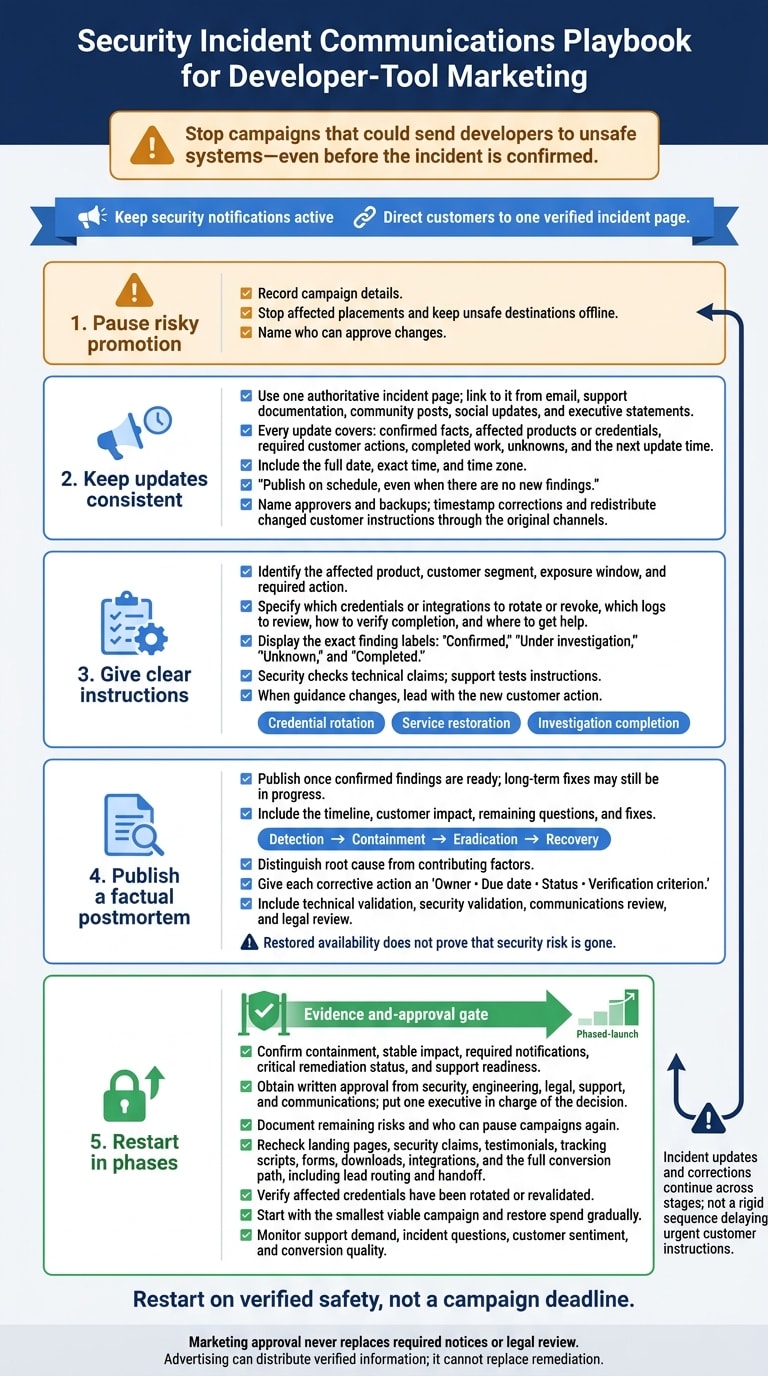
My first move during a security incident: stop campaigns that could send developers to unsafe systems - even before the incident is confirmed. I direct customers to one verified incident page and keep security notices active.
I use five steps to guide the response:
- Pause risky promotion. Record campaign details, stop affected placements, and name who can approve changes.
- Keep updates consistent. Share confirmed facts, customer actions, unknowns, and the next update time across every channel.
- Give clear instructions. Explain who needs to act, which credentials or integrations are affected, and how to get help. Correct earlier guidance when facts change.
- Publish a factual postmortem. Document the timeline, customer impact, remaining questions, and fixes - with owners and due dates.
- Restart in phases. Test destinations and conversion paths, secure written approvals, and set conditions for pausing again.
My rule: restart on verified safety, not a campaign deadline. Marketing approval never replaces required notices or legal review.
2. Set one incident page and an update schedule
Once campaigns are paused, direct every customer update to one authoritative incident page. Make it the central source for confirmed facts, customer impact, required actions, completed work, unresolved questions, and the next update time. Security and legal should approve its structure, publishing process, and any disclosure limits tied to containment or law-enforcement requests. Those limits should guide what you share - not prevent customers from receiving approved instructions to protect themselves.
Use a consistent update template
Every update should cover confirmed facts, affected products or credentials, required customer actions, completed work, unknowns, and the next update time. Separate facts from unconfirmed theories. Place urgent instructions near the top, explain who needs to act, and link to technical guidance.
Set an update schedule based on customer risk and verified developments. An active, high-risk incident may need several updates per day; slower forensic work may call for daily updates. Include the full date, exact time, and time zone, preferably in both local U.S. time and UTC for global customers.
Publish on schedule, even when there are no new findings. If the investigation continues, explain what remains unresolved and when customers can expect the next update.
Keep customer-facing channels aligned
Email, support documentation, community posts, social updates, and executive statements should link to the incident page. Use the same affected dates, terminology, and instructions across all channels.
Keep security notifications active. Name incident-page approvers and backups so urgent corrections can bypass routine campaign review. Timestamp corrections. When customer actions change, share the corrections again through the original channels.
On January 4, 2023, CircleCI disclosed a security incident, sent customer emails, posted a security notice, updated social channels and its Discuss forum, and published a support article with recommended steps. On January 13, it said GitHub OAuth token rotation was complete, all production machines and access keys had been rotated, and no further substantive update was expected until the forensic investigation advanced.
Use that same timeline in the postmortem.
3. Give clear instructions without unsupported claims
Explain who is affected and what to do
Use the incident page to publish specific actions, not general reassurance. Start with the affected product, customer segment, exposure window, and required action. Say whether exposure is confirmed, possible, or still unknown.
Connect each instruction to the affected credential or integration. Explain what to rotate or revoke, which logs to review, how to check that the work is complete, and where to get help. State exactly who each instruction applies to.
Label findings Confirmed, Under investigation, Unknown, or Completed. Share details that help customers protect their systems, such as credential types and log sources. Withhold secrets, exploitable code, and unpatched attack paths. Have the security team check every technical claim and the support team test the steps from start to finish.
Avoid false assurances and correct earlier statements
Avoid “no customer impact,” “fully secure,” and “all issues resolved” unless evidence supports that exact claim. If you say “we have not identified evidence of...,” explain what you examined and what remains unknown.
Leave speculation, customer blame, and sales messaging out of the update. Have legal counsel review statements about privacy, disclosure, contractual duties, or liability.
When guidance changes, lead with the new customer action. Identify the earlier statement, explain which evidence changed it, and make clear which instructions now apply. Treat credential rotation, service restoration, and investigation completion as separate milestones.
Learn from CircleCI's January 2023 communications
CircleCI’s January 2023 notices show the order developers expect: immediate instructions first, evidence-backed investigation details second. Historical example only.
4. Publish a postmortem with clear follow-up actions
Once the live response is stable, publish a factual account of what happened and what will change. Publish as soon as confirmed findings are ready - even if long-term fixes are still in progress. Explain what customers have already changed, what remains uncertain, and what the team will fix next.
Separate causes, impact, and unknowns
Start with detection, then walk through containment, eradication, and recovery. Show the attack path and distinguish the root cause from contributing factors. Name affected packages, authentication weaknesses, or relevant CVEs when confirmed and safe to disclose.
After the timeline, explain the impact. Summarize which credentials and integrations were affected, what outages occurred, and which customer actions remain. For unanswered questions, describe the evidence the team reviewed and where gaps remain. If you cite an availability SLO, include its target, measurement window, and measurement method. Restored availability does not prove that security risk is gone.
Turn those findings into work with clear accountability.
Assign action owners and review the report
Give each corrective action an owner, due date, status, and verification criterion. Address access controls, authentication, secrets management, monitoring, and response procedures where relevant. “Done” should mean deployed controls, completed revocation, or a tested alert - not “security improvements underway.”
Have engineering verify behavior, security validate findings and disclosure risk, communications check clarity, and legal counsel review disclosure obligations. Legal review does not replace technical validation. If findings or commitments change, publish a dated correction that explains what changed, why, and whether customers need to act.
5. Restart marketing after approval
Check restart conditions before restoring spend
Once the incident page is stable and approvals are complete, restart campaigns in phases as you return to normal campaign governance. Restart on evidence, not a campaign deadline. Get written approval from security, engineering, legal, support, and communications. Put one executive in charge of the decision, and have legal counsel review the restart plan against applicable disclosure obligations.
Confirm containment, stable impact, required notifications, critical remediation status, and support readiness. Document remaining risks and name who can pause campaigns again.
Before restoring spend, recheck landing pages, security claims, testimonials, tracking scripts, forms, downloads, and integrations. Test the full conversion path, including lead routing and handoff. Verify that affected credentials have been rotated or revalidated, and keep unsafe destinations offline.
Resume with reviewed technical content
After content review and technical validation are complete, restart with the smallest viable campaign. Begin with a Sponsored Post or In-Feed Native Ads campaign through daily.dev Ads. Link to the incident page, postmortem, or approved technical documentation. Narrow targeting by tech stack, seniority, geography, and interests where relevant. Advertising can distribute verified information; it cannot replace remediation.
Restore spend gradually while monitoring support demand, incident questions, customer sentiment, and conversion quality. Before launch, set conditions for pausing again: new material findings, contradictory messaging, broken forms, or confusion about what customers need to do. Better click-through or signup performance does not prove that trust has returned.
Update campaign controls after the incident
Maintain a campaign-control checklist that covers pause authority, update templates, backup approvers, asset inventories, restart gates, rollback steps, and postmortem commitments. Test these controls in a follow-up exercise. Don't assume the document alone is enough. Once approvals are in place, schedule a conversation about a narrowly scoped campaign.
FAQs
What if our incident page is compromised?
Put transparency and control first. Redirect all traffic to a secure secondary status page hosted on independent infrastructure. This keeps updates authoritative and protects them from tampering. Consult your legal team before making any public statement to address compliance and liability.
Once the primary page is secure, publish a clear, factual postmortem that developers can verify. Explain what happened and how the compromise was mitigated. Skip the marketing language and stick to the technical facts.
How should we handle scheduled emails already queued?
Pause all scheduled emails and social media campaigns as soon as a security incident is identified. Automated marketing during an active incident can feel tone-deaf and damage developers’ trust.
Resume campaigns only after the incident is fully resolved and the required public postmortem has been shared. Keep them paused during sensitive internal recovery phases.
Consult your legal team before pausing or resuming communications to make sure you meet the relevant disclosure requirements.
How can we measure trust after an incident?
After a security incident, measure trust through transparent engineering evidence that developers can verify, not marketing claims. Developers judge your post-incident analysis and whether your technical communications stay consistent over time.
Look for factual reports that document the timeline and root cause, explain exactly what failed, and show changes to systems or documentation. Regular technical updates should provide useful information - not just repeat earlier statements. Have legal review incident communications and postmortems before publication.