

No. You can’t buy ads inside Codex, GitHub Copilot, Cursor, or Claude Code today.
If you want to reach developers who use these tools, I’d stop looking for ad slots inside the product. I’d put budget around the workflow instead: docs, technical articles, community sites, and developer feeds. That fits how these tools are used: developers spend 6 to 8 hours a day in IDEs, many pay about $20/month for pro plans, and technical audiences often use ad blockers at rates above 50%.
Here’s the short version:
- Major AI coding tools do not sell in-product ads
- Paid subscriptions remove the need for ad support
- Coding time is deep-focus time, so interruptions are a bad fit
- Privacy controls make ad targeting even less likely
- The better move is to reach developers between coding sessions
If I were planning a developer campaign, I’d treat AI coding assistants as ad-free workspaces and focus on the places users visit before, after, and between coding tasks.
| Tool | In-product ads | Best way to reach users |
|---|---|---|
| Codex | No | Docs, technical content, developer feeds |
| GitHub Copilot | No | Technical articles, community platforms, developer feeds |
| Cursor | No | Docs, tutorials, developer feeds |
| Claude Code | No | Technical content, docs, developer feeds |
Bottom line: don’t wait for AI coding tools to open ad inventory. Show up around the workflow, not inside it.
Why AI coding assistants do not sell ads
AI coding assistants stay ad-free because ads would weaken the product’s main selling point. Developers spend 6 to 8 hours a day in their IDE , and that time usually involves deep, focused problem-solving. These tools have a user’s attention while the work is happening, not in the idle moments between tasks.
Developers use these tools during high-focus work
Coding is active, not passive. When someone is debugging an issue or writing a feature, even a small interruption can break context and kill momentum. That matters more here than it does in many other software categories.
Privacy is another big factor. Ad-blocker rates among technical users are above 50% , which tells you a lot about what this audience will and won’t tolerate. Enterprise buyers push in the same direction. Some tools, like Cursor, offer Privacy Mode so code and prompts are not stored or used for training . In that kind of setup, ad-based targeting feels out of place.
Paid products do not need ad-supported monetization
These products already make money through subscriptions, so they don’t need ads to fill the gap. Individual pro plans are usually around $20 per month . Enterprise spending can go well beyond individual tiers .
So the business model is pretty direct: users pay for the tool because it helps them work. Adding ads would just create friction without giving users anything back. The same pattern shows up across Codex, GitHub Copilot, Cursor, and Claude Code.
Tool-by-tool reality: Codex, GitHub Copilot, Cursor, and Claude Code
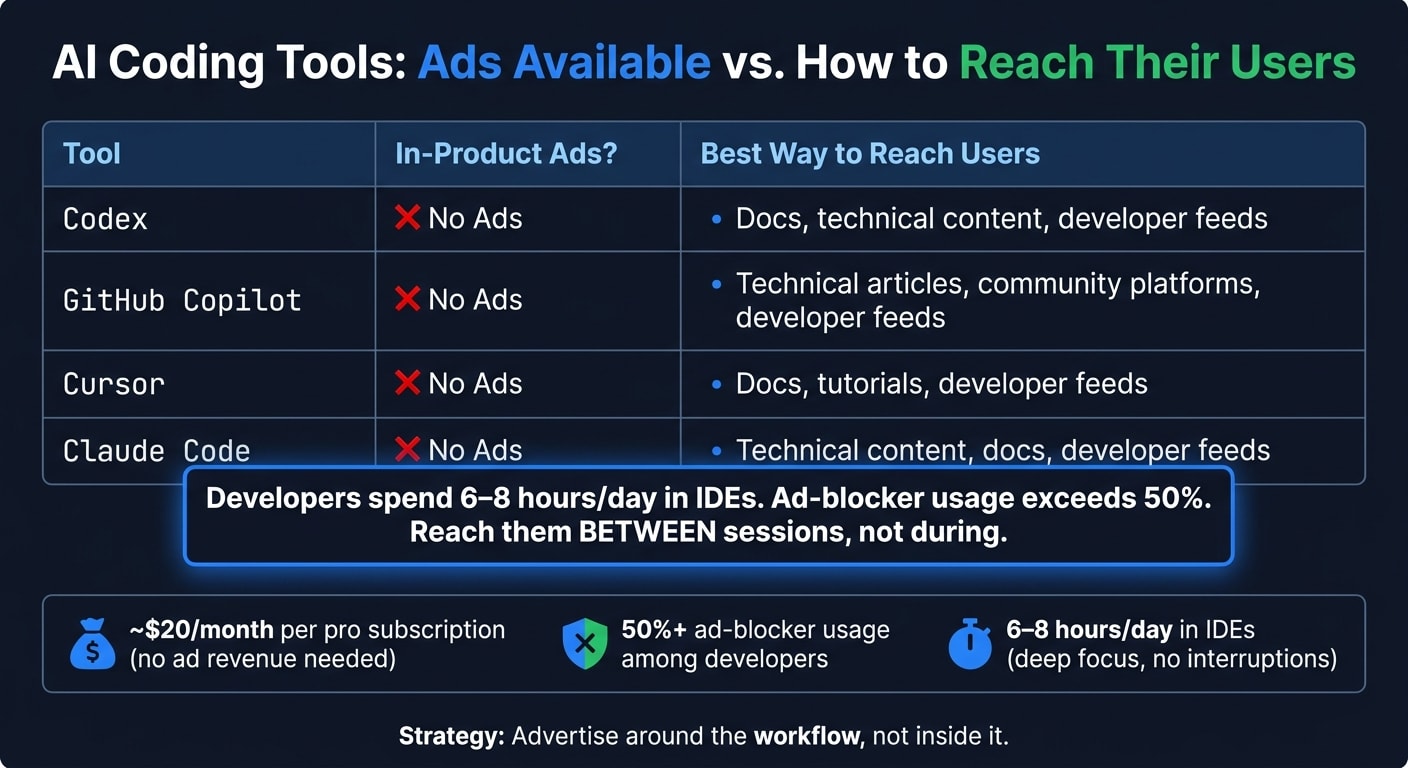
None of the major AI coding assistants sells in-product ads. So the main question becomes simple: where can you reach their users? Not inside the tools, but around the moments when people code.
That shifts your focus to the surfaces around coding sessions, not the products themselves.
Codex and Claude Code
OpenAI's Codex and Anthropic's Claude Code are both used as autonomous coding agents. Neither offers ad inventory for third-party advertisers. Claude Code uses the same ad-free model.
GitHub Copilot and Cursor
It’s the same story with GitHub Copilot and Cursor. There are no GitHub Copilot ads and no Cursor ads available through any official channel.
If you want to get in front of the people using these tools, you need to meet them around the workflow. That leads to the next step: figuring out which surrounding surfaces actually reach these developers.
Comparison table: where to reach users of each tool
| Tool | Ads available | How to reach its users instead | Where to reach users around the workflow |
|---|---|---|---|
| Codex | No | Developer content and docs | Developer content feeds around coding sessions |
| Claude Code | No | Technical articles and docs | Developer content feeds around coding sessions |
| GitHub Copilot | No | Developer content and technical articles | Developer content feeds around coding sessions |
| Cursor | No | Technical tutorials and docs | Developer content feeds around coding sessions |
All four point to the same answer: reach developers around the coding workflow.
How to reach these developers today
Since none of these tools sells ads, the smart move is to advertise around the workflow, not inside it.
Reach developers between sessions, not during active coding
Developers spend 6 to 8 hours a day in IDEs and AI coding assistants. So active coding is a bad moment for interruptive messaging. You want to reach them between sessions instead, when they're reading technical content, looking into tools, or catching up on what's happening in the field.
The surfaces that matter around the coding workflow
The best places to focus are curated developer feeds, documentation, technical articles, community platforms, and verified inventory in AI chats and adjacent platforms.
Documentation and technical articles work well when developers are trying to fix a problem or learn something new. Community platforms like Reddit and Stack Overflow add peer context. And developer feeds are where that between-session browsing time often happens.
Why daily.dev fits this attention shift
Among these surfaces, daily.dev is built for the between-session window, when developers read, explore, and stay current. That's a different setting from an IDE or an AI coding assistant.
daily.dev reaches developers in discovery mode. And through its verified partner publishers, advertisers at business.daily.dev can access developer inventory inside AI chats and adjacent platforms. In plain English: it reaches developers when their attention is actually open.
For a deeper look at building creative and targeting that speaks to this audience, see the guide on how to advertise to developers. It covers a value-first approach for technical audiences.
Conclusion: AI coding tools are ad-free, so build your strategy around them
Major AI coding assistants don’t sell in-product ads today. That’s by design. These tools are built to keep developers focused on coding, not clicking banners or dealing with interruptions.
So the move isn’t to figure out how to advertise inside the tool. The move is to reach developers between sessions.
That shift matters. Developers aren’t impossible to reach. But the timing has changed. As more attention moves from browsers and search into AI coding assistants, when and where you show up starts to matter more than ever.
For the next step, start with the guide on how to advertise to developers. Then use business.daily.dev to reach developers around their workflow. In plain English: stop trying to get inside the tool, and show up around the workflow.
FAQs
can you advertise in ai coding tools
No major AI coding assistant, including Codex, GitHub Copilot, Cursor, and Claude Code, sells in-product ads right now. This article explains what to do instead.
That matters because developers are spending more time inside these tools. And as that shift grows, advertisers still need ways to stay in view without breaking concentration during deep work.
The catch is simple: these products are ad-free on purpose. So the smarter move is to reach developers around coding sessions, not inside them. That usually means showing up in the places where they look for tools, read technical content, and make buying decisions.
does github copilot show ads
No. GitHub Copilot does not sell or show in-product ads.
Most major AI coding assistants are ad-free on purpose. Developers need a clean workspace, and ads would get in the way when they’re trying to write, test, or debug code.
So if you want to reach this audience, don’t aim for the coding tool itself. Aim for the moments around the workflow, especially between sessions.
That’s where daily.dev comes in. It helps you reach developers while they’re in discovery mode, looking for ideas, tools, and content, instead of interrupting them in the middle of work.
how do developer tool companies advertise now
Developer tool companies now put more effort into contextual, low-friction placements that match how people code. A lot of developers run ad blockers, so the better play is to show up on privacy-first platforms where technical people already go to learn, research, and find new tools.
Common approaches include sponsoring technical newsletters, taking part in community-driven platforms like daily.dev, and using native placements that offer technical value instead of generic sales copy. It tends to work better to reach developers between coding sessions than to interrupt them in the middle of focused work.